Page 90 of 656
88
uuIndicators u
Instrument Panel
IndicatorNameOn/BlinkingExplanation
Anti-lock Brake
System (ABS)
Indicator
• Comes on if there is a problem with the
ABS.•Stays on constantly - Have your vehicle checked
by a dealer. With this indicator on, your vehicle still
has normal braking ability but no anti-lock
function.
2 Anti-lock Brake System (ABS) P. 492
Supplemental
Restraint System
Indicator
•Comes on if a problem with any of the
following is detected:
- Supplemental restraint system
- Side airbag system
- Side curtain airbag system
- Seat belt tensioner• Stays on constantly - Have your vehicle checked
by a dealer.
Electric Power
Steering (EPS)
System Indicator• Comes on if there is a problem with the EPS
system.•Stays on constantly - Have your vehicle checked
by a dealer.
2 If the Electric Power Steering (EPS) System
Indicator Comes On P. 616
22 ACURA TLX-31TGV6100.book 88 \b
Page 91 of 656

89
uuIndicators u
Continued
Instrument Panel
IndicatorNameOn/BlinkingExplanation
Vehicle Stability
AssistTM (VSA®)
System Indicator
●Blinks when VSA ® is active.—
●Comes on if there is a problem with the
brake assist system, VSA ® system or hill start
assist system.●Stays on constantly - Have your vehicle checked
by a dealer.
2 Vehicle Stability AssistTM (VSA ®), aka
Electronic Stability Control (ESC), System
P. 405
●Comes on if the VSA® system is deactivated
temporarily after the battery has been
disconnected, then re-connected.●Drive a short distance at more than 12 mph (20
km/h). The indicator should go off. If it does not,
have your vehicle checked by a dealer.
Vehicle Stability
AssistTM (VSA ®)
OFF Indicator
●Comes on when you partially disable VSA ®.2VSA ® On and Off P. 406
●Comes on if the VSA® system is deactivated
temporarily after the battery has been
disconnected, then re-connected.●Drive a short distance at more than 12 mph (20
km/h). The indicator should go off. If it does not,
have your vehicle checked by a dealer.
Low Tire Pressure/
TPMS Indicator
●Comes on if the tire pressure of any of the
tires becomes low.●Comes on while driving - Stop in a safe place,
check tire pressures, and inflate the tire(s) if
necessary.
●Blinks for about one minute, and then stays
on if there is a problem with the TPMS with
Tire Fill Assist, or when a compact spare tire
is temporarily installed.●Blinks and remains on - Have your vehicle
checked by a dealer. If th e vehicle is fitted with a
compact spare tire, get your regular tire repaired or
replaced and put back on your vehicle as soon as
you can.
22 ACURA TLX-31TGV6100.book 89 \b
Page 93 of 656
91
uuIndicators u
Continued
Instrument Panel
IndicatorNameOn/BlinkingExplanation
Immobilizer
System Indicator
●Blinks if the immobilizer system cannot
recognize the key information.•Blinks - You cannot start the engine. Set the
power mode to VEHICLE OFF, then select the ON
mode again.
Depress and hold the brake pedal before setting
the power mode to ON.
• Repeatedly blinks - The system may be
malfunctioning. Have your vehicle checked by a
dealer.
• Do not attempt to alter this system or add other
devices to it. Electrical problems can occur.
Security System
Alarm Indicator
●Blinks when the security system alarm has
been set.
2 Security System Alarm P. 139
IndicatorCanadian models
Indicator
22 ACURA TLX-31TGV6100.book 91 \b
Page 115 of 656
113
uuGauges and Multi-Information Display uHead-Up Display*
Continued
Instrument Panel
The display also shows the following
warnings.
• Lane Departure Warning: When your
vehicle is too close to the traffic lane lines,
the lane departure warning appears.
2 Lane Keeping Assist System (LKAS)
P. 450
• Head-Up Warning Lights:
Flash when the BRAKE message appears
on the multi-information display.
2 Collision Mitigation Braking SystemTM
(CMBSTM) P. 420
2 Adaptive Cruise Control (ACC) with
Low Speed Follow P. 431
Lane Departure Warning
22 ACURA TLX-31TGV6100.book 113 \b
Page 141 of 656

139Continued
Controls
Security System
Immobilizer System
This system prevents a key that has not been preregistered from starting the engine.
Pay attention to the follo wing when pressing the ENGINE START/STOP button:
• Do not allow objects that emit strong radio waves near the ENGINE START/
STOP button.
• Make sure the key is not covered by or touching a metal object.
• Do not bring a key from another vehicle’s immobilizer system near the ENGINE
START/STOP button.
• Do not put the key near magnetic items. Electronic devices, such as televisions
and audio systems emit strong magnetic fields. Note that even a key chain can
become magnetic.
Security System Alarm
The security system alarm activates when the trunk, hood or doors are forcibly
opened. The alarm does not activate if the trunk or doors are opened with the key,
remote transmitter or keyless access system.
However, the alarm activates if a door is opened with the key and then the hood is
opened before the power mode is set to ON.
■When the security system alarm activates
The horn sounds intermittently and some exterior lights flash.
1Immobilizer System
NOTICE
Leaving the key in the vehicl e can result in theft or
accidental movement of the vehicleM
Always take the key with you whenever you leave the
vehicle unattendedM
Do not alter the system or add other devices to itM
Doing so may damage the system and make your
vehicle inoperableM
Apply and hold the brake pedal before turning the
vehicle on the first time after the battery has been
disconnectedM
Canadian models
1 Security System Alarm
Do not alter the system or add other devices to it.
Doing so may damage the system and make your
vehicle inoperable.
The security system alarm continues for a maximum
of two minutes until the security system alarm
deactivates.
22 ACURA TLX-31TGV6100.book 139 \b
Page 152 of 656
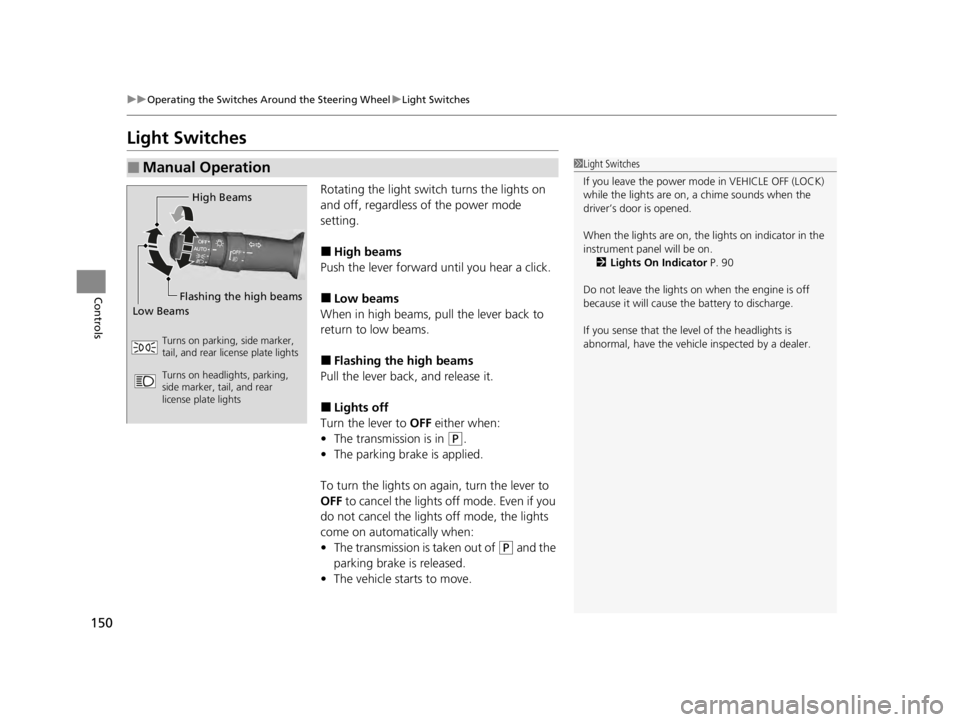
150
uuOperating the Switches Around the Steering Wheel uLight Switches
Controls
Light Switches
Rotating the light switch turns the lights on
and off, regardless of the power mode
setting.
■High beams
Push the lever forward until you hear a click.
■Low beams
When in high beams, pull the lever back to
return to low beams.
■Flashing the high beams
Pull the lever back, and release it.
■Lights off
Turn the lever to OFF either when:
• The transmission is in
(P.
• The parking brake is applied.
To turn the lights on again, turn the lever to
OFF to cancel the lights off mode. Even if you
do not cancel the lights off mode, the lights
come on automatically when:
• The transmission is taken out of
(P and the
parking brake is released.
• The vehicle starts to move.
■Manual Operation1Light Switches
If you leave the power mode in VEHICLE OFF (LOCK)
while the lights are on, a chime sounds when the
driver’s door is opened.
When the lights are on, the lights on indicator in the
instrument pane l will be on.
2 Lights On Indicator P. 90
Do not leave the lights on when the engine is off
because it will cause the battery to discharge.
If you sense that the le vel of the headlights is
abnormal, have the vehicl e inspected by a dealer.
High Beams
Flashing the high beams
Low Beams
Turns on parking, side marker,
tail, and rear license plate lights
Turns on headlights, parking,
side marker, tail, and rear
license plate lights
22 ACURA TLX-31TGV6100.book 150 \b
Page 155 of 656
153
uuOperating the Switches Around the Steering Wheel uFog Lights*
Controls
Fog Lights*
When the low beam headlights are on, turn
the fog light switch on to use the fog lights.
Daytime Running Lights
The parking/daytime running lights come on when the following conditions have
been met:
• The power mode is in ON.
• The headlight switch is in AUTO.
• The parking brake is released.
The lights remain on even if you set the parking brake.
Setting the power mode to VEHICLE OFF (L OCK) will turn off the daytime running
lights.
The daytime running lights are off once the h eadlight switch is turned on, or when
the headlight switch is in AUTO and it is getting darker outside.
Fog Light Switch
* Not available on all models
22 ACURA TLX-31TGV6100.book 153 \b
Page 180 of 656

178
uuSeats uRear Seats
Controls
Rear Seats
1. Pull the release lever in the trunk to release
the lock.
2. Fold the seat-back down.
If the rear head restraints get caught on the
front seat-backs, remove the head restraints.
2 Removing and Reinstalling the Head
Restraints P. 176
■Folding Down the Rear Seats1Folding Down the Rear Seats
The rear seat-backs can be folded down to
accommodate bulkier items in the trunk.
Never drive with a seat-back folded down and the
trunk lid open.
2 Exhaust Gas Hazard P. 75
To lock the seat-back upri ght, push it backwards until
it locks.
When returning the seat-back to its original position,
push it firmly back. Also, m ake sure all rear shoulder
belts are positioned in front of the seat-back, and the
center shoulder be lt is positioned in the guide.
Make sure that the folded seat-back does not press
against the front passenger seat, as this can cause the
weight sensors in the front passenger seat to work
improperly. 2 Passenger Airbag Off Indicator P. 58
Make sure all items in the trunk or items
extending through the opening into the rear
seats are properly secured. Loose items can fly
forward if you have to brake hard.
The front seat(s) must be far enough forward so they
do not interfere with the rear seats as they fold
down.
Release
Lever
22 ACURA TLX-31TGV6100.book 178 \b


