Page 186 of 709

uuSecurity System uSecurity System Alarm
184
Controls
■Setting the security system alarm
The security system alarm automatically sets when the following conditions have
been met:
• The power mode is set to VEHICLE OFF.
• The hood is closed.
• All doors and the tailgate are locked from outside with the key, remote
transmitter, or keyless access system.
■When the security system alarm sets
The security system alarm indicator in the instrument panel blinks and the blinking
interval changes after about 15 seconds.
■To cancel the security system alarm
The security system alarm is canceled when the vehicle is unlocked using the remote
transmitter, keyless ac cess system, or the power mode is set to ON. The security
system alarm indicator goe s off at the same time.
1Security System Alarm
Do not set the security system alarm when someone
is in the vehicle or a window is open. The system can
accidentally activate when:
•Unlocking the door with the lock tab.•Opening the hood with the hood release.
If the battery goes dead after you have set the
security system alarm, the security alarm may go off
once the battery is re charged or replaced.
If this occurs, deactivate the security system alarm by
unlocking a door using the ke y, remote transmitter or
keyless access system.
22 ACURA RDX-31TJB6300.book 184 ページ 2021年8月2日 月曜日 午前11時0分
Page 187 of 709
185
uuSecurity System uSecurity System Alarm
Controls
■The panic button on the remote
transmitter
If you press the panic button for
approximately one second, the following will
occur for about 30 seconds:
• The horn sounds.
• Some exterior lights flash.
■Canceling panic mode
• Press any button on the remote transmitter.
• Set the power mode to ON.
■Panic Mode
Panic
Button
Panic
Button
22 ACURA RDX-31TJB6300.book 185 ページ 2021年8月2日 月曜日 午前11時0分
Page 214 of 709

212
uuOperating the Switches Around the Steering Wheel uAdjusting the Steering Wheel
Controls
Adjusting the Steering Wheel
The steering wheel height and distance from your body can be adjusted so that you
can comfortably grip the steering wheel in an appropriate driving posture.
1.While the vehicle is stopped, push the
steering wheel adjustment lever down.
u The steering wheel adjustment lever is
under the steering column.
2. Move the steering wheel up or down, and
in or out.
u Make sure you can see the instrument
panel gauges and indicators.
3. Pull the steering wheel adjustment lever up
to lock the steering wheel in position.
u After adjusting the position, make sure
you have securely locked the steering
wheel in place by trying to move it up,
down, in, and out.1Adjusting the Steering Wheel
3WARNING
Adjusting the steering wheel position while
driving may cause you to lose control of the
vehicle and be seriously injured in a crash.
Adjust the steering wheel only when the
vehicle is stopped.To adjust
To lockLever
22 ACURA RDX-31TJB6300.book 212 ページ 2021年8月2日 月曜日 午前11時0分
Page 224 of 709

222
uuSeats uRear Seats
Controls
Rear Seats
Separately fold down the left and right halv es of the rear seat to make room for
cargo.
■To fold down the seat
1. Lower the head restraints to their lowest position. Put the armrest back into the
seat-back.
2.Pull the release lever.
2. Pull the release lever.
■Folding Down the Rear Seats1Folding Down the Rear Seats
Make sure all items in the cargo area or items
extending to the rear seats are properly
secured. Loose items can fly forward if you have
to brake hard.
Remove any items from th e rear seat cushion and
floor before you fold down the rear seat.
The rear seat-back(s) can be folded down to
accommodate bulkier items in the cargo area.
When you fold down one side of the rear seats and
use the non-recessed part of the cargo area, make
sure to secure the cargo. Loose items can fly forward
and cause injury if you have to brake hard.
Make sure that the folded seat-back does not press
against the front passenger seat, as this can cause the
weight sensors in the front passenger seat to work
improperly.
2 Passenger Airbag Off Indicator P. 61
The front seat(s) must be far enough forward so they
do not interfere with the rear seats as they fold
down.
Release
Lever
Red TabFrom the rear door side
Lever
From the cargo area side
22 ACURA RDX-31TJB6300.book 222 ページ 2021年8月2日 月曜日 午前11時0分
Page 225 of 709
223
uuSeats uRear Seats
Controls
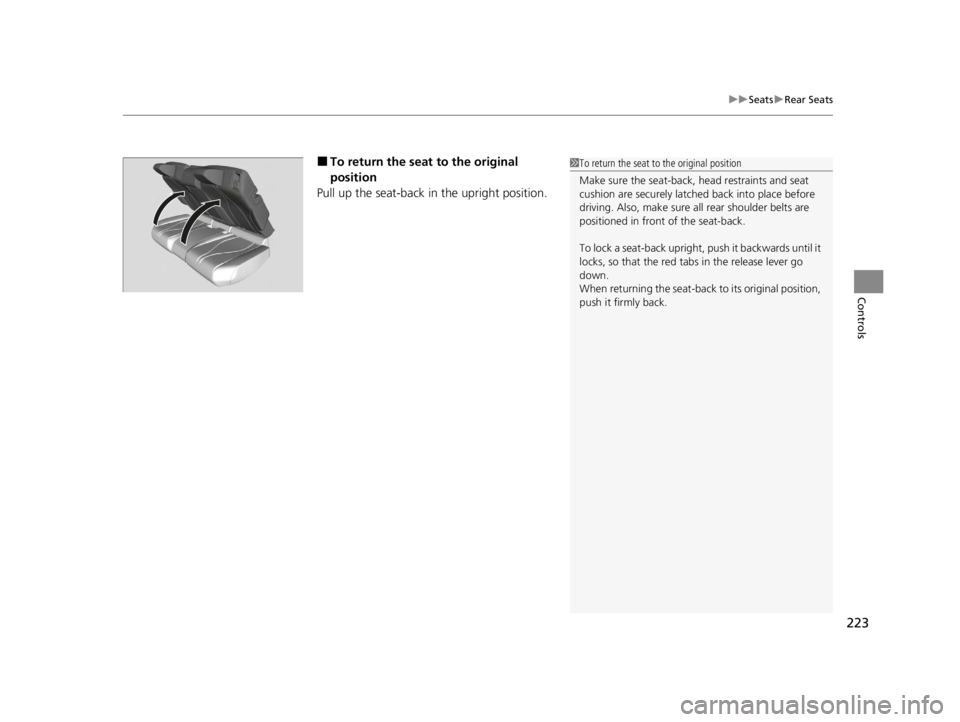
■To return the seat to the original
position
Pull up the seat-back in the upright position.1 To return the seat to the original position
Make sure the seat-back, head restraints and seat
cushion are securely latche d back into place before
driving. Also, make sure all rear shoulder belts are
positioned in front of the seat-back.
To lock a seat-back upright, push it backwards until it
locks, so that the red tabs in the release lever go
down.
When returning the seat-back to its original position,
push it firmly back.
22 ACURA RDX-31TJB6300.book 223 ページ 2021年8月2日 月曜日 午前11時0分
Page 239 of 709
Continued237
uuInterior Convenience Items uStorage Items
Controls
There are coat hooks on the rear grab handle
of both sides. Pull it down to use it.
The tie-down anchors on the cargo area floor
can be used to install a net for securing items.
■Coat Hooks1Coat Hooks
The coat hooks are not desi gned for large or heavy
items.
■Tie-down Anchors1 Tie-down Anchors
Do not let anyone access items in the cargo area
while driving. Loose items can cause injury if you have
to brake hard.
Anchor
Anchor
22 ACURA RDX-31TJB6300.book 237 ページ 2021年8月2日 月曜日 午前11時0分
Page 291 of 709

289
uuAudio System Basic Operation uAlexa Built-In
Features
Alexa Built-In
You can talk to Amazon Alexa through the audio system. With Alexa, you can:
• Stream audio
• Navigate to plac es (If available)
• Call Alexa contacts
• And more with supported Alexa skills
Once you sign into Alexa in the vehicle, you
can use Alexa without opening the app.
You can trigger Alexa by doing any of the following:
• Say the wake word “ Alexa” from anywhere in the audio system.
• Press the (talk) button on the steering wheel.
• Select the Alexa icon from inside the app.
■Using Alexa
1Alexa Built-In
Support Resources
For more information or client support:
•Call Acura Client Re lations at 1-800-382-2238.
•Go to https://www.amazon.com/gp/help/
customer/contact-us .
1Using Alexa
Troubleshooting Tips:
•Make sure you are connected to your phone via
either Wi-Fi Hotspot or AT&T Vehicle Data Plan.
•If using an AT&T Vehicle Data Plan, confirm that
your subscription is active.
•Make sure you are logged into your Amazon
account.
Deleting Your Alexa Settings from the Vehicle
For your privacy and securi ty, if you transfer the
vehicle to a third party, re set all vehicle settings to
default and delete all personal data. Also, remove the
vehicle from the list of de vices in your phone’s Alexa
app. 2 Defaulting All the Settings P. 385
22 ACURA RDX-31TJB6300.book 289 ページ 2021年8月2日 月曜日 午前11時0分
Page 340 of 709

uuGeneral Information on the Audio System uCompatible iPod, iPad, iPhone, and USB Flash Drives
338
Features
• A USB flash drive of 256 MB or higher is recommended.
• Some digital audio players may not be compatible.
• Some USB flash drives (e.g., a device with security lockout) may not work.
• Some software files may not allow for audio play or text data display.
• Some versions of playable file formats may be unsupported.
■Playable audio file
■USB Flash Drives
Format/CodecFile Type(s)
AAC LC3GPP (.3gp), MPEG-4 (.mp4, .m4a),
ADTS raw AAC (.aac, decode in Android
3.1+, encode in Android 4.0+, ADIF not
supported), MPEG-TS (.ts, not seekable,
Android 3.0+)
HE-AACv1 (AAC+)
HE-AACv2 (enhanced AAC+)
AAC ELD (enhanced low delay AAC)
AMR-NB
3GPP (.3gp)
AMR-WB
FLACFLAC (.flac) only
MIDI
Type 0 and 1 (.mid, .xmf, .mxmf), RTTTL/
RTX (.rtttl, .rtx), OTA (.ota), iMelody
(.imy)
MP3MP3 (.mp3)
OpusMatroska (.mkv)
PCM/WAVEWAVE (.wav)
VorbisOgg (.ogg), Matroska (.mkv, Android
4.0+)
1 USB Flash Drives
Files on the USB flash drive are played in their stored
order. This order may be different from the order
displayed on your PC or device.
22 ACURA RDX-31TJB6300.book 338 ページ 2021年8月2日 月曜日 午前11時0分