2022 ACURA RDX change wheel
[x] Cancel search: change wheelPage 459 of 709

Continued457
uuWhen Driving uShifting
Driving
Use the paddle shifters to change betw een 1st and 10th gears without releasing
your hands from the steering wheel. The trans mission will switch to the sequential
mode.
■When the transmi ssion is in (D:
The vehicle will go into th e sequential mode momentarily , and the sequential mode
gear selection indicator will come on.
When the vehicle goes into the sequential mode by
(- paddle shifter and the lower
gear is available, the tran smission properly selects single or double gear change.
Once you start traveling at a constant speed, the sequential mode will automatically
switch off, and the sequential mode gear selection indicator will go off.
Hold the
(+ paddle shifter for two-seconds or push the button to return to
normal drive.
■When the transmi ssion is in (S:
The vehicle will go into th e sequential mode, and the M (sequential mode) indicator
and sequential mode gear selection indicator will come on.
If the vehicle speed increases and the engi ne speed reaches near the tachometer’s
red zone, the transmission automatically shifts up to the next gear.
You can cancel this mode by holding the
(+ paddle shifter for two seconds or push
the button. When the se quential mode is canceled, the sequential mode
indicator and sequential mode gear selection indicator go off.
■Sequential Mode1 Sequential Mode
The sequential mode may be canceled if the Dynamic
Mode is changed to another dynamic mode.
D/S
D/S
22 ACURA RDX-31TJB6300.book 457 ページ 2021年8月2日 月曜日 午前11時0分
Page 471 of 709

Continued469
uuWhen Driving uAuto Idle Stop
Driving
• The brake pedal is released (without the automatic brake hold system activated).
• The accelerator pedal is depressed (with the automatic brake hold system
activated).
2 Automatic Brake Hold P. 550
■The engine restarts even if the brake pedal is depressed*1 when:
• The Auto Idle Stop OFF button is pressed.
• The steering wheel is operated.
• The transmission is put into
(R or (S, or when it is set from (N to (D.
u If you put the tra nsmission into
(P after the Auto Idle Stop activates, the Auto
Idle Stop continues to operate. In this case, the engine restarts when you
depress the brake pedal.
• The pressure on the brake pedal is reduced and the vehicle starts moving while
stopped on an incline.
• The brake pedal is released slightly during a stop.
• The battery charge becomes low.
• The accelerator pedal is depressed.
• The driver’s seat belt is unlatched.
• is ON (indicator on).
• The climate control system is in use, and the difference between the set
temperature and actual interior temperature becomes significant.
• The climate control system is being used to dehumidify the interior.
• The Integrated Dynamics Sy stem mode is changed to SNOW or SPORT mode.
• The vehicle ahead of you starts again when your vehicle stops automatically with
ACC with Low Speed Follow.
■The Engine Automatically Restarts When:1 The Engine Automatically Restarts When:
If you are using an electroni c device during Auto Idle
Stop, the device may tempor arily be turned off when
the engine restarts.
1 The engine restarts even if the brake pedal is depressed*1 when:
*1: With the automatic brake hold system activated,
you can release the brake pe dal while Auto Idle Stop
is in operation.
If the automatic brake hold system has been turned
off, or if there is a problem with the system, the
engine will restart automatically when you release
the brake pedal.
2 Automatic Brake Hold P. 550
22 ACURA RDX-31TJB6300.book 469 ページ 2021年8月2日 月曜日 午前11時0分
Page 476 of 709

474
uuWhen Driving uSuper Handling-All Wheel DriveTM (SH-AWD ®)*
Driving
Super Handling-All Wheel DriveTM (SH-AWD® )*
The system controls and transfers varying amounts of engine torque to each wheel
in accordance with the driving conditions.
SH-AWD ® helps to enhance driving stability, and lets you handle situations like
sli ppe r y sur f a c es , suc h a s o n w e t, i cy , o r sno wy r oa ds , b e tt e r t ha n wh e n dr iv ing wi t h
two wheel drive. However, the system do es not help to enhance braking. Be
precautious about the following:
• It is still your responsibility to drive safely when you steer, accelerate, and apply
brakes.
• Leave a sufficient margin when braking on slippery surfaces.1Super Handling-All Wheel DriveTM (SH-AWD ®)*
The SH-AWD ® system may not function properly if
tire type and size are mixed.
Make sure to use the same size and type of tire, and
the air pressures as specified. 2 Tire and Wheel Replacement P. 618
Do not continuously spin the front tires of your
vehicle. Continuously spinning the front tires can
cause damage to the transmission and SH-AWD ®
unit.
If the Super Handling-All Wheel Drive
TM (SH-AWD ®)
indicator blinks while driving, it indicates the
differential temperature is too high. If this happens,
pull to the side of the road when it is safe, change the
gear position to
( P, and idle the engine until the
indicator goes out.
* Not available on all models
22 ACURA RDX-31TJB6300.book 474 ページ 2021年8月2日 月曜日 午前11時0分
Page 483 of 709

Continued481
uuWhen Driving uBlind Spot Information System
Driving
When you turn the b lind spot information
system on and off, do the following.
1. Press the safety support switch.
2. Roll the right selector wheel to the
symbol and push it.
u The message appears on the multi-
information display when the system
turns on or off.
u A check mark appears in the box and the
color of the symbol changes green
when the system is on. The check mark
disappears and the color of the
symbol changes gray when the system is
off.
The blind spot information system is in the
previously selected on (checked) or off
(unchecked) setting eac h time you start the
engine.
■Blind Spot Information System On and Off1 Blind Spot Information System
You can also sele ct safety support content from the
multi-information display.
2 Multi-Information Display P. 137
You can change the settings for the blind spot
information system. 2 Customized Features P. 359
Safety Support Switch
Right Selector Wheel
22 ACURA RDX-31TJB6300.book 481 ページ 2021年8月2日 月曜日 午前11時0分
Page 492 of 709

uuAcuraWatchTMuCollision Mitigation Braking SystemTM (CMBSTM)
490
Driving
When you turn the CMBSTM on and off, do the
following.
1. Press the safety support switch.
2. Roll the right selector wheel to the
symbol and push it.
u The message appears on the multi-
information display when the system
turns on or off.
u A check mark appears in the box and the
color of the symbol changes green
when the system is on. The check mark
disappears and the color of the
symbol changes gray when the system is
off.
The CMBS
TM is turned on every time you start
the engine, even if you turned it off the last
time you drove the vehicle.
■CMBSTM On and Off1 Collision Mitigation Braking SystemTM (CMBSTM)
The CMBS
TM may automatically shut off, and the
safety support indicator (amb er) will come and stay
on under certain conditions:
2 CMBS
TM Conditions and Limitations P. 491
You can also sele ct safety support content from the
multi-information display. 2 Multi-Information Display P. 137
When the CMBS
TM is activated, it will continue to
operate even if the accele rator pedal is partially
depressed. However, it w ill be canceled if the
accelerator pedal is fully depressed.
Safety Support Switch
Right Selector Wheel
22 ACURA RDX-31TJB6300.book 490 ページ 2021年8月2日 月曜日 午前11時0分
Page 501 of 709

Continued499
uuAcuraWatchTMuLow Speed Braking Control*
Driving
When you turn the system on and off, do the
following.
1. Press the safety support switch.
2. Roll the right selector wheel to the
symbol and push it.
u The message appears on the multi-
information display when the system
turns on or off.
u A check mark appears in the box and the
color of the symbol changes green
when the system is on. The check mark
disappears and the color of the
symbol changes gray when the system is
off.
The system is turned on every time you start
the engine, even if you turned it off the last
time you drove the vehicle.
■System On and Off 1 System On and Off
You can also sele ct safety support content from the
multi-information display.
2 Multi-Information Display P. 137
Right Selector Wheel
Safety Support Switch
22 ACURA RDX-31TJB6300.book 499 ページ 2021年8月2日 月曜日 午前11時0分
Page 524 of 709

522
uuAcuraWatchTMuLane Keeping Assist System (LKAS)
Driving
Lane Keeping Assist System (LKAS)
Provides steering input to help keep the vehicle in the middle of a detected lane and
provides tactile and visual alerts if the ve hicle is detected drifting out of its lane.1Lane Keeping Assist System (LKAS)
Important Safety Reminders
The LKAS is for your convenience only. It is not an
autonomous driving system and always requires
driver attention and control. The system does not
work if you take your hands off the steering wheel or
fail to steer the vehicle. 2 Multi-Information Display Warning and
Information Messages P. 107
The LKAS is convenient when it is used on
expressways or freeways.
Do not place objects on the instrument panel.
Objects may reflect on th e windshield and prevent
correct detection of the traffic lanes.
The LKAS only alerts you when lane drift is detected
without a turn signal in use. The LKAS may not detect
all lane markings or lane departures; accuracy will
vary based on weather, speed, and lane marker
condition.
It is always your responsibility to safely operate the
vehicle and avoid collisions.
The LKAS may not work properly or may work
improperly under the certain conditions: 2 LKAS Conditions and Limitations P. 527
You can read about handling information for the
camera equipped with this system. 2 Front Sensor Camera P. 541
When you operate the turn signals to chan ge lanes, the system is suspended, and
resumes after the signals are off.
If you make a lane change without operating the turn signals, the LKAS alerts
activate, and torque is applied to the steering.
■Front Sensor Camera
Monitors the lane
lines.■Tactile and visual alerts
Rapid vibrations on the steering
wheel and a warning display alert
you that the vehicle is drifting out of
a detected lane.
■Steering input assist
The system applies torque to the steering to keep the vehicle between the left and
right lane lines. The applied torque become s stronger as the vehicle gets closer to
either of the lane lines.
22 ACURA RDX-31TJB6300.book 522 ページ 2021年8月2日 月曜日 午前11時0分
Page 528 of 709
uuAcuraWatchTMuLane Keeping Assist System (LKAS)
526
Driving
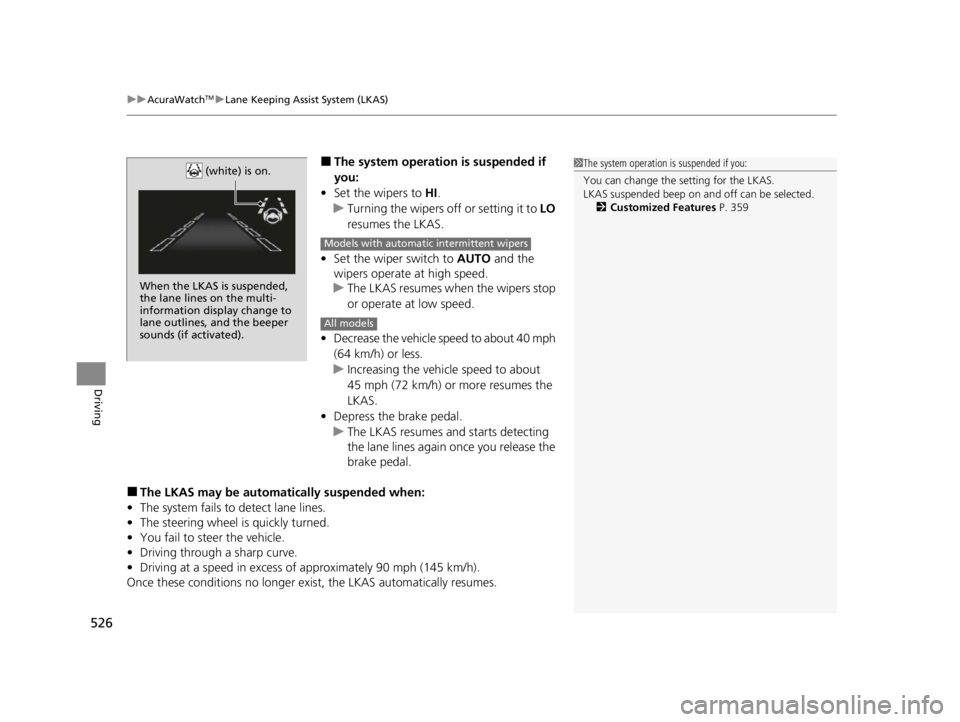
■The system operation is suspended if
you:
• Set the wipers to HI.
u Turning the wipers off or setting it to LO
resumes the LKAS.
• Set the wiper switch to AUTO and the
wipers operate at high speed.
u The LKAS resumes when the wipers stop
or operate at low speed.
• Decrease the vehicle speed to about 40 mph
(64 km/h) or less.
u Increasing the vehicle speed to about
45 mph (72 km/h) or more resumes the
LKAS.
• Depress the brake pedal.
u The LKAS resumes and starts detecting
the lane lines again once you release the
brake pedal.
■The LKAS may be automa tically suspended when:
• The system fails to detect lane lines.
• The steering wheel is quickly turned.
• You fail to steer the vehicle.
• Driving through a sharp curve.
• Driving at a speed in excess of approximately 90 mph (145 km/h).
Once these conditions no longer exis t, the LKAS automatically resumes.
1The system operation is suspended if you:
You can change the setting for the LKAS.
LKAS suspended beep on and off can be selected.
2 Customized Features P. 359
When the LKAS is suspended,
the lane lines on the multi-
information display change to
lane outlines, and the beeper
sounds (if activated). (white) is on.
Models with automatic intermittent wipers
All models
22 ACURA RDX-31TJB6300.book 526 ページ 2021年8月2日 月曜日 午前11時0分