Page 250 of 492
248
uuCustomized Features u
Features
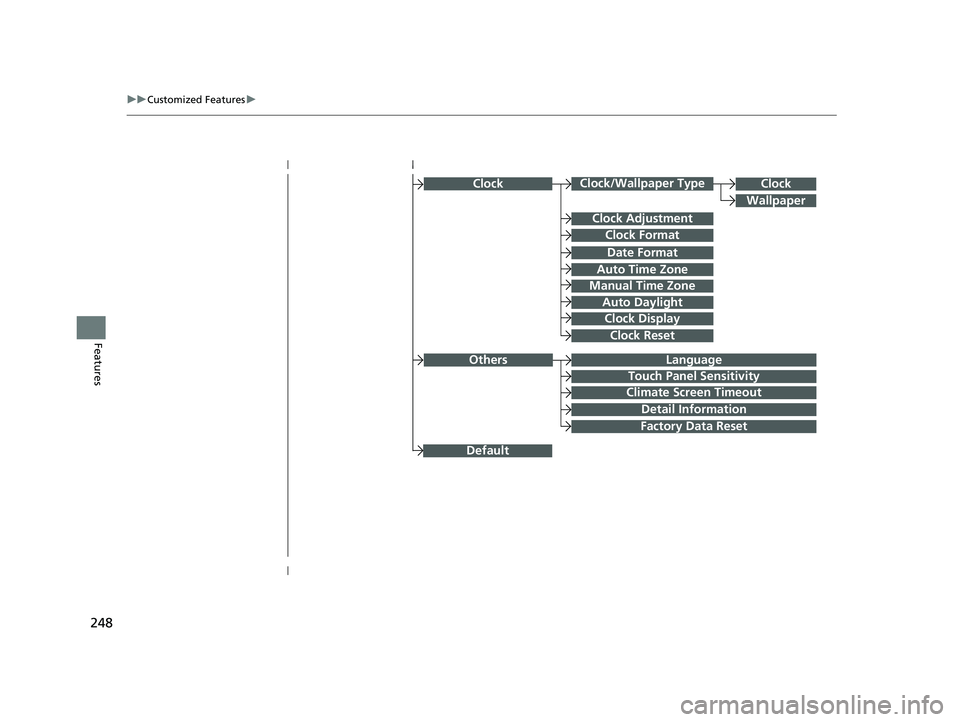
ClockClock/Wallpaper Type
Clock Adjustment
Clock Format
Auto Time Zone
Manual Time Zone
Auto Daylight
Clock Display
Clock Reset
Clock
Wallpaper
Language
Touch Panel Sensitivity
Factory Data Reset
Climate Screen Timeout
Detail Information
Others
Date Format
Default
22 ACURA NSX PMC-31T6N6500.book 248 ページ 2021年9月28日 火曜日 午後4時7分
Page 252 of 492
250
uuCustomized Features u
Features
Lighting SetupInterior Light Dimming Time
Headlight Auto Off Timer
Auto Light Sensitivity*
Auto Interior Illumination Sensitivity
Auto Door Lock
Key and Remote Unlock Mode
Door Setup
Apple CarPlay
Android Auto
Auto Headlight On with Wiper On
Keyless Lock Answer Back
Security Relock Timer
Keyless Access SetupDoor Unlock Mode
Keyless Access Light Flash
Keyless Access Beep
Smartphone
Auto Door Unlock
Maintenance Info
Default
Default
Reset
Dynamic Mode SetupScheduler
* Not available on all models
22 ACURA NSX PMC-31T6N6500.book 250 ページ 2021年9月28日 火曜日 午後4時7分
Page 253 of 492
251
uuCustomized Features u
Continued
Features
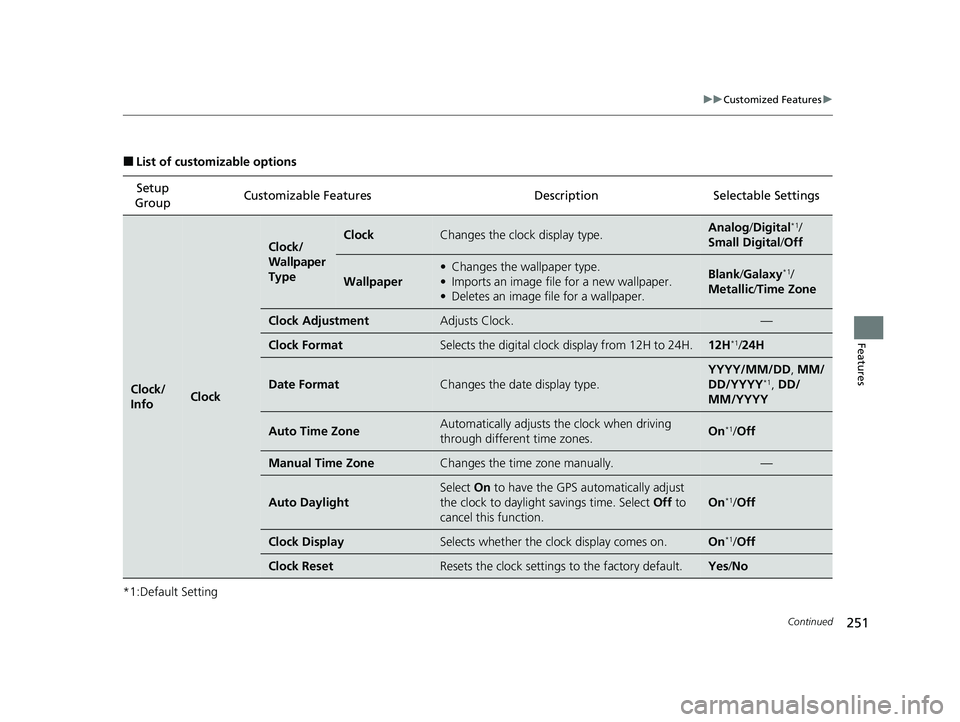
■List of customizable options
*1:Default Setting Setup
Group Customizable Features Description Selectable Settings
Clock/
InfoClock
Clock/
Wallpaper
TypeClockChanges the clock display type.Analog
/Digital*1/
Small Digital /Off
Wallpaper
• Changes the wallpaper type.
• Imports an image file for a new wallpaper.
• Deletes an image file for a wallpaper.Blank /Galaxy*1/
Metallic /Time Zone
Clock AdjustmentAdjusts Clock.—
Clock FormatSelects the digital clock display from 12H to 24H.12H*1/24H
Date FormatChanges the date display type.
YYYY/MM/DD , MM/
DD/YYYY*1, DD/
MM/YYYY
Auto Time ZoneAutomatically adjusts the clock when driving
through different time zones.On*1/ Off
Manual Time ZoneChanges the time zone manually.—
Auto Daylight
Select On to have the GPS automatically adjust
the clock to daylight savings time. Select Off to
cancel this function.
On*1/ Off
Clock DisplaySelects whether the clock display comes on.On*1/Off
Clock ResetResets the clock settings to the factory default.Yes /No
22 ACURA NSX PMC-31T6N6500.book 251 ページ 2021年9月28日 火曜日 午後4時7分
Page 254 of 492
252
uuCustomized Features u
Features
*1:Default SettingSetup
Group Customizable Features
Description Selectable Settings
Clock/
Info
AcuraLinkAcuraLink Subscription
StatusDisplays your current AcuraLink subscription
status.—
OtherInfo Screen Preference
Changes the information screen type.
• Info Top - A brief menu pops up.
• Info Menu - A full menu pops up.
• Off - A menu does not pop up.
Info Top /Info
Menu*1/ Off
DefaultCancels/Resets all customized items in the Clock/
Info group as default.Yes/No
Camera Rear
Camera Fixed Guideline
Selects whether the fixed
guidelines come on the
rear camera monitor.
2 Multi-View Rear Camera P. 367
On*1/Off
Dynamic Guideline Selects whether the guid
elines adjust to the
movement of the steering wheel.
2 Multi-View Rear Camera P. 367
On*1/Off
Default Cancels/Resets all customized items in the
Rear
Camera setting group as default. Yes
/No
22 ACURA NSX PMC-31T6N6500.book 252 ページ 2021年9月28日 火曜日 午後4時7分
Page 261 of 492
259
uuCustomized Features u
Continued
Features
*1:Default SettingSetup
Group Customizable Features Desc
ription Selectable Settings
System Clock Clock/
Wallpaper
Type
Clock
See
Clock/Info on P. 251
Wallpaper
Clock Adjustment
Clock Format
Date Format
Auto Time Zone
Manual Time Zone
Auto Daylight
Clock Display
Clock Reset
Others Language
Change the display language. English
*1/
Français /
Español
Touch Panel Sensitivity Sets the sensitivity of the touch panel screen. High
*1/Low
22 ACURA NSX PMC-31T6N6500.book 259 ページ 2021年9月28日 火曜日 午後4時7分
Page 264 of 492

262
uuCustomized Features u
Features
*1:Default SettingSetup
Group Customizable Features Desc
ription Selectable Settings
Vehicle
Driving
Position
SetupEasy Entry/Exit
Moves the seat rearward when you get in/get out
of the vehicle. Changes the setting for this
feature.
On*1/Off
Memory Position LinkTurns the driving position memory system on and
off.On*1/Off
Keyless
Access
Setup
Door Unlock ModeChanges which doors unlock when you grab the
driver’s door handle.Driver Door Only*1/
All Doors
Keyless Access Light FlashCauses some exterior lights to flash when you
unlock/lock the doors.On*1/ Off
Keyless Access BeepCauses the beeper to sound when you unlock/
lock the doors.On*1/Off
Lighting
Setup
Interior Light Dimming
TimeChanges the length of time the interior lights stay
on after you close the doors.60 sec /30 sec*1/ 15 sec
Headlight Auto Off TimerChanges the length of ti me the exterior lights
stay on after you close the driver’s door.60 sec /30 sec /15
sec*1/ 0 sec
Auto Interior Illumination
SensitivityChanges the sensitivity of the brightness of the
instrument panel when the headlight switch is in
the AUTO position.Min/Low/Mid*1/High /
Max
22 ACURA NSX PMC-31T6N6500.book 262 ページ 2021年9月28日 火曜日 午後4時7分
Page 265 of 492
263
uuCustomized Features u
Continued
Features
*1:Default SettingSetup
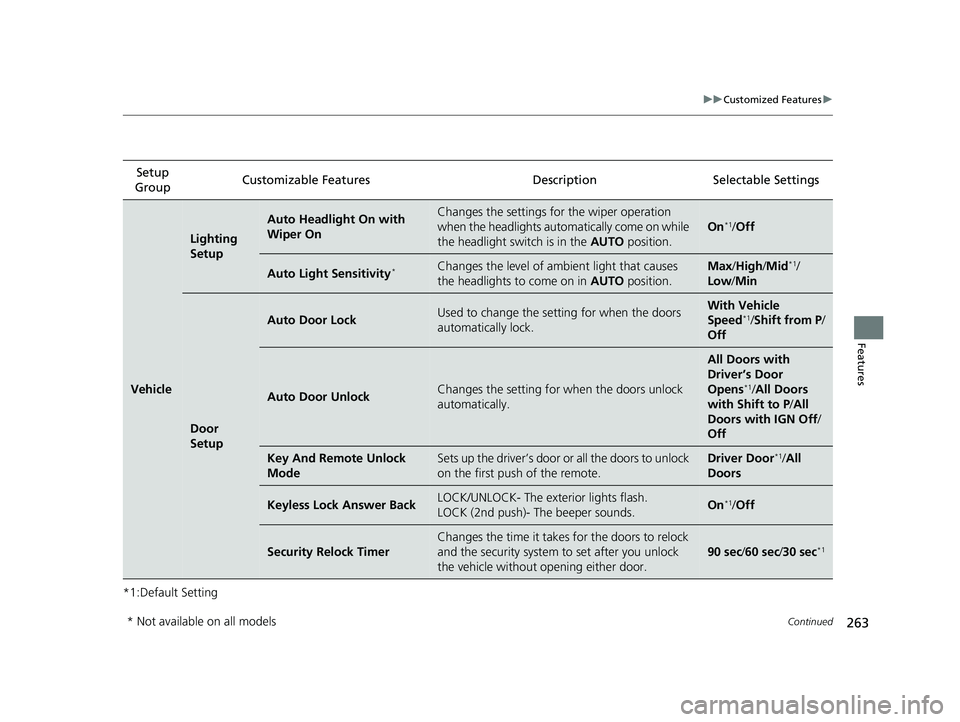
Group Customizable Features Description Selectable Settings
Vehicle
Lighting
Setup
Auto Headlight On with
Wiper OnChanges the settings for the wiper operation
when the headlights automatically come on while
the headlight switch is in the
AUTO position.
On*1/Off
Auto Light Sensitivity*Changes the level of ambient light that causes
the headlights to come on in AUTO position.Max/High /Mid*1/
Low/ Min
Door
Setup
Auto Door LockUsed to change the sett ing for when the doors
automatically lock.With Vehicle
Speed*1/ Shift from P /
Off
Auto Door UnlockChanges the setting for when the doors unlock
automatically.
All Doors with
Driver’s Door
Opens
*1/ All Doors
with Shift to P /All
Doors with IGN Off /
Off
Key And Remote Unlock
ModeSets up the driver’s door or all the doors to unlock
on the first push of the remote.Driver Door*1/ All
Doors
Keyless Lock Answer BackLOCK/UNLOCK- The exterior lights flash.
LOCK (2nd push)- The beeper sounds.On*1/ Off
Security Relock Timer
Changes the time it takes for the doors to relock
and the security system to set after you unlock
the vehicle without opening either door.
90 sec /60 sec /30 sec*1
* Not available on all models
22 ACURA NSX PMC-31T6N6500.book 263 ページ 2021年9月28日 火曜日 午後4時7分
Page 307 of 492

Continued305
uuAcuraLink ®u
Features
Your subscribed telematics service prov ider can track your vehicle’s location,
remotely lock or unlock doors, and help you find your vehicle.
To use these features, you n eed your user ID and personal identification number
(PIN).
■Stolen vehicle tracking
This feature searches and tracks down your vehicle position even if it is on the move.
If you believe that your vehicle has been stolen, contact the police as well as the
provider. Tracking requests must be initiated by the police.
■Remote door lock/unlock
The provider can remotely lock or unlock doors upon your request.
■Vehicle finder
This feature is convenient to use when trying to locate your vehicle in large areas,
such as a crowded parking lot. If you cannot locate your vehicle after using the
remote transmitter’s answerback function, you can contact the provider which can
then flash your vehicle’s exterior lights and sound the horn.
■Security alarm notification
If the security system in your vehicl e detects an abnormal condition, such as
someone tampering with the lock on your vehicle, the provider notifies you by email
or SMS.
■Security Features1 Security Features
The contact information of your provider, your user
ID and PIN will be given when you subscribe to
AcuraLink. If you forget any of the above, contact an
authorized Acura NSX dealer, or go to
owners.acura.com (in U.S.) or www.acura.ca (in
Canada).
You can also activate the remote door lock/unlock
and vehicle finder features from the Internet or using
your smartphone app. Ask an authorized Acura NSX
dealer, or visit owners.acura.com (in U.S.) or
www.acura.ca (in Canada) for details.
1Vehicle finder
The lights will stop flas hing and horn will stop
sounding under the foll owing conditions:
•When 30 seconds have elapsed.
•You unlock the doors using the remote transmitter.•You unlock the doors using the keyless access
system.
•You unlock the doors us ing the built-in key.•The power mode is set to ACCESSORY or ON.
22 ACURA NSX PMC-31T6N6500.book 305 ページ 2021年9月28日 火曜日 午後4時7分