2021 YAMAHA TMAX light
[x] Cancel search: lightPage 37 of 124
Instrument and control functions
5-2
5
EAU77450
En gine stop switch “ / ”
Set this switch to “ ” before starting
the engine. Set this switch to “ ” to
stop the engine in case of an emergen-
cy, such as when the vehicle overturns
or when the throttle cable is stuck.
EAU77291
Power on/Starter switch “ON/ ”
With the smart key turned on and with-
in range, press this switch to turn on
the power to the vehicle. Then with the
sidestand up and while applying the
front or rear brake, push this switch to
crank the engine with the starter. See
page 7-2 for starting instructions prior
to starting the engine.
EAU79601
Hazar d switch “ ”
With the vehicle power is on or in park-
ing mode, use this switch to turn on the
hazard lights (simultaneous flashing of
all turn signal lights).
The hazard lights are used in case of an
emergency or to warn other drivers
when your vehicle is stopped where it
might be a traffic hazard.
NOTICE
ECA10062
Do not use the hazar d lig hts for an
exten ded len gth of time with the en-
g ine not runnin g, otherwise the bat-
tery may d ischarge.
EAU73952
Cruise control switches
See page 4-1 for an explanation of the
cruise control system.
EAU77301
Menu switch “MENU”
This switch is used to make setting
changes within the multi-function dis-
play. (See page 5-5.)
EAU77311
Select switch “ / ”
This switch is used to make setting
changes within the multi-function dis-
play. (See page 5-5.)
EAU73931
Drive mo de switch “MODE”
See page 4-3 for an explanation of the
drive mode.
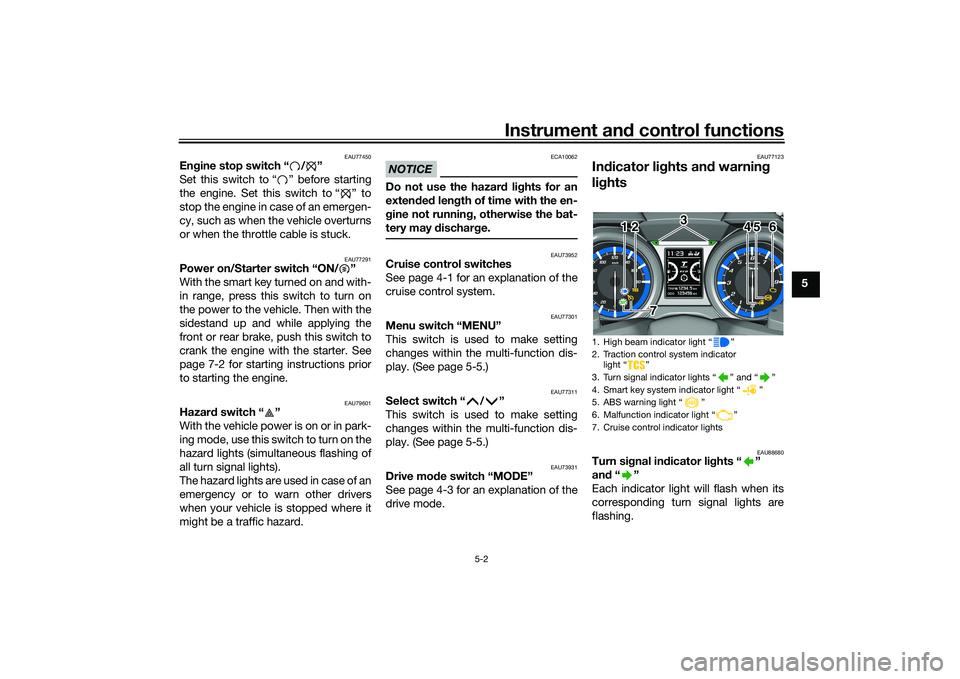
EAU77123
In dicator li ghts an d warnin g
lig hts
EAU88680
Turn si gnal in dicator li ghts “ ”
an d“”
Each indicator light will flash when its
corresponding turn signal lights are
flashing.1. High beam indicator light “ ”
2. Traction control system indicator light “ ”
3. Turn signal indicator lights “ ” and “ ”
4. Smart key system indicator light “ ”
5. ABS warning light “ ”
6. Malfunction indicator light “ ”
7. Cruise control indicator lights
1 2 4 5 6
3
7
12
45 6
3
7
UB3TE1E0.book Page 2 Friday, September 11, 2020 8:48 AM
Page 38 of 124

Instrument and control functions
5-3
5
EAU88690
Hi gh beam in dicator li ght “ ”
This indicator light comes on when the
high beam of the headlight is switched
on.
EAU77551
Cruise control in dicator li ghts
See page 4-1 for an explanation of
these indicator lights.
EAU88711
Malfunction in dicator li ght
(MIL) “ ”
This light comes on or flashes if a prob-
lem is detected in the engine or other
vehicle control system. If this occurs,
have a Yamaha dealer check the on-
board diagnostic system. The electri-
cal circuit of the warning light can be
checked by vehicle power on. The light
should come on for a few seconds,
and then go off. If the light does not
come on initially when the vehicle pow-
er on, or if the light remains on, have a
Yamaha dealer check the vehicle.
NOTICE
ECA26820
If the MIL starts flashin g, re duce en-
g ine spee d to prevent exhaust sys-
tem damag e.TIPThe engine is sensitively controlled for
the on-board diagnostic system to de-
tect deterioration and malfunction of
the emission control system. Due to
this specification, the MIL may come
on or flash for vehicle modifications,
lack of maintenance, or excessive or
improper use of the vehicle. To prevent
this, observe these precautions.
Do not attempt to modify the soft-
ware of the engine control unit.
Do not add any electrical acces-
sories that interfere with engine
control.
Do not use aftermarket accesso-
ries or parts such as suspension,
spark plugs, injectors, exhaust
system, etc.
Do not change drivetrain specifi-
cations (chain, sprockets, wheels,
tires, etc.).
Do not remove or alter the O2 sen-
sor, air induction system, or ex-
haust parts (catalysts or EXUP,
etc.).
Maintain proper V-belt and drive
belt (if equipped).
Maintain correct tire pressure.
Do not operate the vehicle in an
extreme manner. For example, re-
peated or excessive opening and
closing of the throttle, racing,
burnouts, wheelies, etc.
EAU77075
ABS warnin g li ght “ ”
This warning light comes on when a
problem is detected with the ABS. (See
page 5-19.)
When the vehicle power is turned on,
this light will come on and then go off
after reaching a traveling speed of 10
km/h (6 mi/h). If the warning light: does not come on when the vehi-
cle power is turned on
does not go off after traveling at a
speed of 10 km/h (6 mi/h) or high-
er
comes on or flashes while riding
UB3TE1E0.book Page 3 Friday, September 11, 2020 8:48 AM
Page 39 of 124

Instrument and control functions
5-4
5
the anti-lock brake system may not
work correctly. Have a Yamaha dealer
check the vehicle as soon as possible.
WARNING
EWA16043
If the ABS warnin
g li ght does not
turn off after reachin g 10 km/h (6
mi/h), or if the warnin g lig ht comes
on while ri din g:
Use extra caution to avoi d pos-
si ble wheel lock durin g emer-
g ency brakin g.
Have a Yamaha dealer check
the vehicle as soon as possi ble.TIPThe ABS warning light may come on
when revving the engine with the
scooter on its centerstand, but this
does not indicate a malfunction.
EAU88700
Traction control system in dicator
lig ht “ ”
This indicator light will flash when trac-
tion control has engaged.
If the traction control system is turned
off, this indicator light will come on.
TIPWhen the vehicle is turned on, the light
should come on for a few seconds and
then go off. If the light does not come
on, or if the light remains on, have a
Yamaha dealer check the vehicle.
EAU78083
Smart key system in dicator
li g ht “ ”
This indicator light will flash when com-
munication between the vehicle and
smart key takes place and when cer-
tain smart key system operations are
carried out.
The indicator light may also flash when
there is an error in the smart key sys-
tem.TIPWhen the vehicle is turned on, the light
should come on for a few seconds and
then go off. If the light does not come
on, or if the light remains on, have a
Yamaha dealer check the vehicle.
EAU77131
Spee dometerThe speedometer shows the vehicle’s
traveling speed.
When the vehicle power is turned on,
the speedometer needle will sweep
across the speed range and return to
zero in order to test the electrical cir-
cuit.1. Speedometer
1 1 1
UB3TE1E0.book Page 4 Friday, September 11, 2020 8:48 AM
Page 46 of 124

Instrument and control functions
5-11
5
NOTICE
ECA15474
If there is a malfunction, “– –.–” will
b e continuously displaye d. Have a
Yamaha dealer check the vehicle.Setting mode
Stop the vehicle and then push the
“MENU” switch for 2 seconds to enter
the setting mode. To exit the setting
mode and return to the standard dis-
play mode, push the “MENU” switch
again for 2 seconds or
select “ ”.TIPWhen the malfunction indicator light is
on, setting mode cannot be entered.
Menu items
Grip warmer settings1. Use the select switch to highlight “Grip Warmer”.
2. Push the “MENU” switch. The grip warmer setting display will be
shown.
1. Setting mode display
1
Cate gory Description
This function allows you to
set the low, middle, and
high settings to 10 tem-
perature levels.
This function allows you to
set the low, middle, and
high settings to 10 tem-
perature levels.
This function allows you to
turn the traction control
system on or off.
This function allows you to
check and reset the oil
change interval (indicator),
V-Belt change interval (in-
dicator), and the “FREE”
maintenance interval.
This function allows you to
switch the fuel consump-
tion units between
“L/100km” and “km/L”.
For UK-spec vehicles: this
function is not available.
This function allows you to
change the items shown in
3 information displays.
This function allows you to
adjust the brightness of
the instrument panel.
This function allows you to
set the clock.Grip WarmerSeat HeaterTraction ControlMaintenance
UnitDisplayBrightnessClock
This function allows you to
reset all items to their fac-
tory preset or default set-
tings; excepting the
odometer, clock, and
maintenance counter
items “Oil” and “V-Belt”.
All Reset
UB3TE1E0.book Page 11 Friday, September 11, 2020 8:48 AM
Page 47 of 124

Instrument and control functions
5-12
5
3. Push the “MENU” switch. The
temperature level for the high set-
ting will be highlighted.
Use the select switch to set the
temperature level, and then push
the “MENU” switch. 4. Use the select switch to highlight
“Mid” or “Low”, and then change
the setting using the same proce-
dure that was used for the high
setting.
5. When you finished changing the settings, use the select switch to
highlight “ ”, and then push the
“MENU” switch to return to the
menu screen.
Seat heater settings
1. Use the select switch to highlight “Seat Heater”.
2. Push the “MENU” switch. The seat heater setting display will be
shown. 3. Push the “MENU” switch. The
temperature level for the high set-
ting will be highlighted.
Use the select switch to set the
temperature level, and then push
the “MENU” switch.
UB3TE1E0.book Page 12 Friday, September 11, 2020 8:48 AM
Page 48 of 124

Instrument and control functions
5-13
5 4. Use the select switch to highlight
“Mid” or “Low”, and then change
the setting using the same proce-
dure that was used for the high
setting.
5. When you finished changing the settings, use the select switch to
highlight “ ”, and then push the
“MENU” switch to return to the
menu screen.
Traction control system settings
1. Use the select switch to highlight “Traction Control”.
2. Push the “MENU” switch. The traction control system setting
display will be shown. 3. To set the traction control system
to “OFF”, push the select
switch “ ” side for 2 seconds.
4. To set the traction control system to “ON” again, push the select
switch “ ”.
TIPWhen the vehicle is powered on, the
traction control system is automatically
5. When you finished changing the
to return to the menu screen.
Resettin g the maintenance counters
1. Use the select switch to highlight “Maintenance”.
2. Push the “MENU” switch, and then use the select switch to se-
lect the item to reset.
UB3TE1E0.book Page 13 Friday, September 11, 2020 8:48 AM
Page 49 of 124

Instrument and control functions
5-14
5
3. Push the “MENU” switch, and af-
ter the selected item is highlight-
ed, push the select switch “ ”
for one second.
4. When you finished resetting, use the select switch to highlight “ ”,
and then push the “MENU” switch
to return to the menu screen. Selectin
g the units
TIPU.K. specification vehicles only: This
function does not indicate on setting
mode display and cannot be selected.1. Use the select switch to highlight
“Unit”.
2. Push the “MENU” switch. The unit setting display will be shown. 3. Use the select switch to select
“L/100km” or “km/L”.
4. Push the “MENU” switch to make the selection and return to the
menu screen.
Selectin g the d isplay items
1. Use the select switch to highlight “Display Change”.
UB3TE1E0.book Page 14 Friday, September 11, 2020 8:48 AM
Page 50 of 124

Instrument and control functions
5-15
5 2. Push the “MENU” switch, use the
select switch to highlight the dis-
play to change, and then push the
“MENU” switch again.
3. Use the select switch to highlight the item to change, and then push
the “MENU” switch.
TIPDisplay item order is as follows.4. Use the select switch to select theitem to show, and then push the
5. When you finished changing the
settings, use the select switch to
highlight Ž, and then push the
previous display.
6. Use the select switch to highlight Ž, and then push the
menu screen.
Meter panel brightness
1. Use the select switch to highlight
2.
3. Use the select switch to select the desired brightness level.
A.TEMP TRIP-1 TRIP-2
ODO
CRNT.F F.AVG RANGE
UB3TE1E0.book Page 15 Friday, September 11, 2020 8:48 AM