2021 YAMAHA TMAX light
[x] Cancel search: lightPage 26 of 124

Smart key system
3-8
3
If the steering continues to be
locked and will not release, the
smart key system indicator light
will flash slowly. Move the handle-
bar gently to the left and right to
help release the steering lock and
then press the “ON/ ” switch
again.
The smart key system indicator
light will flash if the centerstand
lock cannot automatically release
itself. Gently rock the vehicle for-
ward or backward and then press
the “ON/ ” switch one more
time.
If the centerstand continues to be
locked and will not release, the
smart key system indicator light
will flash slowly. Rock the vehicle
forward and backward to help re-
lease the centerstand lock and
then press the “ON/ ” switch
again.
NOTICE
ECA15826
If the steerin g lock or centerstan d
lock will not release an d the smart
key system in dicator li ght is flash-
in g, have a Yamaha d ealer check the
smart key system.3. The power of the vehicle is turned on when all locks have been re-
leased. The multi-function display
will come on.
4. The engine can now be started. (See page 7-2.)TIPSee page 8-39 for information about
emergency mode and how to turn the
vehicle power on without the smart
key.
EAU78033
Powerin g off the vehicleTo turn the vehicle power off and stop
the engine if it is running, press the
“OFF/LOCK” switch.
Upon authentification of the smart key,
the beeper will sound once to confirm
that the vehicle power has been suc-
cessfully turned off and the storage
compartment and fuel tank cap lid
locks will be released.TIP The rider must turn off the power
of the vehicle manually.
The power of the vehicle will not
turn off automatically even if the
smart key is moved out of operat-
ing range of the smart key system.1. “OFF/LOCK” switch
1
UB3TE1E0.book Page 8 Friday, September 11, 2020 8:48 AM
Page 27 of 124

Smart key system
3-9
3
The power of the vehicle cannot
be turned off via the “OFF/LOCK”
switch when the vehicle is moving.
If the smart key is not within operating
range or cannot communicate with the
vehicle when you press the
“OFF/LOCK” switch, the vehicle will
not be turned off and the beeper will
sound for three seconds (the smart key
system indicator light will also flash) to
alert you that the power was not suc-
cessfully turned off. Confirm the loca-
tion and condition of the smart key and
try powering off the vehicle again.TIPWithout the smart key, the vehicle
power can be turned off by pressing
the smart key system indicator light is
flashing.Auto lock function
After the engine is stopped via the
“OFF/LOCK” switch and also whenev-
er the vehicle power is turned from on
to off, all storage compartment locks
and the fuel tank cap lid lock are re- leased. When 60 seconds have
passed, all compartments will auto-
matically lock.
When the compartment locks are re-
leased via the “ / ” switch, the
compartments will automatically lock
after 10 seconds have passed.
EAU80002
How to lock the steerin
gWith the vehicle power off, turn the
handlebars fully to the left and then
briefly press the “OFF/LOCK” switch.TIPIf the steering lock function locks
correctly, the beeper will sound
once.
If the steering lock function does
not lock correctly, the beeper will
sound for three seconds and the
smart key system indicator light
will flash. Turn the handlebar fully
to the left one more time and press
the “OFF/LOCK” switch again.
UB3TE1E0.book Page 9 Friday, September 11, 2020 8:48 AM
Page 28 of 124

Smart key system
3-10
3
WARNING
EWA14742
Do not operate the steering lock
while the vehicle is movin g.
EAU78052
How to lock the centerstan dPark the vehicle on a firm level surface
and then place it on the centerstand.
Press the “OFF/LOCK” switch for one
second.TIPIf the centerstand lock function
locks correctly, the beeper will
sound once.
If the centerstand lock function
does not lock correctly, the beep-
er will sound for three seconds
and the smart key system indica-
tor light will flash. Gently rock the vehicle forward or backward and
press the “OFF/LOCK” switch for
one second.1. “OFF/LOCK” switch
1
UB3TE1E0.book Page 10 Friday, September 11, 2020 8:48 AM
Page 31 of 124

Smart key system
3-13
3
EAU80842
Parking mo deThe steering is locked, and the hazard
lights and turn signal lights can be
turned on, but all other electrical sys-
tems are off.
To enter parkin g mo de
1. Lock the steering. (See page 3-9.)
2. Press the “ / ” switch for one second.TIPIf the steering lock has not been ap-
plied, the beeper will sound for 3 sec-
onds (the smart key system indicator
light will also flash) and the vehicle will
not enter parking mode.3. Upon authentification of the smartkey, the beeper will sound twice
and the vehicle will enter parking
mode. The smart key system indi-
cator light will come on.TIPThe seat, fuel tank cap lid, and the front
storage compartment cannot be
opened while in parking mode.
NOTICE
ECA20760
Usin g the hazar d or turn sig nal lights
for an exten ded len gth of time may
cause the b attery to discharge.To exit parkin g mo de
Press the “ / ” switch. Upon au-
thentication of the smart key, the beep-
er will sound once and the smart key
system indicator light will go off.
UB3TE1E0.book Page 13 Friday, September 11, 2020 8:48 AM
Page 32 of 124

Special features
4-1
4
EAU77264
Cruise control systemThe cruise control system is designed
to maintain a set cruising speed be-
tween about 50 km/h (31 mi/h) and 140
km/h (87 mi/h).
WARNING
EWA20950
Improper use of the cruise con-
trol system may result in loss of
control, which coul d lea d to an
acci dent. Do not activate the
cruise control system in heavy
traffic, poor weather con ditions,
or amon g win din g, slippery,
hilly, rou gh or gravel roa ds.
When travelin g uphill or d own-
hill, the cruise control system
may not be ab le to maintain the
set cruisin g speed .
To prevent acci dentally activat-
in g the cruise control system,
turn it off when not in use. Make
sure that the cruise control sys-
tem ind icator light “ ” is off.
Activating the cruise control system
1. Push the cruise control power switch “ ” to turn on the system.
The cruise control system indica-
tor light “ ” will come on. 2. Push the “SET–” side of the cruise
control setting switch to activate
the cruise control system. Your
current traveling speed will be-
come the set cruising speed. The
cruise control setting indicator
light “ ” will come on.
A djustin g the set cruisin g speed
While the cruise control system is op-
erating, push the “RES+” side of the
cruise control setting switch to in-
crease the set cruising speed or the
“SET–” side to decrease the set speed.
TIPPushing the setting switch once will
change the speed in increments of ap-
proximately 2.0 km/h (1.2 mi/h). Hold-
the cruise control setting switch will in-
crease or decrease the speed continu-
ously until the switch is released.You can also manually increase your
traveling speed using the throttle. After
you have accelerated, you can set a
new cruising speed by pushing the
do not set a new cruising speed, when
1. Cruise control setting indicator light Ž
2. Cruise control system indicator light Ž
1.
2. Cruise control power switch Ž
1 2
1 212
UB3TE1E0.book Page 1 Friday, September 11, 2020 8:48 AM
Page 33 of 124

Special features
4-2
4
you return the throttle grip, the vehicle
will decelerate to the previously set
cruising speed.
Deactivatin
g the cruise control sys-
tem
Perform one of the following opera-
tions to cancel the set cruising speed.
The “ ” indicator light will turn off. Turn the throttle grip past the
closed position in the deceleration
direction.
Apply the front or rear brake.
TIPTraveling speed decreases as soon as
the cruise control system is deactivat-
ed; unless the throttle grip is turned.
Usin g the resume function
Push the “RES+” side of the cruise
control setting switch to reactivate the
cruise control system. The traveling
speed will return to the previously set
cruising speed. The “ ” indicator
light will come on.
WARNING
EWA16351
It is d angerous to use the resume
function when the previously set
cruisin g speed is too hi gh for current
con ditions.Turnin g off the cruise control sys-
tem
Push the cruise control power
switch “ ” to turn off the cruise con-
trol system. The “ ” indicator light
and the “ ” indicator light will turn
off.TIPWhenever the cruise control system or
the vehicle power is turned off, the pre-
viously set cruising speed is erased.
You will not be able to use the resume
function until a new cruising speed has
been set.
Automatic deactivation of the cruisecontrol systemThe cruise control system is electroni-
cally controlled and linked with other
control systems. The cruise control
system will automatically deactivate
under the following conditions: The cruise control system is not
able to maintain the set cruising
speed (such as when going up a
steep hill).
Wheel slip or wheel spin is detect-
ed. (If the traction control system
is on, traction control will engage.)
Engine trouble, etc.
If the cruise control system is automat-
ically deactivated, the “ ” indicator
light will turn off and the “ ” indica-
tor light will flash for 4 seconds.
If the cruise control system was auto-
matically deactivated, please stop and
confirm that your vehicle is in good op-
erating condition before continuing on.
When traveling on roads with steep
grades, the cruise control system may
not be able to maintain the set cruising
speed.
1. Deceleration direction
1
UB3TE1E0.book Page 2 Friday, September 11, 2020 8:48 AM
Page 35 of 124

Special features
4-4
4
EAU88851
Traction control systemThe traction control system (TCS)
helps maintain traction when acceler-
ating on slippery surfaces, such as un-
paved or wet roads. If sensors detect
that the rear wheel is starting to slip
(uncontrolled spinning), the traction
control system assists by regulating
engine power as needed until traction
is restored.
When traction control has engaged,
the “ ” indicator light will flash. You
may notice changes in engine re-
sponse or exhaust sounds.
WARNING
EWA18860
The traction control system is not a
substitute for ri din g appropriately
for the con ditions. Traction control
cannot prevent loss of traction d ue
to excessive spee d when enterin g
turns, when acceleratin g har d at a
sharp lean an gle, or while b raking,
an d cannot prevent front wheel slip-
pin g. As with any vehicle, approach
surfaces that may be slippery with
caution an d avoi d especially slip-
pery surfaces.
Settin g the traction control system
When the vehicle is turned on, traction
control is automatically turned on.
To turn the traction control system off,
see page 5-11.TIP Turn the traction control system
off to help free the rear wheel if the
vehicle gets stuck in mud, sand, or
other soft surfaces.
When the vehicle is on the center-
stand, do not rev the engine for an
extended period of time. Other-
wise, the traction control system
will automatically disable and
need to be reset.
NOTICE
ECA16801
Use only the specifie d tires. (See
pa ge 8-19.) Usin g different size d
tires will prevent the traction control
system from controllin g tire rotation
accurately.Resettin g the traction control sys-
tem
The traction control system will auto-
matically disable under certain condi-
tions; such as when a sensor fault is
detected, or when only one wheel is al-
lowed to rotate for more than a few
seconds. Should this happen,
the “ ” indicator light will come on.
If the traction control system automat-
ically disables, reset it by riding under
normal conditions.TIPIf the Ž indicator light remains on,
the vehicle may still be ridden; howev-
er, have a Yamaha dealer check the
vehicle as soon as possible.
1. Traction control system indicator light Ž
1 1 1
UB3TE1E0.book Page 4 Friday, September 11, 2020 8:48 AM
Page 36 of 124
Instrument and control functions
5-1
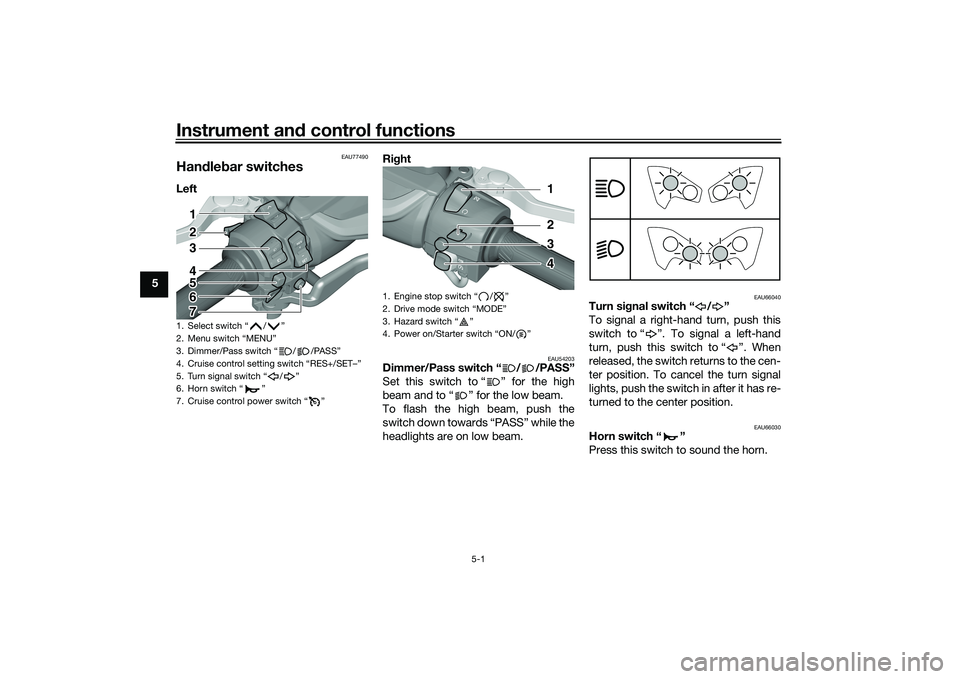
5
EAU77490
Han dle bar switchesLeft Ri
ght
EAU54203
Dimmer/Pass switch “ / /PASS”
Set this switch to “ ” for the high
beam and to “ ” for the low beam.
To flash the high beam, push the
switch down towards “PASS” while the
headlights are on low beam.
EAU66040
Turn si gnal switch “ / ”
To signal a right-hand turn, push this
switch to “ ”. To signal a left-hand
turn, push this switch to “ ”. When
released, the switch returns to the cen-
ter position. To cancel the turn signal
lights, push the switch in after it has re-
turned to the center position.
EAU66030
Horn switch “ ”
Press this switch to sound the horn.
1. Select switch “ / ”
2. Menu switch “MENU”
3. Dimmer/Pass switch “ / /PASS”
4. Cruise control setting switch “RES+/SET–”
5. Turn signal switch “ / ”
6. Horn switch “ ”
7. Cruise control power switch “ ”
1
2
3
4
5
6
7
1. Engine stop switch / Ž
2.
3. Hazard switch Ž
4. Ž
1
2
3
4
UB3TE1E0.book Page 1 Friday, September 11, 2020 8:48 AM