Page 3 of 30

3
Table of Contents
This Quick Guide is divided into the following sections:
(Click on any topic to jump to that page; use the Home icon in the lower
left of each page to return here)
1. Important to know 4
• No electrical 4
• Exterior engine noise 4
• High-voltage current 4
2. Getting ready for your new Pure Electric Volvo 5
• Preparing your home for charging of the vehicle’s
high-voltage battery 5
• Home charging 6
• Public charging 7
• An active Google account will enable access to key features 8
3. When You Take Delivery 9
• Shifter, parking brake, and front trunk storage 9-10
• Signing in with Google 11
• Activating Screen Lock 12
• Interacting with the Google entertainment interface 13
• Pairing a phone 14
• Interacting with the Digital Driver Display 15-16
• Charging basics 17-20
• Preconditioning the vehicle prior to driving 21
• Starting and driving 22
• One-pedal drive and regenerative braking 23-24
• The Volvo Cars app 25
• Volvo Cars app: Pairing Guide 26
4. After Delivery 27 • If desired, schedule a “2nd Delivery” with your Retailer 27
• Charging rates and approximate times 27
• Electrification terms and their meanings 28
• Roadside Assistance 29
Page 7 of 30

7
Public Charging
ChargePoint is an official vehicle-charging partner of Volvo Cars
in North America.
• A ChargePoint Welcome Kit is provided with your vehicle. Please take
the time to review its contents.
• To set up your ChargePoint account, please visit
www.chargepoint.com/drivers/
• With your active ChargePoint account and credit card information
stored, you have several payment methods, including:
- The RFID card, which is included in your vehicle Welcome Kit.
- The ChargePoint mobile app, which is available for both iOS
and Android.
- The in-car app - available in the Google Play Store - which allows
for touchless pay right from your driver’s seat.
How to begin a public charging session:
1. Once in Park, tap your card or phone on the ChargePoint station,
or hit the “Start Charge” button on your mobile app or on your car’s
center screen. This will unlock the charging connector so you can
remove it from the charging station.
2. Plug the connector into your Pure Electric Volvo to start charging.
2. Getting ready for your new Pure Electric Volvo
Page 12 of 30
12
3. When you take delivery of your Volvo
• For instances where you may lend your car to someone outside your
household or at a valet or car wash, adding screen lock to your profile
is an easy and convenient way to safeguard your information. Simply
follow the steps below.
Activating Screen Lock
Ensure you are logged into your profile.
• Press
> Settings
• Select Profile and Privacy
• Select Screen Lock
• Select the type of screen lock (pass code), then Activate
The screen lock will be shown in the center display when switching to
a profile with a screen lock activated. The pass code is required every
time the system is restarted.
Page 19 of 30
19
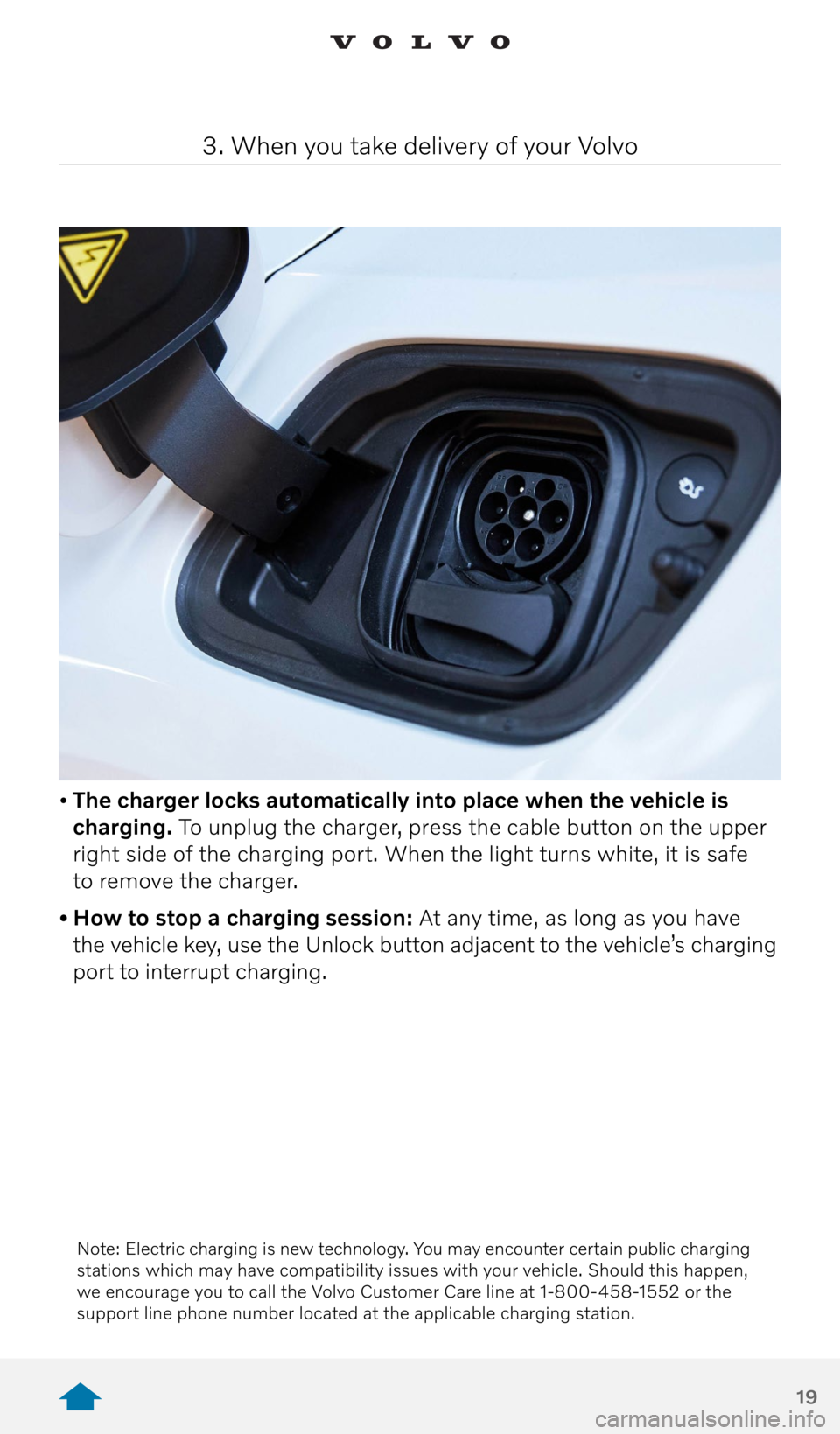
• The charger locks automatically into place when the vehicle is
charging. To unplug the charger, press the cable button on the upper
right side of the charging port. When the light turns white, it is safe
to remove the charger.
• How to stop a charging session: At any time, as long as you have
the vehicle key, use the Unlock button adjacent to the vehicle’s charging
port to interrupt charging.
3. When you take delivery of your Volvo
Note: Electric charging is new technology. You may encounter certain public charging
stations which may have compatibility issues with your vehicle. Should this happen,
we encourage you to call the Volvo Customer Care line at 1-800-458-1552 or the
support line phone number located at the applicable charging station.
Page 20 of 30

20
• “Hey, Google, find a charging
station.” Google can provide real-
time information and directions
to charging stations near you.
• Long-distance route planning
is easy. On a long journey, or
driving around town, Google can
do the work for you. If you enter a
destination that is beyond the car’s
range, Google will automatically
build charging stations into the
route, so there is no guesswork.
• The ChargePoint in-car app makes public charging even easier. From
the Google Play Store, download the ChargePoint app and sync it
to your account. Your car will recognize when you need a charge and
display a nearby station. Simply follow the prompts to initiate charging
from within the car. Unlock the station and start charging – your car
will communicate with the station and administer the payment for you.
3. When you take delivery of your Volvo
• With your ChargePoint account, you can handle payment for
ChargePoint-branded chargers, as well as their partner networks,
including EVGo and Flo. For stations not on the ChargePoint network,
simply follow payment instructions provided on the station. Please be
aware that out-of-network fees may be incurred.
• Please see Section 4 of this Quick Guide for information on charging
rates and times.
Features depicted may not be standard or available.
European specifications may be shown.
Page 25 of 30

25
3. When you take delivery of your Volvo
The Volvo Cars app
The name of the Volvo On Call app has been changed to the Volvo Cars
app.* For users who have automatic app updates enabled on their mobile
devices, the update will happen automatically. If not, please visit the App
store or Google Play store to download the Volvo Cars app.
Please note: At this time there are no changes to the in-car experience.
The On-Call button remains the same and any mention within the in-car
screens will remain Volvo On Call.
The Volvo Cars app provides functions and services that will enhance
your experience with your Pure Electric Volvo. You have access to an
early release version of the Volvo Cars app with limited functionality
and a brand-new design. With the early release version of the Volvo Cars
app, you can enjoy improved remote-control performance at close range
with Bluetooth connectivity for the best experience, approximately 30 ft.
Additional functionality will be added over time.
Remote lock/unlock will allow you to check whether your car is locked
or unlocked, and you can remotely lock or unlock your car directly from
your mobile device.
Climate Direct Start provides great convenience by enabling you to
pre-condition your car while it is charging or parked before getting
into the car.
Charging status allows you to monitor the state of charge from your
mobile device when your car is being charged.
Device management helps you manage your app settings and your
account information on your mobile device, as well as other devices
connected to the car.
How to get started
Start by downloading the Volvo Cars app to your mobile device from
the App store or Google Playstore if you don’t already have it. The Volvo
Cars app is compatible with iOS 13 or higher and Android 6 or higher.
You need to create a Volvo ID and set a password. Your Volvo ID is your
unique identifier for the Volvo Cars app. Create your Volvo ID directly
in the app. Now, you are ready to pair your app to the car by following
the instructions below.
* App Services available with the 4 year subscription included with new vehicles (MY 18
and newer), following expiration new terms and conditions apply. See the support page
for more details.