2021 VOLVO V90 CROSS COUNTRY turn signal
[x] Cancel search: turn signalPage 368 of 683

||
DRIVER SUPPORT
* Option/accessory.
366 The rear sensors will be activated if the vehicle begins rolling backward or if reverse gear isengaged. The distance monitored extends approx. 1.5 meters (5 ft) behind the vehicle. The Park Assist system's rear sensors will be automatically deactivated if the vehicle isbacking up with a trailer connected to thevehicle's electrical system.
NOTE
When reversing with e.g. a trailer or bike carrier on the trailer hitch – without Volvooriginal trailer cables – the Parking Assistsystem may have to be turned off manuallyto prevent the sensors from reacting tothese.
Side sensors
The warning signal will begin pulsating rapidly when the obstacle is less than approx. 25 cm (0.8 ft) fromthe vehicle.
Park Assist's side sensors are automatically activated when the engine is started. They areactive at speeds below 10 km/h (6 mph). The distance monitored is approx. 25 cm (0.8 ft) out from the sides. The detection area of the side sensors increa- ses significantly, however, when the steeringangle of the front wheel increases anddepending on the position of the steeringwheel, obstacles up to approx. 90 cm (3 ft)diagonally behind or in front of the vehicle canbe detected.
Related information
Park Assist
* (p. 364)
Park Assist sensor field (p. 374)
Activating or deactivating Park Assist
*
The Park Assist function (PAS 103
) can be acti-
vated or deactivated.
Park Assist's front and side sensors are auto- matically activated when the engine is started.The rear sensors are activated if the vehicle ismoving backward or reverse gear is engaged.
Activate or deactivate thefunction using this button inthe center display's Functionview.
GREEN button indicator light – the func- tion is activated.
GRAY button indicator light – the functionis deactivated.
In vehicles equipped with Park Assist Cam- era *, Park Assist can also be activated or deac-
tivated from the relevant camera view.
Related information
Park Assist
* (p. 364)
Park Assist limitations (p. 367)
Page 384 of 683
||
DRIVER SUPPORT
3821.
Tap
Park In in Function view or in Camera
view.
> The function will search for a potential parking space and measure it to deter- mine if it is big enough.
2. Be prepared to stop the vehicle when a graphic and message in the center displayindicate that a suitable parking space hasbeen found.
> A pop-up window will appear.
3. Select
Parallel parking or Perpendicular
parking and engage reverse gear.
NOTE
The function searches for space for park- ing, shows instructions and guides thevehicle on its passenger side. But, if sodesired the vehicle can be parked on thedriver's side of the street:
Activate the turn signals on the driver'sside – the system will then search forspace to park on that side of the vehi-cle instead.
Backing into a parking space
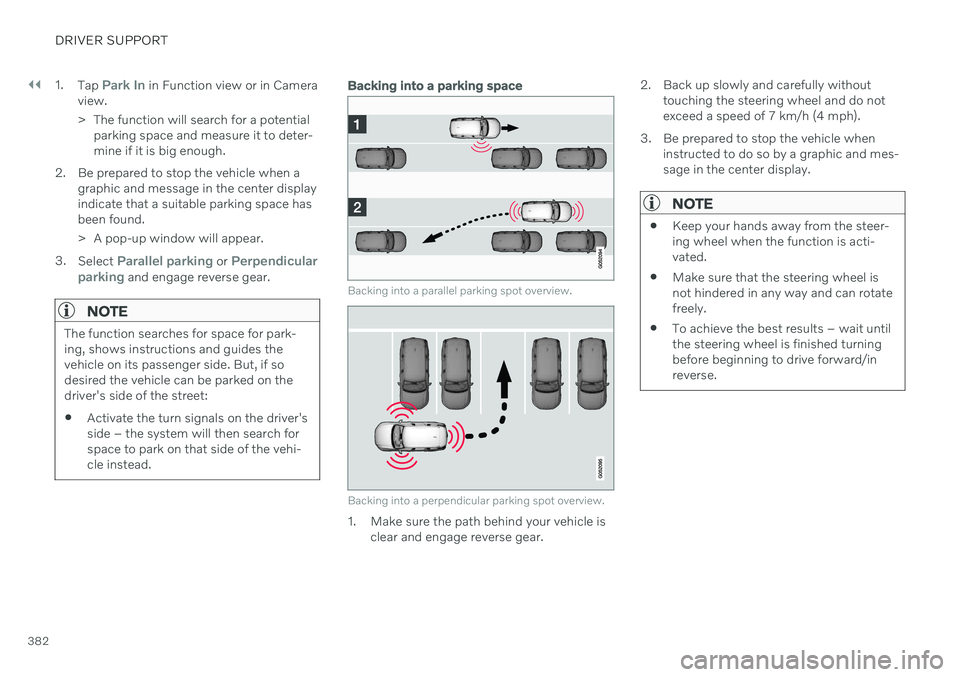
Backing into a parallel parking spot overview.
Backing into a perpendicular parking spot overview.
1. Make sure the path behind your vehicle is
clear and engage reverse gear. 2. Back up slowly and carefully without
touching the steering wheel and do not exceed a speed of 7 km/h (4 mph).
3. Be prepared to stop the vehicle when instructed to do so by a graphic and mes-sage in the center display.
NOTE
Keep your hands away from the steer- ing wheel when the function is acti-vated.
Make sure that the steering wheel isnot hindered in any way and can rotatefreely.
To achieve the best results – wait untilthe steering wheel is finished turningbefore beginning to drive forward/inreverse.
Page 410 of 683
STARTING AND DRIVING
408
Settings for automatically activating the parking brake Choose whether the parking brake should be activated automatically when the vehicle isswitched off.
To change this setting: 1.Tap
Settings in the center display's Top
view.
2. Tap
My CarParking Brake and
Suspension and select or deselect theAuto Activate Parking Brake function.
Related information
Activating and deactivating the parking brake (p. 406)
Parking brake (p. 406)
Parking on a hill
Always use the parking brake when parking on a hill.
WARNING
Always apply the parking brake when park- ing on an incline. Selecting a gear or put-ting the automatic transmission in P may
not be sufficient to keep the vehicle sta-tionary in all situations.
If the vehicle is pointing uphill:
Turn the front wheels so they are pointing away from
the curb.
If the vehicle is pointing downhill:
Turn the front wheels so they are pointingtoward
the curb.
Heavy load uphill
Heavy loads, such as a trailer, could cause the vehicle to roll backward when the parkingbrake is released automatically on steep uphillgradients. To help avoid this, pull the controlupward while you are driving away. Releasethe control when the vehicle gains traction.
Related information
Activating and deactivating the parkingbrake (p. 406)
Parking brake malfunction
If you are unable to deactivate or activate the parking brake after several attempts, contactan authorized Volvo workshop.
A audible warning signal will sound if the park- ing brake is activated while the vehicle isbeing driven. If the vehicle must be parked before the prob- lem is rectified, turn the wheels as when park-ing on an incline and put the gear selector inP .
Low battery charge levelIf the battery charge level is too low, it will notbe possible to activate or deactivate the park-ing brake. Connect an auxiliary battery to thevehicle if the battery is discharged.
Replacing brake padsDue to the design of the electric parkingbrake, the rear brake pads must be replacedby a workshop. An authorized Volvo workshopis recommended.
Page 429 of 683
STARTING AND DRIVING
}}
427
Conditions for the Start/Stop functionCertain conditions must be met for Start/ Stop to function.
If any condition is not met, this will be indi- cated in the instrument panel.
The engine does not auto-stopThe engine will not auto-stop if: The vehicle has not reached a speed of ca 10 km/h (6 mph) after starting.
After several auto-stops, the speed mustagain exceed approximately ca 10 km/h(6 mph) before the next auto-stop.
The driver has not fastened the seatbelt.
The engine is not running at its normaloperating temperature.
The ambient temperature is underapproximately -5 °C (23 °F) or overapproximately 30 °C (86 °F).
Windshield heating is activated.
The climate system settings and theactual climate in the passenger compart-ment differ.
The vehicle is in reverse.
The driver is making large steering wheelmovements.
The road gradient is very steep.
The hood is open.
Driving at high altitude and the engine hasnot reached its normal operating tempera-ture.
ABS has been activated.
Hard braking (even if the ABS system hasnot been activated).
Many starts during a short period of timehave triggered the starter motor's over-heating protection.
The exhaust system's particulate filter isfull.
A trailer is connected to the vehicle's elec-trical system.
The transmission is not running at its nor-mal operating temperature.
The gear selector is in mode
M (±
).
If traffic conditions allow it (for example ina traffic jam).
The engine does not auto-startThe engine will not auto-start after an auto-stop if:
The driver is not wearing a seat belt, thegear selector is in the
P position and the
driver's door is open. The engine must bestarted normally.
The engine auto-starts while the brake pedal is depressed
In the following situations, the engine will auto-start even if the brake pedal isdepressed:
High levels of condensation on the insideof the windows.
The climate system settings and theactual climate in the passenger compart-ment differ.
The brake pedal is pumped repeatedly.
The hood is open.
The vehicle begins to roll or increasesspeed slightly if the engine auto-stoppedbefore the vehicle was at a standstill.
The driver's seat belt is unbuckled with thegear selector in the
D or N positions.
The gear selector is moved from
D to R or
M (± ).
The driver's door is opened with the gearselector in
D. An audible signal and a text
message informs the driver that the igni-tion is on.
WARNING
Do not open the hood if the engine has auto-stopped. Turn off the engine byswitching off the ignition before lifting thehood.
Page 451 of 683
STARTING AND DRIVING
}}
449
When Trailer Stability Assist is activated, the ESC symbolis displayed in the instrumentpanel.
NOTE
A vehicle software update is required when a towbar is retrofitted. Contact a Volvoretailer.
Related information
Driving with a trailer (p. 446)
Electronic Stability Control (p. 279)
Checking trailer lights
When connecting a trailer, make sure that all of the lights on the trailer are functioningbefore starting to drive.
Trailer turn signals and brake lightsIf one or more of the turn signals or brake lights on the trailer is not working, a symboland message will be displayed in the instru-ment panel. The other lights on the trailermust be checked manually by the driver beforethe vehicle is driven.
Symbol Message
Trailer turn indicator Right
turn indicator malfunction
Trailer turn indicator Left
turn indicator malfunction
Trailer brake light Malfunc-
tion
If any of the trailer's turn signal lights is not working, the turn signal symbol in the instru-ment panel will also flash more quickly thannormal.
Trailer rear fog lightWhen a trailer is connected, the vehicle's rearfog light may not illuminate and rear fog lightfunctionality is instead transferred to the trailer. If this is the case, check to see if thetrailer is equipped with a rear fog light beforeactivating the vehicle's fog lights when drivingwith a trailer to help ensure safe operation.
Page 595 of 683
MAINTENANCE AND SERVICE
593
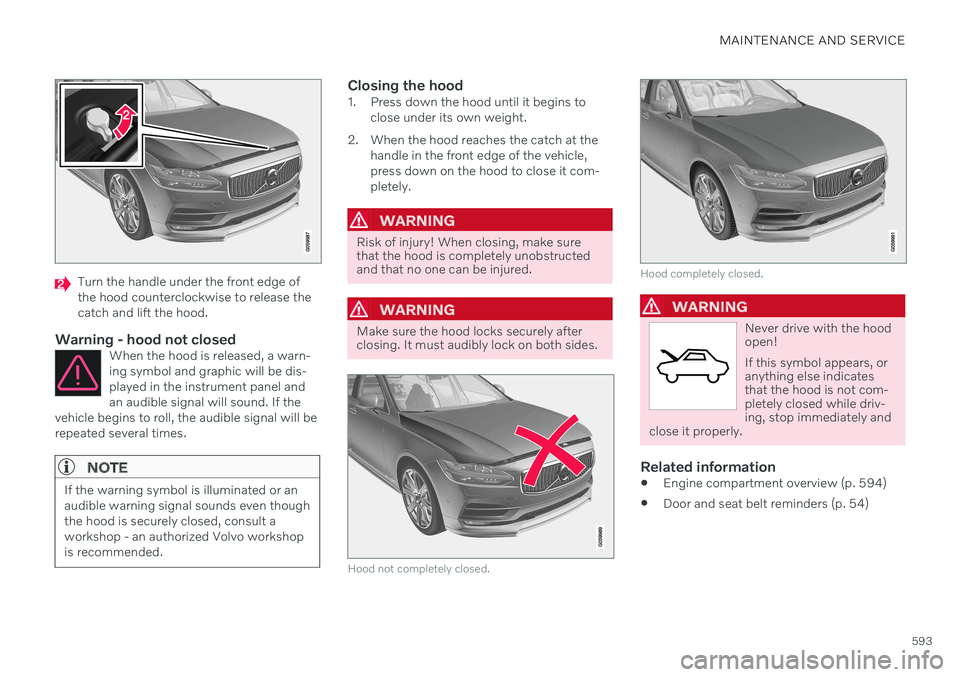
Turn the handle under the front edge of the hood counterclockwise to release thecatch and lift the hood.
Warning - hood not closedWhen the hood is released, a warn-ing symbol and graphic will be dis-played in the instrument panel andan audible signal will sound. If the
vehicle begins to roll, the audible signal will berepeated several times.
NOTE
If the warning symbol is illuminated or an audible warning signal sounds even thoughthe hood is securely closed, consult aworkshop - an authorized Volvo workshopis recommended.
Closing the hood1. Press down the hood until it begins to close under its own weight.
2. When the hood reaches the catch at the handle in the front edge of the vehicle, press down on the hood to close it com-pletely.
WARNING
Risk of injury! When closing, make sure that the hood is completely unobstructedand that no one can be injured.
WARNING
Make sure the hood locks securely after closing. It must audibly lock on both sides.
Hood not completely closed.
Hood completely closed.
WARNING
Never drive with the hood open! If this symbol appears, or anything else indicatesthat the hood is not com-pletely closed while driv-ing, stop immediately and
close it properly.
Related information
Engine compartment overview (p. 594)
Door and seat belt reminders (p. 54)
Page 625 of 683

MAINTENANCE AND SERVICE
* Option/accessory.623
Replacing bulbs
Bulb types vary depending on model and equipment level. If a light bulb 14
breaks, it can
be replaced by following the procedure shown in the Owner's Manual. If you are experiencing problems with any lights other than light bulbs, contact a work- shop 15
.
If there is a problem with an LED 16
light, the
entire lamp unit will normally need to be replaced.
NOTE
For information on lights not mentioned in the Owner's Manual, contact a Volvoretailer or an authorized Volvo workshop.
WARNING
The vehicle electrical system must be in ignition mode 0 when bulbs are replaced.
CAUTION
Never touch the bulb glass with your bare fingers. Grease and oils from your fingersvaporize in the heat and will leave adeposit on the reflector, which may dam-age it.
NOTE
If the error message persists after the defective bulb has been replaced, we rec-ommend a visit to an authorized Volvoworkshop.
NOTE
Exterior lighting such as headlights and taillights may develop temporary conden-sation on the inside of the lens. This is nor-mal. All exterior lighting is designed toresist this. Condensation is normally ven-ted out of the lamp housing once the lighthas been lit for some period of time.
NOTE
Bulbs for Active Bending Lights * contain
traces of mercury and should therefore always be deposited at an authorized Volvoworkshop.
Related information
Location of exterior lights (p. 624)
Removing the plastic cover to replace bulbs (p. 624)
Replacing the low beam headlight bulbs(p. 625)
Replacing the high beam headlight bulbs(p. 626)
Replacing daytime running lights/frontparking light bulbs (p. 626)
Replacing front turn signal bulbs (p. 627)
Bulb specifications (p. 628)
14
Some vehicles do not have any light bulbs.
15 An authorized Volvo workshop is recommended.
16 LED (Light Emitting Diode)
Page 626 of 683

MAINTENANCE AND SERVICE
* Option/accessory.
624
Removing the plastic cover to replace bulbs The headlight bulbs can be replaced without the assistance of a workshop, but before abulb can be replaced, the plastic cover overthe headlight needs to be removed.
–Release the pins in the plastic cover's four clips by pressing them down with ascrewdriver or similar object and removethe covering.
NOTE
To bear in mind when refitting the cover- ing:
The pin in the clip must be pressedback completely before the clip is rein-stalled in the covering.
When the covering is reinstalled, thepin must be pressed in until the endsurface is level with the surface of theclip.
Related information
Replacing bulbs (p. 623)
Replacing the low beam headlight bulbs (p. 625)
Replacing the high beam headlight bulbs(p. 626)
Replacing daytime running lights/frontparking light bulbs (p. 626)
Replacing front turn signal bulbs (p. 627)
Bulb specifications (p. 628)
Location of exterior lights The vehicle's exterior lighting consists of sev- eral different bulbs. LED 17
bulbs must be
replaced by a workshop. An authorized Volvo workshop is recommended.
Front bulbs (vehicles with halogen headlights)
Low beams
High beams
Daytime running light/parking light
Turn signal
Front fog light/cornering illumination *
(LED)
17 LED (Light Emmitting Diode)