Page 268 of 661
||
KEY, LOCKS AND ALARM
266
Related information
Private Locking (p. 264)
Alarm The alarm emits sound and light signals if anyone without a valid remote key attemptsto break into the vehicle or interferes with thestart battery or alarm siren.
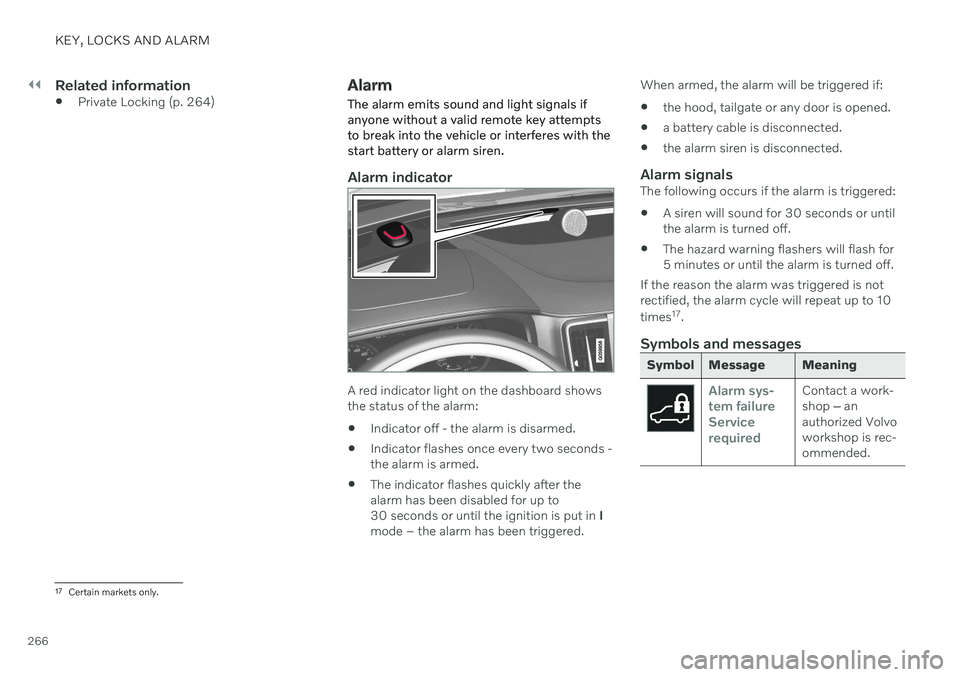
Alarm indicator
A red indicator light on the dashboard shows the status of the alarm:
Indicator off - the alarm is disarmed.
Indicator flashes once every two seconds -the alarm is armed.
The indicator flashes quickly after thealarm has been disabled for up to30 seconds or until the ignition is put in
I
mode – the alarm has been triggered. When armed, the alarm will be triggered if:
the hood, tailgate or any door is opened.
a battery cable is disconnected.
the alarm siren is disconnected.
Alarm signalsThe following occurs if the alarm is triggered:
A siren will sound for 30 seconds or untilthe alarm is turned off.
The hazard warning flashers will flash for5 minutes or until the alarm is turned off.
If the reason the alarm was triggered is notrectified, the alarm cycle will repeat up to 10 times 17
.
Symbols and messages
Symbol Message Meaning
Alarm sys- tem failureServicerequiredContact a work- shop ‒ an
authorized Volvoworkshop is rec-ommended.
17 Certain markets only.
Page 277 of 661
DRIVER SUPPORT
275
Symbol Message Meaning
ESC Temporarily offThe system's functionality has been temporarily reduced due to high brake system tempera- tures. The function will be automatically reactivated when the brakes have cooled.
ESC Service requiredThe system is not functioning properly. Stop the vehicle in a safe place, turn off the engine and then restart it.
A text message can be erased by briefly press- ing the
button in the center of the right-
side steering wheel keypad. If the message persists: Contact a workshop ‒
an authorized Volvo workshop is recom- mended.
Related information
Electronic Stability Control (p. 271)
Page 278 of 661

DRIVER SUPPORT
* Option/accessory.
276
Connected Safety 10
Connected Safety communicates information between your vehicle and other vehicles via the Internet 11
. The function is designed to
notify the driver of any hazardous road condi- tions ahead.
The function can notify the driver if another vehicle further down the road has activated itshazard warning flashers or detected slipperyroad conditions. You will also be notified ifyour own vehicle detects slippery road condi-tions. Connected Safety can assist the driver with the following:
Hazard warning flashers alert
Slippery road alerts
Connected Safety communication betweenvehicles only works for vehicles that are equip-ped with the function and have it activated.
Hazard warning flashers alertIf your vehicle's hazard warning flashers areactivated, information on this can be sent toother vehicles approaching your location. When your vehicleapproaches a vehicle with itshazard warning flashers on,this symbol will appear in theinstrument panel.
In vehicles equipped with a head-up display, the warning symbols for Connected Safetywill also be displayed there.
Slippery road alertsIf your own car detects reduced frictionbetween your tires and the road, informationon this can be sent to vehicles approachingyour own car's position.
As the vehicle approachesthe area affected, this symbolwill be displayed in the instru-ment panel to alert the driverof slippery road conditions.Drivers of other vehiclesreceiving information via
Connected Safety will receive similar notifica-tions as they approach the area.
In vehicles equipped with a head-up display, the warning symbols for Connected Safetywill also be displayed there.
WARNING
The function is supplementary driver support intended to facilitate drivingand help make it safer – it cannot han-dle all situations in all traffic, weatherand road conditions.
The driver is advised to read all sec-tions in the Owner's Manual about thisfunction to learn of its limitations,which the driver must be aware ofbefore using the function.
Driver support functions are not a sub-stitute for the driver's attention andjudgment. The driver is always respon-sible for ensuring the vehicle is drivenin a safe manner, at the appropriatespeed, with an appropriate distance toother vehicles, and in accordance withcurrent traffic rules and regulations.
Related information
Driver support systems (p. 270)
Activating or deactivating ConnectedSafety (p. 277)
Connected Safety limitations (p. 277)
Internet-connected vehicle
* (p. 500)
10
Not available in all markets.
11 There may be a charge for transmitting data over the Internet, depending on your service plan.
Page 279 of 661

DRIVER SUPPORT
}}
* Option/accessory.277
Activating or deactivating Connected Safety
For Connected Safety to be able to share information about road conditions with otherdrivers, the function must be activated. If youdo not wish to share information, the functioncan be deactivated.
Activate or deactivate the function using this button inthe center display's Functionview.
Illuminated button indicator light – the function is activated.
Extinguished button indicator light – thefunction is deactivated.
At activation, the driver must accept the spe-cial terms and conditions shown in the display before an Internet connection 12
can be estab-
lished. The driver must, for example, accept that data is sent from the vehicle using thedriver's cellular phone. Even when your vehicle is not connected to the Internet, you will still be notified if the sys-tem in your own vehicle detects slippery roadconditions. For Connected Safety to functionat full capacity, your vehicle needs to be con-nected to the Internet.
Related information
Connected Safety (p. 276)
Internet-connected vehicle
* (p. 500)
Terms of use and data sharing (p. 506)
Connected Safety limitations (p. 277)
Connected Safety limitations
Information on vehicles with activated hazard warning flashers or which have detected slip-pery road conditions is not always communi-cated between all vehicles in the affectedarea.
This may be the case if: No or insufficient Internet connection.
The maneuvers (steering wheel move- ments, acceleration or braking) made bythe vehicles on slippery surfaces are tooweak for friction between the tires androad to be detected.
Vehicles that have detected slippery roadconditions or activated hazard warningflashers have not activated the function.
Vehicles that have detected slippery roadconditions or activated hazard warningflashers are not equipped with the func-tion.
Insufficient GPS/satellite navigation mayprevent warnings.
Slippery road conditions were detected orhazard warning flashers were activated ona road that is not registered in the VolvoCars database.
Connected Safety is not developed on allmarkets and does not cover all areas. Con-
12
There may be a charge for transmitting data over the Internet, depending on your service plan.
Page 297 of 661
DRIVER SUPPORT
* Option/accessory.295
Symbol Message Meaning
The symbol is WHITE The vehicle is maintaining the stored speed.
Adaptive Cruise Contr. Unavailable
The symbol is GRAY Adaptive Cruise Control is in standby mode.
Adaptive Cruise Contr. Service required
The symbol is GRAYThe system is not functioning as intended. Contact a workshop
‒ an authorized Volvo
workshop is recommended.
Windscreen sensor Sensor blocked, see Owner's manualClean the windshield in front of the camera and radar sensors.
A text message can be erased by briefly press- ing the
button in the center of the right-
side steering wheel keypad. If the message persists: Contact a workshop
‒
an authorized Volvo workshop is recom- mended.
Related information
Adaptive Cruise Control
* (p. 286)
Contacting Volvo (p. 26)
Page 322 of 661
DRIVER SUPPORT
320
Lane Keeping Aid symbols and messages
A number of symbols and messages related to Lane Keeping Aid (LKA 73
) may be dis- played in the instrument panel. Several exam- ples are provided below.
Symbol Message Meaning
Driver support system Reduced functionality Service requiredThe system is not functioning as intended. Contact a workshop
A
.
Windscreen sensor Sensor blocked, see Owner's manualThe camera's ability to detect the lane in front of the vehicle is reduced.
73 Lane Keeping Aid
Page 338 of 661
DRIVER SUPPORT
336
City Safety messages
A number of messages related to City Safety may be displayed in the instrument panel.Several examples are provided below.
Message Meaning
City Safety Automatic interventionWhen City Safety is braking or has activated the automatic braking function, one or more symbols may illuminate in the instrument panel and a text message may be displayed.
City Safety Reduced functionality Service requiredThe system is not functioning as intended. Contact a workshop A
.
A An authorized Volvo workshop is recommended.
A text message can be erased by briefly press- ing the
button in the center of the right-
side steering wheel keypad. If a message cannot be erased, contact a workshop A
.
Related information
City Safety
™ (p. 323)
Page 349 of 661
DRIVER SUPPORT
* Option/accessory.347
BLIS messages
A number of messages related to BLIS 92
may
be displayed in the instrument panel. Several examples are provided below.
Message Meaning
Blind spot sensor Service requiredThe system is not functioning as intended. Contact a workshop A
.
Blind spot system off Trailer attachedBLIS and CTA B
have been deactivated because a trailer has been connected to the vehicle's electrical system.
A An authorized Volvo workshop is recommended.
B Cross Traffic Alert *
A text message can be erased by briefly press- ing the
button in the center of the right-
side steering wheel keypad. If a message cannot be erased, contact a workshop A
.
Related information
BLIS
* (p. 344)
Cross Traffic Alert
* (p. 352)
92
Blind Spot Information


