2021 VOLVO V60 service
[x] Cancel search: servicePage 100 of 661

||
DISPLAYS AND VOICE CONTROL
98
BSD 2-clause “Simplified” license
Copyright (c)
reserved. Redistribution and use in source and binary forms, with or without modification, arepermitted provided that the followingconditions are met:
1. Redistributions of source code must retain the above copyright notice, this list of conditions and the following disclaimer.
2. Redistributions in binary form must reproduce the above copyright notice, thislist of conditions and the followingdisclaimer in the documentation and/orother materials provided with thedistribution.
THIS SOFTWARE IS PROVIDED BY THECOPYRIGHT HOLDERS ANDCONTRIBUTORS "AS IS" AND ANY EXPRESS OR IMPLIED WARRANTIES, INCLUDING, BUT NOT LIMITED TO, THE IMPLIED WARRANTIES OF MERCHANTABILITY AND FITNESS FOR APARTICULAR PURPOSE ARE DISCLAIMED. IN NO EVENT SHALL THE COPYRIGHT OWNER OR CONTRIBUTORS BE LIABLEFOR ANY DIRECT, INDIRECT, INCIDENTAL,SPECIAL, EXEMPLARY, ORCONSEQUENTIAL DAMAGES (INCLUDING,BUT NOT LIMITED TO, PROCUREMENT OFSUBSTITUTE GOODS OR SERVICES; LOSS OF USE, DATA, OR PROFITS; OR BUSINESSINTERRUPTION) HOWEVER CAUSED ANDON ANY THEORY OF LIABILITY, WHETHERIN CONTRACT, STRICT LIABILITY, OR TORT(INCLUDING NEGLIGENCE OROTHERWISE) ARISING IN ANY WAY OUTOF THE USE OF THIS SOFTWARE, EVEN IFADVISED OF THE POSSIBILITY OF SUCHDAMAGE. The views and conclusions contained in the software and documentation are those of theauthors and should not be interpreted asrepresenting official policies, either expressedor implied, of the FreeBSD Project.
FreeType Project License
1. 1 Copyright 1996-1999 by David Turner,
Robert Wilhelm, and Werner Lemberg Introduction The FreeType Project isdistributed in several archive packages;some of them may contain, in addition tothe FreeType font engine, various toolsand contributions which rely on, or relateto, the FreeType Project. This licenseapplies to all files found in such packages,and which do not fall under their ownexplicit license. The license affects thusthe FreeType font engine, the testprograms, documentation and makefiles,at the very least. This license was inspiredby the BSD, Artistic, and IJG(Independent JPEG Group) licenses,which all encourage inclusion and use of free software in commercial and freewareproducts alike. As a consequence, its mainpoints are that: o We don't promise thatthis software works. However, we are beinterested in any kind of bug reports. (`asis' distribution) o You can use thissoftware for whatever you want, in partsor full form, without having to pay us.(`royalty-free' usage) o You may notpretend that you wrote this software. Ifyou use it, or only parts of it, in a program,you must acknowledge somewhere inyour documentation that you've used theFreeType code. (`credits') We specificallypermit and encourage the inclusion of thissoftware, with or without modifications, incommercial products, provided that allwarranty or liability claims are assumed bythe product vendor. Legal Terms 0.Definitions Throughout this license, theterms `package', `FreeType Project', and`FreeType archive' refer to the set of filesoriginally distributed by the authors (DavidTurner, Robert Wilhelm, and WernerLemberg) as the `FreeType project', bethey named as alpha, beta or final release.`You' refers to the licensee, or personusing the project, where `using' is ageneric term including compiling theproject's source code as well as linking itto form a `program' or `executable'. Thisprogram is referred to as `a program usingthe FreeType engine'. This license applies
Page 107 of 661
DISPLAYS AND VOICE CONTROL
}}
105
Service messages
The following table lists a selection of impor- tant service messages and what they mean.
Message Meaning
Stop safelyAStop and switch off the engine. Serious risk ofdamage - contact a workshop B
.
Turn off engineA Stop and switch off the engine. Serious risk ofdamage - contact a workshop
B
.
Service urgent Drive to work- shop
A Contact a workshop
B
to
have the vehicle inspec- ted immediately.
Service requiredA Contact a workshop
B
to
have the vehicle inspec- ted as soon as possible.
Regular main- tenance Book time for maintenanceTime for service - contact a workshop B
. Shown
before the next service date.
Regular main- tenance Time for main- tenanceTime for service - contact a workshop B
. Shown on
the next service date.
Message Meaning
Regular main- tenance Maintenance overdueTime for service - contact a workshop B
. Shown
when the date for service has passed.
Temporarily offA A function has been tem- porarily deactivated andwill be reactivated auto-matically while driving orafter the engine is restar-ted.
A
Part of message, shown along with information on the loca- tion of the problem.
B An authorized Volvo workshop is recommended.
Related information
Handling messages in the instrument panel (p. 105)
Handling messages saved from the instru- ment panel (p. 106)
Messages in the center display (p. 138)
Handling messages in the instrument panel
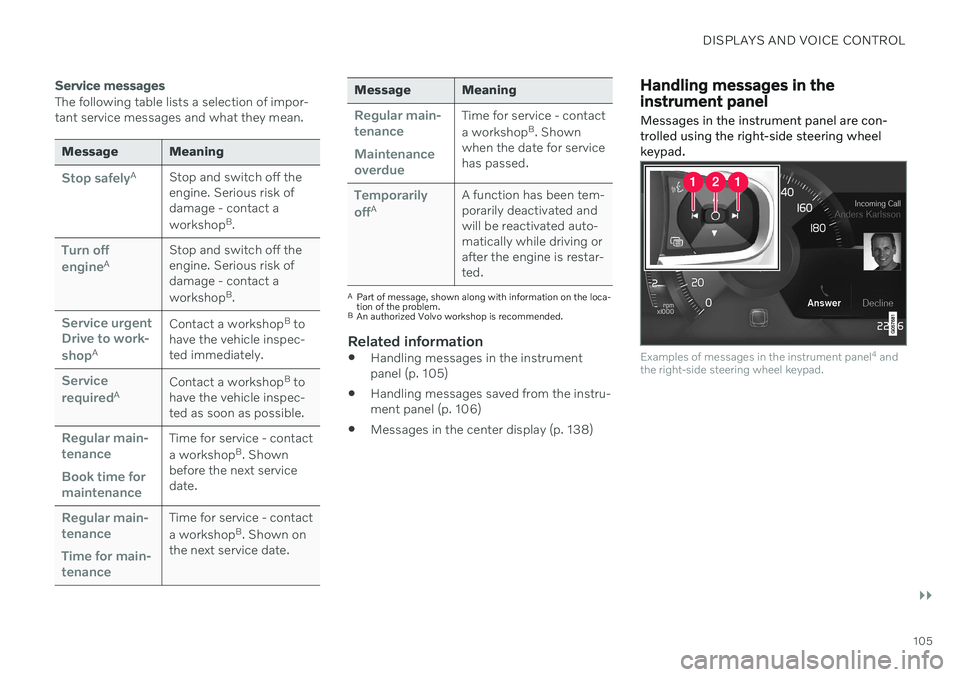
Messages in the instrument panel are con- trolled using the right-side steering wheelkeypad.
Examples of messages in the instrument panel 4
and
the right-side steering wheel keypad.
Page 109 of 661

DISPLAYS AND VOICE CONTROL
107
Reading saved messages
To read a saved message immediately:
–Tap the button to the right of the messageVehicle message stored in Car Status app in the center display.
> The saved message will be displayed in the
Car Status app.
To read saved messages at a later time: 1. Open the
Car Status app from App view
in the center display.
> The app will open in the bottom tile of Home view.
2. Select the
Messages tab in the app.
> A list of saved messages will be dis- played.
3. Tap a message to expand/minimize it. > More information about the messagewill appear in the list and the image to the left of the app will display informa-tion about the message in graphic form.
Handling saved messages
In expanded form, some messages have two buttons available for booking service or read-ing the Owner's Manual. Booking service for saved messages:
–With the message in expanded form, tapRequest appoint./Call to make
Appointment6 for assistance booking
service. > With
Request appoint.: TheAppointments tab will open in the app
and create a request for a service/repair appointment. With
Call to make Appointment: The
phone app will open and call a service center to make an appointment forservice or repairs.
Reading the Owner's Manual for saved mes-sages:
–With the message in expanded form, tapOwner's manual to read relevant infor-
mation about the message in the Owner's Manual.
> The Owner's Manual will open in the center display and provide information related to the message.
Saved messages in the app are automatically deleted each time the engine is started.
Related information
Messages in the instrument panel (p. 104)
Handling messages in the instrument panel (p. 105)
Messages in the center display (p. 138)
6
Market dependent. Volvo ID and selected workshop also need to be registered.
Page 134 of 661

DISPLAYS AND VOICE CONTROL
132
Resetting user data when the vehicle changes owners
If the vehicle changes owners, all user data and system settings should be reset to fac-tory defaults.
Vehicle settings can be reset at different lev- els. Reset all user data and system settings totheir original factory defaults when the vehiclechanges owner. It is also important to changethe owner of the Volvo On Call service.
Related information
Resetting center display settings (p. 132)
Resetting driver profile settings (p. 137)
Resetting center display settings
All settings made in the center display's Set- tings menu can be reset to default values.
Two types of resetThere are two types of reset in the Settings menu:
Factory Reset- erases all data and files
and resets all settings to factory default.
Reset Personal Settings- erases per-
sonal data and resets personalized set- tings to factory default.
Resetting settingsFollow these instructions to reset the settings.
NOTE
Factory Reset is only possible when the
vehicle is stationary.
1. Tap Settings in the center display's Top
view.
2. Proceed to
SystemFactory Reset.
3. Select the type of reset you would like to do.
> A pop-up window will appear. 4.
Tap
OK to confirm the reset.
For
Reset Personal Settings, confirm
the reset by tapping Reset for the active
profile or Reset for all profiles.
> The selected settings will be reset.
Related information
Center display overview (p. 108)
Changing settings in the center display's Top view (p. 130)
Table of settings in the center display(p. 133)
Page 135 of 661

DISPLAYS AND VOICE CONTROL
}}
* Option/accessory.133
Table of settings in the center display
The center display's Settings menu has a number of main categories and sub-catego-ries that contain settings and information formany of the vehicle's features and functions.
There are seven main categories: My Car,Sound, Navigation, Media,Communication, Climate and System.
Each category, in turn, contains a number of sub-categories and possible settings. Thetable below shows the first level of sub-cate-gories. The possible settings for a function oran area are described in more detail in theirrespective sections of the Owner's Manual. Some settings are personal, which means that they can be saved to a
Driver Profiles. Others
are global, which means that they are not linked to a driver profile.
My Car
Sub-categories
Displays IntelliSafeDrive Preferences
/Individual Drive
Mode*
Lights and Lighting Mirrors and Convenience
Sub-categories
Locking Parking Brake and SuspensionWipers
Sound
Sub-categories
Tone BalanceSystem Volumes
Navigation
Sub-categories
Map Route and GuidanceTraffic
Media
Sub-categories
AM/FM Radio SiriusXMSiriusXM Travel Link
Sub-categories
Gracenote ®
Video
Communication
Sub-categories
Phone Text MessagesAndroid Auto
*
Apple CarPlay*
Bluetooth Devices Wi-FiVehicle Wi-Fi Hotspot Vehicle Modem Internet Volvo On Call Volvo Service Networks
ClimateThe Climate main category does not have any
sub-categories.
Page 176 of 661

WINDOWS, GLASS AND MIRRORS
* Option/accessory.
174
Keyless locking and unlocking
* (p. 255)
Locking and unlocking using the remote key (p. 241)
Wiper blades and washer fluid The wipers and the washer fluid are designed to improve visibility and the headlight pat-tern.
Washer fluid direct from the wiper blades and heating
* of the wiper blades gives improved
vision. When there is approximately 1 liter (1 qt) of washer fluid remaining, a message to refill willappear in the instrument panel.
Related information
Using the rain sensor (p. 175)
Using the windshield and headlight wash-ers (p. 177)
Using automatic rear window wipingwhen backing up (p. 179)
Activating and deactivating the rain sen-sor's memory function (p. 176)
Using the rear window wiper/washer(p. 178)
Filling washer fluid (p. 626)
Putting the wiper blades in service posi-tion (p. 625)
Replacing windshield wiper blades(p. 624)
Changing rear window wipers (p. 622)
Using the windshield wipers (p. 174)
Using the windshield wipers
The windshield wipers are designed to clean the windshield. The right-side steering wheellever is used to adjust windshield wiper set-tings.
Right-hand steering wheel lever.
The thumb wheel is used to set rain sen- sor sensitivity and interval wiper speed.
Single sweepMove the lever down and release for asingle sweep.
Wipers offMove the lever to position 0 to turn off
the windshield wipers.
Page 177 of 661

WINDOWS, GLASS AND MIRRORS
}}
175
Interval wipersMove the lever upward to put the wip- ers in interval wiping mode. Set the
number of sweeps per time unit with thethumb wheel when interval wipers areselected.
Continuous wipersMove the lever upward for the wipers to operate at normal speed.
Move the lever upward again for the wipers to operate at high speed.
CAUTION
Before activating the wipers, make sure that the wiper blades are not frozen inplace and that any snow or ice on thewindshield and rear window has beenscraped away.
CAUTION
Use plenty of washer fluid when the wipers clean the windshield. The windshield mustbe wet when the windshield wipers areworking.
Related information
Using the rain sensor (p. 175)
Using the windshield and headlight wash- ers (p. 177)
Using automatic rear window wipingwhen backing up (p. 179)
Wiper blades and washer fluid (p. 174)
Activating and deactivating the rain sen-sor's memory function (p. 176)
Using the rear window wiper/washer(p. 178)
Filling washer fluid (p. 626)
Putting the wiper blades in service posi-tion (p. 625)
Replacing windshield wiper blades(p. 624)
Changing rear window wipers (p. 622)
Using the rain sensor
The rain sensor monitors the amount of water on the windshield and automatically startsthe windshield wipers. Rain sensor sensitivitycan be adjusted using the thumb wheel onthe right-hand steering wheel lever.
Right-hand steering wheel lever.
Rain sensor button
Thumb wheel, sensitivity/interval wiper speed
When the rain sensor is activated, the
rain sensor symbol will be displayed in the instrument panel.
Activating the rain sensorWhen the rain sensor is activated, the enginemust be running or the ignition in mode I or II
while the windshield wiper lever is in position0 or in the single sweep position.
Page 178 of 661

||
WINDOWS, GLASS AND MIRRORS
176Activate the rain sensor by pressing the rain sensor button
.
Move the lever downward for an extra wiper sweep. Turn the thumb wheel upward for increased sensitivity and downward for decreased sensi-tivity. The wipers will make one extra sweepwhen the thumb wheel is turned upward.
Deactivate the rain sensorDeactivate the rain sensor by pressing the
rain sensor button or moving the lever
upward to another wiper mode. The rain sensor is automatically deactivated in ignition mode 0 or when the engine is
switched off. The rain sensor is also automatically deacti- vated when the wiper blades are put in theservice position. The rain sensor will reactivatewhen service mode is switched off.
CAUTION
The windshield wipers may start inadver- tently and be damaged in automatic carwashes. Deactivate the rain sensor whenthe engine is running or when the ignitionis in mode I or II. The symbol in the instru-
ment panel will go out.
Related information
Using the windshield and headlight wash- ers (p. 177)
Using automatic rear window wipingwhen backing up (p. 179)
Wiper blades and washer fluid (p. 174)
Activating and deactivating the rain sen-sor's memory function (p. 176)
Using the rear window wiper/washer (p. 178)
Filling washer fluid (p. 626)
Putting the wiper blades in service posi- tion (p. 625)
Replacing windshield wiper blades(p. 624)
Changing rear window wipers (p. 622)
Using the windshield wipers (p. 174)
Activating and deactivating the rain sensor's memory function
The rain sensor monitors the amount of water on the windshield and automatically startsthe windshield wipers.
When the memory function is activated, the rain sensor button does not need to bepressed every time the vehicle is started: 1. Tap
Settings in the center display's Top
view.
2. Tap
My CarWipers.
3. Select
Rain Sensor Memory to activate/
deactivate the memory function.
Related information
Using the rain sensor (p. 175)
Using the windshield and headlight wash- ers (p. 177)
Using automatic rear window wipingwhen backing up (p. 179)
Wiper blades and washer fluid (p. 174)
Using the rear window wiper/washer(p. 178)
Filling washer fluid (p. 626)
Putting the wiper blades in service posi-tion (p. 625)
Replacing windshield wiper blades(p. 624)