Page 353 of 568
353
6
YARIS(HB) Owner's Manual_Europe_MK0001_en
6-3. Do-it-yourself maintenance
Maintenance and care
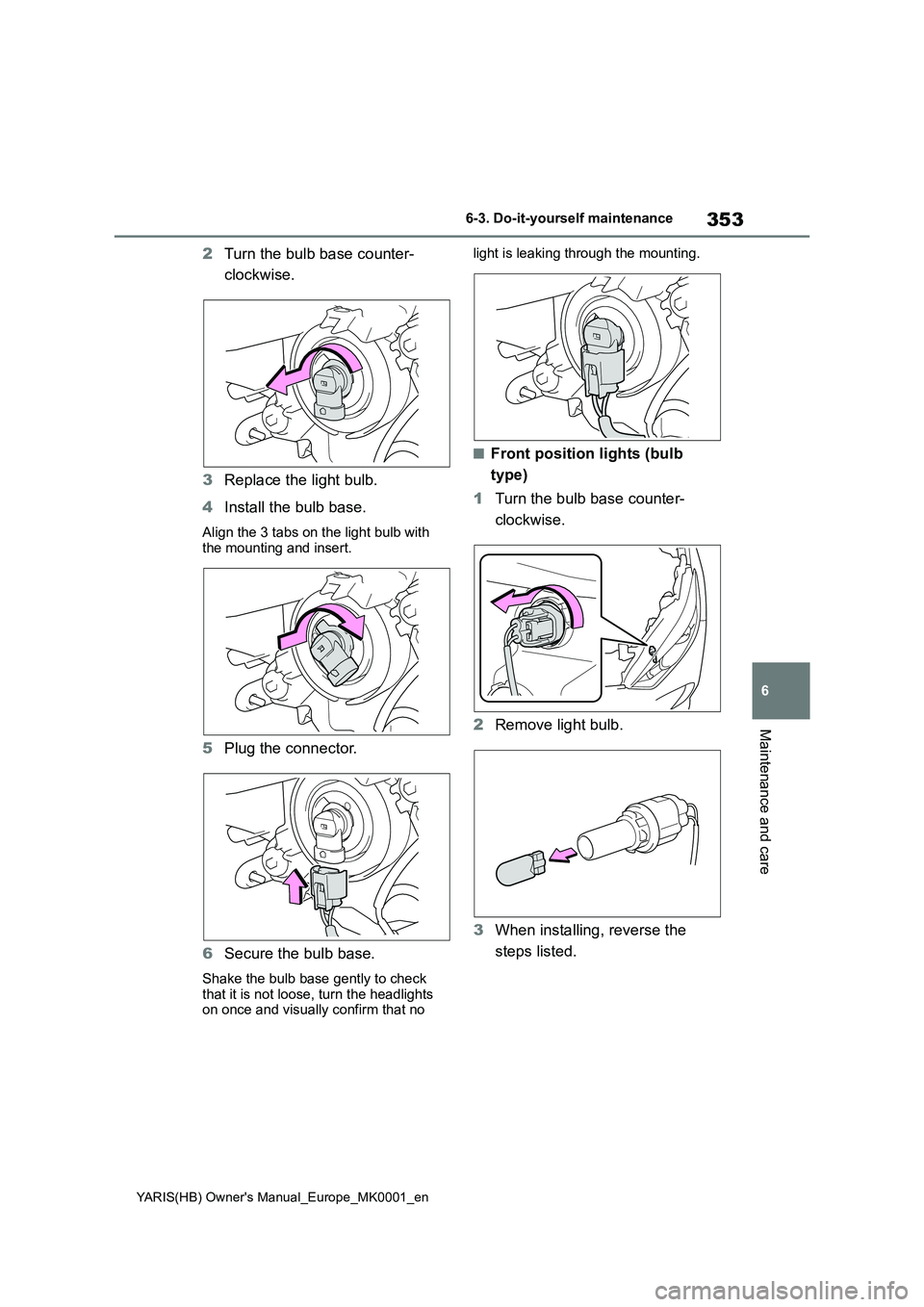
2Turn the bulb base counter-
clockwise.
3 Replace the light bulb.
4 Install the bulb base.
Align the 3 tabs on the light bulb with the mounting and insert.
5 Plug the connector.
6 Secure the bulb base.
Shake the bulb base gently to check
that it is not loose, turn the headlights on once and visually confirm that no
light is leaking through the mounting.
■Front position lights (bulb
type)
1 Turn the bulb base counter-
clockwise.
2 Remove light bulb.
3 When installing, reverse the
steps listed.
Page 354 of 568
354
YARIS(HB) Owner's Manual_Europe_MK0001_en
6-3. Do-it-yourself maintenance
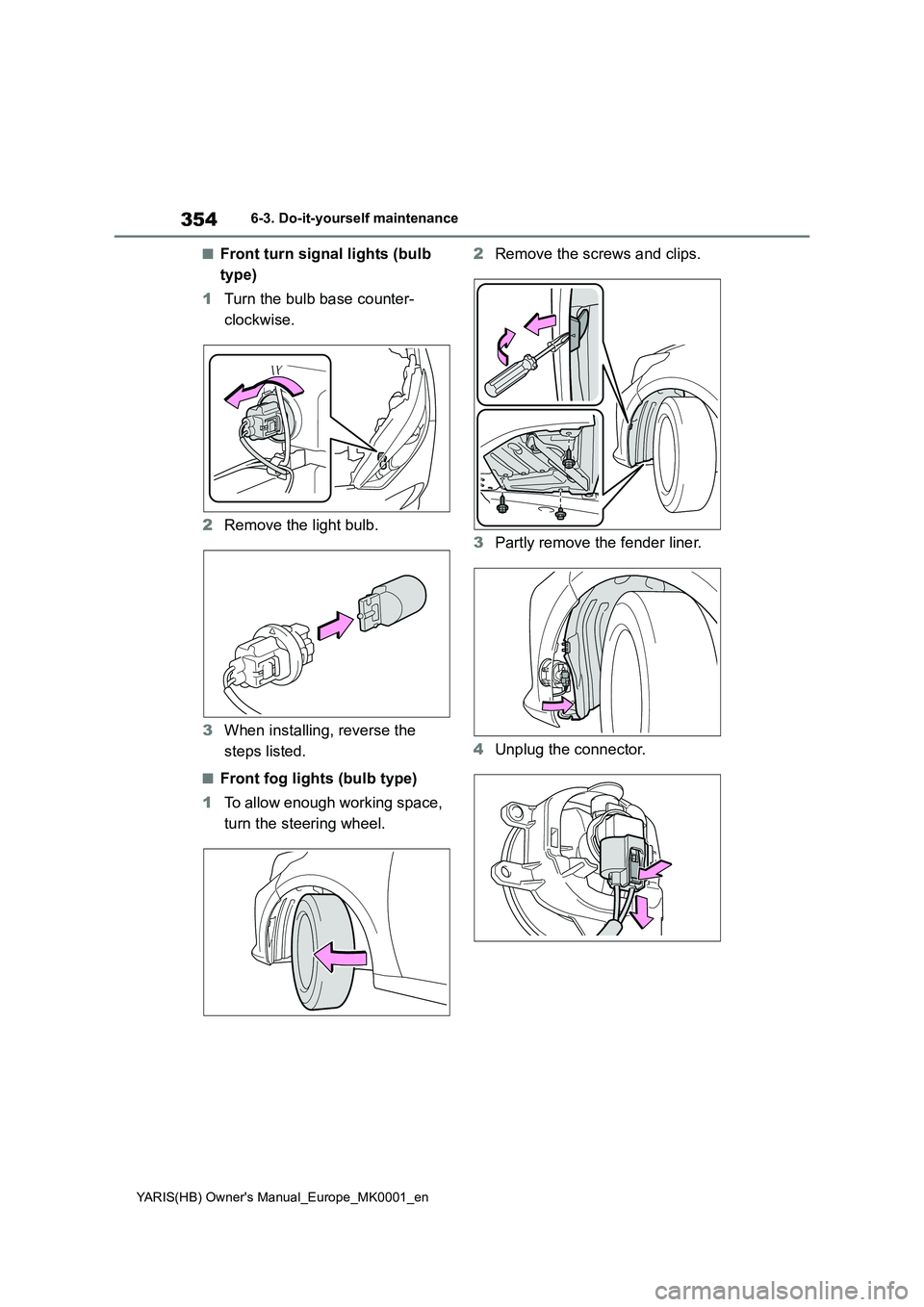
■Front turn signal lights (bulb
type)
1 Turn the bulb base counter-
clockwise.
2 Remove the light bulb.
3 When installing, reverse the
steps listed.
■Front fog lights (bulb type)
1 To allow enough working space,
turn the steering wheel.
2 Remove the screws and clips.
3 Partly remove the fender liner.
4 Unplug the connector.
Page 355 of 568
355
6
YARIS(HB) Owner's Manual_Europe_MK0001_en
6-3. Do-it-yourself maintenance
Maintenance and care
5Turn the bulb base counter-
clockwise.
6 Set a new light bulb.
Align the 3 tabs on the light bulb with the mounting, and insert. Turn it clock-
wise to set.
7 Set the connector.
Shake the bulb base gently to check that it is not loose, turn the front fog
lights on once and visually confirm that no light is leaking through the mount-ing.
8 Reinstall the fender liner.
9 Reinstall the screws and clips.
■Rear turn signal lights (bulb
type)
1 Open the back door.
2 Remove the 2 bolts and pull the
lamp assembly toward the rear
of the vehicle to remove it.
Page 356 of 568
356
YARIS(HB) Owner's Manual_Europe_MK0001_en
6-3. Do-it-yourself maintenance
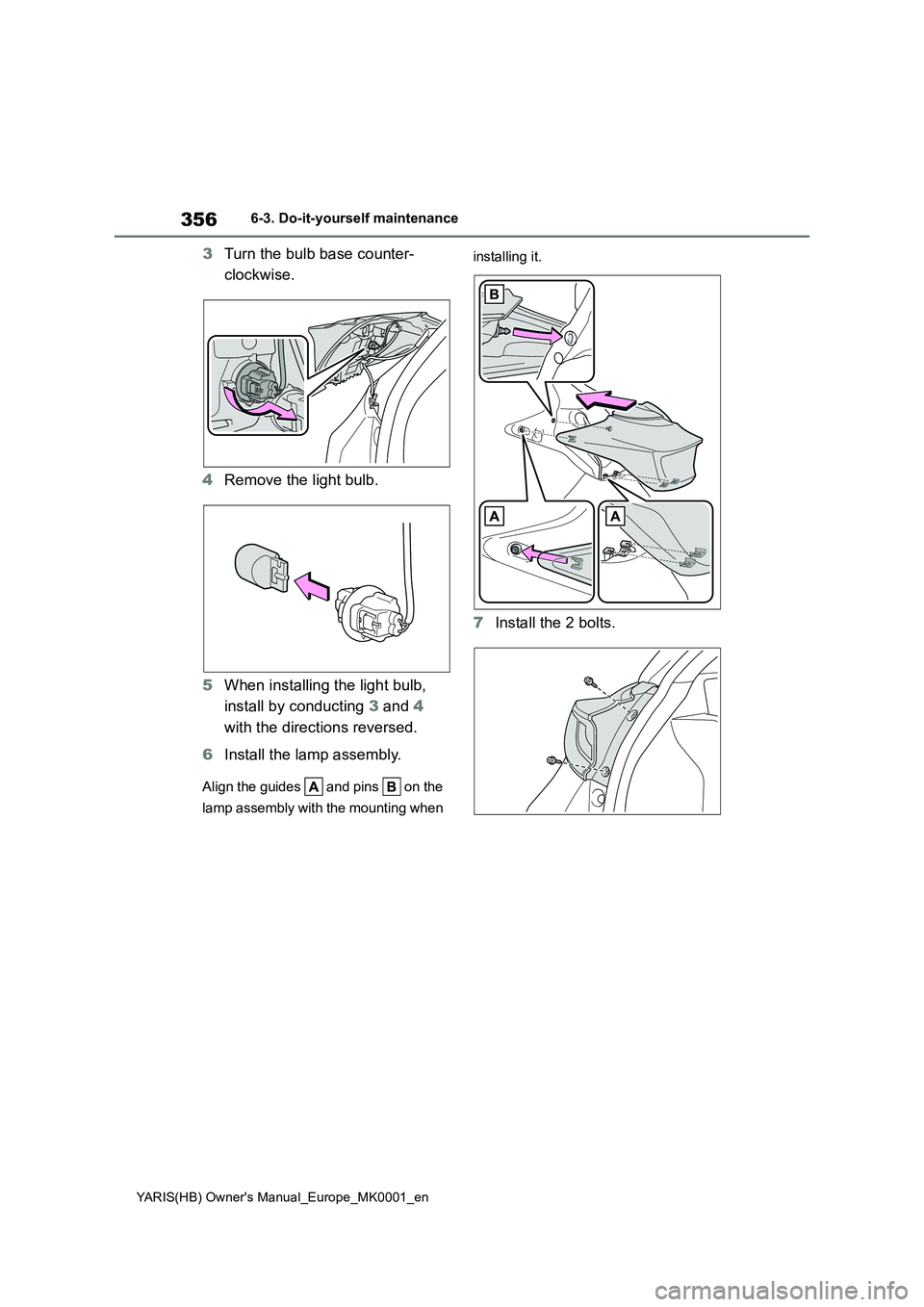
3Turn the bulb base counter-
clockwise.
4 Remove the light bulb.
5 When installing the light bulb,
install by conducting 3 and 4
with the directions reversed.
6 Install the lamp assembly.
Align the guides and pins on the
lamp assembly with the mounting when
installing it.
7 Install the 2 bolts.
Page 357 of 568
357
6
YARIS(HB) Owner's Manual_Europe_MK0001_en
6-3. Do-it-yourself maintenance
Maintenance and care
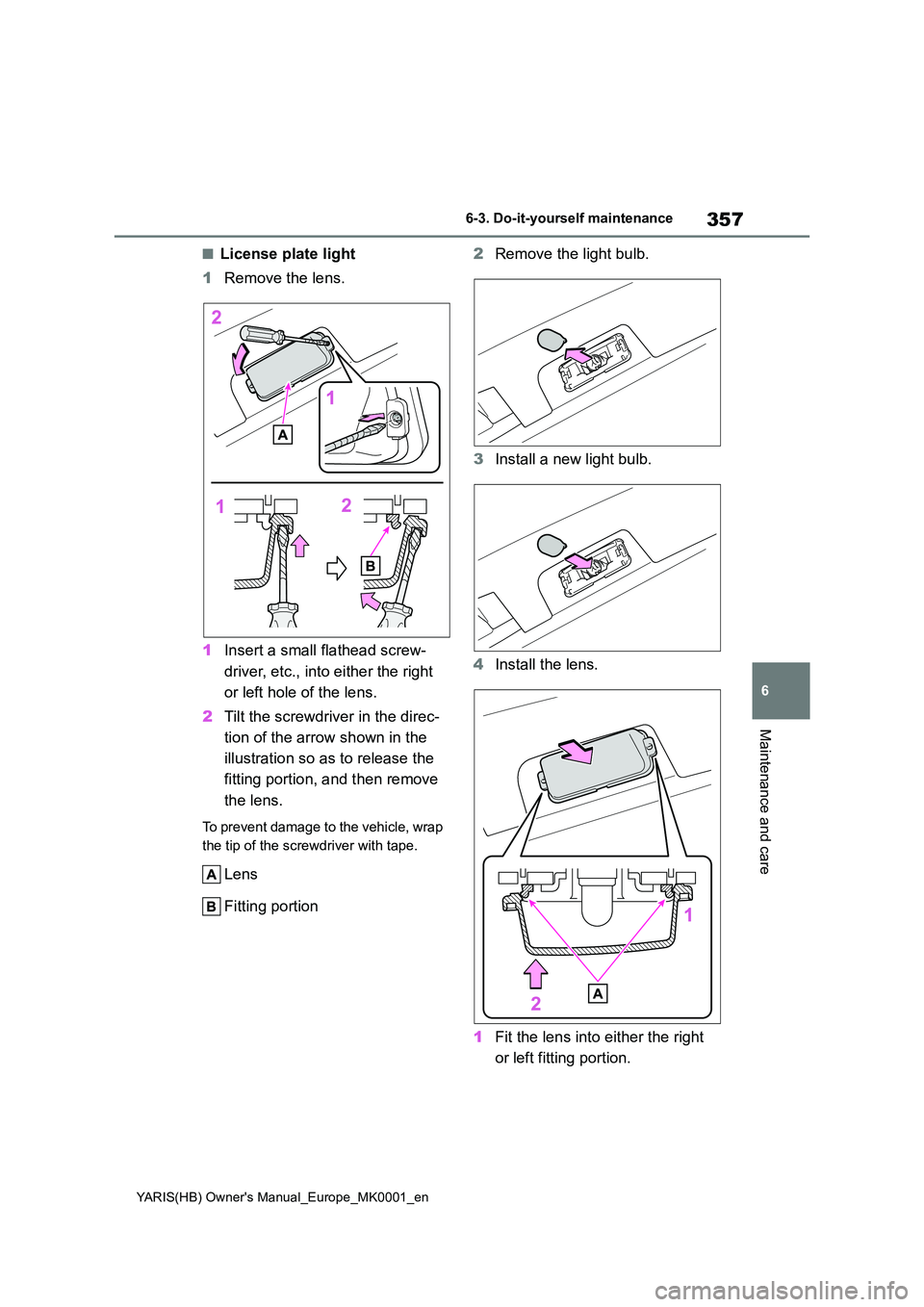
■License plate light
1 Remove the lens.
1 Insert a small flathead screw-
driver, etc., into either the right
or left hole of the lens.
2 Tilt the screwdriver in the direc-
tion of the arrow shown in the
illustration so as to release the
fitting portion, and then remove
the lens.
To prevent damage to the vehicle, wrap
the tip of the screwdriver with tape.
Lens
Fitting portion
2 Remove the light bulb.
3 Install a new light bulb.
4 Install the lens.
1 Fit the lens into either the right
or left fitting portion.
Page 358 of 568
358
YARIS(HB) Owner's Manual_Europe_MK0001_en
6-3. Do-it-yourself maintenance
2Push the lens into place.
After installation, confirm that the lens is
properly installed by gently pulling it.
Fitting portion
WARNING
■Replacing light bulbs
●Turn off the lights. Do not attempt to
replace the bulb immediately after turning off the lights. The bulbs become very hot and may cause
burns.
●Do not touch the glass portion of
the light bulb with bare hands. When it is unavoidable to hold the glass portion, use and hold with a
clean dry cloth to avoid getting moisture and oils on the bulb. Also, if the bulb is scratched or dropped,
it may blow out or crack.
●Fully install light bulbs and any
parts used to secure them. Failure to do so may result in heat damage, fire, or water entering the light unit.
This may damage the lights or cause condensation to build up on the lens.
■To prevent damage or fire
Make sure bulbs are fully seated and
locked.
Page 377 of 568

377
7
YARIS(HB) Owner's Manual_Europe_MK0001_en
7-2. Steps to take in an emergency
When trouble arises
■Warning messages
The warning messages explained below
may differ from the actual messages according to operation conditions and vehicle specifications.
■Warning buzzer
A buzzer may sound when a message is displayed.The buzzer may not be audible if the
vehicle is in a noisy location or if the audio system volume is high.
■If “Engine Oil Level Low Add or Replace” is displayed
The engine oil level is low. Check the
level of the engine oil, and add if neces-
sary.
This message may appear if the vehicle is stopped on a slope. Move the vehicle
to a level surface and check to see if the message disappears.
■If “Engine Stopped Steering Power Low” is displayed
This message is displayed if the engine is stopped while driving.
When steering wheel operations are
heavier than usual, grip the steering wheel firmly and operate it using more force than usual.
■If “Auto Power OFF to Conserve
Battery” is displayed
Power was cut off due to the automatic power off function. Next time when start-
ing the engine, increase the engine speed slightly and maintain that level for approximately 5 minutes to recharge the
battery.
■If “Headlight System Malfunction Visit Your Dealer” is displayed
The following systems may be malfunc-
tioning. Have the vehicle inspected by any authorized Toyota retailer or Toyota authorized repairer, or any reliable
repairer immediately.
●The LED headlight system (if
equipped)
●Automatic High Beam (if equipped)
■If “Front Camera Out of Tempera-
ture Range Unavailable Wait until Normal Temperature”, “Front Cam-era Low Visibility Unavailable See
Owner’s Manual” or “Front Camera Unavailable See Owner’s Manual” is displayed
The following systems may be sus- pended until the problem shown in the message is resolved. ( →P.191, 368)
●PCS (Pre-Collision system) (if equipped)
●LTA (Lane Tracing Assist) (if equipped)
●Automatic High Beam (if equipped)
If a warning message is
displayed
The multi-information display
shows warnings for system
malfunctions and incorrectly
performed operations, and
messages that indicate a need
for maintenance. When a mes-
sage is displayed, perform the
appropriate corrective action
for the message.
If a warning message is dis-
played again after the appro-
priate actions have been
performed, contact any autho-
rized Toyota retailer or Toyota
authorized repairer, or any reli-
able repairer.
Additionally, if a warning light
comes on or flashes at the
same time that a warning mes-
sage is displayed, take the
appropriate corrective action
for the warning light. ( →P.368)
Page 378 of 568

378
YARIS(HB) Owner's Manual_Europe_MK0001_en
7-2. Steps to take in an emergency
●RSA (Road Sign Assist) (if equipped)
●Dynamic radar cruise control (if equipped)
■If “Pre-Collision System Unavail-
able See Owner’s Manual”, “Pre- Collision System Out of Tempera-ture Range Unavailable See
Owner’s Manual” or “Pre-Collision System Radar In Self Calibration Unavailable See Owner’s Manual”
is displayed
The following systems may be sus- pended until the problem shown in the
message is resolved. ( →P.191, 368)
●PCS (Pre-Collision system)
●LTA (Lane Tracing Assist)
●Dynamic radar cruise control
■If “Oil Maintenance Required Soon” is displayed
Indicates that the engine oil should be
scheduled to be changed.
Check the engine oil and change it if necessary.
After changing the engine oil, make sure to reset the message. ( →P.323)
■If “Oil Maintenance Required Visit Your Dealer” is displayed
Indicates that the engine oil should be changed.
Check and change the engine oil, and
oil filter by any authorized Toyota retailer or Toyota authorized repairer, or any reli-able repairer. After changing the engine
oil, make sure to reset the message. ( →P.323)
■If “Radar Cruise Control Unavail- able See Owner’s Manual” is dis-
played (if equipped)
The dynamic radar cruise control sys- tem is suspended temporarily or until
the problem shown in the message is resolved. (causes and coping methods: → P.191)
■If “Radar Cruise Control Unavail-
able” is displayed (if equipped)
The dynamic radar cruise control sys-
tem cannot be used temporarily. Use the
system when it becomes available again.
■If a message that indicates the need for visiting your Toyota dealer
is displayed
The system or part shown on the multi- information display is malfunctioning.
Have the vehicle inspected by any authorized Toyota retailer or Toyota authorized repairer, or any reliable
repairer immediately.
■If a message that indicates the need for referring to Owner’s Man-ual is displayed
●If “Engine Coolant Temp High” is dis-played, follow the instructions accord-
ingly. ( →P.405)
●If “Transmission Oil Temp. High” is
displayed, follow the instructions accordingly. ( →P.164)
●If “Exhaust Filter Full” is displayed, fol- low the instructions accordingly. ( →P.267)
●If any of the following messages are displayed on the multi-information dis-
play, it may indicate a malfunction. Have the vehicle inspected by any authorized Toyota retailer or Toyota
authorized repairer, or any reliable repairer immediately.• “Smart Entry & Start System Malfunc-
tion”
●If any of the following messages are
displayed on the multi-information dis- play, it may indicate a malfunction. Immediately stop the vehicle and con-
tact any authorized Toyota retailer or Toyota authorized repairer, or any reli-able repairer.
• “Braking Power Low” • “12-Volt Battery Charging System Malfunction”
•“Oil Pressure Low”