2021 TOYOTA RAV4 PRIME ignition
[x] Cancel search: ignitionPage 3 of 618

3TABLE OF CONTENTS
1
2
3
4
5
6
7
8
9
10
Back door ......................203
Smart key system ......... 217
4-3. Adjusting the seats Front seats .................... 224
Rear seats..................... 225
Driving position memory 227
Head restraints.............. 230
4-4. Adjusting the steering wheel and mirrors
Steering wheel .............. 232
Inside rear view mirror .. 233
Digital Rear-view Mirror 234
Outside rear view mirrors .................................... 244
4-5. Opening, closing the win- dows and moon roof
Power windows ............. 246
Moon roof ...................... 249
Panoramic moon roof.... 252
5-1. Before driving Driving the vehicle......... 258
Cargo and luggage ....... 265
Vehicle load limits ......... 268
Trailer towing ................ 269
Dinghy towing ............... 278
5-2. Driving procedures Power (ignition) switch .. 279
Hybrid transmission ...... 285
Turn signal lever ........... 289
Parking brake ................ 290
Brake Hold .................... 2935-3. Operating the lights and
wipers
Headlight switch ............ 295
AHB (Automatic High Beam) .................................... 298
Windshield wipers and washer ......................... 301
Rear window wiper and washer ......................... 304
5-4. Refueling Opening the fuel tank cap.................................... 306
5-5. Using the driving support systems
Toyota Safety Sense 2.0 309
PCS (Pre-Collision System) .................................... 315
LTA (Lane Tracing Assist) .................................... 323
RSA (Road Sign Assist) 333
Dynamic radar cruise control with full-speed range ... 336
BSM (Blind Spot Monitor) .................................... 347
Intuitive parking assist ... 356
PKSB (Parking Support Brake) .......................... 363
Parking Support Brake func- tion (static objects) ...... 368
Parking Support Brake func- tion (rear-crossing vehicles)
. ...
................................ 373
Driving mode s elect switch
.................................... 377
Trail Mode ..................... 379
Driving assist systems ... 380
5-6. Driving tips Winter driving tips .......... 387
5Driving
Page 257 of 618

257
5
5
Driving
Driving
5-1. Before drivingDriving the vehicle....... 258
Cargo and luggage ..... 265
Vehicle load limits ....... 268
Trailer towing .............. 269
Dinghy towing ............. 278
5-2. Driving procedures Power (ignition) switch 279
Hybrid transmission .... 285
Turn signal lever ......... 289
Parking brake .............. 290
Brake Hold .................. 293
5-3. Operating the lights and wipers
Headlight switch .......... 295
AHB (Automatic High Beam)........................ 298
Windshield wipers and washer....................... 301
Rear window wiper and washer....................... 304
5-4. Refueling Opening the fuel tank cap.................................. 306
5-5. Using the driving support
systems
Toyota Safety Sense 2.0 .................................. 309
PCS (Pre-Collision System) .................................. 315LTA (Lane Tracing Assist)
.................................. 323
RSA (Road Sign Assist) .................................. 333
Dynamic radar cruise con- trol with full-speed range
.................................. 336
BSM (Blind Spot Monitor) .................................. 347
Intuitive parking assist . 356
PKSB (Parking Support Brake) ........................ 363
Parking Support Brake func- tion (static objects) .... 368
Parking Support Brake func- tion (rear-crossing vehi-
cles) ........................... 373
Driving mode select switch .................................. 377
Trail Mode ................... 379
Driving assist systems. 380
5-6. Driving tips Winter driving tips........ 387
Utility vehicle precautions .................................. 390
Page 279 of 618

2795-2. Driving procedures
5
Driving
5-2.Driving procedures
1Check that the AC charging
cable is disconnected.
( P.123)
2 Pull the parking brake switch
to check that the parking
brake is set. ( P.290)
The parking brake indicator will
come on.
3Check that the shift lever is
set in P.
4 Firmly depress the brake
pedal.
and a messa ge will be dis-
played on the multi-information dis-
play.
If it is not displayed, the hybrid sys-
tem cannot be started.
5 Press the power switch
shortly and firmly.
When operating the power switch,
one short, firm press is enough. It is
not necessary to press and hold the
switch.
If the “READY” indicator turns on,
the hybrid system will operate nor-
mally.
Continue depressing the brake
pedal until the “READY” indicator is illuminated.
The hybrid system can be started
from any power switch mode.
6
Check that the “READY” indi-
cator is illuminated.
The vehicle will not move when the
“READY” indicator is off.
■Power switch illumination
According to the situation, the
power switch illu mination operates
as follows.
●When driver’s door or front pas-
senger’s door is opened, the
power switch illu mination illumi-
nates.
●When the power switch is in OFF
and depressing t he brake pedal
with carrying the electronic key on
your person, the power switch illu-
mination blinks.
●When the power switch is in ACC
or ON, the power switch illumina-
tion illuminates.
●When the power switch mode is
changed from ACC or ON to OFF,
the power switch illumination illu-
minates for a certain amount of
time. Afterwards, the power switch
illumination turns off.
■If the hybrid system does not
start
●The immobilizer system may not
have been deactivated. ( P.72)
Contact your Toyota dealer.
●If a message related to start-up is
shown on the multi-information
Power (ignition)
switch
Performing the following
operations when carrying
the electronic key on your
person starts the hybrid
system or changes power
switch modes.
Starting the hybrid sys-
tem
Page 281 of 618

2815-2. Driving procedures
5
Driving
■Operation of the power switch
●If the switch is not pressed shortly
and firmly, the power switch mode
may not change or the hybrid sys-
tem may not start.
●If attempting to re start the hybrid
system immediately after turning
the power switch to OFF, the
hybrid system ma y not start in
some cases. After turning the
power switch to OFF, please wait
a few seconds before restarting
the hybrid system.
■Customization
If the smart key system has been
deactivated in a customized setting,
refer to P.538.
1 Stop the vehicle completely.
2 If the parking brake is in man-
ual mode, set the parking
brake. ( P.290)
Check the parking brake indicator
is illuminated.
3 Shift the shift lever to P.
4 Press the power switch
shortly and firmly.
The hybrid system will stop, and the
meter display will be extinguished.
Release the shift lever when press-
ing the power switch.
5 Release the brake pedal and
check that “ACCESSORY” or
“IGNITION ON” is not shown
on the multi-information dis-
play.
■Automatic hybrid system shut
off feature
●The vehicle is equipped with a
feature that automatically shuts off
the hybrid system when the shift
lever is in P with the hybrid system
operating for an extended period.
●The hybrid system will automati-
cally shut off after approximately 1
hour if it has been left operating
while the shift lever is in P.
WARNING
■When starting the hybrid sys-
tem
Always start the hybrid system
while sitting in the driver’s seat.
Do not depress the accelerator
pedal while starting the hybrid
system under any circumstances.
Doing so may cause an accident
resulting in dea th or serious
injury.
■Caution while driving
If hybrid system f ailure occurs
while the vehicle is moving, do not
lock or open the doors until the
vehicle reaches a safe and com-
plete stop. Activation of the steer-
ing lock in this circumstance may
lead to an acciden t, resulting in
death or serious injury.
NOTICE
■When starting the hybrid sys-
tem
If the hybrid system becomes diffi-
cult to start, have your vehicle
checked by your Toyota dealer
immediately.
■Symptoms indicating a mal-
function with the power
switch
If the power switch seems to be
operating somewhat differently
than usual, such as the switch
sticking slightly, there may be a
malfunction. Contact your Toyota
dealer immediately.
Stopping the hybrid sys-
tem
Page 283 of 618

2835-2. Driving procedures
5
Driving
Modes can be changed by
pressing the power switch with
the brake pedal released. (The
mode changes each time the
switch is pressed.)1
OFF
*
The emergency flashers can be
used.
2ACC
Some electrical components such
as the audio sys tem can be used.
“ACCESSORY” will be displayed
on the multi-information display.
3 ON
All electrical components can be
used.
“IGNITION ON” will be displayed on
the multi-information display.
*: If the shift lever is in a position
other than P when turning off the
hybrid system, the power switch
will remain ON, will not turn to
OFF.
■Auto power off function
●If the vehicle is left in ACC or ON
(the hybrid system is not operat-
ing) for more than 20 minutes with
the shift lever in P, the power
switch will automat ically turn to
OFF.
●If the 12-volt battery is low with the
shift lever is in P and the power
switch is in ACC or ON (the hybrid
system is not operating), a buzzer
WARNING
■When parking
Exhaust gases include harmful
carbon monoxide (CO), which is
colorless and odorless. Observe
the following precautions.
Failure to do so may cause
exhaust gases to enter the vehicle
and may lead to an accident
caused by light-headedness, or
may lead to death or a serious
health hazard.
●If the vehicle is in a poorly venti-
lated area or a closed area,
such as a garage, stop the
hybrid system.
●Do not leave the vehicle with
the hybrid system operating for
a long time. If such a situation
cannot be avoided, park the
vehicle in an open space and
ensure that exhaust fumes do
not enter the vehicle interior.
●Do not leave the hybrid system
operating in an area with snow
build-up, or where it is snowing.
If snowbanks build up around
the vehicle while the hybrid sys-
tem is operating, exhaust gases
may collect and enter the vehi-
cle.
Changing power switch
modes
Page 284 of 618

2845-2. Driving procedures
sounds and a message will be dis-
played on the multi-information
display. If this continues, the
power switch is automatically turn
to OFF.
However, this function cannot
entirely prevent the 12-volt battery
discharge. Do not leave the vehicle
with the power switch in ACC or ON
for long periods of time when the
hybrid system is not operating.
If the hybrid system is stopped
with the shift lev er in a position
other than P, the power switch
will not be turned to OFF but
instead be turned to ACC. Per-
form the following procedure to
turn the switch to OFF:
1 Check that the parking brake
is set.
2 Shift the shift lever to P.
3 Check that “IGNITION ON” is
displayed on the multi-infor-
mation display and press the power switch shortly and
firmly.
4 Check that “ACCESSORY”
or “IGNITION ON” on the
multi-information display is
off.
NOTICE
■To prevent 12-volt battery dis-
charge
●Do not leave the power switch
in ACC or ON for long periods of
time without the hybrid system
on.
●If “ACCESSORY” or “IGNITION
ON” is displayed on the multi-
information display, the power
switch is not in OFF. Exit the
vehicle after turning the power
switch to OFF.
When stopping the hybrid
system with the shift lever
in a position other than P
NOTICE
■To prevent 12-volt battery dis-
charge
Do not stop the hybrid system
when the shift lever is in a position
other than P. If the hybrid system
is stopped in another shift lever
position, the power switch will not
be turned to OFF but instead
remain ON. If the vehicle is left in
ON, 12-volt battery discharge
may occur.
Page 456 of 618
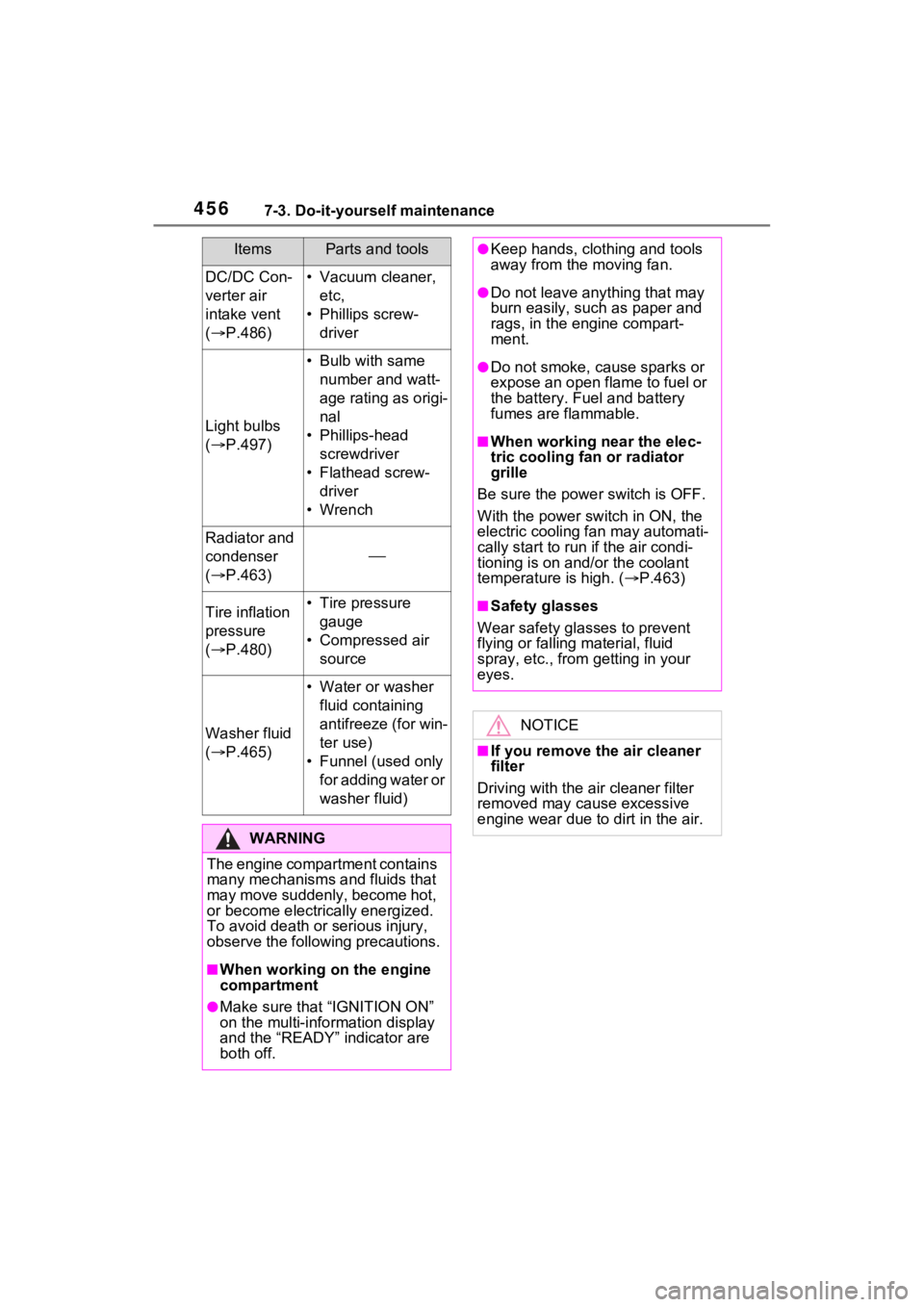
4567-3. Do-it-yourself maintenance
DC/DC Con-
verter air
intake vent
( P.486)• Vacuum cleaner,
etc,
• Phillips screw- driver
Light bulbs
( P.497)
• Bulb with same
number and watt-
age rating as origi-
nal
• Phillips-head screwdriver
• Flathead screw- driver
•Wrench
Radiator and
condenser
( P.463)
Tire inflation
pressure
( P.480)• Tire pressure
gauge
• Compressed air source
Washer fluid
( P.465)
• Water or washer
fluid containing
antifreeze (for win-
ter use)
• Funnel (used only for adding water or
washer fluid)
WARNING
The engine compartment contains
many mechanisms and fluids that
may move suddenly, become hot,
or become electrically energized.
To avoid death or serious injury,
observe the following precautions.
■When working on the engine
compartment
●Make sure that “IGNITION ON”
on the multi-info rmation display
and the “READY” indicator are
both off.
ItemsParts and tools●Keep hands, clothing and tools
away from the moving fan.
●Do not leave anything that may
burn easily, such as paper and
rags, in the engine compart-
ment.
●Do not smoke, c ause sparks or
expose an open flame to fuel or
the battery. Fuel and battery
fumes are flammable.
■When working near the elec-
tric cooling fan or radiator
grille
Be sure the power switch is OFF.
With the power switch in ON, the
electric cooling fa n may automati-
cally start to run if the air condi-
tioning is on and/or the coolant
temperature is high. ( P.463)
■Safety glasses
Wear safety gla sses to prevent
flying or falling material, fluid
spray, etc., from getting in your
eyes.
NOTICE
■If you remove the air cleaner
filter
Driving with the ai r cleaner filter
removed may cause excessive
engine wear due to dirt in the air.
Page 554 of 618

5549-1. Specifications
If replacement is necessary, contact your Toyota dealer.
*: The fluid capacity is the quantity of reference.
If replacement is necessary, contact y our Toyota dealer.
Ignition system (spark plug)
MakeDENSO FC16HR-Q8
Gap0.031 in. (0.8 mm)
NOTICE
■Iridium-tipped spark plugs
Use only iridium-tipped spark plugs. Do not adjust the spark pl ug gap.
Electrical system (12-volt battery)
Specific voltage reading at
68°F (20°C):
12.0 V or higher
(Turn the power switch to OFF and turn on
the high beam headlights for 30 seconds.)
If the voltage is lower than the standard
value, charge the battery.
Charging ratesQuick charge15 A max.
Slow charge5 A max.
Hybrid transmission
Fluid capacity*4.6 qt. (4.4 L, 3.9 Imp.qt.)
Fluid typeToyota Genuine ATF WS
NOTICE
■Hybrid transmission fluid type
Using transmission fluid other than the above type may cause ab normal
noise or vibration, or ultimately damage the transmission of yo ur vehicle.
Rear differential (rear electric motor)
Fluid capacity*1.8 qt. (1.7 L, 1.5 Imp.qt.)
Fluid typeToyota Genuine ATF WS