2021 TOYOTA RAV4 PRIME warning
[x] Cancel search: warningPage 547 of 618

5478-2. Steps to take in an emergency
8
When trouble arises
dropped and the vehicle may be
driven normally.
However, if the message appears
again frequently, contact your
Toyota dealer.
WARNING
■When inspecting under the
hood of your vehicle
Observe the following precau-
tions.
Failure to do so may result in seri-
ous injury such as burns.
●If steam is seen coming from
under the hood, do not open the
hood until the steam has sub-
sided. The engine compart-
ment may be very hot.
●After the hybrid system has
been turned off, check that the
“READY” indicator is off.
When the hybrid system is oper-
ating, the gasoline engine may
automatically start, or the cool-
ing fan may suddenly operate
even if the gasoline engine
stops. Do not touch or approach
rotating parts such as the fan,
which may lead to fingers or
clothing (especially a tie, a scarf
or a muffler) getting caught,
resulting in serious injury.
●Do not loosen the coolant reser-
voir cap while the hybrid system
and radiator are hot.
High temperature steam or
coolant could spray out.
NOTICE
■When adding engine/power
control unit coolant
Add coolant slowly after the
hybrid system has cooled down
sufficiently. Adding cool coolant to
a hot hybrid system too quickly
can cause damage to the hybrid
system.
■To prevent damage to the
cooling system
Observe the following precau-
tions:
●Avoid contaminating the coolant
with foreign matter (such as
sand or dust, etc.).
●Do not use any coolant additive.
Page 548 of 618

5488-2. Steps to take in an emergency
1Stop the hybrid system. Set
the parking brake and shift
the shift lever to P.
2 Remove the mud, snow or
sand from around the stuck
tire.
3 Place wood, stones or some
other material to help provide
traction under the tires.
4 Restart the hybrid system
5 Shift the shift lever to D or R
and release the parking
brake. Then, while exercising
caution, depress the acceler-
ator pedal.
■When it is difficu lt to free the
vehicle
Press to turn off TRAC.
( P.382)
If the vehicle becomes
stuck
Carry out the following pro-
cedures if the tires spin or
the vehicle becomes stuck
in mud, dirt or snow:
Recovering procedure
WARNING
■When attempting to free a
stuck vehicle
If you choose to push the vehicle
back and forth to free it, make
sure the surrounding area is clear
to avoid striking other vehicles,
objects or people. The vehicle
may also lunge forward or lunge
back suddenly as it becomes free.
Use extreme caution.
■When shifting the shift lever
Be careful not to shift the shift
lever with the accelerator pedal
depressed.
This may lead to unexpected
rapid acceleration of the vehicle
that may cause an accident
resulting in dea th or serious
injury.
NOTICE
■To avoid damaging the trans-
mission and other compo-
nents
●Avoid spinning the wheels and
depressing the accelerator
pedal more than necessary.
●If the vehicle remains stuck
even after these procedures are
performed, the vehicle may
require towing to be freed.
Page 562 of 618

5629-1. Specifications
Bead
Sidewall
Shoulder
Tread
Belt
Inner liner
Reinforcing rubber
Carcass
Rim lines
Bead wires
Chafer
This information has been pre-
pared in accordance with regu-
lations issued by the National
Highway Traffic Safety Adminis-
tration of the U.S. Department of
Transportation.
It provides the purchasers
and/or prospective purchasers
of Toyota vehicles with informa-
tion on uniform tire quality grad-
ing.
Your Toyota dealer will help answer
any questions you may have as you
read this information.
■DOT quality grades
All passenger vehicle tires must
conform to Federal Safety
Requirements in addition to
these grades. Quality grades
can be found where applicable on the tire sidewall between
tread shoulder and maximum
section width.
For example: Treadwear 200 Trac-
tion AA Temperature A
■Treadwear
The treadwear grade is a com-
parative rating based on the
wear rate of the tire when tested
under controlled conditions on a
specified government test
course.
For example, a tire graded 150
would wear one and a half (1 - 1/2)
times as well on the government
course as a tire graded 100.
The relative performance of tires
depends upon the ac tual conditions
of their use. Performance may dif-
fer significantly from the norm due
to variations in dri ving habits, ser-
vice practices and differences in
road characteristics and climate.
■Traction AA, A, B, C
The traction grades, from high-
est to lowest, are AA, A, B and
C, and they represent the tire’s
ability to stop on wet pavement
as measured under controlled
conditions on specified govern-
ment test surfaces of asphalt
and concrete.
A tire marked C may have poor
traction performance.
Warning: The traction grade
assigned to this tire is based on
braking (straight ahead) traction
tests and does not include corner-
ing (turning) traction.
Uniform Tire Quality
Grading
A
B
C
D
E
F
G
H
I
J
K
Page 563 of 618

5639-1. Specifications
9
Vehicle specifications
■Temperature A, B, C
The temperature grades are A
(the highest), B, and C, repre-
senting the tire’s resistance to
the generation of heat and its
ability to dissipate heat when
tested under controlled condi-
tions on a specified indoor labo-
ratory test wheel.
Sustained high temperature can
cause the material of the tire to
degenerate and reduce tire life, and
excessive temperature can lead to
sudden tire failure.
Grade C corresponds to a level of performance which all passenger
car tires must meet under the Fed-
eral Motor Vehicle Safety Standard
No. 109.
Grades B and A represent higher
levels of performance on the labo-
ratory test wheel than the minimum
required by law.
Warning: The temperature grades
of a tire assume tha
t it is properly
inflated and not overloaded.
Excessive speed, underinflation, or
excessive loading, either sepa-
rately or in combination, can cause
heat buildup and possible tire fail-
ure.
Glossary of tire terminology
Tire related termMeaning
Cold tire inflation pres-
sureTire pressure when the vehicle has been parked
for three hours or more, or has not been driven
more than 1 mile or 1.5 km under that condition
Maximum inflation pres-
sureThe maximum cold inflated pressure to which a
tire may be inflated, shown on the sidewall of
the tire
Recommended inflation
pressureCold tire inflation pressure recommended by a
manufacturer
Accessory weight
The combined weight (in excess of those stan-
dard items which may be replaced) of transmis-
sion, power steering, power brakes, power
windows, power seats, radio and heater, to the
extent that these items are available as factory-
installed equipment (whether installed or not)
Curb weight
The weight of a motor vehicle with standard
equipment, including th e maximum capacity of
fuel, oil and coolant, and if so equipped, air con-
ditioning and additional weight optional engine
Page 569 of 618

5699-2. Customization
9
Vehicle specifications
9-2.Customization
■Changing using the naviga-
tion/multimedia system
1 Press the “MENU” button.
2 Select “Setup” on the menu
screen and select “Vehicle”.
3 Select “Vehicle Customiza-
tion”.
Various setting can be changed.
Refer to the list o f settings that can
be changed for details.
■Changing using the multi-
information display
1 Press or of the meter
control switches and select
.
2 Press or of the meter
control switches, select the
item.
3 To switch the function on and
off, press to switch to the
desired setting. 4
To perform detailed setting of
functions that support
detailed settings, press and
hold and display the set-
ting screen.
The method of pe rforming detailed
setting differs for each screen.
Please refer to the advice sentence
displayed on the screen.
To go back to the p revious screen
or exit the customize mode, press
.
■When customizing using the
navigation/multimedia system
or multi-information display
Stop the vehicle in a safe place,
apply the parking brake, and shift
the shift lever to P . Also, to prevent
12-volt battery discharge, leave the
hybrid system operating while cus-
tomizing the features.
Customizable features
Your vehicle includes a vari-
ety of electronic features
that can be personalized to
suit your preferences. The
settings of these features
can be changed using the
multi-information display,
navigation/multimedia sys-
tem, or at your Toyota
dealer.
Customizing vehicle fea-
tures
WARNING
■During customization
As the hybrid system needs to be
operating during customization,
ensure that the vehicle is parked
in a place with adequate ventila-
tion. In a closed area such as a
garage, exhaust gases including
harmful carbon monoxide (CO)
may collect and enter the vehicle.
This may lead to death or a seri-
ous health hazard.
NOTICE
■During customization
To prevent 12-vo lt battery dis-
charge, ensure that the hybrid
system is operat ing while custom-
izing features.
Page 576 of 618

5769-2. Customization
■Driving position memory* ( P.227)
*: If equipped
■Power windows, and moon roof* or panoramic moon roof*
( P.246, 249, 252)
*: If equipped
■Lights ( P.295)
FunctionDefault settingCustomized
setting
Selection the door linking
driving position memory with
door unlock operation
Driver’s doorAll doors––O
Function to prevent contact
between the head restraint
and ceiling (while moving to
memory location)
OnOff––O
FunctionDefault settingCustomized setting
Key linked operation (open)OffOn––O
Key linked operation (close)OffOn––O
Wireless remote control
linked operation (open)OffOn––O
Wireless remote control
linked operation signal
(buzzer)
OnOff––O
Side windows open warning
functionOnOff––O
Sliding roof open warning
function OnOff––O
FunctionDefault settingCustomized setting
Daytime Running Lights*1OnOffO–O
Light reminder buzzerOnOff––O
AFS (Adaptive Front-lighting
System)
*2OnOff––O
ABC
ABC
ABC
Page 578 of 618
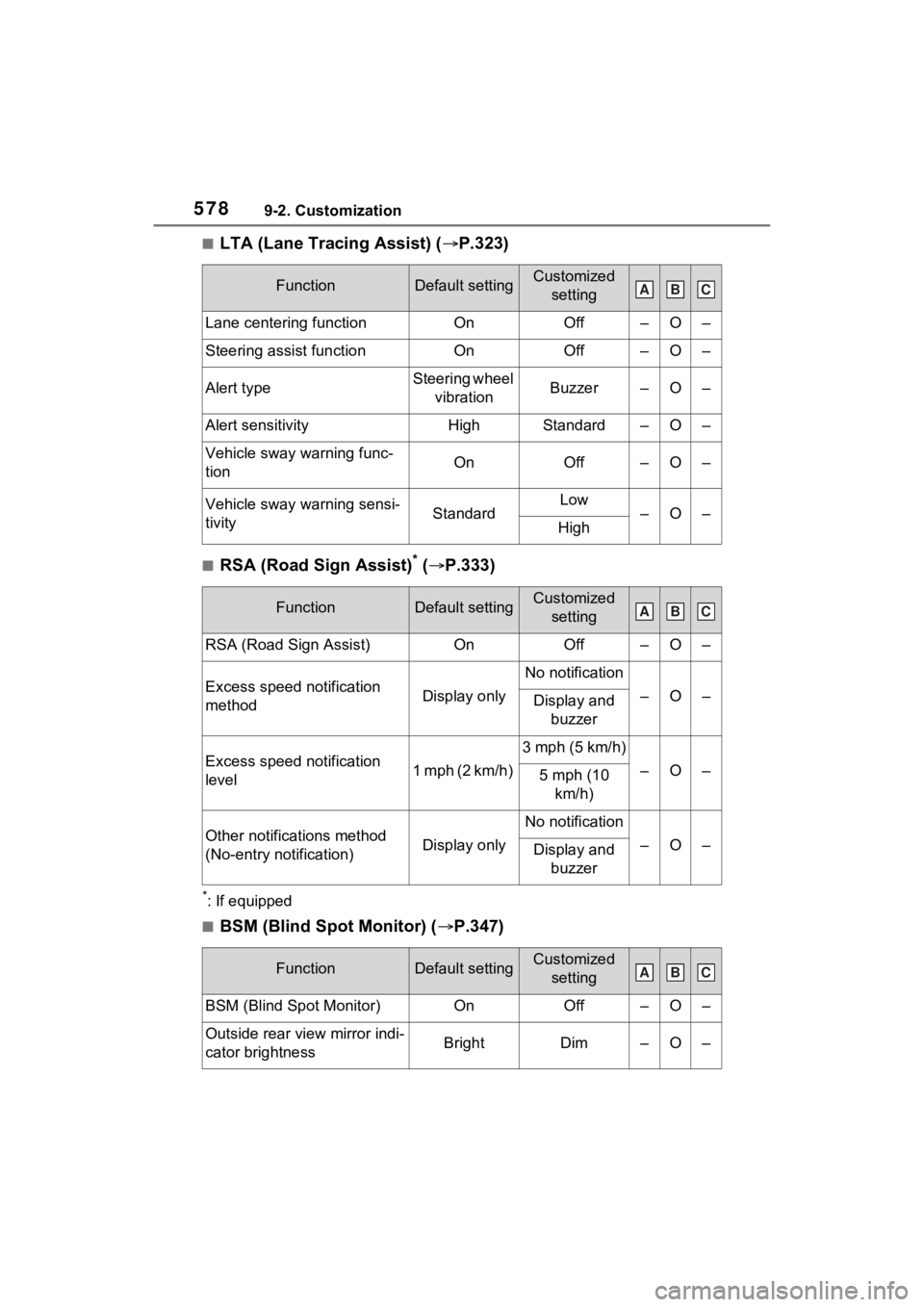
5789-2. Customization
■LTA (Lane Tracing Assist) (P.323)
■RSA (Road Sign Assist)* ( P.333)
*: If equipped
■BSM (Blind Spot Monitor) ( P.347)
FunctionDefault settingCustomized
setting
Lane centering functionOnOff–O–
Steering assist functionOnOff–O–
Alert typeSteering wheel vibrationBuzzer–O–
Alert sensitivityHighStandard–O–
Vehicle sway warning func-
tionOnOff–O–
Vehicle sway warning sensi-
tivityStandardLow–O–High
FunctionDefault settingCustomized setting
RSA (Road Sign Assist)OnOff–O–
Excess speed notification
methodDisplay only
No notification
–O–Display and buzzer
Excess speed notification
level1 mph (2 km/h)
3 mph (5 km/h)
–O–5 mph (10 km/h)
Other notifications method
(No-entry notification)Display only
No notification
–O–Display and buzzer
FunctionDefault settingCustomized setting
BSM (Blind Spot Monitor)OnOff–O–
Outside rear view mirror indi-
cator brightnessBrightDim–O–
ABC
ABC
ABC
Page 582 of 618

5829-3. Initialization
9-3.Initialization
*1: If equipped
*2: Vehicles with Audio Plus or Premium Audio
Items to initialize
The following items must be initialized for normal system
operation after such cases as the battery being reconnected,
or maintenance being performed on the vehicle:
List of the items to initialize
ItemWhen to initializeReference
Power back door*1• After reconnecting or chang-
ing the 12-volt battery
• After changing a fuse
P.212
Power windows
• When functioning abnor- mally
P.246
Moon roof*1P.250
Panoramic moon roof*1P.253
Maintenance required
reminder message• After the maintenance is performedP.450
Tire pressure warning system
• When rotating the tires
• When changing the tire
• After registering the ID codes
P.474
Toyota parking assist moni-
tor
*1
• After reconnecting or chang-ing the 12-volt battery
• After changing a fuse
Refer to
“NAVIGA-
TION AND
MULTIME- DIA SYS- TEM
OWNER’S MANUAL”
Panoramic view monitor*1, 2