2021 TOYOTA RAV4 PHEV warning lights
[x] Cancel search: warning lightsPage 367 of 666

365
5
5-5. Using the driving support systems
Driving
■Lane departure alert function
When the system determines that
the vehicle might depart from its
lane or course*, a warning is dis -
played on the multi-information dis -
play, and either a warning buzzer
will sound or the steering wheel will
vibrate to alert the driver.
When the warning buzzer sounds or
the steering wheel vibrates, check the
area around your vehicle and carefully
WARNING
●The vehicle is driven in an area
without white (yellow) lines, such as
in front of a tollg ate or checkpoint, or at an intersection, etc.
●The white (yellow) lines are cracked, “Raised pavement
marker” or stones are present.
●The white (yellow) lines cannot be seen or are difficu lt to see due to
sand, etc.
●The vehicle is driven on a road sur -
face that is wet due to rain, pud -
dles, etc.
●The traffic lines are yellow (which
may be more difficult to recognize than lines that are white).
●The white (yellow) lines cross over a curb, etc.
●The vehicle is driven on a bright surface, such as concrete.
●If the edge of the road is not clear or straight.
●The vehicle is driven on a surface that is bright due t o reflected light,
etc.
●The vehicle is driven in an area
where the brightness changes sud -
denly, such as at the entrances and exits of tunnels, etc.
●Light from the hea dlights of an oncoming vehicle, the sun, etc.
enters the camera.
●The vehicle is driven on a slope.
●The vehicle is driven on a road which tilts left or right, or a winding
road.
●The vehicle is driven on an
unpaved or rough road.
●The traffic lane is excessively nar -
row or wide.
●The vehicle is ext remely tilted due to carrying heavy luggage or having
improper tire pressure.
●The distance to the preceding vehi -
cle is extremely short.
●The vehicle is moving up and down
a large amount due to road condi-
tions during drivi ng (poor roads or road seams).
●When driving in a t unnel or at night with the headlights off or when a
headlight is dim due to its lens
being dirty or it being misaligned.
●The vehicle is s truck by a cross-
wind.
●The vehicle is affected by wind from
a vehicle driven in a nearby lane.
●The vehicle has just changed lanes
or crossed an intersection.
●Tires which differ by structure, man -
ufacturer, brand or tread pattern are used.
●Snow tires, etc. are equipped.
●The vehicle is b eing driven at
extremely high speeds.
Functions included in LTA
system
Page 382 of 666

3805-5. Using the driving support systems
When a vehicle is de tected running ahead of you, the system automatically deceler-
ates your vehicle. When a great er reduction in vehicle speed is necessary, the sys-
tem applies the brakes (the stop lights will come on at this time). The system will
respond to changes in the speed of the vehicle ahead in order to maintain the vehi-
cle-to-vehicle distance set by the driver. Approach warning war ns you when the sys-
tem cannot decelerate sufficiently to prevent your vehicle from closing in on the
vehicle ahead.
When the vehicle ahead of you stops, your vehicle will also sto p (vehicle is stopped
by system control). After the veh icle ahead starts off, pressing the “+RES” switch or
depressing the accelerator pedal (start-off operation) will res ume follow-up cruising.
If the start-off operation is not performed, system control continues to keep your
vehicle stopped.
When the turn signal lever is operated and your vehicle moves t o an overtaking lane
while driving at 50 mph (80 km/h) or more, the vehicle will acc elerate to help to over-
take a passing vehicle.
The system’s identificat ion of what is an overtaking lane may be determined solely
based on the location of the ste ering wheel in the vehicle (left side driver position
versus right side driv er position.) If the vehicle is driven to a region where the over-
taking lane is on a different sid e from where the vehicle is normally driven, the vehi-
cle may accelerate when the turn signal lever is operated in th e opposite direction to
the overtaking lane (e.g., if th e driver normally operates the vehicle in a region
where the overtaking lane is to t he right but then drives to a region where the over-
taking lane is to the left, the vehicle may accelerate when the right turn signal is acti-
vated).
Example of acceleration
When there are no longer any preceding vehicles driving slower than the
set speed
The system accelerates until the set speed is reached. The system then returns to
constant speed cruising.
1 Press the cruise control main
switch to activate the cruise con -
trol.
Dynamic radar cruise control indicator
will come on and a message will be dis - played on the multi-information display.
Press the switch again to deactivate the
cruise control.
If the cruise control main switch is
pressed and held for 1.5 seconds or
more, the system tur ns on in constant
C
Setting the vehicle speed
(vehicle-to-vehicle distance
control mode)
Page 418 of 666

4165-5. Using the driving support systems
■The system can be operated when
●The power switch is in ON.
●Toyota parking assist-sensor function is on.
●The vehicle speed is less than about 10 km/h (6 mph).
●The shift lever is in other than P.
■If “Clean Parking Assist Sensor” is
displayed on the multi-information display
A sensor may be covered with ice,
snow, dirt, etc. Rem ove the ice, snow, dirt, etc., from the sensor to return the
system to normal.
Also, due to ice forming on a sensor at low temperatures, a warning message
may be displayed or the sensor may not
be able to detect an object. Once the ice melts, the system will return to normal.
If a warning message is displayed even
if the sensor is cle an, there may be a sensor malfunction. Have the vehicle
inspected by any a uthorized Toyota
retailer or Toyota authorized repairer, or any reliable repairer.
WARNING
●The area directly under the bum -
pers is not detected.
Thin posts or objects lower than the sensor may not be detected when
approached, even if they have been
detected once.
■When to disable the function
In the following situations, disable the
function as it may operate even though there is no possibility of a colli -
sion.
●The vehicle is equipped with a com - mercial fender pole, wireless
antenna or fog lights.
●The front or rear bumper or a sen -
sor receives a strong impact.
●A non-genuine Toyota suspension
(lowered suspension, etc.) is
installed.
●Towing eyelets are installed.
●A backlit license plate is installed.
●When using an automatic car wash
■When using the Toyota parking
assist-sensor
In the following situations, the system
may not function correctly due to a
sensor malfunction, etc. Have the vehicle checked by any authorized
Toyota retailer or Toyota authorized
repairer, or any reliable repairer.
●The Toyota parki ng assist-sensor
operation display flashes or shows continuously, a nd a beep sounds
when no objects are detected.
●If the area around a sensor collides
with something, or is subjected to
strong impact.
●If the bumper or grille collides with
something.
●If the display flashes or is displayed continuously and a buzzer does not
sound, except when the mute func -
tion has been turned on.
■Notes when washing the vehicle
Do not apply intensiv e bursts of water or steam to the sensor area.
Doing so may result in the sensor
malfunctioning.
●When using a high pressure
washer to wash the vehicle, do not spray the sensors directly, as doing
so may cause a sensor to malfunc -
tion.
●When using steam to clean the
vehicle, do not direct steam too close to the sensors as doing so
may cause a sensor to malfunction.
Page 448 of 666

4465-6. Driving tips
Perform the following according to
the driving conditions:
Do not try to forcibly open a win-
dow or move a wiper that is fro -
zen. Pour warm water over the
frozen area to melt the ice. Wipe
away the water immediately to
prevent it from freezing.
To ensure proper operation of
the climate control system fan,
remove any sno w that has accu-
mulated on the air inlet vents in
front of the windshield.
Check for and remove any
excess ice or snow that may
have accumulated on the exte -
rior lights, vehicle’s roof, chassis,
around the tires or on the brakes.
Remove any snow or mud from
the bottom of your shoes before
getting in the vehicle.
Accelerate the veh icle slowly, keep
a safe distance between you and
the vehicle ahead, and drive at a
reduced speed suitable to road
conditions.
Park the vehicle and move the
s hif t le ve r to P w itho u t se tt ing th e
parking brake. The parking brake
may freeze up, preventing it from
being released. If the vehicle is
parked without setting the park -
ing brake, make sure to block the
wheels.
Failure to do so may be danger -
ous because it may cause the
vehicle to move unexpectedly,
possibly leading to an accident.
When the parking brake is in automatic
mode, release the parking brake after
shifting the shift lever to P. ( →P.326)
If the vehicle is left parked with
the brakes damp in cold tem -
peratures, there is a possibility of
the brakes freezing.
If the vehicle is parked without
setting the parking brake, con -
firm that the shift lever cannot be
moved out of P*.
*: The shift lever will be locked if it is
attempted to be shifted from P to any
other position with out depressing the
brake pedal. If the shift lever can be
shifted from P, t here may be a prob-
lem with the shift lock system. Have
the vehicle inspected by any autho -
rized Toyota retailer or Toyota autho -
rized repairer, or any reliable repairer
immediately.
Before driving the vehicle
When driving the vehicle
When parking the vehicle
WARNING
■When parking the vehicle
When parking the vehicle without
applying the parki ng brake, make
sure to chock the wheels. If you do
not chock the wheels, the vehicle may move unexpectedly, possibly result-
ing in an accident.
Page 478 of 666
4766-4. Using the other interior features
6-4.Using the other interior features
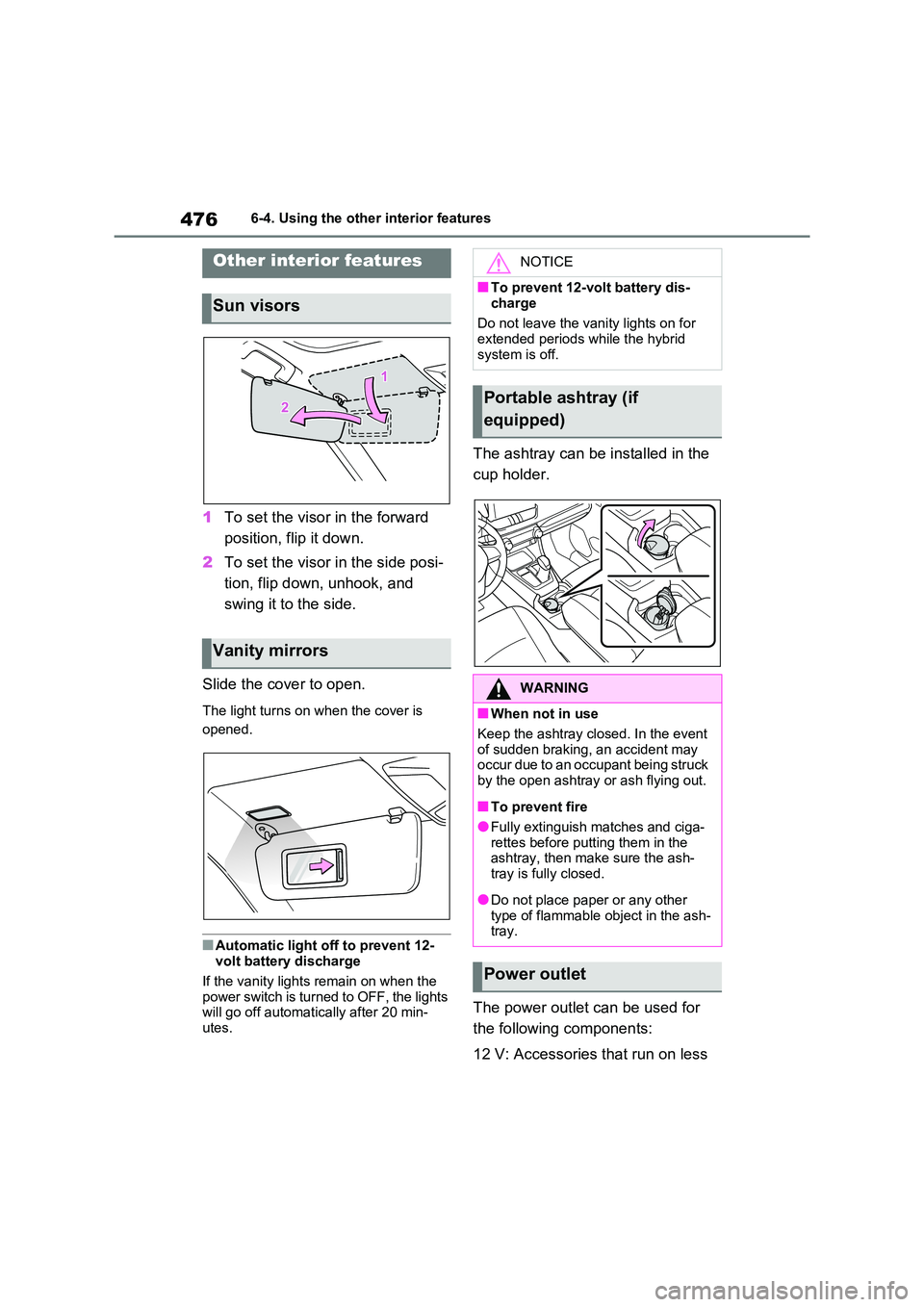
1To set the visor in the forward
position, flip it down.
2 To set the visor in the side posi-
tion, flip down, unhook, and
swing it to the side.
Slide the cover to open.
The light turns on when the cover is
opened.
■Automatic light off to prevent 12-
volt battery discharge
If the vanity lights remain on when the power switch is turned to OFF, the lights
will go off automat ically after 20 min-
utes.
The ashtray can be installed in the
cup holder.
The power outlet can be used for
the following components:
12 V: Accessories t hat run on less
Other interior features
Sun visors
Vanity mirrors
NOTICE
■To prevent 12-volt battery dis-
charge
Do not leave the vani ty lights on for extended periods while the hybrid
system is off.
Portable ashtray (if
equipped)
WARNING
■When not in use
Keep the ashtray closed. In the event
of sudden braking, an accident may
occur due to an occupant being struck by the open ashtray or ash flying out.
■To prevent fire
●Fully extinguish matches and ciga- rettes before putting them in the
ashtray, then make sure the ash -
tray is fully closed.
●Do not place paper or any other
type of flammable object in the ash- tray.
Power outlet
Page 492 of 666

4907-1. Maintenance and care
WARNING
■Precaution regarding the rear
bumper with Blind Spot Monitor
(if equipped)
If the paint of the rear bumper is
chipped or scratched, the system may
malfunction. If this occurs, consult any authorized Toyo ta retailer or
Toyota authorized repairer, or any
reliable repairer.
NOTICE
■To prevent paint deterioration and corrosion on the body and
components (aluminum wheels,
etc.)
●Wash the vehicle immediately in
the following cases:
• After driving near the sea coast
• After driving on salted roads
• If coal tar or tree sap is present on
the paint surface
• If dead insects, insect droppings or
bird droppings are present on the
paint surface
• After driving in an area contami - nated with soot, o ily smoke, mine
dust, iron powder or chemical sub -
stances
• If the vehicle becomes heavily
soiled with dust or mud
• If liquids such as benzene and gas - oline are spilled on the paint sur-
face
●If the paint is chipped or scratched,
have it repaired immediately.
●To prevent the wh eels from corrod-
ing, remove any dirt and store in a
place with low humidity when stor - ing the wheels.
■Cleaning the exterior lights
●Wash carefully. Do not use organic
substances or scrub with a hard
brush. This may damage the surfaces of
the lights.
●Do not apply wax to the surfaces of
the lights.
Wax may cause damage to the lenses.
■When using an automatic car wash
Set the wiper switch to off position.
If the wiper switch is in “AUTO”, the wipers may operate and the wiper
blades may be damaged.
■When using a high pressure car
wash
●When washing the vehicle, do not let water from the high-pressure
washer directly hit the camera (if
equipped) or the area around the camera. Due to the shock from the
high pressure water, it is possible
that the device may not operate normally.
●Do not bring the no zzle tip close to boots (rubber o r resin manufac-
tured cover), or co nnectors or the
following parts. The parts may be damaged if they
come into contact with high-pres -
sure water.
• Traction battery
• Traction related parts
• Steering parts
• Suspension parts
• Brake parts
●Keep the cleaning nozzle at least 30 cm (11.9 in.) away from the vehi -
cle body. Otherwis e resin section,
such as moldings and bumpers, may be deformed and damaged.
Also, do not continuously hold the
nozzle in the same place.
Page 549 of 666

547
7
7-3. Do-it-yours elf maintenance
Maintenance and care
Type C
Normal fuse
Blown fuse
■After a fuse is replaced
●When installing the lid, make sure that
the tab is installed securely.
●If the lights do not t urn on even after
the fuse has been replaced, a bulb
may need replacement. ( →P.548)
●If the replaced fuse blows again, have
the vehicle inspec ted by any autho-
rized Toyota retailer or Toyota autho - rized repairer, or any reliable repairer.
■If there is an over load in a circuit
The fuses are designed to blow, protect -
ing the wiring har ness from damage.
■When replacing an electronic com- ponent, such as a lights, etc.
Toyota recommends that you use genu -
ine Toyota product s designed for this vehicle. Because certain bulbs are con -
nected to circuits de signed to prevent
overload, non-genuine parts or parts not designed for this vehicle may be unus -
able.
A
B
WARNING
■To prevent system breakdowns
and vehicle fire
Observe the following precautions. Failure to do so may cause damage
to the vehicle, and possibly a fire or
injury.
●Never use a fu se of a higher
amperage rating than that indi -
cated, or use any other object in
place of a fuse.
●Always use a genuine Toyota fuse
or equivalent. Never replace a fuse with a wire,
even as a temporary fix.
●Do not modify the fuses or fuse
boxes.
NOTICE
■Before replacing fuses
Have the cause of el ectrical overload
determined and repaired by any authorized Toyota retailer or Toyota
authorized repairer, or any reliable
repairer as soon as possible.
■To prevent damage to the engine
compartment fuse box cover
When opening the fuse box, com - pletely release th e claw locks before
lifting up the cover. Otherwise, the
claws may be damaged.
Page 570 of 666
5688-2. Steps to take in an emergency
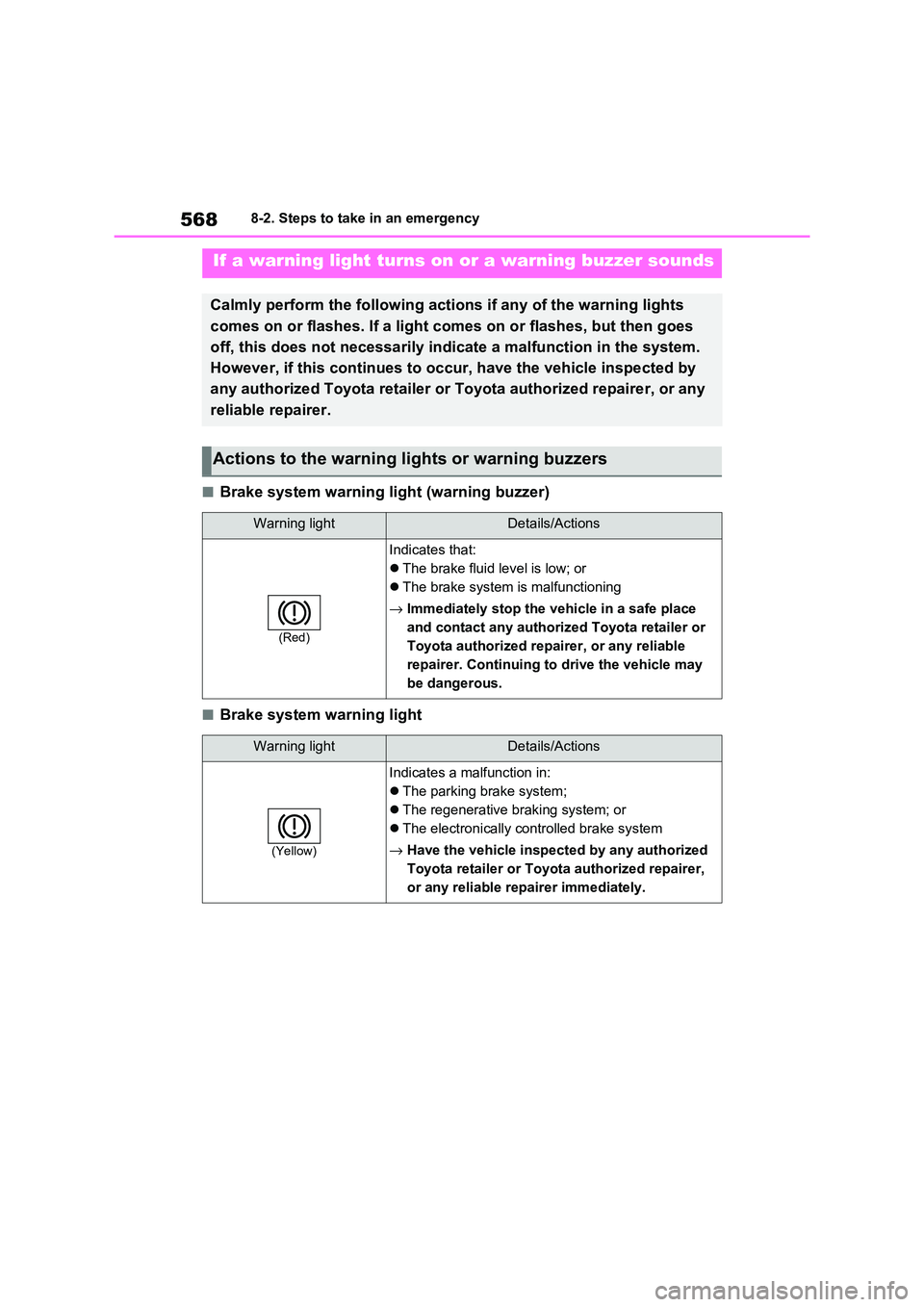
■Brake system warning light (warning buzzer)
■Brake system warning light
If a warning light turns on or a warning buzzer sounds
Calmly perform the following actions if any of the warning lights
comes on or flashes. If a light c omes on or flashes, but then goes
off, this does not necessarily i ndicate a malfunction in the system.
However, if this continues to occur, have the vehicle inspected by
any authorized Toyota retailer or Toyota authorized repairer, o r any
reliable repairer.
Actions to the warning lights or warning buzzers
Warning lightDetails/Actions
(Red)
Indicates that:
The brake fluid level is low; or
The brake system is malfunctioning
→ Immediately stop the vehicle in a safe place
and contact any authorized Toyota retailer or
Toyota authorized repairer, or any reliable
repairer. Continuing to drive the vehicle may
be dangerous.
Warning lightDetails/Actions
(Yellow)
Indicates a ma lfunction in:
The parking brake system;
The regenerative braking system; or
The electronically controlled brake system
→ Have the vehicle inspected by any authorized
Toyota retailer or Toyota authorized repairer,
or any reliable re pairer immediately.