2021 TOYOTA RAV4 PHEV warning lights
[x] Cancel search: warning lightsPage 180 of 666

1783-1. Instrument cluster
changed suddenly (at the
entrance/exit of a garage, tunnel, etc.)
●When “--” or “E” is displayed, the sys -
tem may be malfunctioning. Take your vehicle to any authorized
Toyota retailer or Toyota authorized
repairer, or any reliable repairer.
●Displays the outsi de temperature
within the range o f -40°C (-40°F) to 50°C (122°F).
●When the outside temperature is
approximately 3°C (37°F) or lower,
the indicator will flash for approxi-
mately 10 seconds, then stay on.
■Liquid crystal display
→ P.180
■Customization
Settings (e. g. mete r display) can be
changed on the scre en of the multi-
information display. ( →P.186)
Switches the items of the odome-
ter, trip meter A, trip meter B and
the brightness of the instrument
cluster lights by pressing the “ODO
TRIP” switch.
When the trip meter is displayed,
pressing and holding the switch
will reset the tr ip meter.
When the instrument cluster light
control display is displayed,
pressing and holding the switch
will adjust the brightness of the
instrument cluster lights.
■Instrument cluster brightness
adjustment
The instrument cluster brightness levels when the tail lights are on and off can be
WARNING
■The information display at low
temperatures
Allow the interior o f the vehicle to
warm up before usin g the liquid crys-
tal information display. At extremely low temperatures, the display moni -
tor may respond slowly, and display
changes may be delayed.
For example, there is a lag between
the driver’s shifting and the new shift
range appearing on the display. This lag could cause the driver to down -
shift again, causing rapid and exces -
sive engine braking and possibly an accident resulting in death or injury.
NOTICE
■To prevent damage to the engine
and its components
●The engine may be overheating if “Engine Coolant Temp High Stop in
a Safe Place See Owner’s Manual”
is shown on the multi-information display. In this case, immediately
stop the vehicle in a safe place, and
check the engine after it has cooled
completely. ( →P.611)
Using the “ODO TRIP”
switch
Page 281 of 666

279
4
4-4. Adjusting the steering wheel and mirrors
Before driving
*: If equipped
The height of the rear view mirror
can be adjusted to suit your driving
posture.
Adjust the height of the rear view
mirror by moving it up and down.
Responding to the level of bright -
ness of the headlights of vehicles
behind, the reflecte d light is auto-
matically reduced.
Changing automat ic anti-glare
function mode on/off
When the automatic anti-glare function
is in ON mode, the indicator illumi-
nates.
The function will set to ON mode each
time the power swit ch is turned to ON.
Pressing the button turns the function
to OFF mode. (The indicator also
turns off.)
■To prevent sensor error
To ensure that the sensors operate
properly, do not touch or cover them.
Inside rear view mirror*
The rear view mirror’s position
can be adjusted to enable suf -
ficient confirmation of the rear
view.
Adjusting the height of rear
view mirror
WARNING
■Caution while driving
Do not adjust the position of the mir-
ror while driving. Doing so may lead to mishandling of
the vehicle and c ause an accident,
resulting in death or serious injury.
Anti-glare function
A
A
Page 311 of 666

309
5
5-1. Before driving
Driving
Check the allowable towing capac -
ity, GVM (Gross Vehicle Mass),
MPAC (Maximum Permissible Axle
Capacity), and permissible drawbar
load before towing. ( →P.618)
Toyota recommends the use of the
Toyota hitch/bracke t for your vehi-
cle. Other products of a suitable
nature and comparable quality may
also be used.
For vehicles where the towing
device blocks any of the lights or
license plate, the fo llowing shall be
observed:
Do not use towing device that
cannot be easily removed or
repositioned.
Towing devices must be
removed or repositioned when
not in use.
Please consult a ny authorized
Toyota retailer or Toyota authorized
repairer, or any reliable repairer
when installing tra iler lights, as
incorrect installa tion may cause
damage to the vehicle’s lights.
Please take care to comply with
your state’s laws when installing
trailer lights.
■Total trailer weight and per -
missible drawbar load
Total trailer weight
WARNING
●Do not use dynamic radar cruise
control with full- speed range (if
equipped) or cruise control (if equipped) when trailer towing.
■Vehicle speed in towing
Observe the legal maximum speeds
for trailer towing.
■Before descending hills or long declines
Reduce speed and downshift. How -
ever, never downshift suddenly while descending steep or long downhill
grades.
■Operation of the brake pedal
Do not hold the brake pedal
depressed often or for long periods of time.
Doing so may result in the brake over -
heating or reduce braking effects.
Weight limits
Towing hitch/bracket
Connecting trailer lights
NOTICE
■Do not directly splice trailer lights
Directly splicing trailer lights may
damage your vehicle’s electrical sys - tem and cause a malfunction.
Important points regarding
trailer loads
A
Page 327 of 666

325
5
5-2. Driving procedures
Driving
■S mode
●You can choose from 6 levels of
accelerating force and engine braking force.
●A lower shift range will provide greater accelerating force and engine braking
force than a higher shift range, and
the engine revolutions will also increase.
●To prevent the eng ine from over-rev- ving, upshifting may automatically
occur when the shif t range is 3 or
lower.
●When the shift range is 4 or lower,
holding the shift le ver toward “+” sets the shift range to 6.
■Downshifting restriction warning
buzzer
To help ensure safe ty and driving per- formance, downshifting operation may
sometimes be restricted. In some cir -
cumstances, downshifting may not be possible even when the shift lever or
paddle shift switches (if equipped) is
operated. (A buzze r will sound twice.)
■If the “S” indicator does not come on or the “D” indicator is displayed
even after shifting t he shift lever to
S
This may indicate a malfunction in the transmission system. Have the vehicle
inspected by any authorized Toyota
retailer or Toyota authorized repairer, or any reliable repairer immediately. (In
this situation, the transmission will oper -
ate in the same manner as when the shift lever is in D.)
1 Right turn
2 Lane change to the right (move
the lever partway and release it)
The right hand signals will flash 3 times.
3 Lane change to the left (move
the lever partway and release it)
The left hand signals will flash 3 times.
4 Left turn
■Turn signals can be operated when
The power switch is in ON.
■If the indicator flashes faster than
usual
Check that a light b ulb in the front or rear turn signal lights has not burned
out.
Turn signal lever
Operating instructions
Page 336 of 666

3345-3. Operating the lights and wipers
*: If equipped
1Press the Automatic High Beam
switch.
2 Turn the headlight switch to the
or position.
AHB (Automatic High
Beam)*
The Automati c High Beam
uses an in-vehicle front cam -
era to assess the brightness of
streetlights, the lights of vehi -
cles ahead etc., and automati -
cally turns the high beams on
or off as necessary.
WARNING
■Limitations of the Automatic
High Beam
Do not overly rely on the Automatic High Beam. Always drive safely, tak -
ing care to observe your surroundings
and turning the high beams on or off manually if necessary.
■To prevent incorrect operation of the Automatic Hi gh Beam system
Do not overload the vehicle.
Activating the Automatic
High Beam system
Page 341 of 666

339
5
5-3. Operating the lights and wipers
Driving
■The windshield wipers and washer can be operated when
The power switch is in ON.
■Effects of vehicle speed on wiper
operation
With low speed windshield wiper opera -
tion selected, wiper operation will be
switched from low sp eed to intermittent wiper operation when the vehicle is sta -
tionary. (However, when the sensor sen -
sitivity is adjusted to the highest level, the mode will not switch.)
■Raindrop sensor
●The raindrop sensor judges the
amount of raindrops.* An optical sen - sor is adopted. It may not operate
properly when sunlight from the rising
or setting of the sun intermittently strikes the windshield, or if bugs, etc.
are present on the windshield.
●If the wiper switch is turned to the
“AUTO” position while the power
switch is in ON, the wipers will operate
once to show that “AUTO” mode is activated.
●If the wiper sensitivity is adjusted to higher, the wiper may operate once to
indicate the change of sensitivity.
●If the temperature of the raindrop sen -
sor is 85°C (185°F) or higher, or -15°C
(5°F) or lower, the automatic opera - tion may not occur. In this case, oper -
ate the wipers in any mode other than
“AUTO”.*: It may be located on the opposite side
depending on the target region.
■If no windshield washer fluid
sprays
Check that the washer nozzles are not
blocked if there is washer fluid in the
windshield washer fluid reservoir.
■Washer nozzle heaters (if equipped)
The washer nozzle heaters operate to
prevent frozen nozzle when the outside temperature is 5°C (41°F) or less and
the power switch is in ON.
WARNING
■Caution regarding the use of
windshield wipers in “AUTO” mode
The windshield wipers may operate
unexpectedly if the sensor is touched or the windshield is subject to vibra -
tion in “AUTO” mode. Take care that
your fingers or anything else does not become caught in the windshield wip -
ers.
■Caution regarding the use of
washer fluid
When it is cold, do not use the washer fluid until the windshield becomes
warm. The fluid may freeze on the
windshield and cause low visibility. This may lead to an accident, result -
ing in death or serious injury.
■When the washer nozzle heaters
are operating (if equipped)
Do not touch the area around the washer nozzle, as they can become
very hot and burn you.
NOTICE
■When the washer fluid tank is empty
Do not operate the switch continually
as the washer fluid pump may over - heat.
Page 348 of 666
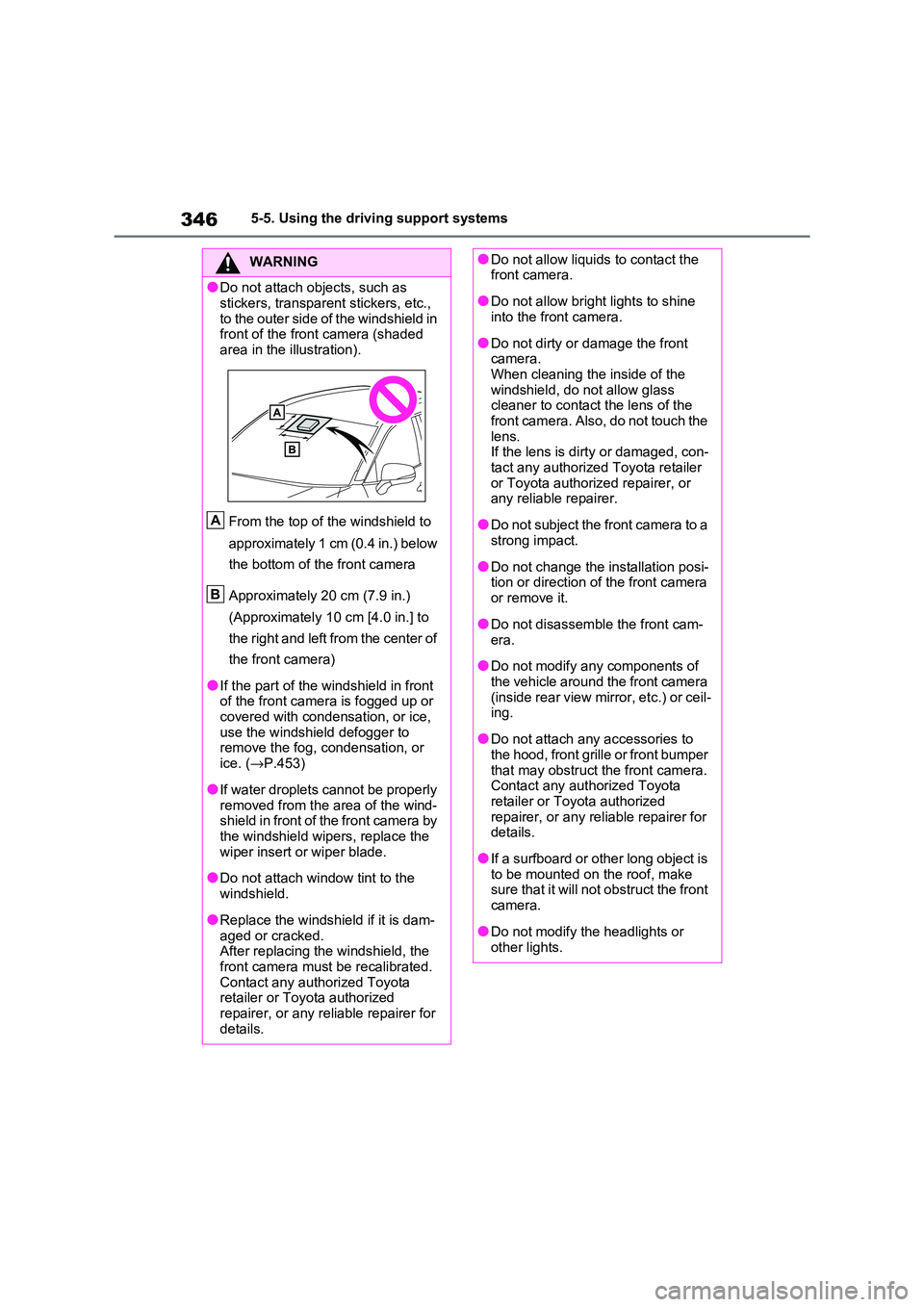
3465-5. Using the driving support systems
WARNING
●Do not attach objects, such as
stickers, transparent stickers, etc.,
to the outer side of the windshield in front of the fron t camera (shaded
area in the illustration).
From the top of the windshield to
approximately 1 cm (0.4 in.) below
the bottom of the front camera
Approximately 20 cm (7.9 in.)
(Approximately 10 cm [4.0 in.] to
the right and left from the center of
the front camera)
●If the part of the wi ndshield in front of the front camera is fogged up or
covered with condens ation, or ice,
use the windshield defogger to remove the fog, condensation, or
ice. ( →P.453)
●If water droplets cannot be properly
removed from the area of the wind-
shield in front of the front camera by the windshield wipers, replace the
wiper insert or wiper blade.
●Do not attach window tint to the
windshield.
●Replace the windshield if it is dam -
aged or cracked.
After replacing the windshield, the
front camera must be recalibrated. Contact any authorized Toyota
retailer or Toyota authorized
repairer, or any reliable repairer for details.
A
B
●Do not allow liquids to contact the front camera.
●Do not allow brigh t lights to shine into the front camera.
●Do not dirty or damage the front camera.
When cleaning the inside of the
windshield, do not allow glass cleaner to contact the lens of the
front camera. Also, do not touch the
lens. If the lens is dirt y or damaged, con-
tact any authorized Toyota retailer
or Toyota authorized repairer, or any reliable repairer.
●Do not subject the front camera to a strong impact.
●Do not change the installation posi - tion or direction of the front camera
or remove it.
●Do not disassemb le the front cam-
era.
●Do not modify any components of
the vehicle around the front camera
(inside rear view mirror, etc.) or ceil - ing.
●Do not attach any accessories to the hood, front grille or front bumper
that may obstruct the front camera.
Contact any authorized Toyota retailer or Toyota authorized
repairer, or any reliable repairer for
details.
●If a surfboard or other long object is
to be mounted on the roof, make sure that it will not obstruct the front
camera.
●Do not modify the headlights or other lights.
Page 365 of 666

363
5
5-5. Using the driving support systems
Driving
WARNING
■Before using LTA system
●Do not rely sole ly upon the LTA
system. The LTA system does not automatically drive the vehicle or
reduce the amount of attention that
must be paid to the area in front of the vehicle. The driver must always
assume full responsibility for driving
safely by paying careful attention to
the surrounding conditions and operating the stee ring wheel to cor-
rect the path of t he vehicle. Also,
the driver must take adequate breaks when fatigued, such as from
driving for a long period of time.
●Failure to perform appropriate driv -
ing operations and pay careful
attention may lead to an accident, resulting in death or serious injury.
●When not u sing the LTA system, use the LTA switch to turn the sys -
tem off.
■Situations unsuitable for LTA
system
In the following situations, use the LTA switch to tu rn the system off.
Failure to do so may lead to an acci -
dent, resulting in death or serious injury.
●Vehicle is driven on a road surface which is slippery due to rainy
weather, fallen snow, freezing, etc.
●Vehicle is driven on a snow-cov -
ered road.
●White (yellow) lines are difficult to
see due to rain, snow, fog, dust,
etc.
●Vehicle is driven in a temporary
lane or restricted lane due to con - struction work.
●Vehicle is driven in a construction zone.
●A spare tire, tire chains, etc. are equipped.
●When the tires have been exces - sively worn, or when the tire infla -
tion pressure is low.
●When tires of a size other than
specified are installed.
●Vehicle is driven in traffic lanes
other than that highways and free -
ways.
●When your vehicle is towing a
trailer or during emergency towing
■Preventing LTA system malfunc -
tions and operations performed by mistake
●Do not modify the headlights or
place stickers, etc. on the surface of the lights.
●Do not modify the suspension etc. If the suspension etc. needs to be
replaced, contact any authorized
Toyota retailer or Toyota authorized repairer, or any reliable repairer.
●Do not install or place anything on the hood or grille. Also, do not
install a grille guar d (bull bars, kan-
garoo bar, etc.).
●If your windshield needs repairs,
contact any autho rized Toyota retailer or Toyota authorized
repairer, or any reliable repairer.
■Conditions in which functions
may not operate properly
In the following situ ations, the func- tions may not operate properly and
the vehicle may depart from its lane.
Drive safely by always paying careful
attention to your surroundings and operate the steering wheel to correct
the path of the vehicle without relying
solely on the functions.