2021 TOYOTA RAV4 PHEV trailer
[x] Cancel search: trailerPage 393 of 666
391
5
5-5. Using the driving support systems
Driving
*: If equipped
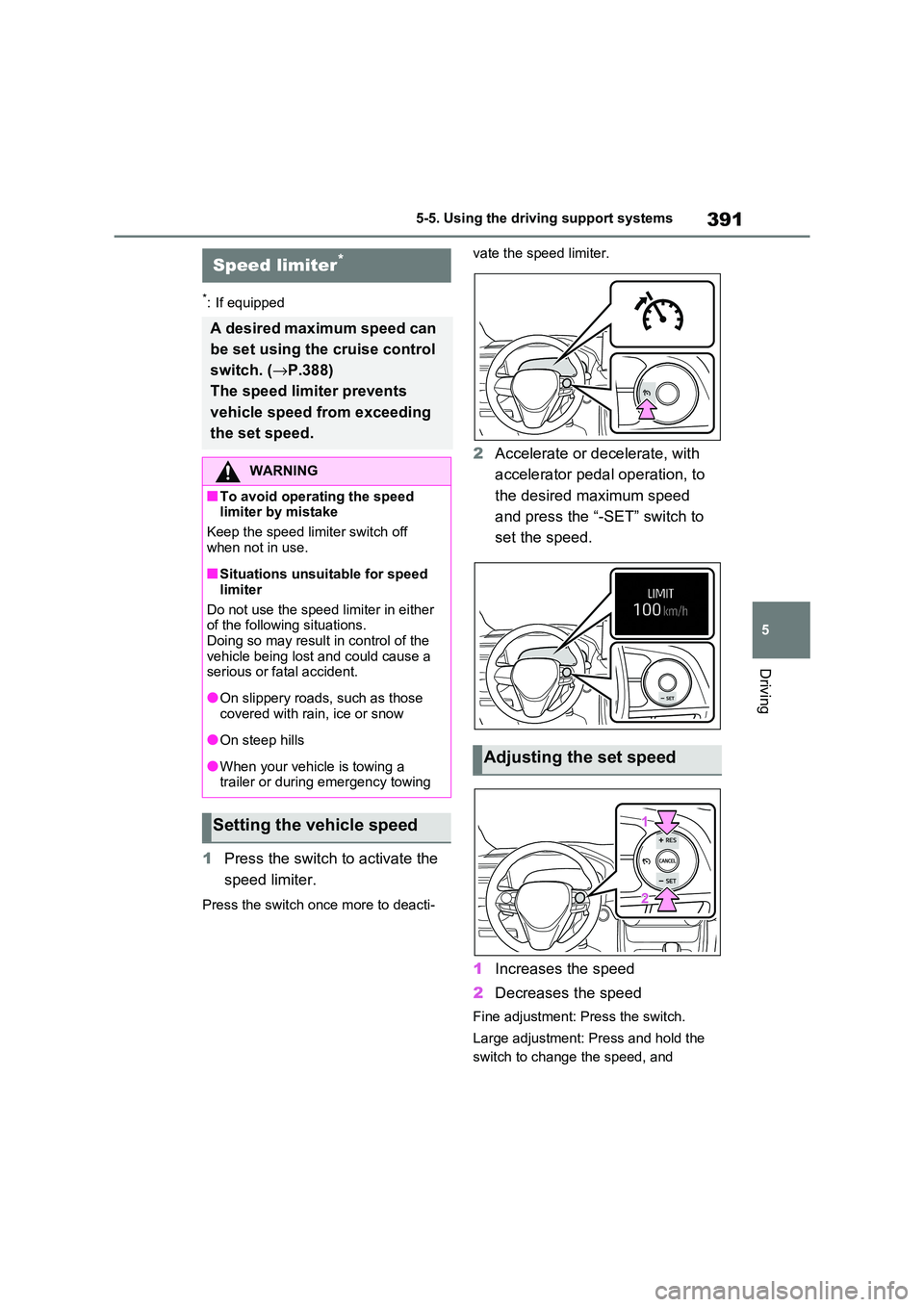
1 Press the switch to activate the
speed limiter.
Press the switch once more to deacti -
vate the speed limiter.
2 Accelerate or decelerate, with
accelerator pedal operation, to
the desired maximum speed
and press the “-SET” switch to
set the speed.
1 Increases the speed
2 Decreases the speed
Fine adjustment: Press the switch.
Large adjustment: Press and hold the
switch to change the speed, and
Speed limiter*
A desired maximum speed can
be set using the cruise control
switch. ( →P.388)
The speed limiter prevents
vehicle speed from exceeding
the set speed.
WARNING
■To avoid operating the speed
limiter by mistake
Keep the speed lim iter switch off
when not in use.
■Situations unsuitable for speed
limiter
Do not use the speed limiter in either of the following situations.
Doing so may result in control of the
vehicle being lost and could cause a serious or fatal accident.
●On slippery roads, such as those
covered with ra in, ice or snow
●On steep hills
●When your vehicle is towing a
trailer or during emergency towing
Setting the vehicle speed
Adjusting the set speed
Page 412 of 666

4105-5. Using the driving support systems
■The BSM function is operational when
The BSM function is operational when
all of the following conditions are met:
●The BSM function is on.
●The shift lever is in a position other
than R.
●The vehicle speed is greater than
approximately 16 km/h (10 mph).
■The BSM function will detect a
vehicle when
The BSM function will detect a vehicle
present in the detection area in the fol -
lowing situations:
●A vehicle in an adjacent lane over -
takes your vehicle.
●You overtake a vehicle in an adjacent
lane slowly.
●Another vehicle enters the detection
area when it changes lanes.
■Conditions under which the BSM function will not detect a vehicle
The BSM function is not designed to
detect the following types of vehicles and/or objects:
●Small motorcycles, bicycles, pedestri -
ans, etc.*
●Vehicles traveling in the opposite
direction
●Guardrails, walls, signs, parked vehi -
cles and similar stationary objects*
●Following vehicles that are in the
same lane*
●Vehicles traveling 2 lanes away from
your vehicle*
●Vehicles which are being overtaken
rapidly by your vehicle*: Depending on the conditions, detec -
tion of a vehicle and/or object may
occur.
■Conditions under which the BSM
function may not function correctly
●The BSM function may not detect
vehicles correctly in the following situ - ations:
• When the sensor is misaligned due to
a strong impact to the sensor or its surrounding area
• When mud, snow, ice, a sticker, etc. is
covering the sensor or surrounding area on the rear bumper
• When driving on a road surface that is
wet with standing water during bad weather, such as heavy rain, snow, or
fog
• When multiple veh icles are approach- ing with only a small gap between
each vehicle
• When the distance between your vehi - cle and a following vehicle is short
• When there is a significant difference
in speed between your vehicle and the vehicle that enters the detection
area
• When the difference in speed between your vehicle and another
vehicle is changing
• When a vehicle enters a detection area traveling at about the same
speed as your vehicle
• As your vehicle starts from a stop, a vehicle remains in the detection area
• When driving up and down consecu-
tive steep inclines, such as hills, dips in the road, etc.
• When driving on roads with sharp
bends, consecutive curves, or uneven surfaces
• When vehicle lanes are wide, or when
driving on the edge of a lane, and the vehicle in an adjacent lane is far away
from your vehicle
• When an accessory (such as a bicycle
carrier) is installed to the rear of the vehicle
• When there is a significant difference
in height between your vehicle and the vehicle that enters the detection
area
• Immediately afte r the BSM func- tion/RCTA function are turned on
• When towing a trailer
Page 415 of 666

413
5
5-5. Using the driving support systems
Driving
a strong impact to the sensor or its
surrounding area • When mud, snow, ice, a sticker, etc. is
covering the sensor or surrounding
area on the rear bumper • When driving on a road surface that is
wet with standing water during bad
weather, such as heavy rain, snow, or fog
• When multiple vehicles are approach -
ing with only a sm all gap between each vehicle
• When a vehicle is approaching at high
speed • When parking on a steep incline, such
as hills, a dip in the road, etc.
• When an accessory (such as a bicycle carrier) is installed to the rear of the
vehicle
• When backing up on a slope with a sharp change in grade
• When backing out of a shallow angle
parking spot
• Immediately after the RCTA function
is turned on
• Immediately after the hybrid system is
started with the RCTA function on
• When towing a trailer • When the sensors cannot detect a
vehicle due to obstructions
●Instances of the RCTA function
unnecessary detecting a vehicle
and/or object may i ncrease in the fol- lowing situations:
• When a vehicle passe s by the side of
your vehicle • When the parking space faces a
street and vehicles are being driven
on the street
• When the distance between your vehi -
cle and metal objects, such as a guardrail, wall, sign, or parked vehicle,
which may reflect electrical waves
toward the rear of th e vehicle, is short • When an accessory (such as a bicycle
carrier) is installed to the rear of the
vehicle
Page 440 of 666

4385-5. Using the driving support systems
■ECB (Electronically Con-
trolled Brake System)
The electronically controlled sys -
tem generates braking force corre -
sponding to the brake operation
■ABS (Anti-lock Brake System)
Helps to prevent wheel lock when
the brakes are applied suddenly, or
if the brakes are applied while driv -
ing on a slippery road surface
■Brake assist
Generates an increased level of
braking force after the brake pedal
is depressed when the system
detects a panic stop situation
■VSC (Vehicle Stability Control)
Helps the driver to control skidding
when swerving suddenly or turning
on slippery road surfaces.
■VSC+ (Vehicle Stability Con -
trol+)
Provides cooperative control of the
ABS, TRC, VSC and EPS.
Helps to maintain directional stabil -
ity when swerving on slippery road
surfaces by controlling steering per -
formance.
■Trailer Sway Control
Helps the driver t o control trailer
sway by selectively applying brake
pressure for individual wheels and
reducing driving torque when trailer
sway is detected.
■TRC (Traction Control)
Helps to maintain drive power and
prevent the drive wheels from spin -
ning when starting the vehicle or
accelerating on slippery roads
■Active Cornering Assist (ACA)
Helps to prevent t he vehicle from
drifting to the outer side by perform -
ing inner wheel brake control when
attempting to acc elerate while turn-
ing
■Hill-start assist control
Helps to reduce the backward
movement of the vehicle when
starting on an uphill
■EPS (Electric Po wer Steering)
Employs an electric motor to
reduce the amount of effort needed
to turn the steering wheel
Driving assist systems
To keep driving safety and per -
formance, the following sys -
tems operate aut omatically in
response to various driving sit -
uations. Be aware, however,
that these sys tems are supple-
mentary and should not be
relied upon too heavily when
operating the vehicle.
Summary of the driving
assist systems
Page 441 of 666

439
5
5-5. Using the driving support systems
Driving
■E-Four (Electronic On-Demand
AWD system)
Automatically switches from front
wheel drive to all-wheel drive
(AWD) according to the driving con -
ditions, helping to ensure reliable
handling and stability. Examples of
conditions where the system will
switch to AWD are when cornering,
going uphill, start ing off or acceler-
ating, and when the road surface is
slippery due to snow, rain, etc.
■Emergency brake signal
When the brakes are applied sud -
denly, the emergency flashers
automatically flash to alert the vehi -
cle behind.
■The Secondary Collision
Brake (if equipped)
When the SRS airbag sensor
detects a collision and the system
operates, the brakes and brake
lights are automatically controlled
to reduce the v ehicle speed and
help reduce the possibility of further
damage due to a secondary colli -
sion.
■When the TRC/VSC/ABS/Trailer Sway Control syst ems are operat-
ing
The slip indicator light will flash while the TRC/VSC/ABS/Traile r Sway Control
systems are operating.
■Disabling the TRC system
If the vehicle gets stuck in mud, dirt or snow, the TRC system may reduce
power from the hyb rid system to the
wheels.
Pressing to turn t he system off may
make it easier for you to rock the vehicle
in order to free it.
To turn the TRC system off, quickly
press and release .
“Traction Control Tu rned OFF” will be
shown on the multi-information display.
Press again to turn the system back
on.
■Turning off the TRC/VSC/Trailer
Sway Control systems
To turn the TRC/VS C/Trailer Sway Con-
trol systems off, press and hold for
more than 3 seconds wh ile the vehicle is
stopped.
The VSC OFF indicator light will come
on and the “Tractio n Control Turned
OFF” will be shown on the multi-infor-
mation display.*
Press again to turn the systems
back on.
*: On vehicles with PCS (Pre-Collision
Page 442 of 666

4405-5. Using the driving support systems
System), PCS will also be disabled
(only Pre-Collision warning is avail -
able). The PCS warning light will
come on and a message will be dis -
played on the multi-information dis -
play. ( →P.361)
■When the message is displayed on
the multi-information display show -
ing that TRC has been disabled
even if has not been pressed
TRC is temporary deactivated. If the information continues to show, contact
any authorized Toyota retailer or Toyota
authorized repairer, or any reliable repairer.
■Operating conditions of hill-start
assist control
When the following four conditions are met, the hill-start as sist control will oper-
ate:
●The shift lever is in a position other
than P or N (when starting off for-
ward/backward on an upward incline).
●The vehicle is stopped.
●The accelerator pedal is not
depressed.
●The parking brake is not engaged.
■Automatic system cancelation of
hill-start assist control
The hill-start assist control will turn off in any of the following situations:
●The shift lever is shifted to P or N.
●The accelerator pedal is depressed.
●The parking brak e is engaged.
●No more than 2 seconds have elapsed after the brake pedal is
released.
■Sounds and vibrations caused by
the ABS, brake assist, VSC, Trailer Sway Control, TRC and hill-start
assist control systems
●A sound may be heard from the
engine compartment when the brake
pedal is depressed repeatedly, when
the hybrid system i s started or just
after the vehicle beg ins to move. This sound does not indicate that a mal -
function has occurred in any of these
systems.
●Any of the followin g conditions may
occur when the a bove systems are operating. None of these indicates
that a malfunction has occurred.
• Vibrations may be felt through the vehicle body and steering.
• A motor sound may be heard also
after the vehicle comes to a stop.
■ECB operating sound
ECB operating sound may be heard in
the following cases, but it does not indi-
cate that a malfun ction has occurred.
●Operating sound heard from the
engine compartment when the brake pedal is operated.
●Motor sound of the brake system heard from the front part of the vehicle
when the driver’ door is opened.
●Operating sound heard from the
engine compartment when one or two
minutes passed after the stop of the hybrid system.
■Active Cornering Assist operation
sounds and vibrations
When the Active Cornering Assist is operated, operation sounds and vibra -
tions may be generat ed from the brake
system, but thi s is not a malfunction.
■EPS operation sound
When the steering wheel is operated, a
motor sound (whirring sound) may be
heard. This does not indicate a malfunc - tion.
■Automatic reacti vation of TRC,
Trailer Sway Control and VSC sys -
tems
After turning the TRC, Trailer Sway Control and VSC systems off, the sys -
tems will be automati cally re-enabled in
the following situations:
●When the power switch is turned off.
●If only the TRC syst em is turned off,
Page 445 of 666

443
5
5-5. Using the driving support systems
Driving
WARNING
●When driving over roads with pot -
holes or uneven surfaces
■TRC/VSC may not operate effec -
tively when
Directional control and power may not be achievable while driving on slip -
pery road surfaces , even if the
TRC/VSC system is operating.
Drive the vehicle carefully in condi - tions where stabilit y and power may
be lost.
■Active Cornering Assist does not
operate effectively when
●Do not overly rely on Active Corner - ing Assist. Active Cornering Assist
may not operate effectively when
accelerating down slopes or driving on slippery road surfaces.
●When Active Cornering Assist fre - quently operates, Active Cornering
Assist may temporarily stop operat -
ing to ensure prop er operation of the brakes, TRC and VSC.
■Hill-start assist control does not operate effectively when
●Do not overly rely on hill-start assist
control. Hill-start assist control may not operate effectively on steep
inclines and roads covered with ice.
●Unlike the parking brake, hill-start
assist control is not intended to hold
the vehicle stationary for an extended period of time. Do not
attempt to use hill-start assist con -
trol to hold the vehicle on an incline, as doing so may lead to an acci-
dent.
■When the TRC/ABS/VSC/Trailer
Sway Control is activated
The slip indicator light flashes. Always drive carefully. Reckless driving may
cause an accident. Exercise particular
care when the indicat or light flashes.
■When the TRC/VSC/Trailer Sway Control systems are turned off
Be especially careful and drive at a
speed appropriate t o the road condi- tions. As these ar e the systems to
help ensure vehicl e stability and driv-
ing force, do not turn the TRC/VSC/Trailer Sway Control sys -
tems off unle ss necessary.
Trailer Sway Control is part of the VSC system and will not operate if
VSC is turned off or experiences a
malfunction.
■Replacing tires
Make sure that all tires are of the specified size, brand, tread pattern
and total load capac ity. In addition,
make sure that the tires are inflated to the recommended tire inflation pres -
sure level.
The ABS, TRC and VSC/Trailer Sway Control systems will not function cor -
rectly if different ti res are installed on
the vehicle. Contact any authorized Toyota
retailer or Toyota a uthorized repairer,
or any reliable repairer for further information when replacing tires or
wheels.
■Handling of tires and the suspen -
sion
Using tires with any kind of problem or modifying the suspension will affect
the driving assist systems, and may
cause a system to malfunction.
■Trailer Sway Control precaution
The Trailer Sway C ontrol system is not able to reduce tr ailer sway in all
situations. Depending on many fac -
tors such as the conditions of the
vehicle, trailer, road surface and driv - ing environment, the Trailer Sway
Control system may not be effective.
Refer to your traile r owner’s manual for information on how to tow your
trailer properly.
Page 446 of 666
4445-5. Using the driving support systems
WARNING
■If trailer sway occurs
Observe the following precautions.
Failing to do so may cause death or serious injury.
●Firmly grip the steering wheel.
Steer straight ahead. Do not try to control trailer sw aying by turning
the steering wheel.
●Begin releasing the accelerator pedal immediately but very gradu -
ally to reduce speed.
Do not increase speed. Do not apply vehicle brakes.
If you make no extreme correction
with the steering or brakes, your vehi-
cle and trailer should stabilize.
( →P.308)
■Secondary Collision Brake (if
equipped)
Do not rely solely upon the Secondary Collision Brake. This system is
designed to help re duce the possibil-
ity of further damage due to a second - ary collision, however, that effect
changes according to various condi -
tions. Overly relyi ng on the system may result in death or serious injury.