2021 TOYOTA RAV4 PHEV lock
[x] Cancel search: lockPage 63 of 666
61
1
1-2. Child safety
For safety and security
■Installing child restraint sys -
tem using a seat belt
Install the child restraint system in
accordance to the operation man -
ual enclosed with the child restraint
system.
If the child restraint system on hand
is not within the “universal” cate -
gory (or the necessary information
is not in the tabl e), refer to the
“Vehicle List” provided by the child
restraint system maker for various
possible installation positions, or
check the compatibility after asking
the retailer of the child seat.
( →P.55, 56)
1 If installing the child restraint
system to the front passenger
seat is unavoidable, refer to
P.52 for the front passenger
seat adjustment.
2 Adjust the seatback angle to the
most upright position. When
installing a forward-facing child
seat, if there is a gap between
the child seat a nd the seatback,
adjust the seatback angle until
good contact is achieved.
3 If the head restraint interferes
with the child restraint system
installation and the head
restraint can be removed,
remove the head restraint. Oth-
erwise, put the head restraint in
the upper most position.
( →P.276)
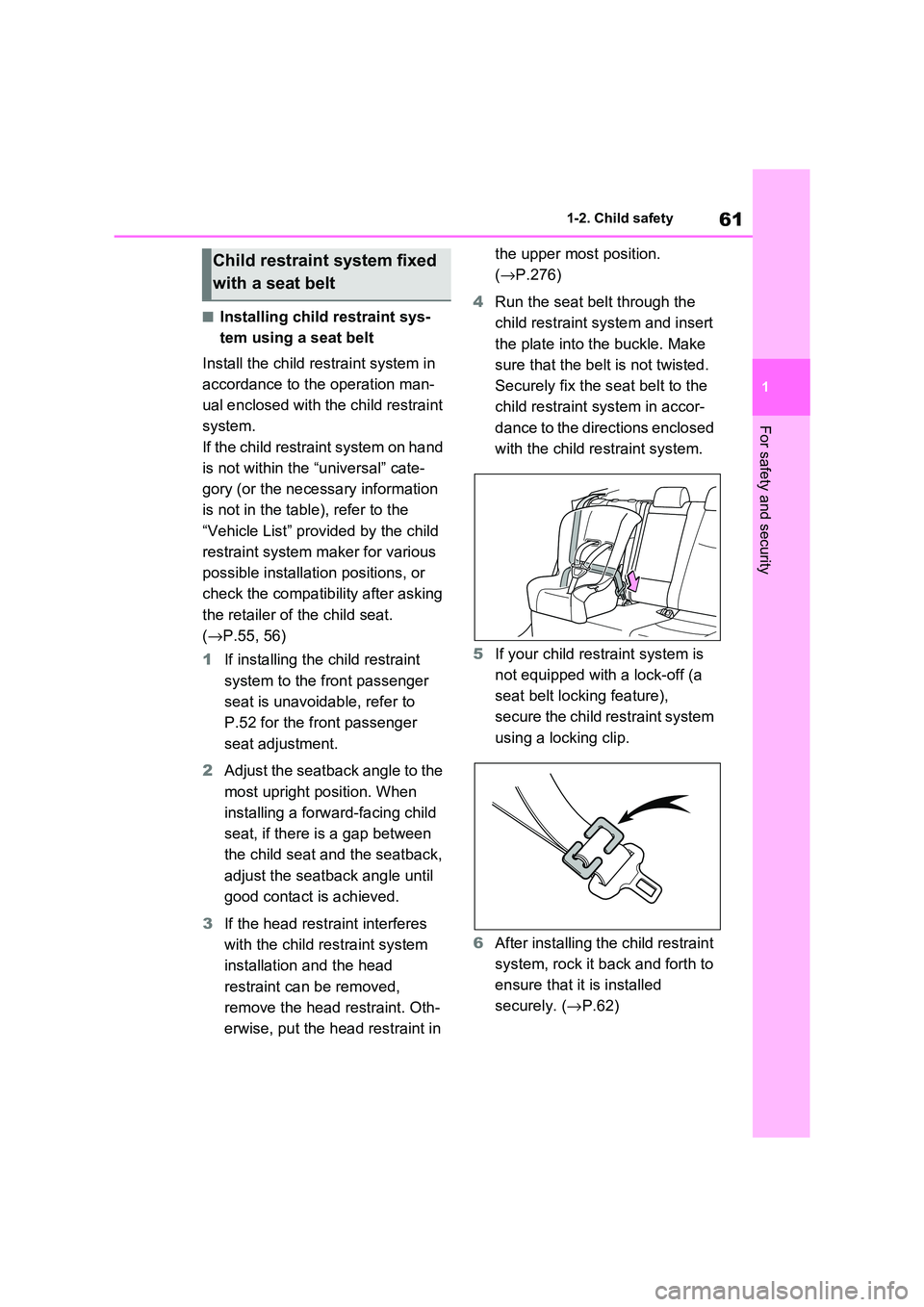
4 Run the seat belt through the
child restraint system and insert
the plate into the buckle. Make
sure that the belt is not twisted.
Securely fix the s eat belt to the
child restraint system in accor -
dance to the directions enclosed
with the child restraint system.
5 If your child restraint system is
not equipped with a lock-off (a
seat belt locking feature),
secure the child restraint system
using a locking clip.
6 After installing the child restraint
system, rock it back and forth to
ensure that it is installed
securely. ( →P.62)
Child restraint system fixed
with a seat belt
Page 64 of 666

621-2. Child safety
■Removing a child restraint
system installed with a seat
belt
Press the buckle release button
and fully retract the seat belt.
When releasing the buckle, the child
restraint system may spring up due to
the rebound of the seat cushion.
Release the buckle while holding down
the child restraint system.
Since the seat belt automatically reels
itself, slowly return it to the stowing
position.
■When installing a child restraint
system
You may need a locking clip to install the child restraint s ystem. Follow the
instructions provided by the manufac -
turer of the system. If your child restraint system does not provide a locking clip,
you can purchase the following item
from any authorized Toyota retailer or Toyota authorized repairer, or any reli -
able repairer: Locking clip for child
restraint system (Part No. 73119-22010)
■ISOFIX lower anchorages
(ISOFIX child restraint system)
Lower anchorages are provided for
the outboard rear seats. (Tags dis -
playing the location of the anchor -
ages are attached to the seats.)
WARNING
■When installing a child restraint
system
Observe the following precautions. Failure to do so may result in death or
serious injury.
●Do not allow children to play with
the seat belt. I f the seat belt
becomes twisted around a child’s neck, it may lead to choking or
other serious injuries that could
result in death. If this occurs and the buckle cannot be unfastened,
scissors should be used to cut the
belt.
●Ensure that the bel t and plate are securely locked and the seat belt is
not twisted.
●Shake the child restraint system left
and right, and forward and back -
ward to ensure that it has been securely installed.
●After securing a ch ild restraint sys- tem, never adjust the seat.
●When a junior seat is installed, always ensure that the shoulder
belt is positioned a cross the center
of the child’s shoulder. The belt should be kept away from the
child’s neck, but not so that it could
fall off the chil d’s shoulder.
●Follow all installation instructions
provided by the child restraint sys - tem manufacturer.
Child restraint system fixed
with an ISOFIX lower
anchorage
Page 74 of 666

721-3. Emergency assistance
2.5. Modalities for exercising data subject’s rights
2.5.1.
The data subject (the vehicle’s owner) has a right
of access to data and as appropriate to request
the rectification, erasure or blocking of data, con-
cerning him or her, the processing of which does
not comply with the pr ovisions of Directive
95/46/EC. Any third par ties to whom the data
have been disclosed have to be notified of such
rectification, erasure or blocking carried out in
compliance with this Direc tive, unless it proves
impossible or involves a disproportionate effort.
O
2.5.2.
The data subject has a right to complain to the
competent data protectio n authority if he or she
considers that his or her rights have been
infringed as a result of the processing of his or
her personal data.
O
2.5.3.
Contact service responsible for handling access
requests (if any):
→ P.73
O
Implementing Regulation Annex1 PART3 User InformationConformity
Page 79 of 666

77
1
1-4. Theft dete rrent system
For safety and security
*: If equipped
■Setting
Turn the power switch to OFF, have
all the passengers exit the vehicle
and ensure that all the doors are
closed.
Using the entry function:
Touch the sensor area on the front
outside door handle twice within 5
seconds.
Using the wireless remote control:
Press twice within 5 sec -
onds.
■Canceling
Using the entry function:
Hold the front outside door handle.
Using the wireless remote control:
Press .
Double locking system*
Unauthorized access to the
vehicle is prevented by dis -
abling the door unlocking
function from both the interior
and exterior of the vehicle.
Vehicles employing this sys -
tem have labels on the front
side windows.
Setting/canceling the double
locking system
WARNING
■Double locking system precau - tion
Never activate the double locking sys-
tem when there are people in the vehicle because all the doors cannot
be opened from inside the vehicle.
Page 80 of 666

781-4. Theft deterrent system
*: If equipped
■Items to check before locking
the vehicle
To prevent unexpected triggering of
the alarm and vehicle theft, make
sure of the following:
Nobody is in the vehicle.
The side windows and pan-
oramic moon roof (if equipped)
are closed before the alarm is
set.
No valuables or other personal
items are left in the vehicle.
■Setting
Close the doors and hood, and lock
all the doors using the entry func -
tion or wireless remote control. The
system will be set automatically
after 30 seconds.
The indicator light changes from being
on to flashing when the system is set.
If all doors are closed with hood open,
alarm system can be set. ( →P.78)
■Canceling or stopping
Do one of the fo llowing to deacti-
vate or stop the alarm:
Unlock the doors using the entry
function or wirel ess remote con-
trol.
Start the hybrid system. (The
alarm will be de activated or
stopped after a few seconds.)
■System maintenance
The vehicle has a maintenance-free type alarm system.
■Triggering of the alarm
The alarm may be tr iggered in the fol-
lowing situations: (Stopping the alar m deactivates the
alarm system.)
Alarm*
The alarm uses light and
sound to give an alert when an
intrusion is detected.
The alarm is triggered in the
following situat ions when the
alarm is set:
A locked door is unlocked or
opened in any way other than
using the entry function or
wireless remote control. (The
doors will lock again automati -
cally.)
The hood is opened.
The intrusion sensor detects
something moving inside the
vehicle. (Example: an intruder
breaks a window and gets into
the vehicle.)
The tilt sensor detects a
change of vehicle inclination.
Setting/canceling/stopping
the alarm system
Page 81 of 666

79
1
1-4. Theft dete rrent system
For safety and security
●The doors are unlocked using the
mechanical key.
●A person inside the vehicle opens a
door or hood, or unlocks the vehicle using an inside lock button.
●The 12-volt battery is recharged or replaced when the v ehicle is locked.
( →P.606)
■Alarm-operated door lock
In the following cases, depending on the
situation, the door may automatically lock to prevent impro per entry into the
vehicle:
●When a person rem aining in the vehi-
cle unlocks the door and the alarm is
activated.
●While the alarm is activated, a person
remaining in the v ehicle unlocks the door.
●When recharging or replacing the 12-
volt battery.
■Customization (if equipped)
The alarm can be set to deactivate when the mechanical key is used to unlock.
(Customizable features: →P.630)
■The intrusion sensor and tilt
sensor detection
The intrusion sensor detects
intruders or movement in the
vehicle.
The tilt sensor detects changes
in vehicle inclination, such as
when the vehicle is towed away.
This system is designed to deter
and prevent vehicle theft but does
not guarantee abs olute security
against all intrusions.
■Setting the intrusion sensor
and tilt sensor
The intrusion sensor and tilt sensor
will be set automa tically when the
alarm is set. ( →P.78)
■Canceling the intrusion sensor
and tilt sensor
If you are leaving pets or other
moving things inside the vehicle,
make sure to disable the intrusion
sensor and tilt sensor before setting
NOTICE
■To ensure the system operates correctly
Do not modify or r emove the system.
If modified or remo ved, the proper
operation of the system cannot be guaranteed.
Intrusion sensor and tilt
sensor
Page 82 of 666
801-4. Theft deterrent system
the alarm, as they will respond to
movement inside the vehicle.
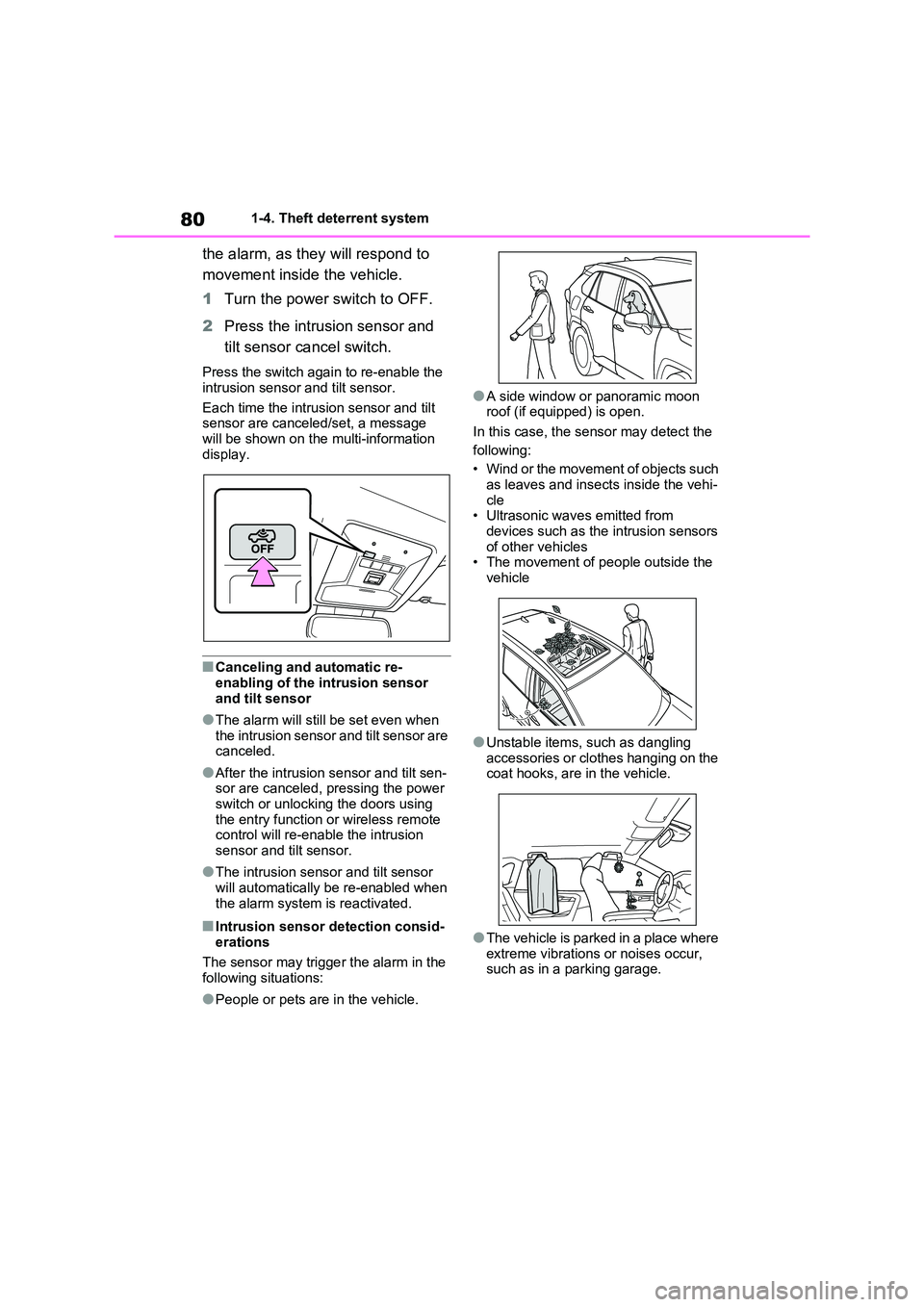
1 Turn the power switch to OFF.
2 Press the intrusion sensor and
tilt sensor cancel switch.
Press the switch again to re-enable the
intrusion sensor and tilt sensor.
Each time the intrus ion sensor and tilt
sensor are canceled/set, a message
will be shown on the multi-information display.
■Canceling and automatic re-
enabling of the intrusion sensor
and tilt sensor
●The alarm will still be set even when
the intrusion sensor and tilt sensor are canceled.
●After the intrusion sensor and tilt sen- sor are canceled, pressing the power
switch or unlocking the doors using
the entry func tion or wireless remote control will re-enable the intrusion
sensor and tilt sensor.
●The intrusion sens or and tilt sensor
will automatically be re-enabled when
the alarm system is reactivated.
■Intrusion sensor detection consid -
erations
The sensor may trigge r the alarm in the
following situations:
●People or pets are in the vehicle.
●A side window or panoramic moon
roof (if equipped) is open.
In this case, the sensor may detect the
following:
• Wind or the movement of objects such
as leaves and insects inside the vehi -
cle • Ultrasonic wave s emitted from
devices such as the intrusion sensors
of other vehicles • The movement of people outside the
vehicle
●Unstable items, such as dangling
accessories or clothes hanging on the
coat hooks, are in the vehicle.
●The vehicle is parked in a place where
extreme vibrations or noises occur, such as in a parking garage.
Page 85 of 666
2
83
2
Plug-in hybrid system
Plug-in hybrid system
2-1. Plug-in hybrid system
Plug-in hybrid system features
......................................... 84
Plug-in hybrid system precau -
tions .................................. 94
Plug-in hybrid vehicle driving
tips .................................... 99
EV driving range ............... 102
2-2. Charging
Charging equipment ......... 105
AC charging cable ............ 108
Locking and unlocking the
charging port lid and charging
connector ........................ 121
Power sources that can be
used ................................ 124
Charging methods ............ 127
Charging tips .................... 130
Things to know before charging
....................................... 132
How to charge .................. 135
Using the charging schedule
function ........................... 144
Using the “My Room Mode”
....................................... 153
When charging cannot be car -
ried out ........................... 156