2021 TOYOTA RAV4 PHEV light
[x] Cancel search: lightPage 367 of 666

365
5
5-5. Using the driving support systems
Driving
■Lane departure alert function
When the system determines that
the vehicle might depart from its
lane or course*, a warning is dis -
played on the multi-information dis -
play, and either a warning buzzer
will sound or the steering wheel will
vibrate to alert the driver.
When the warning buzzer sounds or
the steering wheel vibrates, check the
area around your vehicle and carefully
WARNING
●The vehicle is driven in an area
without white (yellow) lines, such as
in front of a tollg ate or checkpoint, or at an intersection, etc.
●The white (yellow) lines are cracked, “Raised pavement
marker” or stones are present.
●The white (yellow) lines cannot be seen or are difficu lt to see due to
sand, etc.
●The vehicle is driven on a road sur -
face that is wet due to rain, pud -
dles, etc.
●The traffic lines are yellow (which
may be more difficult to recognize than lines that are white).
●The white (yellow) lines cross over a curb, etc.
●The vehicle is driven on a bright surface, such as concrete.
●If the edge of the road is not clear or straight.
●The vehicle is driven on a surface that is bright due t o reflected light,
etc.
●The vehicle is driven in an area
where the brightness changes sud -
denly, such as at the entrances and exits of tunnels, etc.
●Light from the hea dlights of an oncoming vehicle, the sun, etc.
enters the camera.
●The vehicle is driven on a slope.
●The vehicle is driven on a road which tilts left or right, or a winding
road.
●The vehicle is driven on an
unpaved or rough road.
●The traffic lane is excessively nar -
row or wide.
●The vehicle is ext remely tilted due to carrying heavy luggage or having
improper tire pressure.
●The distance to the preceding vehi -
cle is extremely short.
●The vehicle is moving up and down
a large amount due to road condi-
tions during drivi ng (poor roads or road seams).
●When driving in a t unnel or at night with the headlights off or when a
headlight is dim due to its lens
being dirty or it being misaligned.
●The vehicle is s truck by a cross-
wind.
●The vehicle is affected by wind from
a vehicle driven in a nearby lane.
●The vehicle has just changed lanes
or crossed an intersection.
●Tires which differ by structure, man -
ufacturer, brand or tread pattern are used.
●Snow tires, etc. are equipped.
●The vehicle is b eing driven at
extremely high speeds.
Functions included in LTA
system
Page 377 of 666
375
5
5-5. Using the driving support systems
Driving
system will notify the driver.
When the vehicle speed exceeds
the speed notific ation threshold
of the speed limit sign displayed,
the sign display will be empha -
sized and a buzzer will sound.
When the RSA system recog-
nizes a no-entry sign and detects
that the vehicle has entered a
no-entry area based on the map
information of the navigation sys -
tem, the no-entry sign flashes
and a buzzer will sound. (For
vehicles with navigation system)
If it is detected that your vehicle
is overtaking when a no overtak -
ing sign is displayed on the multi-
information display, the dis -
played sign will flash and a steer -
ing wheel will vibrate.
Depending on the situation, traffic
environment (traffic direction,
speed unit) may be detected incor -
rectly and a notification function
may not operate properly.
■Setting procedure
→ P.186
■Automatic turn-off of RSA sign dis-
play
One or more signs automatically turn off
in the following situations.
●No sign has been recognized for a
certain distance.
●The road changes due to a left or right
turn, etc.
■Conditions in which the function
may not operate or detect correctly
In the following situations, RSA does not
operate normally and may not recognize
signs, display the i ncorrect sign, etc.
However, this does not indicate a mal - function.
●The front camera is misaligned due to a strong impact being applied to the
sensor, etc.
●Dirt, snow, stickers, etc. are on the
windshield near the front camera.
●In inclement weather such as heavy
rain, fog, snow or sand storms.
●Light from an oncoming vehicle, the
sun, etc. enters the front camera.
●The sign is dirty, f aded, tilted or bent.
●The contrast of electronic sign is low.
●All or part of the sign is hidden by the
leaves of a tree, a pole, etc.
●The sign is only visi ble to the front
camera for a short amount of time.
●The driving scene (turning, lane
change, etc.) is judged incorrectly.
●If a sign not appropriate for the cur -
rently traveled lane, but the sign exists dir e ct ly a ft er a f r eew ay br an ch es , or in
an adjacent lane ju st before merging.
●Stickers are attached to the rear of the
preceding vehicle.
●A sign resembling a system compati-
ble sign is recognized.
●Side road speed signs may be
detected and displa yed (if positioned
in sight of the front camera) while the vehicle is traveling on the main road.
●Roundabout exit road speed signs may be detected and displayed (if
positioned in sight of the front camera)
while traveling on a roundabout.
●The front of the vehicle is raised or
lowered due to the carried load.
●The surrounding br ightness is not suf-
ficient or changes suddenly.
●When a sign intended for trucks, etc.
is recognized.
●The vehicle is driven in a country with
a different direction of traffic.
●The navigation syst em map data is
Page 382 of 666

3805-5. Using the driving support systems
When a vehicle is de tected running ahead of you, the system automatically deceler-
ates your vehicle. When a great er reduction in vehicle speed is necessary, the sys-
tem applies the brakes (the stop lights will come on at this time). The system will
respond to changes in the speed of the vehicle ahead in order to maintain the vehi-
cle-to-vehicle distance set by the driver. Approach warning war ns you when the sys-
tem cannot decelerate sufficiently to prevent your vehicle from closing in on the
vehicle ahead.
When the vehicle ahead of you stops, your vehicle will also sto p (vehicle is stopped
by system control). After the veh icle ahead starts off, pressing the “+RES” switch or
depressing the accelerator pedal (start-off operation) will res ume follow-up cruising.
If the start-off operation is not performed, system control continues to keep your
vehicle stopped.
When the turn signal lever is operated and your vehicle moves t o an overtaking lane
while driving at 50 mph (80 km/h) or more, the vehicle will acc elerate to help to over-
take a passing vehicle.
The system’s identificat ion of what is an overtaking lane may be determined solely
based on the location of the ste ering wheel in the vehicle (left side driver position
versus right side driv er position.) If the vehicle is driven to a region where the over-
taking lane is on a different sid e from where the vehicle is normally driven, the vehi-
cle may accelerate when the turn signal lever is operated in th e opposite direction to
the overtaking lane (e.g., if th e driver normally operates the vehicle in a region
where the overtaking lane is to t he right but then drives to a region where the over-
taking lane is to the left, the vehicle may accelerate when the right turn signal is acti-
vated).
Example of acceleration
When there are no longer any preceding vehicles driving slower than the
set speed
The system accelerates until the set speed is reached. The system then returns to
constant speed cruising.
1 Press the cruise control main
switch to activate the cruise con -
trol.
Dynamic radar cruise control indicator
will come on and a message will be dis - played on the multi-information display.
Press the switch again to deactivate the
cruise control.
If the cruise control main switch is
pressed and held for 1.5 seconds or
more, the system tur ns on in constant
C
Setting the vehicle speed
(vehicle-to-vehicle distance
control mode)
Page 394 of 666

3925-5. Using the driving support systems
release when the desired speed is
reached.
1 Pressing the cancel switch can-
cels the speed limiter.
2 Pressing the “+RES” switch
resumes the speed limiter.
■Setting the vehicle speed
If the “-SET” switch i s pressed while the
vehicle is stopped or being driven at 30 km/h (20 mph) or less, the set speed will
be 30 km/h (20 mph)
■Exceeding the set speed
In the following situat ions, the vehicle speed exceeds the set speed, and multi-
information display will be highlighted:
●When fully depressing the accelerator
pedal
●When driving down a hill (a buzzer
also sounds)
■Automatic speed limiter cancella -
tion
The set speed is automatically canceled
when the cruise control is activated.
■If the speed limiter indicator turns
off and “Speed Limiter Malfunction Visit Your Dealer” is displayed
Stop the hybrid system and then restart
the hybrid system. Af ter restarting the hybrid system, set the speed limiter.
If the speed limiter c annot be set, there
may be a malfunction in the speed lim - iter system. Have th e vehicle inspected
by any authorized Toyota retailer or
Toyota authorized repairer, or any reli - able repairer.
Canceling and resuming the
speed limiter
Page 396 of 666

3945-5. Using the driving support systems
BSM function:
When a vehicle is detected in a blind
spot of the outside rear view mirrors or
approaching rapidly from behind into a
blind spot, the outside rear view mirror
indicator on the detected side will illumi -
nate. If the turn signal lever is operated
toward the detected side, the outside
rear view mirror indicator will flash.
RCTA function:
When a vehicle approaching from the
right or left at the re ar of the vehicle is
detected, both outsi de rear view mirror
indicators will flash.
Monitor screen display (RCTA
function only)
If a vehicle approaching from the right
or left at the rear of the vehicle is
detected, the RCTA icon ( →P.411) for
the detected side will be displayed.
BSM OFF indicator/RCTA OFF
indicator
When the Blind Spot Monitor is dis -
abled, the BSM OFF indicator illumi -
nates.
When the RCTA func tion is disabled,
the RCTA OFF indicator illuminates.
RCTA buzzer (RCTA function
only)
If a vehicle approaching from the right
or left at the rear of the vehicle is
detected, a buzzer will sound from
behind the rear seat.
The BSM function and the RCTA
function can be e nabled/disabled
on the screen of the multi-infor -
mation display. ( →P.186)
The BSM function/RCTA function will
be enabled each time the power switch
is turned to ON.
■Outside rear view mirror indicators visibility
In strong sunlight, the outside rear view
mirror indicator may be difficult to see.
■Hearing the RCTA buzzer
The RCTA buzzer may be difficult to
hear over loud noi ses such as high
audio volume.
■When “Blind Spot Monitor Unavail - able” or “RCTA Unavailable” is
shown on the multi-information
display
The sensor voltage has become abnor -
mal, or water, snow, mud, etc., may be
built up in the vicinit y of the sensor area of the rear bumper. ( →P.408)
Removing the water, snow, mud, etc.,
from the vicinity of the sensor area should return it to normal.
Also, the sensor ma y not function nor-
mally when used in extremely hot or cold weather.
■When “Blind Spot Monitor Malfunc -
tion Visit Your Dealer” or “RCTA
Malfunction Visit Your Dealer” is
shown on the multi-information display
There may be a sensor malfunction or
misaligned. Have the vehicle inspected at any authorized To yota retailer or
Toyota authorized repairer, or any reli -
able repairer.
■Customization
Some functions can be customized.
( →P.186)Turning the BSM func-
tion/RCTA function on/off
C
D
E
Page 410 of 666
4085-5. Using the driving support systems
■Vehicles that can be detected
by the Blind Spot Monitor
The BSM function uses radar sen-
sors to detect the following vehicles
traveling in adjacent lanes and
advises the driver of the presence
of such vehicles via the indicators
WARNING
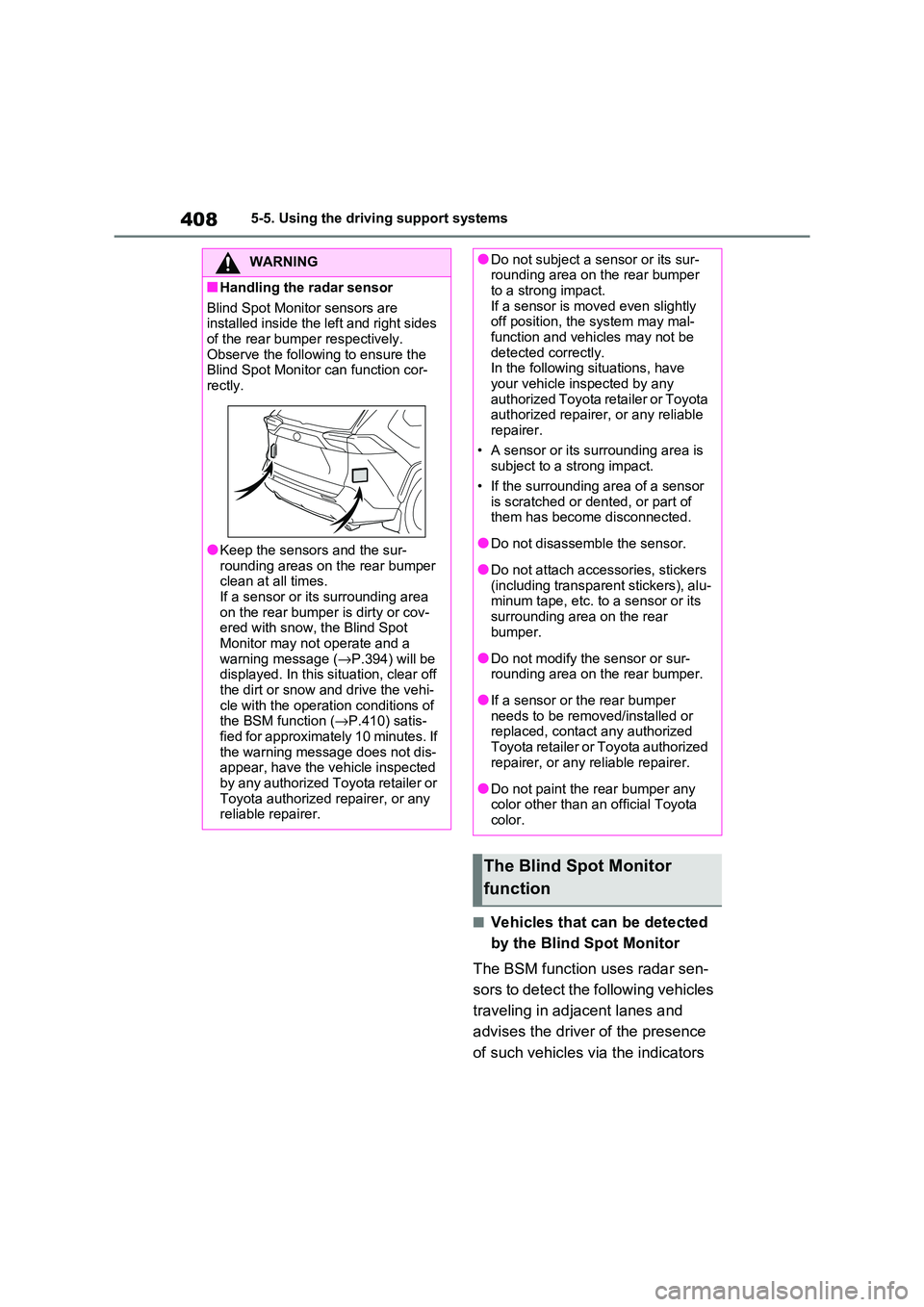
■Handling the radar sensor
Blind Spot Monitor sensors are
installed inside the left and right sides of the rear bumper respectively.
Observe the following to ensure the
Blind Spot Monitor can function cor - rectly.
●Keep the sensor s and the sur-
rounding areas on the rear bumper clean at all times.
If a sensor or its surrounding area
on the rear bumper is dirty or cov - ered with snow, the Blind Spot
Monitor may not operate and a
warning message ( →P.394) will be displayed. In this s ituation, clear off
the dirt or snow a nd drive the vehi-
cle with the operation conditions of the BSM function ( →P.410) satis-
fied for approximately 10 minutes. If
the warning message does not dis - appear, have the v ehicle inspected
by any authorized Toyota retailer or
Toyota authorized repairer, or any reliable repairer.
●Do not subject a sensor or its sur - rounding area on the rear bumper
to a strong impact.
If a sensor is moved even slightly off position, the system may mal-
function and vehicles may not be
detected correctly. In the following situations, have
your vehicle inspected by any
authorized Toyota retailer or Toyota authorized repairer, or any reliable
repairer.
• A sensor or its surrounding area is subject to a strong impact.
• If the surrounding area of a sensor
is scratched or dented, or part of them has become disconnected.
●Do not disassemble the sensor.
●Do not attach acce ssories, stickers
(including transparent stickers), alu - minum tape, etc. to a sensor or its
surrounding area on the rear
bumper.
●Do not modify the sensor or sur -
rounding area on the rear bumper.
●If a sensor or the rear bumper
needs to be removed/installed or replaced, contact any authorized
Toyota retailer or Toyota authorized
repairer, or any reliable repairer.
●Do not paint the rear bumper any
color other than an official Toyota color.
The Blind Spot Monitor
function
Page 418 of 666

4165-5. Using the driving support systems
■The system can be operated when
●The power switch is in ON.
●Toyota parking assist-sensor function is on.
●The vehicle speed is less than about 10 km/h (6 mph).
●The shift lever is in other than P.
■If “Clean Parking Assist Sensor” is
displayed on the multi-information display
A sensor may be covered with ice,
snow, dirt, etc. Rem ove the ice, snow, dirt, etc., from the sensor to return the
system to normal.
Also, due to ice forming on a sensor at low temperatures, a warning message
may be displayed or the sensor may not
be able to detect an object. Once the ice melts, the system will return to normal.
If a warning message is displayed even
if the sensor is cle an, there may be a sensor malfunction. Have the vehicle
inspected by any a uthorized Toyota
retailer or Toyota authorized repairer, or any reliable repairer.
WARNING
●The area directly under the bum -
pers is not detected.
Thin posts or objects lower than the sensor may not be detected when
approached, even if they have been
detected once.
■When to disable the function
In the following situations, disable the
function as it may operate even though there is no possibility of a colli -
sion.
●The vehicle is equipped with a com - mercial fender pole, wireless
antenna or fog lights.
●The front or rear bumper or a sen -
sor receives a strong impact.
●A non-genuine Toyota suspension
(lowered suspension, etc.) is
installed.
●Towing eyelets are installed.
●A backlit license plate is installed.
●When using an automatic car wash
■When using the Toyota parking
assist-sensor
In the following situations, the system
may not function correctly due to a
sensor malfunction, etc. Have the vehicle checked by any authorized
Toyota retailer or Toyota authorized
repairer, or any reliable repairer.
●The Toyota parki ng assist-sensor
operation display flashes or shows continuously, a nd a beep sounds
when no objects are detected.
●If the area around a sensor collides
with something, or is subjected to
strong impact.
●If the bumper or grille collides with
something.
●If the display flashes or is displayed continuously and a buzzer does not
sound, except when the mute func -
tion has been turned on.
■Notes when washing the vehicle
Do not apply intensiv e bursts of water or steam to the sensor area.
Doing so may result in the sensor
malfunctioning.
●When using a high pressure
washer to wash the vehicle, do not spray the sensors directly, as doing
so may cause a sensor to malfunc -
tion.
●When using steam to clean the
vehicle, do not direct steam too close to the sensors as doing so
may cause a sensor to malfunction.
Page 430 of 666

4285-5. Using the driving support systems
• When driving on a gravel road or in an
area with tall grass
• When driving toward a banner, flag,
low-hanging branch or boom barrier (such as those used at railroad cross-
ings, toll gates and parking lots)
• When there is a structure on the road - side (such as when driving in a narrow
tunnel, on a narrow bridge or on a nar -
row road) • When parallel parking
• When there is a rut o r hole in the sur-
face of the road • When driving on a metal cover (grat -
ing), such as those used for drainage
ditches • When driving up or down a steep
slope
• If a sensor is hit by a large amount of water, such as when driving on a
flooded road
• When loaded on ships or trucks • Moving type automatic car wash
• Lift type parking area or multi-story
parking lot • Underground parking area
• Structures on the ground (speed
bumps, cat’s eyes, etc.)
• Differences in height • When moving straight ahead or turn -
ing right
• Snow-melting pipes • Devices for detecting vehicles, such
as traffic lights, dev ices for detecting
traffic congestion, or devices for
detecting empty spaces in parking areas
• Railroad tracks
• H-shaped steel • When there are vehicles on both
sides, or there is a vehicle that resem -
bles this vehicle
●Weather
• If a sensor is covered with ice, snow, dirt, etc. (when c leared, the system
will return to normal)
• If heavy rain or water strikes a sensor • When driving in inclement weather
such as fog, snow or a sandstorm
• Strong wind is blowing
●Other sonic wave sources
• When vehicle horns, vehicle detec - tors, motorcycle engines, air brakes of
large vehicles, the clearance sonar of
other vehicles or other devices which produce ultrasonic waves are near the
vehicle
• If a sticker or an electronic compo - nent, such as a backlit license plate
(especially fluorescent type), fog
lights, fender pole or wireless antenna is installed near a sensor
●Changes in the vehicle posture• If the vehicle is significantly tilted
• If the front of the v ehicle is raised or
lowered due to the carried load • If the orientation of a sensor has been
changed due to a collision or other
impact
■Situations in which the Parking Support Brake function (static
objects) may not operate properly
In some situations, s uch as the follow- ing, this function m ay not operate prop-
erly.
●Weather • When a sensor or the area around a
sensor is extremely hot or cold