Page 72 of 360
72
Removing
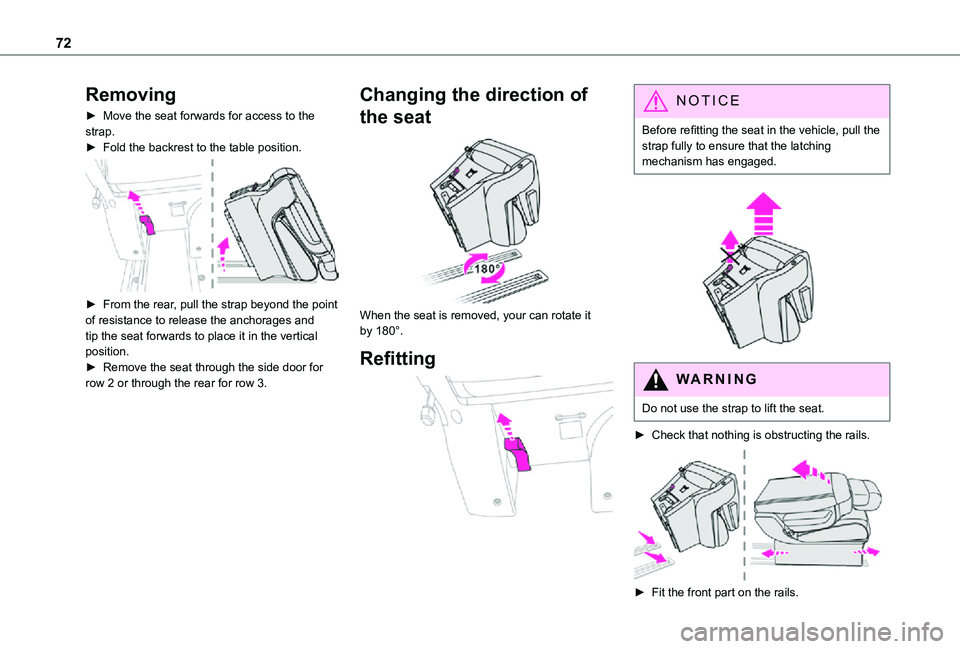
► Move the seat forwards for access to the strap.► Fold the backrest to the table position.
► From the rear, pull the strap beyond the point of resistance to release the anchorages and tip the seat forwards to place it in the vertical position.► Remove the seat through the side door for row 2 or through the rear for row 3.
Changing the direction of
the seat
When the seat is removed, your can rotate it by 180°.
Refitting
NOTIC E
Before refitting the seat in the vehicle, pull the strap fully to ensure that the latching mechanism has engaged.
WARNI NG
Do not use the strap to lift the seat.
► Check that nothing is obstructing the rails.
► Fit the front part on the rails.
Page 74 of 360

74
Depending on the country of sale, the wells can be dismantled and removed through the rear so that bulky objects can be stowed underneath the bench seat.
NOTIC E
Do not attach anything to the cab fixing structure.Do not exceed the number of passengers indicated on the registration certificate.In the rear, the loading area is intended for
carrying goods only.You are advised to place the goods or heavy objects as far forwards as possible in the loading area (towards the cab) and secure them by means of straps using the stowing rings on the floor.The rear seat belt frames are not designed to secure the load being carried.
Folding Crew Cab
The Crew Cab has a folding bench seat, seat belts and side windows. It is separated from the loading area by the bench seat by a high-strength grille.
Folded position
► With just one hand, pull one of the straps A upwards to fold the bench seat.
► Using handle B, guide the movement of the bench seat until it locks in the folded position.
Bench seat position
► To put the bench seat back in place, pull the strap C to unlock the bench seat, then release the strap.► Then, using only the handle B, guide the descent of the backrest to tip the assembly until it locks in the bench seat position.
Page 83 of 360
83
Ease of use and comfort
1
Retractable sliding table
PROACE VERSO
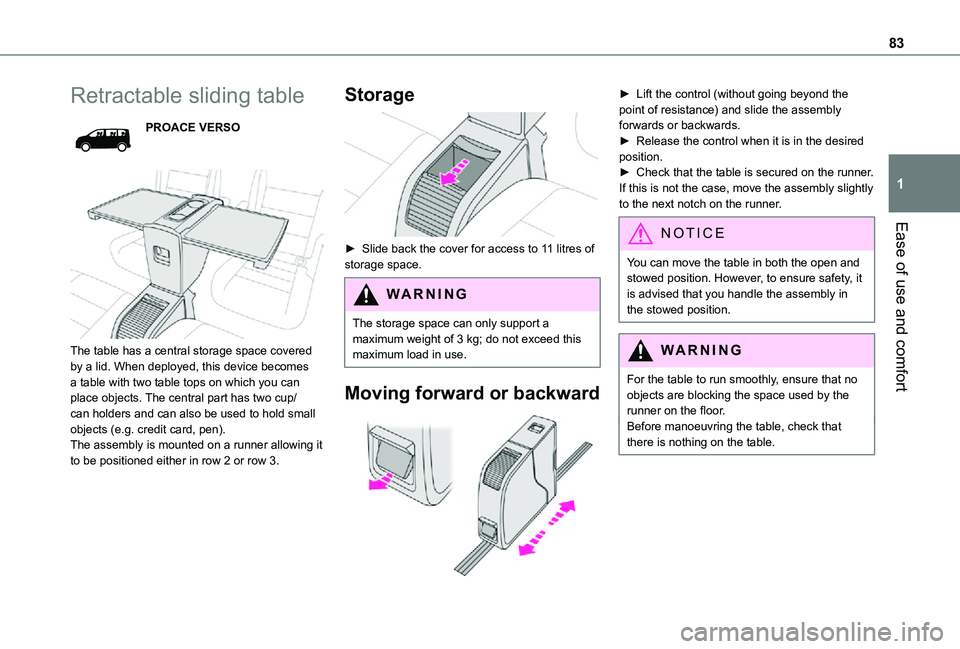
The table has a central storage space covered by a lid. When deployed, this device becomes a table with two table tops on which you can place objects. The central part has two cup/can holders and can also be used to hold small objects (e.g. credit card, pen).The assembly is mounted on a runner allowing it to be positioned either in row 2 or row 3.
Storage
► Slide back the cover for access to 11 litres of storage space.
WARNI NG
The storage space can only support a maximum weight of 3 kg; do not exceed this maximum load in use.
Moving forward or backward
► Lift the control (without going beyond the point of resistance) and slide the assembly forwards or backwards.► Release the control when it is in the desired position.► Check that the table is secured on the runner. If this is not the case, move the assembly slightly to the next notch on the runner.
NOTIC E
You can move the table in both the open and stowed position. However, to ensure safety, it is advised that you handle the assembly in the stowed position.
WARNI NG
For the table to run smoothly, ensure that no objects are blocking the space used by the runner on the floor.Before manoeuvring the table, check that there is nothing on the table.
Page 84 of 360
84
Unfolding
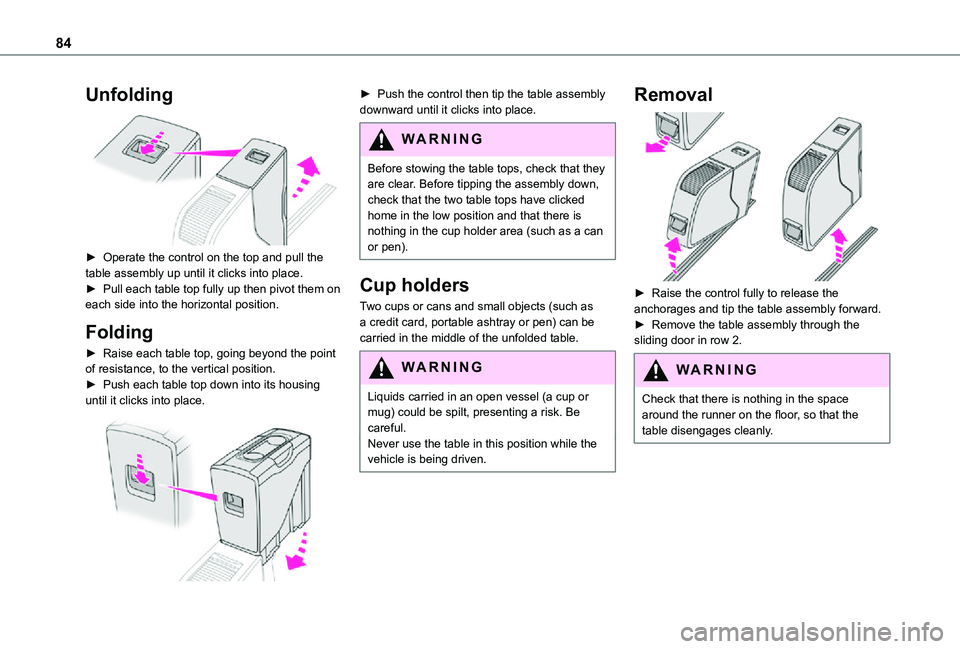
► Operate the control on the top and pull the table assembly up until it clicks into place.► Pull each table top fully up then pivot them on each side into the horizontal position.
Folding
► Raise each table top, going beyond the point of resistance, to the vertical position.► Push each table top down into its housing until it clicks into place.
► Push the control then tip the table assembly downward until it clicks into place.
WARNI NG
Before stowing the table tops, check that they are clear. Before tipping the assembly down, check that the two table tops have clicked home in the low position and that there is nothing in the cup holder area (such as a can
or pen).
Cup holders
Two cups or cans and small objects (such as a credit card, portable ashtray or pen) can be carried in the middle of the unfolded table.
WARNI NG
Liquids carried in an open vessel (a cup or mug) could be spilt, presenting a risk. Be careful.Never use the table in this position while the vehicle is being driven.
Removal
► Raise the control fully to release the anchorages and tip the table assembly forward. ► Remove the table assembly through the sliding door in row 2.
WARNI NG
Check that there is nothing in the space around the runner on the floor, so that the table disengages cleanly.
Page 85 of 360
85
Ease of use and comfort
1
Changing the direction
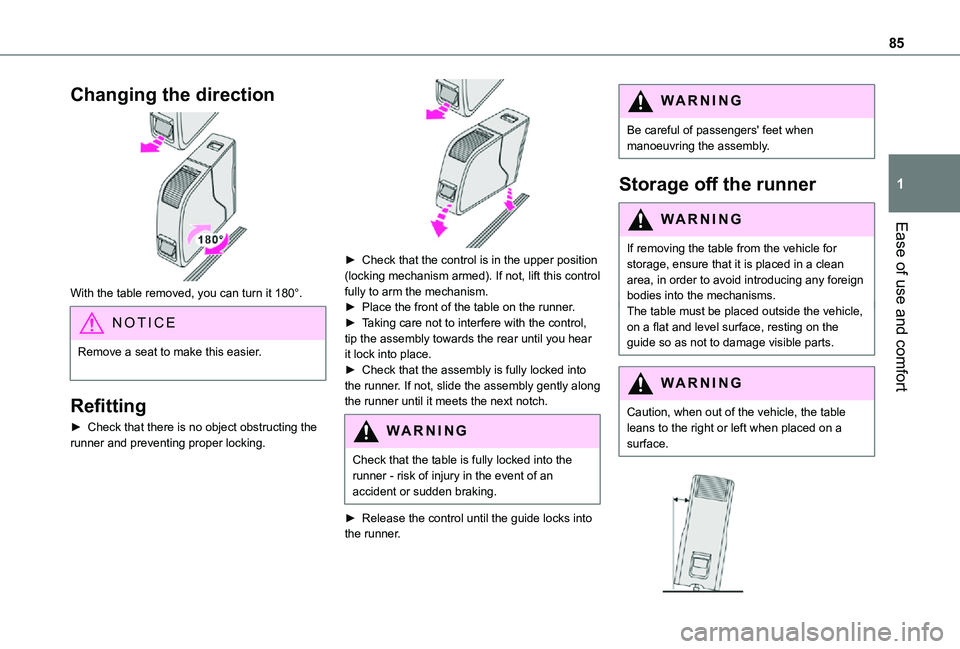
With the table removed, you can turn it 180°.
NOTIC E
Remove a seat to make this easier.
Refitting
► Check that there is no object obstructing the runner and preventing proper locking.
► Check that the control is in the upper position (locking mechanism armed). If not, lift this control fully to arm the mechanism.► Place the front of the table on the runner.► Taking care not to interfere with the control, tip the assembly towards the rear until you hear it lock into place.► Check that the assembly is fully locked into the runner. If not, slide the assembly gently along the runner until it meets the next notch.
WARNI NG
Check that the table is fully locked into the runner - risk of injury in the event of an accident or sudden braking.
► Release the control until the guide locks into the runner.
WARNI NG
Be careful of passengers' feet when manoeuvring the assembly.
Storage off the runner
WARNI NG
If removing the table from the vehicle for storage, ensure that it is placed in a clean area, in order to avoid introducing any foreign bodies into the mechanisms.The table must be placed outside the vehicle, on a flat and level surface, resting on the guide so as not to damage visible parts.
WARNI NG
Caution, when out of the vehicle, the table leans to the right or left when placed on a surface.
Page 105 of 360
105
Lighting and visibility
4
Wiper control lever
NOTIC E
Before operating the wipers in wintry conditions, clear any snow, ice or frost from the windscreen, and from around the wiper arms and blades.
WARNI NG
Do not operate the wipers on a dry windscreen. In extremely hot or cold weather, check that the wiper blades are not stuck to the windscreen before operating the wipers.
NOTIC E
After using an automatic car wash, you may temporarily notice abnormal noises and poorer wiping performance. You do not need to replace the wiper blades.
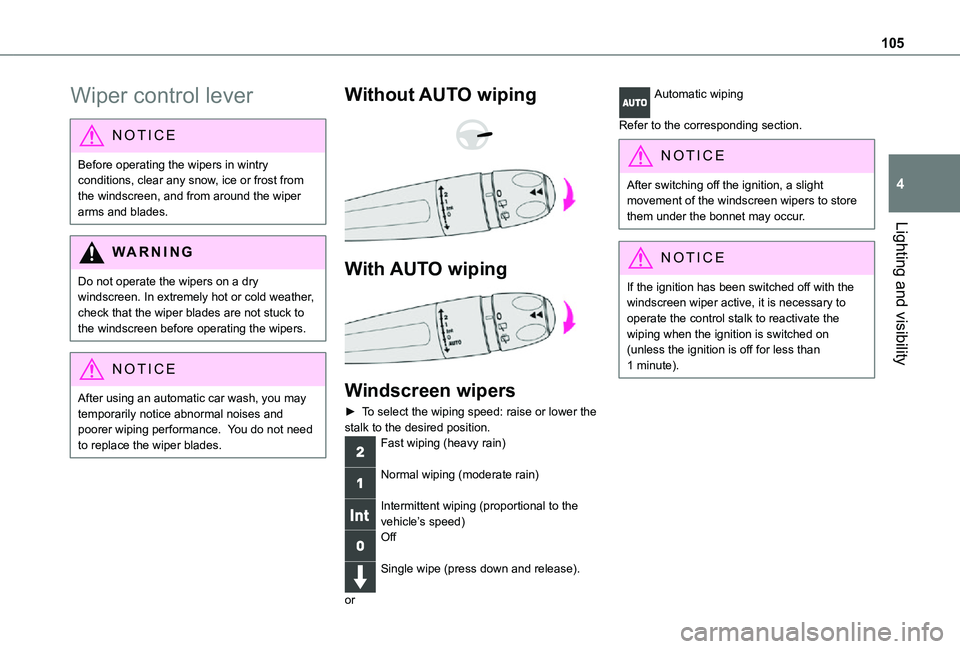
Without AUTO wiping
With AUTO wiping
Windscreen wipers
► To select the wiping speed: raise or lower the stalk to the desired position.Fast wiping (heavy rain)
Normal wiping (moderate rain)
Intermittent wiping (proportional to the vehicle’s speed)Off
Single wipe (press down and release).
or
Automatic wiping
Refer to the corresponding section.
NOTIC E
After switching off the ignition, a slight movement of the windscreen wipers to store them under the bonnet may occur.
NOTIC E
If the ignition has been switched off with the windscreen wiper active, it is necessary to operate the control stalk to reactivate the wiping when the ignition is switched on (unless the ignition is off for less than 1 minute).
Page 107 of 360

107
Lighting and visibility
4
Operating fault
If a fault occurs with the automatic windscreen wipers, the wipers will operate in intermittent mode.Have it checked by any authorized Toyota retailer or Toyota authorized repairer, or any reliable repairer.
WARNI NG
Do not cover the rain/sunshine sensor.Switch off the automatic windscreen wipers when using an automatic car wash.In winter, it is advisable to wait until the windscreen is completely clear of ice before activating the automatic rain sensitive wipers.
Rear wiper
Off.
Intermittent wipe.
Wash-wipe (set duration).
Reverse gear
When reverse gear is engaged, the rear wiper will come into operation automatically if the windscreen wipers are operating.
Activation/Deactivation
With audio system or touch screen
The system's settings are adjusted via the vehicle configuration menu.
NOTIC E
This function is activated by default.
WARNI NG
In the event of accumulation of snow or hard frost or if a bicycle carrier is fitted to the tailgate, deactivate the automatic rear wiper via the vehicle configuration menu.
Rear screenwash
► Turn the ring all the way towards the dashboard and hold.The screenwash and the wiper operate for as long as the ring remains turned.A final wiping cycle is performed when screenwashing ends.
Special position of the
windscreen wipers
This maintenance position is used while cleaning or replacing the wiper blades. It can also be useful, in wintry weather (ice, snow), to release the wiper blades from the windscreen.
NOTIC E
To maintain the effectiveness of the flat wiper blades, it is advisable to:– handle them with care.– clean them regularly using soapy water.– avoid using them to hold cardboard on the windscreen.– replace them at the first signs of wear.
Before removing a windscreen wiper blade
► Operating the wiper control stalk within one minute after switching off the ignition will place the wiper blades in a vertical position.
Page 108 of 360
108
► Proceed with the desired operation or the replacement of the wiper blades.
After refitting a windscreen wiper blade
► To return the wiper blades to their initial position, switch on the ignition and operate the wiper control stalk.
Changing a wiper blade
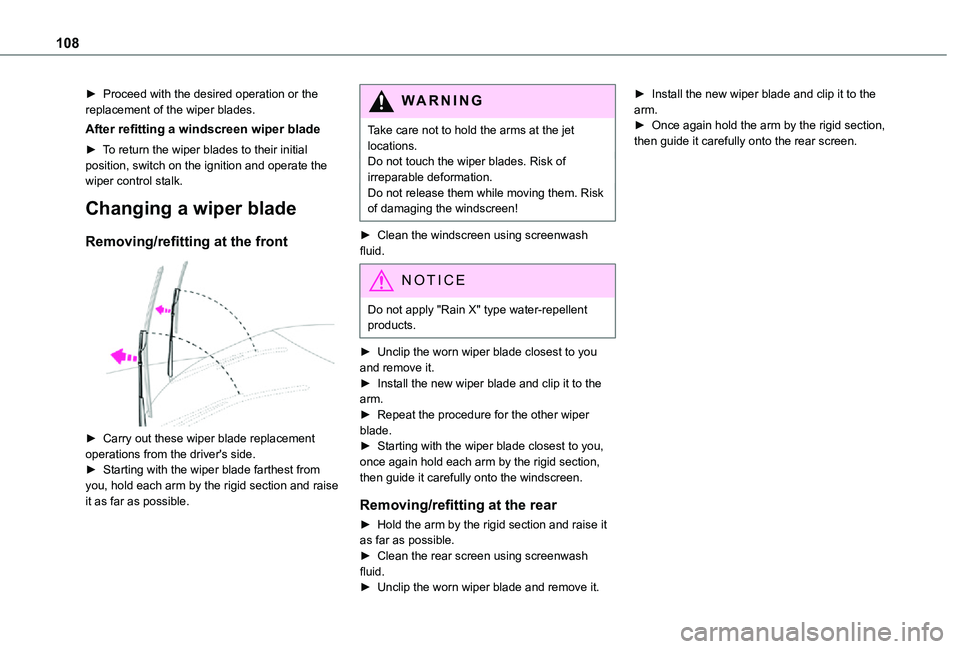
Removing/refitting at the front
► Carry out these wiper blade replacement
operations from the driver's side.► Starting with the wiper blade farthest from you, hold each arm by the rigid section and raise it as far as possible.
WARNI NG
Take care not to hold the arms at the jet locations.Do not touch the wiper blades. Risk of irreparable deformation.Do not release them while moving them. Risk of damaging the windscreen!
► Clean the windscreen using screenwash fluid.
NOTIC E
Do not apply "Rain X" type water-repellent products.
► Unclip the worn wiper blade closest to you and remove it.► Install the new wiper blade and clip it to the arm.► Repeat the procedure for the other wiper blade.► Starting with the wiper blade closest to you, once again hold each arm by the rigid section, then guide it carefully onto the windscreen.
Removing/refitting at the rear
► Hold the arm by the rigid section and raise it as far as possible.► Clean the rear screen using screenwash fluid.► Unclip the worn wiper blade and remove it.
► Install the new wiper blade and clip it to the arm.► Once again hold the arm by the rigid section, then guide it carefully onto the rear screen.