2021 TOYOTA PROACE EV Release
[x] Cancel search: ReleasePage 41 of 360

41
Access
2
NOTIC E
To deactivate this automatic locking, go to any authorized Toyota retailer or Toyota authorized repairer, or any reliable repairer.
Manual
► With complete unlocking activated, press this button to lock (indicator lamp comes on)/unlock (indicator lamp goes off) the vehicle.► With selective unlocking activated, press this button to lock (indicator lamp comes on)/unlock (indicator lamp goes off) the loading area.
WARNI NG
Driving with the doors locked could make it more difficult for the emergency services to enter the vehicle in an emergency.
NOTIC E
The indicator lamp goes off when unlocking one or more doors of the loading area.With the ignition off and the vehicle fully locked, the indicator lamp goes off for energy economy reasons.
Electric sliding side
door(s)
The exterior and interior door handles and the interior buttons allow the electrically powered movement of the door to be started.Opening and closing of the doors is accompanied by an audible signal.
Opening
With the exterior or interior handle
► With the door unlocked, pull and release the handle to start opening the door. Pull the handle again to reverse the direction of the door's movement.
With the remote control
► With the door unlocked, press and hold this button until the corresponding sliding side door has opened. ► Press this button again to reverse the direction of the door's movement.
NOTIC E
The remote control buttons are not active with the ignition switched on.
With the button(s) on the door pillar
With the button(s) at the front
Page 42 of 360
42
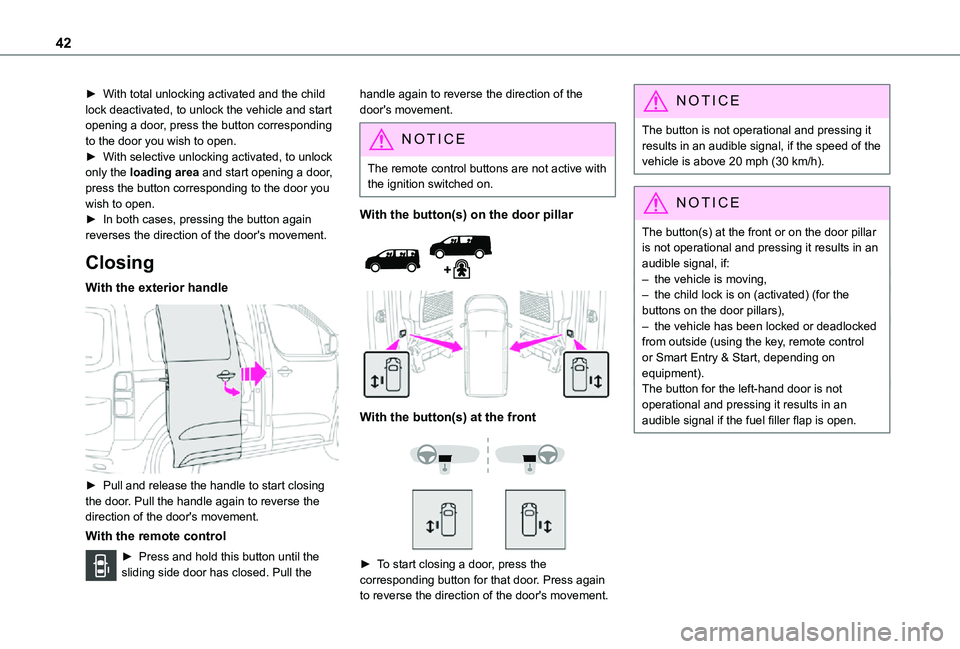
► With total unlocking activated and the child lock deactivated, to unlock the vehicle and start opening a door, press the button corresponding to the door you wish to open.► With selective unlocking activated, to unlock only the loading area and start opening a door, press the button corresponding to the door you wish to open.► In both cases, pressing the button again reverses the direction of the door's movement.
Closing
With the exterior handle
► Pull and release the handle to start closing the door. Pull the handle again to reverse the direction of the door's movement.
With the remote control
► Press and hold this button until the sliding side door has closed. Pull the
handle again to reverse the direction of the door's movement.
NOTIC E
The remote control buttons are not active with the ignition switched on.
With the button(s) on the door pillar
With the button(s) at the front
► To start closing a door, press the corresponding button for that door. Press again to reverse the direction of the door's movement.
NOTIC E
The button is not operational and pressing it results in an audible signal, if the speed of the vehicle is above 20 mph (30 km/h).
NOTIC E
The button(s) at the front or on the door pillar is not operational and pressing it results in an audible signal, if:– the vehicle is moving,– the child lock is on (activated) (for the buttons on the door pillars),– the vehicle has been locked or deadlocked from outside (using the key, remote control or Smart Entry & Start, depending on equipment).The button for the left-hand door is not operational and pressing it results in an audible signal if the fuel filler flap is open.
Page 43 of 360

43
Access
2
General
recommendations for the
sliding side doors
WARNI NG
Doors must only be operated when the vehicle is stationary.For your safety and that of your passengers, as well as for correct operation of the doors, you are strongly advised not to drive with a door open.Always check that it is safe to operate the door and in particular, be sure not to leave children or animals near the door controls without supervision.The audible warning, the lighting of the "door open" warning lamp and the message on the screen are there to remind you. Contact any authorized Toyota retailer or Toyota authorized repairer, or any reliable repairer if
you want to deactivate this warning.Lock the vehicle when you use an automatic car wash.
WARNI NG
Before opening or closing and while moving doors, ensure that no person, animal or object is in the door frame or any other position that would block the desired movement, inside or outside the vehicle.If this advice is not followed, injuries or damage may occur if any part of a person or an object is trapped or caught.Electrical door opening is disabled at speeds above 2 mph (3 km/h):– However, if the vehicle started moving while the doors were open, the speed must be reduced below 19 mph (30 km/h) before they can be closed.– Any attempt to open a door electrically using the interior handle while driving results in it only being possible to open the door manually.– This situation is accompanied by the audible warning, the lighting of the "door open" warning lamp and the message on the
screen. To release the door and be able to operate it again, it is necessary to stop the vehicle.
WARNI NG
Take care not to block the guide space on the floor so that the door can slide correctly.For safety and functional reasons, do not drive with the sliding side door open.
NOTIC E
The electric controls are disabled in the event of an impact. Manual opening and closing remain possible.
NOTIC E
While starting the engine, door movements are paused, resuming when the engine is running.
NOTIC E
Depending on the engine fitted, if the door is closed and an opening request is issued in Stop mode of Stop & Start, the door will open slightly and then stop. In Start mode, the door will resume its movement when the engine re-starts.
Page 51 of 360

51
Access
2
Electric windows
1.Left-hand electric window control.
2.Right-hand electric window control.
Operation
► To open/close the window manually, press/pull the switch without passing the point of resistance; the window stops as soon as the switch is released.► To open/close the window automatically, press/pull the switch fully, beyond the point of resistance; the window opens/closes completely when the switch is released (pressing the switch again stops the movement of the window).
NOTIC E
The electric window controls remain operational for about 45 seconds after the ignition is switched off if the front doors are not open.After that time, the controls are disabled. To reactivate them, switch the ignition on again.
Safety anti-pinch
If your vehicle is fitted with the safety anti-pinch function, when the window rises and meets an obstacle, it stops and partially lowers.In the event of unwanted opening of the window on closing, press the control until the window opens completely. Within 4 seconds, pull the control until the window closes.The safety anti-pinch does not operate while doing this.
Reinitialising the electric
windows
After reconnecting the battery, or in the event of abnormal window movement, the anti-pinch function must be reinitialised.The anti-pinch function is disabled during the following sequence of operations.For each window:► Lower the window fully, then raise it; it will rise in steps of a few centimetres each time the control is pressed. Repeat the operation until the
window is fully closed.► Continue to pull the control for at least one second after the window reaches the closed position.
WARNI NG
If an electric window meets an obstacle during operation, the movement of the window must be reversed. To do this, press the relevant switch.When the driver operates the passenger electric window switch, it is important to ensure that nothing can prevent the window from closing properly.Pay particular attention to children when operating windows.
Page 52 of 360

52
Correct driving position
Before taking to the road and to make the most of the ergonomic layout of the instruments and controls, carry out these adjustments in the following order:– head restraint height.– seat backrest angle.– seat cushion height.– longitudinal seat position.– steering wheel height and reach.– rear view mirror and door mirrors.
WARNI NG
Once these adjustments have been made, check that the instrument panel can be viewed correctly from your driving position.
Manually-adjusted front
seats
NOTIC E
For more information on the Seat belts, refer to the corresponding section.
Longitudinal
► Raise the control bar and slide the seat forwards or backwards.► Release the bar to lock the seat in position on one of the notches.
WARNI NG
Before moving the seat backwards, ensure that there is nothing that might prevent the full travel of the seat.There is a risk of trapping or pinching passengers if present in the rear seats or
jamming the seat if large objects are placed on the floor behind the seat.
Height
► Pull the control upwards to raise the seat or push it downwards to lower the seat, until the position required is obtained.
Backrest angle
► Depending on equipment, turn the knob or pull the control all the way up and tilt the backrest forwards or backwards to adjust it.
Lumbar
► Turn the knob manually to obtain the desired level of lumbar support.
Page 53 of 360
53
Ease of use and comfort
1
Table position of the driver's
and/or the front passenger
seat backrest
On the front passenger side, this position allows long objects to be carried.On the driver's side, this position allows rear passengers to be helped out of the vehicle (by the emergency services).
WARNI NG
Check that there is no object that could interfere with the movement of a seat, both above and below.
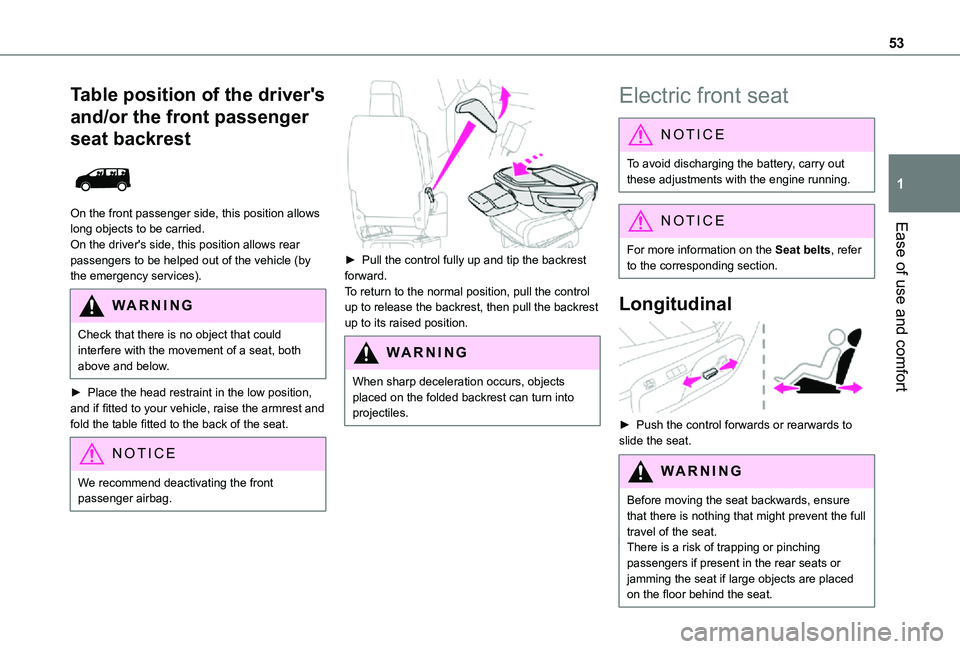
► Place the head restraint in the low position, and if fitted to your vehicle, raise the armrest and fold the table fitted to the back of the seat.
NOTIC E
We recommend deactivating the front passenger airbag.
► Pull the control fully up and tip the backrest forward.To return to the normal position, pull the control up to release the backrest, then pull the backrest up to its raised position.
WARNI NG
When sharp deceleration occurs, objects placed on the folded backrest can turn into projectiles.
Electric front seat
NOTIC E
To avoid discharging the battery, carry out these adjustments with the engine running.
NOTIC E
For more information on the Seat belts, refer to the corresponding section.
Longitudinal
► Push the control forwards or rearwards to slide the seat.
WARNI NG
Before moving the seat backwards, ensure that there is nothing that might prevent the full travel of the seat.There is a risk of trapping or pinching passengers if present in the rear seats or jamming the seat if large objects are placed on the floor behind the seat.
Page 57 of 360
57
Ease of use and comfort
1
Adjustment of intensity
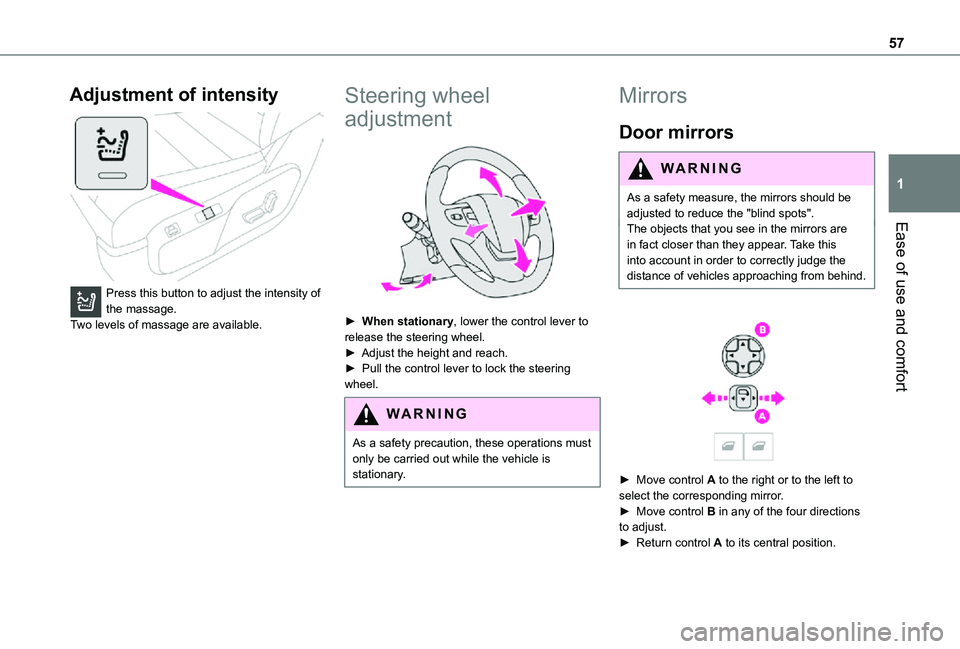
Press this button to adjust the intensity of the massage.Two levels of massage are available.
Steering wheel
adjustment
► When stationary, lower the control lever to release the steering wheel.► Adjust the height and reach.► Pull the control lever to lock the steering wheel.
WARNI NG
As a safety precaution, these operations must only be carried out while the vehicle is stationary.
Mirrors
Door mirrors
WARNI NG
As a safety measure, the mirrors should be adjusted to reduce the "blind spots".The objects that you see in the mirrors are in fact closer than they appear. Take this into account in order to correctly judge the distance of vehicles approaching from behind.
► Move control A to the right or to the left to select the corresponding mirror.► Move control B in any of the four directions to adjust.► Return control A to its central position.
Page 59 of 360
59
Ease of use and comfort
1
Smart Cargo
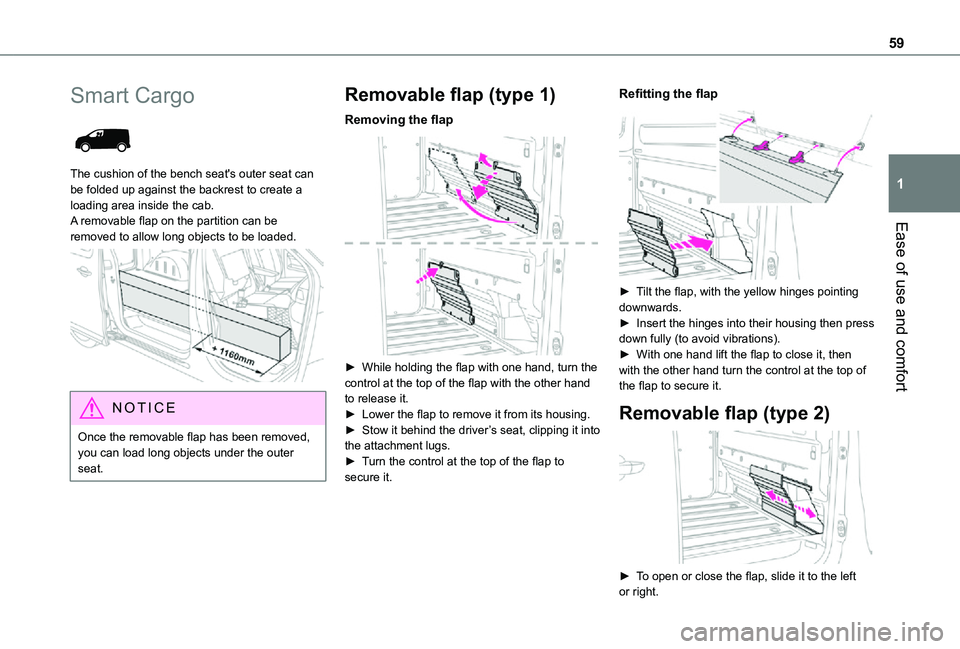
The cushion of the bench seat's outer seat can be folded up against the backrest to create a loading area inside the cab. A removable flap on the partition can be removed to allow long objects to be loaded.
NOTIC E
Once the removable flap has been removed, you can load long objects under the outer seat.
Removable flap (type 1)
Removing the flap
► While holding the flap with one hand, turn the control at the top of the flap with the other hand to release it.► Lower the flap to remove it from its housing.► Stow it behind the driver’s seat, clipping it into the attachment lugs.► Turn the control at the top of the flap to secure it.
Refitting the flap
► Tilt the flap, with the yellow hinges pointing downwards.► Insert the hinges into their housing then press down fully (to avoid vibrations).► With one hand lift the flap to close it, then with the other hand turn the control at the top of the flap to secure it.
Removable flap (type 2)
► To open or close the flap, slide it to the left or right.