2021 TOYOTA PROACE EV settings
[x] Cancel search: settingsPage 66 of 360
66
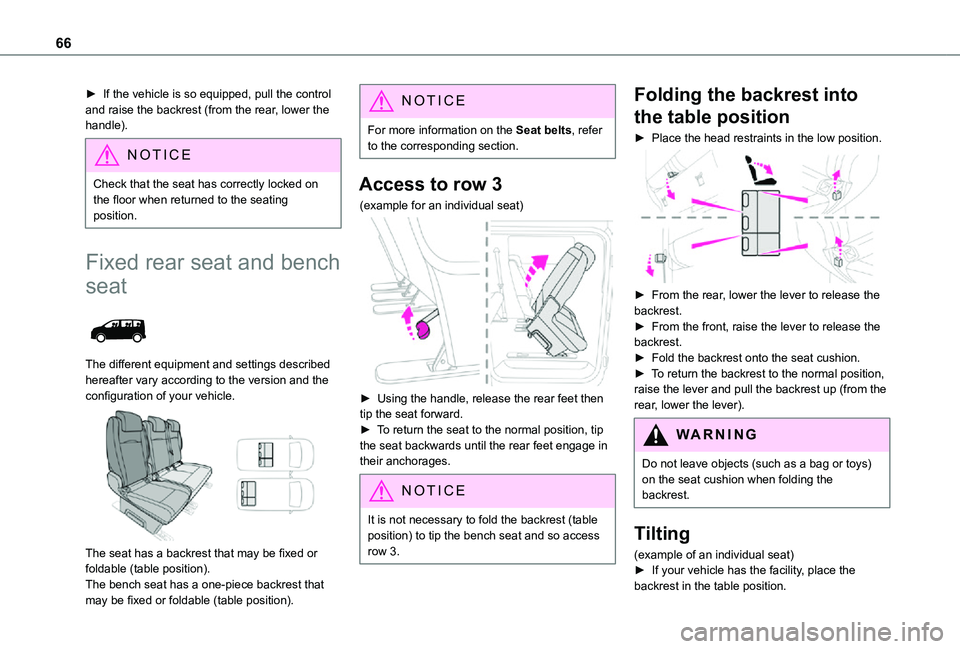
► If the vehicle is so equipped, pull the control and raise the backrest (from the rear, lower the handle).
NOTIC E
Check that the seat has correctly locked on the floor when returned to the seating position.
Fixed rear seat and bench
seat
The different equipment and settings described hereafter vary according to the version and the configuration of your vehicle.
The seat has a backrest that may be fixed or foldable (table position).The bench seat has a one-piece backrest that may be fixed or foldable (table position).
NOTIC E
For more information on the Seat belts, refer to the corresponding section.
Access to row 3
(example for an individual seat)
► Using the handle, release the rear feet then tip the seat forward.► To return the seat to the normal position, tip
the seat backwards until the rear feet engage in their anchorages.
NOTIC E
It is not necessary to fold the backrest (table position) to tip the bench seat and so access
row 3.
Folding the backrest into
the table position
► Place the head restraints in the low position.
► From the rear, lower the lever to release the backrest.► From the front, raise the lever to release the backrest.► Fold the backrest onto the seat cushion.► To return the backrest to the normal position, raise the lever and pull the backrest up (from the rear, lower the lever).
WARNI NG
Do not leave objects (such as a bag or toys) on the seat cushion when folding the backrest.
Tilting
(example of an individual seat)► If your vehicle has the facility, place the backrest in the table position.
Page 68 of 360
68
Rear seat and bench seat
on rails
PROACE VERSO
The different equipment and settings described hereafter vary according to the version and the configuration of your vehicle.
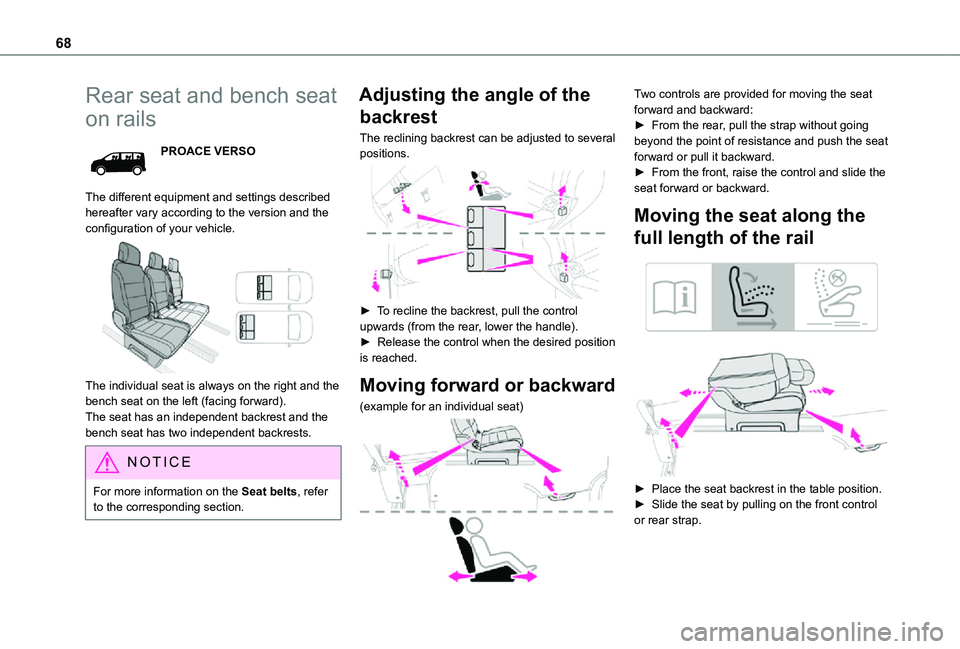
The individual seat is always on the right and the bench seat on the left (facing forward).The seat has an independent backrest and the bench seat has two independent backrests.
NOTIC E
For more information on the Seat belts, refer to the corresponding section.
Adjusting the angle of the
backrest
The reclining backrest can be adjusted to several positions.
► To recline the backrest, pull the control upwards (from the rear, lower the handle).► Release the control when the desired position is reached.
Moving forward or backward
(example for an individual seat)
Two controls are provided for moving the seat forward and backward:► From the rear, pull the strap without going beyond the point of resistance and push the seat forward or pull it backward.► From the front, raise the control and slide the seat forward or backward.
Moving the seat along the
full length of the rail
► Place the seat backrest in the table position.► Slide the seat by pulling on the front control or rear strap.
Page 70 of 360
70
Refitting
NOTIC E
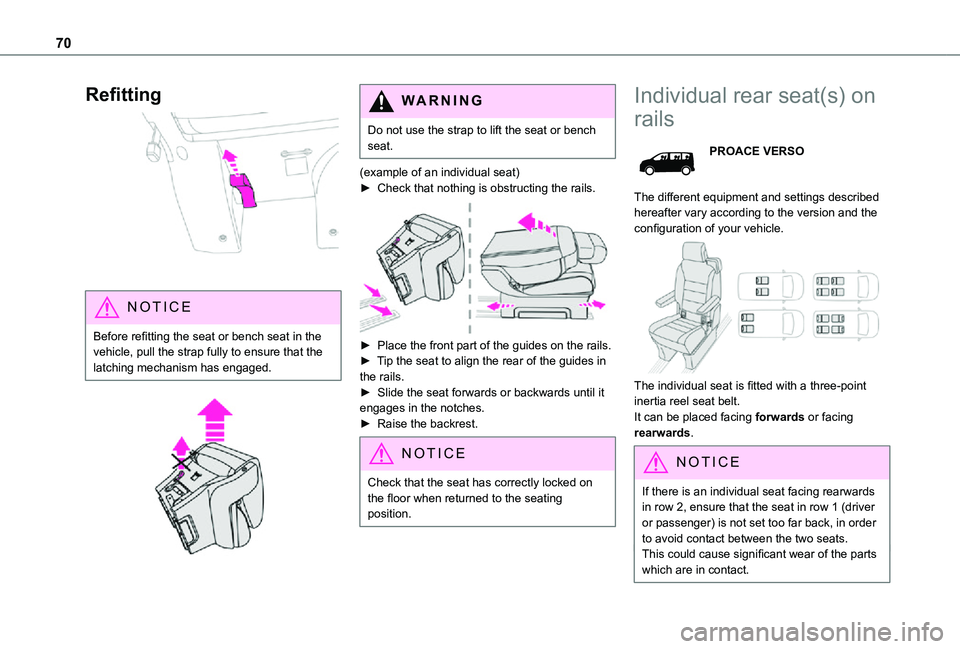
Before refitting the seat or bench seat in the vehicle, pull the strap fully to ensure that the latching mechanism has engaged.
WARNI NG
Do not use the strap to lift the seat or bench seat.
(example of an individual seat)► Check that nothing is obstructing the rails.
► Place the front part of the guides on the rails.► Tip the seat to align the rear of the guides in the rails.► Slide the seat forwards or backwards until it engages in the notches.► Raise the backrest.
NOTIC E
Check that the seat has correctly locked on the floor when returned to the seating position.
Individual rear seat(s) on
rails
PROACE VERSO
The different equipment and settings described hereafter vary according to the version and the configuration of your vehicle.
The individual seat is fitted with a three-point inertia reel seat belt.It can be placed facing forwards or facing rearwards.
NOTIC E
If there is an individual seat facing rearwards in row 2, ensure that the seat in row 1 (driver or passenger) is not set too far back, in order to avoid contact between the two seats.This could cause significant wear of the parts which are in contact.
Page 93 of 360

93
Ease of use and comfort
1
Activation/Deactivation
Depending on version, this button is accessible at the front, from the dual-zone automatic air conditioning control panel.► Press this button to activate/deactivate the operation of the rear controls.
Additional heating/
ventilation system
Heating
This is an additional and separate system which
heats the passenger compartment and improves defrosting performance.
This indicator lamp is lit while the system is programmed or set in operation remotely via the remote control.It flashes during the whole duration of the heating and goes off at the end of the heating cycle or when stopped using the remote control.
Ventilation
This system allows ventilation of the passenger compartment with exterior air to improve the temperature experienced on entering the vehicle in summer.
Programming
With a TOYOTA Pro Touch with navigation system, use the remote control to start/stop the additional heating.With a Bluetooth® audio system or a TOYOTA Pro Touch, use the remote control to start/stop the additional heating and/or adjust the pre-heating times.
With Bluetooth® audio system
► Press the MENU button to access the main menu. ► Select "Pre-heat. / Pre-ventil.".► Select "Activation" and, if necessary, for programming, “Parameters".
► Select "Heating" to heat the engine and passenger compartment or "Ventilation" to ventilate the passenger compartment.
► Select:• the first clock to set/save the time at which the pre-heating temperature will be reached,
• the second clock to set/save a second time at which the pre-heating temperature will be reached,
N OTIC E
Using these two clocks and depending on the season you can, for example, select one or the other start time.A message on the screen confirms your choice.
With TOYOTA Pro Touch
Press Connect-App to display the main page.Then press "Programmable heating/ventilation".► Select the "Status" tab to activate/deactivate the system.► Select the "Other settings" tab to choose the "Heating" mode, to heat the engine and
Page 94 of 360

94
passenger compartment, or "Ventilation" to ventilate the passenger compartment.► Then set/save the time at which the preheating temperature will be reached for each selection.Press this button to save.
With TOYOTA Pro Touch with
navigation system
In the Applications > Vehicle apps menu:► Select AIR CON programming.
► Press the Status tab to activate/deactivate the system.► Press the Settings tab to select Heating mode to heat the engine and passenger compartment or Ventilation mode to ventilate the passenger compartment.► Then programme/save the activation time for each selection.► Press OK to confirm.
NOTIC E
You must allow at least 60 minutes between programming operations.
NOTIC E
Depending on the outside temperature, a certain amount of pre-conditioning time is necessary in order to reach the programmed temperature by the stored activation time.This pre-conditioning time lasts up to 45 min.
Long range remote control
This enables you to switch the heating in the passenger compartment on or off from a distance.The remote control has a range of about 1 km (0.6 miles) in open country.
On
► Pressing and holding this button starts the heating immediately (confirmed by the green indicator lamp coming on briefly).
Off
► Pressing and holding this button stops the heating immediately (confirmed by the red indicator lamp coming on briefly).
NOTIC E
The indicator lamp in the remote control flashes for about 2 seconds if the vehicle has not received the signal, in which case
you should move to a different location and repeat the command.
Changing the battery
The indicator lamp in the remote control will change to orange if the battery charge is low.If the indicator lamp is not on, the battery is discharged.
► Use a coin to unscrew the cap and replace the battery.
Page 102 of 360

102
Exterior welcome lighting
The remote operation of the lighting makes your approach to the vehicle easier in poor light. It is activated when the lighting control is in the "AUTO" position and the level of light detected by the sunshine sensor is low.
Switching on
Press this button on the remote control or on one of the front door handles with the "Smart Entry & Start" system.The dipped beam headlamps and sidelamps come on; your vehicle is also unlocked.
Switching off
The exterior welcome lighting switches off automatically after a set time, when the ignition is switched on or on locking the vehicle.
Programming
With audio system or touch screen
The activation, deactivation and
duration of the welcome lighting can be set via the vehicle configuration menu.
Cornering lighting
This system makes use of the beam from a front foglamp to illuminate the inside of a bend, when the main or dipped beam headlamps are on and the vehicle speed is below 25 mph (40 km/h) (urban driving, winding road, junctions, parking manoeuvres).
Without/With cornering lighting
Switching on / off
This system starts:– when the corresponding direction indicator is switched on.or– from a certain angle of rotation of the steering wheel.It becomes inactive:– below a certain angle of rotation of the steering wheel.– above 25 mph (40 km/h).– when reverse gear is engaged.
Programming
With audio system or touch screen
The system's settings are adjusted via the vehicle configuration menu.
Automatic headlamp
dipping
When the ring is in the "AUTO” position, this system automatically switches between dipped and main beam headlamps according to the lighting and traffic conditions, using a camera located at the top of the windscreen.
Page 103 of 360
103
Lighting and visibility
4
WARNI NG
This system is a driving aid.The driver remains responsible for the vehicle's lighting, its correct use for the prevailing conditions of light, visibility and traffic, and for observation of driving and vehicle regulations.
NOTIC E
The system will be operational as soon as you exceed 25 km/h (16 mph).If the speed drops below 15 km/h (9 mph), the system no longer operates.
Activation/Deactivation
With/without audio system
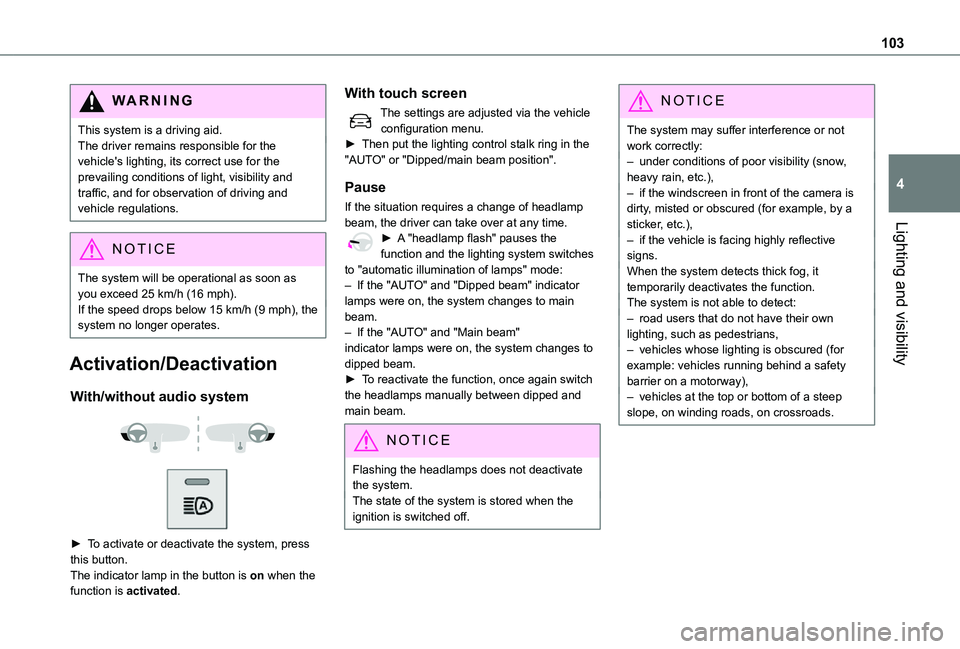
► To activate or deactivate the system, press this button.The indicator lamp in the button is on when the function is activated.
With touch screen
The settings are adjusted via the vehicle configuration menu.► Then put the lighting control stalk ring in the "AUTO" or "Dipped/main beam position".
Pause
If the situation requires a change of headlamp beam, the driver can take over at any time.► A "headlamp flash" pauses the function and the lighting system switches to "automatic illumination of lamps" mode:– If the "AUTO" and "Dipped beam" indicator lamps were on, the system changes to main beam.– If the "AUTO" and "Main beam" indicator lamps were on, the system changes to dipped beam.► To reactivate the function, once again switch the headlamps manually between dipped and main beam.
NOTIC E
Flashing the headlamps does not deactivate the system.The state of the system is stored when the ignition is switched off.
NOTIC E
The system may suffer interference or not work correctly:– under conditions of poor visibility (snow, heavy rain, etc.),– if the windscreen in front of the camera is dirty, misted or obscured (for example, by a sticker, etc.),– if the vehicle is facing highly reflective signs.When the system detects thick fog, it temporarily deactivates the function.The system is not able to detect:– road users that do not have their own lighting, such as pedestrians,– vehicles whose lighting is obscured (for example: vehicles running behind a safety barrier on a motorway),– vehicles at the top or bottom of a steep slope, on winding roads, on crossroads.
Page 107 of 360

107
Lighting and visibility
4
Operating fault
If a fault occurs with the automatic windscreen wipers, the wipers will operate in intermittent mode.Have it checked by any authorized Toyota retailer or Toyota authorized repairer, or any reliable repairer.
WARNI NG
Do not cover the rain/sunshine sensor.Switch off the automatic windscreen wipers when using an automatic car wash.In winter, it is advisable to wait until the windscreen is completely clear of ice before activating the automatic rain sensitive wipers.
Rear wiper
Off.
Intermittent wipe.
Wash-wipe (set duration).
Reverse gear
When reverse gear is engaged, the rear wiper will come into operation automatically if the windscreen wipers are operating.
Activation/Deactivation
With audio system or touch screen
The system's settings are adjusted via the vehicle configuration menu.
NOTIC E
This function is activated by default.
WARNI NG
In the event of accumulation of snow or hard frost or if a bicycle carrier is fitted to the tailgate, deactivate the automatic rear wiper via the vehicle configuration menu.
Rear screenwash
► Turn the ring all the way towards the dashboard and hold.The screenwash and the wiper operate for as long as the ring remains turned.A final wiping cycle is performed when screenwashing ends.
Special position of the
windscreen wipers
This maintenance position is used while cleaning or replacing the wiper blades. It can also be useful, in wintry weather (ice, snow), to release the wiper blades from the windscreen.
NOTIC E
To maintain the effectiveness of the flat wiper blades, it is advisable to:– handle them with care.– clean them regularly using soapy water.– avoid using them to hold cardboard on the windscreen.– replace them at the first signs of wear.
Before removing a windscreen wiper blade
► Operating the wiper control stalk within one minute after switching off the ignition will place the wiper blades in a vertical position.