Page 87 of 310
87
1. BASIC OPERATION
PRIUS_Navi_OM47E22U_(U)
20.03.26 18:17
AUDIO SYSTEM
31Select the “DSP” tab and select the
desired item to be set.
Type A
2Select “Automatic Sound Levelizer” .
3Select “High”, “Mid”, “Low”, or
“Off” .
Type B
2Select “Automatic Sound Levelizer” .
3Select on or off.
USB video
1Display the audio control screen.
(P.82)
2Select “Options”.
3Select “Wide” .
4Select the desired i tem to be adjusted.
DSP CONTROL
The system adjusts to the optimum vol-
ume and tone quality according to ve-
hicle speed to compensate for
increased vehicle noise.AUDIO SCREEN
ADJUSTMENT
SCREEN SIZE SETTINGS
The screen size can be selected for
each type of media.
No.Function
Select to display a 4 : 3 screen, with
either side in black.
Select to enlarge the image horizon-
tally and vertically to full screen.
Select to enlarge the image by the
same ratio horizontally and vertically.
Page 88 of 310
88
1. BASIC OPERATION
PRIUS_Navi_OM47E22U_(U)
20.03.26 18:17
USB video
1Display the audio control screen.
(P.82)
2Select “Options”.
3Select “Display”.
4Select the desired i tem to be adjusted.
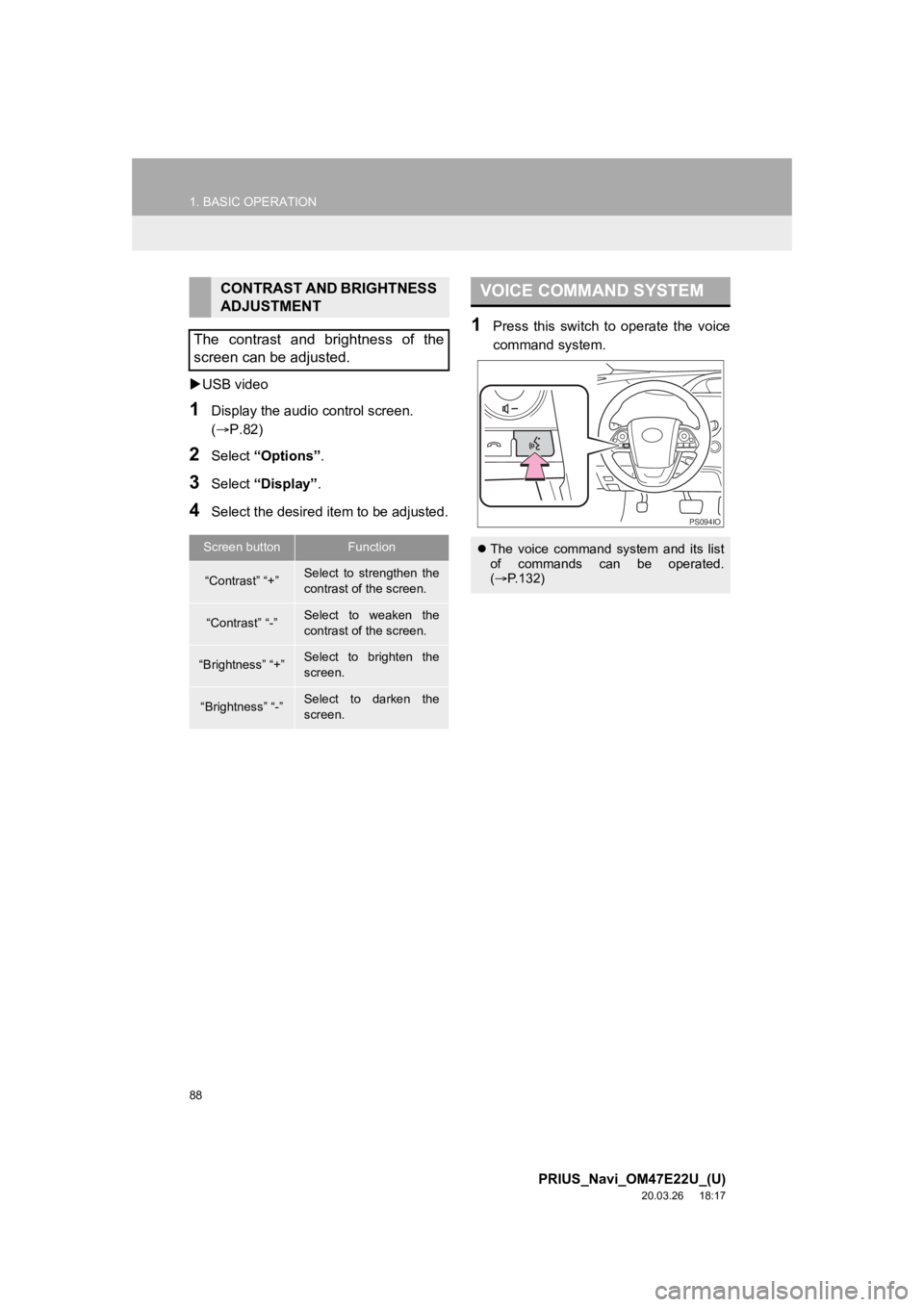
1Press this switch to operate the voice
command system.
CONTRAST AND BRIGHTNESS
ADJUSTMENT
The contrast and brightness of the
screen can be adjusted.
Screen buttonFunction
“Contrast” “+”Select to strengthen the
contrast of the screen.
“Contrast” “-”Select to weaken the
contrast of the screen.
“Brightness” “+”Select to brighten the
screen.
“Brightness” “-”Select to darken the
screen.
VOICE COMMAND SYSTEM
The voice command system and its list
of commands can be operated.
( P.132)
PS094IO
Page 89 of 310
89
PRIUS_Navi_OM47E22U_(U)
20.03.26 18:17
AUDIO SYSTEM
3
2. RADIO OPERATION
1. AM/FM RADIO
OVERVIEW
Select “AM” or “FM” on the “Select Audio Source” screen. ( P.84)
No.Function
Select to display HD) multicast channels available. ( P.95)
Select to display the cache radio operation buttons. ( P.92)
Select to display the radio preset buttons. ( P.91)
Select to display a list o f receivable stations. (P.92)
Select to turn HD Radio mode on/off.
When the “HD Radio” indicator is off, the station list shows only analog broadcasts.
Select to scan for receivable stations.
When a program type is selected: Select to scan for receivable stations of the selected
program type/channel category.
Select to change the screen buttons (at the bottom of the scree n) to the optional screen
buttons.
Select to step up/down frequencies.
Select and hold to seek for a station.
Select to display text messages.
When “Options” is selected
Page 91 of 310

91
2. RADIO OPERATION
PRIUS_Navi_OM47E22U_(U)
20.03.26 18:17
AUDIO SYSTEM
3
1Select “Presets” .
2Select the desired item.
1Tune in the desi red station.
2Select “Presets” .
3Select and hold “(Add New)”.
To change a previously registered preset
station to a different one, select and hold
the preset station.
When “(Add New)” is selected, a confir-
mation message appears. Select “Yes”
and select “OK”.
PRESET BUTTON SCREEN
Two preset button screens are avail-
able: the “Mixed Presets” screen and
“Individual Presets” screen.
On the “Mixed Presets” screen, preset
stations for all radio modes (AM, FM
and XM Satellite Radio modes) are dis-
played together.
On the “Individual Presets” screen,
only preset stations for the current ra-
dio mode are displayed.
No.Function
Select to tune in to the desired pre-
set station/channel.
Select to change to the “Individual
Presets” screen. (On the “Individual
Presets” screen, select “Mixed Pre-
sets” to change to the “Mixed Pre-
sets” screen.
Select to step up/down frequencies.
Select to display the control screen.
INFORMATION
● On the “Mixed Presets” screen, up to 36
stations (6 stations per page x 6 pages)
can be set as presets.
On the “Individual Presets” screen, up to
another 12 AM stations, 12 FM stations,
and 12 XM Satellite Radio stations can
be set as presets. (Maximum 36 sta-
tions)
PRESETTING A STATION
INFORMATION
●The number of preset radio stations dis-
played on the screen can be changed.
( P.121)
Page 92 of 310
92
2. RADIO OPERATION
PRIUS_Navi_OM47E22U_(U)
20.03.26 18:17
1Select “Station List”.
2FM radio only: Select the desired pro-
gram type.
3Select the desired station.
“Info” : Select to display the control
screen.
■REFRESHING THE STATION LIST
1Select “Refresh” on the “Station List”
screen and the following screen will be
displayed.
“Cancel Refresh” : Select to cancel the
refresh.
“Source” : Select to change to another au-
dio source while refreshing.1Select on the right side of the
screen.
SELECTING A STATION
FROM THE LIST
INFORMATION
● The audio system sound is muted during
refresh operation.
● In some situations, it may take some
time to update the station list.
CACHING A RADIO
PROGRAM
A radio program can be cached and
played back in a time-shifted manner.
PLAYING BACK THE CACHE
MANUALLY
The broadcast cached in the program
cache can be played back manually.
Page 93 of 310

93
2. RADIO OPERATION
PRIUS_Navi_OM47E22U_(U)
20.03.26 18:17
AUDIO SYSTEM
3
2Select the desired cache radio opera-
tion button.
No.Function
Select: Skips backward 2 minutes
Select and hold: Fast rewinds con-
tinuously
Returns to the live radio broadcast
Pauses the playback (To restart, se-
lect )
Select: Skips forward 2 minutes
Select and hold: Fast forwards con-
tinuously
Hides the cache operation buttons
Vertical bar: Shows what portion of
the cached broadcast is currently
playing
Light blue bar: Shows time in which
cache writing is in progress
AUTOMATIC PLAYBACK OF
THE CACHE
If the radio broadcast is interrupted by
another audio output, such as an
incoming phone call, the system will
automatically cache the interrupted
portion and perform time-shift
playback when the interruption ends.
To manually operate the cache
operation: ( P.92)
INFORMATION
●The system can store up to 15 minutes.
Cached data will be erased when the
radio mode or station is changed or
when the audio system is turned off.
● If noise or silence occurs during the
caching process, cache writing will con-
tinue, with the noise or silence recorded
as is. In this case, the cached broadcast
will contain the noise or silence when
played back.
Page 94 of 310

94
2. RADIO OPERATION
PRIUS_Navi_OM47E22U_(U)
20.03.26 18:17
1Select “Options”.
2Select “Type” .
3Select to select a program type/chan-
nel category.
Once a program type has been set,
“TYPE SEEK” will appear on the screen.
The program list is in the following order:
• “Classical”
• “Country”
• “Easy Listening”
• “Information”
• “Jazz”
• “News”
• “Oldies”
• “Other”
• “Pop Music”
• “Religion”
• “Rock”
• “R&B” (Rhythm and Blues)
• “Sports”
•“Talk”
• “Traffic” (Not available when “HD Radio”
indicator is off.)
• “Emergency Alert”
4Select “TYPE SEEK” and the system
will start to seek for stations in the rele-
vant program typ e/channel category.
RADIO BROADCAST DATA
SYSTEM
This audio system is equipped with Ra-
dio Broadcast Data Systems (RBDS).
RBDS mode allows text messages to
be received from radio stations that uti-
lize RBDS transmitters.
When RBDS is on, the radio can
— only select stations of a particular
program type,
— display messages from radio sta-
tions,
— search for a stronger signal station.
RBDS features are available only
when listening to an FM station that
broadcasts RBDS information and the
“FM Info” indicator is on.
SELECTING A DESIRED
PROGRAM TYPEINFORMATION
●If no relevant program can be found, “no
type” will appear on the screen.
Page 95 of 310

95
2. RADIO OPERATION
PRIUS_Navi_OM47E22U_(U)
20.03.26 18:17
AUDIO SYSTEM
3
1Select the “HD)” logo.
2Select the desired channel.
Press the “TUNE” button can also select
the desired multicast channel.
USING HD Radio ™
TECHNOLOGY
HD Radio ™
Technology is the digital
evolution of analog AM/FM radio. Your
radio product has a special receiver
which allows it to receive digital broad-
casts (where available) in addition to
the analog broadcasts it already re-
ceives. Digital broadcasts have better
sound quality than analog broadcasts
as digital broadcasts provide free, crys-
tal clear audio with no static or distor-
tion. For more information, and a guide
to available radio stations and pro-
gramming, refer to www.hdradio.com
.
HD Radio features included in
Toyota radios:
Digital Sound HD Radio broadcasts
deliver crystal-clear, digital audio quality
to listeners.
HD2/HD3 Channels FM stations can
provide additional digital only audio pro-
gramming with expanded content and
format choices on HD2/HD3 channels.
PSD Program Service Data (PSD)
gives you on-screen information such as
artist name and song title.
Artist Experience Images related to
the broadcast are displayed on the radio
screen, such as album cover art and sta-
tion logos.
HD Radio Technology manufactured
under license from iBiquity Digital
Corporation. U.S. and Foreign
Patents. For patents see http://
dts.com/patents. HD Radio and the
HD, HD Radio, and “ARC” logos are
registered trademarks or trademarks
of iBiquity Digital Corporation in the
United States and/or other countries.
AVAILABLE HD Radio ™
TECHNOLOGY
MULTICAST
On the FM radio frequency most digital
stations have “multiple” or supplemen-
tal programs on one FM station.