2627-4. Panoramic view monitor (vehicles with Toyota Teammate Adva nced Park)
NOTICE
●In panoramic view/moving
view/see-through view/side
clearance view/cornering view,
the system combines images
taken from the front, back, left
and right side cameras into a
single image. There are limits to
the range and content that can
be displayed. Familiarize your-
self with the char acteristics of
the panoramic view monitor
system before using it.
●Image clarity may decline at the
four corners of the panoramic
view/moving view/see-through
view/side clearance view/cor-
nering view. However, this is not
a malfunction, as these are the
regions along the border of
each camera image where the
images are combined.
●Depending on lighting condi-
tions near each of the cameras,
bright and dark patches may
appear on the panoramic
view/moving view/see-through
view/side clearance view/cor-
nering view.
●The panoramic view/moving
view/see-through view/side
clearance view/cornering view
display does not extend higher
than the installation position and
image capture range of each
camera.
●There are blind spots around
the vehicle. Accordingly, there
are regions not displayed in
panoramic view/moving
view/see-through view/side
clearance view/cornering view.
●Three-dimensional objects dis-
played in side view, wide front
view or rear view may not be
displayed in panoramic
view/moving view/see-through
view/side clearance view/cor-
nering view.
●People and oth er three-dimen-
sional obstacles may appear
differently when displayed on
the panoramic view monitor.
(These differences include,
among others, cases in which
displayed objects appear to
have fallen over, disappear near
image processing areas, appear
from image processing areas,
or when the actual distance to
an object differs from the dis-
played position.)
●When the trunk, which is
equipped with the back camera,
or front doors, which are
equipped with door mirrors that
have built-in side cameras, are
open, images will not be dis-
played properly on the pan-
oramic view monitor.
●The vehicle icon displayed in
panoramic view/moving
view/see-through view/side
clearance view/cornering view
is a computer generated image.
Accordingly, properties such as
the color, sh ape and size will
differ from the actual vehicle.
For this reason, nearby three-
dimensional objects may
appear to be touching the vehi-
cle, and actual distances to
three-dimensional objects may
differ from those displayed.
2647-4. Panoramic view monitor (vehicles with Toyota Teammate Adva nced Park)
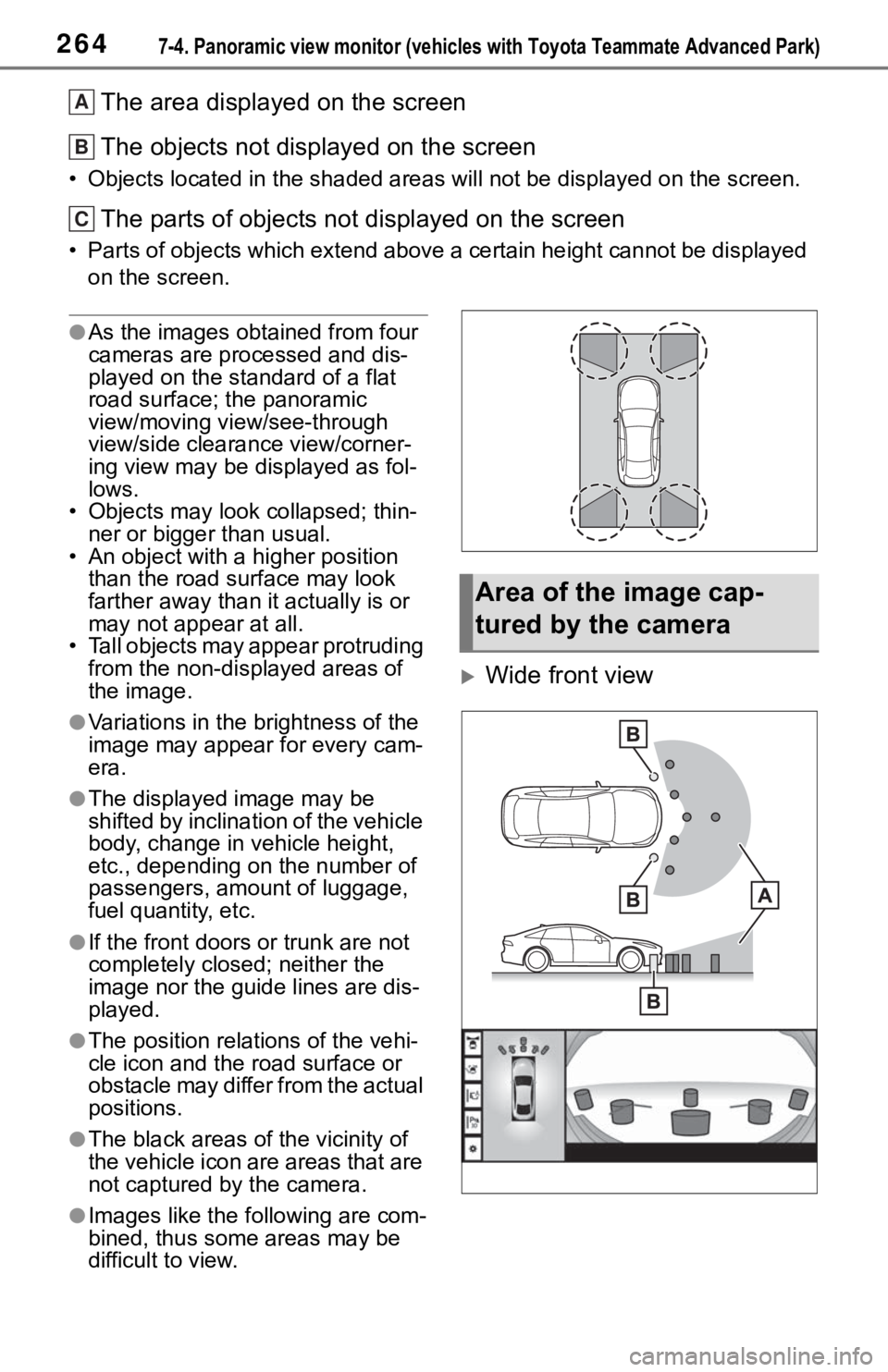
The area displayed on the screen
The objects not displayed on the screen
• Objects located in the shaded areas will not be displayed on t he screen.
The parts of objects not displayed on the screen
• Parts of objects which extend above a certain height cannot be displayed
on the screen.
●As the images obtained from four
cameras are processed and dis-
played on the standard of a flat
road surface; the panoramic
view/moving view/see-through
view/side clearance view/corner-
ing view may be displayed as fol-
lows.
• Objects may look collapsed; thin- ner or bigger than usual.
• An object with a higher position
than the road surface may look
farther away than i t actually is or
may not appear at all.
• Tall objects may appear protruding from the non-displayed areas of
the image.
●Variations in the brightness of the
image may appear for every cam-
era.
●The displayed image may be
shifted by inclination of the vehicle
body, change in vehicle height,
etc., depending on the number of
passengers, amou nt of luggage,
fuel quantity, etc.
●If the front doors or trunk are not
completely closed; neither the
image nor the guide lines are dis-
played.
●The position relations of the vehi-
cle icon and the road surface or
obstacle may differ from the actual
positions.
●The black areas of the vicinity of
the vehicle icon are areas that are
not captured by the camera.
●Images like the fo llowing are com-
bined, thus some areas may be
difficult to view.
Wide front view
A
B
C
Area of the image cap-
tured by the camera
2737-4. Panoramic view monitor (vehicles with Toyota Teammate Advanced Park)
7
Peripheral monitoring system
The image is out of
alignment
The camera or sur-
rounding area has
received a strong
impact.Have the vehicle
inspected by your Toy-
ota dealer.
The guide lines are very
far out of alignment
The camera position is
out of alignment.Have the vehicle
inspected by your Toy-
ota dealer.
The vehicle is tilted.
(There is a heavy load
on the vehicle, tire
pressure is low due to
a tire puncture, etc.)
The vehicle is used on
an incline.If this happens due to
these causes, it does
not indicate a malfunc-
tion.
Back up while visually
checking the vehicle’s
surroundings.
The estimated course
lines move even though
the steering wheel is
straightThere is a malfunction
in the signals being out-
put by the steering sen-
sor.Have the vehicle
inspected by your Toy-
ota dealer.
Guide lines are not dis-
playedThe trunk is open.
Close the trunk.
If this does not resolve
the symptom, have the
vehicle inspected by
your Toyota dealer.
is displayed
12-volt battery has
been reinstalled.
The steering wheel
has been moved while
the 12-volt battery
was being reinstalled.
12-volt battery power
is low.
The steering sensor
has been reinstalled.
There is a malfunction
in the signals being
output by the steering
sensor.
Stop the vehicle, and
turn the steering wheel
as far as it will go to the
left and right.
If this does not resolve
the symptom, have the
vehicle inspected by
your Toyota dealer.
SymptomLikely causeSolution