Page 5 of 546

3
1
7
8
6
5
4
3
2
9
AYGO_OM_Europe_OM9A012E
4-2. Driving procedures
Engine (ignition) switch
(vehicles without a smart
entry & start system)........214
Engine (ignition) switch
(vehicles with a smart
entry & start system)........217
Multi-mode manual
transmission ....................222
Manual transmission ..........227
Turn signal lever ................229
Parking brake.....................230
4-3. Operating the lights
and wipers
Headlight switch.................231
Fog light switch ..................235
Windshield wiper
and washer ......................237
Rear window wiper
and washer ......................239
4-4. Refueling
Opening the fuel tank
cap ...................................241
4-5. Toyota Safety Sense
Toyota Safety Sense .........245
PCS (Pre-Collision
system) ............................251
LDA (Lane Departure
Alert) ................................264
4-6. Using the driving support
systems
Speed limiter ......................269
Stop & Start system ...........272
Driving assist systems .......279
4-7. Driving tips
Winter driving tips ..............285
5-1. Basic Operations
Audio system types ........... 290
Steering wheel audio
switches .......................... 292
AUX port/USB port ............ 293
5-2. Using the audio system
Optimal use of the
audio system ................... 294
5-3. Using the radio
Radio operation ................. 296
5-4. Using an external device
Listening to an iPod........... 305
Listening USB memory
device.............................. 313
Using the AUX port ........... 320
5-5. Using Bluetooth® devices
Bluetooth® audio/phone .... 321
Using the steering
wheel switches ................ 327
Registering a
Bluetooth® device ........... 328
5-6. “SETUP” menu
Using the “SETUP” menu
(“Bluetooth*” menu)......... 329
Using the “SETUP” menu
(“TEL” menu)................... 333
5-7. Bluetooth® Audio
Operating a Bluetooth®
enabled portable
player .............................. 336
5Audio system
*: Bluetooth is a registered trademark of Bluetooth SIG, Inc.
Page 18 of 546

16Pictorial index
AYGO_OM_Europe_OM9A012E
■Switches (Left-hand drive vehicles)
Outside rear view mirror switches*1. . . . . . . . . . . . . . . . . . P. 192
Headlight leveling dial. . . . . . . . . . . . . . . . . . . . . . . . . . . . . . P. 232
Stop & Start cancel switch*1 . . . . . . . . . . . . . . . . . . . . . . . . P. 273
PCS switch*1. . . . . . . . . . . . . . . . . . . . . . . . . . . . . . . . . . . . . P. 254
VSC off switch . . . . . . . . . . . . . . . . . . . . . . . . . . . . . . . . . . . . P. 280
Power window switches*1 . . . . . . . . . . . . . . . . . . . . . . . . . . P. 194
Power outlet . . . . . . . . . . . . . . . . . . . . . . . . . . . . . . . . . . . . . . P. 376
USB port*1, 3 . . . . . . . . . . . . . . . . . . . . . . . . . . . . . . . . . . . . . P. 293
AUX port*1, 3 . . . . . . . . . . . . . . . . . . . . . . . . . . . . . . . . . . . . . P. 293
Emergency flasher switch . . . . . . . . . . . . . . . . . . . . . . . . . . P. 438
Tire pressure warning reset switch*1 . . . . . . . . . . . . . . . . . P. 406
1
2
3
4
5
6
7
8
9
10
11
Page 24 of 546

22Pictorial index
AYGO_OM_Europe_OM9A012E
■Switches (Right-hand drive vehicles)
Outside rear view mirror switches*1. . . . . . . . . . . . . . . . . . P. 192
Headlight leveling dial. . . . . . . . . . . . . . . . . . . . . . . . . . . . . . P. 232
Stop & Start cancel switch*1 . . . . . . . . . . . . . . . . . . . . . . . . P. 273
PCS switch*1. . . . . . . . . . . . . . . . . . . . . . . . . . . . . . . . . . . . . P. 254
VSC off switch . . . . . . . . . . . . . . . . . . . . . . . . . . . . . . . . . . . . P. 280
Power window switches*1 . . . . . . . . . . . . . . . . . . . . . . . . . . P. 194
Power outlet . . . . . . . . . . . . . . . . . . . . . . . . . . . . . . . . . . . . . . P. 376
AUX port*1, 3 . . . . . . . . . . . . . . . . . . . . . . . . . . . . . . . . . . . . . P. 293
USB port*1, 3 . . . . . . . . . . . . . . . . . . . . . . . . . . . . . . . . . . . . . P. 293
Emergency flasher switch . . . . . . . . . . . . . . . . . . . . . . . . . . P. 438
Tire pressure warning reset switch*1 . . . . . . . . . . . . . . . . . P. 406
1
2
3
4
5
6
7
8
9
10
11
Page 291 of 546

289
5Audio system
AYGO_OM_Europe_OM9A012E5-1. Basic Operations
Audio system types ........... 290
Steering wheel audio
switches ........................... 292
AUX port/USB port ............ 293
5-2. Using the audio system
Optimal use of the
audio system ................... 294
5-3. Using the radio
Radio operation ................. 296
5-4. Using an external device
Listening to an iPod ........... 305
Listening USB memory
device .............................. 313
Using the AUX port ............ 3205-5. Using Bluetooth
® devices
Bluetooth® audio/phone..... 321
Using the steering
wheel switches ................ 327
Registering a
Bluetooth
® device ............ 328
5-6. “SETUP” menu
Using the “SETUP” menu
(“Bluetooth*” menu) ......... 329
Using the “SETUP” menu
(“TEL” menu) ................... 333
5-7. Bluetooth
® Audio
Operating a Bluetooth®
enabled portable
player ............................... 336
5-8. Bluetooth
® Phone
Making a phone call ........... 338
Receiving a phone call....... 340
Speaking on the phone ...... 341
5-9. Bluetooth
®
Bluetooth®......................... 343
*: Bluetooth is a registered trademark of Bluetooth SIG, Inc.
Page 294 of 546

2925-1. Basic Operations
AYGO_OM_Europe_OM9A012E
Steering wheel audio switches
Vo lu m e swi tc h
• Increases/decreases volume
• Press and hold: Continuously
increases/decreases volume
Radio mode:
• Press: Select a radio station
• Press and hold: Seek up/
down
Bluetooth®, iPod or USB mode:
• Press: Select a track/file/song
• Press and hold: Select a folder or album (Bluetooth® or USB)
“MODE” switch
• Turns the power on, selects audio source
• Press and hold this switch to mute or pause the current opera-
tion. To cancel the mute or pause, press and hold the switch
again.
: If equipped
Some audio features can be controlled using the switches on
the steering wheel.
Operation may differ depending on the type of audio system or
navigation system. For details, refer to the manual provided with
the audio system or navigation system.
Operating the audio system using the steering wheel switches
1
2
WARNING
■ To reduce the risk of an accident
Exercise care when operating the audio switches on the steering wheel.
3
Page 295 of 546
293
5
5-1. Basic Operations
Audio system
AYGO_OM_Europe_OM9A012E
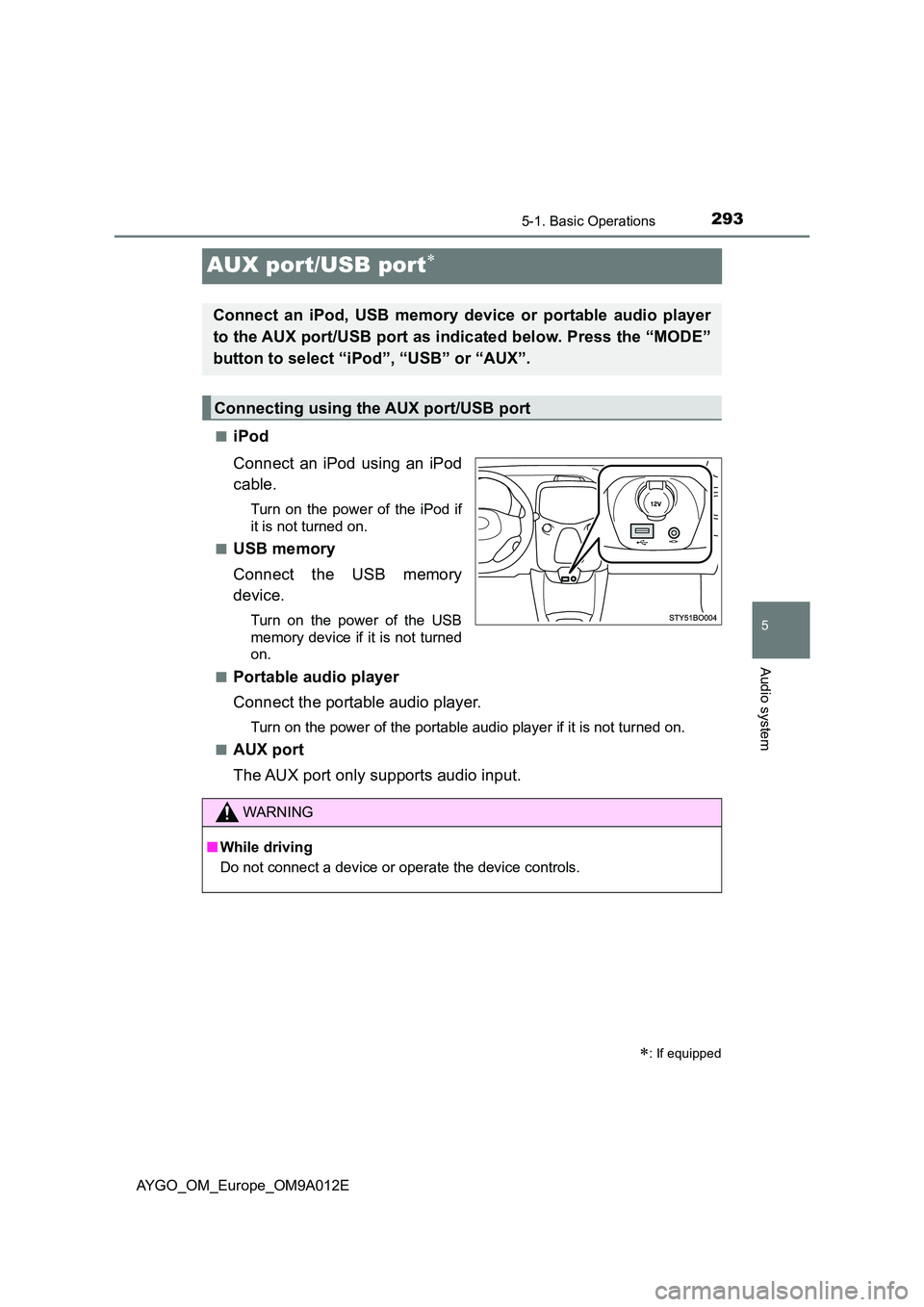
AUX port/USB port
■iPod
Connect an iPod using an iPod
cable.
Turn on the power of the iPod if
it is not turned on.
■USB memory
Connect the USB memory
device.
Turn on the power of the USB
memory device if it is not turned
on.
■Portable audio player
Connect the portable audio player.
Turn on the power of the portable audio player if it is not turned on.
■AUX port
The AUX port only supports audio input.
: If equipped
Connect an iPod, USB memory device or portable audio player
to the AUX port/USB port as indicated below. Press the “MODE”
button to select “iPod”, “USB” or “AUX”.
Connecting using the AUX port/USB port
WARNING
■ While driving
Do not connect a device or operate the device controls.
Page 315 of 546
313
5
5-4. Using an external device
Audio system
AYGO_OM_Europe_OM9A012E
Listening USB memory device
P. 2 9 3
Ty pe A
: If equipped
Connecting a USB memory enables you to enjoy music from the
vehicle speakers. Press the “MODE” button until “USB” is dis-
played.
Connecting a USB memory
Control panel
Power
Vo lu m e
Changing the audio source/
playback
Selecting a folder
Random play or back buttonRepeat play
Selecting a file or selecting
items
Displaying folder list
Displaying text message
Selecting a file, fast-forward-
ing or rewinding1
2
3
4
5
6
7
8
9
10
Page 318 of 546
3165-4. Using an external device
AYGO_OM_Europe_OM9A012E
Press (Text) to display or hide the album title.
If there are continuing texts, is displayed.
Press and hold the button to display the remaining texts.
■USB memory functions
●Depending on the USB memory that is connected to the system, the device
itself may not be operable and certain functions may not be available. If the
device is inoperable or a function is unavailable due to a malfunction (as
opposed to a system specification), disconnecting the device and recon-
necting it once again may resolve the problem.
●If the USB memory still does not begin operation after being disconnected
and reconnected, format the memory.
■Display
P. 309
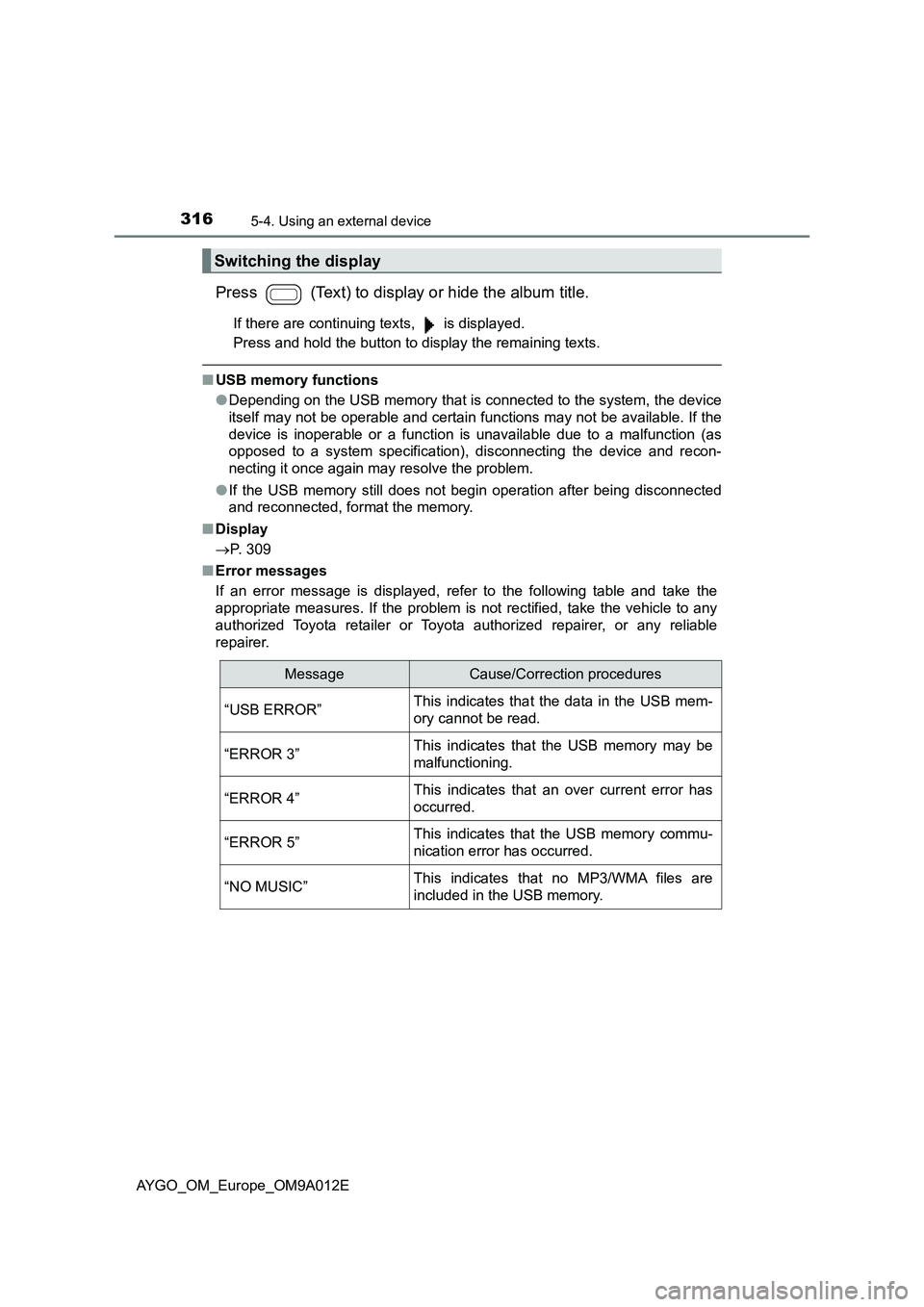
■Error messages
If an error message is displayed, refer to the following table and take the
appropriate measures. If the problem is not rectified, take the vehicle to any
authorized Toyota retailer or Toyota authorized repairer, or any reliable
repairer.
Switching the display
MessageCause/Correction procedures
“USB ERROR”This indicates that the data in the USB mem-
ory cannot be read.
“ERROR 3”This indicates that the USB memory may be
malfunctioning.
“ERROR 4”This indicates that an over current error has
occurred.
“ERROR 5”This indicates that the USB memory commu-
nication error has occurred.
“NO MUSIC”This indicates that no MP3/WMA files are
included in the USB memory.