Page 109 of 546

1072. Instrument cluster
2
Instrument cluster
AYGO_OM_Europe_OM9A012E■
Average fuel consumption
Displays the average fuel consumption since the function was
reset.
• The function can be reset by pushing one of the “DISP” buttons for lon-
ger than 1 second when the average fuel consumption is displayed.
• Use the displayed average fuel consumption as a reference.
■
Driving range
Displays the estimated approximate distance that can be driven
with the quantity of fuel remaining.
• This distance is computed based on your average fuel consumption. As
a result, the actual distance that can be driven may differ from that dis-
played.
• When only a small amount of fuel is added to the tank, the display may
not be updated.
When refueling, turn the engine switch to the “LOCK” position (vehicles
without a smart entry & start system) or off (vehicles with a smart entry
& start system). If the vehicle is refueled without turning the engine
switch to the “LOCK” position or off, the display may not be updated.
• The display shows “LoFUEL” when the remaining is very low.
■
Average vehicle speed
Displays the average vehicle speed since the function was reset.
The function can be reset by pushing one of the “DISP” button for longer
than 1 second when the average vehicle speed is displayed.
■
Instrument cluster light control
Displays the instrument cluster light control display.
• This screen is only displayed when the tail lights are on.
• The brightness of the instrument cluster light can be adjusted.
(P. 108)
Page 110 of 546

1082. Instrument cluster
AYGO_OM_Europe_OM9A012E
The automatically displayed function of the Stop & Start system oper-
ation time can be activated or deactivated.
Push one of the “DISP” buttons and the Stop & Start system opera-
tion time is displayed, while the vehicle is stopped.
Push and hold the “DISP” buttons for 5 seconds.
Push the “DISP” buttons to
switch activate or deactivate.
Activated
Deactivated
The screen will change back to the
previous screen after 6 seconds or
by push and holding one of the
“DISP” buttons for 2 seconds.
Push the one of the “DISP” buttons and the instrument cluster light
control display while the tail lights is turned on and vehicle is
stopped.
Push and hold one of the “DISP” buttons until instrument cluster
light control display flashes.
Push one of the “DISP” buttons.
Brighter
Darker
The illumination level can be set by
push and holding one of the “DISP”
buttons, turning off the tail lights, or
automatically 6 seconds after the
last button push has elapsed.
Stop & Start system operation time customization (if equipped)
1
2
Instrument cluster light control
1
2
Page 147 of 546

1453-2. Opening, closing and locking the doors
3
Operation of each component
AYGO_OM_Europe_OM9A012E■Alarms and warning indicators
A combination of exterior and interior alarms as well as warning lights are
used to prevent theft of the vehicle and unforeseeable accidents resulting
from erroneous operation. Take appropriate measures for the warning light
that comes on. (P. 457)
The following table describes circumstances and correction procedures when
only alarms are sounded.
AlarmSituationCorrection procedure
Exterior alarm sounds
once for 5 seconds
An attempt was made
to lock the doors using
the smart entry & start
system while the elec-
tronic key was still
inside the vehicle.
Retrieve the electronic
key from the vehicle
and lock the doors
again.
An attempt was made
to lock the vehicle while
a door was open.Close all of the doors
and lock the doors
again.
Interior alarm pings
once and exterior alarm
sounds once for 5 sec-
onds
An attempt was made
to lock any door by
opening a door and
putting the inside lock
button into the lock
position, then closing
the door by pulling on
the outside door handle
with the electronic key
still inside the vehicle.
Retrieve the electronic
key from the vehicle
and lock the doors
again.
Interior alarm sounds
continuously
The engine switch was
turned to ACCESSORY
mode while the driver’s
door was open (or the
driver’s door was
opened while the
engine switch was in
ACCESSORY mode).
Turn the engine switch
off and close the
driver’s door.
The engine switch was
turned to off while the
driver’s door was open.
Close the driver’s door.
Page 193 of 546
191
3
3-4. Adjusting the steering wheel and mirrors
Operation of each component
AYGO_OM_Europe_OM9A012E
Inside rear view mirror
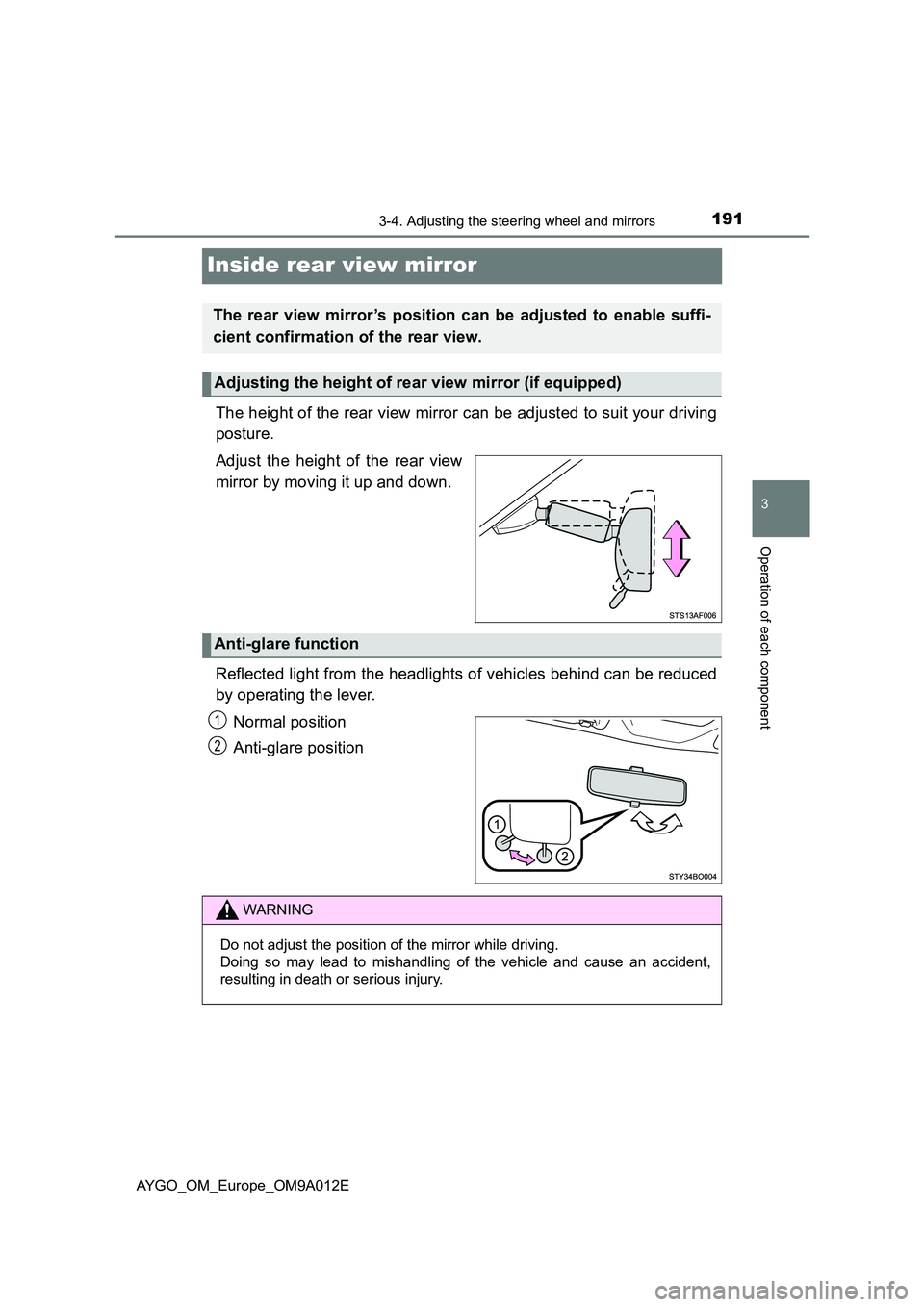
The height of the rear view mirror can be adjusted to suit your driving
posture.
Adjust the height of the rear view
mirror by moving it up and down.
Reflected light from the headlights of vehicles behind can be reduced
by operating the lever.
Normal position
Anti-glare position
The rear view mirror’s position can be adjusted to enable suffi-
cient confirmation of the rear view.
Adjusting the height of rear view mirror (if equipped)
Anti-glare function
1
2
WARNING
Do not adjust the position of the mirror while driving.
Doing so may lead to mishandling of the vehicle and cause an accident,
resulting in death or serious injury.
Page 203 of 546

201
4Driving
AYGO_OM_Europe_OM9A012E4-1. Before driving
Driving the vehicle ............. 202
Cargo and luggage ............ 212
Trailer towing ..................... 213
4-2. Driving procedures
Engine (ignition) switch
(vehicles without a smart
entry & start system)........ 214
Engine (ignition) switch
(vehicles with a smart
entry & start system)........ 217
Multi-mode manual
transmission .................... 222
Manual transmission.......... 227
Turn signal lever ................ 229
Parking brake .................... 2304-3. Operating the lights
and wipers
Headlight switch................. 231
Fog light switch .................. 235
Windshield wiper
and washer ...................... 237
Rear window wiper
and washer ...................... 239
4-4. Refueling
Opening the fuel tank
cap ................................... 241
4-5. Toyota Safety Sense
Toyota Safety Sense ......... 245
PCS (Pre-Collision
system) ............................ 251
LDA (Lane Departure
Alert) ................................ 264
4-6. Using the driving support
systems
Speed limiter ...................... 269
Stop & Start system ........... 272
Driving assist systems ....... 279
4-7. Driving tips
Winter driving tips .............. 285
Page 231 of 546
229
4
4-2. Driving procedures
Driving
AYGO_OM_Europe_OM9A012E
Turn signal lever
Right turn
Lane change to the right (push
and hold the lever partway)
The right hand signals will flash
until you release the lever.
Lane change to the left (push
and hold the lever partway)
The left hand signals will flash until
you release the lever.
Left turn
■Turn signals can be operated when
Vehicles without a smart entry & start system
The engine switch is in the “ON” position.
Vehicles with a smart entry & start system
The engine switch is in IGNITION ON mode.
■If the indicator flashes faster than usual
Check that a light bulb in the front or rear turn signal lights has not burned
out.
Operating instructions
1
2
3
4
Page 233 of 546
231
4
4-3. Operating the lights and wipers
Driving
AYGO_OM_Europe_OM9A012E
Headlight switch
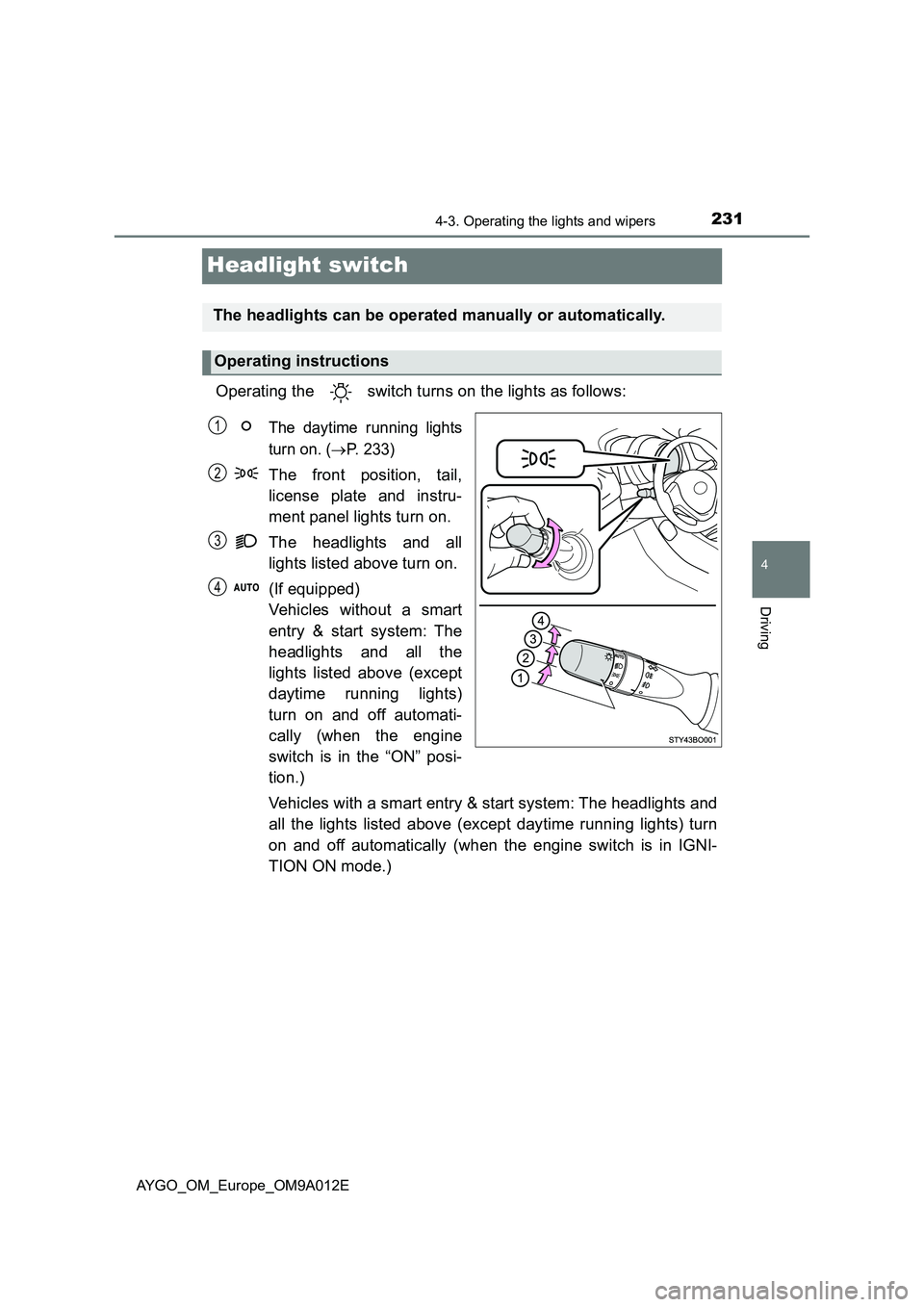
Operating the switch turns on the lights as follows:
The daytime running lights
turn on. (
P. 233)
The front position, tail,
license plate and instru-
ment panel lights turn on.
The headlights and all
lights listed above turn on.
(If equipped)
Vehicles without a smart
entry & start system: The
headlights and all the
lights listed above (except
daytime running lights)
turn on and off automati-
cally (when the engine
switch is in the “ON” posi-
tion.)
Vehicles with a smart entry & start system: The headlights and
all the lights listed above (except daytime running lights) turn
on and off automatically (when the engine switch is in IGNI-
TION ON mode.)
The headlights can be operated manually or automatically.
Operating instructions
1
2
3
4
Page 234 of 546
2324-3. Operating the lights and wipers
AYGO_OM_Europe_OM9A012E
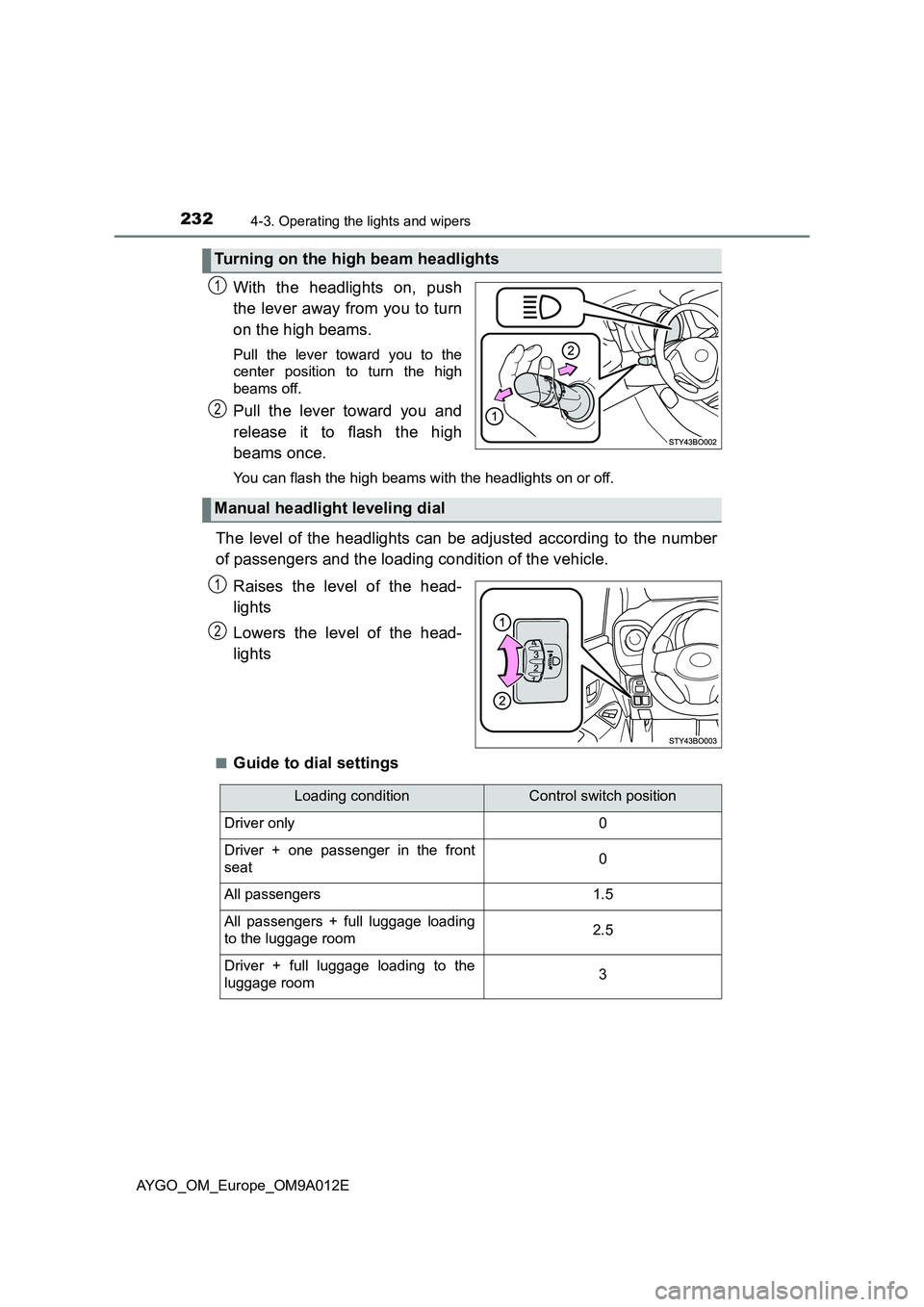
With the headlights on, push
the lever away from you to turn
on the high beams.
Pull the lever toward you to the
center position to turn the high
beams off.
Pull the lever toward you and
release it to flash the high
beams once.
You can flash the high beams wi th the headlights on or off.
The level of the headlights can be adjusted according to the number
of passengers and the loading condition of the vehicle.
Raises the level of the head-
lights
Lowers the level of the head-
lights
■Guide to dial settings
Turning on the high beam headlights
1
2
Manual headlight leveling dial
1
2
Loading conditionControl switch position
Driver only0
Driver + one passenger in the front
seat0
All passengers1.5
All passengers + full luggage loading
to the luggage room2.5
Driver + full luggage loading to the
luggage room3