Page 3 of 140
PURPOSE OF THIS GUIDE
WELCOME................. 4
IMPORTANT SAFETY
INFORMATION.............. 4
OWNER’S RESOURCES....... 4
IN CASE OF EMERGENCY..... 5
TOWING YOUR ALL-WHEEL
DRIVE SUBARU............. 6
ENTRY AND EXIT
KEYLESS ENTRY............ 7
KEYLESS ACCESS WITH PUSH
BUTTON START............. 9
POWER REAR GATE (PRG)....11
INSTRUMENT PANEL........14
GETTING COMFORTABLE
SEATING...................16
TILT AND TELESCOPIC STEERING
COLUMN...................19
POWER EXTERIOR MIRRORS . . 19
REAR VIEW MIRROR.........20
CABIN VIEW MIRROR.........21
POWER WINDOWS..........21
POWER MOONROOF........22
CLIMATE CONTROL..........23
ACCESSORY CONNECTIONS . . 29
CONTROLS
INSTRUMENT PANEL SWITCHES
(LOWER LEFT)..............30AUDIO CONTROLS...........30
ADVANCED ADAPTIVE CRUISE
CONTROL..................31
I/SET SWITCH...............31
VIEW/ENTER Switch..........32
LIGHT CONTROLS...........32
TURN SIGNALS.............34
WINDSHIELD WIPERS........34
REAR WINDOW WIPER.......35
ONE-TOUCH INTERIOR
LIGHTING..................35
OVERHEAD CONSOLE........36
GAUGES AND WARNING
LIGHTS
COMBINATION METER.......37
WARNING AND INDICATOR
LIGHTS....................37
OPERATING THE VEHICLE
IGNITION SWITCH...........38
PUSH-BUTTON IGNITION
SWITCH...................38
STARTING THE VEHICLE......38
DRIVING THE VEHICLE.......39
ELECTRONIC PARKING BRAKE
(EPB).....................40
X-MODE
®..................42
TURNING OFF THE VEHICLE...43
TABLE OF CONTENTS
Page 10 of 140
Automatic Door Locking/Unlocking
This feature allows you to set when your Subaru automatically locks or unlocks the doors
through the STARLINK®Touchscreen (select “Settings” then “Vehicle”). The available
settings are listed in the table below.
AVAILABLE SETTINGS
AUTO DOOR LOCK
Vehicle Speed
(12 mph)Shift into or
out of PARKOFF
AUTO DOOR UNLOCK
Shift into or out of
PARKIgnition OFF Driver’s Door
OpenOFF
ENTRY AND EXIT
8
Page 22 of 140

Power Folding Mirrors(if equipped)
The Power Folding Mirrors make it easy to
protect your exterior mirrors when your Subaru
is parked or being washed in an automated
car wash. Press the switch to fold the exterior
mirrors and press again to unfold. The switch
works with the ignition in the “ON” or “ACC”
positions.
NOTE: Always ensure the mirrors are
unfolded before driving.
REAR VIEW MIRROR
Auto-dimming Mirror(if equipped)
The auto-dimming function senses distracting glare during
nighttime driving and automatically dims to eliminate the
glare and preserve your vision. Press the switch to turn
auto-dimming on or off. A green LED indicator on the
switch illuminates when the function is on.
HomeLink®5 Accessory Mirror(if
equipped)
The HomeLink®5 accessory mirror provides three
buttons to replace devices such as garage door
openers, gate openers, entry door locks, security
systems, and home lighting. The Owner’s Manual
provides programming instructions, and
www.subaru.com/homelinkhas a helpful “how to”
video.
NOTE: HomeLink
®5 may not be compatible with some older door
openers or additional equipment may be required.
Power Folding Mirror Switch
GETTING COMFORTABLE
20
Page 34 of 140

VIEW/ENTER Switch
Use the arrows to cycle through
useful information in the
Multi-Function Display (MFD).
Navigate to the “Settings” menu
and hold the “VIEW/ENTER”
switch to adjust a number of MFD
settings.
For more information, please
refer to “Multi-Function Display”
in your Subaru Owner’s Manual.
LIGHT CONTROLS
1AUTO:Rotate the end of the lever to set
your headlights to automatically turn on
or off, depending on the level of light
outside.
NOTE: The sensitivity of the automatic
headlights can be adjusted through the
STARLINK
®multimedia display.
2Parking Lights:Rotate the end of the
lever to turn on the instrument panel
lights, parking lights, side marker lights,
tail lights, and license plate lights.
3Headlights:Rotate the end of the lever to turn on the headlights, instrument panel
lights, parking lights, side marker lights, tail lights, and license plate lights.
4High Beams:Push the lever forward to change from low beam to high beam. When
set to the “AUTO” position, pushing the lever forward also activates the High Beam
Assist (HBA) system. Pull the lever back to center to return to low beam.
5Fog Lights:If equipped, rotate the dial to turn on the fog lights when the headlights
are on low beams in the
” or “AUTO” position.
CONTROLS
32
Page 35 of 140
Illumination Brightness
When the light controls are on (in
the
,, or “AUTO”
position), and ambient light is low,
rotating the illumination
brightness dial on the instrument
panel upward will make the
instrument panel illumination
brighter. When the dial is fully
rotated upward (dots aligned), the
instrument panel illumination
stays at full brightness. Rotating
the dial downward dims the
instrument panel illumination.
When the ambient light is bright,
the illumination brightness is set
to the maximum regardless of the position of the control dial.
Daytime Running Lights
The daytime running lights automatically turn on when the engine is running, the parking
brake is released, the select lever is out of the “P” position, and the light switch is set to
Off, “AUTO”, or “
”. Always turn on the headlights when it’s dark outside by rotating
the dial to the “
” or “AUTO” position.
Illumination Brightness Dial
CONTROLS
33
Page 42 of 140
ELECTRONIC PARKING BRAKE (EPB)
To apply the parking brake,
depress the brake pedal and pull
up the parking brake switch. The
indicator light on the parking
brake switch will illuminate and
“PARK” will appear in the
Combination Meter.
To release the parking brake
manually, depress the brake pedal
and push the parking brake
switch down. To automatically
release the parking brake, gently
press the accelerator pedal with
the select lever in the “D” or “R” position.
NOTE: Automatic parking brake release will not work unless all the doors are closed and
your seatbelt is fastened.
OPERATING THE VEHICLE
40
Page 46 of 140
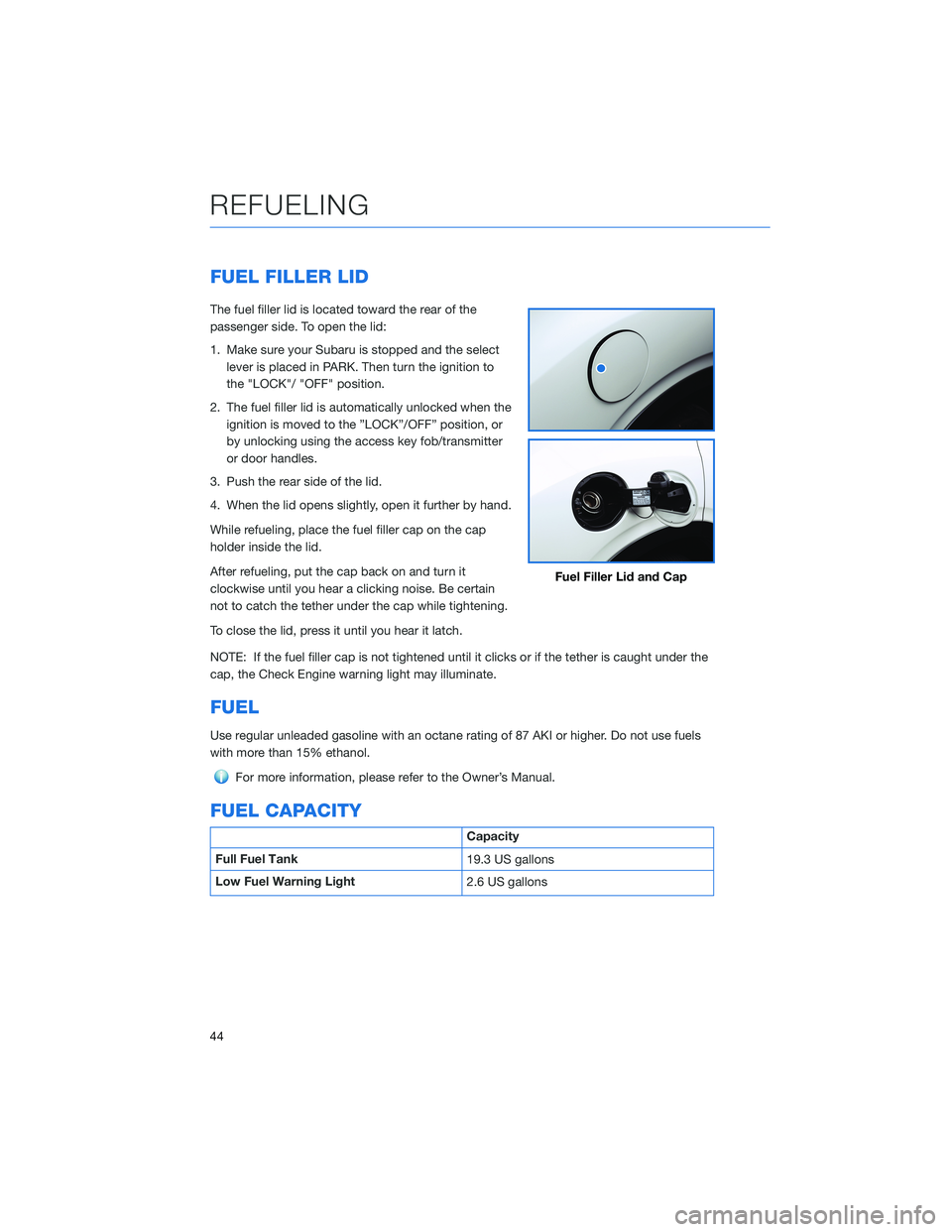
FUEL FILLER LID
The fuel filler lid is located toward the rear of the
passenger side. To open the lid:
1. Make sure your Subaru is stopped and the select
lever is placed in PARK. Then turn the ignition to
the "LOCK"/ "OFF" position.
2. The fuel filler lid is automatically unlocked when the
ignition is moved to the ”LOCK”/OFF” position, or
by unlocking using the access key fob/transmitter
or door handles.
3. Push the rear side of the lid.
4. When the lid opens slightly, open it further by hand.
While refueling, place the fuel filler cap on the cap
holder inside the lid.
After refueling, put the cap back on and turn it
clockwise until you hear a clicking noise. Be certain
not to catch the tether under the cap while tightening.
To close the lid, press it until you hear it latch.
NOTE: If the fuel filler cap is not tightened until it clicks or if the tether is caught under the
cap, the Check Engine warning light may illuminate.
FUEL
Use regular unleaded gasoline with an octane rating of 87 AKI or higher. Do not use fuels
with more than 15% ethanol.
For more information, please refer to the Owner’s Manual.
FUEL CAPACITY
Capacity
Full Fuel Tank
19.3 US gallons
Low Fuel Warning Light
2.6 US gallons
Fuel Filler Lid and Cap
REFUELING
44
Page 58 of 140
OVERVIEW OF YOUR MULTIMEDIA SYSTEM
SUBARU STARLINK®Multimedia combines the radio along with the ability to connect your
phone* through Bluetooth®to the radio for making calls, sending text messages and
listening to your favorite songs on your phone.
* Compatible smartphone and application required. For applications to operate, latest version of each
application required. Data provided by smartphone is displayed on the Touchscreen. Some state laws
prohibit the operation of handheld electronic devices while operating a vehicle. Smartphone apps
should only be launched when vehicle is safely parked. Your wireless carrier’s rates may apply.
Various Systems
Depending on your model and trim level there are several types of SUBARU STARLINK®
Multimedia systems. Some of the functions described in this guide will vary by system.
• 6.5-inch Multimedia Plus
• 8.0-inch Multimedia Plus
• 8.0-inch Multimedia Navigation
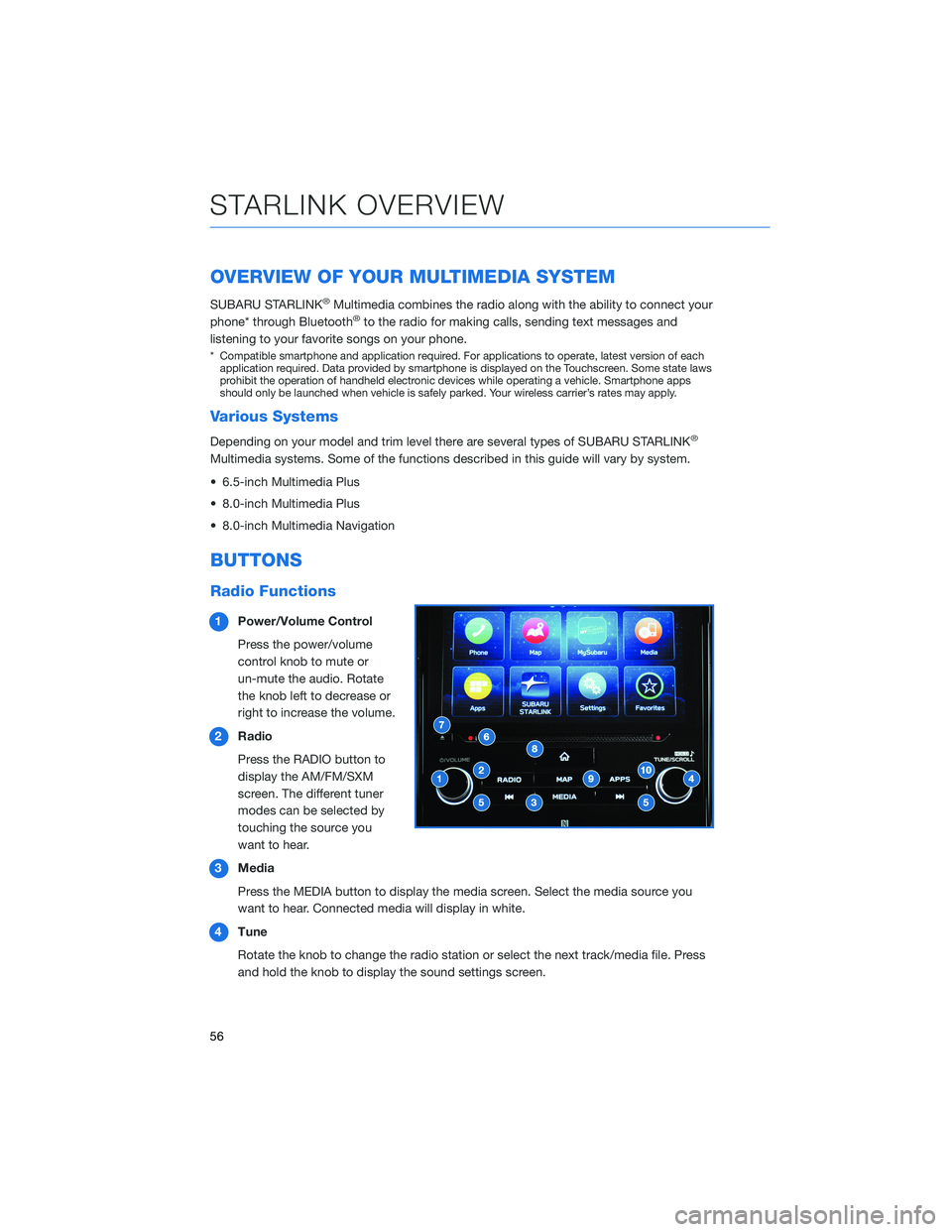
BUTTONS
Radio Functions
1Power/Volume Control
Press the power/volume
control knob to mute or
un-mute the audio. Rotate
the knob left to decrease or
right to increase the volume.
2Radio
Press the RADIO button to
display the AM/FM/SXM
screen. The different tuner
modes can be selected by
touching the source you
want to hear.
3Media
Press the MEDIA button to display the media screen. Select the media source you
want to hear. Connected media will display in white.
4Tune
Rotate the knob to change the radio station or select the next track/media file. Press
and hold the knob to display the sound settings screen.
STARLINK OVERVIEW
56


