2021 RAM PROMASTER power steering
[x] Cancel search: power steeringPage 4 of 288

2
INTRODUCTION
Symbols Key ............................................................ 7
WARNINGS AND CAUTIONS ................................. 7
VAN CONVERSIONS/CAMPERS ........................... 7
VEHICLE MODIFICATIONS/ALTERATIONS ........... 7
Symbol Glossary ..................................................... 8
GETTING TO KNOW YOUR VEHICLE
KEYS ......................................................................10
Key Fob......................................................... 10
SENTRY KEY ..........................................................12
IGNITION SWITCH .................................................12
VEHICLE SECURITY SYSTEM —
IF EQUIPPED .........................................................13
To Arm The System ...................................... 13
To Disarm The System................................. 13
Rearming Of The System............................. 13
Security System Manual Override .............. 13
DOORS ..................................................................14
Power Door Locks ....................................... 14
Auto Unlock Doors ....................................... 15
Automatic Door Locks ................................. 15
STEERING WHEEL.................................................15
Telescoping Steering Column ..................... 15 SEATS .................................................................... 15
Manual Adjustments ................................... 16
Heated Seats — If Equipped ....................... 19
Fold Down Tray — If Equipped..................... 20
Adjustable Armrests — If Equipped ............ 20
Head Restraints .......................................... 20
UCONNECT VOICE RECOGNITION ....................... 22
Introducing Voice Recognition .................... 22
Basic Voice Commands............................... 22
Get Started ................................................... 22
Additional Information ................................. 22
MIRRORS ............................................................. 23
Inside Rearview Mirror ................................ 23
Outside Mirrors ........................................... 24
Power Mirrors — If Equipped ....................... 24
Power Folding Outside Mirrors —
If Equipped ................................................... 25 Heated Mirrors — If Equipped ..................... 25
EXTERIOR LIGHTS ................................................ 26
Multifunction Lever ..................................... 26
Headlights ................................................... 26
Daytime Running Lights (DRLs) —
If Equipped .................................................. 26 High/Low Beam Switch .............................. 26
Flash-To-Pass .............................................. 26
Parking Lights ............................................. 26
Follow Me Home/Headlight Delay .............. 27
Fog Lights — If Equipped ............................ 27 Turn Signals ................................................. 27
Lane Change Assist ..................................... 27
Battery Saver ............................................... 27
INTERIOR LIGHTS ................................................28
Courtesy Lights ............................................ 28
Illuminated Entry ......................................... 30
WIPERS AND WASHERS .....................................30
Windshield Wiper Operation ...................... 30
CLIMATE CONTROLS ...........................................31
Manual Climate Control Descriptions
And Functions .............................................. 31 Additional Rear Climate Control —
If Equipped ................................................... 34 Operating Tips.............................................. 34
INTERIOR STORAGE AND EQUIPMENT ..............36
Storage ......................................................... 36
USB/AUX Control — If Equipped ................ 37
Power Outlets............................................... 37
Auxiliary Switches — If Equipped ................ 38
WINDOWS ............................................................39
Power Windows .......................................... 39
Window Bar Grates — If Equipped .............. 39
Wind Buffeting ............................................ 40
HOOD......................................................................40
Opening ........................................................ 40
Closing.......................................................... 41
CARGO AREA FEATURES .....................................41
21_VF_OM_EN_USC_t.book Page 2
Page 5 of 288

3
GETTING TO KNOW YOUR
INSTRUMENT PANEL
INSTRUMENT CLUSTER........................................42Instrument Cluster Descriptions ................. 43
INSTRUMENT CLUSTER DISPLAY .......................44
Location And Controls ................................. 44
Change Engine Oil — If Equipped................ 45
Display Setup Menu .................................... 46
Values Displayed ......................................... 46
Personal Settings
(Customer-Programmable Features) .......... 47
TRIP COMPUTER ...................................................47
Trip Button.................................................... 47
Trip Functions .............................................. 48
WARNING LIGHTS AND MESSAGES ..................48
Red Warning Lights...................................... 48
Yellow Warning Lights ................................. 50
Yellow Indicator Lights................................. 53
Green Indicator Lights ................................. 54
Blue Indicator Lights .................................... 54
ONBOARD DIAGNOSTIC SYSTEM — OBD II ......55
Onboard Diagnostic System (OBD II)
Cybersecurity................................................ 55
EMISSIONS INSPECTION AND MAINTENANCE
PROGRAMS ...........................................................56
STARTING AND OPERATING
STARTING THE ENGINE ...................................... 57
Automatic Transmission.............................. 57
Normal Starting............................................ 57
Cold Weather Operation
(Below –22°F Or −30°C) ........................... 57 If Engine Fails To Start ................................ 57
After Starting ................................................ 58
ENGINE BLOCK HEATER — IF EQUIPPED ......... 58
ENGINE BREAK-IN RECOMMENDATIONS ........ 58
PARKING BRAKE ................................................. 59
AUTOMATIC TRANSMISSION ............................. 60 Key Ignition Park Interlock .......................... 60
Brake/Transmission Shift Interlock
System ......................................................... 60 Six-Speed Automatic Transmission ............ 61
POWER STEERING .............................................. 66
Power Steering Fluid Check ....................... 67
CRUISE CONTROL — IF EQUIPPED .................... 67
To Activate.................................................... 68
To Set A Desired Speed............................... 68
To Vary The Speed Setting .......................... 68
To Accelerate For Passing ........................... 69
To Resume Speed ....................................... 69
To Deactivate ............................................... 69
PARKSENSE REAR PARK ASSIST —
IF EQUIPPED ......................................................... 69
ParkSense Rear Park Assist Sensors ......... 70
ParkSense Rear Park Assist Alerts ............. 70 ParkSense Rear Park Assist Failure
Indications.................................................... 72 Cleaning The ParkSense System................ 72
ParkSense Rear Park Assist System
Usage Precautions ...................................... 72
PARKVIEW REAR BACK UP CAMERA ...............73
REFUELING THE VEHICLE ....................................75
Loose Fuel Filler Cap Message................... 76
VEHICLE LOADING ................................................76
Vehicle Certification Label .......................... 76
Gross Vehicle Weight Rating (GVWR) ......... 76
Gross Axle Weight Rating (GAWR) ............. 76
Tire Size ........................................................ 77
Rim Size ....................................................... 77
Inflation Pressure ........................................ 77
Curb Weight ................................................. 77
Overloading .................................................. 77
Loading ........................................................ 77
TRAILER TOWING .................................................78
Common Towing Definitions ....................... 78
Trailer Hitch Classification .......................... 80
Trailer Towing Weights
(Maximum Trailer Weight Ratings) ............ 81 Trailer And Tongue Weight ......................... 81
Towing Requirements ................................ 81
Towing Tips ................................................. 84
RECREATIONAL TOWING
(BEHIND MOTORHOME) ......................................85
Towing This Vehicle Behind Another
Vehicle .......................................................... 85 Recreational Towing .................................... 85
21_VF_OM_EN_USC_t.book Page 3
Page 40 of 288
38GETTING TO KNOW YOUR VEHICLE
(Continued)
NOTE:
Do not connect devices with power higher than
180 W to the socket. Do not damage the socket
by using unsuitable adapters.
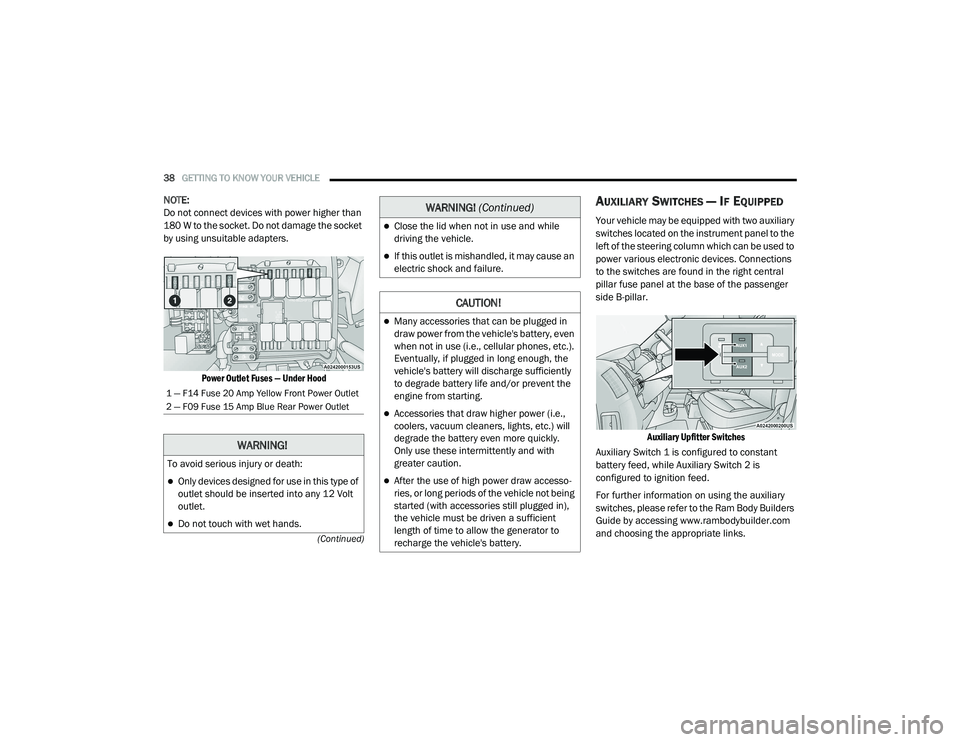
Power Outlet Fuses — Under Hood
AUXILIARY SWITCHES — IF EQUIPPED
Your vehicle may be equipped with two auxiliary
switches located on the instrument panel to the
left of the steering column which can be used to
power various electronic devices. Connections
to the switches are found in the right central
pillar fuse panel at the base of the passenger
side B-pillar.
Auxiliary Upfitter Switches
Auxiliary Switch 1 is configured to constant
battery feed, while Auxiliary Switch 2 is
configured to ignition feed.
For further information on using the auxiliary
switches, please refer to the Ram Body Builders
Guide by accessing www.rambodybuilder.com
and choosing the appropriate links.
1 — F14 Fuse 20 Amp Yellow Front Power Outlet
2 — F09 Fuse 15 Amp Blue Rear Power Outlet
WARNING!
To avoid serious injury or death:
Only devices designed for use in this type of
outlet should be inserted into any 12 Volt
outlet.
Do not touch with wet hands.
Close the lid when not in use and while
driving the vehicle.
If this outlet is mishandled, it may cause an
electric shock and failure.
CAUTION!
Many accessories that can be plugged in
draw power from the vehicle's battery, even
when not in use (i.e., cellular phones, etc.).
Eventually, if plugged in long enough, the
vehicle's battery will discharge sufficiently
to degrade battery life and/or prevent the
engine from starting.
Accessories that draw higher power (i.e.,
coolers, vacuum cleaners, lights, etc.) will
degrade the battery even more quickly.
Only use these intermittently and with
greater caution.
After the use of high power draw accesso -
ries, or long periods of the vehicle not being
started (with accessories still plugged in),
the vehicle must be driven a sufficient
length of time to allow the generator to
recharge the vehicle's battery.
WARNING! (Continued)
21_VF_OM_EN_USC_t.book Page 38
Page 55 of 288

GETTING TO KNOW YOUR INSTRUMENT PANEL53
Anti-Lock Brake System (ABS) Warning
Light
This light monitors the ABS. The light
will turn on when the ignition is placed
in the ON/RUN or MAR/ON/RUN
position and may stay on for as long
as four seconds. If the ABS light remains on or turns on while
driving, then the Anti-Lock portion of the brake
system is not functioning and service is
required. However, the conventional brake
system will continue to operate normally if the
brake warning light is not on.
If the ABS light is on, the brake system should
be serviced as soon as possible to restore the
benefits of Anti-Lock Brakes. If the ABS light
does not turn on when the ignition is placed in
the ON/RUN or MAR/ON/RUN position, have
the light inspected by an authorized dealer.
Generic Warning Light
The Generic Warning Light will
illuminate if any of the following
conditions occur: Engine Oil Pressure
Sensor Failure, External Light Failure,
Fuel Cut-Off intervention or fail, Parking Sensor
Failure, Dynamic Steering Torque System
Failure.
The telltale will remain on fixed in case of swivel
seat failure and on blinking in case of Air Bag
Warning Light Failure. Contact an authorized
dealer immediately for service.
YELLOW INDICATOR LIGHTS
Forward Collision Warning Off Indicator
Light — If Equipped
This indicator light illuminates to
indicate that Forward Collision
Warning is off.
Service Forward Collision Warning (FCW)
Light — If Equipped
This warning light will illuminate to
indicate a fault in the FCW System.
Contact an authorized dealer for service.
TOW/HAUL Indicator Light
This indicator light will illuminate
when TOW/HAUL mode is selected
Ú page 78.
WARNING!
A malfunctioning catalytic converter, as
referenced above, can reach higher
temperatures than in normal operating
conditions. This can cause a fire if you drive
slowly or park over flammable substances
such as dry plants, wood, cardboard, etc. This
could result in death or serious injury to the
driver, occupants or others.
CAUTION!
Prolonged driving with the Malfunction
Indicator Light (MIL) on could cause damage
to the vehicle control system. It also could
affect fuel economy and driveability. If the
MIL is flashing, severe catalytic converter
damage and power loss will soon occur.
Immediate service is required.
3
21_VF_OM_EN_USC_t.book Page 53
Page 68 of 288

66STARTING AND OPERATING
Overdrive Operation
The automatic transmission includes an
electronically controlled Overdrive (SIXTH gear).
The transmission will automatically shift into
Overdrive if the following conditions are present:
The gear selector is in the DRIVE position.
The transmission fluid has reached an
adequate temperature.
The engine coolant has reached an adequate
temperature.
The vehicle speed is sufficiently high.
The driver is not heavily pressing the acceler -
ator.
When To Use TOW/HAUL Mode
When driving in hilly areas, towing a trailer,
carrying a heavy load, etc., and frequent
transmission shifting occurs, push the TOW/
HAUL switch to activate TOW/HAUL mode. This
will improve performance and reduce the
potential for transmission overheating or failure
due to excessive shifting. When operating in
TOW/HAUL mode, transmission upshifts are
delayed, and the transmission will automatically
downshift (for engine braking) during steady
braking maneuvers.
The “TOW/HAUL Indicator Light” will illuminate
in the instrument cluster to indicate that TOW/
HAUL mode has been activated. Pushing the
switch a second time restores normal
operation. Normal operation is always the
default at engine start-up. If TOW/HAUL mode is
desired, the switch must be pushed each time
the engine is started.
Torque Converter Clutch
A feature designed to improve fuel economy
has been included in the automatic
transmission on your vehicle. A clutch within the
torque converter engages automatically at
calibrated speeds. This may result in a slightly
different feeling or response during normal
operation in the upper gears. When the vehicle
speed drops or during some accelerations, the
clutch automatically disengages.
NOTE:
The torque converter clutch will not engage
until the transmission fluid and engine
coolant are warm [usually after 1 to 3 miles
(2 to 5 km) of driving]. Because the engine
speed is higher when the torque converter
clutch is not engaged, it may seem as if the
transmission is not shifting into Overdrive
when cold. This is normal. Using the Elec
-
tronic Range Select (ERS) shift control, when
the transmission is sufficiently warm, will
demonstrate that the transmission is able to
shift into and out of Overdrive.
If the vehicle has not been driven for several
days, the first few seconds of operation after
shifting the transmission into gear may seem
sluggish. This is due to the fluid partially
draining from the torque converter into the
transmission. This condition is normal and
will not cause damage to the transmission.
The torque converter will refill within five
seconds after starting the engine.
POWER STEERING
The standard power steering system will
provide increased vehicle response and ease
of maneuverability. The system will provide
mechanical steering capability if power assist
is lost.
If for some reason the power assist is
interrupted, it will still be possible to steer your
vehicle. Under these conditions, you will
observe a substantial increase in steering
effort, especially at very low vehicle speeds and
during parking maneuvers.
21_VF_OM_EN_USC_t.book Page 66
Page 69 of 288

STARTING AND OPERATING67
NOTE:
Increased noise levels at the end of the
steering wheel travel are considered normal
and do not indicate that there is a problem
with the power steering system.
Upon initial start-up in cold weather, the
power steering pump may make noise for a
short amount of time. This is due to the cold,
thick fluid in the steering system. This noise
should be considered normal, and it does not
in any way damage the steering system.
POWER STEERING FLUID CHECK
Checking the power steering fluid level at a
defined service interval is not required. The fluid
should be checked at every oil change if a leak
is suspected, abnormal noises are apparent, and/or the system is not functioning as
anticipated. Coordinate inspection efforts
through an authorized dealer.
If necessary, add fluid to restore to the proper
indicated level. With a clean cloth, wipe any
spilled fluid from all surfaces Ú
page 270.
CRUISE CONTROL — IF EQUIPPED
When engaged, the Cruise Control takes over
accelerator operations at speeds greater than
25 mph (40 km/h) up to the maximum speed of
100 mph (160 km/h).
The Cruise Control lever is located on the left
side of the steering column.
Cruise Control Lever
NOTE:
In order to ensure proper operation, the Cruise
Control system has been designed to shut down
if multiple Cruise Control functions are operated
at the same time. If this occurs, the Cruise
Control system can be reactivated by rotating
the Cruise Control ON/OFF center ring and
resetting the desired vehicle set speed.
CAUTION!
Prolonged operation of the steering system at
the end of the steering wheel travel will
increase the steering fluid temperature and it
should be avoided when possible. Damage to
the power steering pump may occur.
WARNING!
Fluid level should be checked on a level
surface and with the engine off to prevent
injury from moving parts and to ensure
accurate fluid level reading. Do not overfill.
Use only FCA recommended power steering
fluid.
CAUTION!
Do not use chemical flushes in your power
steering system as the chemicals can
damage your power steering components.
Such damage is not covered by the New
Vehicle Limited Warranty.
4
21_VF_OM_EN_USC_t.book Page 67
Page 81 of 288

STARTING AND OPERATING79
Trailer Sway Control (TSC)
The TSC can be a mechanical telescoping link
that can be installed between the hitch receiver
and the trailer tongue that typically provides
adjustable friction associated with the
telescoping motion to dampen any unwanted
trailer swaying motions while traveling.
If equipped, the electronic TSC recognizes a
swaying trailer and automatically applies
individual wheel brakes and/or reduces engine
power to attempt to eliminate the trailer sway.
Weight-Carrying Hitch
A weight-carrying hitch supports the trailer
tongue weight, just as if it were luggage located
at a hitch ball or some other connecting point of
the vehicle. These kinds of hitches are
commonly used to tow small and medium sized
trailers.
Weight-Distributing Hitch
A weight-distributing system works by applying
leverage through spring (load) bars. They are
typically used for heavier loads to distribute
trailer tongue weight to the tow vehicle's front
axle and the trailer axle(s). When used in
accordance with the manufacturer's directions,
it provides for a more level ride, offering more
consistent steering and brake control thereby
enhancing towing safety. The addition of a
friction/hydraulic sway control also dampens
sway caused by traffic and crosswinds and
contributes positively to tow vehicle and trailer
stability. Trailer sway control and a weight
distributing (load equalizing) hitch are
recommended for heavier Tongue Weights (TW)
and may be required depending on vehicle and
trailer configuration/loading to comply with
Gross Axle Weight Rating (GAWR) requirements.WARNING!
An improperly adjusted Weight Distributing
Hitch system may reduce handling,
stability, braking performance, and could
result in a collision.
Weight Distributing Systems may not be
compatible with Surge Brake Couplers.
Consult with your hitch and trailer manufac -
turer or a reputable Recreational Vehicle
dealer for additional information.
4
21_VF_OM_EN_USC_t.book Page 79
Page 126 of 288

124MULTIMEDIA
To enable Siri, push and hold, then release the
Uconnect Voice Recognition (VR) button on the
steering wheel. After you hear a double beep,
you can ask Siri to play podcasts and music, get
directions, read text messages, and many other
useful requests.
Bluetooth® Communication Link
Mobile phones may lose connection to the
Uconnect Phone. When this happens, the
connection can generally be re-established by
restarting the mobile phone. Your mobile phone
is recommended to remain in Bluetooth® ON
mode.
Power-Up
After switching the ignition key from OFF to
either the ON/RUN or ACC position, or after a
language change, you must wait at least
15 seconds prior to using the system
Úpage 274.NAVIGATION MODE — IF EQUIPPED
OPERATING NAVIGATION MODE — IF
E
QUIPPED
Planning A Route
Using the search bar provides a wide range of
ways to find places and then navigate to them.
You can search for your destination in different
ways:
A specific address
A partial address
A type of place
A zip code
A city to navigate to a city center
A Point of Interest (POI) near your current
location
Latitude and longitude coordinates Using Search
Press the Search button in the Main menu
to start searching. The search screen will open,
displaying the keyboard and the following
buttons:
Navigation Search
1 — Back Button
2 — Search Box
3 — Type Of Search
4 — View Button
5 — Show/Hide Keyboard Button
6 — List/Map Button
7 — Keyboard Layout Button
8 — 123?! Button
21_VF_OM_EN_USC_t.book Page 124