2021 RAM 1500 wheel
[x] Cancel search: wheelPage 34 of 496

32GETTING TO KNOW YOUR VEHICLE
(Continued)
downward as desired. To lengthen or shorten
the steering column, pull the steering wheel
outward or push it inward as desired. To lock
the steering column in position, push the
control upward until fully engaged.
HEATED STEERING WHEEL — IF
E
QUIPPED
The steering wheel contains a heating element
that helps warm your hands in cold weather.
The heated steering wheel has only one
temperature setting. Once the heated steering
wheel has been turned on, it will stay on until the operator turns it off. The heated steering
wheel may not turn on when it is already warm.
The heated steering wheel control button is
located within the climate or controls screen of
the touchscreen.
Press the heated steering wheel button
once to turn the heating element on.
Press the heated steering wheel button a
second time to turn the heating element off.
NOTE:
The engine must be running for the heated
steering wheel to operate.
For information on use with the Remote Start
system, see Ú page 24.DRIVER MEMORY SETTINGS — IF EQUIPPED
This feature allows the driver to save up to two
different memory profiles for easy recall
through a memory switch. Each memory profile
saves desired position settings for the following
features:
Driver’s seat
Easy Entry/Exit seat operation (on/off) (if
equipped)
Adjustable pedals (if equipped)
Side mirrors
NOTE:
Your vehicle is equipped with two key fobs, each
can be linked to either memory position 1 or 2.
WARNING!
Do not adjust the steering column while
driving. Adjusting the steering column while
driving or driving with the steering column
unlocked, could cause the driver to lose
control of the vehicle. Failure to follow this
warning may result in serious injury or death.
WARNING!
Persons who are unable to feel pain to the
skin because of advanced age, chronic
illness, diabetes, spinal cord injury, medica -
tion, alcohol use, exhaustion, or other phys -
ical conditions must exercise care when
using the steering wheel heater. It may
cause burns even at low temperatures,
especially if used for long periods.
Do not place anything on the steering wheel
that insulates against heat, such as a
blanket or steering wheel covers of any type
and material. This may cause the steering
wheel heater to overheat.
WARNING! (Continued)
21_DT_OM_EN_USC_t.book Page 32
Page 45 of 496

GETTING TO KNOW YOUR VEHICLE43
GET STARTED
The VR button is used to activate /deactivate
your Voice Recognition system.
Helpful hints for using Voice Recognition:
Reduce background noise. Wind noise and
passenger conversations are examples of
noise that may impact recognition.
Speak clearly at a normal pace and volume
while facing straight ahead.
Each time you give a Voice Command, first
push the VR button, wait until after the beep,
then say your Voice Command.
You can interrupt the help message or
system prompts by pushing the VR button
and saying a Voice Command from the
current category.
Uconnect Voice Command Buttons
ADDITIONAL INFORMATION
© 2020 FCA US LLC. All rights reserved. Mopar
and Uconnect are registered trademarks and
Mopar Owner Connect is a trademark of FCA US
LLC. Android™ is a trademark of Google Inc.
SiriusXM® and all related marks and logos are
trademarks of SiriusXM® Radio Inc
Ú
page 482. For Uconnect system support, call
1-877-855-8400 (24 hours a day 7 days a
week) or visit DriveUconnect.com (US) or
DriveUconnect.ca (Canada).
DRIVER ADJUSTABLE PEDALS — IF
EQUIPPED
The adjustable pedals system is designed to
allow a greater range of driver comfort for
steering wheel tilt and seat position. This
feature allows the brake and accelerator pedals
to move toward or away from the driver to
provide improved position with the steering
wheel.
The adjustable pedal switch is located on the
instrument panel, below the headlight switch.
1 — Push To Start Or Answer A Phone Call And
Send Or Receive A Text
2 — Push The Voice Recognition Button To Begin
Radio, Media, Navigation, And Climate Functions
3 — Push The Hang-up Button To End A Call
2
21_DT_OM_EN_USC_t.book Page 43
Page 47 of 496

GETTING TO KNOW YOUR VEHICLE45
Automatic Dimming Mirror — If Equipped
The rearview mirror can be adjusted up, down,
left, and right. The mirror should be adjusted to
center on the view through the rear window.
This mirror automatically adjusts for headlight
glare from vehicles behind you.
NOTE:
The Automatic Dimming Mirror feature is
disabled when the vehicle is in REVERSE to
improve the driver’s rear view.
The Automatic Dimming feature can be turned
on or off through the touchscreen.
Automatic Dimming Mirror
Digital Rearview Mirror — If Equipped
The Digital Rearview Mirror provides a high
definition, wide and unobstructed view of the
road behind while driving.
To activate the Digital Rearview Mirror, push the
on/off control lever on the bottom of the mirror
forward.
Digital Rearview Mirror
Push the menu button next to the on/off control
to access the following mirror options:
Brightness
Tilt
Pan (if equipped)
Use the left and right buttons to scroll through
menu options.
When not in use, pull the on/off control back
toward the steering wheel to return the mirror to
the regular Automatic Dimming Mirror.
NOTE:
The Digital Rearview Mirror is not as effective
during night time driving in low light applica-
tions.
CAUTION!
To avoid damage to the mirror during clean -
ing, never spray any cleaning solution directly
onto the mirror. Apply the solution onto a
clean cloth and wipe the mirror clean.
1 — On/Off Control
2 — Menu Button
3 — Left Scroll Button
4 — Right Scroll Button
2
21_DT_OM_EN_USC_t.book Page 45
Page 57 of 496

GETTING TO KNOW YOUR VEHICLE55
HEADLIGHT DELAY
To assist when exiting the vehicle, the headlight
delay feature will leave the headlights on for up
to 90 seconds. This delay is initiated when the
ignition is placed in the OFF position while the
headlight switch is on, and then the headlight
switch is cycled off. Headlight delay can be
cancelled by either turning the headlight switch
on then off, or by placing the ignition in the ON
position.
NOTE:
This feature can be programmed through the
Uconnect system Úpage 237.
The headlight delay feature is automatically
activated if the headlight switch is left in the
AUTO position when the ignition is placed in
the OFF position.
LIGHTS-ON REMINDER
If the headlights, parking lights, or cargo lights
are left on after the ignition is placed in the OFF
position, the vehicle will chime when the
driver’s door is opened.
FOG LIGHTS — IF EQUIPPED
The fog lights are turned on by rotating the
headlight switch to the parking light or headlight
position and pushing in the fog light button on
the headlight switch.
Fog Light Button
The fog lights will operate only when the parking
lights are on or when the vehicle headlights are
on low beam. An indicator light located in the
instrument cluster will illuminate when the fog
lights are on. The fog lights will turn off when the
button is pushed a second time, when the
headlight switch is rotated to the off position, or
the high beam is selected. If the fog lights are off, one of the fog lights will
illuminate depending on the direction in which
the vehicle is turning. This will provide
increased visibility while turning, depending on
the angle of the steering wheel.
TURN SIGNALS
Move the multifunction lever up or down to
activate the turn signals. The arrows on each
side of the instrument cluster flash to show
proper operation.
NOTE:
If either light remains on and does not flash, or
there is a very fast flash rate, check for a defec
-
tive outside light bulb.
LANE CHANGE ASSIST — IF EQUIPPED
Lightly push the multifunction lever up or down,
without moving beyond the detent, and the turn
signal will flash three times then automatically
turn off.
2
21_DT_OM_EN_USC_t.book Page 55
Page 65 of 496
GETTING TO KNOW YOUR VEHICLE63
Panel Mode
Air comes from the outlets in the
instrument panel. Each of these
outlets can be individually adjusted to
direct the flow of air. The air vanes of
the center outlets and outboard outlets can be
moved up and down or side to side to regulate
airflow direction. There is a shut off wheel
located below the air vanes to shut off or adjust
the amount of airflow from these outlets.
Bi-Level Mode
Air comes from the instrument panel
outlets and floor outlets. A slight
amount of air is directed through the
defrost and side window demister
outlets.
NOTE:
Bi-Level mode is designed under comfort condi -
tions to provide cooler air out of the panel
outlets and warmer air from the floor outlets.
Floor Mode
Air comes from the floor outlets. A
slight amount of air is directed
through the defrost and side window
demister outlets.
Mix Mode
Air is directed through the floor,
defrost, and side window demister
outlets. This setting works best in cold
or snowy conditions that require extra
heat to the windshield. This setting is good for
maintaining comfort while reducing moisture on
the windshield.
Climate Control OFF Button
Press and release the OFF button on
the touchscreen, or push the OFF
button on the faceplate (if equipped)
to turn the Climate Control on/off.
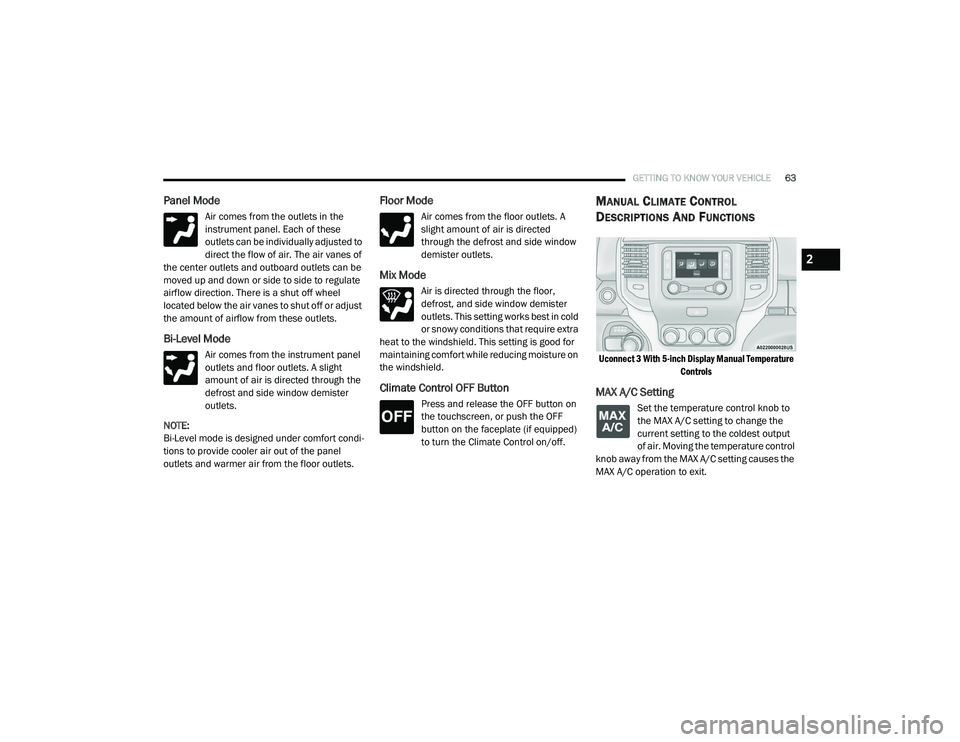
MANUAL CLIMATE CONTROL
D
ESCRIPTIONS AND FUNCTIONS
Uconnect 3 With 5-inch Display Manual Temperature
Controls
MAX A/C Setting
Set the temperature control knob to
the MAX A/C setting to change the
current setting to the coldest output
of air. Moving the temperature control
knob away from the MAX A/C setting causes the
MAX A/C operation to exit.
2
21_DT_OM_EN_USC_t.book Page 63
Page 67 of 496

GETTING TO KNOW YOUR VEHICLE65
Temperature Control
Temperature Control regulates the temperature
of the air forced through the climate system.
The temperature increases as you
turn the temperature control knob
clockwise.
The temperature decreases as you
turn the temperature control knob
counterclockwise.
Blower Control
Blower Control regulates the amount
of air forced through the climate
control system. There are seven
blower speeds available. The blower
speed increases as you turn the blower control
knob clockwise from the lowest blower setting.
The blower speed decreases as you turn the
blower control knob counterclockwise.
Mode Control
Turn the mode control knob to adjust
airflow distribution. The airflow
distribution mode can be adjusted so
air comes from the instrument panel
outlets, floor outlets, defrost outlets and demist
outlets.
Panel Mode
Air comes from the outlets in the
instrument panel. Each of these
outlets can be individually adjusted to
direct the flow of air. The air vanes of
the center outlets and outboard outlets can be
moved up and down or side to side to regulate
airflow direction. There is a shut off wheel
located below the air vanes to shut off or adjust
the amount of airflow from these outlets.
Bi-Level Mode
Air comes from the instrument panel
outlets and floor outlets. A slight
amount of air is directed through the
defrost and side window demister
outlets.
NOTE:
Bi-Level mode is designed under comfort condi -
tions to provide cooler air out of the panel
outlets and warmer air from the floor outlets.
Floor Mode
Air comes from the floor outlets. A
slight amount of air is directed
through the defrost and side window
demister outlets.
Mix Mode
Air is directed through the floor,
defrost, and side window demister
outlets. This setting works best in cold
or snowy conditions that require extra
heat to the windshield. This setting is good for
maintaining comfort while reducing moisture on
the windshield.
AUTOMATIC TEMPERATURE CONTROL
(ATC) — I
F EQUIPPED
Automatic Operation
1. Push the AUTO button on the faceplate, or the AUTO button on the touchscreen on the
Automatic Temperature Control (ATC)
Panel.
2. Next, adjust the temperature that you would like the system to maintain by adjusting the
driver and passenger temperature control
buttons. Once the desired temperature is
displayed, the system will achieve and
automatically maintain that comfort level.
3. When the system is set up for your comfort level, it is not necessary to change the
settings. You will experience the greatest
efficiency by simply allowing the system to
function automatically.
2
21_DT_OM_EN_USC_t.book Page 65
Page 68 of 496

66GETTING TO KNOW YOUR VEHICLE
NOTE:
It is not necessary to move the temperature
settings for cold or hot vehicles. The system
automatically adjusts the temperature,
mode, and blower speed to provide comfort
as quickly as possible.
The temperature can be displayed in US or
Metric units by selecting the US/Metric
customer-programmable feature within
Uconnect Settings Úpage 237.
To provide you with maximum comfort in the
Automatic mode during cold start-ups, the
blower fan will remain on low until the engine
warms up. The blower will increase in speed
and transition into Auto mode.
Manual Operation Override
This system offers a full complement of manual
override features. The AUTO symbol in the front
ATC display will be turned off when the system
is being used in the manual mode.
CLIMATE VOICE RECOGNITION
Adjust vehicle temperatures hands-free and
keep everyone comfortable while you keep
moving ahead. Push the VR button on the steering wheel. After
the beep, say one of the following commands:
“
Set driver temperature to 70 degrees ”
“Set passenger temperature to 70 degrees ”
Did you know: Voice Command for Climate may
only be used to adjust the interior temperature
of your vehicle. Voice Command will not work to
adjust the heated seats or steering wheel if
equipped.
OPERATING TIPS
NOTE:
Refer to the chart at the end of this section for
suggested control settings for various weather
conditions.
Summer Operation
The engine cooling system must be protected
with a high-quality antifreeze coolant to provide
proper corrosion protection and to protect
against engine overheating. OAT coolant
(conforming to MS.90032) is recommended.
Winter Operation
To ensure the best possible heater and
defroster performance, make sure the engine
cooling system is functioning properly and the proper amount, type, and concentration of
coolant is used. Use of the Air Recirculation
mode during Winter months is not
recommended, because it may cause window
fogging.
Vacation/Storage
For information on maintaining the Climate
Control system when the vehicle is being stored
for an extended period of time, see
Ú
page 461.
Window Fogging
Vehicle windows tend to fog on the inside in
mild, rainy, and/or humid weather. To clear the
windows, select Defrost or Mix mode and
increase the front blower speed. Do not use the
Recirculation mode without A/C for long
periods, as fogging may occur.
Outside Air Intake
Make sure the air intake, located directly in
front of the windshield, is free of obstructions,
such as leaves. Leaves collected in the air
intake may reduce airflow, and if they enter the
air distribution box, they could plug the water
drains. In Winter months, make sure the air
intake is clear of ice, slush, and snow.
21_DT_OM_EN_USC_t.book Page 66
Page 86 of 496

84GETTING TO KNOW YOUR VEHICLE
Venting Sunroof — Express
Push and release the Vent button within one
half second and the sunroof will open to the
vent position. This is called “Express Vent” and
it will occur regardless of sunroof position.
During Express Vent operation, any movement
of the switch will stop the sunroof.
NOTE:
If the sunshade was not already open, it will
automatically open prior to the roof opening to
the vent position.
Ignition Off Operation
The power sunroof switch will remain active for
up to approximately 10 minutes after the
ignition switch is placed in the OFF position.
Opening either front door will cancel this
feature.
NOTE:
Ignition Off time is programmable through the
Uconnect system Úpage 237.
Sunroof Maintenance
Use only a non-abrasive cleaner and a soft cloth
to clean the glass panel. Periodically check for
and clear out any debris that may have
collected in the tracks.
HOOD
TO OPEN THE HOOD
To open the hood, two latches must be
released.
1. Pull the hood release lever located below
the steering wheel at the base of the
instrument panel.
Hood Release Lever Location
2. Reach into the opening beneath the center
of the hood and push the safety latch lever
to the left to release it, before raising the
hood.
Safety Latch Location
21_DT_OM_EN_USC_t.book Page 84