2021 PEUGEOT EXPERT ECU
[x] Cancel search: ECUPage 132 of 324
130
Sécurité
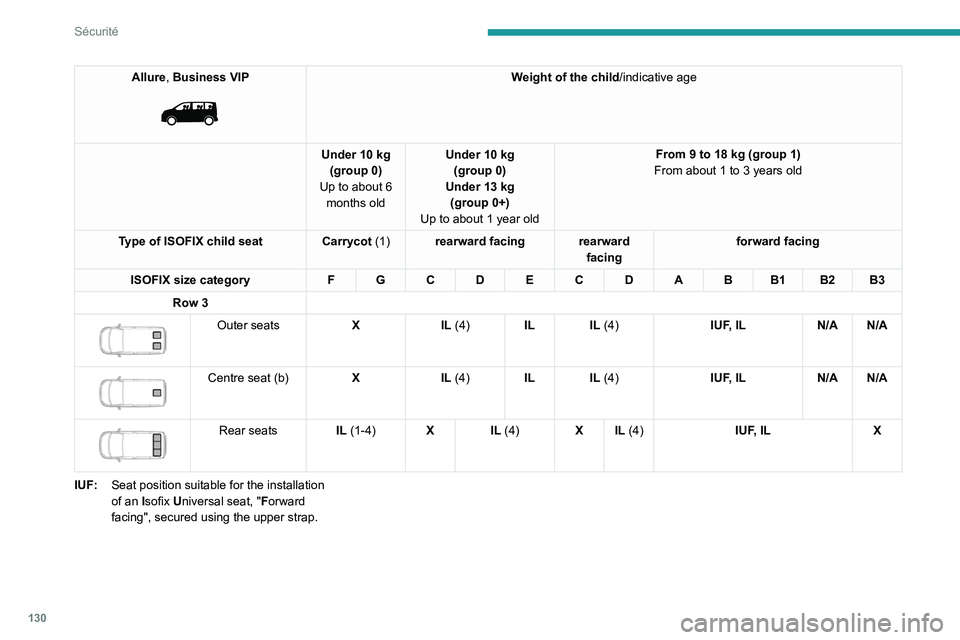
Allure, Business VIP
Weight of the child/indicative age
Under 10 kg (group 0)
Up to about 6 months old Under 10 kg
(group 0)
Under 13 kg (group 0+)
Up to about 1 year old From 9 to 18 kg (group 1)
From about 1 to 3 years old
Type of ISOFIX child seat Carrycot (1)rearward facing rearward
facingforward facing
ISOFIX size category F G C D E C D A B B1 B2 B3
Row 3
Outer seats XIL (4)IL IL (4) IUF, ILN/A N/A
Centre seat (b) XIL (4)IL IL (4) IUF, ILN/A N/A
Rear seats IL (1-4)X IL (4) X IL (4) IUF, ILX
IUF: Seat position suitable for the installation
of an Isofix Universal seat, "Forward
facing", secured using the upper strap.
Page 133 of 324
131
Sécurité
5IL:Seat position suitable for the installation
of an
Isofix Semi-Universa L seat which is
either:
–
"rearward facing" fitted with an upper
strap or a support leg,
–
"forward facing" fitted with a support leg,
–
a carrycot fitted with an upper strap or a
support leg.
X: Seat position not suitable for the installation
of
an ISOFIX child seat or carrycot for the
specified weight group.
N/A: Not applicable
(a) Refer to the current legislation in the country
in which you are driving before placing a
child in this seat position.(b)The seat can be installed centrally in the
vehicle; it then prevents the use of the outer
seats.
For information on securing the upper
strap using the ISOFIX mountings , refer
to the corresponding section.
(1) Installing a carrycot on this seat may
prevent the use of one or more of the other
seats in this row.
(2) Installation possible only behind the driver's
seat.
(3) Installation possible only behind the driver's
seat with individual passenger seat. (4)
The seat in row 2 must be adjusted so that
there is no contact between the child in row
3 and the seat immediately in front.
(5) The front seat must be adjusted so that
there is no contact between the child in row
2 and the seat immediately in front.
(6) The front seat must be adjusted so that
there is no contact between the child in row
2 and the seat immediately in front (with the
front seat adjusted to 2 notches ahead of
the centre of the slide).
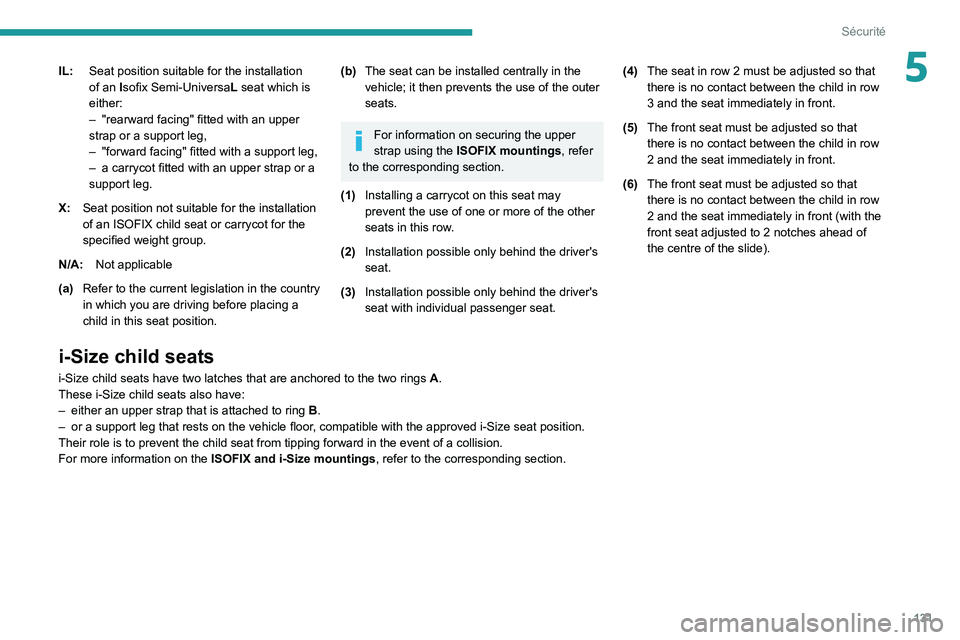
i-Size child seats
i-Size child seats have two latches that are anchored to the two rings A.
These i-Size child seats also have:
–
either an upper strap that is attached to ring B
.
–
or a support leg that rests on the vehicle floor
, compatible with the approved i-Size seat position.
Their role is to prevent the child seat from tipping forward in the even\
t of a collision.
For more information on the ISOFIX and i-Size mountings , refer to the corresponding section.
Page 134 of 324
132
Sécurité
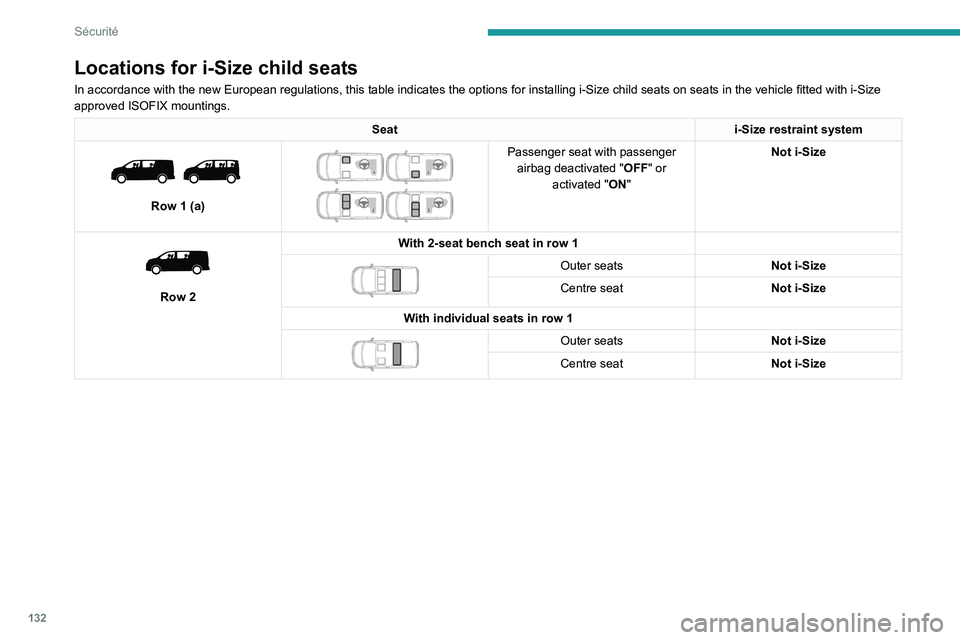
Locations for i-Size child seats
In accordance with the new European regulations, this table indicates the options for installing i-Size child seats on seats in the vehicle fitted with i-Size
approved ISOFIX mountings.
Seati-Size restraint system
Row 1 (a)
Passenger seat with passenger
airbag deactivated " OFF" or
activated "ON" Not i-Size
Row 2 With 2-seat bench seat in row 1
Outer seats
Not i-Size
Centre seat Not i-Size
With individual seats in row 1
Outer seats Not i-Size
Centre seat Not i-Size
Page 135 of 324
133
Sécurité
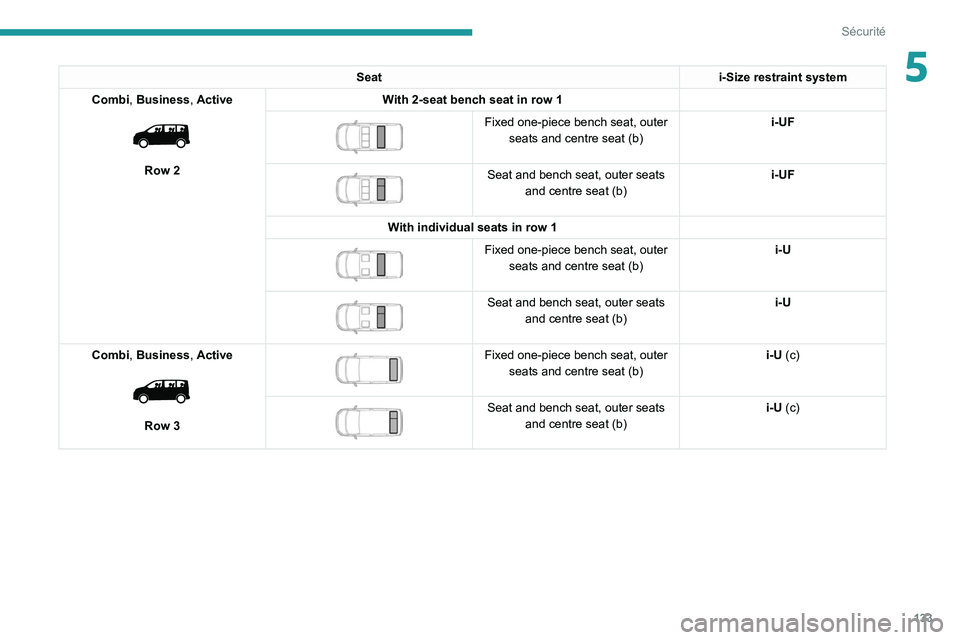
5Seati-Size restraint system
Combi, Business, Active
Row 2 With 2-seat bench seat in row 1
Fixed one-piece bench seat, outer
seats and centre seat (b) i-UF
Seat and bench seat, outer seats
and centre seat (b) i-UF
With individual seats in row 1
Fixed one-piece bench seat, outer seats and centre seat (b) i-U
Seat and bench seat, outer seats
and centre seat (b) i-U
Combi, Business, Active
Row 3
Fixed one-piece bench seat, outer seats and centre seat (b) i-U (c)
Seat and bench seat, outer seats
and centre seat (b) i-U (c)
Page 136 of 324
134
Sécurité
Seati-Size restraint system
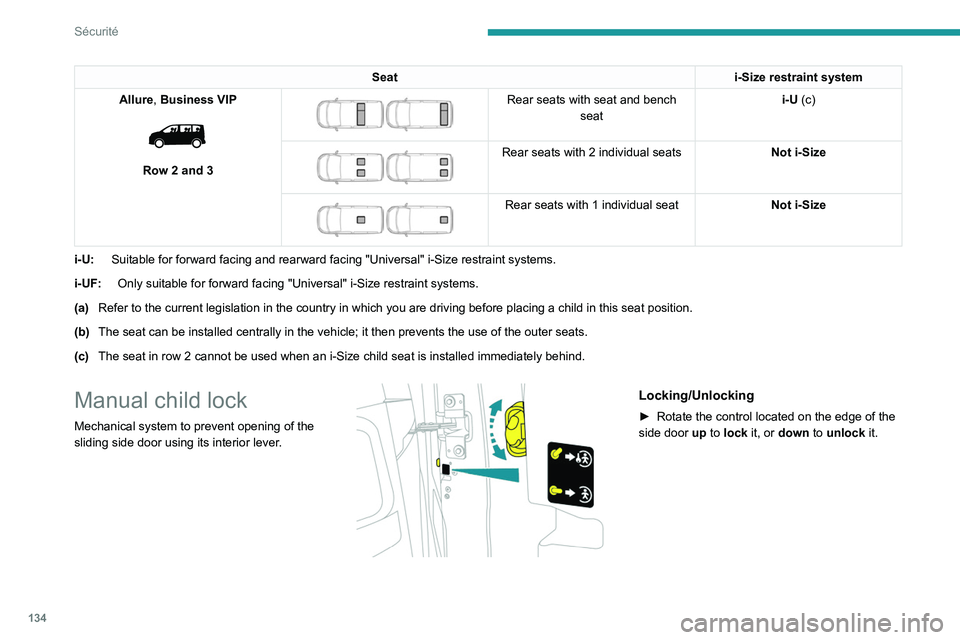
Allure, Business VIP
Row 2 and 3
Rear seats with seat and bench seat i-U (c)
Rear seats with 2 individual seats
Not i-Size
Rear seats with 1 individual seatNot i-Size
i-U: Suitable for forward facing and rearward facing "Universal" i-Size restr\
aint systems.
i-UF: Only suitable for forward facing "Universal" i-Size restraint systems.
(a) Refer to the current legislation in the country in which you are driving\
before placing a child in this seat position.
(b) The seat can be installed centrally in the vehicle; it then prevents the use of the outer seats.
(c) The seat in row 2 cannot be used when an i-Size child seat is installed \
immediately behind.
Manual child lock
Mechanical system to prevent opening of the
sliding side door using its interior lever.
Locking/Unlocking
► Rotate the control located on the edge of the
side door up
to lock it, or down to unlock it.
Page 137 of 324
135
Sécurité
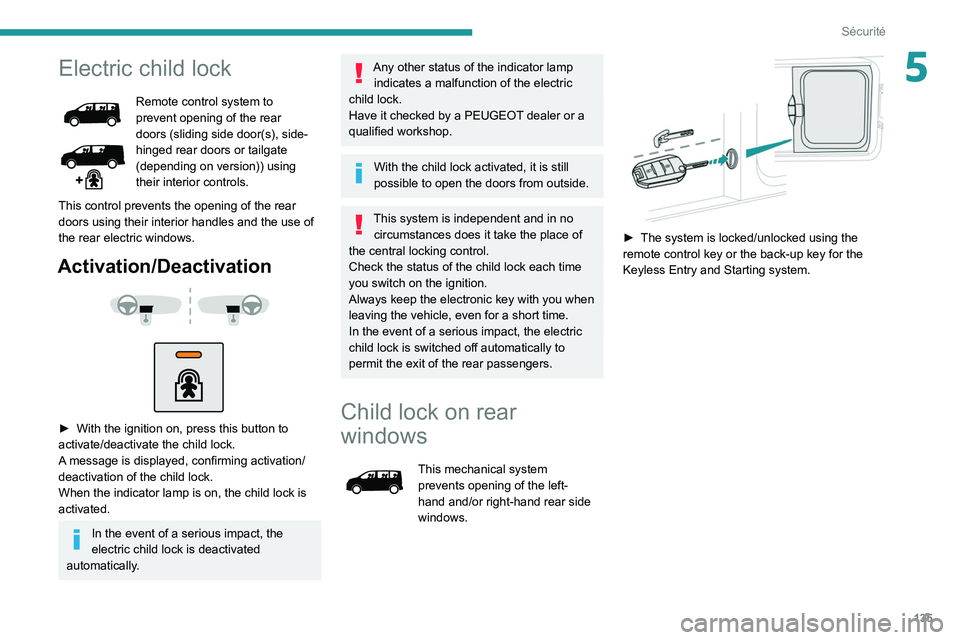
5Electric child lock
Remote control system to
prevent opening of the rear
doors (sliding side door(s), side-
hinged rear doors or tailgate
(depending on version)) using
their interior controls.
This control prevents the opening of the rear
doors using their interior handles and the use of
the rear electric windows.
Activation/Deactivation
► With the ignition on, press this button to
activate/deactivate the child lock.
A
message is displayed, confirming activation/
deactivation of the child lock.
When the indicator lamp is on, the child lock is
activated.
In the event of a serious impact, the
electric child lock is deactivated
automatically.
Any other status of the indicator lamp indicates a malfunction of the electric
child lock.
Have it checked by a PEUGEOT dealer or a
qualified workshop.
With the child lock activated, it is still
possible to open the doors from outside.
This system is independent and in no circumstances does it take the place of
the central locking control.
Check the status of the child lock each time
you switch on the ignition.
Always keep the electronic key with you when
leaving the vehicle, even for a short time.
In the event of a serious impact, the electric
child lock is switched off automatically to
permit the exit of the rear passengers.
Child lock on rear
windows
This mechanical system
prevents opening of the left-
hand and/or right-hand rear side
windows.
► The system is locked/unlocked using the
remote control key or the back-up key for the
Keyless Entry and Starting system.
Page 143 of 324
141
Driving
6satisfied, an audible signal is emitted,
accompanied by the display of a warning
message.
Special case with Keyless
Entry and Starting
Switching on the ignition without
starting the engine
With the "Keyless Entry and Starting"
electronic key inside the vehicle, pressing
the "START/STOP" button, without depressing
any of the pedals , allows the ignition to be
switched on.
►
Press this button again to switch off the
ignition and allow the vehicle to be locked.
Back-up starting
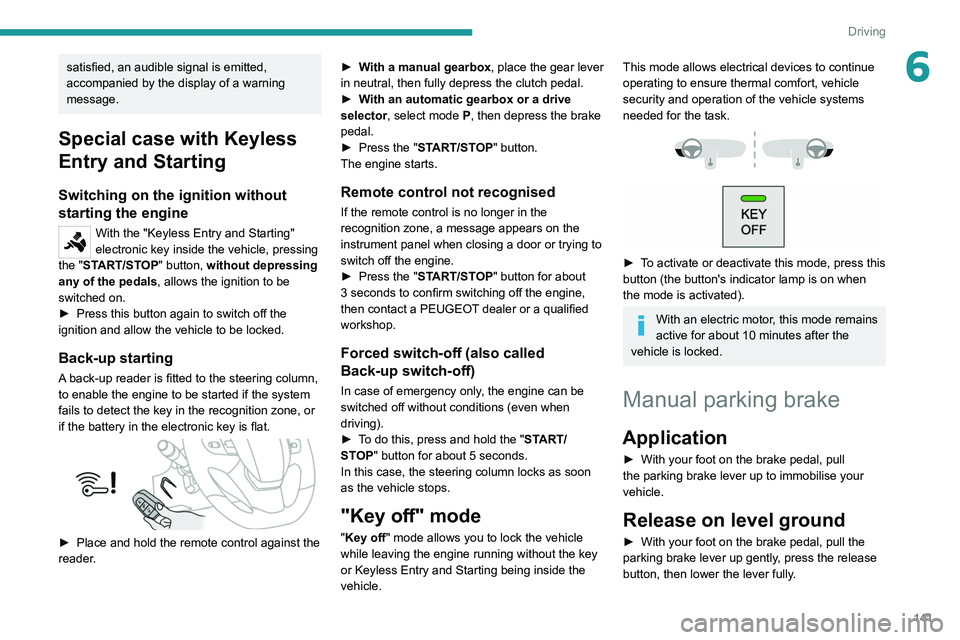
A back-up reader is fitted to the steering column,
to enable the engine to be started if the system
fails to detect the key in the recognition zone, or
if the battery in the electronic key is flat.
► Place and hold the remote control against the
reader . ►
W
ith a manual gearbox, place the gear lever
in neutral, then fully depress the clutch pedal.
►
W
ith an automatic gearbox or a drive
selector, select mode P, then depress the brake
pedal.
►
Press the "
START/STOP" button.
The engine starts.
Remote control not recognised
If the remote control is no longer in the
recognition zone, a message appears on the
instrument panel when closing a door or trying to
switch off the engine.
►
Press the "
START/STOP" button for about
3 seconds to confirm switching off the engine,
then contact a PEUGEOT dealer or a qualified
workshop.
Forced switch-off (also called
Back-up switch-off)
In case of emergency only, the engine can be
switched off without conditions (even when
driving).
►
T
o do this, press and hold the " START/
STOP" button for about 5 seconds.
In this case, the steering column locks as soon
as the vehicle stops.
"Key off" mode
"Key off" mode allows you to lock the vehicle
while leaving the engine running without the key
or Keyless Entry and Starting being inside the
vehicle.
This mode allows electrical devices to continue
operating to ensure thermal comfort, vehicle
security and operation of the vehicle systems
needed for the task.
► To activate or deactivate this mode, press this
button (the button's indicator lamp is on when
the mode is activated).
With an electric motor, this mode remains
active for about 10 minutes after the
vehicle is locked.
Manual parking brake
Application
► With your foot on the brake pedal, pull
the parking brake lever up to immobilise your
vehicle.
Release on level ground
► With your foot on the brake pedal, pull the
parking brake lever up gently , press the release
button, then lower the lever fully.
Page 149 of 324
147
Driving
6When you move the selector or press button M,
the corresponding gear and indicator lamp are
shown on the instrument panel.
The "-" symbol is displayed if a value is invalid.
► If the message " Foot on the brake" is
displayed on the instrument panel, press
the brake pedal firmly.
Starting the vehicle
► With your foot on the brake, select
position P
.
►
Start the engine.
If the conditions are not met, there is an audible
signal, accompanied by a message on the
instrument panel screen.
►
Release the parking brake, unless it is set to
automatic mode (with electric parking brake).
►
Select position R
, N or D.
If you are setting off from a steep slope
with a loaded vehicle, depress the
brake pedal, select position D, release the
parking brake, unless it is set to automatic
mode (with electric parking brake), then
release the brake pedal.
►
Gradually release the brake pedal.
Or
►
Accelerate gradually in order to release the
electric parking brake (if it is set to automatic
mode).
The vehicle moves off immediately
.
If P is displayed on the instrument panel
but the selector is in another position,
place the selector in position P to allow the
engine to be started.
If position N is selected inadvertently while
driving, allow the engine to return to idle, then
select position D to accelerate.
When the engine is running at idle with
the brakes released, if position R, D or M
is selected, the vehicle moves even without
the accelerator being pressed.
Never leave children inside the vehicle
unsupervised.
As a safety measure, never leave the vehicle
without taking your key or remote control with
you, even for a short time.
When carrying out maintenance with the
engine running, apply the parking brake and
select position P.
With an automatic gearbox, never try to
start the engine by pushing the vehicle.
Automatic operation
► Select position D for automatic
changing of the gears.
The gearbox then operates in auto-adaptive
mode, without any intervention on the part of the
driver. It continuously selects the most suitable
gear according to the driving style, the road
profile and the load in the vehicle.
► For maximum acceleration without
touching the selector , fully depress the
accelerator pedal (kick-down).
The gearbox changes down automatically or
holds the gear selected until the maximum
engine speed is reached.
When braking, the gearbox changes down
automatically to provide effective engine braking.
If you release the accelerator sharply, the
gearbox will not shift to a higher gear for safety
reasons.
Never select position N while the vehicle
is moving.
Never select positions P or R unless the
vehicle is completely stationary.
Temporary manual control
of gear changes
You can temporarily assume control of gear
changing using the " +" et "-” steering-mounted
controls. The gear change request will be
executed if the engine speed permits.
This function allows you to anticipate certain
situations, such as overtaking another vehicle or
approaching a bend in the road.
After a few seconds with no inputs via the control
paddles, the gearbox reverts to automatic
operation.