2021 NISSAN LEAF warning
[x] Cancel search: warningPage 399 of 602
•In some road or traffic conditions, a
vehicle or object can unexpectedly
come into the sensor detection zone
and cause automatic braking. Al-
ways stay alert and avoid using the
ICC system where not recommended
in this warning section.
The radar sensor will not detect the follow-
ing objects:
• Stationary and slow-moving vehicles
• Pedestrians or objects in the roadway
• Oncoming vehicles in the same lane
• Motorcycles traveling offset in the travel lane
The sensor generally detects the signals
returned from the vehicle ahead. Therefore,
if the sensor cannot detect the reflection
from the vehicle ahead, the ICC system
may not maintain the selected distance.
The following are some conditions in which
the sensor cannot properly detect a ve-
hicle ahead and the system may not oper-
ate properly:
• When snow or road spray from traveling vehicles reduces the sensor’s detection.
• When excessively heavy baggage is loaded in the rear seat or the cargo area
of your vehicle. The ICC system is designed to automati-
cally check the sensor’s operation within
the limitations of the system.
When the sensor is covered with dirt or is
obstructed, the system will automatically
be canceled. If the sensor is covered with
ice, a transparent or translucent vinyl bag,
etc., the ICC system may not detect them.
In these instances, the vehicle-to-vehicle
distance control mode may not cancel and
may not be able to maintain the selected
following distance from the vehicle ahead.
Be sure to check and clean the sensor
regularly.
The detection zone of the radar sensor is
limited. A vehicle ahead must be in the de-
tection zone for the vehicle-to-vehicle dis-
tance detection mode to maintain the se-
lected distance from the vehicle ahead.
A vehicle ahead may move outside of the
detection zone due to its position within
the same lane of travel. Motorcycles may
not be detected in the same lane ahead if
they are traveling offset from the center
line of the lane. A vehicle that is entering the
lane ahead may not be detected until the
vehicle has completely moved into the
lane.
If this occurs, the ICC system may warn
you by blinking the system indicator and
sounding the chime. The driver may
have to manually control the proper dis-
tance away from the vehicle traveling
ahead.
5-80Starting and driving
Page 403 of 602

Condition B
• When the radar sensor area of the frontbumper is covered with dirt or is ob-
structed, the ICC system will automati-
cally be canceled.
The chime will sound and the “Forward
Driving Aids temporarily disabled. Front
Sensor blocked. See Owner’s Manual”
warning message will appear in the vehicle
information display.
Action to take
If the warning message appears, stop the
vehicle in a safe place, place the shif t lever
in the P (Park) position, and turn the EV
system off. When the radar signal is tempo-
rarily interrupted, clean the sensor area of
the front bumper and restart the EV sys-
tem. If the “Forward Driving Aids temporar-
ily disabled. Front Sensor blocked. See
Owner’s Manual” warning message contin-
ues to be displayed, have the system
checked. It is recommended that you visit a
NISSAN certified LEAF dealer for this
service.• When driving on roads with limited road
structures or bridges (for example, long
bridges, deserts, snowfields, driving next
to long walls), the system may illuminate
the system warning light (orange) and
display the “Forward Driving Aids tempo-
rarily disabled. Front Sensor blocked. See
Owner’s Manual” message.
Action to take
When the above driving conditions no lon-
ger exist, turn the system back on.
Condition C
When the ICC system is not operating
properly, a chime sounds and the ICC sys-
tem warning light (orange) will come on.
LSD3956
5-84Starting and driving
Page 404 of 602

Action to take
If the warning light comes on, park the ve-
hicle in a safe place. Turn the EV system off,
restart the EV system, resume driving and
set the ICC system again.
If it is not possible to set the system or
the indicator stays on, it may indicate
that the system is malfunctioning. Al-
though the vehicle is still drivable under
normal conditions, have the vehicle
checked. It is recommended that you
visit a NISSAN certified LEAF dealer for
this service.SYSTEM MAINTENANCE
The sensor for the ICC systemOAis located
on the front of the vehicle.
To keep the ICC system operating properly,
be sure to observe the following:
• Always keep the sensor area clean.
• Do not strike or damage the areas around the sensor.
• Do not attach a sticker (including trans- parent material) or install an accessory
near the sensor. This could cause failure
or malfunction. • Do not attach metallic objects near the
sensor area (brush guard, etc.). This could
cause failure or malfunction.
• Do not alter, remove, or paint the front bumper. Before customizing or restoring
the front bumper, it is recommended that
you visit a NISSAN certified LEAF dealer.
Radio frequency statement
For USA
FCC ID OAYARS4B
This device complies with Part 15 of the FCC
Rules. Operation is subject to the following
two conditions:
1. This device may not cause harmful inter- ference, and
2. This device must accept any interfer- ence received, including interference
that may cause undesired operation.
FCC Warning
Changes or modifications not expressly
approved by the party responsible for
compliance could void the user’s authority
to operate the equipment.
LSD2858LSD2859
Starting and driving5-85
Page 405 of 602
For Canada
Model: ARS4–B
IC: 4135A-ARS4B
FCC ID: OAYARS4B
This device complies with Part 15 of the FCC
Rules and with Industry Canada licence-
exempt RSS standard(s). Operation is sub-
ject to the following two conditions:
1. This device may not cause interference,
2. This device must accept any interfer-ence, including interference that may
cause undesired operation of the
device.
Le présent appareil est conforme aux CNR
d’Industrie Canada applicables aux appar-
eils radio exempts de licence. L’exploitation
est autorisée aux deux conditions
suivantes:
1. L’appareil ne doit pas produire de brouil- lage, et
2. L’utilisateur de l’appareil doit accepter tout brouillage radio électrique subi,
même si le brouillage est susceptible
d’en compromettre le fonctionnement. Radio Frequency Radiation Exposure
Information:
This equipment complies with FCC radia-
tion exposure limits set forth for an uncon-
trolled environment.
This equipment should be installed and
operated with minimum distance of 30 cm
between the radiator and your body.
The transmitter must not be co-located or
operating in conjunction with any other an-
tenna or transmitter.
Cet équipement est conforme aux limites
d’exposition aux rayonnements IC établies
pour un environnement non contrôlé. Cet
équipement doit être installé et utilisé avec
un minimum de 30 cm de distance entre la
source de rayonnement et votre corps.
FCC Notice
Changes or modifications not expressly
approved by the party responsible for
compliance could void the user’s authority
to operate the equipment.CONVENTIONAL (fixed speed)
CRUISE CONTROL MODE
This mode allows driving at a speed be-
tween 25 to 90 mph (40 to 144 km/h) with-
out keeping your foot on the accelerator
pedal.
WARNING
• In the conventional (fixed speed)
cruise control mode, a warning
chime does not sound to warn you if
you are too close to the vehicle
ahead, as neither the presence of the
vehicle ahead nor the vehicle-to-
vehicle distance is detected.
• Pay special attention to the distance
between your vehicle and the vehicle
ahead of you or a collision could
occur.
• Always confirm the setting in the ICC
system display.
• Do not use the conventional (fixed
speed) cruise control mode when
driving under the following conditions:
– When it is not possible to keep the
vehicle at a set speed
– In heavy traffic or in traffic that
varies in speed
5-86Starting and driving
Page 407 of 602

Conventional (fixed speed) cruise
control mode display and
indicators
The display is located in the vehicle infor-
mation display.
1.Cruise indicator: This indicator indi-
cates the ICC system status depending
on a color:
• Cruise control ON indicator (gray):
Indicates that the ICC switch is on.
• Cruise control SET indicator (green):
Indicates that the cruising speed is
set. •
Cruise control warning (yellow): Indi-
cates that there is a malfunction in the
ICC system.
2. Set vehicle speed indicator: This indi-
cator indicates the set vehicle speed.
For Canadian models, the speed is dis-
played in km/h.
Operating conventional (fixed
speed) cruise control mode
To turn on the conventional (fixed speed)
cruise control mode, push and hold the ICC
switch
OAfor longer than about 1.5
seconds.
When pushing ICC switch on, the conven-
tional (fixed speed) cruise control mode
display and indicators
OBare displayed in
the vehicle information display. Af ter you
hold the ICC switch for longer than about
1.5 seconds, the ICC system display turns
off. The cruise indicator appears. You can
LSD2901LSD2902
5-88Starting and driving
Page 410 of 602
• When the parking brake is applied
• When the VDC operates (including thetraction control system)
• When a wheel slips
When the system is not operating properly,
the chime sounds and the color of the
cruise indicator will change to orange.
Action to take
If the color of the cruise indicator changes
to orange, stop the vehicle in a safe place
and place the shif t lever in the P (Park) po-
sition. Turn the EV system off, restart the EV
system, resume driving, and then perform
the setting again.
If it is not possible to set or the indicator
stays on, it may indicate that the system
is malfunctioning. Although the vehicle
is still drivable under normal conditions,
have the vehicle checked. It is recom-
mended that you visit a NISSAN certified
LEAF dealer for this service.WARNING
Failure to follow the warnings and in-
structions for proper use of the ProPI-
LOT Assist system could result in seri-
ous injury or death.
• ProPILOT Assist is not a self-driving
system. Within the limits of its capa-
bilities, as described in this manual, it
helps the driver with certain driving
activities.
• The ProPILOT Assist system is not a
replacement for proper driving pro-
cedures and is not designed to cor-
rect careless, inattentive or absent-
minded driving. ProPILOT Assist will
not always steer the vehicle to keep it
in the lane. The ProPILOT Assist sys-
tem is not designed to prevent loss of
control. It is the driver’s responsibility
to stay alert, drive safely, keep the
vehicle in the traveling lane, and be in
control of the vehicle at all times. •
There are limitations to the ProPILOT
Assist system capability. The ProPI-
LOT Assist system does not function
in all driving, traffic, weather, and
road conditions. It is the driver’s re-
sponsibility to stay alert, drive safely,
keep the vehicle in the traveling lane,
and be in control of the vehicle at all
times.
• The ProPILOT Assist system is only an
aid to assist the driver and is not a
collision warning or avoidance
device.
• The ProPILOT Assist system is for
highway use only and is not intended
for city driving. Failure to apply the
brake or steer the vehicle when nec-
essary may result in a serious
accident.
• Always observe posted speed limits
and do not set the speed over them.
• Never take your hands off the steer-
ing wheel when driving. Always keep
your hands on the steering wheel
and drive your vehicle safely.
• Never unfasten your safety belt
when using ProPILOT Assist. Doing so
automatically cancels the ProPILOT
Assist system.
PROPILOT ASSIST (if so equipped)
Starting and driving5-91
Page 415 of 602
2.ProPILOT Assist activation
Displays once the ProPILOT Assist sys-
tem is activated
3. Vehicle ahead detection indicator
Indicates whether the system detects a
vehicle in front of you
4. ProPILOT Assist status indicator
Indicates the status of the ProPILOT As-
sist system by the color of the indicator • ProPILOT Assist status indicator (white): ProPILOT Assist is on but in
standby
• ProPILOT Assist status indicator (blue): ProPILOT Assist active
5. Lane marker indicator
Indicates whether the system detects
lane markers • No lane markers displayed: Steering Assist is turned off
• Lane marker indicator (gray): No lane markers detected
• Lane marker indicator (green): Lane markers detected
• Lane marker indicator (yellow): Lane departure is detected 6.
Set distance indicator
Displays the selected distance
7. Steering Assist status
indicator/warning
Displays the status of the Steering Assist
by the color of the indicator/warning
• No Steering Assist status indicator displayed: Steering Assist is turned off
• Steering Assist indicator (gray): Steer- ing Assist standby
• Steering Assist indicator (green): Steering Assist active
• Steering Assist indicator (yellow): Steering Assist malfunction
8. Speed control status
indicator/warning
Displays the status of speed control by
the color and shape of the
indicator/warning
• Speed control status indicator/ warning (gray): ICC standby
• Speed control status indicator/ warning (solid green
): ICC (dis-
tance control mode) is active (vehicle
detected ahead). Your vehicle
matches the speed of the vehicle
ahead. • Speed control status indicator/
warning (green outline
): ICC
(maintain speed control mode) is ac-
tive (no vehicle detected ahead). Your
vehicle maintains the driver-selected
set speed.
• Speed control status indicator/ warning (orange): Indicates an ICC
malfunction
9. Set vehicle speed indicator
Indicates the set vehicle speed
TURNING THE CONVENTIONAL
(fixed speed) CRUISE CONTROL
MODE ON
NOTE:
ProPILOT Assist provides no approach
warnings, automatic braking, or steering
assist in the conventional (fixed speed)
cruise control mode.
To choose the conventional (fixed speed)
cruise control mode, push and hold the
ProPILOT Assist switch for longer than ap-
proximately 1.5 seconds. For additional in-
formation, see “Conventional (fixed speed)
cruise control mode” (P. 5-119).
5-96Starting and driving
Page 418 of 602
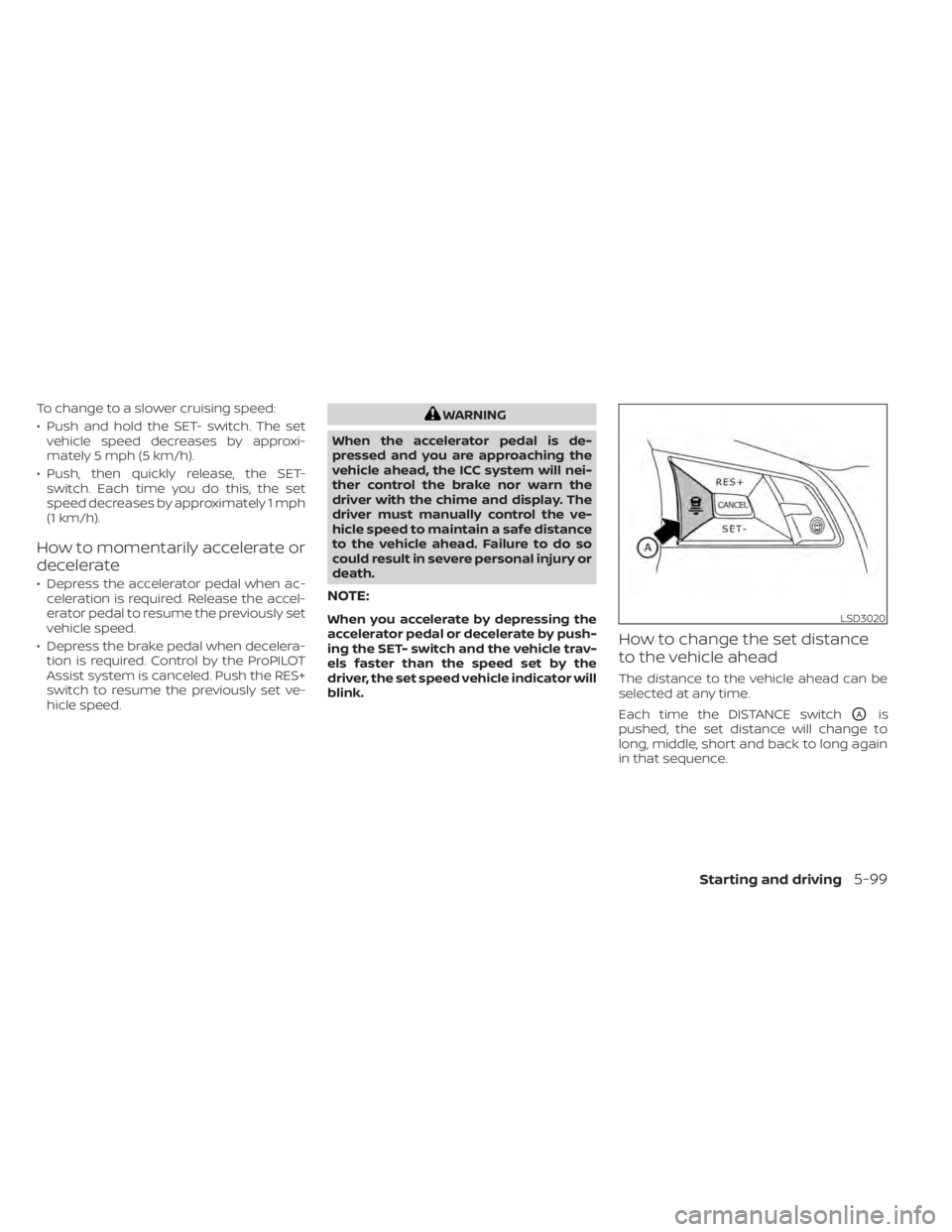
To change to a slower cruising speed:
• Push and hold the SET- switch. The setvehicle speed decreases by approxi-
mately 5 mph (5 km/h).
• Push, then quickly release, the SET- switch. Each time you do this, the set
speed decreases by approximately 1 mph
(1 km/h).
How to momentarily accelerate or
decelerate
• Depress the accelerator pedal when ac-celeration is required. Release the accel-
erator pedal to resume the previously set
vehicle speed.
• Depress the brake pedal when decelera- tion is required. Control by the ProPILOT
Assist system is canceled. Push the RES+
switch to resume the previously set ve-
hicle speed.
WARNING
When the accelerator pedal is de-
pressed and you are approaching the
vehicle ahead, the ICC system will nei-
ther control the brake nor warn the
driver with the chime and display. The
driver must manually control the ve-
hicle speed to maintain a safe distance
to the vehicle ahead. Failure to do so
could result in severe personal injury or
death.
NOTE:
When you accelerate by depressing the
accelerator pedal or decelerate by push-
ing the SET- switch and the vehicle trav-
els faster than the speed set by the
driver, the set speed vehicle indicator will
blink.
How to change the set distance
to the vehicle ahead
The distance to the vehicle ahead can be
selected at any time.
Each time the DISTANCE switch
OAis
pushed, the set distance will change to
long, middle, short and back to long again
in that sequence.
LSD3020
Starting and driving5-99