2021 MERCEDES-BENZ GLE SUV select
[x] Cancel search: selectPage 6 of 545
Mir
rors ........................................................ 157
Area pe rmeable toradio wav es on the
windscreen ................................................ .160
Infrared-reflective windscreen function ...... 16 0Climate control
......................................... 161
Overview of climate contro l systems ........... 161
Operating the climate control sy stem ......... 16 2 Driving and pa
rking .................................. 17 3
Driving ........................................................ 173
DY NA MIC SELECT switch ........................... 188
Au tomatic transmission .............................. 19 2
Tr ans fer case .............................................. 19 6
Fu nction of the 4MATIC .............................. 19 8
Re fuelling .................................................... 19 8
Pa rking ...................................................... .205
Driving and driving saf ety sy stems .............. 211
Tr ailer hit ch................................................ 283
Bicycle rack function .................................. 289
Ve hicle towing instructions ........................ .291 Instrument display and on-board
compu
ter.................................................. 292
No tes on the instrument display and on-
board computer .......................................... 292
Instrument display overview ...................... .293
Overview of the buttons on thesteering
wheel ..........................................................2 94
Operating the on-board computer .............. 294
Overview of what is shown on the multi‐
function display .......................................... 296
Head-up display .......................................... 296 MBUX multimedia sy
stem ...................... 299
Overview and operation .............................. 299
Sy stem settings .......................................... 308
Na vigation ................................................... 312
Te lephone .................................................. .321
Mercedes me and apps .............................. 324
Mercedes-Benz emer gency call sy stem ...... 333
Ra dio, media & TV...................................... 341
Sound settings ............................................ 347 Main
tenance and care ............................. 349
ASS YST PLUS service inter val display ........ 349 Engine compartment .................................. 350
Cleaning and care ......................................
.356 Breakdown assi
stance ............................ 365
Emergency ................................................. .365
Flat tyre ...................................................... 367
Battery (vehicle) .......................................... 374
To w- starting or towing away ....................... 379
Electrical fuses ........................................... 384 Wheels and tyres
..................................... 387
No tes on noise or unusual handling char‐
acteristics .................................................. .387
No tes on regular lyinspecting wheels and
tyres .......................................................... .387
No tes on snow chains ................................ 387
Ty re pressure .............................................. 388
Wheel change ............................................ .391
Emergency spare wheel .............................. 401
Collapsible spare wheel .............................. 403 Te
ch nical data .......................................... 406
No tes on tech nical da ta.............................. 406 Contents
3
Page 8 of 545
In
this Owner's Manual, you will find thefo llow‐
ing symbols: &
DANG ER Dan ger due tonot observing
th ewa rning notices
Wa rning notices dr awyour attention tohaz‐
ards that may endanger your health or life, or
th e health or life of others. #
Obser vethewa rning notices. +
ENVIRONMENTAL
NOTEEnvironmental
dama gedue tofailure toobser veenvi‐
ro nmental no tes Environmental no
tes include information on
environmentally responsible behaviour or
environmentally responsible disposal. #
Obser veenvironmen tal no tes. *
NO
TEDama getoproperty due tofailure
to obser venotes on material damage No
tes on material damage inform you of
ri sks which may lead to yourvehicle being
damaged. #
Obser venotes on material damage. %
These symbols indicate useful instructions
or fur ther information that could be helpful
to yo u.
# Instru ction
(/ page)F urther information on a topic
Display Information on
the multifunction dis‐
play/media display
4 Highest menu le vel, which is tobe
selected in the multimedia sy stem
5 Releva nt submenus, which are tobe
selected in the multimedia sy stem
*I ndicates a cause Symbols
5
Page 10 of 545
1
Steering wheel gearshift paddles →
194
2 Combination swit ch →
14 3
3 Instrument display →
293
4 DIRECT SELECT le ver →
19 2
5 Media display →
299
6 Climate contro l systems →
16 2
7 002F Hazardwa rning light sy stem →
14 4
8 PASSENGER AIR BAG indicator lamps →
50
9 Glovecompa rtment →
12 2
A Stow age compartment →
12 2
B 0063 Controller forvo lume and switching
sound on/off →
299
00D0 Switches the MBUX multimedia sy stem
on/off →
299
C z Calls up navigation →
301
D | Calls up radio or media →
301
E 002B Calls up thete lephone →
301 F
Swit chpanel for:
ä Individual wheel control (vehicles with‐
out off-road pac kage ) or →
260
002E Trans fer case (vehicles with off-road
pac kage) →
19 6
0063 Manual gearshifting →
194
¿ AIRMATIC or →
250
¿ E-AC TIVE BODY CONTROL →
257
00BB Activating/deactivating ESP ®
→
214
î Downhill Speed Regulation →
232
G ß Calls up favo urites →
301
H y Calls up vehicle functions →
301
I c Active Parking Assist →
277
J DYNA MIC SELECT switch →
19 0
K Touchpad →
301
L Start/ stop button →
174
00D6 ECOstart/ stop function →
185 At
aglance – Cockpit 7
Page 23 of 545
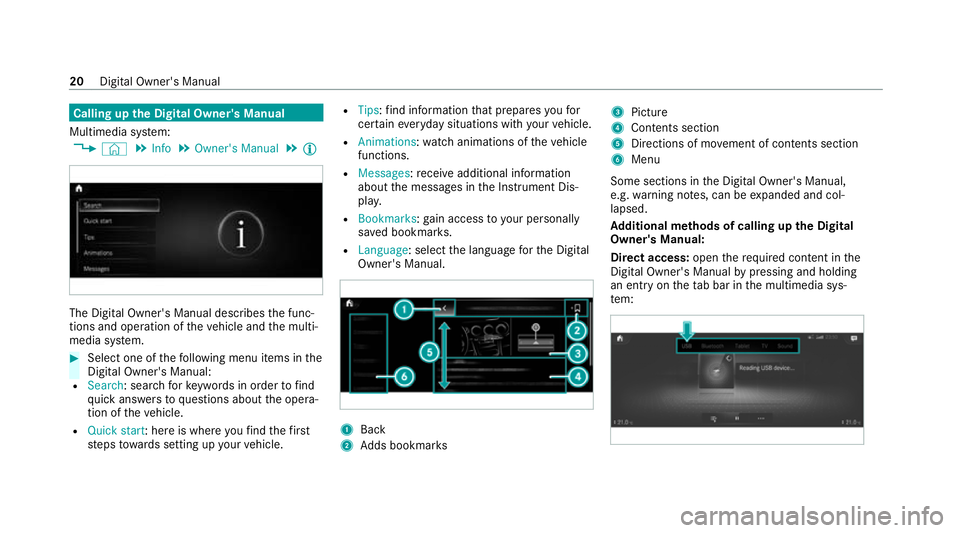
Calling up
the Digital Owner's Manual
Multimedia sy stem:
4 © 5
Info 5
Owner's Manual 5
Õ The Digital Owner's Manual describes
the func‐
tions and operation of theve hicle and the multi‐
media sy stem. #
Select one of thefo llowing menu items in the
Digital Owner's Manual:
R Search: sea rchfo rke ywords in order tofind
qu ick answers toquestions about the opera‐
tion of theve hicle.
R Quick start: here is where youfind thefirst
st eps towa rds setting up your vehicle. R
Tips: find information that prepares youfor
cer tain eve ryday situations with your vehicle.
R Animations: watch animations of theve hicle
functions.
R Messages: recei veadditional information
about the messages in the Instrument Dis‐
pla y.
R Bookmarks: gain access to your personally
sa ve d bookmar ks.
R Language: select the language forth e Digital
Owner's Manual. 1
Back
2 Adds bookmar ks 3
Picture
4 Contents section
5 Directions of mo vement of contents section
6 Menu
Some sections in the Digital Owner's Manual,
e.g. warning no tes, can be expanded and col‐
lapsed.
Ad ditional methods of calling up the Digital
Owner's Manual:
Di rect access: openthere qu ired conte nt inthe
Digital Owner's Manual bypressing and holding
an ent ryon theta b bar in the multimedia sys‐
te m: 20
Digital Owner's Manual
Page 40 of 545
data can also be used
toexamine the cus tom‐
er's warranty and guarantee claims.
Fa ult memories in theve hicle can be reset by a
service outlet or at your requ est as part of repair
or maintenance work.
Con venience and inf otainment functions
Yo u can store con venience settings and individ‐
ual settings in theve hicle and change or reset
th em at any time.
Depending on theve hicle equipment, this
includes thefo llowing settings, forex ample:
R seat and steering wheel positions
R suspension and climate control settings
R individual settings, such as interior lighting
Depending on the selected equipment, you can
import data into vehicle inf otainment functions
yo urself.
Depending on theve hicle equipment, this
includes thefo llowing data, forex ample:
R multimedia data, such as music, films or pho‐
to sfo r playback in an integrated multimedia
sy stem R
address book data for use in connection with
an integrated hands-free sy stem or an inte‐
grated navigation sy stem
R entered navigation destinations
R data about the use of Internet services
These data for con venience and inf otainment
functions may be sa ved locally in theve hicle or
th ey may be located on a device which you ha ve
connected totheve hicle, such as a smartphone,
USB flash drive or MP3 pla yer.If yo u ha ve
entered these data yourself, you can dele tethem
at any time.
This data is transmit ted from theve hicle tothird
parties only at your requ est. This applies, in par‐
ticular, when you use online services in accord‐
ance with the settings that you ha veselected.
Smartphone integ ration (e.g. Android Autoor
Apple CarPlay ®
)
If yo ur vehicle is accordingly equipped, you can
connect your smartphone or ano ther mobile end
device totheve hicle. You can then control them
by means of the control elements integrated in
th eve hicle. Images and audio from the smart‐ phone can be output via
the multimedia sy stem.
Cer tain information is simultaneously transfer‐
re dto yo ur smartphone. Depending on the type
and integration, this includes position data, day/
night mode and other general vehicle statuses.
Fo r more information please consult the Owner's
Manual of theve hicle/inf otainment sy stem.
This integration allo wsthe use of selected
smartphone apps, such as navigation or music
pla yer apps. There is no fur ther interaction
between the smartphone and theve hicle; in par‐
ticular, vehicle data is not directly accessible.
The type of additional data processing is de ter‐
mined bythe pr ovider of the app being used.
Which settings you can make, if an y,depends on
th e specific app and the operating sy stem of
yo ur smartphone. Online services
Wi
reless network connection
If yo ur vehicle has a wireless network connec‐
tion, it enables data tobe exc hanged between
yo ur vehicle and additional sy stems. The wire‐
less network connection is made possible bythe Gene
ral no tes 37
Page 80 of 545
Ac
tivating/deactivating the acoustic lo cking
ve rification signal Multimedia sy
stem:
4 © 5
Settings 5
Vehicle #
Activate or deacti vate Acoustic lock .
% Please no
te:
The selected setting forth e acoustic locking
ve rification signal must comply wi th there le‐
va nt national road and traf fic re gulations. In
some countri es, including German y,using
th e acoustic locking verification signal is for‐
bidden bytraf fic la ws(in accordance with
§16 Para. 1 and §30 Para. 1 of the German
national road traf fic re gulations). The driver
of theve hicle must comply with these regu‐
lations. In countri es wherethe use of this
function is forbidden, this function is not
activated in theve hicle and must not be acti‐
va ted. Changing
the unlocking settings Po
ssible unlocking functions of theke y:
R Central unlocking R
Unlocking the driver's door and fuel filler flap #
Toswitch between settings: pressthe
Ü andß buttons simultaneously for
appr oximately six seconds until the indicator
lamp flashes twice.
Options if the unlocking function forth e driver's
door and fuel filler flap has been selec ted:
R Tounlo cktheve hicle centrall y:press the
Ü button twice.
R Vehicles with KEYLESS-GO: ifyo uto uch
th e inner sur face of the door handle on the
driver's door, only the driver's door and fuel
fi ller flap are unlo cked. Deactivating
the function of thekey Ve
hicles with KEYLESS-GO: ifyo u deactivate
th e function of theke y,the KEYLESS-GO func‐
tions are also deactivated. Access or drive
au thorization byKEYLESS-GO is then no longer
possible with that particular key.Activate the
function of theke y so that all its functions will
again be available. Yo
u can also deactivate the function of thekey
to reduce the energy consum ption of theke y if
yo u do not use theve hicle or a keyfo r an exten‐
ded pe riod of time. #
Todeactivate: presstheß button on the
ke y twice in quick succession.
The key indicator lamp flashes twice brief ly
and lights up once. #
Toactivate: press any button on thekey.
% When theve hicle is star ted with theke y in
th estow age compartment of the cent recon‐
sole, the function of theke y is automatical ly
activated (/ page175). Opening and
closing77
Page 103 of 545
R
when using HANDS-FREE ACCESS
In fo rm ation on collision de tection on a park ed
ve hicle (/ page210). Priming/deactivating
tow- aw ay protection Multimedia sy
stem:
4 © 5
Settings 5
Quick access #
Prime or deactivate Tow-away protection .
To w- aw ay protection is primed again in thefo l‐
lowing cases:
R The vehicle is unloc ked again.
R A door is opened.
R The vehicle is loc ked again.
% Ifqu ick access is una vailable, select the
Vehicle submenu in theSettings main menu
to prime or deactivate tow- aw ay protection. Fu
nction of interior pr otection When interior pr
otection is primed, a visual and
audible alarm is triggered if mo vement is de tec‐
te d in theve hicle interior. Interior pr
otection is primed automatically af ter
appr oximately ten seconds:
R afte r locking theve hicle with thekey
R afte r locking theve hicle using KEYLESS-GO
Interior pr otection is only primed when thefo l‐
lowing components are closed:
R doors
R tailgate
Interior pr otection is automatically deactivated:
R afte r pressing theÜ or008B button on
th ekey
R afte r pressing thest art/ stop button with the
ke y in thestow age compartment
(/ page 175)
R afte r unlocking theve hicle using KEYLESS-
GO
R when using HANDS-FREE ACCESS
The following situations can lead toafa lse
alarm:
R moving objects such as masc ots in theve hi‐
cle interior R
when a side window is open
R when a panoramic sliding sunroof is open Priming/deactivating interior pr
otection Multimedia sy
stem:
4 © 5
Settings 5
Quick access #
Prime or deactivate Interior motion sensor.
Interior pr otection is primed again in thefo llow‐
ing cases:
R The vehicle is unloc ked again.
R A door is opened.
R The vehicle is loc ked again.
% Ifqu ick access is una vailable, select the
Vehicle menu under Settingstoprime or
deactivate interior pr otection. 100
Opening and closing
Page 107 of 545
Ad
justing the front passen ger seat electri‐
cally from the driver's seat &
WARNING Risk of injury or death dueto
th e front seat being positioned too close
to the cockpit
The front airbags can also injure the occu‐
pants in the front of theve hicle. #
Alw ays adjust the front seats so they
are as faraw ay as possible from the
front airbags. #
In addition, obse rveth e no tes on cor‐
re ct seat adjustment. Re
quirements:
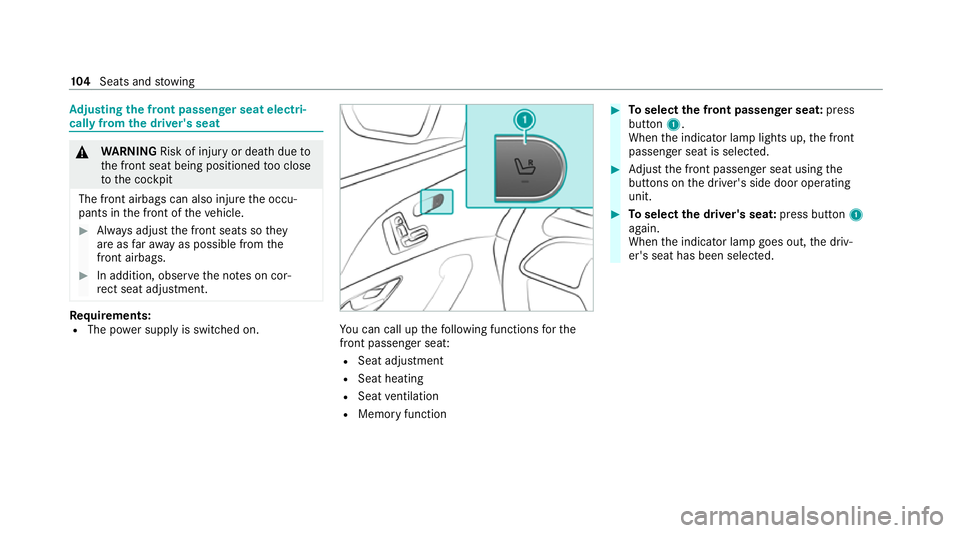
R The po wer supply is switched on. Yo
u can call up thefo llowing functions forthe
front passenger seat:
R Seat adjustment
R Seat heating
R Seat ventilation
R Memory function #
Toselect the front passenger seat: press
button 1.
When the indicator lamp lights up, the front
passenger seat is selected. #
Adjust the front passenger seat using the
buttons on the driver's side door operating
unit. #
Toselect the driver's seat: press button1
again.
When the indicator lamp goes out, the driv‐
er's seat has been selected. 104
Seats and stowing