2021 MERCEDES-BENZ GLE SUV steering
[x] Cancel search: steeringPage 251 of 545
or
#
Activate or deacti vate Act. Blind Spot Assist .Ac
tive Lane Keeping Assist Fu
nction of Active Lane Keeping Assist
Ac tive Lane Keeping Assist monitors the area in
front of your vehicle bymeans of the multifunc‐
tion camera (/ page212). It se rves toprotect
yo u against unin tentionally le aving your lane.
Yo u will be warned byvibration pulses in the
st eering wheel and guided bya course-cor rect‐
ing brake application back intoyour lane.
Ac tive Lane Keeping Assist is available in the
speed range between 60 km/h and 200 km/h.
Ac tive Lane Keeping Assist can neither reduce
th erisk of an accident if youfa ilto adapt your
driving style nor override the la wsof ph ysics. It
cannot take into account road, weather or traf fic
conditions. Active Lane Keeping Assist is only an
aid. You are responsible for maintaining a safe
dis tance totheve hicle in front, forve hicle
speed, for braking in good time and forst ay ing
in lane. The
status of Active Lane Keeping Assist is dis‐
pla yed in the on-board computer:
R 00B0 (green): Active Lane Keeping Assist is
active and operating.
R 00B0 (grey):Ac tive Lane Keeping Assist is
active but not operating.
R ·: Active Lane Keeping Assist is deactiva‐
te d or there is a malfunction. If a lane-cor
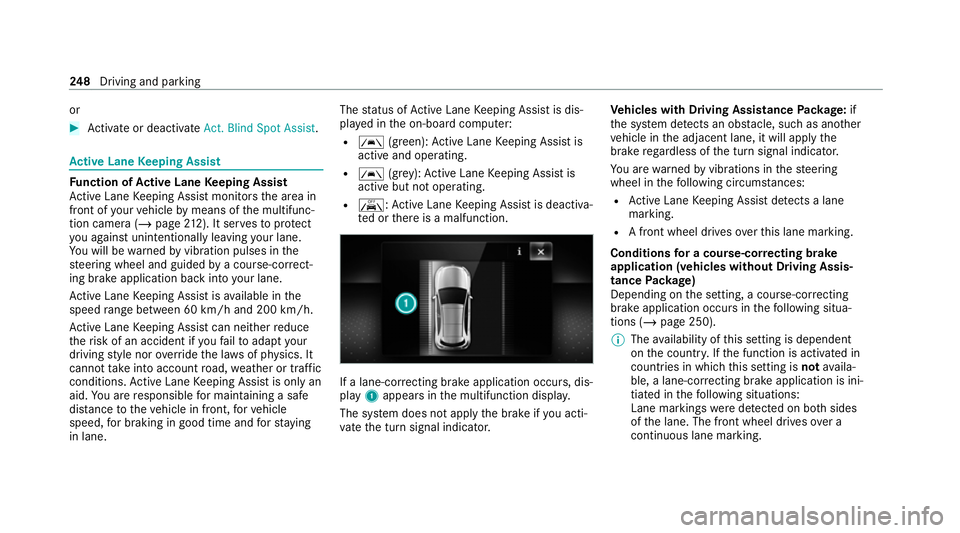
recting brake application occurs , dis‐
play 1appears in the multifunction displa y.
The sy stem does not apply the brake if you acti‐
va te the turn signal indicator. Ve
hicles with Driving Assistance Package: if
th e sy stem de tects an obs tacle, su chas ano ther
ve hicle in the adjacent lane, it will apply the
brake rega rdless of the turn signal indicator.
Yo u are warned byvibrations in thesteering
wheel in thefo llowing circums tances:
R Active Lane Keeping Assist de tects a lane
marking.
R A front wheel drives over this lane marking.
Conditions for a course-cor recting brake
application (vehicles without Driving Assis‐
tance Package)
Depending on the setting, a course-cor recting
brake application occu rsinthefo llowing situa‐
tions (/ page 250).
% The availability of this setting is dependent
on the count ry. If the function is activated in
count ries in which this setting is notavaila‐
ble, a lane-cor recting brake application is ini‐
tia ted in thefo llowing situations:
Lane markings weredetected on bo thsides
of the lane. The front wheel drives over a
continuous lane marking. 248
Driving and pa rking
Page 255 of 545
Dif
fere nces between dif fere nt vehicle le vels
compared tothe normal le vel Ve
hicle
le vel Ve
hicles
without Off-
ro ad pac kage Ve
hicles with
Off-road pack‐
age
Car wash Appr ox.
+90 mm Appr
ox.
+90 mm
Off-road
le ve l +3 Una
vailable Appr ox.
+90 mm
Off-road
le ve l +2 Una
vailable Appr ox.
+60 mm
Off-road
le ve l +1 +60 mm Appr
ox.
+30 mm
Spor tA pprox.
-15 mm App
rox.
-15 mm
Spo rt+A pprox.
-25 mm App
rox.
-25 mm If
th e entry /exit le vel function is activated, the
ve hicle is lo weredto the Sport + le velto facili‐
ta te entering/exiting theve hicle. When driving at speeds of appr
oximately 30 km/h or abo ve,
th e entry /exit le vel is deactivated and theve hi‐
cle is raised (/ page 255).
Operation with a trailer or bicycle rack
If transport equipment, forex ample a trailer or
bicycle rack , is attached tothe trailer hitch and
th e electrical connection has been cor rectly
es tablished:
R In drive prog ram F andG, theve hicle
adopts the normal le velst arting from a
speed of 30 km/h.
R In all other drive programs, theve hicle
re mains at normal le vel ir respective of
speed.
Sy stem limits
AIRMATIC may not be available or ha veonly limi‐
te dav ailability in thefo llowing cases:
R The overheating pr otection has been activa‐
te d due tofrequent le velch anges within a
short time. The 00C4warning lamp appears
in the multifunction displa y.
Af terth e cooling phase, the sy stem is again
av ailable without restriction. Setting the
vehicle le vel (vehicles with AIR‐
MATIC) &
WARNING Risk of accident because
ve hicle le vel is too high
Driving characteristics may be impaired.
The vehicle can drift outwards, forex ample,
when steering or cornering. #
Choose a vehicle le vel which is suited
to the driving style and thero ad sur face
conditions. &
WARNING Risk of entrapment from vehi‐
cle lo wering
When lo wering theve hicle, other people
could become trapped if their limbs are
between theve hicle body and the tyres or
underneath theve hicle. #
Make sure no one is underneath the
ve hicle or in the immediate vicinity of
th e wheel ar ches when theve hicle is
being lo wered. 252
Driving and parking
Page 264 of 545
Ad
justing the vehicle le vel (vehicles with E-
AC TIVE BODY CONT ROL) &
WARNING Risk of accident because
ve hicle le vel is too high
Driving characteristics may be impaired.
The vehicle can drift outwards, forex ample,
when steering or cornering. #
Choose a vehicle le vel which is suited
to the driving style and thero ad sur face
conditions. &
WARNING Risk of entrapment from vehi‐
cle lo wering
When lo wering theve hicle, other people
could become trapped if their limbs are
between theve hicle body and the tyres or
underneath theve hicle. #
Make sure no one is underneath the
ve hicle or in the immediate vicinity of
th e wheel ar ches when theve hicle is
being lo wered. &
WARNING Risk of becoming trapped
due totheve hicle lo wering
Ve hicles with AIRMATIC or le vel control:
when you unload luggage or lea vetheve hi‐
cle, theve hicle firs trises slightly and then
re turns tothe set le vel shortly af terw ards.
Yo u or an yone else in the vicinity of the
wheel ar ches or the underbody could thus
become trapped.
The vehicle can also be lo wered af ter being
loc ked. #
When leaving theve hicle, make sure
th at nobody is in the vicinity of the
wheel ar ches or the underbody. Re
quirements:
R The vehicle has been star ted.
R Vehicles without Off-road pac kage: the
ve hicle is being driven no fasterthan
65 km/h.
R Vehicles with Off-road pac kage:
- Off-road le vel +1: theve hicle is not mov‐
ing fast erthan 100 km/h. -
Off-road le vel +2: theve hicle is not mov‐
ing fast erthan 65 km/h.
- Off- road le vel +3: theve hicle is not mov‐
ing fast erthan 20 km/h.
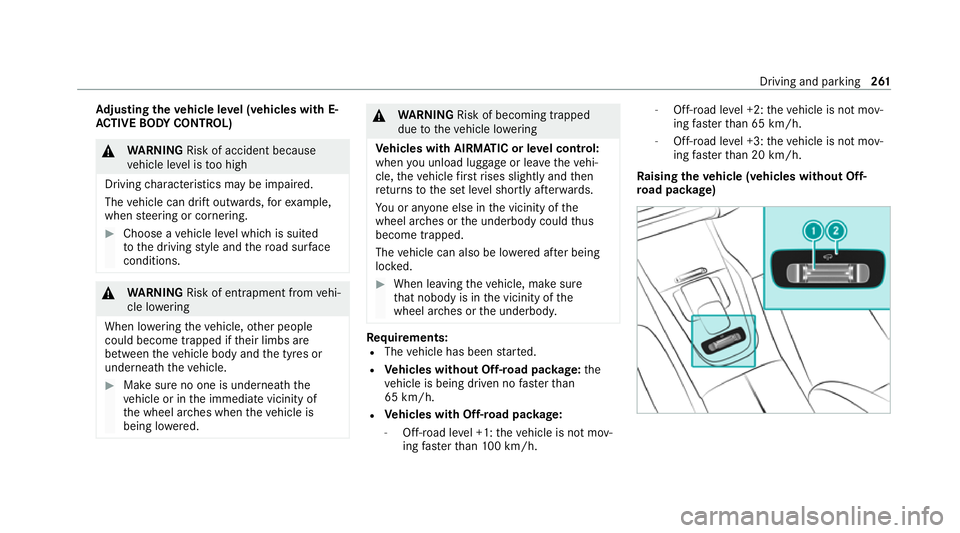
Ra ising theve hicle (vehicles without Off-
ro ad pac kage) Driving and pa
rking 261
Page 267 of 545
R
there is no trailer coupled
R theve hicle is outdoors
R the de tected late ral inclination of theve hicle
must not exceed appr ox.15 °
R the sy stem is within its operating temp era‐
ture
R the on-board voltage is suf ficiently high
Multimedia sy stem:
4 © 5
Settings 5
Assistance
5 Offroad Assist
Re covery mode
Re covery mode assist sth e driver when pulling
aw ay on rough terrain, such as sand or sn ow.#
Select Free driving mode. #
Select Start.
Re covery mode is activated. #
Select Stoptostop reco very mode.
Re covery mode is auto maticallydeactivated in
th efo llowing situations:
R you are actually tr avelling fasterthan
15 km/h R
afte r a running time of 30 seconds
R it is de tected that an object has hit the
underbody of theve hicle hard
R not all conditions are met
% Further information on reco very mode
(/ page 260).
Individual wheel control
Individual wheel control enables theve hicle le vel
to be set separately for each wheel. #
Select Individual wheel control. #
Set theve hicle le velfo rth e desired wheel.
% You can also use theto uchsc reen toset the
le ve lfo r two or more wheels at the same
time. #
Select Resettoset all wheels tothe default
setting.
Individual wheel control is automatically deacti‐
va ted in thefo llowing situations:
R you are tra velling fasterthan 15 km/h
R it is de tected that an object has hit the
underbody of theve hicle hard R
not all conditions are met
% Further information on individual wheel con‐
trol (/ page 260). Re
versing camera Fu
nction of there ve rsing camera
If yo u ha veactivated the function in the multime‐
dia sy stem (/ page270), the image from the
re ve rsing camera is shown in the media display
when there ve rsege ar is engaged. Dynamic
guide lines show the path theve hicle will take
with the cur rent steering angle. This helps youto
orient yourself and toavoid obs tacles when
re ve rsing.
The reve rsing camera is only an aid. It is not a
substitute foryo ur attention tothe sur roundings.
The responsibility for safe manoeuvring and
parking remains with you. Make sure that there
are no persons, animals or objects etc., in the
manoeuvring area while manoeuvring and park‐
ing.
% You can open the co ver of there ve rsing
camera manually (/ page270). 264
Driving and pa rking
Page 268 of 545
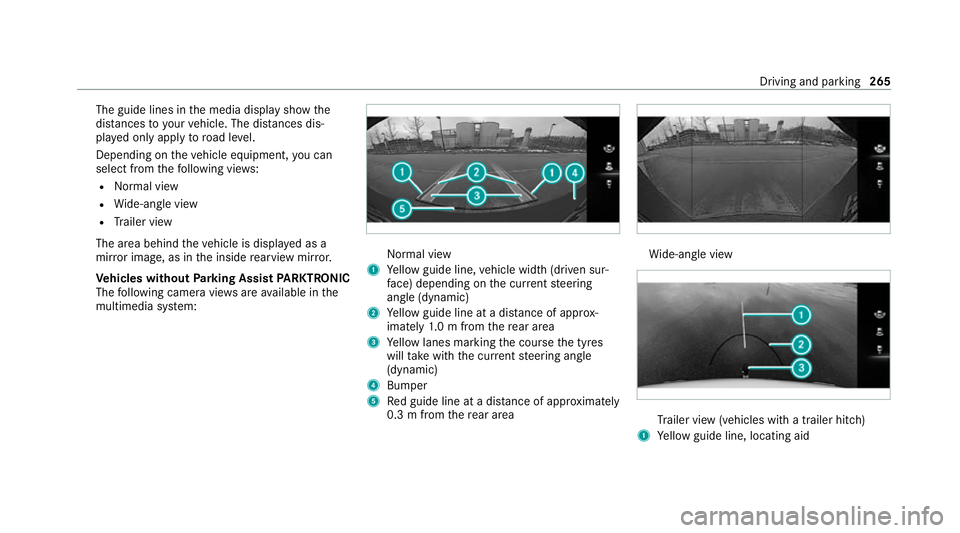
The guide lines in
the media display show the
dis tances to yourvehicle. The dis tances dis‐
pl ay ed only apply toroad le vel.
Depending on theve hicle equipment, you can
select from thefo llowing vie ws:
R Normal view
R Wide-angle view
R Trailer view
The area behind theve hicle is displa yed as a
mir ror image, as in the inside rearview mir ror.
Ve hicles without Parking Assist PARKTRONIC
The following camera vie wsare available in the
multimedia sy stem: Normal view
1 Yellow guide line, vehicle width (driven sur‐
fa ce) depending on the cur rent steering
angle (dynamic)
2 Yellow guide line at a dis tance of appr ox‐
imately 1.0 m from there ar area
3 Yellow lanes marking the course the tyres
will take with the cur rent steering angle
(dynamic)
4 Bumper
5 Red guide line at a dis tance of appr oximately
0.3 m from there ar area Wi
de-angle view Tr
ailer view (vehicles with a trailer hit ch)
1 Yellow guide line, locating aid Driving and parking
265
Page 269 of 545
2
Red guide line at a dis tance of appr oximately
0.3 m from the ball head of the trailer hitch
3 Ball head of the trailer hitch
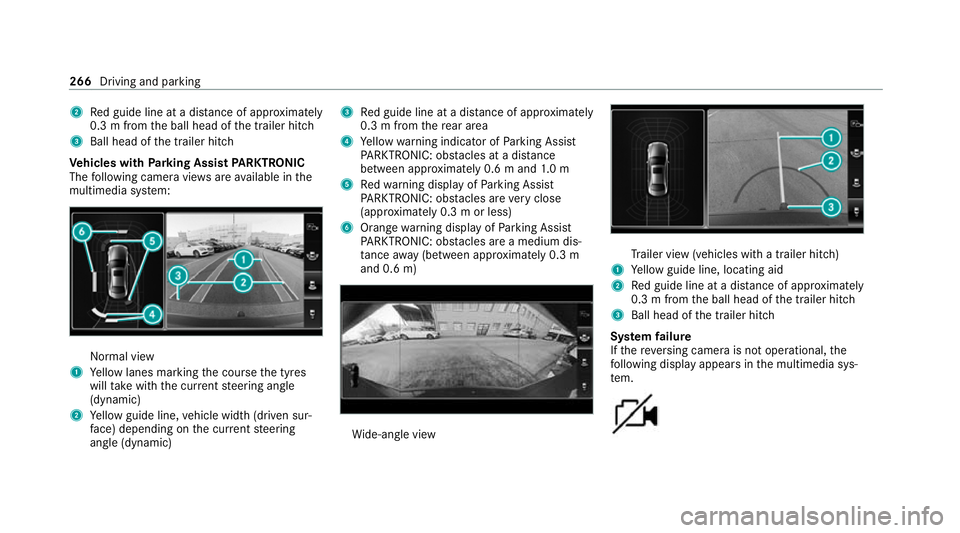
Ve hicles with Parking Assist PARKTRONIC
The following camera vie wsare available in the
multimedia sy stem: Normal view
1 Yellow lanes marking the course the tyres
will take with the cur rent steering angle
(dynamic)
2 Yellow guide line, vehicle width (driven sur‐
fa ce) depending on the cur rent steering
angle (dynamic) 3
Red guide line at a dis tance of appr oximately
0.3 m from there ar area
4 Yellow warning indicator of Parking Assist
PA RKTRONIC: obstacles at a dis tance
between appr oximately 0.6 m and 1.0 m
5 Redwa rning display of Parking Assist
PA RKTRONIC: obstacles are very close
(appr oximately 0.3 m or less)
6 Orange warning display of Parking Assist
PA RKTRONIC: obstacles are a medium dis‐
ta nce away (between appr oximately 0.3 m
and 0.6 m) Wi
de-angle view Tr
ailer view (vehicles with a trailer hit ch)
1 Yellow guide line, locating aid
2 Red guide line at a dis tance of appr oximately
0.3 m from the ball head of the trailer hitch
3 Ball head of the trailer hitch
Sy stem failure
If th ere ve rsing camera is not operational, the
fo llowing display appears in the multimedia sys‐
te m. 266
Driving and parking
Page 271 of 545
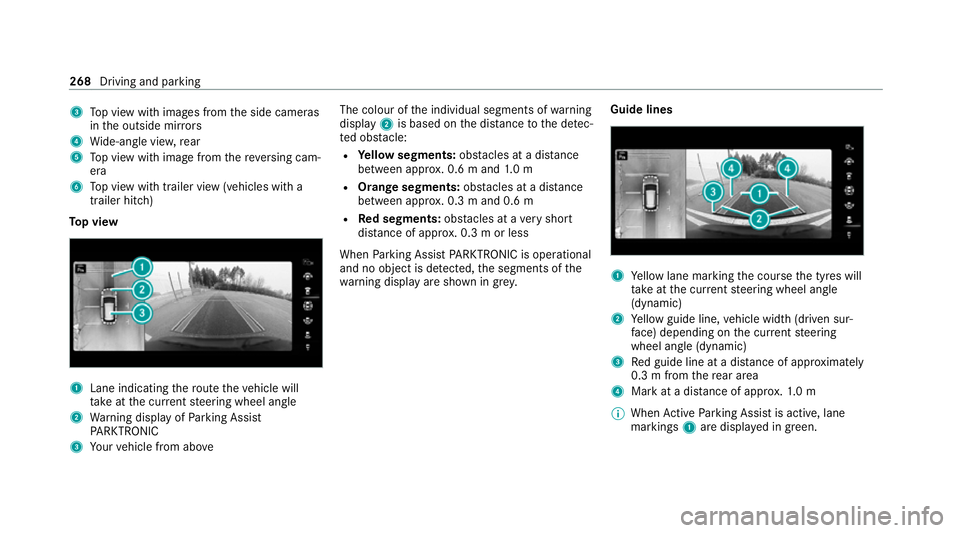
3
Top view with images from the side cameras
in the outside mir rors
4 Wide-angle vie w,rear
5 Top view with image from there ve rsing cam‐
era
6 Top view with trailer view (vehicles with a
trailer hitch)
To p view 1
Lane indicating thero ute theve hicle will
ta ke atthe cur rent steering wheel angle
2 Warning display of Parking Assist
PA RKTRONIC
3 Your vehicle from abo ve The colour of
the individual segments of warning
display 2is based on the dis tance tothe de tec‐
te d obs tacle:
R Yellow segments: obstacles at a di stance
between appr ox. 0.6 m and 1.0 m
R Orange segments: obstacles at a di stance
between appr ox. 0.3 m and 0.6 m
R Red segments: obstacles at a very short
dis tance of appr ox. 0.3 m or less
When Parking Assist PARKTRONIC is operational
and no object is de tected, the segments of the
wa rning display are shown in gr ey.Guide lines 1
Yellow lane marking the course the tyres will
ta ke atthe cur rent steering wheel angle
(dynamic)
2 Yellow guide line, vehicle width (driven sur‐
fa ce) depending on the cur rent steering
wheel angle (dynamic)
3 Red guide line at a dis tance of appr oximately
0.3 m from there ar area
4 Mark at a distance of appr ox.1. 0 m
% When Active Parking Assist is active, lane
markings 1are displa yed in green. 268
Driving and parking
Page 279 of 545
Specifying
thest arting point for the warning
to nes
Yo u can specify whe ther thePa rking Assist
PA RKTRONIC warning tones should commence
when theve hicle is fur ther aw ay from an obs ta‐
cle. #
Select Warn early all-round. #
Switch the function on or off.
Ac tivating/deactivating audio fadeout
Yo u can specify whe ther thevo lume of a media
source in the multimedia sy stem is tobe
re duced when Parking Assist PARKTRONIC
sounds a warning tone. #
Select Audio fadeout during warning tones. #
Switch the function on or off. Ac
tive Parking Assist Fu
nction of Active Parking Assist
Ac tive Parking Assist is an electro nic parking
assis tance sy stem, which uses ultrasound with
th e assis tance of there ve rsing camera and 360°
Camera. When you are driving forw ards up to
appr oximately 35 km/h, the sy stem automati‐ cally measures parking spaces on bo
thsides of
th eve hicle.
Ac tive Parking Assist of fers thefo llowing func‐
tions:
R Count ry-dependent: parking in parking
spaces parallel tothero ad
R Parking in parking spaces perpendicular to
th ero ad (optionally either forw ards or
re ve rse)
R Exiting parking spaces if you ha vepar ked
using Active Parking Assist
As soon as all requ irements are met for sear ch‐
ing for parking spaces, theÇ display appears
in the multifunction displa y.
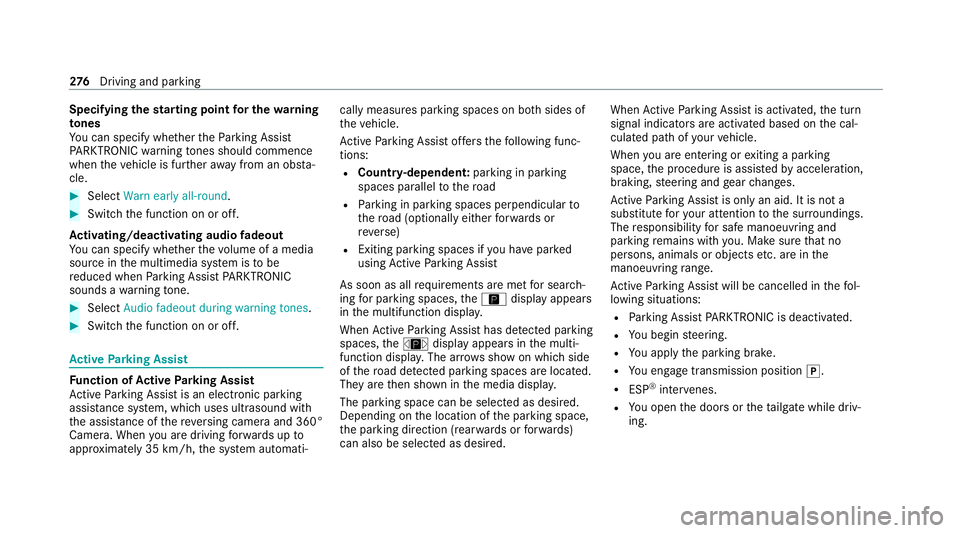
When Active Parking Assist has de tected park ing
spaces, theÈ display appears in the multi‐
function displa y.The ar rows show on which side
of thero ad de tected park ing spaces are located.
They are then shown in the media displa y.
The parking space can be selected as desired.
Depending on the location of the parking space,
th e parking direction (rear wards or forw ards)
can also be selec ted as desired. When
Active Parking Assist is activated, the turn
signal indicators are activated based on the cal‐
culated path of your vehicle.
When you are en tering or exiting a parking
space, the procedure is assis tedby acceleration,
braking, steering and gear changes.
Ac tive Parking Assist is only an aid. It is not a
substitute foryo ur attention tothe sur roundings.
The responsibility for safe manoeuvring and
parking remains with you. Make sure that no
persons, animals or objects etc. are in the
manoeuvring range.
Ac tive Parking Assist will be cancelled in thefo l‐
lowing situations:
R Parking Assist PARKTRONIC is deacti vated.
R You begin steering.
R You apply the parking brake.
R You en gage transmission position 005D.
R ESP ®
inter venes.
R You open the doors or theta ilgate while driv‐
ing. 276
Driving and pa rking