2021 MERCEDES-BENZ GLE COUPE headlamp
[x] Cancel search: headlampPage 136 of 525
Exterior lighting
Note
s on adjusting the lights when driving
abroad Ve
hicles with Intelligent Light Sy stem: The
headlamps are automatically adjus ted when the
ve hicle enters countries in which traf fic drives
on theot her side of thero ad.
In thefo llowing cases, check the headlamp set‐
ting and change it manually if necessary:
R Ifth eDipped-beam setting (left/right-side
traffic) Manual adjustment only display mes‐
sage is displa yed.
R Ifth eCheck dipped-beam setting (left/right-
side traffic) display message is displa yed.
Once the headlamps ha vebeen con verted:
R Oncoming tra ffic will not be dazzled.
R The edge of thero ad will not be illuminated
as far or as high.
R The "mo torw ay mode" and "enhanced fog
light" functions will not be available. Information about lighting sy
stems and your
re sponsibility The
various lighting sy stems of theve hicle are
only aids. The driver of theve hicle is responsible
fo r cor rect vehicle illumination in accordance
with the pr evailing light and visibility conditions,
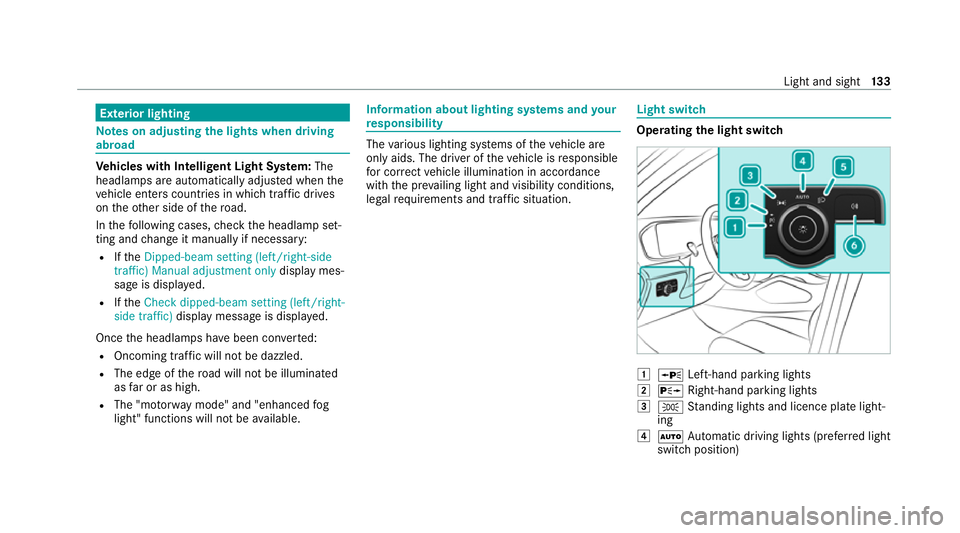
legal requirements and traf fic situation. Light switch
Ope
rating the light switch 0047
0063 Left-hand pa rking lights
0048 0064 Right-hand parking lights
0049 0060 Standing lights and licence plate light‐
ing
004A 0058 Automatic driving lights (prefer red light
switch position) Light and sight
13 3
Page 138 of 525
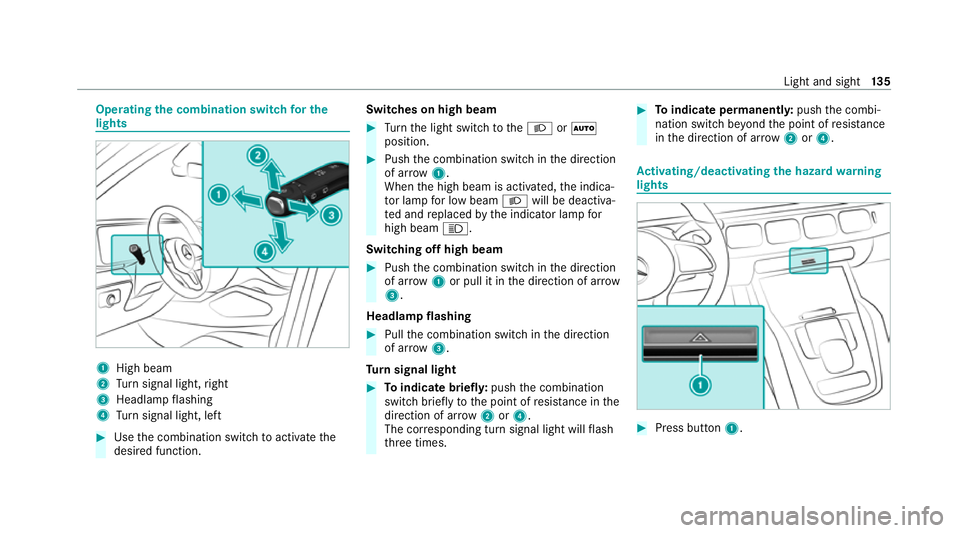
Operating
the combination switch for the
lights 1
High beam
2 Turn signal light, right
3 Headlamp flashing
4 Turn signal light, left #
Use the combination switch toactivate the
desired function. Switches on high beam #
Turn the light switch tothe0058 or0058
position. #
Push the combination switch in the direction
of ar row1.
When the high beam is activated, the indica‐
to r lamp for low beam 0058will be deactiva‐
te d and replaced bythe indicator lamp for
high beam 0057.
Switching off high beam #
Push the combination switch in the direction
of ar row1or pull it in the direction of ar row
3 .
Headlamp flashing #
Pull the combination switch in the direction
of ar row3.
Tu rn signal light #
Toindicate briefl y:push the combination
switch briefly tothe point of resis tance in the
direction of ar row2or4.
The cor responding turn signal light will flash
th re e times. #
Toindicate permanentl y:push the combi‐
nation switch be yond the point of resis tance
in the direction of ar row2or4. Ac
tivating/deactivating the hazard warning
lights #
Press button 1. Light and sight
13 5
Page 139 of 525
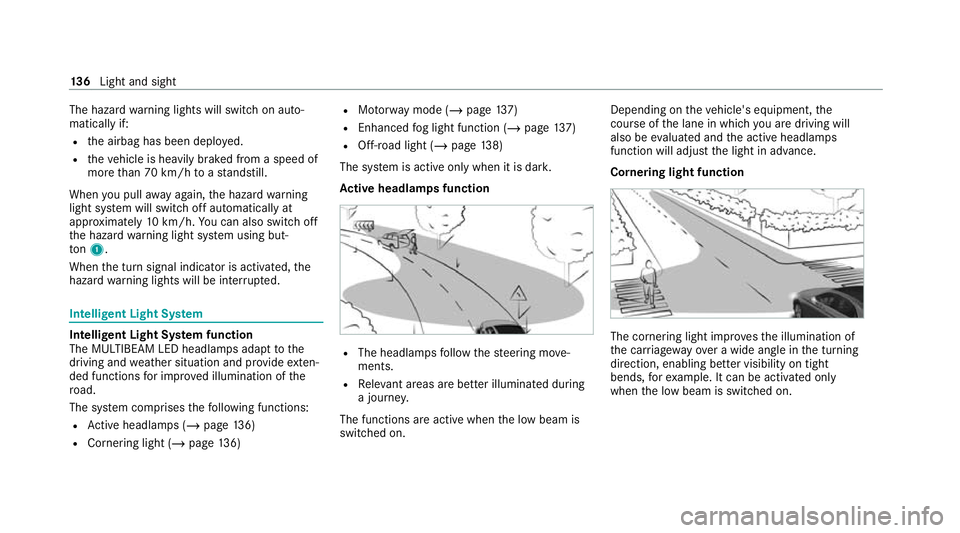
The hazard
warning lights will switch on auto‐
matically if:
R the airbag has been deplo yed.
R theve hicle is heavily braked from a speed of
more than 70 km/h toast andstill.
When you pull away again, the hazard warning
light sy stem will switch off automatically at
appr oximately 10km/h. You can also swit choff
th e hazard warning light sy stem using but‐
to n1.
When the turn signal indicator is activated, the
hazard warning lights will be inter rupte d. Intelligent Light Sy
stem Intelligent Light Sy
stem function
The MULTIBEAM LED headlamps adapt tothe
driving and weather situation and pr ovide exten‐
ded functions for impr oved illumination of the
ro ad.
The sy stem comprises thefo llowing functions:
R Active headla mps (/ page136)
R Cornering light (/ page136) R
Motorw ay mode (/ page137)
R Enhanced fog light function (/ page137)
R Off-road light (/ page138)
The sy stem is active only when it is dar k.
Ac tive headlamps function R
The headlamps follow thesteering mo ve‐
ments.
R Releva nt areas are better illumina ted during
a journe y.
The functions are active when the low beam is
switched on. Depending on
theve hicle's equipment, the
cou rse of the lane in which you are driving will
also be evaluated and the active headlamps
function will adjust the light in advance.
Cornering light function The cornering light impr
ovesth e illumination of
th e car riag ewa yove r a wide angle in the turning
direction, enabling better visibility on tight
bends, forex ample. It can be activated only
when the low beam is switched on. 13 6
Light and sight
Page 141 of 525
Fu
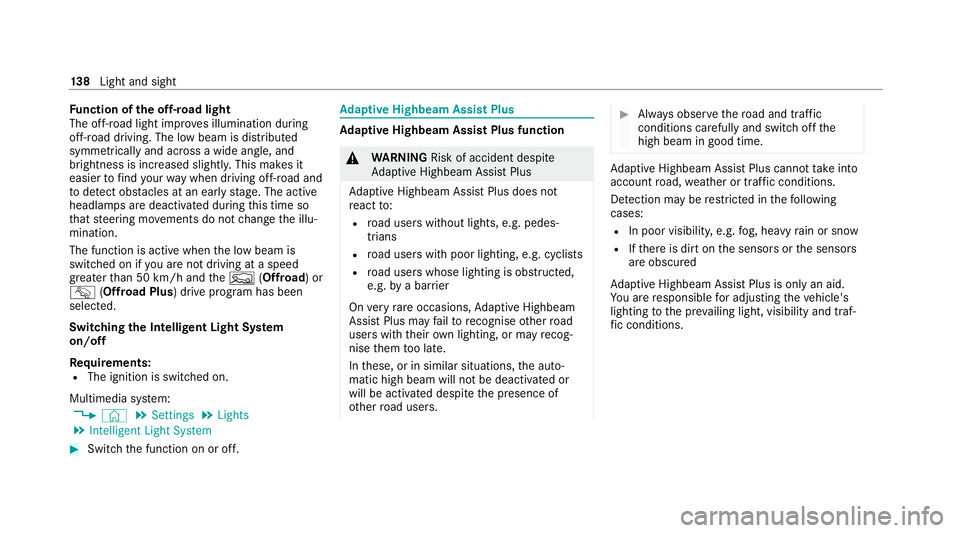
nction of the off-road light
The off-ro ad light impr oves illumination during
off-road driving. The low beam is distributed
symmetrically and across a wide angle, and
brightness is increased slightl y.This makes it
easier tofind your wa y when driving off-ro ad and
to detect obs tacles at an earl yst age. The active
headlamps are deactivated during this time so
th at steering mo vements do not change the illu‐
mination.
The function is active when the low beam is
switched on if you are not driving at a speed
greater than 50 km/h and theF (Offroad) or
G (Offroad Plus) drive program has been
selected.
Switching the Intelligent Light Sy stem
on/off
Re quirements:
R The ignition is switched on.
Multimedia sy stem:
4 © 5
Settings 5
Lights
5 Intelligent Light System #
Switch the function on or off. Ad
aptive Highbeam Assist Plus Ad
aptive Highbeam Assist Plus function &
WARNING Risk of accident despite
Ad aptive Highbeam Assist Plus
Ad aptive Highbeam Assist Plus does not
re act to:
R road users without lights, e.g. pedes‐
trians
R road users with poor lighting, e.g. cyclists
R road users whose lighting is obstructed,
e.g. bya bar rier
On very rare occasions, Adaptive Highbeam
Assist Plus may failto recognise other road
users with their own lighting, or may recog‐
nise them too late.
In these, or in similar situations, the auto‐
matic high beam will not be deactivated or
will be activated despite the presence of
ot her road users. #
Alw ays obser vethero ad and traf fic
conditions carefully and switch off the
high beam in good time. Ad
aptive Highbeam Assist Plus cannot take into
account road, weather or traf fic conditions.
De tection may be restricted in thefo llowing
cases:
R In poor visibilit y,e.g. fog, heavy rain or snow
R Ifth ere is dirt on the sensors or the sensors
are obscured
Ad aptive Highbeam Assist Plus is on lyan aid.
Yo u are responsible for adju sting theve hicle's
lighting tothe pr evailing light, visibility and traf‐
fi c conditions. 13 8
Light and sight
Page 142 of 525
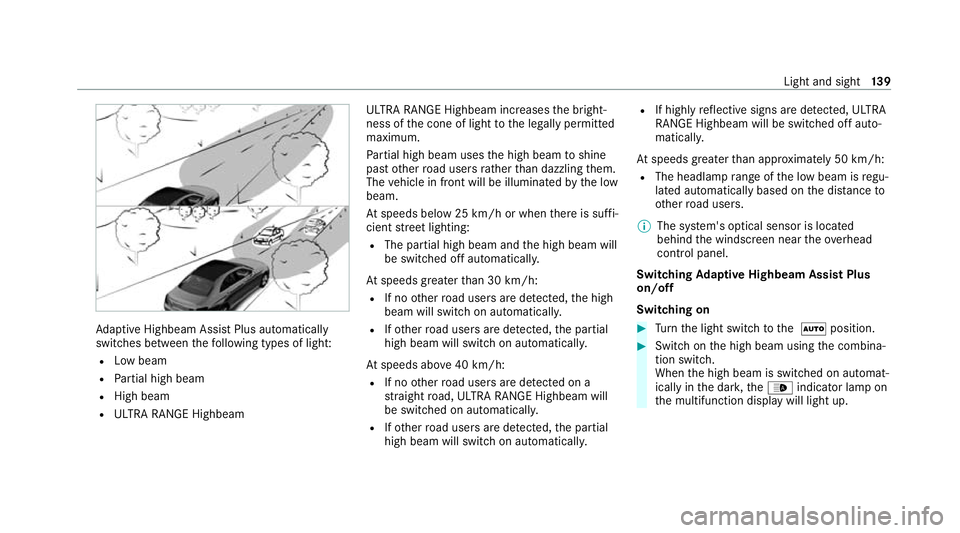
Ad
aptive Highbeam Assist Plus automatically
swit ches between thefo llowing types of light:
R Low beam
R Partial high beam
R High beam
R ULTRA RANGE Highbeam ULTRA RANGE Highbeam inc
reases the bright‐
ness of the cone of light tothe legally permitted
maximum.
Pa rtial high beam uses the high beam toshine
past other road users rath er than dazzling them.
The vehicle in front will be illuminated bythe low
beam.
At speeds below 25 km/h or when there is suf fi‐
cient stre et lighting:
R The partial high beam and the high beam will
be switched off automaticall y.
At speeds greater than 30 km/h:
R If no other road users are de tected, the high
beam will switch on automaticall y.
R Ifot her road users are de tected, the partial
high beam will switch on automaticall y.
At speeds abo ve40 km/h:
R If no other road users are de tected on a
st ra ight road, ULTRA RANGE Highbeam will
be swit ched on automaticall y.
R Ifot her road users are de tected, the partial
high beam will switch on automaticall y.R
If highly reflective signs are de tected, ULTRA
RANGE Highbeam will be switched off au to‐
matical ly.
At speeds greater than appr oximately 50 km/h:
R The headlamp range of the low beam is regu‐
lated automatically based on the dis tance to
ot her road users.
% The sy stem's optical sensor is located
behind the windscreen near theove rhead
control panel.
Switching Adaptive Highbeam Assist Plus
on/off
Switching on #
Turn the light switch tothe 0058 position. #
Switch on the high beam using the combina‐
tion switch.
When the high beam is switched on automat‐
ically in the dar k,the00CE indicator lamp on
th e multifunction display will light up. Light and sight
13 9
Page 143 of 525
Switching off
#
Switch off the high beam using the combina‐
tion switch. Setting
the low beam (vehicles with MULTI‐
BEAM LED headlamps only) Multimedia sy
stem:
4 © 5
Settings 5
Lights
5 Dipped-beams #
Select Right-side traffic, Left-side trafficor
Automatic. Setting
theex terior lighting switch-off delay
time Re
quirements:
R The light switch is in the0058 position. Multimedia sy
stem:
4 © 5
Settings 5
Lights
5 Ext. light. del. sw. off #
Set the switch-off delay time.
When theve hicle engine is switched off, the
ex terior lighting will be activated forth e set
time. Switching
the sur round lighting on/off Multimedia sy
stem:
4 © 5
Settings 5
Lights
5 Surround lighting
When Surround lighting is active,theex terior
lighting lights up for 40 seconds af terth eve hicle
is unloc ked. When youstart theve hicle, the sur‐
ro und lighting is deactivated and the automatic
driving lights are activated.
Illuminated running boards: whenthe sur‐
ro und lighting is swit ched on, the illumination of
th eru nning boards is acti vated when a door is
opened. If the door is not closed, theru nning
board cou rtesy lighting is automatically deactiva‐
te d af ter 40 seconds. #
Activate or deacti vate the function. Interior lighting
Ad
justing the in terior lighting Fr
ont overhead control panel 1
003D Front left reading lamp
2 0033 Automatic interior lighting control
3 004A Front interior lighting
4 0042 Rear interior lighting
5 003D Front right reading lamp 14 0
Light and sight
Page 150 of 525
Au
tomatic anti-dazzle mir rors function &
WARNING Risk of acid burn s and poi‐
soning due tothe anti-dazzle mir ror elec‐
trolyte
Electrolyte may escape if theglass in an
automatic anti-dazzle mir ror breaks.
The electrolyte is hazardous tohealth and
causes ir rita tion. It mu stnot come into con‐
ta ct with your skin, eyes,respiratory or gans
or clo thing or be swallo wed. #
Ifyo u come into contact with electro‐
ly te , obser vethefo llowing:
R Immediately rinse the electrolyte
from your skin with water and seek
medical attention.
R If electrolyte comes into contact
with your eyes, immediately rinse
th em thoroughly with clean water
and seek medical attention.
R Ifth e electrolyte is swallo wed,
immediately rinse your mouth out
th oroughl y.Do not induce vomiting.
Seek medical attention immediately. R
Immedia tely ch ange out of clo thing
which has been con taminated with
electrolyte.
R If an allergic reaction occurs, seek
medical attention immediatel y. The inside
rear-view mir ror and the outside mir‐
ro r on the driver's side will automatically go into
anti-dazzle mode if light from a headlamp hits
th e sensor on the inside rear-view mir ror.
Sy stem limits
The sy stem will not go into anti-dazzle mode if:
R The engine is switched off.
R Reversege ar is engaged.
R The interior lighting is swit ched on. Fr
ont-passenger outside mir ror parking posi‐
tion function %
The pa rking position is available on ly invehi‐
cles with a memory function.
The parking position makes parking easier. In
thefo llowing situations, the front-passen ger
outside mir ror will swive l downwards in the
direction of there ar wheel on the front passeng‐
er's side:
R the parking position is stored (/ page148)
R The front-passenger mir ror is selected
R Reversege ar is engaged.
The front-passenger outside mir ror will mo ve
back toits original position in thefo llowing sit‐
uations:
R You shift the transmission toano ther trans‐
mission position
R You are tra velling at speeds greaterth an
15 km/h
R You press the button forth e outside mir ror
on the driver's side Light and sight
147
Page 176 of 525
R
Lowe rth eve hicle le vel again toa le vel suita‐
ble tothero ad conditions, e.g. tothe normal
le ve l.
R Apply the brakes todry them af terfo rd ing.
R Check that the service brake is working nor‐
mally af ter a long downhill stre tch.
R Clean thefo llowing components every time
af te r driving off-road:
- licence plate number
- headlamps and tail lamps
- tyres, wheels and wheel ar ches
- underbody
R After driving thro ugh sand, mud, water or
gr av el, ha vethefo llowing components
ch ecked and cleaned:
- brake disks and brakepads
- tyres and wheels
- axle joints ECO
start/s top function ECO
start/s top function
% Depending on the engine, the ECO start/
st op function is not available in all drive pro‐
grams. Obse rveth est atus display in the
multifunction display forth is.
The engine is switched off automatically in the
fo llowing situations if all vehicle conditions for
an automatic engine stop are me t:
R You brake theve hicle toast andstill in trans‐
mission position 005Bor005C.
R Vehicles with a 48 V on-board electrical
sy stem: You depress the brake pedal when
tra velling at a low speed.
If th e sy stem has de tected one of thefo llowing
situations, the engine will not stop:
R Youstop at a stop sign and there is no vehi‐
cle in front of you.
R The vehicle that stopped in front of you
st arts up again.
R You manoeuv re, turn thesteering wheel
sharply or engage reve rsege ar. %
Ifth e sy stem de tects an intellige ntstop
inhibitor, forex ample, a stop sign, the engine
will not stop.
If yo u activate the HOLD function or engage
th e park position 005D,the engine can be
switched off in spite of an intelligent stop
inhibitor.
The engine is restar ted automatically if:
R You en gage transmission position 005Bor005E.
R You depress the accelerator pedal.
R An automatic engine start is requiredbythe
ve hicle.
R Youre lease the brake pedal.
R Vehicles with a 48 V on-board electrical
sy stem:
- Youre lease the brake pedal on a downhill
gradient and theve hicle does not roll.
- The vehicle rolls on a downhill gradient
and does not automatically enter glide
mode at 20 km/h. Driving and parking
17 3