2021 MERCEDES-BENZ GLC SUV park assist
[x] Cancel search: park assistPage 194 of 481
R
The transmission is shif tedto position j.
R The vehicle is secured with the electric park‐
ing brake.
In thefo llowing situations, theve hicle is held by
transmission position jand/or bythe electric
parking brake:
R The seat belt is unfas tened and the driver's
door is opened.
R The vehicle is switched off.
R There is a malfunction in the sy stem or the
po we r supply is insuf ficient. Fu
nction of Hill Start Assist Hill
Start Assist holds theve hicle for a short
time when pulling away on a hill under thefo l‐
lowing conditions:
R The transmission is in position hork.
R The elect ric pa rking brake is released.
This gives you enough time tomo veyour foot
from the brake pedal tothe accelerator pedal
and depress it before theve hicle begins toroll
aw ay. &
WARNING Risk of accident and inju ry
due totheve hicle rolling away
Af ter a short time, Hill Start Assist no lon ger
holds theve hicle. #
Swiftly mo veyour foot from the brake
pedal tothe accelera tor pedal. Do not
lea vetheve hicle when it is being held
by Hill Start Assist. Fu
nction of Adaptive Brake Lights Ad
aptive Brake Lights warnfollowing traf fic in an
emergency braking situation with th efo llowing
actions:
R Byflashing the brake lamps
R By activating the hazard warning lights
If th eve hicle is braked sharply from speeds
abo ve50 km/h, the brake lamps flash rapidl y.
This pr ovides traf fic tr avelling behind you with an
ev en more noticeable warning.
If th eve hicle is tr avelling at speeds of more than
70 km/h at the beginning of the brake applica‐
tion, the hazard warning lights switch on once th
eve hicle is stationar y.When you pull away
again, the hazard warning lights will switch off
automatically at appr oximately 10km/h. Yo u
can also switch off the hazard warning lights
using the hazard warning button. AT
TENTION ASSI ST Fu
nction of ATTENTION ASSI ST
AT TENTION ASSIST assists you on long, mon oto‐
nous jou rney s, e.g. on mo torw ays and trunk
ro ads. If ATTENTION ASSIST de tects indicators
of fatigue or increasing lapses in concentration
on the part of the driver, it suggests taking a
brea k.
AT TENTION ASSIST is only an aid. It cannot
alw ays de tect fatigue or lapses in concentration
in time. The sy stem is not a substitute for a well-
re sted and attentive driver. On long journe ys,
ta ke regular breaks in good time that allow for
adequate recuperation.
Yo u can choose between two settings:
R Standard: normal sy stem sensitivity. Driving and parking
191
Page 196 of 481
R
Ifyo u unfas tenyo ur seat belt and open the
driver's door (e.g. tochange drivers or take a
break).
Setting ATTENTION ASSI ST
Multimedia sy stem:
4 © 5
Settings 5
Assistance
5 Attention Assist
Setting options #
Select Standard, SensitiveorOff.
Suggesting a rest area #
Select Suggest rest area . #
Activate or deacti vate the function.
If AT TENTION ASSIST de tects fatigue or
increasing la ckof attention, it suggests a
re st area in the vicinit y. #
Select the sugges tedre st area.
Yo u are guided tothe selected rest area. Cruise cont
rol and limiter Fu
nction of cruise control
Cruise contro lre gulates the speed totheva lue
selec tedby the driver.
If yo u accelerate toove rtake, forex ample, the
st ored speed is not dele ted. If youre mo veyour
fo ot from the accelerator pedal af terove rtaking,
cruise control will resume speed regulation back
to thestored speed.
Yo u can store any speed abo ve20 km/h up to
th e maximum design speed or up tothe set win‐
te r tyre limit.
Obser vethe no tes on driving sy stems and your
re sponsibility; you may otherwise failto recog‐
nise dangers (/ page 184).
Me rcedes‑AMG vehicles: cruise control is avail‐
able up toa maximum speed of 250 km/h.
Displ ays on the multifunction display
R h (gre y): cruise contro l is selected but
not yet acti vated.
R h (green): cruise control is active. A
stored speed appears along with theh dis‐
pla y.
% The segments extending from the cur rent
st ored speed tothe end of the scale, or to
th e set winter tyre limit, light up in the
speedome ter.
Sy stem limits
Cruise control may be unable tomaintain the
st ored speed on uphill gradients. The stored
speed is resumed when the gradient evens out.
Change into a lo werge ar in good time on long
and steep downhill gradients. Take particular
no te ofthis when driving a laden vehicle. By
doing so, you will make use of the engine's brak‐
ing ef fect. This relie vesth e load on the brake
sy stem and pr events the brakes from overheat‐
ing and wearing tooqu ickl y.
Do not use cruise control in thefo llowing situa‐
tions:
R In traf fic situations whi chrequ ire frequent
ch anges of speed, e.g. in heavy traf fic, on
winding roads. Driving and parking
19 3
Page 199 of 481
Deactivating cruise cont
rol or theva riable
limi ter #
Select Owith th e left rock er switch.
% Ifyo u brake, deactivate ESP ®
or if ESP ®
inter venes, cruise control is deacti vated. The
va riable limiter is not deactivated.
Information on the permanent limiter
If th eve hicle should ne verexc eed a specific
speed (e.g. for driving in winter tyre mode), you
can set this speed with the permanent limiter.
Yo u do this by limiting the speed between
16 0 km/h and 240 km/h in the multimedia sys‐
te m (/ page196).
Shortly before the set speed is reached, it
appears in the multifunction displa y.When you
confirm the message, display messages no lon‐
ge r appear until you swit choff theve hicle. The
speed will only be displa yed again once theve hi‐
cle has been restar ted or if the set speed is
ch anged.
The permanent limiter does not swit chtopas‐
sive mode even du ring kickdown and the driven
speed remains below the set speed. Setting
the speed limitation for winter tyres
Multimedia sy stem:
4 © 5
Settings 5
Vehicle
5 Winter tyres limit #
Select a speed or deactivate the function. Ac
tive Di stance Assist DISTRO NIC Fu
nction of Active Di stance Assist
DISTRO NIC
Ac tive Dis tance Assi stDISTRONIC maintains the
set speed on free-flowing roads. If vehicles in
front are de tected, the set dis tance is main‐
ta ined, if necessar y,until theve hicle comes to a
halt. The vehicle accelerates or brakes depend‐
ing on the dis tance totheve hicle in front and
th e set speed. The speed and dis tance tothe
ve hicle in front are set and sa ved using the
st eering wheel.
Av ailable speed range:
R Vehicles without Driving Assistance Pack‐
age: 20 km/h - 200 km/h
R Vehicles with Driving Assistance Pack‐
age: 20 km/h - 210 km/h %
Plug-in hybrid: the adjus table set speed can
be reduced due tothe selected drive pro‐
gram. Obser vethere leva nt no tes in the Sup‐
plement.
Other features of Active Dis tance Assi st
DISTRONIC:
R Adjusts the driving style depending on the
selected drive program (fuel-saving, comfort‐
able or dynamic)
R Initiates acceleration tothestored speed if
th e turn signal indicator is switched on to
ch ange totheove rtaking lane
R Vehicles with Driving Assistance Pack‐
age:
- Reacts tostationary vehicles de tected in
urban speed ranges (e xcept bicycles and
mo torcyc les)
- Take s one-sided overtaking restrictions
into account on mo torw ays or on multi-
lane roads with separate car riag ew ays
(countr y-dependent)
Ve hicles with Driving Assistance Package
and Park ingPackage: ifth eve hicle has been 19 6
Driving and pa rking
Page 202 of 481
&
WARNING Risk of accident if de tection
function of Active Dis tance Assi st
DISTRONIC is impaired
Ac tive Dis tance Assi stDISTRONIC does not
re act or has a limited reaction:
R when driving on a dif fere nt lane or when
ch anging lanes
R topedestrians, animals, bicycles or sta‐
tionary vehicles, or unexpected obs tacles
R tocompl extraf fic conditions
R tooncoming vehicles and crossing traf fic
As a result, Active Dis tance Assi st
DISTRONIC may nei ther give warnings nor
inter vene in su chsituations. #
Alw ays obser vethe tra ffic conditions
carefully and react accordin gly. Operating
Active Di stance Assist DIST RONIC
Re quirements:
R The elect ric pa rking brake is released.
R ESP ®
is activated and is not inter vening. R
The transmission is in position h.
R The driver's door is closed.
R Check of thera dar sensor sy stem has been
successfully comple ted.
R Parking Assist PARKTRONIC is not being
used topark theve hicle or toexit from a
parking space. #
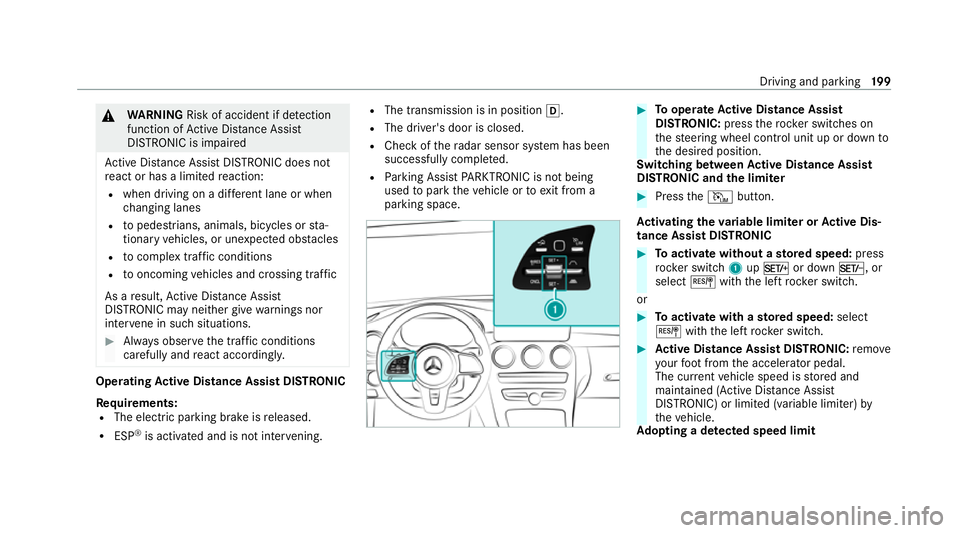
Tooperate Active Di stance Assist
DISTRO NIC:press thero ck er switches on
th esteering wheel control unit up or down to
th e desired position.
Switching between Active Di stance Assist
DISTRO NIC and the limiter #
Press theI button.
Ac tivating the variable limi ter or Active Dis‐
tance Assi stDISTRONIC #
Toactivate with out astored speed: press
rock er switch 1upM or down N, or
select Jwiththe left rocker switch.
or #
Toactivate with ast ored speed: select
J withthe left rocker switch. #
Active Di stance Assist DISTRO NIC:remo ve
yo ur foot from the accelerator pedal.
The cur rent vehicle speed is stored and
maintained (Active Dis tance Assi st
DISTRONIC) or limited (variable limiter) by
th eve hicle.
Ad opting a de tected speed limit Driving and parking
19 9
Page 203 of 481
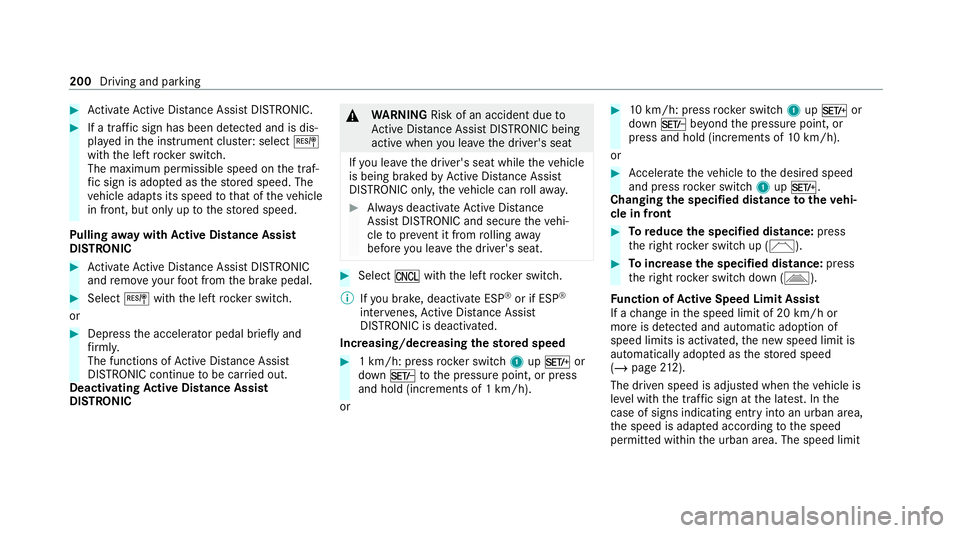
#
Activate Active Dis tance Assi stDISTRONIC. #
If a traf fic sign has been de tected and is dis‐
pl ay ed in the instrument clus ter: select J
with the left rocker switch.
The maximum permissible speed on the traf‐
fi c sign is adop ted as thestored speed. The
ve hicle adapts its speed tothat of theve hicle
in front, but only up tothestored speed.
Pulling away with Active Di stance Assist
DISTRO NIC #
Activate Active Dis tance Assi stDISTRONIC
and remo veyour foot from the brake pedal. #
Select Jwiththe left rock er switch.
or #
Depress the accelerator pedal briefly and
fi rm ly.
The functions of Active Dis tance Assi st
DISTRONIC continue tobe car ried out.
Deactivating Active Di stance Assist
DISTRO NIC &
WARNING Risk of an accident due to
Ac tive Dis tance Assi stDISTRONIC being
acti vewhen you lea vethe driver's seat
If yo u lea vethe driver's seat while theve hicle
is being braked byActive Dis tance Assi st
DISTRONIC only, theve hicle can rollaw ay. #
Alw ays deactivate Active Dis tance
Assi stDISTRONIC and secure theve hi‐
cle topreve nt it from rolling away
before you lea vethe driver's seat. #
Select Owiththe left rock er switch.
% Ifyo u brake, deactivate ESP ®
or if ESP ®
inter venes, Active Dis tance Assi st
DISTRONIC is deacti vated.
Increasing/decreasing thesto red speed #
1 km/h: press rocker switch 1upM or
down Ntothe pressure point, or press
and hold (increments of 1 km/h).
or #
10km/h: press rock er switch 1upM or
down Nbeyond the pressure point, or
press and hold (increments of 10km/h).
or #
Accelerate theve hicle tothe desired speed
and press rocker switch 1upM.
Changing the specified distance totheve hi‐
cle in front #
Toreduce the speci fied distance: press
th eright rock er switch up (Ñ). #
Toincrease the specified distance: press
th eright rock er switch down (Ò).
Fu nction of Active Speed Limit Assi st
If a change in the speed limit of 20 km/h or
more is de tected and auto matic adoption of
speed limits is activated, the new speed limit is
automatically adop ted as thestored speed
(/ page 212).
The driven speed is adju sted when theve hicle is
le ve l with the traf fic sign at the latest. In the
case of signs indicating entry into an urban area,
th e speed is adap ted according tothe speed
permitted within the urban area. The speed limit 200
Driving and parking
Page 205 of 481
Also,
the speed is reduced if the turn signal indi‐
cator tochange lanes is swit ched on and one of
th efo llowing situations is de tected:
R Turning off at junctions
R Driving on slowing-down lanes
R Driving on lanes adjacent toslowing-down
lanes
The driver is responsible forch oosing theright
speed and observing other road users. This
applies in particular tojunctions, roundabouts
and traf fic lights, as route-based speed adap ta‐
tion does not brake theve hicle toast andstill.
When route guidance is active, thefirs t speed
adjustment is car ried out automaticall y.Ifthe
turn signal indica tor is switched on, the selected
ro ute is confirmed and fur ther speed adjustment
is activated.
Speed adap tation is cancelled in thefo llowing
cases:
R Ifth e turn signal indicator is switched off
before thero ute event.
R Ifth e driver depresses the accelerator or
brake pedal during the process. Sy
stem limits
Ro ute-based speed adap tation does not take
ri ght of wayre gulations into account. The driver
is responsible for complying with road traf fic
re gulations and driving at a suitable speed.
The speed adap tation made bythe sy stem may
not alw ays be suitable, particular lyin thefo llow‐
ing situations:
R thero ad's course not clear lyvisible
R road nar rowing
R varying maximum permissible speeds in indi‐
vidual lanes, forex ample at tollst ations
R wetro ad sur faces, snow or ice
R when towing a trailer
In these situations the driver must inter vene
acco rding ly. &
WARNING Risk of accident in spite of
ro ute-based speed adap tation
Ro ute-based speed adap tation can malfunc‐
tion or be temp orarily una vailable in thefo l‐
lowing situations: R
Ifth e driver does not follow the calcula‐
te dro ute
R If map data is not up-to-date or available
R Intheeve nt of roadwor ks
R In bad weather or road conditions
R Ifth e accelera tor pedal is depressed
R Intheeve nt of electronical lydispla yed
speed limitations #
Adapt the speed tothe traf fic situation. Setting
route-based speed adaptation
Re quirements:
R Active Dis tance Assi stDISTRONIC is acti va‐
te d.
R ECO Assist is active. 202
Driving and parking
Page 206 of 481
Multimedia sy
stem:
4 © 5
Settings 5
Assistance
5 Route-based speed adapt. #
Activate or deacti vate the function.
When the function is active, theve hicle
speed is adjus ted depending on thero ute
eve nts ahead.
% Further information on thero ute-based
speed adap tation (/ page 201). Ac
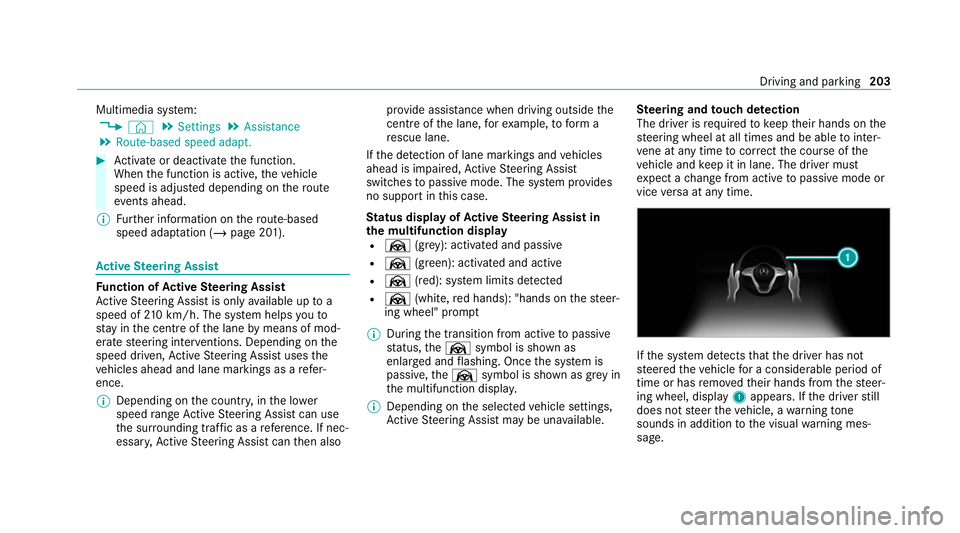
tive Steering Assist Fu
nction of Active Steering Assist
Ac tive Steering Assist is only available up to a
speed of 210 km/h. The sy stem helps youto
st ay inthe cent reofthe lane bymeans of mod‐
erate steering inter ventions. Depending on the
speed driven, Active Steering Assist uses the
ve hicles ahead and lane markings as a refer‐
ence.
% Depending on the count ry, in the lo wer
speed range Active Steering Assist can use
th e sur rounding traf fic as a refere nce. If nec‐
essar y,Ac tive Steering Assist can then also pr
ov ide assis tance when driving outside the
centre of the lane, forex ample, toform a
re scue lane.
If th e de tection of lane markings and vehicles
ahead is impaired, Active Steering Assist
switches topassive mode. The sy stem pr ovides
no support in this case.
St atus display of Active Steering Assist in
th e multifunction display
R Ø (gre y): activated and passive
R Ø (gre en): activated and active
R Ø (red): sy stem limits de tected
R Ø (white, red hands): "hands on thesteer‐
ing wheel" prom pt
% During the transition from active topassive
st atus, theØ symbol is shown as
enlar ged and flashing. Once the sy stem is
passive, theØ symbol is shown as gr eyin
th e multifunction displa y.
% Depending on the selected vehicle settings,
Ac tive Steering Assist may be una vailable. Ste
ering and touch de tection
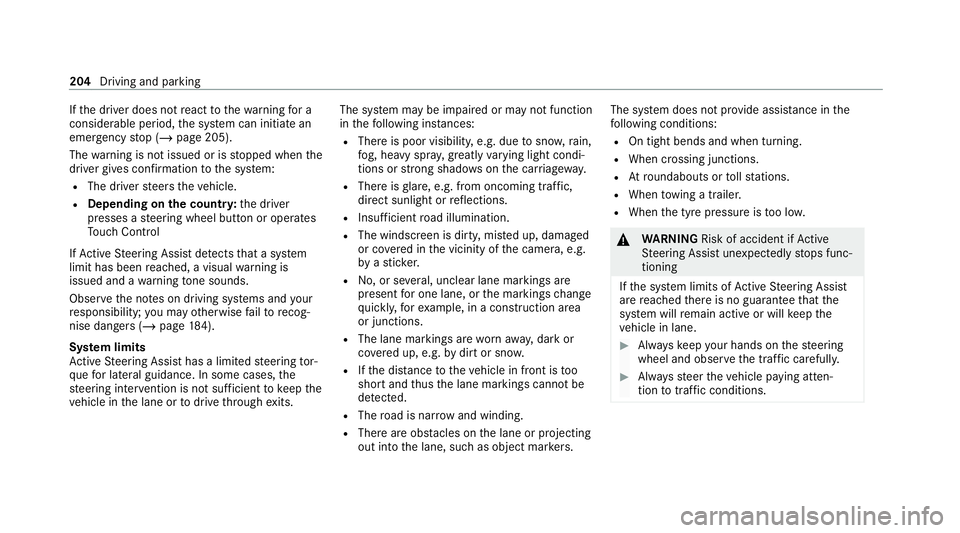
The driver is requiredtokeep their hands on the
st eering wheel at all times and be able tointer‐
ve ne at any time tocor rect the course of the
ve hicle and keep it in lane. The driver must
ex pect a change from active topassive mode or
vice versa at any time. If
th e sy stem de tects that the driver has not
st eered theve hicle for a considerable period of
time or has remo vedth eir hands from thesteer‐
ing wheel, display 1appears. If the driver still
does not steer theve hicle, a warning tone
sounds in addition tothe visual warning mes‐
sage. Driving and parking
203
Page 207 of 481
If
th e driver does not react tothewa rning for a
considerable period, the sy stem can initiate an
emer gency stop (/ page 205).
The warning is not issued or is stopped when the
driver gives con firm ation tothe sy stem:
R The driver steers theve hicle.
R Depending on the count ry:th e driver
presses a steering wheel button or operates
To uch Control
If Ac tive Steering Assist de tects that a sy stem
limit has been reached, a visual warning is
issued and a warning tone sounds.
Obser vethe no tes on driving sy stems and your
re sponsibility; you may otherwise failto recog‐
nise dangers (/ page 184).
Sy stem limits
Ac tive Steering Assist has a limited steering tor‐
qu efo r lateral guidance. In some cases, the
st eering inter vention is not su fficient tokeep the
ve hicle in the lane or todrive thro ugh exits. The sy
stem may be impaired or may not function
in thefo llowing ins tances:
R The reis poor visibilit y,e.g. due tosno w,rain,
fo g, heavy spr ay, greatly varying light condi‐
tions or strong shado wsonthe car riag ewa y.
R There is glare, e.g. from oncoming traf fic,
di re ct sunlight or reflections.
R Insuf ficient road illumination.
R The windsc reen is dirty, mis ted up, damaged
or co vered in the vicinity of the camera, e.g.
by ast icke r.
R No, or se veral, unclear lane markings are
present for one lane, or the markings change
qu ickl y,forex ample, in a con stru ction area
or junctions.
R The lane markings are wornaw ay, dark or
co vered up, e.g. bydirt or sno w.
R Ifth e dis tance totheve hicle in front is too
short and thus the lane markings cann otbe
de tected.
R The road is nar rowand winding.
R There are obs tacles on the lane or projecting
out into the lane, such as object mar kers. The sy
stem does not pr ovide assis tance in the
fo llowing conditions:
R On tight bends and when turning.
R When crossing junctions.
R Atroundabouts or tollst ations.
R When towing a trailer.
R When the tyre pressure is too lo w. &
WARNING Risk of accident if Active
St eering Assist unexpectedly stops func‐
tioning
If th e sy stem limits of Active Steering Assist
are reached there is no guarantee that the
sy stem will remain active or will keep the
ve hicle in lane. #
Alw ayske ep your hands on thesteering
wheel and obser vethe tra ffic carefull y. #
Alw aysst eer theve hicle paying atten‐
tion totraf fic conditions. 204
Driving and park ing