2021 MERCEDES-BENZ C CLASS ECU
[x] Cancel search: ECUPage 230 of 478

#
Select Autom aticSynch ronization. #
Activate0073 ordeacti vate 0053 thefunc tion.
% Formor einf ormation aboutimpor ting/
ex por tinguser profiles (/ page228 ).
Cr eating auser profile
Multimedia system:
4 System 5
g Person alization
5 Create Profile #
Entera name. #
Select 0076.
The follo wing informatio nis save din theuser
pr ofile, forex am ple:
R System settings
R Navig ation andtraf fic inf ormati on
The settings differ depending ontheve hicle
eq uipment.
Im por ting/e xportingauser profile
Re quirement s:
R Ther eis an Interne tcon nection . R
AMer cedes meacco untexists at htt ps:/ /
me. secur e.mercedes -benz.com.
R The Perso nalization service isact ive.
R The func tion isavailable inyour count ry.
Multimedia system:
4 System 5
g Person alization
5 Manual Export/ Import
Im por ting auser profile #
Select Import Profiles fromServer.
The Theprofile dataimport overwrit esall
exist ingprofile data.Doyou want tocon -
tinue? messag eappear s. #
Select Yes.
User profiles areim por ted.
Expor tingauser profile #
Select Export Profiles tothe Serv er.
User profiles areex por ted.
% Onlyindividual profiles can beimpor tedor
ex por ted. The individual profiles arealw ays
coll ectiv elyimpor tedor expor ted. %
Certain settings ,suc has addr essbook
ent ries orprev ious destination sfrom the
na vig ation system, areno tex por ted.
Se tting user profile options
Multimedia system:
4 System 5
g Person alization #
Highlight apr ofile. #
Select ¥option s.
The follo wing option sar eav ailable:
R Renam e
R Delete
R Reset
% The gues tpr ofile can notbe dele tedor
re nam ed. So
ftwa reupdat es Inf
ormation onsof twareupdat es
The multimedi asy stem displa ysacor responding
messag ewhen asof twareupda teisavailable.
The availabilit yof this func tion isdepen denton
th ecount ry. 228
Multimedia system
Page 231 of 478

Depe
nding onthesour ce,youcan perform
va rious updates: Sour
ceofthe
updat e Up
dat etype
Up dat esvia mobile
phone Sy
stem updat es,Digi‐
ta lOpera tor's Manua l
Up dat esvia anexter‐
nal stor ag emedium,
e.g. anSD card Na
vig ation maps %
Softwareupd ates via mobil ephone requ ire
an act ive Int erne tcon nection forth eve hicle.
This isno tav ailable inall coun tries. Forfur‐
th er information oncon nect ingtotheInt er‐
ne t,see (/page27 9).
Ad vantag esofsof twareupd ates
Sof twareupdat esensur eyo ur vehicle's tech nol ‐
ogy isup -to-d ate.
In orde rto cons tantl yimpr ovethequ alit yof our
ser vices youwill recei vefutur esof twareupd ates
fo ryo ur mult imed iasystem, theMer cedes me
con nect services andyour vehicle's communica‐
tion module. Thesewillbesent toyouvia the mobil
ephone connection inyour vehicle and,as
an option, installed automat ically.Yo ucan mon i‐
to rth est atus ofyour sof twareupdat eson the
Mer cedes mePortal and find informa tionab ou t
po tentia linno vatio ns.
Yo ur adv antages ataglanc e:
R Con venie ntly recei vesof twareupda tesvia
th emobile phonenetwork
R Improve sth equ alit yand availabilit yof
Mer cedesme connectser vices
R Keeps your mult imed iasystem and comm uni‐
cation module up-to-dat e
Fu rther information aboutsoftwareupdat escan
be found athttp s:// me. secure.m erced es-
ben z.co m
Car rying out softwareupd ates
Re quirement s:
R Ther eis an Interne tcon nection
(/ page27 9).
R Foraut omat icso ftwa reupdat es:your
ve hicle hasaper manent lyins talled com mu‐
nic ation module. Multim
ediasystem:
4 System 5
Soft ware Update
Au tomatic softwa reupdat es #
Activate0073 Auto matic Onl ine Update.
Th esof twareup dateswill bedownloaded
and installed automat ically.
The current status ofthesof twareupdat eis
displa yed.
Manu alsof twareupd ates #
Switc hof f0053 Auto matic OnlineUpdate. #
Select asof twareupdat efrom thelis tand
st ar tth eupdat e.
Ac tiv atin gaso ftwa reupdat e #
Restar tth esy stem.
Fu nction ofimpor tant system updates
Im por tant system updat esma ybe neces saryfo r
th esecur ityofyour mult imed iasystem's data.
Please installth ese updat es,other wise the
secur ityofyour mult imed iasystem cann otbe
ensur ed. Multimedia
system 229
Page 232 of 478

%
Ifaut omatic onlineupdatesar eactiv ated,
th esy stem updat eswill bedownloaded auto‐
maticall y(/ page229).
As soon asasy stem updat eis available for
do wnload, acor responding messageappea rson
th emedia display.
Yo uha ve thefo llo wing selectionoption s:
R Down load
The system updat ewill bedownloaded inthe
bac kground .
R Detail s
In fo rm atio nabout thepending system
updat eis displa yed.
R Later
The system updat ecan bedownloaded man‐
uall yat alat er time (/page229).
Yo uwill beinformed when thedo wnload iscom‐
ple teand thesy stem updat eis ready forins talla‐
tion .
% Park theve hicle safely inasuit able location
bef orest ar tin gth eins tallation . Re
quiremen tsforth eins tallation :
R The ignit ionisswitc hedon.
R The engin eis no tru nning .
R Notesand warnings have been read and
acc epted.
R The parkingbr ak eis applied.
If all requ iremen tsareme t,th esy stem updat eis
ins talled. Themultim ediasystem cann otbe
oper ated dur ing theins tallation andvehicle func‐
tions arere strict ed.
If er ro rs should occurduring theins tallation ,th e
multime diasystem automaticall yatt em ptsto
re stor eth epr ev ious version. Ifre stor ation ofthe
pr ev ious version isno tpossible ,a symbol
appear son themultimedia system displa y.Con ‐
sult aqu alif ied spec ialistwo rkshop toresol ve
th epr oblem. Re
setfunction Multimedia
system:
4 System 5
Reset
Pe rsonal datais dele ted, forex am ple:
R Statio npr ese ts
R Con nectedmobile phones #
Select Yes.
If PIN protect ion isactiv ated, apr om ptappear s
ask ing ifyo ualso wish torestor eth is to thefa c‐
to ry settin gsdur ing are se t. #
Select Yes. #
Enterthecur rent PIN .
The PINisrese t.
or #
Select No.
The current PIN stay sth esame afte rre se t‐
ting.
% Ifyo uha ve forg ottenyo ur PIN ,an aut hor ized
Mer cedes-Ben zCen tercan deactivateth e
PIN protect ion foryo u. 230
Multimed iasystem
Page 235 of 478

tr
af fic situ ation. Thiscou ldalso cau seyouto
lose control of theve hicle. #
Onlyoper ateth is eq uipmen twhen the
tr af fic situ ation per mits. #
Ifyo ucan notbe sur eof this, stop the
ve hicle whilstpa ying attention toroad
and traffic condi tions andoperate the
eq uipment withth eve hicle statio nary. Yo
umus tobse rveth eleg alrequ iremen tsforth e
cou ntryin whi chyouar ecur rentl ydr ivi ng when
op erati ng themultimedia system.
Re quirement s:
R Forthe online search :Me rcedes mecon‐
nect isavailable.
R Youha ve auser accoun tfo rth eMer cedes
me Portal.
R The serviceis available.
R The servicehas been activat ed atan aut hor ‐
ize dMer cedes-Ben zCent er.
Fu rther information canbefound at:ht tp s://
www .merced es.me Mult
imed iasystem:
4 Navigation #
Sho wthena vig ation menu. #
Select ªEnter Dest ination . The
stat eor prov inc ein whic hth eve hicle is
locat edisset1.
Ther ear etw oav ailable methods ofdes tinat ion
entr y:
R Free sear ch2
R Sea rchstep-b y-step 3 Me
thod 1:free sear ch #
EnterthePOI oraddr essin2. The entries
can bemade inanyor der .
Dur ing destinat ionentry,sugg estion sar e
made bythemultimedia system. Aselect ion
of des tinat ions appear sin alis t.
En terth ese addr esselement s,forex am ple:
R City ,st re et,house number
R Street,cit y
R ZIP code
R POI name
R POI categor y,e.g. Gas Station
R City ,POI name #
Toswitc hto handwr itingrecognit ion:
selec tv 5. #
Write th ech aract eron theto uc hpad. #
Toswitc hto charact ersel ection :pr ess the
0038 button.
or #
Press theto uc hpad. Mult
imed iasystem 233
Page 237 of 478

An
entr y,e.g. POI, canbedele tedwit h
£ inast ep-b y-step sear ch.Na vig ate
to thelef tto do so.
R Call uptheonline searchfunction (if
av ailable).
R Call upalis t.
The function sar edesc ribed inthefree
sear ch. #
Tochang eth est at e/ prov ince: select the
st at eor thepr ov inc e. #
Enterth est at eor thepr ov inc e.Youon ly
nee dto ent erthefirs tch aract er. #
Select thest at eor thepr ov inc ein thelis t. #
Tochang eth ecount ry:sel ect thecount ry. #
Enterthecount ry.Yo uon lyne ed toent erthe
fi rs tch aract er. #
Select thecount ryon thelis t. #
Toadop ta des tinatio n:sele ctSelect Desti-
nation.
If th er ear ese verallis tin gs fora des tination,
a dis tance-o rient ated listappear s. #
Select thedes tinat ion.
The destinat ionaddr essissho wn.
Selecting prev ious destina tions
Multime diasystem:
4 Navigation
5 ¬ Previous andOther Destination s #
Select Previous Destination s. #
Select thedes tinat ion.
The destinat ionaddr essissho wn.
or #
Iffavo urites have been save dalr eady
(/ page24 7), sele ctFrom MyFavori tes. #
Select thefa vo urite.
The destinatio naddr essissho wn.
Select ingaPOI
Mult imed iasystem:
4 Navigation
5 ¬ Previous andOther Destination s
5 POIs #
Select thecat egor y.
or #
Select AllCategories andthecat egor y.
If ro ut eguidanc eis no tactiv e:thesear ch
begins inthevicin ityofthecur rent vehicle
position. Thelistis sor tedby distance in
as cend ingorde r.
The POIs showthefo llo wing informatio n:
R Name ofPOI
R Linear distance tothePOI
R The direct ion ofthelinear distance tothe
POI (arrow )is displa yedwhen searching
fo rth eve hicle's current positio n #
Select thePOI. #
Routeguidanc eis activ e:sele ctthesear ch
position prior tochoosing aPOI (see exam‐
ple). #
Ifint ermedi atedes tinatio nsarese t,th ese
can also beselect edasthesear chposition
af te rsele cting NearDestination .
Fi lter ing disp lays forPO Is #
Enterthesear chterm inª Search:.
The results listsho wsreleva nt POI s. Mu
ltimed iasystem 235
Page 242 of 478

des
tinations aredele ted. Ro uteguidan ceto
th ene wdes tinat ionbegins.
Set asNext WayPoint :th eselect eddes tina‐
tion addr essissetas thene xt int ermediat e
des tinat ion.Routeguidan cebegin s.
Ta king alternativ ero ut es intoco nside ratio n #
Select analte rn ativ ero ute(/ page24 2).
Ot he rmen ufun ctions #
Tosave thedes tina tion: select¥ Store
in "Prev iousDestination s". #
Todispl ayon thema p:selec t¥ Map. #
Tocall ate lephone number: select
¥ Call(ifavailable). #
Tocall upanInterne tad dress: selec t
¥ www(ifavailable).
Select ingaro ut etype
Mul timedi asy stem:
4 Navigation 5
À Route andPosition #
Select RouteSetting s. #
Select thero utetyp e.
If ro uteguidan ceisact ive, thene wrouteis
calc ulatedwithth ene wroutetype .
If ro uteguidan ceisno tact ive, thene xt route
is calc ulatedwithth ene wroutetyp e.
Yo ucan choose from thefo llo wing routetype s:
R EcoRout e
An eco nomic alrouteis calc ulated. The jour‐
ne ytim ema ybe som ewhat long erthan for
qu icke rro utes.
The symb olforth ecur rent vehicle position is
displa yedin green.
R Fast Route
A ro utewit haqu ick jour neytim eis calc ula‐
te d.
R Shor tRoute
A ro utewit hasho rtdriving distance iscal cu‐
la te d.
Auto matic Traffic JamAvoidan cecan be
switc hedon0073 oroff0053 forth ese routetyp es.
If Aut omat icTraf ficJam Avoidan ceisswit ched on,
Ask inthe Even tof Traffic JamAvoidan cecan
be select ed.
The Autom aticTraffic JamAvoidan ceand Askin
the Even tof Traffic JamAvoidan cesettings are
no tav ailable ineverycount ry.
The settings enable thefo llo wing:
R Automat icTraff icJam Avoidanc e
The routeis calc ulatedwithth ecur rentl yse t
ro utetyp e.
Tr af fic re por tsvia LiveTr af fic Inf ormati onare
ta ke nint oacco unt.
Liv eTr af fic Inf ormati onisno tav ailable inall
coun tries.
R Askin theEv ent ofTraf ficJam Avoidan ce
A pr om ptappear swhen ane wrouteis de tec‐
te dwit hashor terjour neytime basedon traf‐
fi c re por ts.Youcan continue touse thecur‐
re nt routeor use thedynamic routeins tead. 24
0
Multimedia system
Page 245 of 478
#
Onlyoper ateth is eq uipmen twhen the
tr af fic situ ation per mits. #
Ifyo ucan notbe sur eof this, stop the
ve hicle whilstpa ying attention toroad
and traffic condi tions andoperate the
eq uipment withth eve hicle statio nary. Yo
umus tobse rveth eleg alrequ iremen tsforth e
cou ntryin whi chyouar ecur rentl ydr ivi ng when
op erati ng themultimedia system.
Ro uteguidan cebegin son ce aro utehas been
calc ulated.
The road and traf fic ru les and regulations always
ha ve prior ity ove rmulti media system driving
ins truction s.
Dr iving instruction sar e:
R Navig ation announcements
R Routeguidan cedispl ays
R Lane recomme ndations
If yo udo notfo llo wthedr iving instruction sor if
yo ulea vethecalculat edroute, ane wrouteis
calc ulatedaut omat ically. Dr
iving instructi ons maydi ffer from theactual
ro ad and traf fic condi tions if:
R The routeis div erted
R The direction ofaone-w aystre et has been
ch ang ed
Fo rth is reason ,yo umus talw aysobser veroad
and traffic ru les and regulations during your
jo ur ne yas wellas thepr eva iling traffic condi ‐
tions .
The routema ydif ferfr om theideal routedue to
th efo llo wing:
R Roadw orks
R Incom pletedigit almap data
No teson GPS recep tion
The correct functi onofthena vig ation system
depends amongstot her things onGPS recep‐
tion. Incer tain situat ionsGPS recep tion canbe
im pa ired, defectiv eor eve nno tpo ssi ble, e.g .in
tunne lsor inpa rking garage s. Changing
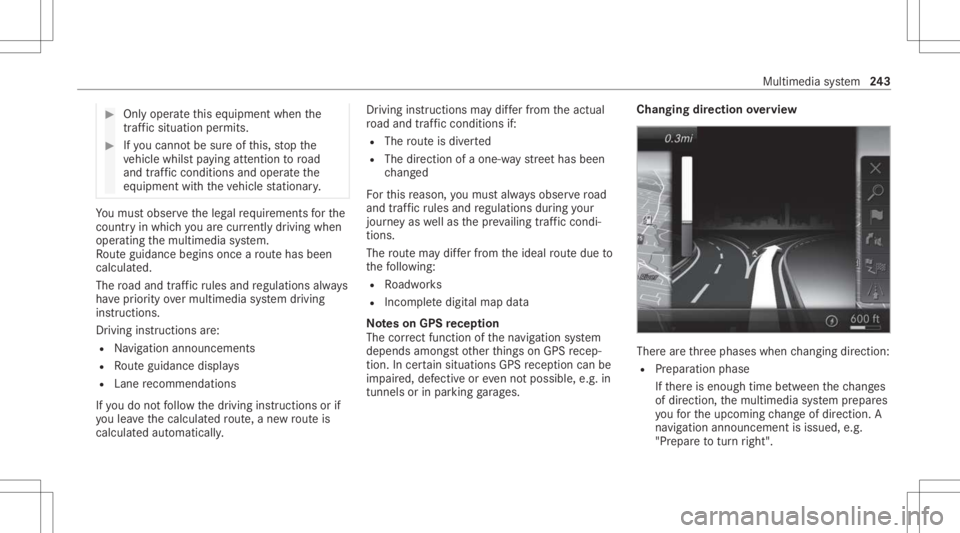
direction overview Ther
ear eth re ephases whenchang ingdirect ion:
R Preparation phase
If th er eis enough timebetween thech ang es
of dir ect ion,th emultimedia system prepar es
yo ufo rth eupcoming chang eof dir ect ion.A
na vig atio nann oun cem entisissue d,e.g .
"Pr epar eto tur nright". Multimedia
system 24
3
Page 246 of 478

The
map appear sin full-scr eenmode.
R Ann ouncemen tphase
The multimedia system announ cesthe
upco mingch ang eof dir ect ion,e.g .by
ann oun cing"T ur nright in300 ft(100 m)".
The displa yis split intotw opar ts.The map is
displa yedon thelef t;on theright, ther eis a
de tailed imag eof theint ersect ionora3D
imag eof theupcoming chang eof dir ect ion.
R Chan ge-of-d irecti onpha se
The multimed iasystem announ cestheimmi‐
nen tch ang eof dir ect ion,e.g .by ann oun cing
"N ow turnright".
The displa yis split intotw opar ts.
The vehicle hassuccessfull ych ang eddirec‐
tio nwhen thelight- color barontheright
dr ops down to0feet (0 m) and thecur rent
ve hicle position symbolhasreac hed the
highlight edchang e-of-dir ect ion poin t.
When thech ang eof dir ect ion iscom plete,
th emap appear sin full-scr eenmode.
% Chang esofdir ect ion arealso showninthe
Ins trument Display. Lane
recomm endationsov ervie w
This displa yappear sfo rmulti -lane roads.
If th edigit almap contains there leva nt data,th e
multime diasystem can displa ylane recomme n‐
da tions forth ene xt twoch ang esofdir ect ion. 1
Recomme ndedlane
2 Possible lane
3 Lanes notre comme nded The
follo wing lanes aredispla yed:
R Recomme ndedlane 1
In this lane, youwill beable tocom plet ebo th
th ene xt chang eof dir ect ion and theone
af te rth at.
R Possible lane2
In this lane, youwill onlybe able tocom plet e
th ene xt chang eof dir ect ion.
R Lan eno tre comme nded3
In this lane, youwill notbe able tocom plet e
th ene xt chang eof dir ect ion without chang ‐
ing lane .
Dur ing thech ang eof dir ect ion,ne wlane sma y
be added.
% Lanere comme ndations canalso be dis‐
pl ay ed intheIns trument Displayand inthe
Hea d-up Display.
Ov ervie wof des tinat ionreac hed
Once thedes tinat ionisreac hed, youwill see the
Í checkeredflag. Routeguidan ceisfinis hed .
Whe nan intermed iate des tination hasbeen
re ac hed, youwill see theint ermediat edes tina‐ 24
4
Multimedia system