Page 361 of 639

REPORTING SAFETY DEFECTS
(U.S. ONLY)
If you believe that your vehicle has a
defect which could cause a crash or
could cause injury or death, you should
immediately inform the National
Highway Traffic Safety Administration
(NHTSA) in addition to notifying Ford
Motor Company.
If NHTSA receives similar complaints, it
may open an investigation, and if it finds
that a safety defect exists in a group of
vehicles, it may order a recall and
remedy campaign. However, NHTSA
cannot become involved in individual
problems between you, your dealer, or
Ford Motor Company.
To contact NHTSA, you may call the
Vehicle Safety Hotline toll-free at
1-888-327-4236 (TTY: 1-800-424-9153);
go to www .safercar . gov ; or write to:
Administrator
1200 New Jersey Avenue, Southeast Washington, D.C. 20590
You can also obtain other information
about motor vehicle safety from
www .safercar . gov .
REPORTING SAFETY DEFECTS
(CANADA ONLY)
If you believe that your vehicle has a defect
which could cause a crash or could cause
injury or death, you should immediately
inform Transport Canada and Ford of
Canada. Transport Canada Contact Information
http://www.tc.gc.ca/eng/motorvehiclesafety/reporting-defects-motor-vehicles.html (Englis\
h)
Website
http://www.tc.gc.ca/fra/securiteautomobile/signaler-defauts-vehicules-automobiles.html (\
French)
Website
1-800-333-0510
Phone
358
Navigator (TB9) Canada/United States of America, enUSA, First-Printing Customer Assistance
Page 362 of 639
Ford of Canada Contact Information
www.ford.ca
Website
1-800-565-3673
Phone
359
Navigator (TB9) Canada/United States of America, enUSA, First-Printing Customer Assistance
Page 460 of 639

Possible Cause and Resolution
Symptom
•If your vehicle has metallic tinting on the windows and the windshield, \
open the
windows that are facing the hotspot.
• If your vehicle is in a garage and you have the garage door closed, open\
the garage
door.
I cannot see a network in the list of available
networks that I expect to see. –
Hidden network.
•Make the network visible and try again.
I cannot see the Wi-Fi hotspot name when I
search for Wi-Fi networks on my cell phone
or other device. –
System limitation.
•Make sure Wi-Fi hotspot visibility is on.
• The system does not provide a Wi-Fi hotspot at this time.
– Weak network signal.
•Move your vehicle closer to the Wi-Fi hotspot or to a place where the ne\
twork signal
is not obstructed.
– Wi-Fi hotspot in high demand or has a slow Internet connection.
•Use a more reliable Wi-Fi hotspot.
Software downloads take too long.
–No software update available.
– Wi-Fi network requires a subscription or acceptance of terms and conditi\
ons.
•Test the connection using another device. If the network requires a subscription or
acceptance of terms and conditions, contact the network service provider\
.
The system seems to connect to a Wi-Fi
network and the signal strength is excellent
but the software does not update.
457
Navigator (TB9) Canada/United States of America, enUSA, First-Printing Connected Vehicle
Page 476 of 639
GENERAL INFORMATION
WARNING: Driving while distracted
can result in loss of vehicle control, crash
and injury. We strongly recommend that
you use extreme caution when using any
device that may take your focus off the
road. Your primary responsibility is the safe
operation of your vehicle. We recommend
against the use of any hand-held device
while driving and encourage the use of
voice-operated systems when possible.
Make sure you are aware of all applicable
local laws that may affect the use of
electronic devices while driving.
About SYNC
The system allows you to interact with the
entertainment, information and
communication systems on your vehicle
using voice commands and a touchscreen.
The system provides easy interaction with
audio, phone, navigation, mobile apps and
settings. Note:
You can switch the system on and use
it for up to an hour without switching the
ignition on.
Note: You can use the system after you
switch the ignition off for up to 10 minutes or
until you open a door.
Note: For your safety, some features are
speed-dependent. Their use is limited to
when your vehicle speed is less than 3 mph
(5 km/h)
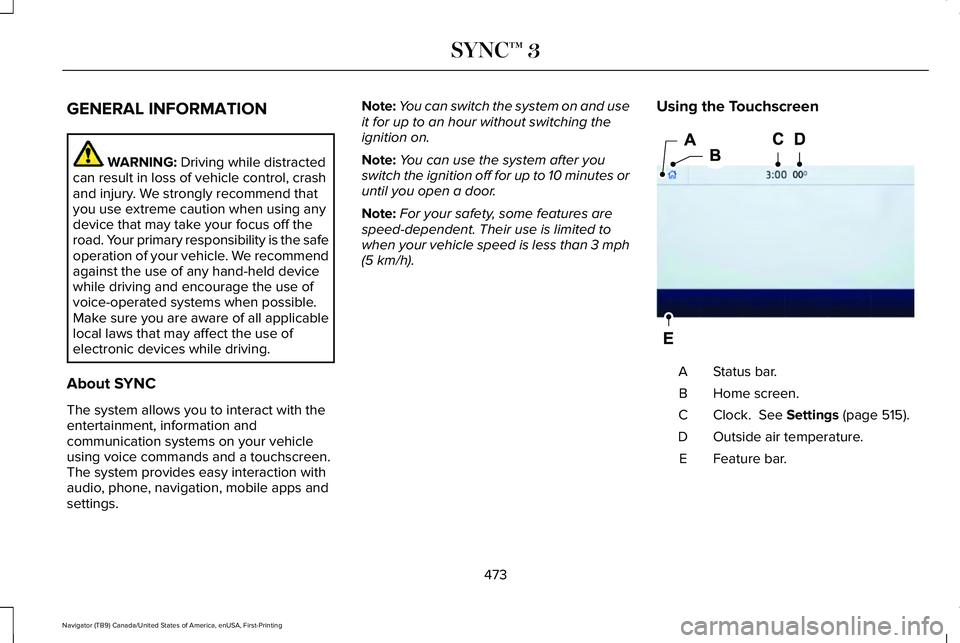
. Using the Touchscreen Status bar.
A
Home screen.
B
Clock.
See Settings (page 515).
C
Outside air temperature.
D
Feature bar.
E
473
Navigator (TB9) Canada/United States of America, enUSA, First-Printing SYNC™ 3E293823
Page 477 of 639

Status Bar
Cell phone microphone muted.
Audio system muted.
Software update installed.
Wi-Fi connected.
Cell phone roaming.
Text message received.
Automatic crash notification system
off.
Cell phone network signal
strength.
Vehicle data sharing on. Vehicle location sharing on.
Vehicle data and vehicle location
sharing on.
Wireless charger active.
Feature Bar Select to use the radio, a USB, a
media player or a Bluetooth
device. See Entertainment (page
487). Select to adjust climate settings
See
Climate (page 499).
Select to make calls and access
the phonebook on your cell phone.
See
Phone (page 502).
Select to use the navigation
system. See Navigation (page 504). Select to search for and use
compatible apps on your iOS or
Android device.
See Apps (page
512). Select to adjust system settings.
See
Settings (page 515).
Cleaning the Touchscreen
See
Cleaning the Interior (page 400).
Updating the System
Updating the System Using a USB Drive
Downloading an Update
1. Go to the SYNC update page on the local
Ford website.
2. Download the update.
Note: The website notifies you if an update
is available.
3. Insert a USB drive into your computer.
Note: The USB drive needs to be empty and
meet the minimum requirements detailed on
the website.
474
Navigator (TB9) Canada/United States of America, enUSA, First-Printing SYNC™ 3 E100027 E283811 E280315
Page 479 of 639
Action and Description
Voice Command
Brings you to the main menu.
Main Menu
Returns you to the previous screen.
Go back
Ends the voice session.
Cancel
Gives you a list of possible voice commands.
List of Commands
You can name any feature and the system gives a list of commands availabl\
e for the feature. For
example, you could say:
___ List of Commands
Phone List of Commands
Navigation List of Commands
You can use this command to view the next page of options on any screen w\
here multiple pages of
choices are given.
Next Page
You can use this command to view the previous page of options on any scre\
en where multiple pages
of choices are given.
Previous Page
Gives you available commands you can use on the current screen.
Help
Included here are some of the most popular
commands for each SYNC 3 feature.
476
Navigator (TB9) Canada/United States of America, enUSA, First-Printing SYNC™ 3
Page 482 of 639
To adjust the temperature, say:
Description
Voice command
Adjust the temperature between 60–85°F (15.5–29.5°C).
Set the Temperature to ____
Phone Voice Commands
Pairing a Phone
You can use voice commands to connect
your Bluetooth enabled phone to the system.
To pair your phone, press the voice button and when prompted, say: Description
Voice command
Follow the on-screen instructions to complete the pairing process.
See Settings (page 515).
Pair Phone
Making Calls
___ is a dynamic listing, meaning that for
phone voice commands it can be the name
of the contact you wish to call or the digits
you want to dial.
479
Navigator (TB9) Canada/United States of America, enUSA, First-Printing SYNC™ 3
Page 483 of 639
Press the voice button and say a command similar to the following:
Description
Voice command
Allows you to call a specific contact from your phonebook such as "Call Jenny".
Call ___
Allows you to call a specific contact from your phonebook at a specific \
location such as "Call
Jenny at Home".
Call ___ at ___
Allows you to dial a specific number such as “Dial 867-5309” .
Dial ___
Please make sure that you are saying the
contact name exactly as it appears in your
contact list.
Once you have provided the digits of the phone number, you can say the following commands: Description
Voice Command
If you did not enter the full number with the first command, you can con\
tinue saying the number.
<0-9>
Tells SYNC 3 to make the phone call.
Dial
Tells SYNC 3 to erase the last block of digits you state.
Delete
Tells SYNC 3 to erase the entire number.
Clear
480
Navigator (TB9) Canada/United States of America, enUSA, First-Printing SYNC™ 3


