2021 LINCOLN NAUTILUS tow
[x] Cancel search: towPage 75 of 579

CRASH SENSORS AND AIRBAG
INDICATOR
WARNING: Modifying or adding
equipment to the front end of your vehicle
(including hood, bumper system, frame,
front end body structure, tow hooks and
hood pins) may affect the performance of
the airbag system, increasing the risk of
injury. Do not modify or add equipment to
the front end of your vehicle.
Your vehicle has a collection of crash and
occupant sensors. These sensors provide
information to the restraints control module
which activates the following:
• Front and rear seatbelt pretensioners.
• Driver airbag.
• Passenger airbag.
• Knee airbag(s).
• Seat mounted side airbags.
• Safety Canopy. Based on the type of crash, the restraints
control module deploys the appropriate
safety devices.
The restraints control module also monitors
the readiness of the above safety devices
plus the crash and occupant sensors. The
readiness of the safety system is indicated
by a warning indicator light in the instrument
cluster or by a backup tone if the warning
light is not working. Routine maintenance of
the airbag is not required.
A difficulty with the system is indicated by
one or more of the following:
The readiness light will not
illuminate immediately after you
switch the ignition on.
• The readiness light either flashes or stays
on.
• You hear a series of five tones. The tone
pattern repeats periodically until the
problem, the light or both are repaired. If any of these things happen, even
intermittently, have the supplemental
restraint system serviced immediately.
Unless serviced, the system may not function
properly in the event of a crash.
The fact that the seatbelt pretensioners or
front airbags did not activate for both front
seat occupants in a crash does not mean
that something is wrong with the system.
Rather, it means the restraints control module
determined the accident conditions (crash
severity, seatbelt usage) were not
appropriate to activate these safety devices.
•
The front airbags activate only in frontal
and near-frontal crashes. Front airbags
may activate in rollovers, side impacts or
rear impacts if the crash causes sufficient
frontal deceleration.
• The seatbelt pretensioners activate in
frontal, near-frontal and side crashes, and
in rollovers.
• The knee airbag(s) deploy based on
crash severity and occupant conditions.
71
2021 Nautilus (CD9) Canada/United States of America, enUSA, Edition date: 202011, First-Printing AirbagsE67017
Page 82 of 579

Note:
If your programmed remote controls
are lost or stolen and you do not have an
extra coded remote, you need to have your
vehicle towed to an authorized dealer. Store
an extra programmed remote away from
your vehicle in a safe place to help prevent
any inconvenience. Contact an authorized
dealer to purchase additional spare or
replacement remotes.
You must have two previously programmed
remote controls inside your vehicle and the
new unprogrammed remote controls readily
accessible. Contact an authorized dealer to
have the spare remote control programmed
if two previously programmed remotes are
not available. Make sure that your vehicle
is off before beginning this procedure. Make
sure that you close all the doors before
beginning and that they remain closed
throughout the procedure. Perform all steps
within 30 seconds of starting the sequence.
Stop and wait for at least one minute before
starting again if you perform any steps out
of sequence.
Read and understand the entire procedure
before you begin. 1.
Place the first programmed remote in the
backup slot inside the center console,
with your foot off the brake pedal press
and release the push button ignition
switch.
2. Wait five seconds and then press and release the push button ignition switch
again.
3. Remove the remote control.
78
2021 Nautilus (CD9) Canada/United States of America, enUSA, Edition date: 202011, First-Printing Keys and Remote ControlsE203693 E203694
Page 112 of 579

PASSIVE ANTI-THEFT SYSTEM
What Is the Passive Anti-Theft System
The passive anti-theft system prevents
someone from starting the vehicle with an
incorrectly coded key.
How Does the Passive Anti-Theft
System Work
The passive anti-theft system arms when you
switch the ignition off.
It disarms when the ignition is switched on
with a correctly coded key.
Note:
The system is not compatible with
non-Ford aftermarket remote start systems.
Note: Do not leave a duplicate coded key
in your vehicle. Always take the keys and
lock all doors when leaving your vehicle. ANTI-THEFT ALARM SYSTEM
What Is the Anti-Theft Alarm System
The Anti-Theft Alarm System warns you of
an unauthorized entry to your vehicle.
How Does the Anti-Theft Alarm System
Work
When armed, the anti-theft alarm is triggered
in any of the following ways:
•
If someone opens a door, the liftgate or
the hood without a correctly coded key
or remote control.
• If you turn the power on without a
correctly coded key.
• If the interior sensors detect movement
inside your vehicle.
• If the inclination sensors detect an
attempt to raise your vehicle.
• If someone disconnects the vehicle
battery or the battery backup alarm. If the anti-theft alarm is triggered, the alarm
horn sounds for 30 seconds and the
direction indicators flash for 5 minutes.
Any further attempts to carry out one of the
above sounds the alarm again.
What Is the Perimeter Alarm
The perimeter alarm is designed to detect
unauthorized access to your vehicle.
What Are the Interior Sensors
The interior sensors are designed to detect
any movement inside your vehicle.
The interior sensors are in the overhead
console.
Note:
Do not cover the interior sensors.
What Are the Inclination Sensors (If
Equipped)
The inclination sensor is designed to detect
an attempt to raise your vehicle, for example
to remove a wheel or to tow it away.
108
2021 Nautilus (CD9) Canada/United States of America, enUSA, Edition date: 202011, First-Printing Security
Page 118 of 579

WIPERS
Wiper Precautions
Do not operate the wipers on a dry
windshield. This could scratch the glass or
damage the wiper blades. Use the
windshield washers before wiping a dry
windshield.
Fully defrost the windshield before you
switch the windshield wipers on.
Switch the windshield wipers off before
entering a car wash.
Switching Windshield Wipers On and
Off Single wipe.
A
Intermittent wipe.
B
Normal wipe.
C
High-speed wipe.
D Push the lever up or down to
operate the windshield wipers.AUTOWIPERS
What Are Autowipers
Autowipers turns on and controls the speed
and frequency of the windshield wipers.
Autowipers Settings
1. Using the instrument cluster controls on
the steering wheel, select Settings.
2. Select
Vehicle.
3. Select
Wipers.
4. Switch
Rain Sensing on or off.
Note: When you switch the feature off, the
wipers do not operate based on the rain
sensor. When you switch on the windshield
wipers to the intermittent wipe position with
the feature off, the wipers use the wipe
speed set by the rotary control.
114
2021 Nautilus (CD9) Canada/United States of America, enUSA, Edition date: 202011, First-Printing Wipers and Washers E269410 E270969
Page 121 of 579

2. Remove the wiper blade.
Note:
Make sure that the wiper arm does
not spring back against the glass when the
wiper blade is not attached.
3. To install, reverse the removal procedure.
Note: Make sure that the wiper blade locks
into place.
WASHERS
Washer Precautions WARNING: If you operate your
vehicle in temperatures below 41°F (5°C),
use washer fluid with antifreeze protection.
Failure to use washer fluid with antifreeze
protection in cold weather could result in
impaired windshield vision and increase
the risk of injury or accident.
Do not operate the washers when the
washer reservoir is empty. This could cause
the washer pump to overheat. Keep the outside of the windshield clean.
The rain sensor is very sensitive and the
wipers may operate if dirt, mist or insects hit
the windshield.
Using the Windshield Washer
Pull the lever toward you to
operate the windshield washer.
Note: A courtesy wipe occurs a short time
after the wipers stop to clear any remaining
washer fluid when switched on.
See
Switching the Courtesy Wipe On and Off
(page
117). Switching the Courtesy Wipe On and
Off
1. Using the instrument cluster controls on
the steering wheel, select
Settings.
2. Select
Vehicle.
3. Select
Wipers.
4. Switch
Courtesy Wipe on or off.
Using the Rear Window Washer Push the lever away from you to operate the
rear window washer.
117
2021 Nautilus (CD9) Canada/United States of America, enUSA, Edition date: 202011, First-Printing Wipers and WashersE269412 E270967 E269727
Page 123 of 579

EXTERIOR LIGHTING CONTROL
Headlamps on.
A
Autolamps on.
B
Parking lamps on.
C
Lamps off.
D
Press the toggle switch upward or downward
to make a selection. Note:
The lighting control defaults to
autolamps each time you switch your vehicle
on.
HEADLAMPS
Using the High Beam Headlamps Push the lever away from you to
switch the high beam on.
Push the lever forward again or pull the lever
toward you to switch the high beams off.
Slightly pull the lever toward you and release
it to flash the headlamps. Switching Headlamp Exit Delay On and
Off
To switch headlamp exit delay on, pull the
turn signal lever toward you after switching
your vehicle off.
To switch headlamp exit delay off, pull the
turn signal lever toward you again or switch
your vehicle on.
Note:
The headlamps turn off after three
minutes with any door open or 30 seconds
after the last door closes.
Headlamp Indicators
Lamps On Illuminates when you switch the
low beam headlamps or the
parking lamps on.
Headlamp High Beam Illuminates when you switch the
high beam headlamps on.
119
2021 Nautilus (CD9) Canada/United States of America, enUSA, Edition date: 202011, First-Printing Exterior LightingE344567 E339556
Page 137 of 579
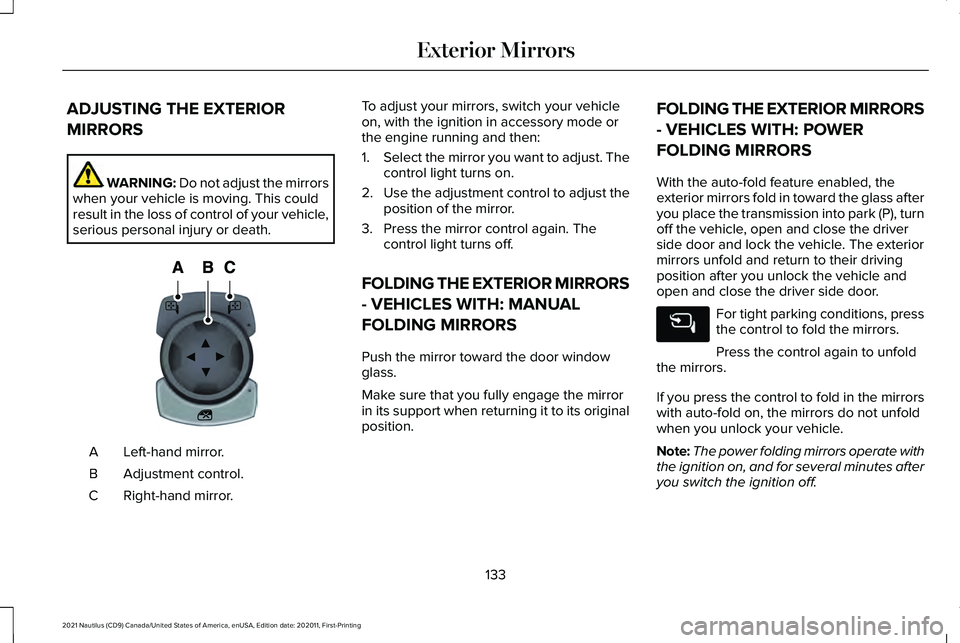
ADJUSTING THE EXTERIOR
MIRRORS
WARNING: Do not adjust the mirrors
when your vehicle is moving. This could
result in the loss of control of your vehicle,
serious personal injury or death. Left-hand mirror.
A
Adjustment control.
B
Right-hand mirror.
C To adjust your mirrors, switch your vehicle
on, with the ignition in accessory mode or
the engine running and then:
1.
Select the mirror you want to adjust. The
control light turns on.
2. Use the adjustment control to adjust the
position of the mirror.
3. Press the mirror control again. The control light turns off.
FOLDING THE EXTERIOR MIRRORS
- VEHICLES WITH: MANUAL
FOLDING MIRRORS
Push the mirror toward the door window
glass.
Make sure that you fully engage the mirror
in its support when returning it to its original
position. FOLDING THE EXTERIOR MIRRORS
- VEHICLES WITH: POWER
FOLDING MIRRORS
With the auto-fold feature enabled, the
exterior mirrors fold in toward the glass after
you place the transmission into park (P), turn
off the vehicle, open and close the driver
side door and lock the vehicle. The exterior
mirrors unfold and return to their driving
position after you unlock the vehicle and
open and close the driver side door.
For tight parking conditions, press
the control to fold the mirrors.
Press the control again to unfold
the mirrors.
If you press the control to fold in the mirrors
with auto-fold on, the mirrors do not unfold
when you unlock your vehicle.
Note: The power folding mirrors operate with
the ignition on, and for several minutes after
you switch the ignition off.
133
2021 Nautilus (CD9) Canada/United States of America, enUSA, Edition date: 202011, First-Printing Exterior MirrorsE144073
Page 162 of 579

WHAT IS THE CABIN AIR FILTER
The cabin air filter improves the quality of air
in your vehicle by trapping dust, pollen and
other particles.
REPLACING THE CABIN AIR FILTER
Replace the filter at regular intervals. See
Scheduled Maintenance (page 459).
The cabin air filter is behind the glove
compartment.
To remove the lower glove compartment and
access the filter:
1. Open the glove compartment. 2. Press the tab on each side.
3. Fully lower the glove compartment.
4. Pull the glove compartment toward you.
158
2021 Nautilus (CD9) Canada/United States of America, enUSA, Edition date: 202011, First-Printing Interior Air QualityE311296