2021 LINCOLN NAUTILUS lock
[x] Cancel search: lockPage 451 of 579

HOW DO PERSONAL PROFILES
WORK
This feature allows you to create multiple
personal profiles enabling users to
personalize vehicle
’s settings such as seats
and mirrors, as well as non-positional settings
like radio, navigation, driver assist system
settings. Positional settings are saved by
holding a memory seat button.
Non-positional settings are saved you
change a setting while a profile is active. You
can create one profile for each preset
memory seat button along with a guest
profile.
Recalling and Changing a Profile
You can recall a profile using the
touchscreen or the preset button you
selected when you created your profile. You
can also link a remote control and a mobile
device to your profile, which are used to
recall it. ENABLING OR DISABLING
PERSONAL PROFILES
When you switch on the Personal Profiles
feature:
•
Unlocking a door with a remote control
or mobile device that is not linked to a
driver profile does not change the active
profile, but remains in the last known
profile. It does not change the positional
settings.
• Pressing a memory seat button that is
not linked to a driver profile or saved to
a preset setting does not change the
active profile, but remains in the last
known profile. It does not change the
positional settings.
• Pressing a memory seat button that is
not linked to a driver profile but is saved
to a preset setting does not change the
active profile, but remains in the last
known profile. It recalls the positional
settings that you saved to that memory
seat button. When you switch off a Personal Profiles
feature:
•
Unlocking a door with a remote control
or mobile device does not recall any
non-positional settings but still recalls
positional settings from the driver profile
which the remote control or mobile
device is linked to.
• Pressing a memory seat button that is
not linked to a driver profile or saved to
a preset setting recalls non-positional
settings from the guest profile. It does
not change the positional settings.
• Pressing a memory seat button that is
linked to a driver profile or has saved to
a preset setting recalls non-positional
settings from the guest profile. It recalls
the positional settings that you saved to
that memory seat button.
CREATING A PERSONAL PROFILE
Use the touchscreen to create a personal
profile.
1. Switch the vehicle on and leave the vehicle in park (P).
447
2021 Nautilus (CD9) Canada/United States of America, enUSA, Edition date: 202011, First-Printing Personal Profiles
Page 456 of 579
UPDATING THE VEHICLE SYSTEMS
WIRELESSLY
System software updates allow you
to update your vehicle system
software wirelessly. To make sure
you receive all updates, set a recurring
schedule and connect to Wi-Fi. Updates may
take longer if not connected to Wi-Fi, or may
not download at all.
System Update Requirements
Before updating, reference this list to make
sure your vehicle is ready be updated. If
these requirements are not met during a
scheduled update, the update will be
canceled and you can reschedule.
• Your vehicle is not running.
• Your vehicle is stopped.
• Your vehicle is parked.
• The hazard indicators are switched off.
• The alarm is not sounding.
• The doors are closed.
• The parking lights are switched off. •
You are not pressing the brake pedal.
• An emergency call is not in progress.
• Your vehicle is not in limp mode.
Scheduling an Update
Make sure Vehicle Connectivity and
Automatic Updates are switched on.
Using the Settings Menu Press the settings option on the
feature bar.
1. Press the System Update tile.
2. Press
Schedule Update.
3. Use the controls to set the time and day
of the update.
4. Save the schedule.
Note: You can set the updates to occur
every seven days.
Using the Status Bar Icon When an update is available, tap
the notification icon and follow the
prompts on the screen.Applying a Vehicle System Software
Update
You can schedule a convenient time for the
update to complete. During scheduled
updates you may not be able to use your
vehicle.
Note:
Updates may take up to 30 minutes
to complete.
You can see the progress of the update on
the touchscreen. An update cannot be
canceled once it has been started.
During an update you will not be able to
drive your vehicle, start the vehicle, use
remote controls to lock and unlock the
vehicle. The alarm, central locks, and door
tones are disabled. The electronic door lock
will not function during an update. You can
open the doors using the mechanical latch
if child locks are not on. Pull the handle until
it stops to use the mechanical latch.
Note: Double locking is switched off and
central locking is switched on during and
after an update.
452
2021 Nautilus (CD9) Canada/United States of America, enUSA, Edition date: 202011, First-Printing Vehicle System UpdatesE327789 E280315 E327785
Page 460 of 579
WHAT IS LINCOLN PROTECT
Protect yourself from the rising cost of
vehicle repairs with the Lincoln Protect
extended service plan.
Lincoln Protect Extended Service Plans
(United States Only)
Lincoln Protect means peace of mind. It is
the extended service plan backed by the
Lincoln Motor Company, and provides more
protection beyond the New Vehicle Limited
Warranty coverage. When you visit your
Lincoln Dealer, insist on genuine Lincoln
Protect extended service plans.
Lincoln Protect Extended Service Plan Can
Quickly Pay for Itself
One trip to the Service Center could easily
exceed the price of your Lincoln Protect
extended service plan. With Lincoln Protect,
you minimize your risk for unexpected repair
bills and rising repair costs.
Up to 1000+ Covered Vehicle Components
There are four mechanical Lincoln Protect
extended service plans with different levels
of coverage. Ask your authorized dealer for
details.
1.
PremiumCARE - Our most comprehensive
coverage. With over 1,000 covered
components, this plan is so complete it
is probably easier to list what is not
covered.
2. ExtraCARE - Covers 113 components, and
includes many high-tech items.
3. BaseCARE - Covers 84 components.
4. PowertrainCARE - Covers 29 critical components.
Lincoln Protect extended service plans are
honored by all authorized Lincoln dealers in
the United States, Canada and Mexico.
That means you get:
• Reliable, quality service at any Lincoln or
Ford dealership.
• Repairs performed by factory trained
technicians, using genuine parts. Rental Car Reimbursement
First Day Rental Benefit
If you bring your car into your dealer for
service, we will give you a rental vehicle to
use for the day.
Extended Rental Benefits
If your vehicle is kept overnight for covered
repairs, you are eligible for rental car
coverage, including bumper to bumper
warranty repairs, and field service actions.
Roadside Assistance
Exclusive 24/7 roadside assistance, including:
•
Towing, flat-tire change and battery jump
starts.
• Out of fuel and lock-out assistance.
• Travel expense reimbursement for
lodging, meals and rental car.
• Assistance for taxi, shuttle, rental car
coverage and other transportation.
456
2021 Nautilus (CD9) Canada/United States of America, enUSA, Edition date: 202011, First-Printing Lincoln Protect
Page 465 of 579
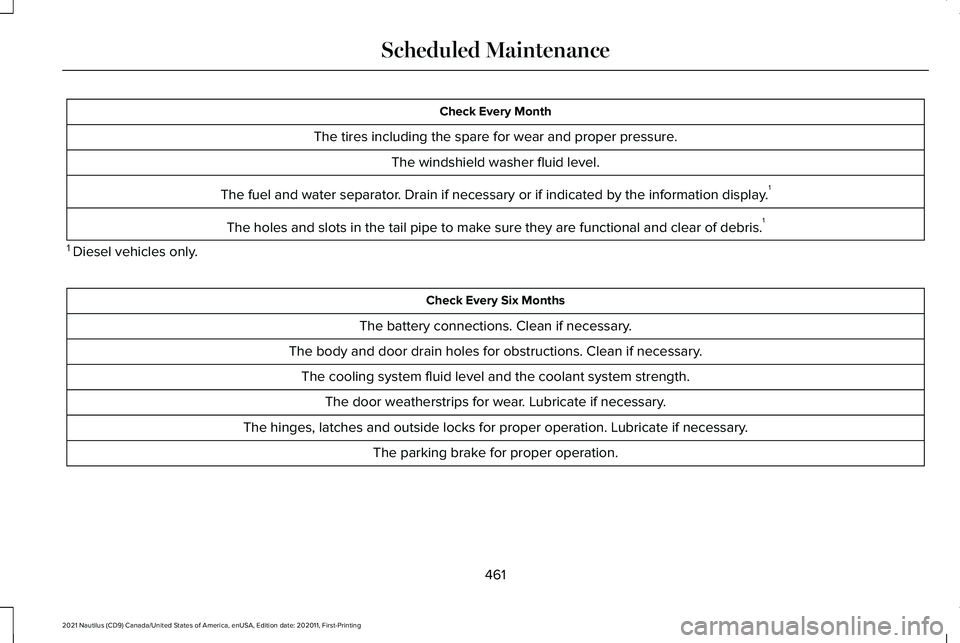
Check Every Month
The tires including the spare for wear and proper pressure. The windshield washer fluid level.
The fuel and water separator. Drain if necessary or if indicated by the information display. 1
The holes and slots in the tail pipe to make sure they are functional and clear of debris. 1
1 Diesel vehicles only. Check Every Six Months
The battery connections. Clean if necessary.
The body and door drain holes for obstructions. Clean if necessary. The cooling system fluid level and the coolant system strength. The door weatherstrips for wear. Lubricate if necessary.
The hinges, latches and outside locks for proper operation. Lubricate if necessary. The parking brake for proper operation.
461
2021 Nautilus (CD9) Canada/United States of America, enUSA, Edition date: 202011, First-Printing Scheduled Maintenance
Page 558 of 579

Speed Compensated Volume.........................424
Tone Settings.......................................................424
Adjusting the Steering Wheel - Vehicles With: Manual Adjustable Steering
Column...........................................................112
Adjusting the Steering Wheel - Vehicles With: Power Adjustable Steering
Column...........................................................112
Adjusting the Volume..................................423
Aid Mode........................................................267
How Does Aid Mode Work..............................267
What Is Aid Mode...............................................267
Airbag Precautions
.........................................66
Airbags..............................................................63 Front Passenger Sensing System.....................
67
Air Conditioning See: Climate Control..........................................154
Air Conditioning System Capacity and Specification - 2.0L....................................410
Air Conditioning System Capacity and Specification - 2.7L
.....................................412
Air Filter See: Changing the Engine Air Filter..............344
Alert and Aid Mode.....................................268 How Does Alert and Aid Mode Work............268
What Is Alert and Aid Mode............................268
Alert Mode
.....................................................267
How Does Alert Mode Work............................267 What Is Alert Mode............................................267
All-Wheel Drive
..............................................214
All-Wheel Drive Driving Hints...........................214
All-Wheel Drive – Troubleshooting.................217
All-Wheel Drive Driving Hints
.....................214
Driving In Sand.....................................................215
Driving on Hilly or Sloping Terrain..................216
Driving on Snow and Ice...................................216
Driving Through Mud and Water.....................215
Emergency Maneuvers......................................214
All-Wheel Drive Limitations
.........................214
All-Wheel Drive Precautions.......................214
All-Wheel Drive – Troubleshooting...........217 All-Wheel Drive – Information
Messages..........................................................217
AM/FM Radio
.................................................425
AM/FM Radio Limitations.................................425
Selecting a Radio Station.................................425
Ambient Lighting...........................................128 Adjusting Ambient Lighting..............................128
Switching Ambient Lighting On and Off........128
Anti-Lock Braking System
...........................218
Anti-Lock Braking System Limitations...........218
Anti-Theft Alarm System.............................108 How Does the Anti-Theft Alarm System
Work...................................................................108
What Are the Inclination Sensors...................108
What Are the Interior Sensors.........................
108 What Is the Anti-Theft Alarm System.............108
What Is the Perimeter Alarm............................108
Anti-Theft Alarm System Settings.............109 Setting the Alarm Security Level.....................109
Switching Ask on Exit On and Off...................109
What are the Alarm Security Levels...............109
What Is Ask on Exit.............................................109
Appendices....................................................548
Applying the Electric Parking Brake
.........221
Applying the Electric Parking Brake in an Emergency...................................................221
App Precautions...........................................444
App Requirements.......................................444
Apps
.................................................................444
Audio System................................................423
AM/FM Radio.......................................................425
Digital Radio........................................................426
Satellite Radio......................................................427
Audio System Precautions.........................423
Auto-Dimming Exterior Mirror
....................134
What Is the Auto-Dimming Exterior
Mirror..................................................................134
Auto-Dimming Interior Mirror.....................132 Auto-Dimming Interior Mirror
Limitations.........................................................132
What Is the Auto-Dimming Interior Mirror..................................................................132
Auto Hold
.......................................................226
554
2021 Nautilus (CD9) Canada/United States of America, enUSA, Edition date: 202011, First-Printing Index
Page 559 of 579

Auto Hold Indicators....................................227
Autolamps.......................................................120
Autolamp Settings..............................................120
What Are Autolamps..........................................120
Autolock.............................................................91 Autolock Requirements........................................91
What Is Autolock....................................................91
Automatically Releasing the Electric Parking Brake.............................................222
Automatic Crash Shutoff.............................312 Automatic Crash Shutoff Precautions............312
Re-Enabling Your Vehicle..................................312
What Is Automatic Crash Shutoff....................312
Automatic Emergency Braking.................284 Switching Automatic Emergency Braking On
and Off..............................................................284
What Is Automatic Emergency Braking........284
Automatic Engine Stop................................189 How Does Automatic Engine Stop
Work...................................................................190
Overriding Automatic Engine Stop.................190
Switching Automatic Engine Stop On and Off.......................................................................190
What Is Automatic Engine Stop.......................189
Automatic High Beam Control...................122 Automatic High Beam Control
Indicators..........................................................124 Automatic High Beam Control
Limitations.........................................................123
Automatic High Beam Control Precautions .......................................................123
Automatic High Beam Control Requirements...................................................123
How Does Automatic High Beam Control Work...................................................................122
Overriding Automatic High Beam Control...............................................................124
Switching Automatic High Beam Control On and Off...............................................................124
Automatic High Beam Control – Troubleshooting..........................................125
Automatic High Beam Control – Information Messages..........................................................125
Automatic Locking Mode.............................55 Disengaging Automatic Locking Mode..........56
Engaging Automatic Locking Mode................56
What Is Automatic Locking Mode....................55
Automatic Return to Park (P).....................209 Automatic Return to Park (P)
Limitations.......................................................209
How Does Automatic Return to Park (P) Work..................................................................209
What Is Automatic Return to Park (P)............209 Automatic Transmission Audible
Warnings.......................................................212
Park (P) Selection Audible Warning................212
Transmission Not In Park (P) Audible Warning.............................................................212
Automatic Transmission.............................206 Automatic Return to Park (P)...........................209
Automatic Transmission Positions.................
206
Automatic Transmission – Troubleshooting..............................................212
Manually Shifting Gears....................................207
Manual Park Release..........................................210
Temporary Neutral Mode.................................208
Automatic Transmission Position Indicators.....................................................207
Automatic Transmission Positions...........206 Drive (D)................................................................207
Neutral (N)............................................................206
Park (P)..................................................................206
Reverse (R) ..........................................................206
Sport (S).................................................................207
Automatic Transmission Precautions.................................................206
Automatic Transmission – Troubleshooting..........................................212
Automatic Transmission – Information Messages..........................................................212
555
2021 Nautilus (CD9) Canada/United States of America, enUSA, Edition date: 202011, First-Printing Index
Page 560 of 579

Auto Mode......................................................156
Auto Mode Indicators.........................................156
Switching Auto Mode On and Off...................
156
Auto-Start-Stop..............................................194 Auto-Start-Stop – Troubleshooting.................195
Auto-Start-Stop Indicators...........................194
Auto-Start-Stop Precautions.......................194
Auto-Start-Stop – Troubleshooting..........195 Auto-Start-Stop – Frequently Asked
Questions.........................................................196
Auto-Start-Stop – Information Messages..........................................................195
Autounlock.......................................................90 Autounlock Requirements..................................90
Switching Autounlock On and Off....................
90
What Is Autounlock..............................................90
Autowipers.......................................................114 Adjusting the Sensitivity of the Rain
Sensor.................................................................115
Autowipers Settings.............................................114
What Are Autowipers..........................................114
AWD See: All-Wheel Drive...........................................214
B
Battery See: Changing the 12V Battery.......................345 Beginning a Voice Interaction
...................435
Blind Spot Information System..................273 Blind Spot Information System –
Troubleshooting.............................................275
Blind Spot Information System Indicators.....................................................275
Blind Spot Information System Limitations....................................................273
Blind Spot Information System Precautions..................................................273
Blind Spot Information System Requirements..............................................274
Blind Spot Information System – Troubleshooting.........................................275
Blind Spot Information System – Information Messages.........................................................275
Bluetooth®
......................................................443
Body Control Module Fuse Box...............326 Accessing the Body Control Module Fuse
Box.....................................................................326
Identifying the Fuses in the Body Control Module Fuse Box...........................................327
Locating the Body Control Module Fuse Box.....................................................................326
Body Styling Kit Precautions.....................360
Body Styling Kits...........................................360
Bonnet Lock See: Opening and Closing the Hood............332 Booster Seats..................................................49
Types of Booster Seats.......................................49
Brake Fluid Specification............................219
Brake Over Accelerator...............................218
Brake Precautions
.........................................218
Brakes..............................................................218 Anti-Lock Braking System.................................
218
Brakes – Troubleshooting.................................219
Brakes – Troubleshooting..........................219 Brakes – Frequently Asked Questions........220
Brakes – Information Messages....................
220
Brakes – Warning Lamps..................................219
Breaking-In.....................................................305
C
Calculating Payload......................................291
Calculating the Load Limit..........................291 Helpful examples for calculating the available
amount of cargo and luggage load
capacity............................................................292
California Proposition 65............................514
Canceling the Set Speed...........................252
Capacities and Specifications
...................398
Catalytic Converter......................................204
Catalytic Converter – Troubleshooting........204
Catalytic Converter Precautions..............204
556
2021 Nautilus (CD9) Canada/United States of America, enUSA, Edition date: 202011, First-Printing Index
Page 561 of 579

Catalytic Converter –
Troubleshooting.........................................204
Catalytic Converter – Warning Lamps..........204
Center Console................................................31
Changing a Flat Tire.....................................391 ........................................................................\
........396
Dissimilar Spare Wheel and Tire Assembly
Information.......................................................391
Stowing the flat tire ...........................................396
Tire Change Procedure....................................392
Changing a Road Wheel.............................391
Changing the 12V Battery..........................345 Remove and Reinstall the Battery..................347
Changing the Engine Air Filter..................344
Changing the Fuel Filter.............................344
Changing the Remote Control Battery.............................................................76
Changing the Vehicle Wi-Fi Hotspot Name or Password.................................................421
Changing the Wi-Fi Hotspot Frequency.......422
Charging a Device .........................................178
Charging a Wireless Device.......................183
Checking MyKey System Status.................87 MyKey Distance.....................................................87
Number of Admin Keys.......................................87
Number of MyKeys...............................................87
Checking the Brake Fluid
...........................218 Checking the Coolant.................................340
Adding Coolant...................................................340
Coolant Change...................................................341
Engine Coolant Temperature
Management...................................................343
Fail-Safe Cooling................................................342
Severe Climates...................................................341
Checking the Seatbelts................................60
Checking the Tire Pressures.....................374
Checking the Wiper Blades.........................116
Children and Airbags.....................................67
Child Restraint Anchor Points
......................40
Locating the Child Restraint Lower Anchor
Points....................................................................41
Locating the Child Restraint Top Tether Anchor Points.....................................................41
What Are the Child Restraint Anchor Points...................................................................40
Child Restraints
................................................41
Child Restraint Position Information..................41
Child Restraints Recommendation...................43
Child Safety
......................................................39
Child Restraint Anchor Points............................40
Child Restraints.......................................................41
Installing Child Restraints....................................44
Child Safety Locks..........................................52 Left-Hand Side.......................................................52
Right-Hand Side....................................................52 Child Safety Precautions
...............................39
Cleaning Products........................................354
Materials...............................................................354
Cleaning the Exterior
..................................355
Cleaning Camera Lenses and Sensors........356
Cleaning Chrome, Aluminium or Stainless
Steel..................................................................355
Cleaning Headlamps and Rear Lamps.........355
Cleaning Stripes or Graphics..........................356
Cleaning the Engine Compartment...............356
Cleaning Wheels................................................356
Cleaning Windows and Wiper Blades
..........355
Cleaning the Interior....................................357 Cleaning Carpets and Floor Mats..................358
Cleaning Displays and Screens......................357
Cleaning Fabric Seats and Headliners.........358
Cleaning Leather and Vinyl ............................357
Cleaning Moonroof Tracks...............................359
Cleaning Plastic...................................................357
Cleaning Seatbelts.............................................358
Cleaning Storage Compartments..................358
Cleaning the Instrument Panel........................357
Clearing All MyKeys.......................................86
Clearing the Garage Door Opener...........176
Climate Control..............................................154 Auto Mode............................................................156
Climate Control – Troubleshooting................157
557
2021 Nautilus (CD9) Canada/United States of America, enUSA, Edition date: 202011, First-Printing Index