2021 LEXUS RX350 Sound
[x] Cancel search: SoundPage 275 of 508

2754-5. Using the driving support systems
4
Driving
■Disabling the TRAC system
If the vehicle gets stuck in mud, dirt or snow,
the TRAC system may reduce power from
the engine to the wheels. Pressing the
switch to turn the system off may make it
easier for you to rock the vehicle in order to
free it.
To turn the TRAC system off, quickly press
and release the switch.
The “Traction Control Turned Off” will be
shown on the multi-information display.
Press the switch again to turn the sys-
tem back on.
■Turning off both TR AC, VSC and Trailer
Sway Control systems
To turn the TRAC, VSC and Trailer Sway
Control systems off, press and hold the
switch for more th an 3 seconds while
the vehicle is stopped.
The VSC OFF indicator light will come on
and the “Traction Cont rol Turned Off” will
be shown on the mult i-information display.
*
Press the switch again to turn the sys-
tem back on.
*: On vehicles with PCS (Pre-Collision System), PCS will also be disabled (only
Pre-Collision warning is available). The
PCS warning light will come on and a
message will be di
splayed on the
multi-information display. ( P.209)
■When the message is displayed on the
multi-information display showing that
TRAC has been disabled even if the
switch has not been pressed
TRAC is temporary deactivated. If the infor-
mation continues to show, contact your
Lexus dealer.
■Operating conditions of hill-start assist
control
When the following four conditions are met,
the hill-start assist control will operate:
●The shift lever is in a position other than P
or N (when starting off forward/back-
ward on an upward incline)
●The vehicle is stopped
●The accelerator pedal is not depressed
●The parking brake is not engaged
■Automatic system cancelation of
hill-start assist control
The hill-start assist control will turn off in any
of the following situations:
●The shift lever is shifted to P or N
●The accelerator pedal is depressed
●The parking brake is engaged
●2 seconds at maximum elapsed after the
brake pedal is released
■Sounds and vibrations caused by the
ABS, brake assist, VSC, Trailer Sway
Control, TRAC and hill-start assist con-
trol systems
●A sound may be heard from the engine
compartment when the brake pedal is
depressed repeatedly, when the engine is
started or just after the vehicle begins to
move. This sound does not indicate that a
malfunction has occurred in any of these
systems.
●Any of the following conditions may
occur when the above systems are oper-
ating. None of these indicates that a mal-
Page 276 of 508

2764-5. Using the driving support systems
function has occurred.
• Vibrations may be felt through the vehicle body and steering.
• A motor sound may be heard also after the vehicle comes to a stop.
• The brake pedal may pulsate slightly after
the ABS is activated.
• The brake pedal may move down slightly after the ABS is activated.
■Active Cornering Assist operation
sounds and vibrations
When the Active Cornering Assist is oper-
ated, operation sounds and vibrations may
be generated from the brake system, but
this is not a malfunction.
■EPS operation sound
When the steering wheel is operated, a
motor sound (whirring sound) may be
heard. This does not indicate a malfunction.
■Reduced effectiveness of the EPS sys-
tem
The effectiveness of the EPS system is
reduced to prevent the system from over-
heating when there is frequent steering
input over an extended period of time. The
steering wheel may feel heavy as a result.
Should this occur, re frain from excessive
steering input or stop the vehicle and turn
the engine off. The EPS system should
return to normal within 10 minutes.
■Automatic reactivation of TRAC, Trailer
Sway Control and VSC systems
After turning the TRAC, Trailer Sway Con-
trol and VSC systems off, the systems will
be automatically re-enabled in the following
situations:
●When the engine switch is turned off
●If only the TRAC system is turned off, the
TRAC will turn on when vehicle speed
increases
If both the TRAC and VSC systems are
turned off, automatic re-enabling will not
occur when vehicle speed increases.
■Operating conditions of Active Corner-
ing Assist
The system operates when the following
occurs.
●TRAC/VSC can operate
●The driver is attempting to accelerate
while turning
●The system detects that the vehicle is
drifting to the outer side
●The brake pedal is released
■Secondary Collision Brake operating
conditions
The system operates when the SRS airbag
sensor detects a collision while the vehicle
is in motion.
However, the system does not operate in
any of the following situations.
●The vehicle speed is below 6 mph (10
km/h)
●Components are damaged
■Secondary Collision Brake automatic
cancellation
The system is automatically canceled in any
of the following situations.
●The vehicle speed drops below approxi-
mately 6 mph (10 km/h)
●A certain amount of time elapses during
operation
●The accelerator pedal is depressed a
large amount
WARNING
■The ABS does not operate effectively
when
●The limits of tire gripping performance
have been exceeded (such as exces-
sively worn tires on a snow covered
road).
●The vehicle hydroplanes while driving
at high speed on wet or slick roads.
■Stopping distance when the ABS is
operating may exceed that of normal
conditions
The ABS is not designed to shorten the
vehicle’s stopping di stance. Always main-
tain a safe distance from the vehicle in
front of you, especially in the following
situations:
●When driving on dirt, gravel or
snow-covered roads
Page 325 of 508

3255-6. Using the other interior features
5
Interior features
Blinks (orange) 4 times repeatedly
■The wireless charger can be operated
when
The engine switch is in ACCESSORY or
IGNITION ON mode.
■Portable devices t hat can be charged
●Portable devices compatible with the Qi
wireless charging standard can be
charged by the wireless charger. How-
ever, compatibility with all devices which
meet the Qi wireless charging standard is
not guaranteed.
●The wireless charger is designed to sup-
ply low power electricity (5 W or less) to
a cellular phone, smartphone, or other
portable device.
■If a cover or accessory is attached to the
portable device
Do not charge a portable device if a cover
or accessory which is not Qi compatible is
attached. Depending on the type of cover
and/or accessory attached, it may not be
possible to charge the portable device. If
the portable device is placed on the
charging area and does not charge, remove
the cover and/or accessories.
■If interference is heard in AM radio
broadcasts while charging
Turn off the wireless charger and check if
the noise is reduced. If noise is reduced,
press and hold the powe r supply switch of
the wireless charger fo r 2 seconds. The fre-
quency of the wireless charger is changed
and noise may be reduced. When the fre-
quency is changed, the operation indicator
light will blink (orange) 2 times.
■Charging precautions
●If the electronic key cannot be detected
in the cabin, charging cannot be per-
formed. When a door is opened and
closed, charging may be temporarily sus-
pended.
●While charging, the wi reless charger and
the portable device will become warm.
This is not a malfunction. If a portable
device becomes warm while charging
and charging stops due to the protection
function of the portable device, wait until
the portable device cools down and
charge it again.
■Sound generated during operation
When the power supply switch is turned on
or while a portable device is being identi-
fied, operation sounds may be heard. This is
not a malfunction.
■Cleaning the wireless charger
P.347
Suspected causesMeasure
A foreign object
exists between
the portable
device and
charging area.
Remove the foreign
object.
Portable device is
not positioned
properly on the
charging area.Move the portable
device toward the cen-
ter of the charging
area.
Suspected causesMeasure
The temperature
of the wireless
charger is exces-
sively high.Stop charging immedi-
ately and continue
charging after a while.
Page 351 of 508

3516-2. Maintenance
6
Maintenance and care
3Select the “Yes” and press .
4 A message will be displayed on the
multi-information display when the
reset procedure has been completed.
You can perform some maintenance
procedures by yourself.
Please be aware that do-it-yourself
maintenance may affect warranty cov-
erage.
The use of Lexus repair manuals is recom-
mended.
For details about warra nty coverage, refer
to the separate “Owner’s Guide”, “War-
ranty and Service Guide”, “Owner’s Man-
ual Supplement” or “Warranty Booklet”.
Do-it-yourself maintenance
General maintenance
Listed below are the general main-
tenance items that should be per-
formed at the intervals specified in
the “Warranty and Service Guide”
or “Owner’s Manual Supplement”.
It is recommended that any prob-
lem you notice should be brought to
the attention of your Lexus dealer
or qualified service shop for advice.
WARNING
■If the engine is running
Turn the engine off and ensure that there
is adequate ventilati on before perform-
ing maintenance checks.
Engine compartment
ItemsCheck points
BatteryCheck the connec-
tions. ( P.363)
Brake fluid
Is the brake fluid at the
correct level?
( P.362)
Engine coolant
Is the engine coolant at
the correct level?
( P.361)
Engine oil
Is the engine oil at the
correct level?
( P.359)
Exhaust system
There should not be
any fumes or strange
sounds.
Page 353 of 508

3536-2. Maintenance
6
Maintenance and care
Seats• Do the seat controls operate properly?
Steering wheel
• Does the steering wheel rotate
smoothly?
• Does the steering wheel have the cor-
rect amount of free
play?
•There should not be any strange sounds
coming from the
steering wheel.
Vehicle exterior
ItemsCheck points
Doors• Do the doors oper-ate smoothly?
Engine hood
•Does the engine hood lock system
work properly?
Fluid leaks
•There should not be any signs of fluid
leakage after the
vehicle has been
parked.
ItemsCheck points
Tires
• Is the tire inflation pressure correct?
• The tires should not be damaged or
excessively worn.
• Have the tires been rotated according to
the maintenance
schedule?
•The wheel nuts should not be loose.
Windshield wip-
ers/rear window
wiper
• The wiper blades should not show any
signs of cracking,
splitting, wear, con-
tamination or defor-
mation.
• The wiper blades should clear the
windshield/rear win-
dow without streak-
ing or skipping.
ItemsCheck points
Page 393 of 508

393
7
7
When trouble arises
When trouble arises
.7-1. Essential informationEmergency flashers.................. 394
If your vehicle has to be stopped in an emergency .......................... 394
If the vehicle is trapped in rising water............................................ 395
7-2. Steps to take in an emergency If your vehicle needs to be towed........................................................ 397
If you think something is wrong ......................................................... 401
Fuel pump shut off system ..... 402
If a warning light turns on or a warning buzzer sounds ....... 403
If a warning message is displayed ......................................................... 412
If you have a flat tire................... 416
If the engine wi ll not start .......428
If you lose your keys ................. 430
If the fuel filler door cannot be opened........................................ 430
If the electronic key does not operate properly ..................... 431
If the vehicle battery is discharged ........................................................ 433
If your vehicle overheats ........ 437
If the vehicle becomes stuck ........................................................ 439
Page 398 of 508
3987-2. Steps to take in an emergency
The following may indicate a problem
with your transmission. Contact your
Lexus dealer or commercial towing
service before towing.
The engine is running but the vehi-
cle does not move.
The vehicle makes an abnormal
sound.
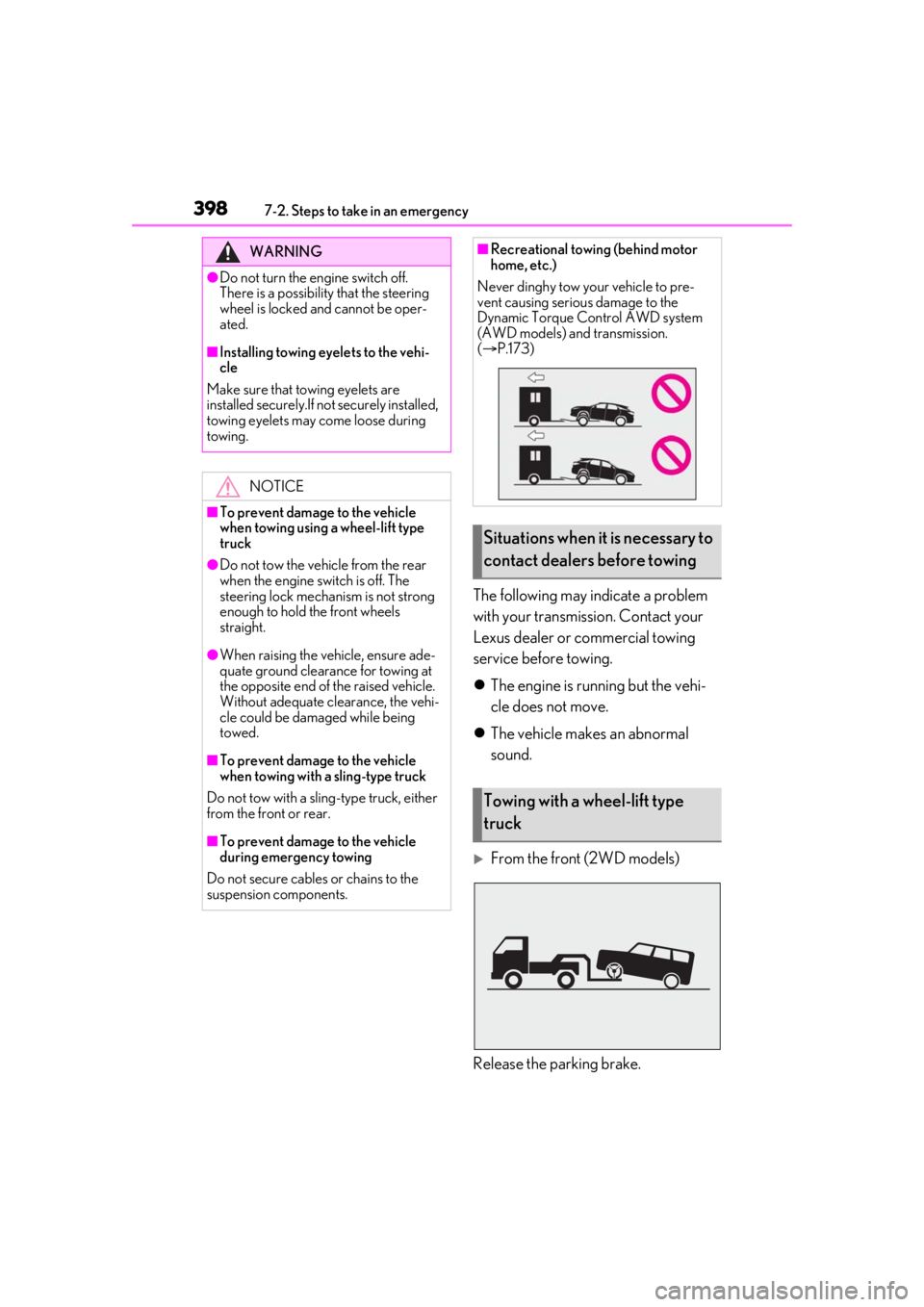
From the front (2WD models)
Release the parking brake.
WARNING
●Do not turn the engine switch off.
There is a possibility that the steering
wheel is locked and cannot be oper-
ated.
■Installing towing eyelets to the vehi-
cle
Make sure that towing eyelets are
installed securely.If no t securely installed,
towing eyelets may come loose during
towing.
NOTICE
■To prevent damage to the vehicle
when towing using a wheel-lift type
truck
●Do not tow the vehicle from the rear
when the engine switch is off. The
steering lock mechanism is not strong
enough to hold the front wheels
straight.
●When raising the vehicle, ensure ade-
quate ground clearance for towing at
the opposite end of the raised vehicle.
Without adequate clearance, the vehi-
cle could be damaged while being
towed.
■To prevent damage to the vehicle
when towing with a sling-type truck
Do not tow with a sling-type truck, either
from the front or rear.
■To prevent damage to the vehicle
during emergency towing
Do not secure cables or chains to the
suspension components.
■Recreational towing (behind motor
home, etc.)
Never dinghy tow your vehicle to pre-
vent causing serious damage to the
Dynamic Torque Control AWD system
(AWD models) and transmission.
( P.173)
Situations when it is necessary to
contact dealers before towing
Towing with a wheel-lift type
truck
Page 401 of 508
4017-2. Steps to take in an emergency
7
When trouble arises
Fluid leaks under the vehicle
(Water dripping from the air condi-
tioning after use is normal.)
Flat-looking tires or uneven tire
wear
Engine coolant temperature gauge
needle continually points higher
than normal
Changes in exhaust sound
Excessive tire squeal when corner-
ing
Strange noises related to the sus-
pension system
Pinging or other noises related to
the engine
Engine missing, stumbling or run-
ning roughly
Appreciable loss of power
Vehicle pulls heavily to one side
when braking
Vehicle pulls heavily to one side
when driving on a level road
Loss of brake effectiveness, spongy
feeling, pedal almost touches the
floor
If you think something is
wrong
If you notice any of the following
symptoms, your vehicle probably
needs adjustment or repair. Con-
tact your Lexus dealer as soon as
possible.
Visible symptoms
Audible symptoms
Operational symptoms