2021 LEXUS RX350 Back door
[x] Cancel search: Back doorPage 50 of 508
501-2. Child safety
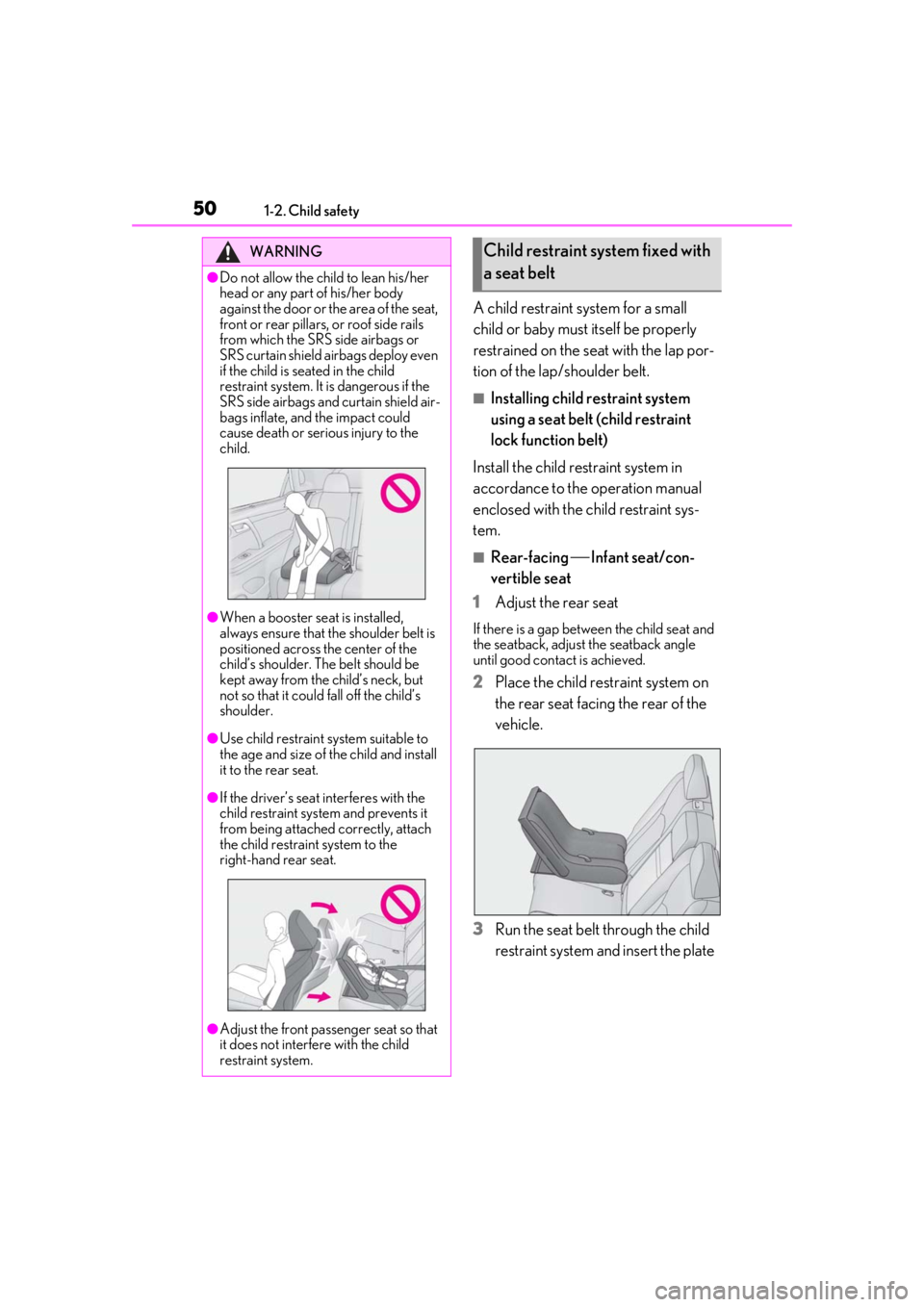
A child restraint system for a small
child or baby must itself be properly
restrained on the seat with the lap por-
tion of the lap/shoulder belt.
■Installing child restraint system
using a seat belt (child restraint
lock function belt)
Install the child restraint system in
accordance to the operation manual
enclosed with the child restraint sys-
tem.
■Rear-facing Infant seat/con-
vertible seat
1 Adjust the rear seat
If there is a gap between the child seat and
the seatback, adjust the seatback angle
until good contact is achieved.
2Place the child restraint system on
the rear seat facing the rear of the
vehicle.
3 Run the seat belt through the child
restraint system and insert the plate
WARNING
●Do not allow the child to lean his/her
head or any part of his/her body
against the door or the area of the seat,
front or rear pillars, or roof side rails
from which the SRS side airbags or
SRS curtain shield ai rbags deploy even
if the child is seated in the child
restraint system. It is dangerous if the
SRS side airbags and curtain shield air-
bags inflate, and the impact could
cause death or serious injury to the
child.
●When a booster seat is installed,
always ensure that th e shoulder belt is
positioned across the center of the
child’s shoulder. The belt should be
kept away from the child’s neck, but
not so that it could fall off the child’s
shoulder.
●Use child restraint system suitable to
the age and size of the child and install
it to the rear seat.
●If the driver’s seat interferes with the
child restraint system and prevents it
from being attached correctly, attach
the child restraint system to the
right-hand rear seat.
●Adjust the front passenger seat so that
it does not interfere with the child
restraint system.
Child restraint system fixed with
a seat belt
Page 86 of 508

862-1. Instrument cluster
Select to set the tachometer needle color.
Rev indicator (F SPORT models)
( P.78)
• Select to enable/disable the Rev indica-
tor.
• Select to set the desired engine speed at which the Rev indicator will begin to be
displayed.
Selectable engine speed range:
2000 rpm to 6500 rpm
Rev peak (F SPORT models)
( P.79)
Select to enable/dis able the Rev peak.
Default setting
Select to reset the meter display settings to
the default setting.
■Vehicle functions and settings that
can be changed
P.461
■Background color of the indicator/shift
position display area (except F SPORT
models)
The background color of the indicator/shift
position display area is changed according
to the driving mode as follows ( P.271):
●Eco drive mode: Blue
●Sport mode: Red
■Suspension of the settings display
●Some settings cannot be changed while
driving. When changi ng settings, park
the vehicle in a safe place.
●If a warning message is displayed, opera-
tion of the settings display will be sus-
pended.
Displays suggestions to the driver in
the following situations. To select a
response to a displayed suggestion,
use the meter control switches.
■Suggestion to enable the power
back door
If the power back door system is dis-
abled (setting on set to off) and the
power back door switch on the instru-
ment panel is operated, a suggestion
message will be displayed asking if you
wish to enable the power back door
system.
To enable the power back door system,
select “Yes”.
After enabling the power back door sys-
tem, press the power back door switch
again to open or close the power back
door.
WARNING
■Cautions during setting up the dis-
play
As the engine needs to be running
during setting up the display, en sure that
the vehicle is parked in a place with ade-
quate ventilation. In a closed area such as
a garage, exhaust gases including harm-
ful carbon monoxide (CO) may collect
and enter the vehicle. This may lead to
death or a serious health hazard.
NOTICE
■While setting up the display
To prevent battery discharge, ensure that
the engine is running while setting up the
display features.
Suggestion function
Page 95 of 508

95
3
3
Before driving
Before driving
.3-1. Key informationKeys ................................................... 96
3-2. Opening, closing and locking the doors
Side doors ....................................... 99
Power back door........................ 103
Smart access system with push-button start ...................... 115
3-3. Adjusting the seats Front seats ...................................... 121
Rear seats ...................................... 122
Driving position memory ........ 133
Head restraints............................ 136
3-4. Adjusting the steering wheel and mirrors
Steering wheel............................. 139
Inside rear view mirror............. 140
Outside rear view mirrors ....... 141
3-5. Opening, closing the windows and moon roof
Power windows........................... 144
Moon roof ..................................... 146
Panoramic moon roof .............. 149
Page 97 of 508

973-1. Key information
3
Before driving
The electronic keys are equipped with
the following wireless remote control:Locks all the doors (
P.99)
Unlocks all the doors ( P.99)
Opens the windows
*2 and the
moon roof
*1, 2 or panoramic moon
roof
*1, 2 ( P.99)
Opens and closes the power back
door ( P.104)
Sounds the alarm
*1: If equipped
*2: These settings must be customized at
your Lexus dealer.
■Theft deterrent panic mode
When is pressed for longer than
about one second, an alarm will sound
intermittently and the vehicle lights will flash
to deter any person from trying to break
into or damage your vehicle.
To stop the alarm, press any button on the
electronic key.
To take out the mechanical key, push
NOTICE
■To prevent key damage
●Do not drop the keys, subject them to
strong shocks or bend them.
●Do not expose the keys to high tem-
peratures for long periods of time.
●Do not get the keys wet or wash them
in an ultrasonic washer, etc.
●Do not attach metallic or magnetic
materials to the keys or place the keys
close to such materials.
●Do not disassemb le the keys.
●Do not attach a sticker or anything else
to the surface of the electronic key.
●Do not place the keys near objects that
produce magnetic fields, such as TVs,
audio systems and induction cookers,
or medical electrical equipment, such
as low-frequency therapy equipment.
■Carrying the electronic key on your
person
Carry the electronic key 3.9 in. (10 cm)
or more away from electric appliances
that are turned on. Radio waves emitted
from electric applianc es within 3.9 in. (10
cm) of the electronic key may interfere
with the key, causing the key to not func-
tion properly.
■In case of a smart access system with
push-button start malfunction or
other key-related problems
P.431
■When an electronic key is lost
P.430
Wireless remote control
Using the mechanical key
A
B
C
D
E
Page 99 of 508

993-2. Opening, closing and locking the doors
3
Before driving
3-2.Opening, closing and locking the doors
■Smart access system with
push-button start
Carry the electronic key to enable this
function.
1 Grip the driver’s door handle to
unlock the door. Grip any passen-
ger door handle to unlock all the
doors.
*
Make sure to touch the sensor on the back
of the handle.
The doors cannot be unlocked for 3 sec-
onds after the doors are locked.
*: The door unlock settings can be
changed.
2 Touch the lock sensor (indentation
on the surface of the door handle)
to lock all the doors.
Check that the door is securely locked.
■Wireless remote control
1 Locks all the doors
Check that the door is securely locked.
2Unlocks all the doors
Pressing the button unlocks the driver’s
door. Pressing the button again within 3
seconds unlocks the other doors.
Press and hold to open the windows
*2 and
the moon roof
*1, 2 or panoramic moon
roof
*1, 2
*1
: If equipped
*2: This setting must be customized at your
Lexus dealer.
■Switching the door unlock function
It is possible to set which doors the entry
function unlocks using the wireless remote
control.
1 Turn the engine switch off.
2 When the indicator light on the key sur-
face is not on, press and hold ,
or for approxi-
mately 5 seconds while pressing and
holding .
The setting changes each time an operation
is performed, as shown below. (When
changing the setting continuously, release
the buttons, wait for at least 5 seconds, and
repeat step 2 .)
Side doors
The vehicle can be locked and
unlocked using the entry function,
wireless remote control or door
lock switches.
Unlocking and locking the doors
from the outside
Page 103 of 508

1033-2. Opening, closing and locking the doors
3
Before driving
Power back door
The power back door can be
opened using the power back door
opener switch, smart access system
with push-button start or wireless
remote control.
WARNING
Observe the following precautions.
Failure to do so may result in death or
serious injury.
■Before driving the vehicle
Before driving the vehicle, make sure
that the power back door is fully closed. If
the power back door is not fully closed, it
may open unexpectedly while driving,
causing an accident.
■Caution while driving
●Keep the power back door closed
while driving.
If the power back door is left open, it may
hit nearby objects while driving or lug-
gage may be unexpectedly thrown out,
causing an accident.
In addition, exhaust gases may enter the
vehicle, causing death or a serious health
hazard. Make sure to close the power
back door before driving.
●Never let anyone sit in the luggage
compartment. In the event of sudden
braking, sudden swerving or a colli-
sion, they are susceptible to death or
serious injury.
■When children are in the vehicle
Observe the following precautions.
Failure to do so may result in death or
serious injury.
●Do not allow children to play in the lug-
gage compartment.
If a child is accidentally locked in the lug-
gage compartment, they could have heat
exhaustion or other injuries.
●Do not allow a child to open or close
the power back door.
Doing so may cause the power back
door to move unexpectedly, or cause the
child’s hands, arms, head, or neck to be
caught by the closing power back door.
■Operating the power back door
Observe the following precautions.
Failure to do so may cause parts of the
body to be caught, resulting in death or
serious injury.
●Remove any heavy loads, such as snow
and ice, from the power back door
before opening it. Failure to do so may
cause the power back door to sud-
denly shut again after it is opened.
●When opening or closing the power
back door, thoroughly check to make
sure the surrounding area is safe.
●If anyone is in the vicinity, make sure
they are safe and let them know that
the power back door is about to open
or close.
●Use caution when opening or closing
the power back door in windy weather
as it may move abruptly in strong wind.
●The power back door may suddenly
shut if it is not open ed fully. It is more
difficult to open or close the back door
on an incline than on a level surface, so
beware of the back door unexpectedly
opening or closing by itself. Make sure
that the back door is fully open and
secure before using the luggage com-
partment.
Page 104 of 508

1043-2. Opening, closing and locking the doors
■Smart access system with
push-button start
Carry the electronic key to enable this
function. 1
Locks all the doors
Check that the door is securely locked.
2Unlocks all the doors
The doors cannot be unlocked for 3 sec-
onds after the doors are locked.
■Wireless remote control
P.97
■Door lock switch
P.101
■Opening/closing the power back
door using the wireless remote
control
Press and hold the switch for approxi-
mately 1 second.
The power back door can be operated
whether it is locked
* or unlocked.
Pressing the switch while the power back
door is opening/closing will stop the oper-
ation.
Pressing and holding the switch again for
approximately 1 second will operate the
power back door in the opposite direction.
WARNING
●When closing the power back door,
take extra care to prevent your fingers,
etc., from being caught.
●When closing the power back door,
make sure to press it lightly on its outer
surface. If the back d oor handle is used
to fully close the power back door, it
may result in hands or arms being
caught.
●Do not pull on the back door spindle
(P.112) to close the power back
door, and do not hang on the back
door spindle.
Doing so may cause hands to be caught
or the back door spindle to break, caus-
ing an accident.
●If a bicycle carrier or similar heavy
object is attached to the power back
door, it may suddenly shut again after
being opened, causing someone’s
hands, arms, head or neck to be
caught and injured. When installing an
accessory part to the power back
door, using a genuine Lexus part is
recommended.
Unlocking and locking the
power back door from the out-
side
Unlocking and locking the
power back door from the inside
Opening/closing the power back
door
Page 105 of 508
1053-2. Opening, closing and locking the doors
3
Before driving
*: Opening of the power back door when it is locked can be disabled by a custom-
ized setting.
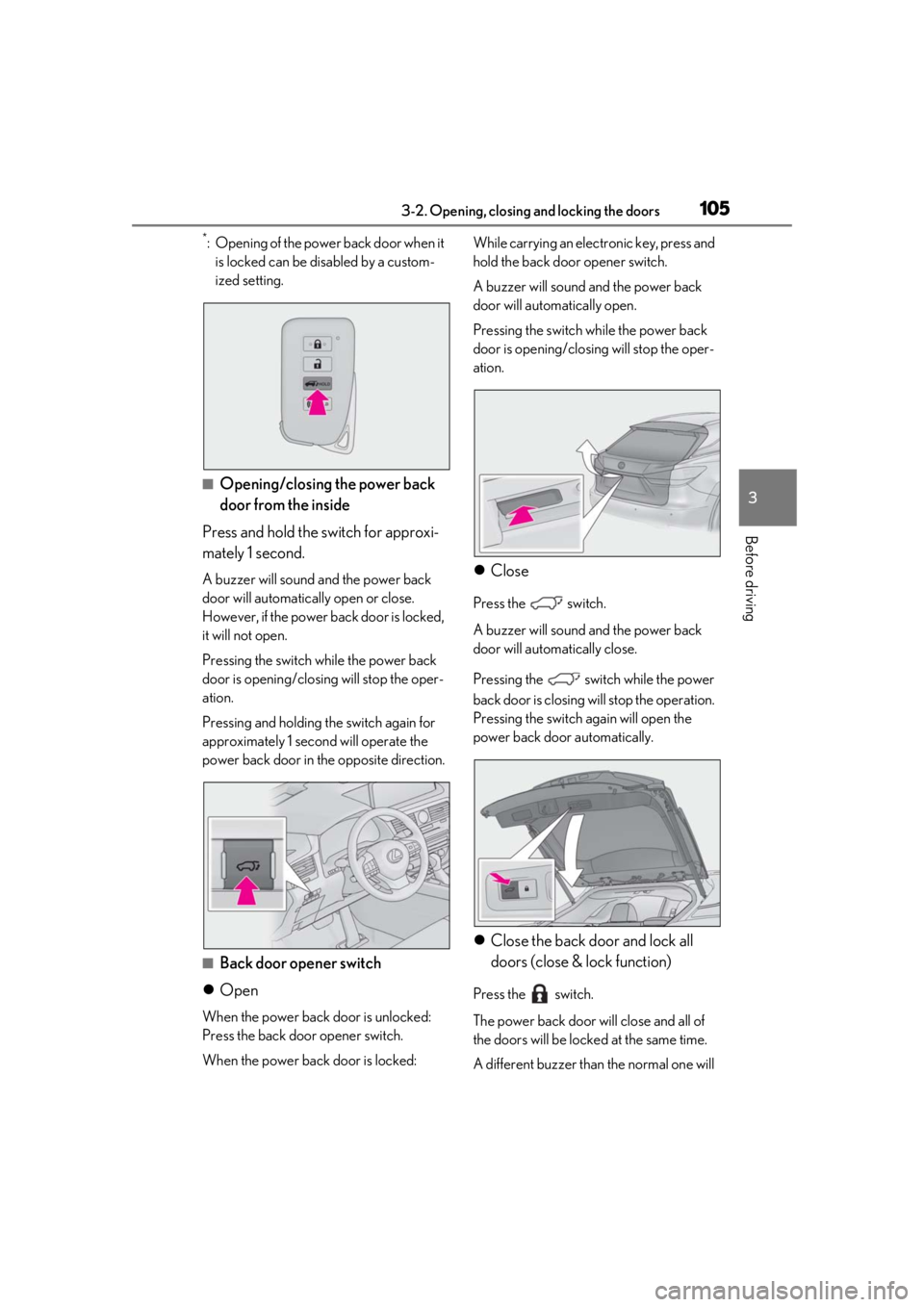
■Opening/closing the power back
door from the inside
Press and hold the switch for approxi-
mately 1 second.
A buzzer will sound and the power back
door will automatically open or close.
However, if the power back door is locked,
it will not open.
Pressing the switch while the power back
door is opening/closing will stop the oper-
ation.
Pressing and holding the switch again for
approximately 1 second will operate the
power back door in the opposite direction.
■Back door opener switch
Open
When the power back door is unlocked:
Press the back door opener switch.
When the power back door is locked: While carrying an electronic key, press and
hold the back door opener switch.
A buzzer will sound and the power back
door will automatically open.
Pressing the switch while the power back
door is opening/closing will stop the oper-
ation.
Close
Press the switch.
A buzzer will sound and the power back
door will automatically close.
Pressing the swit ch while the power
back door is closing w ill stop the operation.
Pressing the switch again will open the
power back door automatically.
Close the back door and lock all
doors (close & lock function)
Press the switch.
The power back door will close and all of
the doors will be locked at the same time.
A different buzzer than the normal one will