Page 463 of 508
4638-2. Customization
8
Vehicle specifications
*2: The default setting varies according to country.
*3:Except F SPORT models
*4:F SPORT models
■Head-up Display*( P.88)
*:If equipped
■Door lock ( P.99, 431)
FunctionDefault settingCustomized setting
Gauge informationNo content
Eco Driving Indica-
tor
—O—
Tachometer
Route guidance to destina-
tion/street nameOnOff—O—
Driving support system displayOnOff—O—
CompassOnOff—O—
Audio system operation statusOnOff—O—
FunctionDefault settingCustomized setting
Unlocking using a mechanical
key
Driver’s door
unlocked in one step, all doors
unlocked in two step
All doors unlocked in one step——O
Automatic door locking func-
tionShift position linked
door locking opera- tionOff
O—OSpeed linked door locking operation
Automatic door unlocking
functionShift position linked door unlocking operationOff
O—ODriver’s door linked door unlocking operation
ABC
ABC
Page 464 of 508
4648-2. Customization
■Power back door (P.103)
*:If equipped
■Smart access system with push-button start and wireless remote control
( P.99, 115)
■Smart access system with push-button start ( P.99, 115)
FunctionDefault settingCustomized setting
Power back doorOnOff—O—
Power back door opening
position51 to 5O——
Buzzer volumeLevel 3Level 1—O—Level 2
Kick sensor*OnOff—O—
Hands free close & lock func-
tion
*OffOn——O
FunctionDefault settingCustomized setting
Operation buzzer volume5OffO—O1 to 7
Operation signal (Emergency
flashers)OnOffO—O
Time elapsed before automatic
door lock function is activated
if door is not opened after
being unlocked
60 seconds
Off
O—O30 seconds
120 seconds
Open door warning buzzerOffOn——O
Reservation lockOnOff——O
FunctionDefault settingCustomized setting
Smart access system with
push-button startOnOff——O
ABC
ABC
ABC
Page 465 of 508
4658-2. Customization
8
Vehicle specifications
■Wireless remote control (P.97, 99, 103)
The doors that are unlocked
using the smart access system
with push-button start can be
selected
Driver’s doorAll the doorsO—O
Number of consecutive door
lock operations2 timesAs many as desired——O
FunctionDefault settingCustomized setting
Wireless remote controlOnOff——O
Unlocking operation
Driver’s door
unlocked in one step, all doors
unlocked in two step
All doors unlocked in one stepO—O
Panic functionOnOff——O
FunctionDefault settingCustomized settingABC
ABC
Page 466 of 508
4668-2. Customization
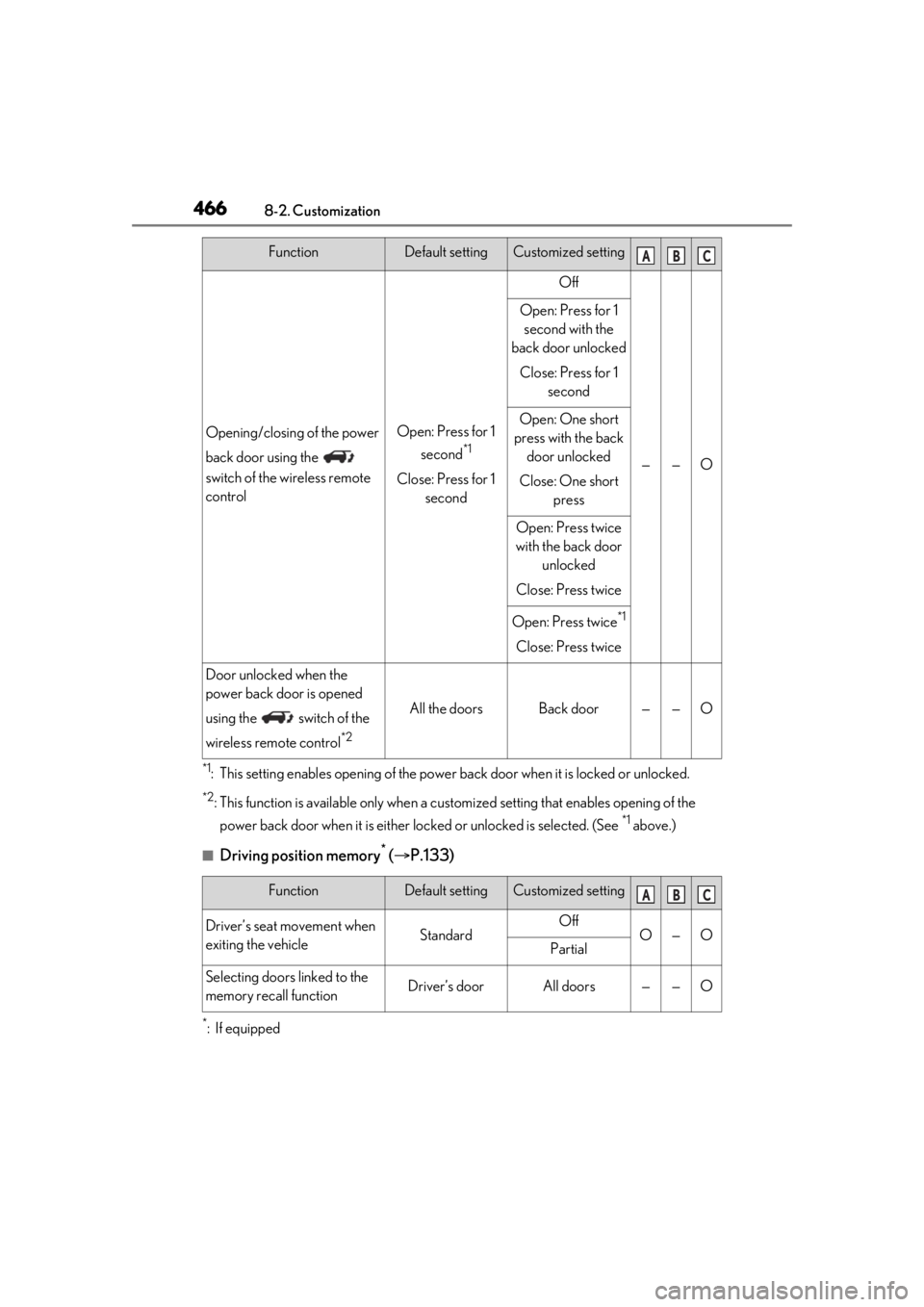
*1: This setting enables opening of the power back door when it is locked or unlocked.
*2: This function is available only when a customized setting that en ables opening of the
power back door when it is either lo cked or unlocked is selected. (See
*1 above.)
■Driving position memory* ( P.133)
*:If equipped
Opening/closing of the power
back door using the
switch of the wireless remote
controlOpen: Press for 1
second
*1
Close: Press for 1 second
Off
——O
Open: Press for 1 second with the
back door unlocked
Close: Press for 1 second
Open: One short
press with the back door unlocked
Close: One short press
Open: Press twice
with the back door unlocked
Close: Press twice
Open: Press twice*1
Close: Press twice
Door unlocked when the
power back door is opened
using the switch of the
wireless remote control
*2
All the doorsBack door——O
FunctionDefault settingCustomized setting
Driver’s seat movement when
exiting the vehicleStandardOffO—OPartial
Selecting doors linked to the
memory recall functionDriver’s doorAll doors——O
FunctionDefault settingCustomized settingABC
ABC
Page 467 of 508
4678-2. Customization
8
Vehicle specifications
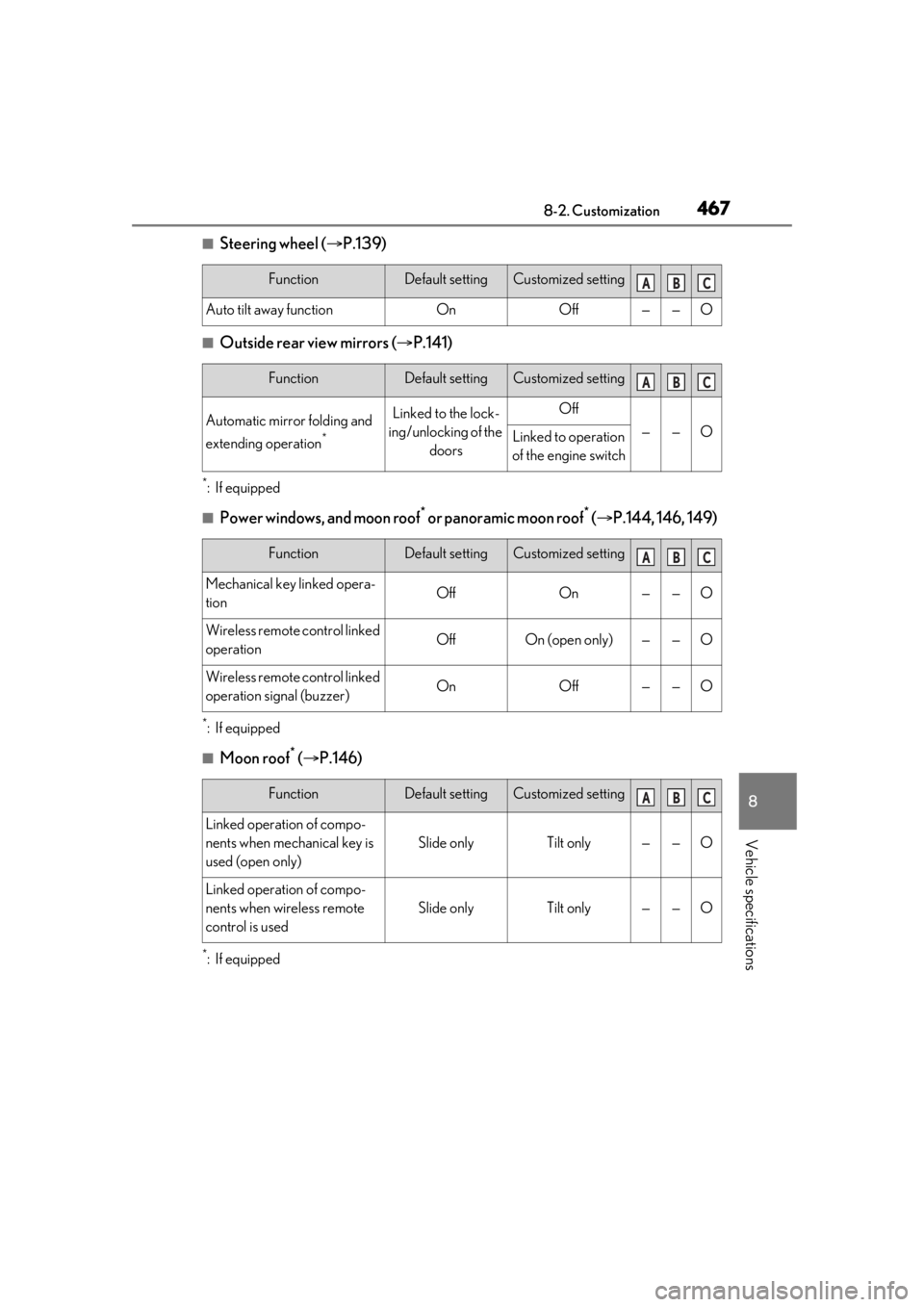
■Steering wheel (P.139)
■Outside rear view mirrors ( P.141)
*:If equipped
■Power windows, and moon roof* or panoramic moon roof* ( P.144, 146, 149)
*:If equipped
■Moon roof* ( P.146)
*:If equipped
FunctionDefault settingCustomized setting
Auto tilt away functionOnOff——O
FunctionDefault settingCustomized setting
Automatic mirror folding and
extending operation
*
Linked to the lock-
ing/unlocking of the doorsOff
——OLinked to operation
of the engine switch
FunctionDefault settingCustomized setting
Mechanical key linked opera-
tionOffOn——O
Wireless remote control linked
operationOffOn (open only)——O
Wireless remote control linked
operation signal (buzzer)OnOff——O
FunctionDefault settingCustomized setting
Linked operation of compo-
nents when mechanical key is
used (open only)
Slide onlyTilt only——O
Linked operation of compo-
nents when wireless remote
control is used
Slide onlyTilt only——O
ABC
ABC
ABC
ABC
Page 472 of 508
4728-2. Customization
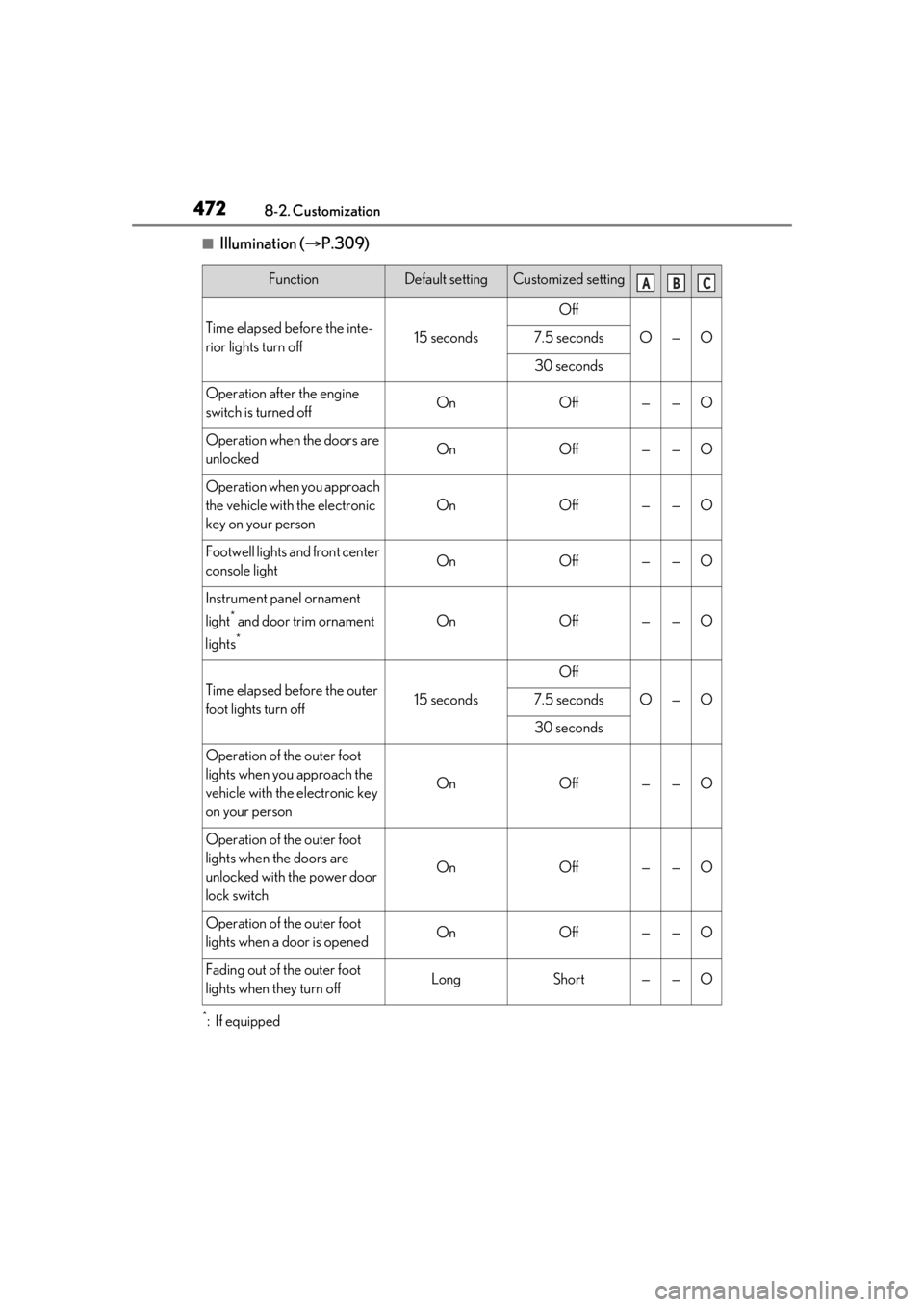
■Illumination (P.309)
*:If equipped
FunctionDefault settingCustomized setting
Time elapsed before the inte-
rior lights turn off15 seconds
Off
O—O7.5 seconds
30 seconds
Operation after the engine
switch is turned offOnOff——O
Operation when the doors are
unlockedOnOff——O
Operation when you approach
the vehicle with the electronic
key on your person
OnOff——O
Footwell lights and front center
console lightOnOff——O
Instrument panel ornament
light
* and door trim ornament
lights
*
OnOff——O
Time elapsed before the outer
foot lights turn off15 seconds
Off
O—O7.5 seconds
30 seconds
Operation of the outer foot
lights when you approach the
vehicle with the electronic key
on your person
OnOff——O
Operation of the outer foot
lights when the doors are
unlocked with the power door
lock switch
OnOff——O
Operation of the outer foot
lights when a door is openedOnOff——O
Fading out of the outer foot
lights when they turn offLongShort——O
ABC
Page 473 of 508

4738-2. Customization
8
Vehicle specifications
■Seat belt reminder (P.403)
■Vehicle customization
●When the smart access system with
push-button start is off, the entry unlock
function cannot be customized.
●When the doors remain closed after
unlocking the doors and the timer acti-
vated automatic door lock function acti-
vates, signals will be generated in
accordance with the operation buzzer
volume and operational signal (Emer-
gency flashers) function settings.
●Some settings can be changed using a
switch or the Remote Touch. If a setting is
changed using a switch, the changed set-
ting will not be reflected on the Remote
Touch until the engine switch is turned off
and then to IGNITION ON mode.
■Clock settings screen
If the clock adjustment screen is displayed
continuously when attempting to change
the clock settings, the system may be mal-
functioning. Have the vehicle inspected by
your Lexus dealer.
FunctionDefault settingCustomized setting
Vehicle speed linked seat belt
reminder buzzerOnOff——O
ABC
Page 490 of 508

490What to do if... (Troubleshooting)
1-1.What to do if... (Troubleshooting)What to do if... (Troubleshooting)
If you lose your mechanical keys,
new genuine mechanical keys can
be made by your Lexus dealer.
( P.430)
If you lose your electronic keys, the
risk of vehicle theft increases signifi-
cantly. Contact your Lexus dealer
immediately. ( P.430)
Is the electronic key battery weak or
depleted? ( P.379)
Is the engine switch in IGNITION
ON mode?
When locking the doors, turn the engine
switch off. ( P.177)
Is the electronic key left inside the
vehicle?
When locking the doors, make sure that
you have the electronic key on your per-
son.
The function may not operate prop-
erly due to the condition of the radio
wave. ( P.116)
Is the child-protector lock set?
The rear door cannot be opened from
inside the vehicle when the lock is set.
Open the rear door from outside and then
unlock the child-protector lock. ( P.102)
Did you press the engine switch
while firmly depressing the brake
pedal? ( P.174)
Is the shift lever in P? ( P.174)
Is the electronic key anywhere
detectable inside the vehicle?
( P.115)
Is the steering wheel unlocked?
( P.175)
Is the electronic key battery weak or
depleted?
In this case, the engine can be started in a
temporary way. ( P.432)
Is the battery discharged?
( P.433)
If you have a problem, check the
following before contacting your
Lexus dealer.
The doors cannot be locked,
unlocked, opened or closed
You lose your keys
The electronic key does not
operate properly
The doors cannot be locked or
unlocked
The rear door cannot be opened
If you think something is wrong
The engine does not start
The shift lever cannot be shifted
from P even if you depress the
brake pedal