Page 142 of 635

142
LX570_OM_OM60T33U_(U)3-2. Opening, closing and locking the doors
●If the electronic key is inside the vehicle
and a door handle becomes wet during a car
wash, a message may be shown on the mult i-information display and a buzzer will
sound outside the vehicle. To turn off the alarm, lock all the doors.
●The lock sensor may not work properly if it comes into contact with ice, snow, mud, etc.
Clean the lock sensor and attempt to operate it again, or use the lock sensor on the
lower part of the door handle.
●If there is another electronic key in the de tection area, it may take slightly longer to
unlock the doors after the do or handle is gripped or back door unlock switch is
pressed.
●A sudden approach to the effective range or door handle may prevent the doors from
being unlocked. In this case, return the door handle to the original position and check
that the doors unlock before pulling the door handle again.
■When the vehicle is not driven for extended periods
●To prevent theft of the vehicle, do not leave the electronic key within 6 ft. (2 m) of the
vehicle.
●The smart access system wi th push-button start can be deactivated in advance.
( P. 584)
■To operate the system properly
Make sure to carry the electronic key when operating the system. Do not get the elec-
tronic key too close to the vehicle when operating the system from the outside of the
vehicle.
Depending on the position and holding condition of the electronic key, the key may not
be detected correctly and the system may not operate properly. (The alarm may go off
accidentally, or the door lock prev ention function may not operate.)
■If the smart access system with push-button start does not operate properly
●Locking and unlocking the doors: Use the mechanical key. (P. 550)
●Starting the engine: P. 551
■Customization
Settings (e. g. smart access system with push-button start) can be changed.
(Customizable features: P. 584)
■If the smart access system with push-button start has been deactivated in a customized
setting
●Locking and unlocking the doors:
Use the wireless remote cont rol or mechanical key. (P. 121, 550)
●Starting the engine and changing engine switch modes: P. 551
●Stopping the engine: P. 212
Page 143 of 635
LX570_OM_OM60T33U_(U)
1433-2. Opening, closing and locking the doors
3
Operation of each component
■Certification for the smart access system with push-button start
For vehicles sold in the U.S.A., Hawaii, Guam and Puerto Rico
For vehicles sold in Canada
Page 144 of 635
144
LX570_OM_OM60T33U_(U)3-2. Opening, closing and locking the doors
For vehicles sold in the U.S.A., Hawaii, Guam and Puerto Rico
For vehicles sold in Canada
Page 145 of 635

LX570_OM_OM60T33U_(U)
1453-2. Opening, closing and locking the doors
3
Operation of each component
WARNING
■Caution regarding interference with electronic devices
●People with implantable cardiac pacema kers, cardiac resynchronization therapy-
pacemakers or implantable cardioverter de fibrillators should keep away from the
smart access system antennas. ( P. 138)
The radio waves may affect the operation of such devices. If necessary, the entry
function can be disabled. Ask your Lexus dealer for details, such as the frequency of
radio waves and timing of the emitted radio waves. Then, consult your doctor to see if
you should disable the entry function.
●Users of any electrical medical device ot her than implantable cardiac pacemakers,
cardiac resynchronization th erapy-pacemakers or implantable cardioverter defibril-
lators should consult the manufacturer of the device for information about its opera-
tion under the influence of radio waves.
Radio waves could have unexpected effects on the operation of such medical
devices.
Ask your Lexus dealer for details on disabling the entry function.
Page 147 of 635
LX570_OM_OM60T33U_(U)
1473-3. Adjusting the seats
3
Operation of each component
■Power easy access system
The driver’s seat and steering wheel move in accordance with engine switch mode and
the driver’s seat belt condition. ( P. 157)
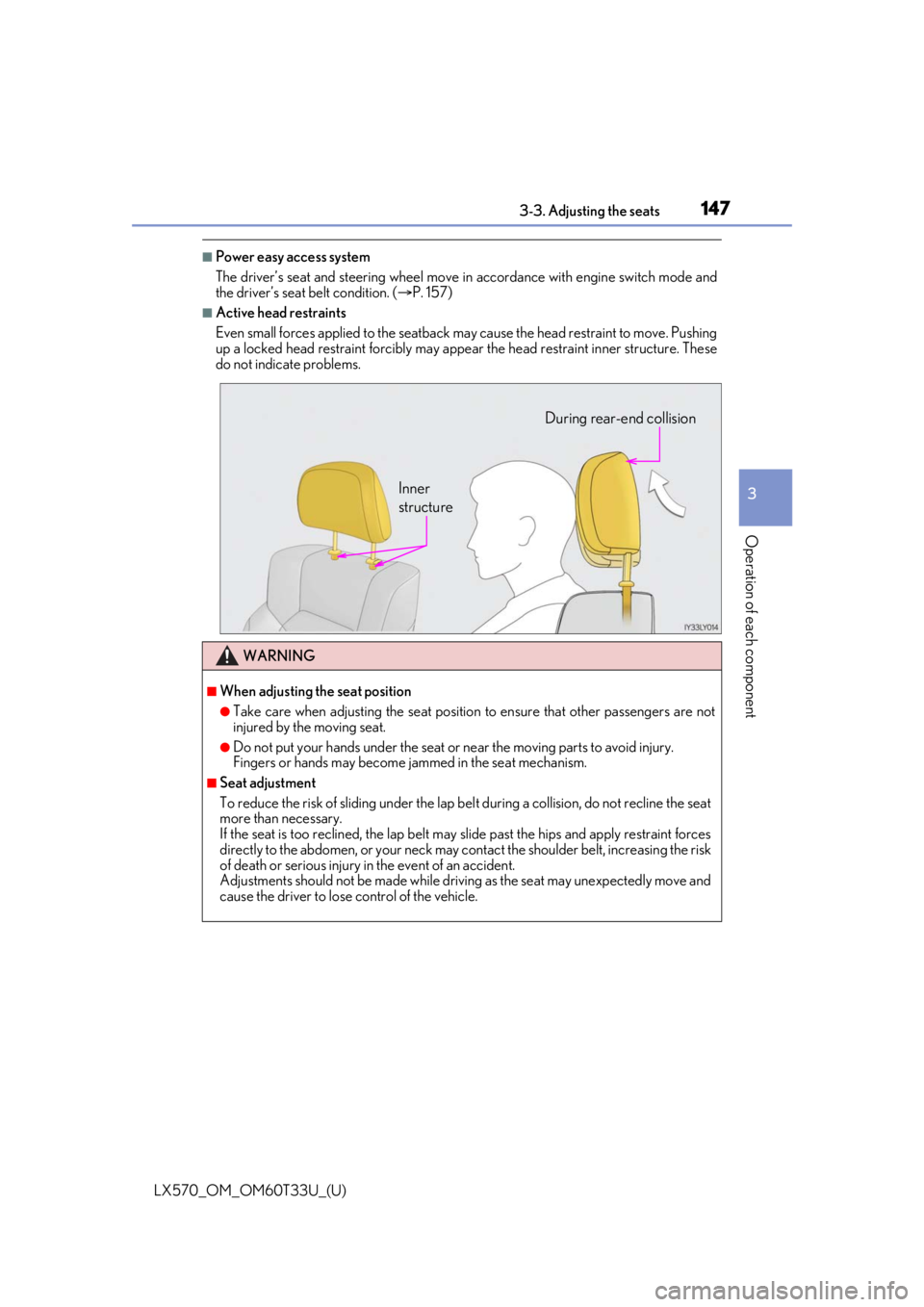
■Active head restraints
Even small forces applied to the seatback may cause the head restraint to move. Pushing
up a locked head restraint fo rcibly may appear the head re straint inner structure. These
do not indicate problems.
WARNING
■When adjusting the seat position
●Take care when adjusting the seat position to ensure that other passengers are not
injured by the moving seat.
●Do not put your hands under the seat or near the moving parts to avoid injury.
Fingers or hands may become jammed in the seat mechanism.
■Seat adjustment
To reduce the risk of sliding under the lap be lt during a collision, do not recline the seat
more than necessary.
If the seat is too reclined, the lap belt may slide past the hips and apply restraint forces
directly to the abdomen, or your neck may contact the shou lder belt, increasing the risk
of death or serious injury in the event of an accident.
Adjustments should not be made while drivin g as the seat may unexpectedly move and
cause the driver to lose control of the vehicle.
Inner
structure During rear-end collision
Page 156 of 635

156
LX570_OM_OM60T33U_(U)3-3. Adjusting the seats
WARNING
■Seat adjustment
To reduce the risk of sliding under the lap be
lt during a collision, do not recline the seat
more than necessary.
If the seat is too reclined, the lap belt may slide past the hips and apply restraint forces
directly to the abdomen, or your neck may contact the shou lder belt, increasing the risk
of death or serious injury in the event of an accident.
Adjustments should not be made while drivin g as the seat may unexpectedly move and
cause the driver to lose control of the vehicle.
■When the seatback is folded
●Do not sit on or place anything on the seatback while driving.
●Be sure to install the seat hook covers on the seat hooks, or you may get burned when
they become hot.
■When returning the seatbacks to their original position
Observe the following precautions. Failure to do so may result in death or serious
injury.
●Be careful not to get your hand s or feet pinched in the seat.
●Make sure the seats are secure ly locked. Failure to do so will prevent the seat belt
from operating properly.
●Check that the seat belts are not twisted or caught under the seat.
●Arrange the seat belts in the proper positions for ready use.
■Avoiding damage to seat components
Do not hang or attach anythi ng on the seatback striker.
NOTICE
■Before tumbling, folding up the seats
The seat belts and buc kles must be stowed.
■After returning the third seat (if equipped)
Make sure that the handle on the re ar of the seatback has been secured.
Page 158 of 635
![LEXUS LX570 2021 Owners Manual 158
LX570_OM_OM60T33U_(U)3-3. Adjusting the seats
Your preferred driving position (the positi
on of the driver’s seat, steering wheel,
outside rear view mirrors and HUD [head-up display] [if equippe](/manual-img/36/58942/w960_58942-157.png "LEXUS LX570 2021 Owners Manual 158
LX570_OM_OM60T33U_(U)3-3. Adjusting the seats
Your preferred driving position (the positi
on of the driver’s seat, steering wheel,
outside rear view mirrors and HUD [head-up display] [if equippe")
158
LX570_OM_OM60T33U_(U)3-3. Adjusting the seats
Your preferred driving position (the positi
on of the driver’s seat, steering wheel,
outside rear view mirrors and HUD [head-up display] [if equipped]) can be
entered into the computer’s memory and recalled with the touch of a button. It is
also possible to set this function to activate automatically when the doors are
unlocked.
Three different driving positions can be recorded into memory.
■Recording procedure
Check that the shift lever is in P.
Turn the engine switch to IGNITION ON mode.
Adjust the driver’s seat, steering wh eel, outside rear view mirrors and HUD
(head-up display) (if equipped) to the desired positions.
While pressing the “SET” button,
or within 3 seconds after the
“SET” button is pressed, press
button “1”, “2” or “3” until the
buzzer sounds.
If the selected button has already
been preset, the previously recorded
position will be overwritten.
■Recall procedure
Check that the shift lever is in P.
Turn the engine switch to IGNITION ON mode.
Press one of the buttons for the
driving position you want to recall
until the buzzer sounds.
Driving position memory
1
2
3
4
1
2
3
Page 159 of 635

LX570_OM_OM60T33U_(U)
1593-3. Adjusting the seats
3
Operation of each component
■To stop the position recall operation part-way through
Perform any of the following:
●Press the “SET” button.
●Press button “1”, “2” or “3”.
●Operate any of the seat adjustment switches (only cancels seat position recall).
●Operate the tilt and telescopic steering control switch (only cancels steering wheel
position recall).
■Operating the driving position memory after turning the engine switch off
Recorded seat positions can be activated up to 180 seconds after the driver’s door is
opened and another 60 seconds after it is closed again.
■If the battery is disconnected
The memorized positions must be reset becau se the computer’s memory is erased when
the battery is disconnected.
Each electronic key can be registered to recall your preferred driving position.
■Registering procedure
Record your driving position to button “1”, “2” or “3” before performing the
following:
Carry only the key you want to regist er, and then close the driver’s door.
If 2 or more keys are in the vehicle, the driving position cannot be recorded
properly.
Check that the shift lever is in P.
Turn the engine switch to IGNITION ON mode.
Recall the driving position that you want to record.
While pressing the recalled but-
ton, press and hold the door lock
switch (either lock or unlock) until
the buzzer sounds.
If the button could not be registered,
the buzzer sounds continuously for
approximately 3 seconds.
Memory recall function (driver’s side only)
1
2
3
4

