2021 LEXUS LS500 tow
[x] Cancel search: towPage 292 of 520
2924-5. Using the driving support systems
to normal)
• If heavy rain or water strikes a sensor
• When driving in incl ement weather such
as fog, snow or a sandstorm
• When strong winds are blowing
●Other ultrasonic wave sources
• When vehicle horns, vehicle detectors, motorcycle engines, air brakes of large
vehicles, the clearance sonar of other
vehicles or other devices which produce
ultrasonic waves are near the vehicle
• If a sticker or an el ectronic component,
such as a backlit license plate (especially
fluorescent type), fog lights, fender pole
or wireless antenna is installed near a
sensor
●Changes in the vehicle posture
• If the vehicle is significantly tilted
• If the front of the vehicle is raised or low- ered due to the carried load
• If the orientation of a sensor has been changed due to a collision or other
impact
■Situations in which the Parking Support
Brake function (stati c objects) may not
operate properly
In some situations, such as the following, this
function may not operate properly.
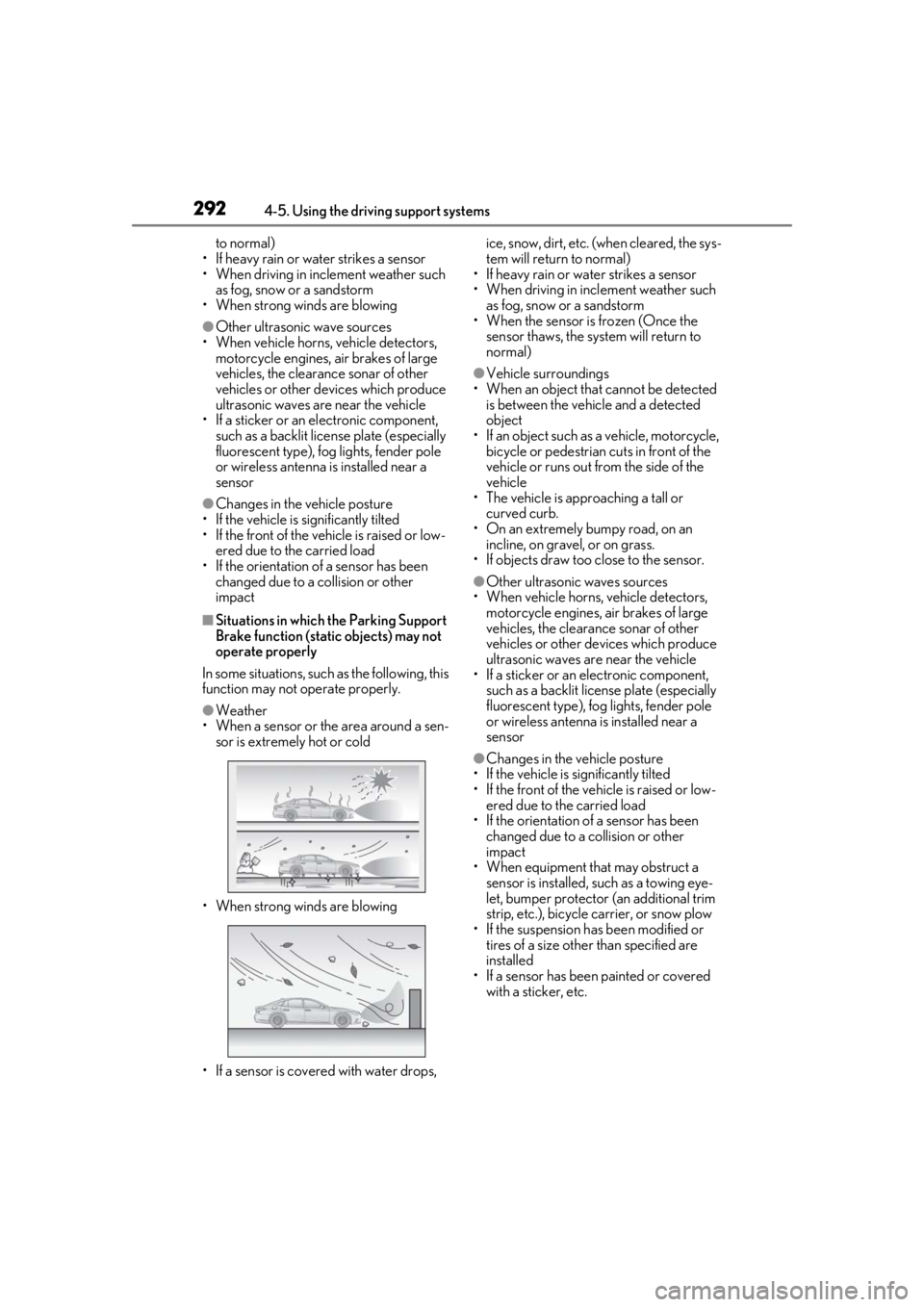
●Weather
• When a sensor or the area around a sen-
sor is extremely hot or cold
• When strong winds are blowing
• If a sensor is covered with water drops, ice, snow, dirt, etc. (when cleared, the sys-
tem will return to normal)
• If heavy rain or water strikes a sensor
• When driving in incl ement weather such
as fog, snow or a sandstorm
• When the sensor is frozen (Once the
sensor thaws, the system will return to
normal)
●Vehicle surroundings
• When an object that cannot be detected is between the vehicle and a detected
object
• If an object such as a vehicle, motorcycle, bicycle or pedestrian cuts in front of the
vehicle or runs out from the side of the
vehicle
• The vehicle is approaching a tall or
curved curb.
• On an extremely bumpy road, on an incline, on gravel, or on grass.
• If objects draw too close to the sensor.
●Other ultrasonic waves sources
• When vehicle horns, vehicle detectors, motorcycle engines, air brakes of large
vehicles, the clearance sonar of other
vehicles or other de vices which produce
ultrasonic waves are near the vehicle
• If a sticker or an electronic component,
such as a backlit license plate (especially
fluorescent type), fog lights, fender pole
or wireless antenna is installed near a
sensor
●Changes in the vehicle posture
• If the vehicle is significantly tilted
• If the front of the vehicle is raised or low- ered due to the carried load
• If the orientation of a sensor has been
changed due to a collision or other
impact
• When equipment that may obstruct a sensor is installed, such as a towing eye-
let, bumper protector (an additional trim
strip, etc.), bicycle carrier, or snow plow
• If the suspension has been modified or tires of a size othe r than specified are
installed
• If a sensor has been painted or covered with a sticker, etc.
Page 295 of 520

2954-5. Using the driving support systems
4
Driving
●When a detected vehicle turns while
approaching the vehicle
●When a vehicle passes by the side of your
vehicle
●When the distance between your vehicle
and metal objects, such as a guardrail,
wall, sign, or parked vehicle, which may
reflect electrical waves toward the rear of
the vehicle, is short
●When there are spinning objects near
your vehicle such as the fan of an air con-
ditioning unit
●When water is splashed or sprayed
toward the rear bumper, such as from a
sprinkler
■Situations in which the Parking Support
Brake function (rear-crossing vehicles)
may not operate properly
In some situations, such as the following, the
radar sensors may not detect an object and
this function may not operate properly
●Stationary objects
●When a sensor or the area around a sen-
sor is extremely hot or cold
●If the rear bumper is covered with ice,
snow, dirt, etc.
●When it is raining he avily or water strikes
the vehicle
●If the vehicle is significantly tilted
●When equipment that may obstruct a
sensor is installed, such as a towing eye-
let, bumper protector (an additional trim
strip, etc.), bicycle carrier, or snow plow
●If the suspension has been modified or
tires of a size othe r than specified are
installed
●If the front of the vehicle is raised or low-
ered due to the carried load
●If an electronic component, such as a
backlit license plate (especially fluores-
cent type), fog lights, fender pole or wire-
less antenna is installed near a radar
sensor
●If the orientation of a radar sensor has
been changed
●When multiple vehicl es are approaching
with only a small gap between each vehi-
cle
●If a vehicle is approaching the rear of
your vehicle rapidly
●Situations in which the radar sensor may
not detect a vehicle
• When a vehicle approaches from the right or left at the rear of the vehicle while
you are turning while backing up
• When turning while backing up
Page 298 of 520

2984-5. Using the driving support systems
Brake function (rear pedestrians) differs
from the detection area of the RCD func-
tion (P.282). Therefore, even if the RCD
function detects a pedestrian and provides
an alert, the Parking Support Brake function
(rear pedestrians) may not start operating.
■Situations in which the system may not
operate properly
●Some pedestrians, such as the following,
may not be detected by the Parking Sup-
port Brake function (rear pedestrians),
preventing the function from operating
properly:
• Pedestrians who are bending forward or squatting
• Pedestrians who are lying down
• Pedestrians who are running
• Pedestrians who suddenly enter the detection area
• People riding a bicycle, skateboard, or other light vehicle
• Pedestrians wearing oversized clothing such as a rain coat, long skirt, etc., making
their silhouette obscure
• Pedestrians whose body is partially hid- den by an object, such as a cart or
umbrella
• Pedestrians which are obscured by dark- ness, such as at night
●In some situations, such as the following,
pedestrians may not be detected by the
Parking Support Brake function (rear
pedestrians), preventing the function
from operating properly:
• When backing up in inclement weather
(rain, snow, fog, etc.)
• When the rear camera is obscured (dirt, snow, ice, etc. are attached) or scratched
• When a very bright light, such as the sun, or the headlights of another vehicle,
shines directly into the rear camera
• When backing up in a place where the surrounding brightness changes sud-
denly, such as at the entrance or exit of a
garage or underground parking lot
• When backing up in a dim environment such as during dusk or in an underground
parking lot
●Even though there are no pedestrians in
the detection area, some objects, such as
the following, may be detected, possibly
causing the Parking Support Brake func- tion (rear pedestrians) to operate.
• Three dimensional objects, such as a pole, traffic cone, fence, or parked vehi-
cle
• Moving objects, such as a car or motor- cycle
• Objects moving toward your vehicle when backing up, such as flags or pud-
dles (or airborne matter, such as smoke,
steam, rain, or snow)
• Cobblestone or gravel roads, tram rails, road repairs, white lines, pedestrian
crossings, puddles or fallen leaves on the
road
• Metal covers (gratings), such as those
used for drainage ditches
• Objects reflected in a puddle or on a wet road surface
• The roadside or bumps on the road
•Shadows on the road
●In some situations, such as the following,
the Parking Support Brake function (rear
pedestrians) may operate even though
there are no pedestrians in the detection
area.
• When backing up toward the roadside or
a bump on the road
• If the vehicle is signif icantly tilted, such as
when carrying a heavy load
• When backing up toward an incline/decline
• If the suspension has been modified or
tires of a size othe r than specified are
installed
• If the rear of the vehicle is raised or low-
ered due to the carried load
• If an electronic component, such as a backlit license plate or rear fog light, is
installed near the rear camera
• If a bumper protector, such as an addi- tional trim strip, is installed to the rear
bumper
• If the orientation of the rear camera has been changed
• If a towing eyelet is in stalled to the rear of
the vehicle
• When water is flowing over the rear cam- era lens
• When the rear camera is obscured (dirt,
snow, ice, etc. are at tached) or scratched
• If there is a flashing light in the detection
area, such as the emergency flashers of
another vehicle
Page 302 of 520

3024-5. Using the driving support systems
To adjust the vehicle height to one
appropriate for road and driving con-
ditions, press the vehicle height adjust-
ment switch.
Turns high mode on/off.
When high mode is enabled, the high
mode indicator on the meter will illuminate.
The vehicle height will increase by approxi-
mately 0.8 in. (20 mm) from its normal
position.
When the vehicle height is increased by a
control of access mo de press the vehicle height adjustment switch twice to
enable/disable high mode.
■The vehicle height adjustment switch
can be used to change the mode when
The engine switch is in IGNITION ON
mode.
■System protection function
If the vehicle height is repeatedly increased
and decreased using the vehicle height
adjustment switch, etc., the system may not
operate temporarily.
In order to improve the ease of enter-
ing and exiting the vehicle, the vehicle
height will automatically increase when
the P shift position is selected and a
door is opened.
When any of the following conditions
are met, the vehicle will return to its
WARNING
• If the vehicle needs to be jacked up
• If the vehicle is to be tied down
• If the vehicle is to be towed
NOTICE
■Parking precaution
●If the vehicle is parked for a long time,
the vehicle height may change due to
changes in the ambient temperature.
When parking the vehicle, make sure
that the area above and below the
vehicle is clear, so that the vehicle will
not contact anything if its height
changes.
●Be careful when parking the vehicle in
an area with a low ceiling or near low
hanging objects, as the vehicle height
will increase when passengers exit the
vehicle and exit control of access
mode operates.
●When the doors are closed or locked,
the vehicle height may decrease.
When parking in a parking lot with a
device which raises to contact the bot-
tom of the vehicle, make sure to dis-
able the vehicle height control.
Selecting the vehicle height
WARNING
■When operating the vehicle height
adjustment switch
When operating the vehicle height
adjustment switch, make sure to check
the safety of the area around the vehicle,
as the vehicle height may change and
part of someone’s body may be caught
under the vehicle, possibly causing injury.
Vehicle height control when
entering/exiting the vehicle
(“Access Mode”)
Page 315 of 520
3155-1. Remote Touch/Display
5
Interior features
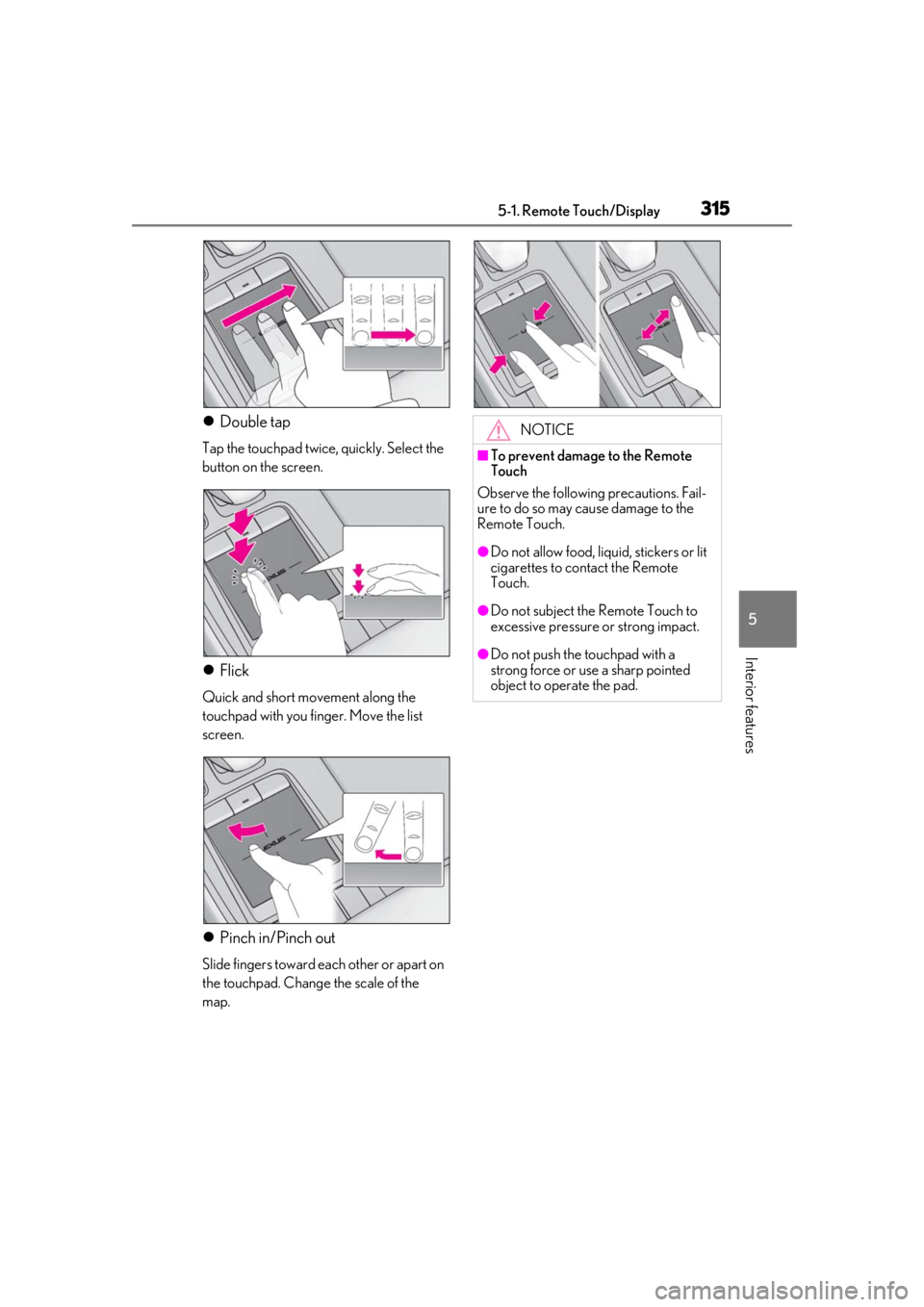
Double tap
Tap the touchpad twice, quickly. Select the
button on the screen.
Flick
Quick and short movement along the
touchpad with you finger. Move the list
screen.
Pinch in/Pinch out
Slide fingers toward each other or apart on
the touchpad. Change the scale of the
map.
NOTICE
■To prevent damage to the Remote
Touch
Observe the following precautions. Fail-
ure to do so may cause damage to the
Remote Touch.
●Do not allow food, liquid, stickers or lit
cigarettes to contact the Remote
Touch.
●Do not subject the Remote Touch to
excessive pressure or strong impact.
●Do not push the touchpad with a
strong force or use a sharp pointed
object to operate the pad.
Page 347 of 520
3475-5. Using the storage features
5
Interior features
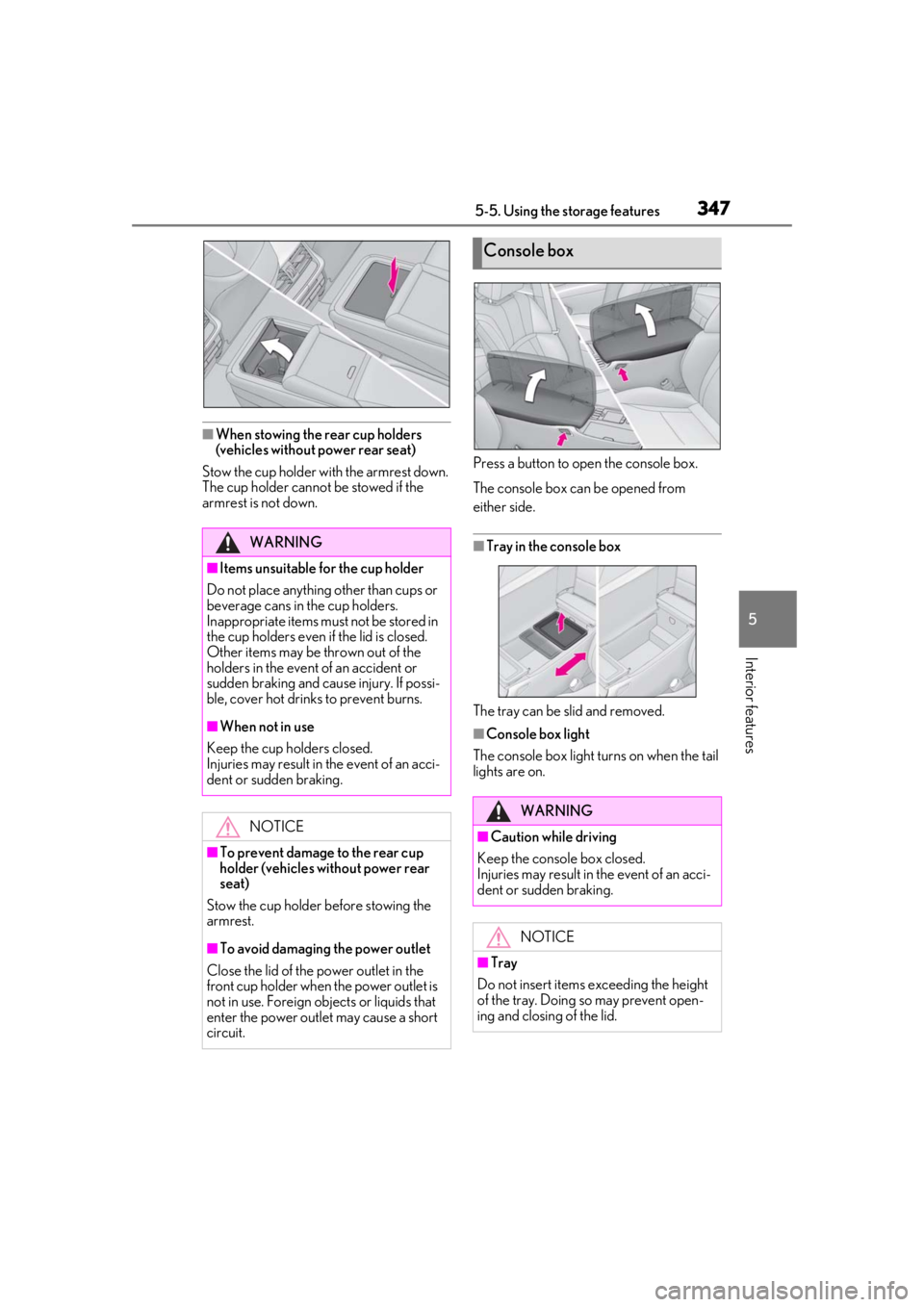
■When stowing the rear cup holders
(vehicles without power rear seat)
Stow the cup holder with the armrest down.
The cup holder cannot be stowed if the
armrest is not down. Press a button to open the console box.
The console box can be opened from
either side.
■Tray in the console box
The tray can be slid and removed.
■Console box light
The console box light turns on when the tail
lights are on.
WARNING
■Items unsuitable for the cup holder
Do not place anything other than cups or
beverage cans in the cup holders.
Inappropriate items must not be stored in
the cup holders even if the lid is closed.
Other items may be thrown out of the
holders in the event of an accident or
sudden braking and cause injury. If possi-
ble, cover hot drinks to prevent burns.
■When not in use
Keep the cup holders closed.
Injuries may result in the event of an acci-
dent or sudden braking.
NOTICE
■To prevent damage to the rear cup
holder (vehicles without power rear
seat)
Stow the cup holder before stowing the
armrest.
■To avoid damaging the power outlet
Close the lid of the power outlet in the
front cup holder when the power outlet is
not in use. Foreign ob jects or liquids that
enter the power outlet may cause a short
circuit.
Console box
WARNING
■Caution while driving
Keep the console box closed.
Injuries may result in the event of an acci-
dent or sudden braking.
NOTICE
■Tray
Do not insert items exceeding the height
of the tray. Doing so may prevent open-
ing and closing of the lid.
Page 349 of 520
3495-5. Using the storage features
5
Interior features
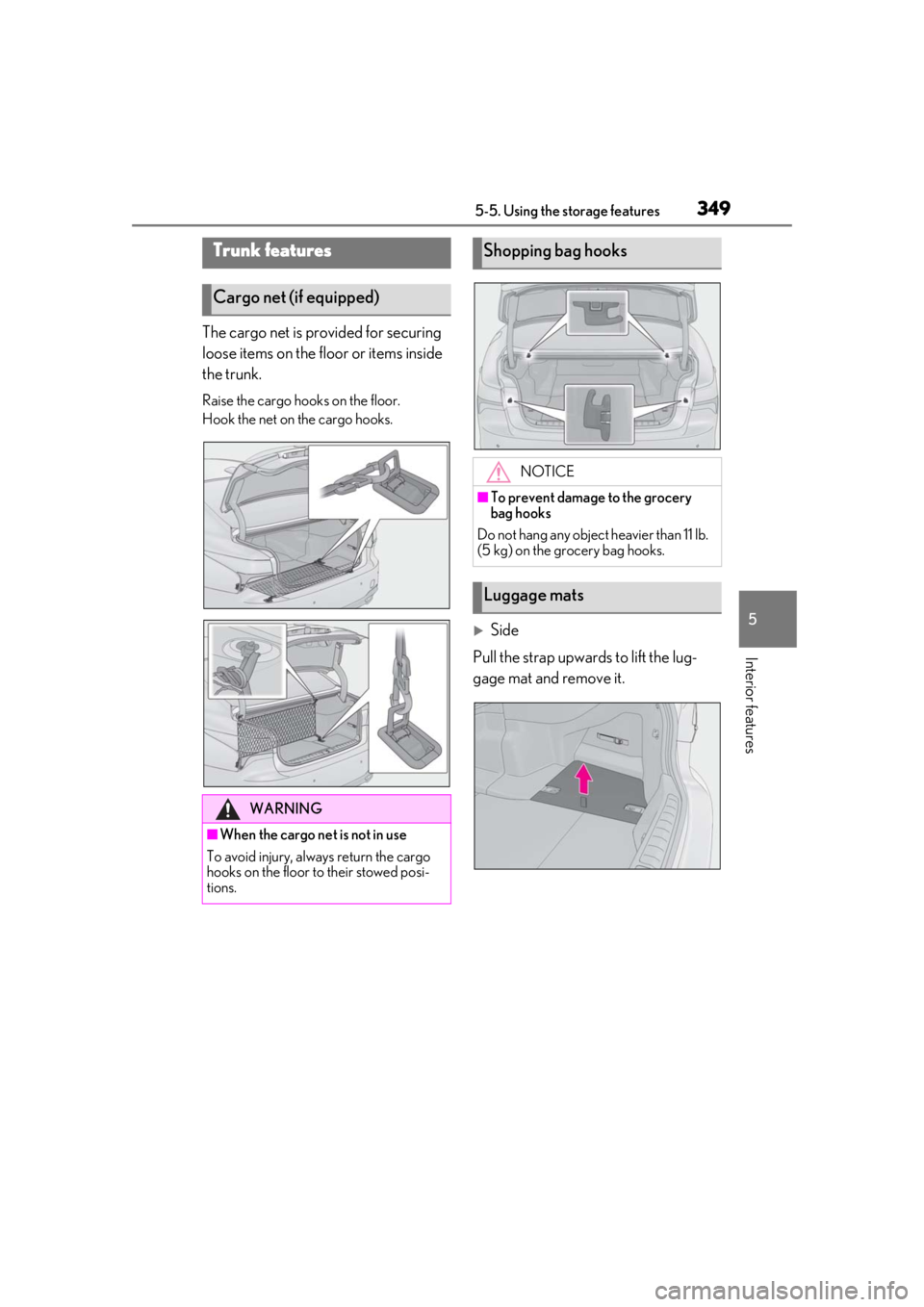
The cargo net is provided for securing
loose items on the floor or items inside
the trunk.
Raise the cargo hooks on the floor.
Hook the net on the cargo hooks.
Side
Pull the strap upwards to lift the lug-
gage mat and remove it.
Trunk features
Cargo net (if equipped)
WARNING
■When the cargo net is not in use
To avoid injury, always return the cargo
hooks on the floor to their stowed posi-
tions.
Shopping bag hooks
NOTICE
■To prevent damage to the grocery
bag hooks
Do not hang any object heavier than 11 lb.
(5 kg) on the grocery bag hooks.
Luggage mats
Page 351 of 520
3515-5. Using the storage features
5
Interior features
2Pass the belt through the clip
3 Tighten the belt
Depending on the size and shape of an
object, such as the case of a warning
reflector, the object may not be able to be
secured with the belts or stowed in an aux-
iliary box.
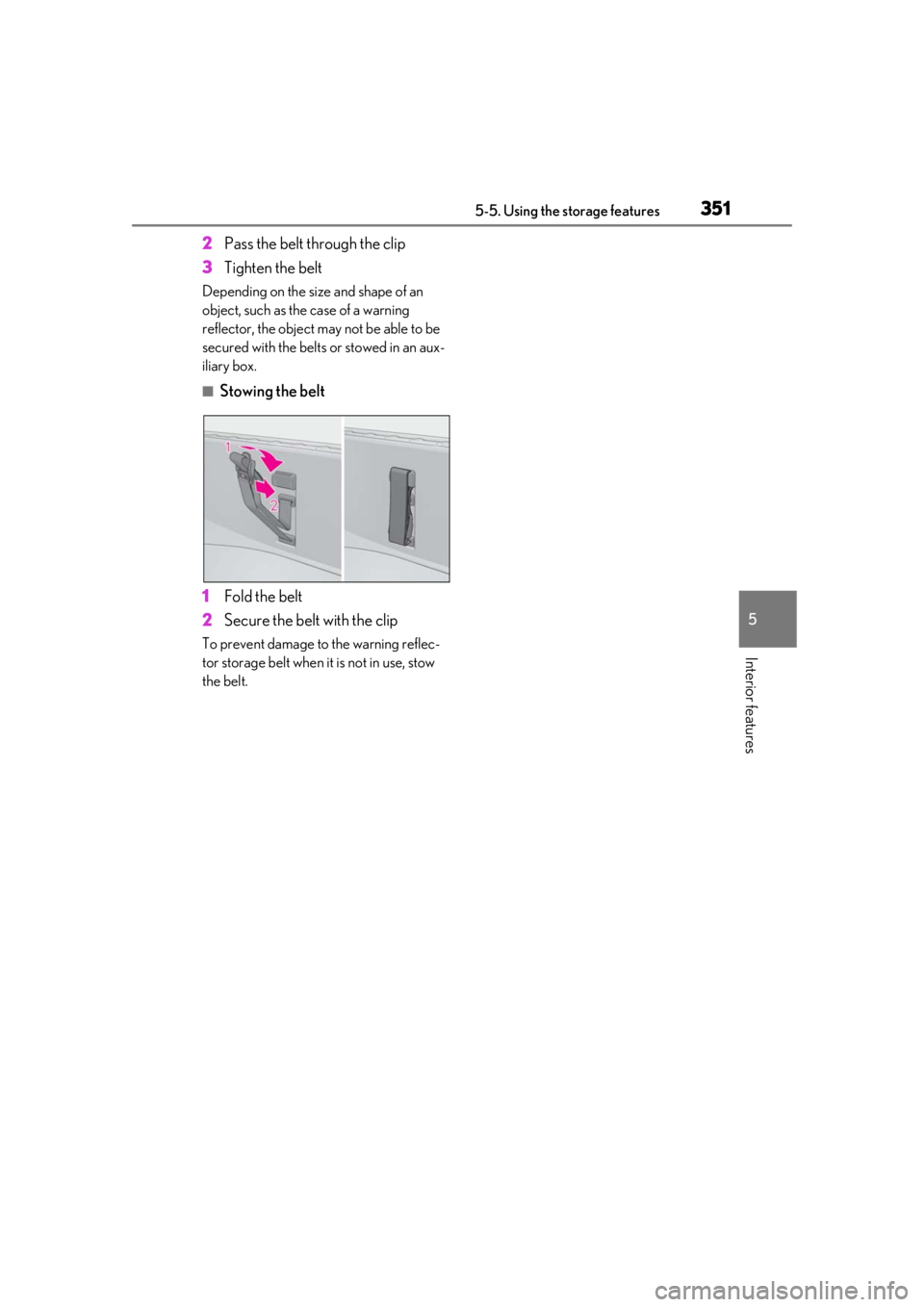
■Stowing the belt
1 Fold the belt
2 Secure the belt with the clip
To prevent damage to the warning reflec-
tor storage belt when it is not in use, stow
the belt.