Page 270 of 520

2704-5. Using the driving support systems
lane*
●Vehicles traveling 2 lanes away from your
vehicle*
●Vehicles which are being overtaken rap-
idly by your vehicle*
*
: Depending on the conditions, detection of a vehicle and/or object may occur.
■Conditions under wh ich the Blind Spot
Monitor may not fu nction correctly
●The Blind Spot Monitor may not detect
vehicles correctly in the following situa-
tions:
• When the sensor is misaligned due to a strong impact to the sensor or its sur-
rounding area
• When mud, snow, ice, a sticker, etc. is covering the sensor or surrounding area
on the rear bumper
• When driving on a road surface that is wet with standing water during bad
weather, such as heavy rain, snow, or fog
• When multiple vehicles are approaching with only a small gap between each vehi-
cle
• When the distance between your vehicle and a following vehicle is short
• When there is a significant difference in
speed between your vehicle and the vehi-
cle that enters the detection area
• When the difference in speed between
your vehicle and another vehicle is
changing
• When a vehicle enters a detection area
traveling at about the same speed as your
vehicle
• As your vehicle starts from a stop, a vehi-
cle remains in the detection area
• When driving up an d down consecutive
steep inclines, such as hills, dips in the
road, etc.
• When driving on roads with sharp bends, consecutive curves, or uneven surfaces
• When vehicle lanes are wide, or when driving on the edge of a lane, and the
vehicle in an adjacent lane is far away
from your vehicle
• When an accessory (such as a bicycle carrier) is installed to the rear of the vehi-
cle
• When there is a significant difference in height between your vehicle and the vehicle that enters the detection area
• Immediately after the Blind Spot Monitor is turned on
●Instances of the Blind Spot Monitor
unnecessarily detecting a vehicle and/or
object may increase in the following situ-
ations:
• When the sensor is misaligned due to a
strong impact to the sensor or its sur-
rounding area
• When the distance between your vehicle
and a guardrail, wall, etc. that enters the
detection area is short
• When driving up and down consecutive
steep inclines, such as hills, dips in the
road, etc.
• When vehicle lanes are narrow, or when
driving on the edge of a lane, and a vehi-
cle traveling in a lane other than the adja-
cent lanes enters the detection area
• When driving on roads with sharp bends, consecutive curves, or uneven surfaces
• When the tires are slipping or spinning
• When the distance between your vehicle
and a following vehicle is short
• When an accessory (such as a bicycle
carrier) is installed to the rear of the vehi-
cle
Page 349 of 520
3495-5. Using the storage features
5
Interior features
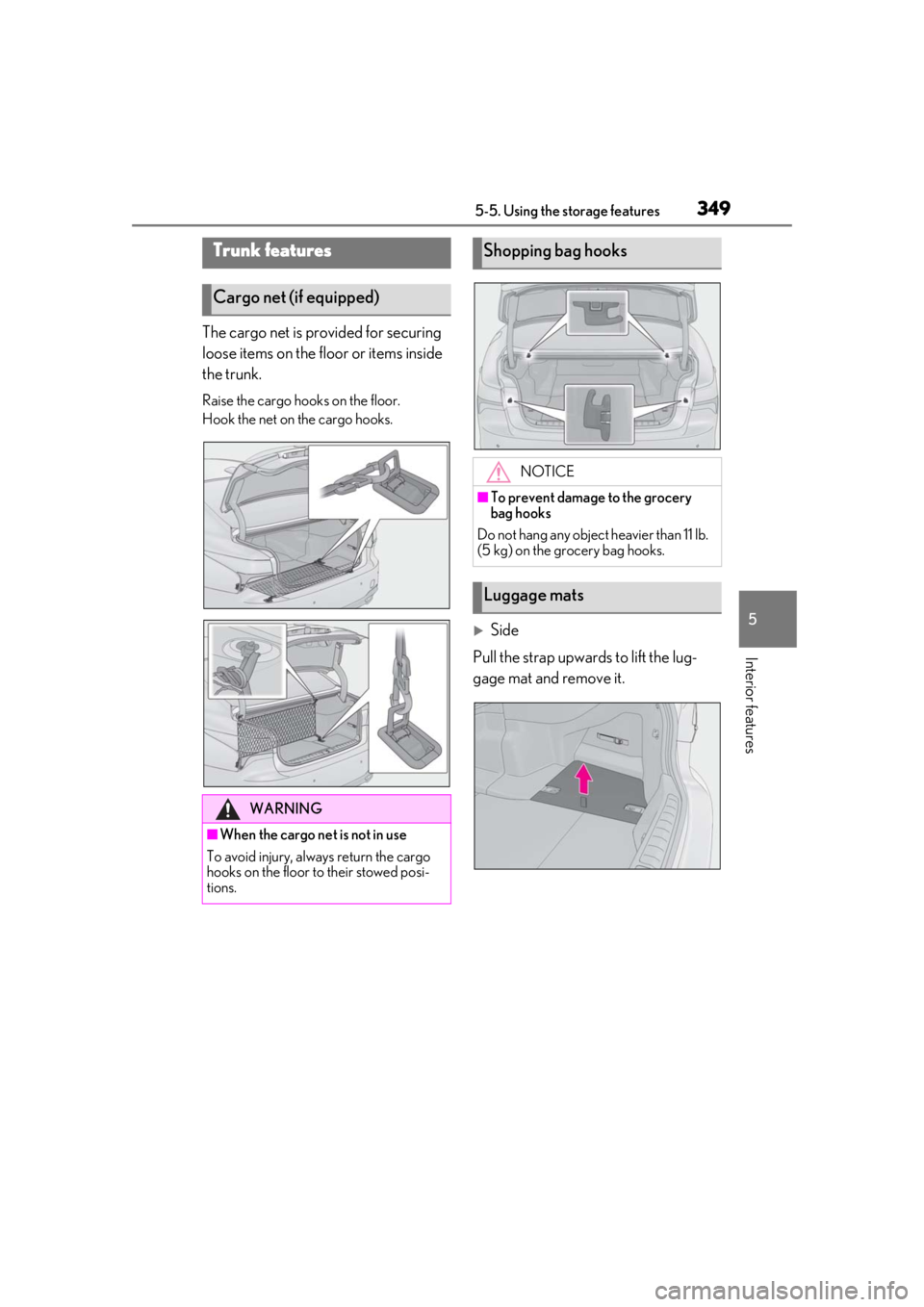
The cargo net is provided for securing
loose items on the floor or items inside
the trunk.
Raise the cargo hooks on the floor.
Hook the net on the cargo hooks.
Side
Pull the strap upwards to lift the lug-
gage mat and remove it.
Trunk features
Cargo net (if equipped)
WARNING
■When the cargo net is not in use
To avoid injury, always return the cargo
hooks on the floor to their stowed posi-
tions.
Shopping bag hooks
NOTICE
■To prevent damage to the grocery
bag hooks
Do not hang any object heavier than 11 lb.
(5 kg) on the grocery bag hooks.
Luggage mats
Page 351 of 520
3515-5. Using the storage features
5
Interior features
2Pass the belt through the clip
3 Tighten the belt
Depending on the size and shape of an
object, such as the case of a warning
reflector, the object may not be able to be
secured with the belts or stowed in an aux-
iliary box.
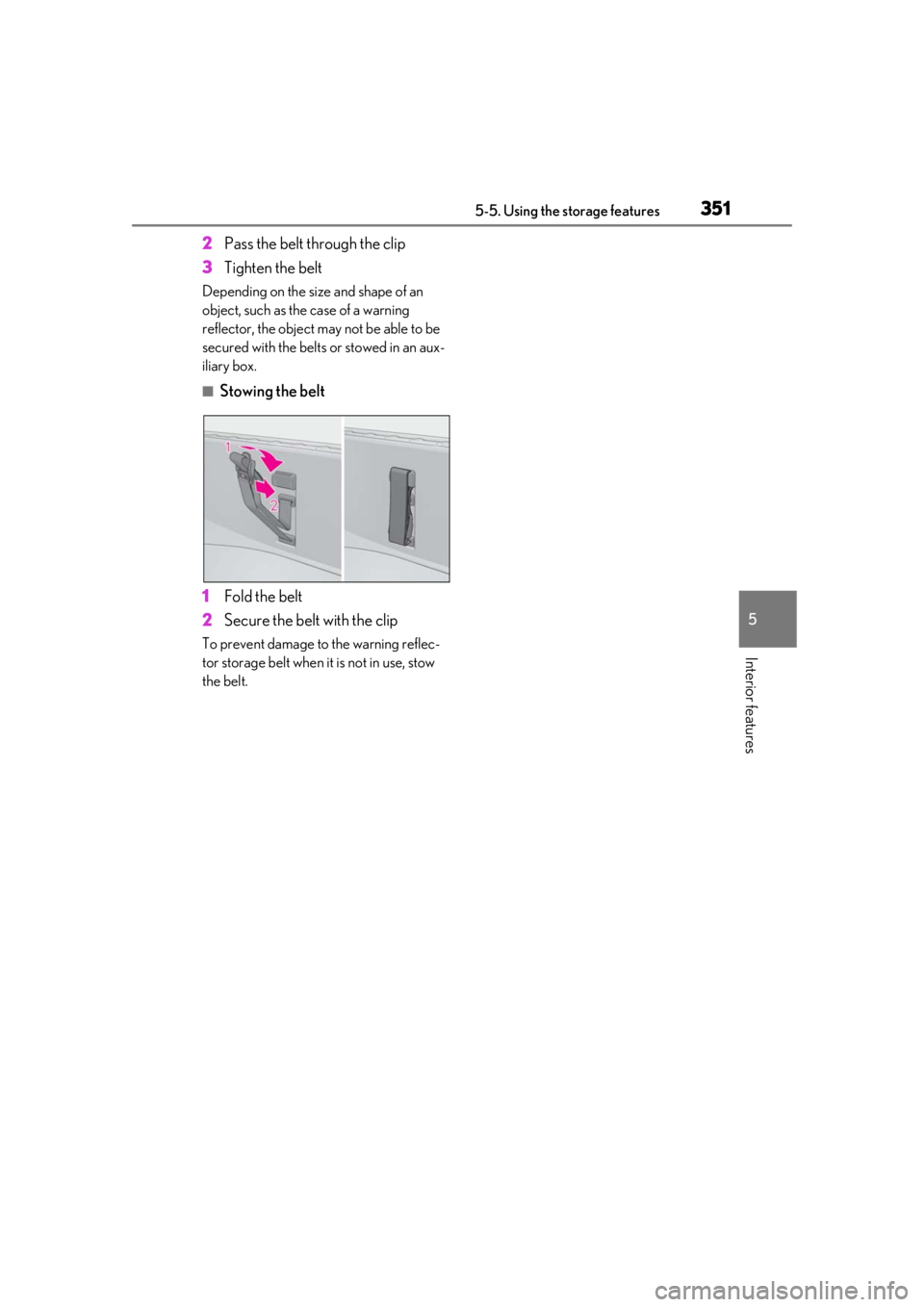
■Stowing the belt
1 Fold the belt
2 Secure the belt with the clip
To prevent damage to the warning reflec-
tor storage belt when it is not in use, stow
the belt.
Page 360 of 520
3605-6. Using the other interior features
The HomeLink® wireless control sys-
tem in your vehicle has 3 buttons which
can be programmed to operate 3 dif-
ferent devices. Refer to the program-
ming methods on the following pages
to determine the method which is
appropriate for the device.
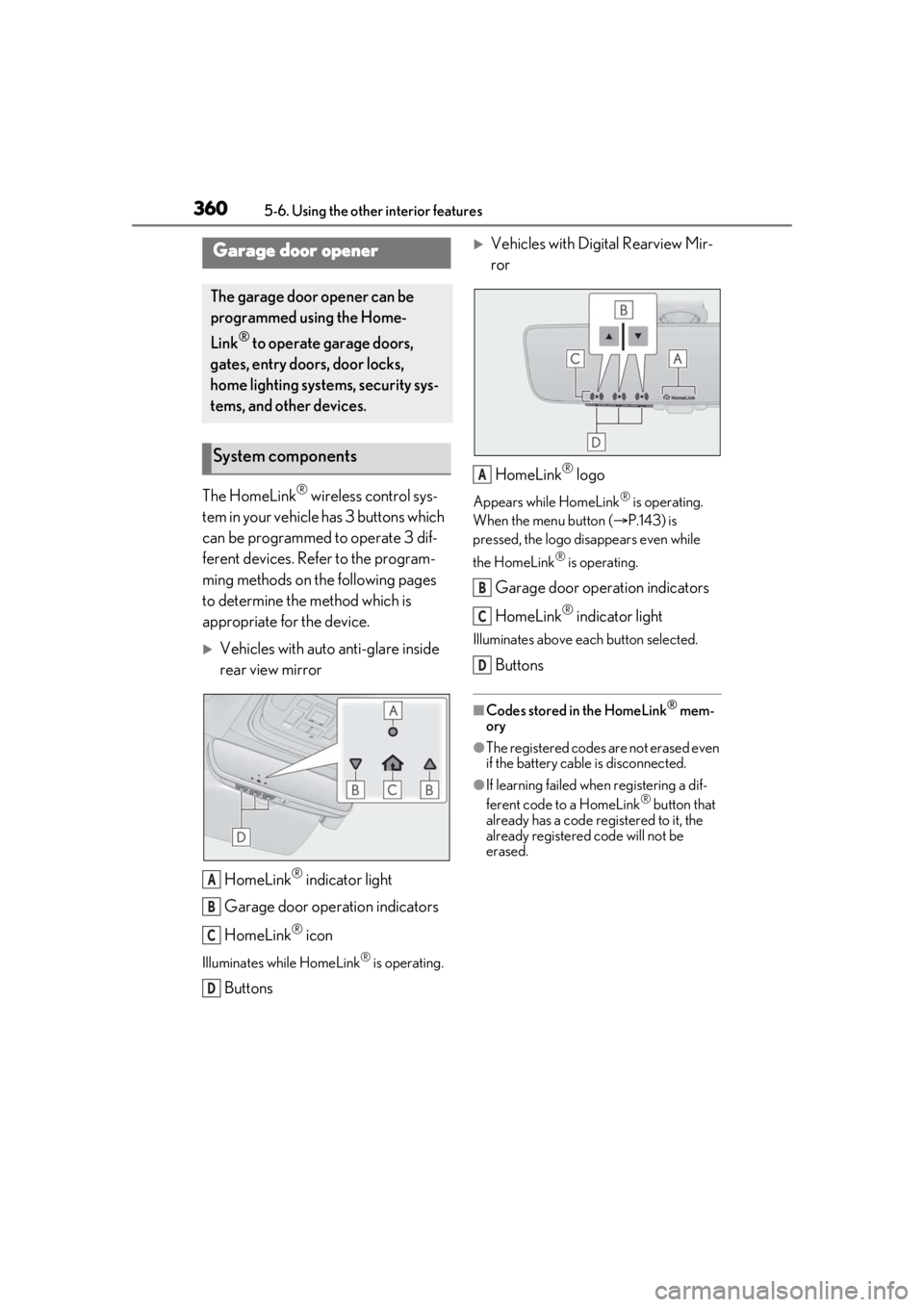
Vehicles with auto anti-glare inside
rear view mirror
HomeLink
® indicator light
Garage door operation indicators
HomeLink
® icon
Illuminates while HomeLink® is operating.
Buttons
Vehicles with Digital Rearview Mir-
ror
HomeLink
® logo
Appears while HomeLink® is operating.
When the menu button ( P.143) is
pressed, the logo disappears even while
the HomeLink
® is operating.
Garage door operation indicators
HomeLink
® indicator light
Illuminates above each button selected.
Buttons
■Codes stored in the HomeLink® mem-
ory
●The registered codes are not erased even
if the battery cable is disconnected.
●If learning failed when registering a dif-
ferent code to a HomeLink® button that
already has a code registered to it, the
already registered code will not be
erased.
Garage door opener
The garage door opener can be
programmed using the Home-
Link
® to operate garage doors,
gates, entry doors, door locks,
home lighting systems, security sys-
tems, and other devices.
System components
A
B
C
D
A
B
C
D
Page 376 of 520

3766-2. Maintenance
Radiator, con-
denser, inter-
cooler radiator
and intercooler
sub radiator
The radiator, con-
denser, intercooler
radiator and inter-
cooler sub radiator
should be free from
foreign objects.
( P.389)
Washer fluid
Is there sufficient
washer fluid?
( P.390)
Trunk
ItemsCheck points
BatteryCheck the connec-
tions. ( P.391)
Vehicle interior
ItemsCheck points
Accelerator
pedal
• The accelerator
pedal should move
smoothly (without
uneven pedal effort
or catching).
Automatic trans-
mission “Park”
mechanism
•When parked on a slope and the shift
position is in P, is the
vehicle securely
stopped?
ItemsCheck points
Brake pedal
•Does the brake pedal move
smoothly?
•Does the brake pedal have appro-
priate clearance
from the floor?
•Does the brake pedal have the cor-
rect amount of free
play?
Brakes
• The vehicle should not pull to one side
when the brakes are
applied.
•The brakes should work effectively.
• The brake pedal should not feel
spongy.
• The brake pedal should not get too
close to the floor
when the brakes are
applied.
Head restraints
•Do the head restraints move
smoothly and lock
securely?
Indicators/buzz-
ers•Do the indicators and buzzers function
properly?
Lights
• Do all the lights come on?
• Are the headlights aimed correctly?
( P.415)
ItemsCheck points
Page 377 of 520

3776-2. Maintenance
6
Maintenance and care
Parking brake
• Does the parking brake operate nor-
mally?
•When parked on a slope and the park-
ing brake is on, is the
vehicle securely
stopped?
Seat belts
• Do the seat belts operate smoothly?
• The seat belts should not be damaged.
Seats• Do the seat controls operate properly?
Steering wheel
• Does the steering wheel rotate
smoothly?
• Does the steering wheel have the cor-
rect amount of free
play?
•There should not be any strange sounds
coming from the
steering wheel.
Vehicle exterior
ItemsCheck points
Doors/trunk• Do the doors/trunk operate smoothly?
Engine hood
•Does the engine hood lock system
work properly?
Fluid leaks
•There should not be any signs of fluid
leakage after the
vehicle has been
parked.
ItemsCheck points
Tires
• Is the tire inflation pressure correct?
• The tires should not be damaged or
excessively worn.
• Have the tires been rotated according to
the maintenance
schedule?
•The wheel nuts should not be loose.
Windshield wip-
ers
• The wiper blades should not show any
signs of cracking,
splitting, wear, con-
tamination or defor-
mation.
• The wiper blades should clear the
windshield without
streaking or skip-
ping.
ItemsCheck points
Page 384 of 520
3846-3. Do-it-yourself maintenance
■Battery
P.391
■Removing the engine compartment cover
Outside
Front
■Installing the clips
1 Push up center portion
2 Insert
3 Press
■Removing the engine cover
Lift the front of the engine cover
straight up and then pull it forward.
Engine compartment cover
A
NOTICE
■Checking the engine compartment
cover after installation
Make sure that the cover is securely
installed in its original position.
Engine cover
Page 385 of 520
3856-3. Do-it-yourself maintenance
6
Maintenance and care
■Installing the engine cover
Engage the claws of the engine cover
to install it.
■Removing the service cover
1 Pull up the passenger side end of
the rubber strip to disengage it
from the vehicle body.
2 Remove the service cover.
Push the tabs and lift away the service
cover.
■Installing the service cover
1 Install the service cover.
Make sure to engage the claws on the
windshield side of th e service cover when
installing the service cover.
NOTICE
■Checking the engine cover after
installation
Make sure that the cover is securely
installed in its original position.
Service cover