2021 LEXUS LS500 tow
[x] Cancel search: towPage 62 of 520
621-3. Lexus Enform
location.
■Stolen Vehicle Location
If your vehicle is stolen, Safety Connect
can work with local authorities to assist
them in locating and recovering the
vehicle. After filing a police report, call
the Safety Connect response center at
1-800-25-LEXUS
(1-800-255-3987) in the United
States, 1-877-539-8777 in Puerto
Rico or 1-800-265- 3987 in Canada,
and follow the prompts for Safety Con-
nect to initiate this service.
In addition to assisting law enforce-
ment with recovery of a stolen vehicle,
Safety-Connect-equipped vehicle
location data may, under certain cir-
cumstances, be shared with third par-
ties to locate your vehicle. Further
information is available at Lexus.com.
■Emergency Assistance Button
(“SOS”)
In the event of an emergency on the
road, push the “SOS” button to reach
the Safety Connect response center.
The answering agent will determine
your vehicle’s location, assess the
emergency, and dispatch the neces-
sary assistance required.
If you accidentally press the “SOS” button,
tell the response-center agent that you are
not experiencing an emergency.
■Enhanced Roadside Assistance
Enhanced Roadside Assistance adds
GPS data to the already included war-
ranty-based Lexus roadside service.
Subscribers can press the “SOS” but-
ton to reach a Safety Connect response-center agent, who can help
with a wide range of needs, such as:
towing, flat tire, fuel delivery, etc. For a
description of the Roadside Assistance
services and their limitations, please
see the Safety Connect Terms and
Conditions, which are available at
Lexus.com.
Important! Read this information about
exposure to radio frequency signals
before using Safety Connect;
The Safety Connect system installed in
your vehicle is a low-power radio trans-
mitter and receiver. It receives and also
sends out radio frequency (RF) signals.
In August 1996, the Federal Commu-
nications Commission (FCC) adopted
RF exposure guidelines with safety lev-
els for mobile wireless phones. Those
guidelines are consistent with the
safety standards previously set by the
following U.S. and international stan-
dards bodies.
ANSI (American National Stan-
dards Institute) C95.1 [1992]
NCRP (National Council on Radia-
tion Protection and Measurement)
Report 86 [1986]
ICNIRP (International Commission
on Non-Ionizing Radiation Protec-
tion) [1996]
Those standards were based on com-
prehensive and periodic evaluations of
the relevant scientific literature. Over
Safety information for Safety
Connect
Page 112 of 520

1123-2. Opening, closing and locking the doors and trunk
●When a foot remains under the rear
bumper
●If the rear bumper is strongly hit with a
foot or is touched for a while
If the rear bumper has been touched for a
while, wait for a short time before
attempting to operate the Hands Free
Power Trunk Lid again.
●When standing excessively close to the
rear bumper
●When an external radio wave source
interferes with the communication
between the electronic key and the vehi-
cle ( P.115)
●When the vehicle is parked near an elec-
trical noise source which affects the sen-
sitivity of the Hands Free Power Trunk Lid,
such as a pay parking spot, gas station,
electrically heated road, or fluorescent
light
●When the vehicle is near a TV tower,
electric power plant, radio station, large
display, airport or other facility that gen-
erates strong radio waves or electrical
noise
●When a large amount of water is applied
to the rear bumper, such as when the
vehicle is being washed or in heavy rain
●When mud, snow, ice, etc. is attached to
the rear bumper
●When the vehicle has been parked for a
while near objects that may move and
contact the rear bumper, such as plants
●When an accessory is installed to the rear
bumper
If an accessory has been installed, turn the
Hands Free Power Trunk Lid (kick sensor)
operation setting off.
■Preventing unintentional operation of
the Hands Free Power Trunk Lid (if
equipped)
When an electronic ke y is in the operation
detection area, the Ha nds Free Power Trunk
Lid may operate unintentionally, so be care-
ful in the following situations:
●When a large amount of water is applied
to the rear bumper, such as when the
vehicle is being washed or in heavy rain
●When dirt is wiped off the rear bumper
●When a small animal or small object, such
as a ball, moves under the rear bumper
●When an object is moved from under the
rear bumper
●If someone is swinging their legs while sit-
ting on the rear bumper
●If the legs or another part of someone’s
body contacts the rear bumper while
passing by the vehicle
●When the vehicle is parked near an elec-
trical noise source which affects the sen-
sitivity of the Hands Free Power Trunk Lid,
such as a pay parking spot, gas station,
electrically heated road, or fluorescent
light
●When the vehicle is near a TV tower,
electric power plant, radio station, large
display, airport or ot her facility that gen-
erates strong radio waves or electrical
noise
●When the vehicle is parked in a place
where objects such as plants are near the
rear bumper
●If luggage, etc. is set near the rear
bumper
●If accessories or a vehicle cover is
installed/removed ne ar the rear bumper
●When the vehicle is being towed
To prevent unintentiona l operation, turn the
Hands Free Power Trunk Lid (kick sensor)
operation setting off.
■Open door warning buzzer
P.105
■Customization
Some functions can be customized.
( P.476)
The trunk opener switch can be tem-
porarily disabled to protect luggage
stored in the trunk against theft.
Turn the main switch in the glove box
off to disable the trunk opener.
Luggage security system
Page 115 of 520

1153-2. Opening, closing and locking the doors and trunk
3
Before driving
take some time to unlock the doors.
• The electronic key has been left in an area of approximately 6 ft. (2 m) of the
outside of the vehicle for 10 minutes or
longer.
• The smart access system with push-but-
ton start has not been used for 5 days or
longer.
●If the smart access system with push-but-
ton start has not been used for 14 days or
longer, the doors cannot be unlocked at
any doors except the driver’s door. In this
case, take hold of the driver’s door han-
dle, or use the wireless remote control or
the mechanical key, to unlock the doors.
■Turning an electronic key to bat-
tery-saving mode
When battery-saving mode is set, battery
depletion is minimized by stopping the elec-
tronic key from re ceiving radio waves.
Press twice while pressing and holding . Confirm that the electronic key indica-
tor flashes 4 times.
While the battery-saving mode is set, the
smart access system with push-button start
cannot be used. To cancel the function,
press any of the electronic key buttons.
■Conditions affe cting operation
The smart access system with push-button
start uses weak radio waves. In the following
situations, the communication between the
electronic key and the vehicle may be
affected, preventing the smart access sys-
tem with push-button start, wireless remote
control and engine immobilizer system
from operating properly. (Ways of coping:
P.442)
●When the electronic key battery is
depleted
●Near a TV tower, electric power plant, gas station, radio stat
ion, large display,
airport or other fac ility that generates
strong radio waves or electrical noise
●When carrying a portable radio, cellular
phone, cordless phone or other wireless
communication device
●When the electronic key is in contact
with, or is covered by the following metal-
lic objects
• Cards to which aluminum foil is attached
• Cigarette boxes that have aluminum foil
inside
• Metallic wallets or bags
•Coins
• Hand warmers made of metal
• Media such as CDs and DVDs
●When other wireless keys (that emit radio
waves) are being used nearby
●When carrying the electronic key
together with the following devices that
emit radio waves
• Another vehicle’s electronic key or a wireless key that emits radio waves
• Personal computers or personal digital assistants (PDAs)
• Digital audio players
• Portable game systems
●If window tint with a metallic content or
metallic objects are attached to the rear
window
●When the electronic key is placed near a
battery charger or electronic devices
●When the vehicle is parked in a pay park-
ing spot where radio waves are emitted.
■Note for the entry function
●Even when the electronic key is within the
effective range (detection areas), the sys-
tem may not operate properly in the fol-
lowing cases:
• The electronic key is too close to the win- dow or outside door handle, near the
ground, or in a high place when the doors
are locked or unlocked.
• The electronic key is near the ground or in a high place, or too close to the center
of the rear bumper when the trunk is
opened.
• The electronic key is on the instrument
panel, rear package tray or floor, or in the
door pockets or glove box when the
Page 126 of 520
1263-3. Adjusting the seats
senger’s seat seatback*
The seatback will move while a button is
touched and held.
*: Vehicles with a foldable head restraint
■Operating the front passenger’s seat
from the rear seat
●In the following situations, the front pas-
senger’s seat cannot be operated using
the Rear Multi Operation Panel:
• The engine switch is in ACCESSORY
mode or off.
*
• The rear seat belt is not fastened and weight is not detected on the rear seat.
Once weight is detect ed on the seat, the
seat will be judged as occupied until a rear
door is opened then closed or the engine
switch is turned off and the doors are
locked.
• The weight of an occupant or heavy object, etc. is detected on the front pas-
senger’s seat.
Once weight is detect ed on the seat, the
seat will be judged as occupied until the
front passenger’s door is opened then
closed or the engine switch is turned off.
• The front passenger’s seat belt is fas-
tened.
• The front passenger’s door is open. (The
front seat will not move forward.)
*: Vehicles with foldab le head restraint:
Even when the engine switch is in
ACCESSORY mode or off, the front
passenger seat position and seatback
angle can be adjusted.
●If the rear armrest is stowed while the
seat position is being adjusted, the opera-
tion will stop.
■Canceling an operation
To cancel an operation, press and hold the
button of the Rear Multi Opera-
tion Panel or press it 3 times in quick suc-
cession.
■When the front passenger’s seat is
folded forward
P.125
Pneumatic chambers built into the
front seat apply pressure to the occu-
pant’s body at different modes and
intensities.
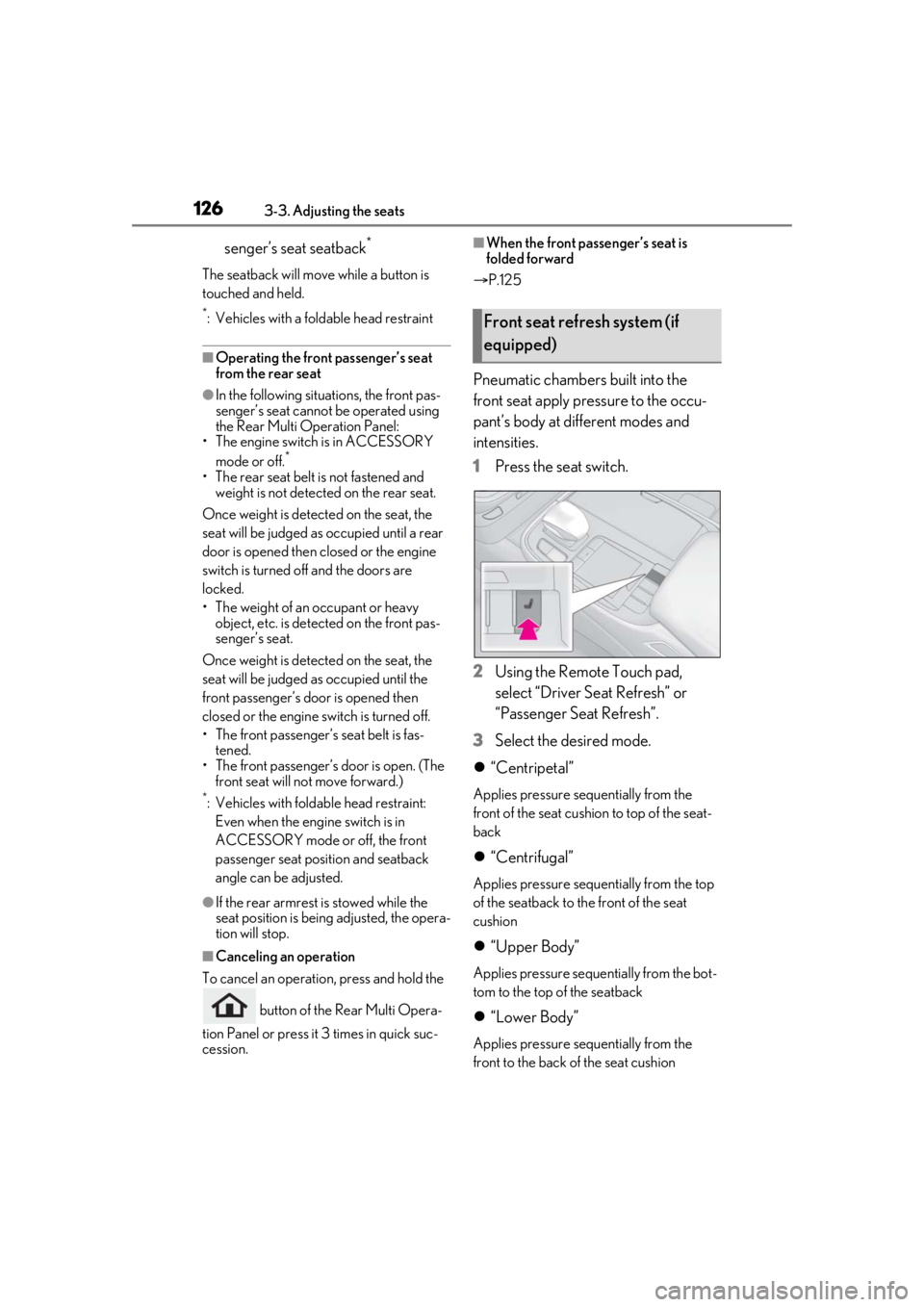
1 Press the seat switch.
2 Using the Remote Touch pad,
select “Driver Se at Refresh” or
“Passenger Seat Refresh”.
3 Select the desired mode.
“Centripetal”
Applies pressure sequentially from the
front of the seat cushion to top of the seat-
back
“Centrifugal”
Applies pressure sequentially from the top
of the seatback to the front of the seat
cushion
“Upper Body”
Applies pressure sequentially from the bot-
tom to the top of the seatback
“Lower Body”
Applies pressure sequentially from the
front to the back of the seat cushion
Front seat refresh system (if
equipped)
Page 128 of 520

1283-3. Adjusting the seats
*:If equipped
■Automatic operation
The seat can be moved to preset posi-
tions.
1 Display the home screen on the
Rear Multi Operation Panel
(P.318) and then touch “Seat”.
2 Touch “Left” or “Right”.
3 Touch the desired preset button.
When the operating conditions are not
Power rear seat*
WARNING
■When adjusting the seat position
●Take care when ad justing the seat
position to ensure that other passen-
gers are not injured by the moving
seat.
●When adjusting the rear seat with an
ottoman, make sure there is sufficient
space so that a foot does not get
caught between the ottoman and front
passenger seat . (If equipped)
●Vehicles with a rear seat entertainment
system: When the rear seat is moving
to the Entertainment Mode position,
do not allow hands near the rear dis-
play. Otherwise, a hand or finger may
be caught, possibly causing injury.
■Seat adjustment
To reduce the risk of sliding under the lap
belt during a collision, do not recline the
seat more than necessary.
If the seat is too reclined, the lap belt may
slide past the hips and apply restraint
forces directly to the abdomen, or your
neck may contact the shoulder belt,
increasing the risk of death or serious
injury in the event of an accident.
Adjustments should not be made while
driving as the seat may unexpectedly
move and cause the driver to lose control
of the vehicle.
■Using the ottoman (if equipped)
●Do not sit on the ottoman.
If someone sits on the ottoman, the seat
belt cannot be fitted properly, and they
may be thrown from the seat, resulting in
death or serious injury in the event of an
accident or sudden braking.
●When getting in or out of the vehicle,
retract the ottoman. If the ottoman is
not retracted, it may cause a fall, result-
ing in injury.
●Do not operate the ottoman when the
vehicle is moving.
●Do not allow anyone to put their hands
or feet under the re ar seat when stow-
ing the ottoman.
NOTICE
■To prevent an ottoman malfunction (if
equipped)
●Do not place any objects in the rear
seat footwell that could prevent the
operation of the ottoman.
●Do not place heavy luggage on the
ottoman.
●Do not place any objects under the
ottoman while it is raised for use. These
objects may interfere with the ottoman
being folded, causing damage to the
ottoman or the objects themselves.
■To prevent a rear display malfunction
(if equipped)
Do not attempt to move the rear display
by hand, as doing so may damage the
rear display.
Adjustment procedure
Page 129 of 520

1293-3. Adjusting the seats
3
Before driving
met, the preset buttons will be grayed out.
/ : Moves the rear seat
to the upright position (Business
Mode)
/ : Moves the rear seat
with an ottoman to a slightly reclined
position (Entertainment Mode) (if
equipped)
Vehicles without a rear seat entertainment
system: Moves the front passenger’s seat
forward.
Vehicles with a rear seat entertainment
system: Moves the front passenger’s seat
and rear display to allow the rear display to
be comfortably viewed.
: Moves the rear seat with an
ottoman to a deeply reclined position
(Relaxation Mode) (if equipped)
Moves the front passen ger’s seat forward
and folds the seatback and head restraint
forward.
To stop the front passenger seat while it is
moving, touch “STOP”.
■Manual operation
1 Display the home screen on the
Rear Multi Operation Panel
(P.318) and then touch “Seat”.
2 Touch “Left” or “Right”. 3
Touch the button for the desired
adjustment.
Select the part you wish to adjust.
Adjust the position of the selected
part.
The part will move while a button is
touched.
■Adjustment of the rear seat
●When a rear seat is close to a front seat,
the operation of the rear seat may be
restricted.
●If the rear armrest is stowed while the
seat position is bein g adjusted, the opera-
tion will stop.
■Operating conditions of Business Mode
When the rear seat belt is not fastened and
weight is not detected on the rear seat,
Business Mode cannot be selected.
Once weight is detected on the seat, the
seat will be judged as occupied until a rear
door is opened then closed or the engine
switch is turned off and the doors are
locked.
■The rear seat with an ottoman cannot be
moved to Entertainment Mode/Relax-
ation Mode when (if equipped)
In the following situations, Entertainment
Mode or Relaxation Mode cannot be
selected:
●The engine switch is in ACCESSORY
mode or off.
●The rear seat belt is not fastened and
weight is not detected on the rear seat.
A
B
Page 130 of 520

1303-3. Adjusting the seats
Once weight is detected on the seat, the
seat will be judged as occupied until a rear
door is opened then closed or the engine
switch is turned off and the doors are
locked.
●The weight of an occupant or heavy
object, etc. is detected on the front pas-
senger’s seat.
Once weight is detect ed on the seat, the
seat will be judged as occupied until the
front passenger’s door is opened then
closed or the engine switch is turned off.
●The front passenger’s seat belt is fas-
tened.
●The front passenger’s door is open.
■When the front passenger’s seat is
folded forward
P.125
■Automatic angle adjustment of the rear
displays (if equipped)
When a seat is adjusted, the angle of the
rear display will be adjusted automatically
to maintain an optima l viewing angle for the
rear display from the rear seat.
■Operation after the engine switch is
turned off
After a certain time el apses after the engine
switch is turned off, the following parts of
the rear seats will move to their neutral
positions.
●Shoulder bolster
●Lumbar/pelvic support
■Canceling an operation
To cancel an operation, press and hold the
button of the Rear Multi Opera-
tion Panel or press it 3 times in quick suc-
cession.
■Pre-collision seatbacks for the passen-
ger seats
P.216, 228
■Customization
Some functions can be customized.
( P.476)
1 Press the seat switch.
2 Select “Return” of “Rear”.
The rear seat will move to the upright posi-
tion.
■Operation of the rear seats from the
front seats
In the following situations, the rear seats
cannot be operated from the front seats.
●When the armrest is stowed and weight
of an occupant, heavy object, etc. is
detected on a rear seat
Once weight is detected on the seat, the
seat will be judged as occupied until a rear
door is opened then closed or the engine
switch is turned off and the doors are
locked.
●When the armrest is stowed and a rear
seat belt is fastened.
Returning the rear seat from the
front seats
WARNING
■When returning the rear seats to the
neutral position
To avoid injuring th e rear passengers,
wait until they have gotten out of the
vehicle before operating the switch.
Page 132 of 520

1323-3. Adjusting the seats
side with the rear seat with an ottoman
is opened, the seatback of the rear seat
with an ottoman will move to a more
upright position. The seatback will
move to the upright position after the
door is closed and the system deter-
mines that the rear passenger has
exited.
However, if the armrest is stowed, the
rear seat will not move.
■Shift-linked rear seat reclining
function
When the shift position is shifted from
P, to enhance rear visibility for the
driver, the rear seats will recline slightly.
However, the shift-linked rear seat
reclining function will not operate in
the following situations:
The weight of an occupant or heavy
object, etc. is detected on a rear
seat.
Once weight is detect ed on the seat, the
seat will be judged as occupied until a rear
door is opened then closed or the engine
switch is turned off and the doors are
locked.
A rear seat belt is fastened.
A rear door is open.
The armrest is stowed.
When a front seat is close to a rear
seat, the rear seats may not operate or
the range of movement may be
restricted.
■Changing automatic seat opera-
tion settings
The settings can be changed on the
Rear Multi Operation Panel. ( P.318) 1
Display the home screen on the
Rear Multi Operation Panel
(P.318) and then touch “Seat”.
2 Touch “Left” or “Right”.
3 Touch .
4 Touch a button to change the set-
ting.
Rear right seat automatic operation
Rear right seatback movement
amount when door-linked rear seat
return function operates
*
Rear left seat automatic operation
*: Vehicles with a rear seat with an ottoman
A
B
C