2021 Lexus LC500C turn signal
[x] Cancel search: turn signalPage 165 of 410

1634-3. Operating the lights and wipers
4
Driving
1With the headlights on, push the
lever away from you to turn on the
high beams.
Pull the lever toward you to the center
position to turn the high beams off.
2Pull the lever toward you and
release it to flash the high beams
once.
You can flash the high beams with the
headlights on or off.
When any of the following conditions is
met, while the headlights (low beam)
are on, the cornering lights will addi-
tionally turn on and light up the direc-
tion of movement for the vehicle. This is
to ensure excellent visibility when
either driving at intersections or park-
ing at night.
The steering wheel is operated
The turn signal lever is operated
The shift position is in R (both left
and right side cornering lights)
■Cornering light control
●The lights illuminate when the vehicle speed is approximately 19 mph (30
km/h) or less. However,
the lights turn off
when the vehicle speed increases to
approximately 22 mph (35 km/h) or
more.
●After the lights remain illuminated for 30
minutes, they automatically turn off.
Turning on the high beam head-
lights
Cornering lights
Page 167 of 410

1654-3. Operating the lights and wipers
4
Driving
●House lights, street lights, traffic signals,
and illuminated billboards or signs may
cause the high beam to switch to the low
beams, or the low beams to remain on.
●The following factors may affect the
amount of time taken to turn the high
beam on or off:
• The brightness of headlights, fog lights,
and tail lights of vehicles ahead
• The movement and direction of vehicles ahead
• When a vehicle ahead only has opera- tional lights on one side
• When a vehicle ahead is a two-wheeled
vehicle
• The condition of the road (gradient, curve, condition of the road surface etc.)
• The number of passengers and amount of luggage
●The high beam may be turned on or off
when the driver does not expect it.
●Bicycles or similar objects may not be
detected.
●In the situations show n below, the system
may not be able to accurately detect sur-
rounding brightness levels. This may
cause the low beams to remain on or the
high beams to cause problems for pedes-
trians, vehicles ahead or other parties. In
these cases, manually switch between the
high and low beams.
• In bad weather (rain, snow, fog, sand-
storms etc.)
• The windshield is obscured by fog, mist, ice, dirt etc.
• The windshield is cracked or damaged.
• The front camera is deformed or dirty.
• Surrounding brightness levels are equal to those of headlights, tail lights or fog
lights.
• Vehicles ahead have headlights or tail
lights that are either switched off, dirty,
changing color, or have improperly
adjusted aim.
• When driving through an area of inter- mittently changing brightness and dark-
ness.
• When frequently and repeatedly driving
ascending/descending roads, or roads
with rough, bumpy or uneven surfaces
(such as stone-paved roads, gravel tracks
etc.). • When frequently and repeatedly taking
curves or driving on a winding road.
• There is a highly re flective object ahead
of the vehicle, such as a sign or a mirror.
• The vehicle’s headlights are damaged or dirty.
• The vehicle is listing or titling, due to a flat tire, a trailer being towed etc.
• The driver believes that the high beam
may be causing problems or distress to
other drivers or pedestrians nearby.
■Temporarily lowering sensor sensitivity
The sensitivity of the sensor can be tempo-
rarily lowered.
1 Turn the engine switch off while the fol-
lowing conditions are met.
• The headlight swit ch is in or .
• The headlight switch lever is in low beam
position.
• Automatic High Be am switch is on.
2 Turn the engine switch to ON.
3 Within 60 seconds after 2, repeat pull-
ing the headlight switch lever to the
original position then pushing it to the
high beam position quickly 10 times,
then leave the lever in high beam posi-
tion.
4 If the sensitivity is changed, the Auto-
matic High Beam indicator turns on and
off 3 times.
Automatic High Beam (headlights) may
turn on even the vehicle is stopped.
■Switching to high beam
Push the lever away from you.
The Automatic High Beam indicator will
turn off and the high beam indicator will
turn on.
Pull the lever to its original position to acti-
vate the Automatic High Beam system
again.
Turning the high beam on/off
manually
Page 192 of 410
1904-5. Using the driving support systems
■Operation conditions of each function
●Lane departure alert function
This function operates when all of the fol-
lowing conditions are met.
• LKA is turned on.
• Vehicle speed is approximately 32 mph (50 km/h) or more.
• System recognizes white (yellow) lines.
• Width of traffic lane is approximately 9.8
ft. (3 m) or more.
• Turn signal lever is not operated.
• Vehicle is driven on a straight road or
around a gentle curve with a radius of
more than approximately 492 ft. (150
m).
• No system malfunctions are detected. ( P.192)
●Steering assist function
This function operates when all of the fol-
lowing conditions are me t in addition to the
operation conditions for the lane departure
alert function.
•Setting for “Steering Assist” in of the multi-information display is set to “On”.
( P.79)
• Vehicle is not accelerated or decelerated by a certain amount or more.
• Steering wheel is not operated with a steering force level su itable for changing
lanes.
• ABS, VSC, TRAC and PCS are not operating.
• TRAC or VSC is not turned off.
• Hands off steering wheel warning is not
displayed. ( P.190)
●Vehicle sway warning function
This function operates when all of the fol-
lowing conditions are met.
• Setting for “Sway Warning” in of the multi-information display is set to “On”.
( P.79)
• Vehicle speed is approximately 32 mph (50 km/h) or more.
• Width of traffic lane is approximately 9.8
ft. (3 m) or more.
• No system malfunctions are detected. ( P.192)
●Lane centering function
This function operates when all of the fol-
lowing conditions are met.
• LKA is turned on.
• Setting for “Steering Assist” and “Lane
Center” in of the multi-information
display are set to “On”. ( P.79)
• System recognizes white (yellow) lines.
• Dynamic radar cruise control with full- speed range is operating.
• Width of traffic lane is approximately 8.2 to 13.5 ft. (2.5 to 4.1 m).
• Turn signal lever is not operated.
• Vehicle is driven on a straight road or around a gentle curve with a radius of
more than approximately 656 ft. (200
m).
• No system malfunctions are detected.
( P.192)
• Vehicle does not ac celerate or deceler-
ate by a certain amount or more.
• Steering wheel is not operated with a steering force level su itable for changing
lanes.
• ABS, VSC, TRAC and PCS are not operating.
• TRAC or VSC is not turned off.
• Hands off steering wheel warning is not
displayed. ( P.190)
• Steering assist function is not operating.
■Temporary cancellation of functions
When the operation conditions are no lon-
ger met, a function may be temporarily can-
celed. However, when the operation
conditions are met agai n, operation of the
function is automatically restored.
( P.190)
■Steering assist function/lane centering
function
Depending on the vehicle speed, lane
departure situation, road conditions, etc.,
the driver may not feel the function is oper-
ating or the function may not operate at all.
■Lane departure alert function
The warning buzzer may be difficult to hear
due to external noise, audio playback, etc.
■Hands off steering wheel warning
In the following situations, a warning mes-
sage urging the driver to hold the steering
Page 212 of 410

2104-5. Using the driving support systems
Turning the BSM function/RCTA function
on/off.
The RCTA function is available when the
BSM function is on.
Outside rear view mirror indicators
BSM function:
When a vehicle is detected in a blind spot
of the outside rear view mirrors or
approaching rapidly from behind into a
blind spot, the outside rear view mirror
indicator on the detected side will illumi-
nate. If the turn signal lever is operated
toward the detected side, the outside rear
view mirror indicator will flash.
RCTA function:
When a vehicle approaching from the right
or left at the rear of the vehicle is detected,
both outside rear view mirror indicators
will flash.
BSM indicator/RCTA indicator
When the BSM function/RCTA function is
turned on, the indicator comes on.
Monitor screen display (RCTA
function only)
If a vehicle approaching from the right or
left at the rear of the vehicle is detected,
the RCTA icon (P.215) for the detected
side will be displayed on the monitor
screen. This illustration shows an example
of a vehicle approaching from the left at
the rear of the vehicle.
RCTA buzzer (RCTA function
only)
If a vehicle approaching from the right or
left at the rear of the vehicle is detected, a
buzzer will sound. The buzzer also sounds
for approximately 1 second immediately
after the BSM function is operated to turn
the system on.
1 Press or of the meter con-
trol switches, select .
2 Press or of the meter con-
trol switches, select “BSM”, and
then press “OK”.
3 Press or of the meter con-
trol switches, select “BSM” or
“RCTA”, and press “OK”.
■Outside rear view mirror indicator visi-
bility
In strong sunlight, the outside rear view mir-
ror indicator may be difficult to see.
■Hearing the RCTA buzzer
The RCTA buzzer may be difficult to hear
over loud noises, such as if the audio system
volume is high.
■When “Blind Spot Monitor Unavailable”
is shown on the multi-information dis-
play
Water, snow, mud, etc., may be built up in
the vicinity of the sensor area of bumper.
( P.212) Removing the water, snow, mud,
etc., from the vicinity of the sensor area
bumper should return it to normal.
Also, the sensor may not function normally
when used in extremely hot or cold
weather.
■When “Blind Spot Monitor System Mal-
function” is shown on the multi-informa-
tion display
There may be a sensor malfunction or volt-
age abnormality. Have the vehicle
inspected at your Lexus dealer.
■Customization
Some functions can be customized. (Cus-
tomizable features: P.367)
B
C
D
E
Turning the BSM func-
tion/RCTA function on/off
Page 257 of 410

2555-6. Using the other interior features
5
Interior features
Press the appropriate HomeLink®
button. The HomeLink
® indicator light
should turn on.
The status of the opening and closing
of a garage door is shown by the indi-
cators.
Opening
Closing
This function is only available if the garage
door opener motor used is a compatible
device. (To check device compatibility,
refer to www.homelink.com.)
The indicators can operate within
approximately 820 ft. (250 m) of the
garage door. However, if there are
obstructions between the garage door
and the vehicle, such as houses and
trees, feedback signals from the
garage door may not be received. To recall the previous door operation
status, press and release either
HomeLink
® buttons and
or and simulta-
neously. The last recorded status will
be displayed for 3 seconds.
Press and hold the 2 outside buttons
for 10 seconds until the HomeLink
®
indicator light changes from continu-
ously lit (orange) to rapidly flashing
(green).
If you sell your vehicle, be sure to erase the
programs stored in the HomeLink
® mem-
ory.
Operating HomeLink®
ColorStatus
Orange (flashing)Currently open- ing/closing
GreenOpening/closing has completed
Red (flashing)Feedback signals
cannot be received
A
B
Erasing the entire HomeLink®
memory (all three codes)
Page 305 of 410

3036-3. Do-it-yourself maintenance
6
Maintenance and care
1Using a Phillips-head screwdriver,
turn bolt A in either direction.
2
Turn bolt B in either direction as
step 1
.
If the headlight cannot be adjusted using
this procedure, take the vehicle to your
Lexus dealer to adjust the headlight aim.
■LED lights
The following lights consist of a number of
LEDs. If any of the LEDs burn out, take your
vehicle to your Lexus dealer to have the
light replaced.
●Headlights
●Parking lights and daytime running lights
●Front side marker lights
●Front turn signal lights
●Cornering lights
●Side turn signal lights
●Tail lights
●Stop lights
●Rear side marker lights
●Rear turn signal lights
●Back-up lights
●High mounted stoplight
●License plate lights
■Condensation build-up on the inside of
the lens
Temporary condensation build-up on the
inside of the headlight lens does not indi-
cate a malfunction. Contact your Lexus
dealer for more information in the following
situations:
●Large drops of water have built up on the
inside of the lens.
●Water has built up inside the headlight.
Adjusting the headlight aimLight bulbs
If any lights burn out, have it
replaced by your Lexus dealer.
WARNING
■Handling lights
Do not touch the lights while they are on
or immediately after they have been
turned off. Doing so may result in burns.
Page 308 of 410
3067-1. Essential information
7-1.Essential information
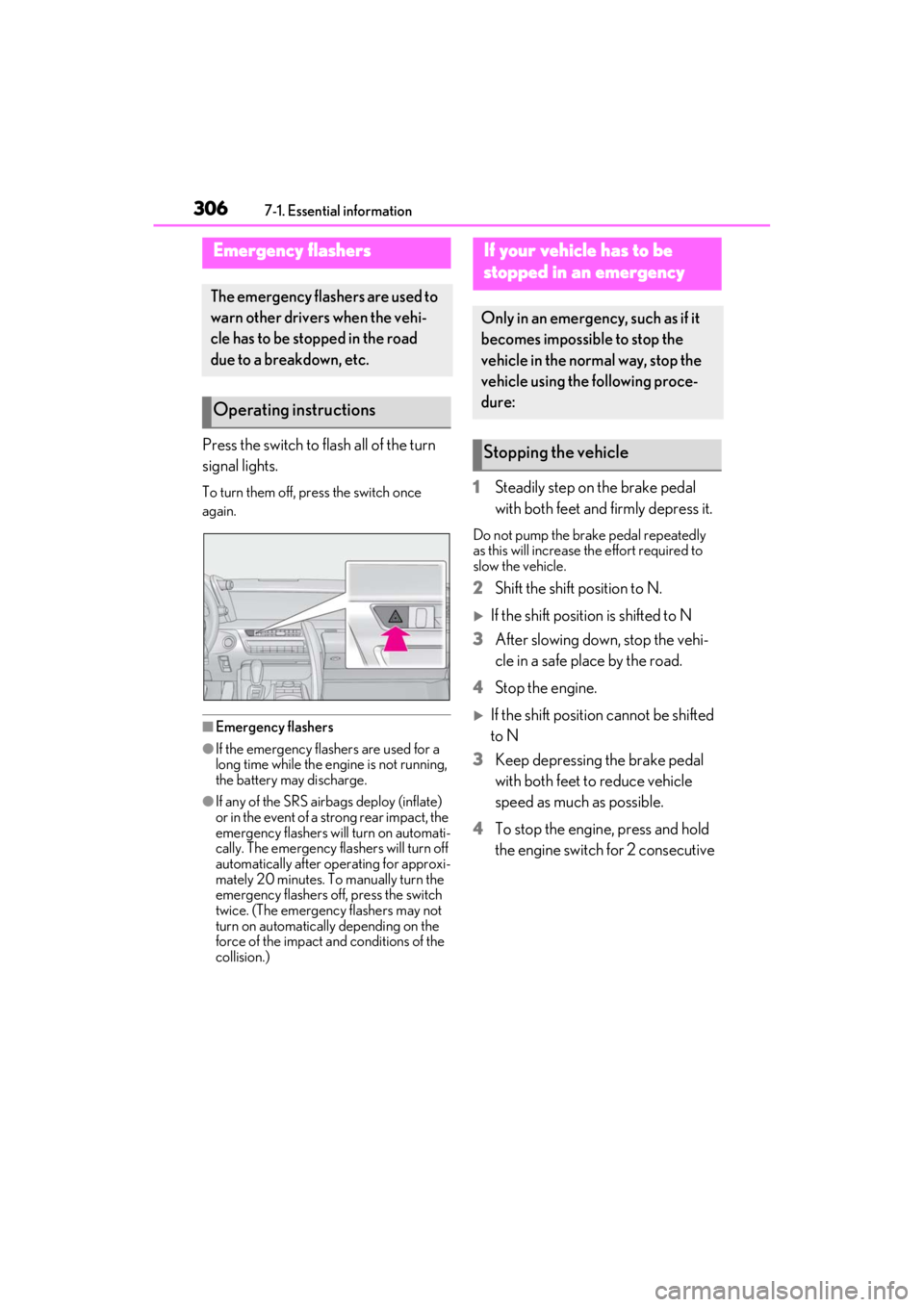
Press the switch to flash all of the turn
signal lights.
To turn them off, press the switch once
again.
■Emergency flashers
●If the emergency flashers are used for a
long time while the engine is not running,
the battery may discharge.
●If any of the SRS airbags deploy (inflate)
or in the event of a strong rear impact, the
emergency flashers will turn on automati-
cally. The emergency flashers will turn off
automatically after operating for approxi-
mately 20 minutes. To manually turn the
emergency flashers off, press the switch
twice. (The emergency flashers may not
turn on automatically depending on the
force of the impact and conditions of the
collision.)
1Steadily step on the brake pedal
with both feet and firmly depress it.
Do not pump the brake pedal repeatedly
as this will increase the effort required to
slow the vehicle.
2Shift the shift position to N.
If the shift position is shifted to N
3 After slowing down, stop the vehi-
cle in a safe place by the road.
4 Stop the engine.
If the shift position cannot be shifted
to N
3 Keep depressing the brake pedal
with both feet to reduce vehicle
speed as much as possible.
4 To stop the engine, press and hold
the engine switch for 2 consecutive
Emergency flashers
The emergency flashers are used to
warn other drivers when the vehi-
cle has to be stopped in the road
due to a breakdown, etc.
Operating instructions
If your vehicle has to be
stopped in an emergency
Only in an emergency, such as if it
becomes impossible to stop the
vehicle in the normal way, stop the
vehicle using the following proce-
dure:
Stopping the vehicle
Page 373 of 410

3718-2. Customization
8
Vehicle specifications
*1: If equipped
*2: BSM function only
■Door lock (P.96, 100, 330)
■Smart access system with push-butto n start and wireless remote control
( P.94, 103)
RCTA buzzer volumeLevel 2Level 1OLevel 3
FunctionDefault settingCustomized setting
Unlocking using a mechanical key
Driver’s door
unlocked in one step, both side
doors unlocked in two steps
Both side doors
unlocked in one step
O
Automatic door lock
Shifting the shift position to
position other than POff
OOVehicle speed is
approximately 12
mph (20 km/h) or higher
Automatic door unlockShifting the shift position to POff
OODriver’s door is opened
Locking/unlocking of the trunk
when both side doors are
locked/unlocked
OnOffO
Time elapsed before the door lock
indicator lights turn off30 seconds
1 minute
O10 minutes
20 minutes
FunctionDefault settingCustomized setting
Operating signal (Buzzers)5OffOO1 to 7
Operation signal (Emergency
flashers)OnOffOO
FunctionDefault settingCustomized settingABC
ABC
ABC