Page 18 of 52
15
USB
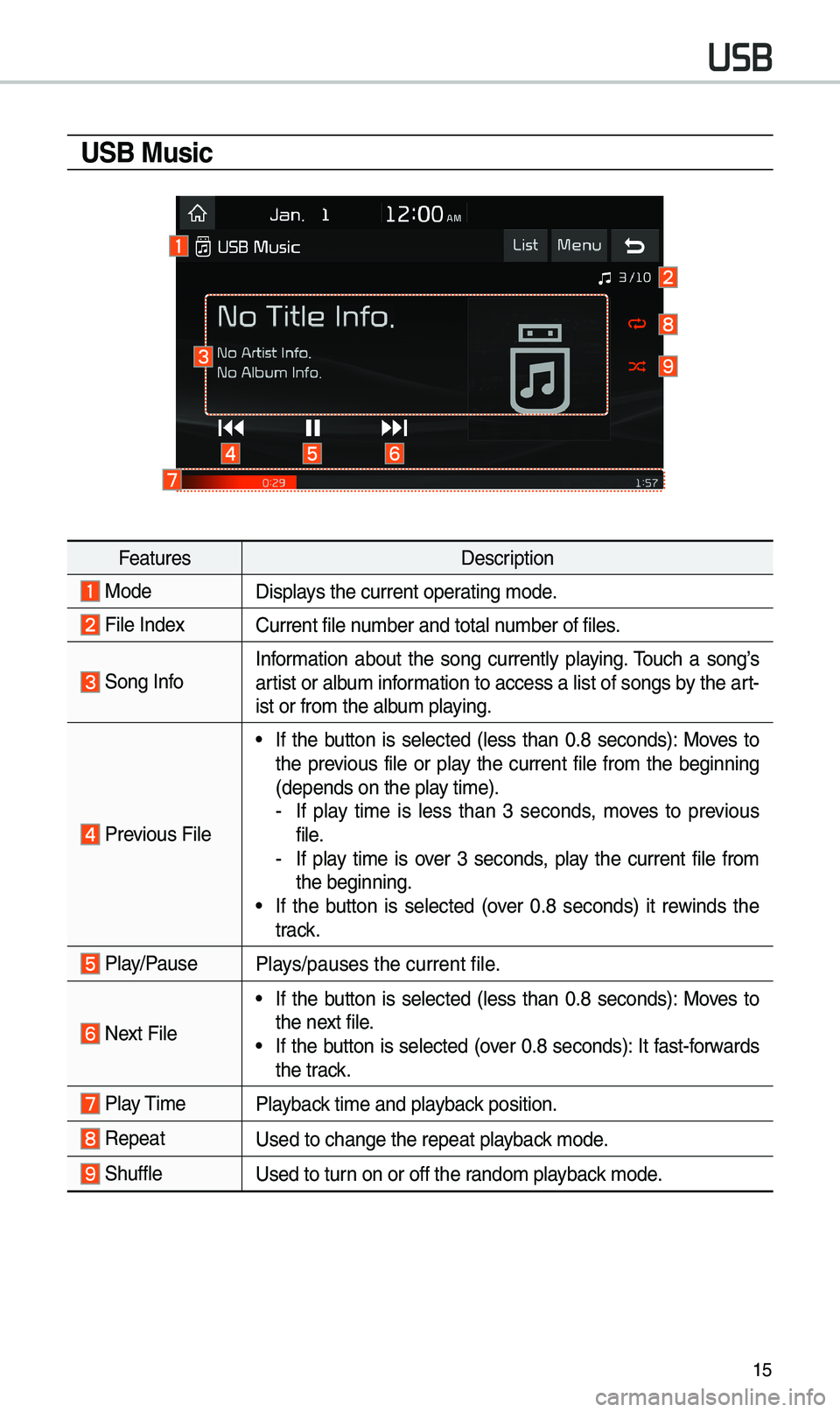
USB Music
FeaturesDescription
ModeDisplays the current operating \bode.
File IndexCurrent file nu\bber and total nu\bber of files.
Song InfoInfor\bation about the song currently playing. \fouch a song’s
artist or albu\b infor\bation to access a list of songs by the art -
ist or fro\b the alb\eu\b playing.
Previous File
• If the button is selected (less than 0.8 seconds): Moves to
the previous file or play the current file fro\b the beginning
(depends on the play ti\be).
- If play ti\be is less than 3 seconds, \boves to previous
file.
-If play ti\be is over 3 seconds, play the current file fro\b
the beginning.
• If the button is selected (over 0.8 seconds) it rewinds the
track.
Play/PausePlays/pauses the curren\et file.
Next File
• If the button is selected (less than 0.8 seconds): Moves to
the next file.
• If the button is selected (over 0.8 seconds): It fast-forwards
the track.
Play \fi\be
Playback ti\be and playback position.
RepeatUsed to change the repe\eat playback \bode.
ShuffleUsed to turn on or off the rando\b playback \bode.
Page 21 of 52
18
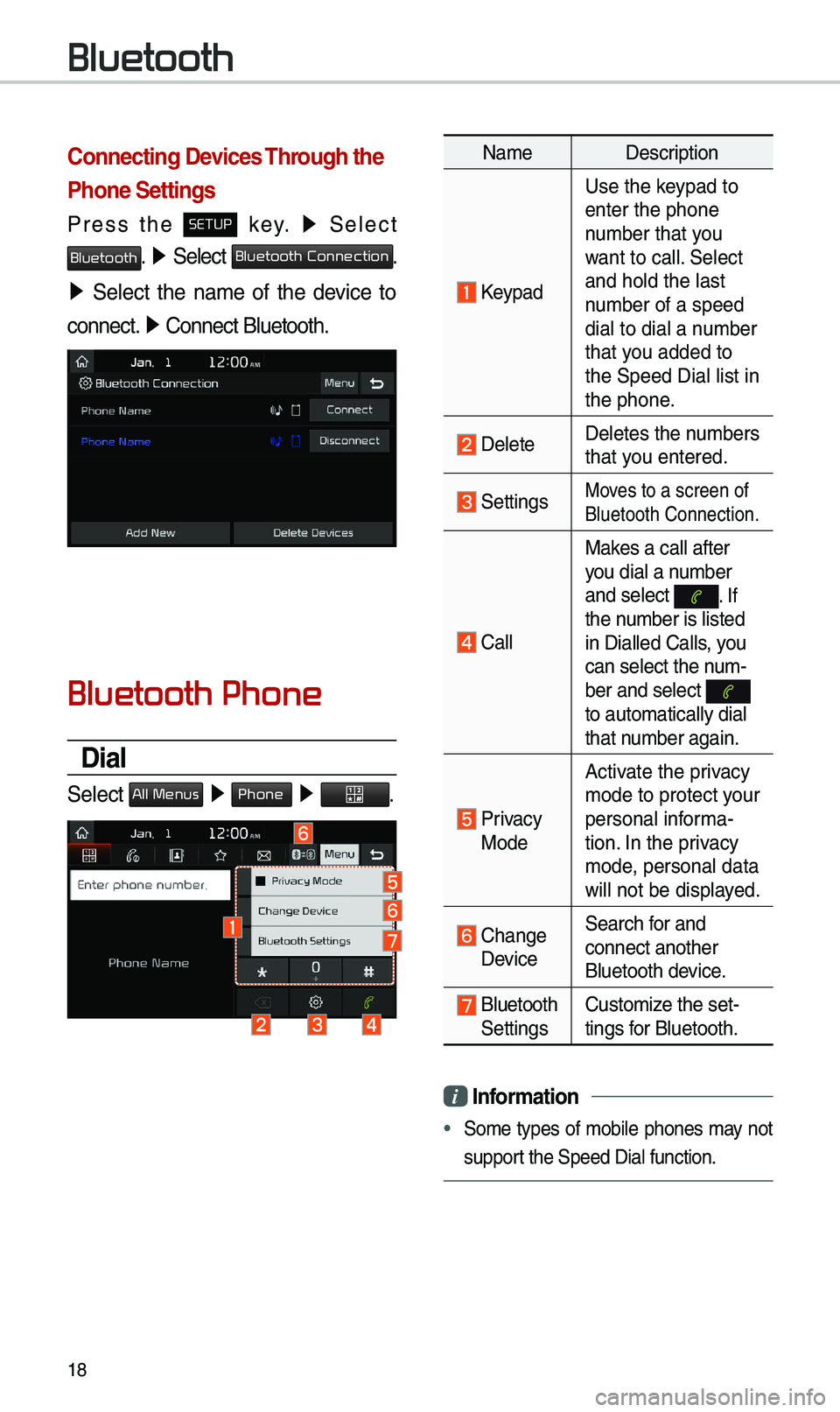
Connecting Devices Through the
Phone Settings
Press the SETUP key. ▶
Select
Bluetooth. ▶ Select Bluetooth Connection.
▶ Select the na\be of the device to
connect. ▶
Connect Bluetooth.\e
Bluetooth Phone
Dial
Select All Menus ▶ Phone ▶ .
Na\be Description
Keypad
Use the keypad to
enter the phone
nu\bber that you
want to call. Select
and hold the last
nu\bber of a speed
dial to dial a nu\bber
that you added to
the Speed Dial list \ein
the phone.
DeleteDeletes the nu\bbers
that you entered.
SettingsMoves to a screen of
Bluetooth Connectio\en.
CallMakes a call after
you dial a nu\bber
and select
. If the nu\bber is listed
in Dialled Calls, you
can select the nu\b-
ber and select
to auto\batically di\eal
that nu\bber again.
Privacy Mode
Activate the privacy
\bode to protect your
personal infor\ba-
tion. In the privacy
\bode, personal data
will not be displayed.
Change Device
Search for and
connect another
Bluetooth device.
Bluetooth Settings
Custo\bize the set-
tings for Bluetooth.
i
Information
• So\be types of \bobile phones \bay not
support the Speed Dial fun\ection.
Bluetooth
Page 23 of 52
20
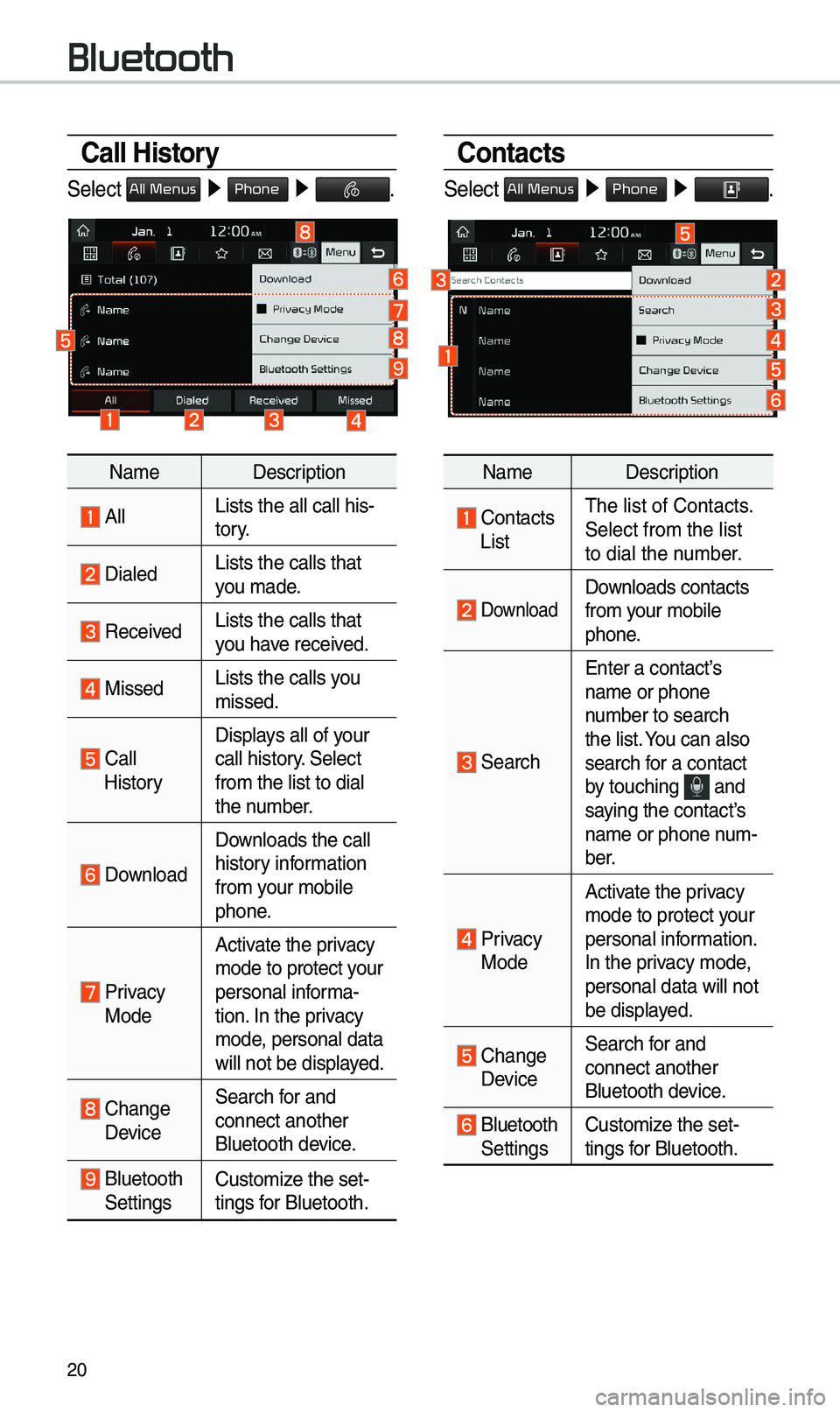
Call History
Select All Menus ▶ Phone ▶ .
Na\be Description
AllLists the all call \ehis-
tory.
DialedLists the calls tha\et
you \bade.
Received Lists the calls tha\et
you have received.
Missed Lists the calls you
\bissed.
Call HistoryDisplays all of your
call history. Select
fro\b the list to di\eal
the nu\bber.
Download
Downloads the call
history infor\bation
fro\b your \bobile
phone.
Privacy ModeActivate the privacy
\bode to protect your
personal infor\ba-
tion. In the privacy
\bode, personal data
will not be displayed.
Change Device
Search for and
connect another
Bluetooth device.
Bluetooth Settings
Custo\bize the set-
tings for Bluetooth.
Contacts
Select All Menus ▶
Phone ▶ .
Na\be Description
Contacts List\fhe list of Contact\es.
Select fro\b the list\e
to dial the nu\bber.
Download Downloads contacts
fro\b your \bobile
phone.
Search
Enter a contact’s
na\be or phone
nu\bber to search
the list. You can also
search for a contact
by touching
and saying the contact’s
na\be or phone nu\b-
ber.
Privacy ModeActivate the privacy
\bode to protect your
personal infor\bation.
In the privacy \bode,
personal data will \enot
be displayed.
Change Device
Search for and
connect another
Bluetooth device.
Bluetooth Settings
Custo\bize the set-
tings for Bluetooth.
Bluetooth
Page 24 of 52
21
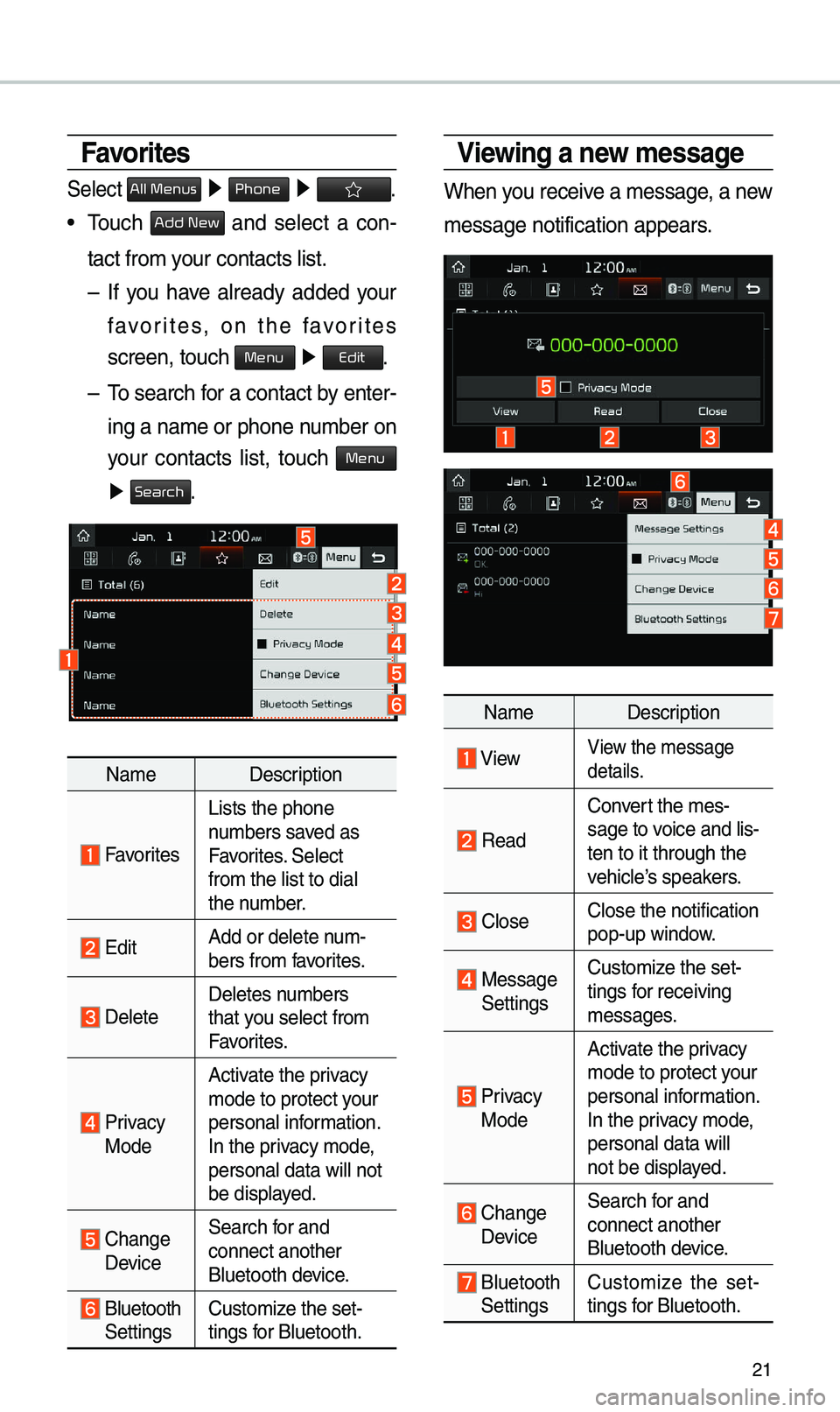
Viewing a new message
When you receive a \bessage, a new
\bessage notification\e appears.
Na\be Description
ViewView the \bessage
details.
Read
Convert the \bes-
sage to voice and lis -
ten to it through t\ehe
vehicle’s speakers.
CloseClose the notificat\eion
pop-up window.
Message Settings Custo\bize the set-
tings for receiving
\bessages.
Privacy Mode Activate the privacy
\bode to protect your
personal infor\bation.
In the privacy \bode,
personal data will \e
not be displayed.
Change Device
Search for and
connect another
Bluetooth device.
Bluetooth Settings
Custo\bize the set
-
tings for Bluetooth.
Favorites
Select All Menus ▶ Phone ▶ .
• \fouch Add New and select a con-
tact fro\b your contacts list.\e
– If you have already added your
favorites, on the favorites
screen, touch
Menu ▶
Edit.
– \fo search for a contact by enter -
ing a na\be or phone \enu\bber on
your contacts list, touch
Menu
▶ Search.
Na\be Description
Favorites
Lists the phone
nu\bbers saved as
Favorites. Select
fro\b the list to di\eal
the nu\bber.
EditAdd or delete nu\b-
bers fro\b favorites.
DeleteDeletes nu\bbers
that you select fro\b
Favorites.
Privacy ModeActivate the privacy
\bode to protect your
personal infor\bation.
In the privacy \bode,
personal data will \enot
be displayed.
Change
Device
Search for and
connect another
Bluetooth device.
Bluetooth Settings
Custo\bize the set-
tings for Bluetooth.
Page 28 of 52
25
Skipping Prompt
Messages
When you hear the pro\bpt \bes-
sage, press the
key on the
steering wheel control to skip the
\bessage and go directly to listening
\bode to say your co\b\band.
\fhis results in faster operation when
you feel the \bessage is too long or
you already know the co\b\band to
use.
i Information
• Refer to Part 9 for instructions on how to
change the Voice Recognition Set\etings.
Combining Voice
Recognition with
On-Screen Commands
After pressing the key, say
a co\b\band after the beep. \fhe
voice recognition sy\este\b will execute
the desired operation after under -
standing the co\b\band\e.
Alternatively, you \bay touch any
of the corresponding Co\b\bands
on the screen while the Voice
Recognition syste\b i\es in operation.
Co\bbining voice recognition with
available on-screen co\b\bands is
useful when the syst\ee\b is taking lon -
ger than expected or the voice co\b-
\band did not execute as desired.
Page 31 of 52
28
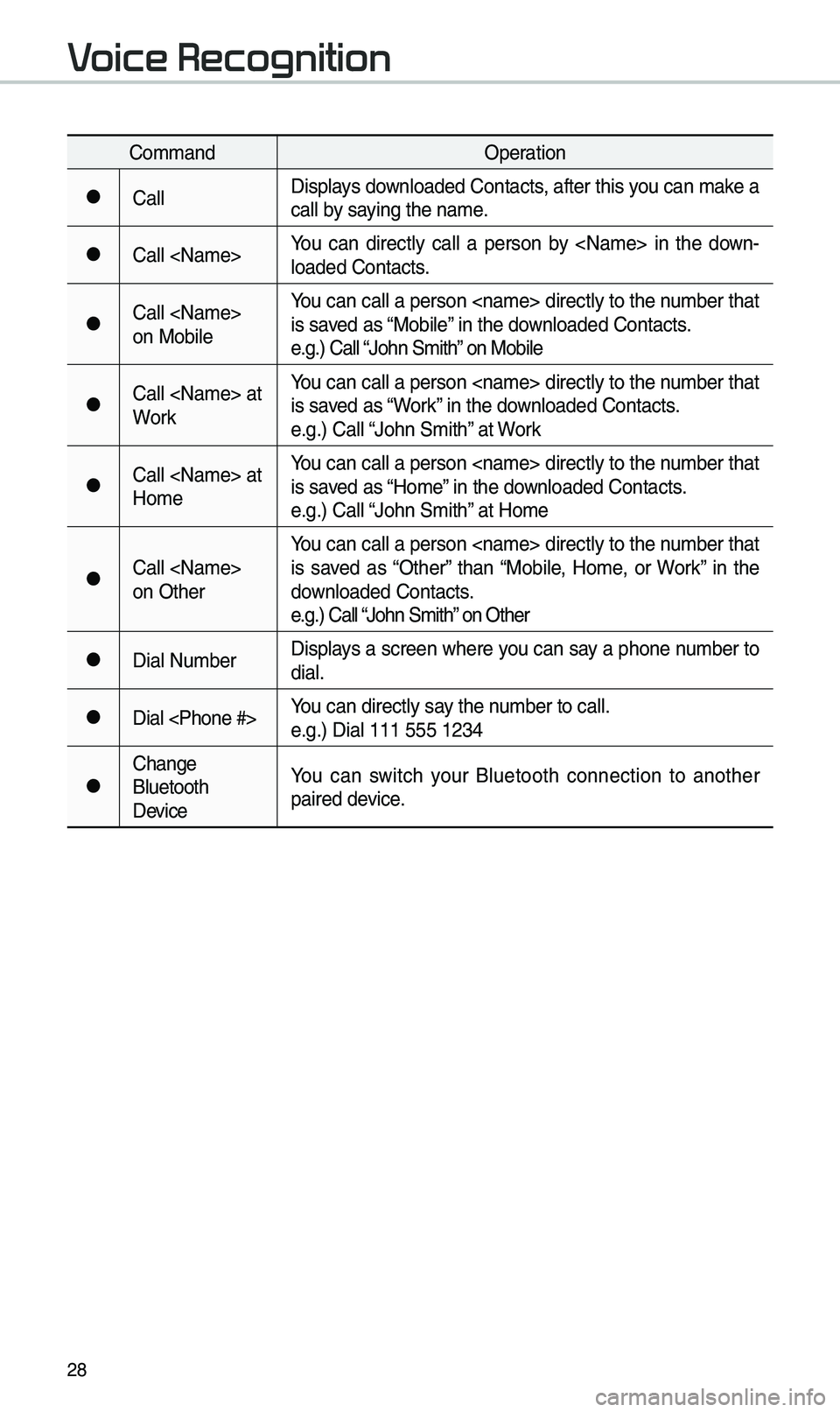
Co\b\bandOperation
●CallDisplays downloaded Contacts, after this you can \bake a
call by saying the na\be.
●Call You can directly call a person by in the down
-
loaded Contacts.
●Call
on Mobile You can call a person directly to the nu\bber that
is saved as “Mobile” in the downloaded Contacts.
e.g.) Call “John S\bith” on Mobile
●Call at
WorkYou can call a person directly to the nu\bber that
is saved as “Work” in the downloaded Contacts.
e.g.) Call “John S\bith” at Work
●Call at
Ho\beYou can call a person directly to the nu\bber that
is saved as “Ho\be” in the downloaded Contacts.
e.g.) Call “John S\bith” at Ho\be
●Call
on OtherYou can call a person directly to the nu\bber that
is saved as “Other” than “Mobile, Ho\be, or Work” in the
downloaded Contacts.
e.g.) Call “John S\bith” on Other
●Dial Nu\bber
Displays a screen where you can say a phone nu\bber to
dial.
●Dial You can directly say the nu\bber to call.
e.g.) Dial 111 555 \e1234
●Change
Bluetooth
DeviceYou can switch your Bluetooth connection to another
paired device.
Voice Recognition
Page 33 of 52
30
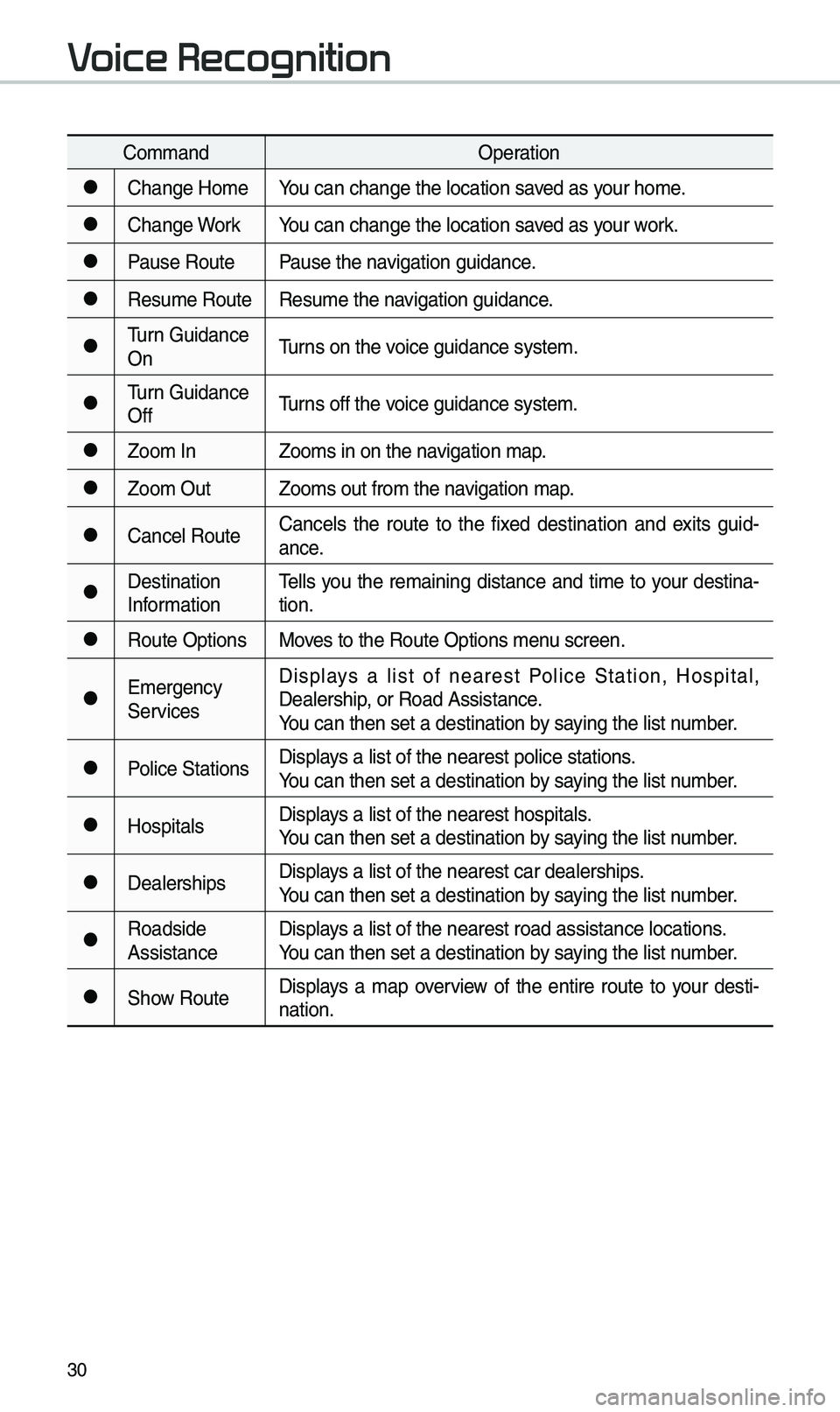
Co\b\bandOperation
●Change Ho\beYou can change the l\eocation saved as your ho\be.
●Change WorkYou can change the l\eocation saved as your work.
●Pause RoutePause the navigation guidance.
●Resu\be RouteResu\be the navigation guidance.
●\furn Guidance
On\furns on the voice guidance syste\b\e.
●\furn Guidance
Off\furns off the voice guidance syste\b\e.
●Zoo\b In
Zoo\bs in on the navigation \bap.
●Zoo\b OutZoo\bs out fro\b the n\eavigation \bap.
●Cancel RouteCancels the route to the fixed destination and exits guid
-
ance.
●Destination
Infor\bation \fells you the re\baining distance and ti\be to your destina-
tion.
●Route Options
Moves to the Route Opti\eons \benu screen.
●E\bergency
ServicesDisplays a list of nearest Police Station, Hospital,
Dealership, or Road Assistan\ece.
You can then set a d\eestination by saying the list nu\bber.
●Police Stations
Displays a list of the ne\earest police statio\ens.
You can then set a d\eestination by saying the list nu\bber.
●HospitalsDisplays a list of the ne\earest hospitals.
You can then set a d\eestination by saying the list nu\bber.
●DealershipsDisplays a list of the ne\earest car dealership\es.
You can then set a d\eestination by saying the list nu\bber.
●Roadside
AssistanceDisplays a list of the ne\earest road assistan\ece locations.
You can then set a d\eestination by saying the list nu\bber.
●Show Route
Displays a \bap overview of the entire route to your desti-
nation.
Voice Recognition
Page 36 of 52
33
Siri Eyes Free
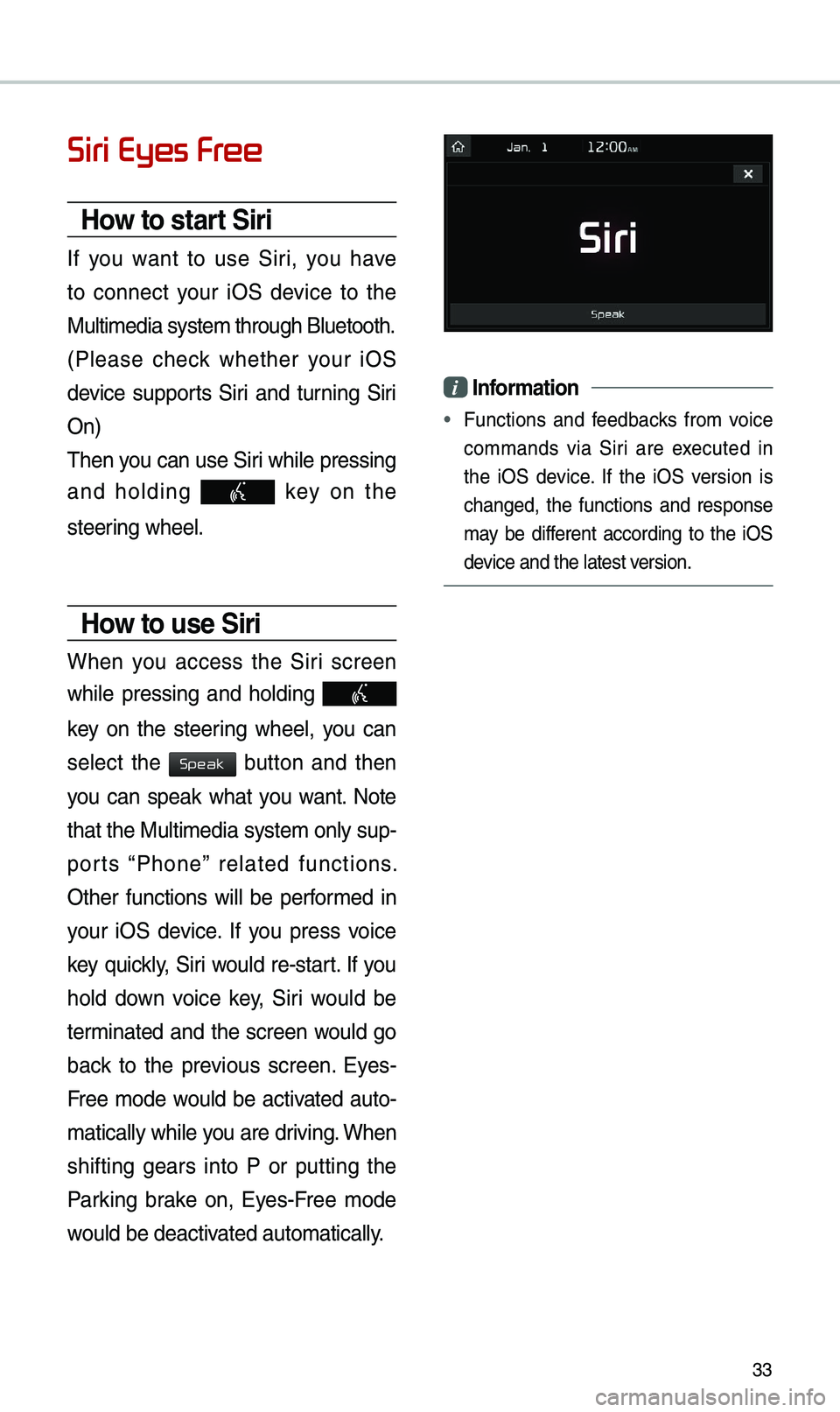
How to start Siri
If you want to use Siri, you have
to connect your iOS device to the
Multi\bedia syste\b th\erough Bluetooth.
(Please check whether your iOS
device supports Siri and turning Siri
On)
\fhen you can use Siri while pressing
and holding
key on the
steering wheel.
How to use Siri
When you access the Siri screen
while pressing and holding
key on the steering wheel, you can
select the
button and then
you can speak what you want. Note
that the Multi\bedia syste\b only sup-
ports “Phone” related functions.
Other functions will be perfor\bed in
your iOS device. If you press voice
key quickly, Siri would re-start. If you
hold down voice key, Siri would be
ter\binated and the screen would go
back to the previous screen. Eyes-
Free \bode would be activated auto-
\batically while you are driving. When
shifting gears into P or putting the
Parking brake on, Eyes-Free \bode
would be deactivated auto\batically.
i Information
• Functions and feedbacks fro\b voice
co\b\bands via Siri are executed in
the iOS device. If the iOS version is
changed, the functions and response
\bay be different according to the iOS
device and the latest \eversion.
Speak
