Page 93 of 300

5-3
l l You can register your home, office, or other frequently visited places as a favorite for ease
of search.
> See "Registering a frequently visited place as a favorite place ."
m m The list of menu items appears.
\225Reorder Icons: Can change the location of an icon on the Navigation Menu screen.
\225Display Off: Turns off the screen. To switch the screen back on, press the screen or
briefly press the power knob.
\225User's Manual on Web (QR Code): Displays the QR code that provides access to the
online user manual for the system.
0000
A
Available icons and their arrangement may differ depending on the vehicle model and
specifications.
Finding a route easily
\335Warning
Driving while distracted may cause a loss of vehicle control that may lead to an accident,
severe bodily injury, or death. The driver's primary responsibility is the safe and legal
operation of the vehicle, and the use of any devices or systems that take the driver's attention
away from driving.
1 Perform any of the following methods:
\225On the All Menus screen, press Navigation Menu >
Places.
\225 On the map screen, press .
0000
A
Press and hold the [ NAV] button on the control panel to enter into Places.
2 Enter the location data such as place name, address, coordinates, or ZIP
code and then press OK.
Page 102 of 300
5-12
2 Enter the location data such as place name, address, coordinates, or ZIP
code and then press OK.
0000
A
When there are any similar matches, the recommendations appear at the left of
keypad.
0000
A
To access the online user's manual on the Places screen, press
>
User's Manual
on Web (QR Code) and then scan the displayed QR code.
3 Select a destination from the search result.
0000
A
You can see the sites in the list on the preview screen at the right.
0000
A
To sort the search results in a different order, press on the attribute to toggle between
options.
4 Check the location of the destination and then press Set as Destination.
0000A
If you press Parking at the bottom right of the screen, the map screen displays the
parking lot icon.
5 Select the desired route from the searched ones and press Start
Guidance.
Page 103 of 300
5-13
Searching by previous destinations
You can set a destination by selecting from the recently searched ones.
1 On the Navigation Menu screen, press Previous Destinations.
The navigated destinations appear in the list.
0000AAvailable icons and their arrangement may differ depending on the vehicle model
and specifications.
2 Select the desired destination from the list.
0000
A
To categorize the searched items, select a category.
0000
A
To sort the search results in a different order, press on the attribute to toggle between
options.
0000
A
To access the online user's manual on the Previous Destinations screen, press
>
User's Manual on Web (QR Code) and then scan the displayed QR code.
3 Check the location of the destination and then press Set as Destination.
4 Select the desired route from the searched ones and press Start
Guidance.
Page 104 of 300
5-14
Deleting a previous destination
1 On the Previous Destinations screen, press Delete.
2 Select the destination(s) to delete and press Delete.
You can delete the selected place(s) or all places.
Searching for Kia Dealerships
You can easily search for service centers or service stations.
1 On the Navigation Menu screen, press Kia Dealerships.
0000AAvailable icons and their arrangement may differ depending on the vehicle model
and specifications.
2 Select a Kia Dealerships from the list.
0000
A
To sort the search results in a different order, press on the attribute to toggle between
options.
0000
A
To access the online user's manual, on the Kia Dealerships screen, press
>
User's Manual on Web (QR Code) and then scan the displayed QR code.
3 Check the location of the destination and then press Set as Destination.
4 Select the desired route from the searched ones and press Start
Guidance.
Page 105 of 300
5-15
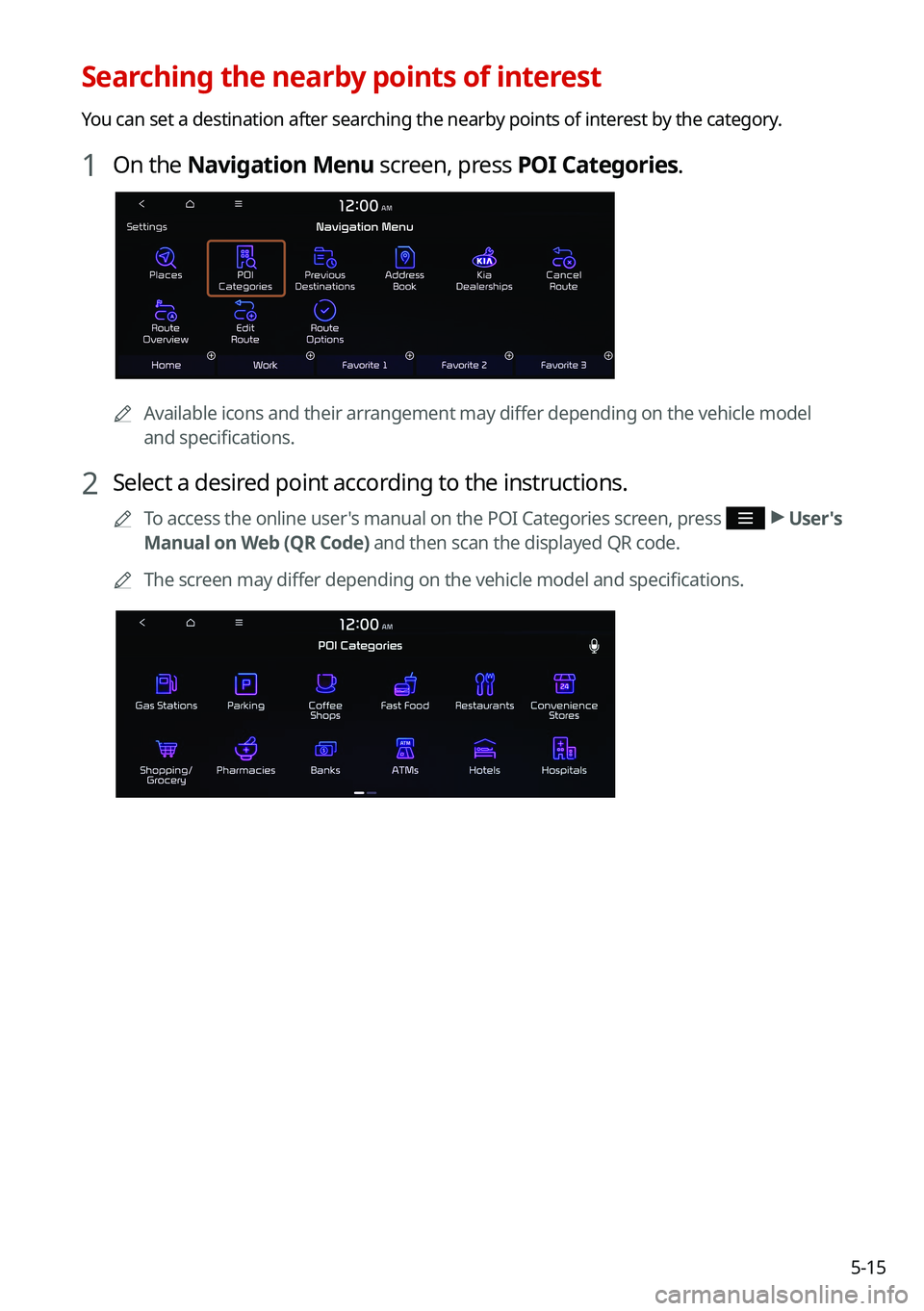
Searching the nearby points of interest
You can set a destination after searching the nearby points of interest by the category.
1 On the Navigation Menu screen, press POI Categories.
0000AAvailable icons and their arrangement may differ depending on the vehicle model
and specifications.
2 Select a desired point according to the instructions.
0000
A
To access the online user's manual on the POI Categories screen, press >
User's
Manual on Web (QR Code) and then scan the displayed QR code.
0000
A
The screen may differ depending on the vehicle model and specifications.
Page 108 of 300
5-18
2 On the map for a search, press Add Waypoint.
The selected waypoint is immediately added to the route.
3 After adding waypoints, press Calculate.
0000
A
To access the online user's manual on the Edit Route screen, press >
User's
Manual on Web (QR Code) and then scan the displayed QR code.
4 Select the updated route and then press Start Guidance.
Changing the order of waypoints
You can change the order of waypoints on the route.
1 On the Navigation Menu screen, press Edit Route.
2 To change the order of waypoints, select a waypoint and then press
or .
0000
A
To add another waypoint on the Edit Route screen, press Add waypoint.
0000
A
To see on the map, press
next to the name.
Page 110 of 300
5-20
3 Select the search criteria and press Recalculate.
0000
A
To access the online user's manual on the Route Options screen, press >
User's
Manual on Web (QR Code) and then scan the displayed QR code.
0000
A
Available options may differ depending on the vehicle model and specifications.
Avoiding specific zones
You can resume routing after excluding the specified roads such as congested roads or roads
under construction.
1 On the Navigation Menu screen, press Route Overview.
2 Press Route Info. / Avoid.
0000AThe screen may differ depending on the vehicle model and specifications.
3 Select the roads to avoid and press Avoid the Selected Road.
4 Select the updated route and then press Start Guidance.
0000
A
When there is any zone under construction ahead on the way, you are prompted to
confirm whether or not to exclude the zone from the route. To avoid the zone, press Yes
to resume routing.
Page 111 of 300
5-21
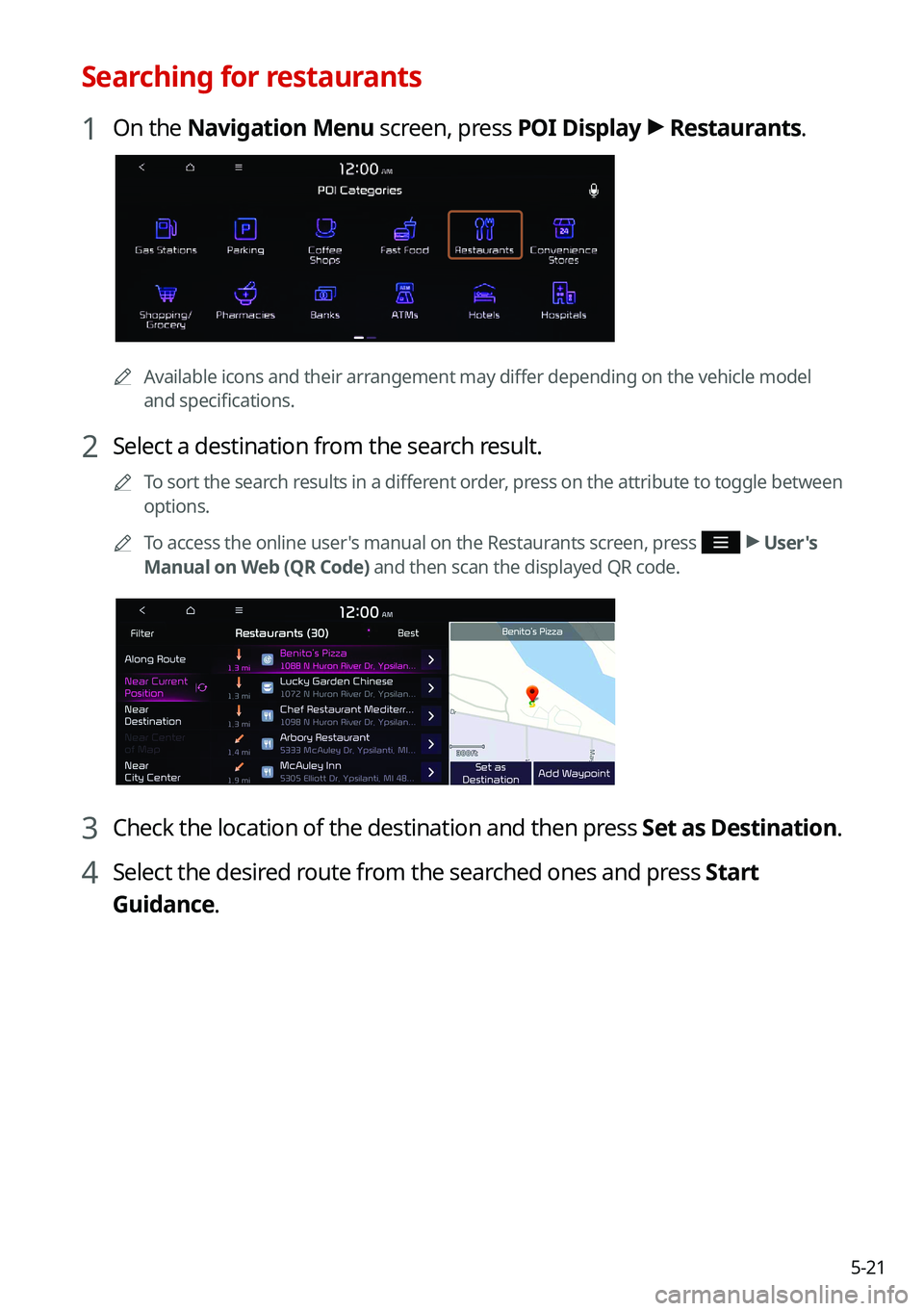
Searching for restaurants
1 On the Navigation Menu screen, press POI Display >
Restaurants.
0000A
Available icons and their arrangement may differ depending on the vehicle model
and specifications.
2 Select a destination from the search result.
0000
A
To sort the search results in a different order, press on the attribute to toggle between
options.
0000
A
To access the online user's manual on the Restaurants screen, press
>
User's
Manual on Web (QR Code) and then scan the displayed QR code.
3 Check the location of the destination and then press Set as Destination.
4 Select the desired route from the searched ones and press Start
Guidance.