2021 INFINITI Q50 Navigation route guidance
[x] Cancel search: Navigation route guidancePage 5 of 268

Table of Contents
1Introduction
How to use this manual ..... 1-2
Safety information ............... 1-3
Regulatory information ..... 1-4
Trademarks ........................... 1-4
Licenses ................................... 1-6
2Getting started
Control buttons and touch
screen display ....................... 2-2
Starting system .................. 2-10
Touch panel operation ..... 2-10
Basic operation .................. 2-11
How to operate dual
display ................................... 2-13
How to view and operate
MENU screen ..................... 2-18
Functions disabled while
driving .................................. 2-20
System settings ................. 2-22
3Audio system
Audio operation
precautions ............................ 3-2
Names and functions of
audio control buttons ...... 3-11
Audio operations ............... 3-13
Mobile Entertainment
System (MES) (if so
equipped) ............................. 3-36
Audio settings .................... 3-57
CD/USB memory device
care and cleaning .............. 3-58
4Hands-Free Phone
Bluetooth® Hands-Free
Phone System ...................... 4-2
5Information and vehicle settings
Information menu ................ 5-2
INFINITI InTouchTM
Services (if so equipped) ... 5-7SiriusXM® Travel Link
(if so equipped) .................. 5-15
Apple CarPlay® ................. 5-18
Android Auto
TM................. 5-22
Siri® Eyes Free .................. 5-26
TomTom Weather
information .......................... 5-27
Fully customizable digital
environment (if so
equipped) ............................. 5-29
Driver Assistance
settings ................................. 5-32
INFINITI Drive Mode
Selector settings (if so
equipped) ............................. 5-34
6Navigation (if so equipped)
Safety information .............. 6-3
Map operation ..................... 6-3
Setting destination ........... 6-14
Route guidance .................. 6-27
Viewing traffic
information .......................... 6-41
Page 16 of 268
2. Getting started
The screen may become distorted by strong
magnetic fields.
Maintenance of display:
CAUTION
.To clean the display, stop the vehicle
in a safe location.
. Clean the display with the ignition
switch in the “OFF” position. If the
display is cleaned while the ignition
switch is in the “ON” position, unin-
tentional operation may occur.
. To clean the display, never use a
rough cloth, alcohol, benzine, thinner
and any kind of solvent or paper towel
with a chemical cleaning agent. They
will scratch or deteriorate the panel.
. Do not splash any liquid such as water
or car fragrance on the display. Con-
tact with liquid will cause the system
to malfunction.
. When cleaning the display, use the
dedicated cleaning cloth.
. Before cleaning, wipe away any sand or
dust from the surface of the display and shake out the exclusive cloth in order to
prevent damaging the display.
. If the display is heavily soiled, moisten
the dedicated cleaning cloth and then
clean the display. If the exclusive cloth is
moistened, be sure to dry it out suffi-
ciently before storing it. Color may be
transferred to objects that it comes in
contact with.
. The dedicated cleaning cloth retains its
cleaning properties even if it is washed
repeatedly.
. When washing the exclusive cloth, be
sure to rinse it thoroughly so that no
detergent remains.
. When ironing the exclusive cloth, iron
using a low temperature setting 176 to
248 °F (80 to 120°C).
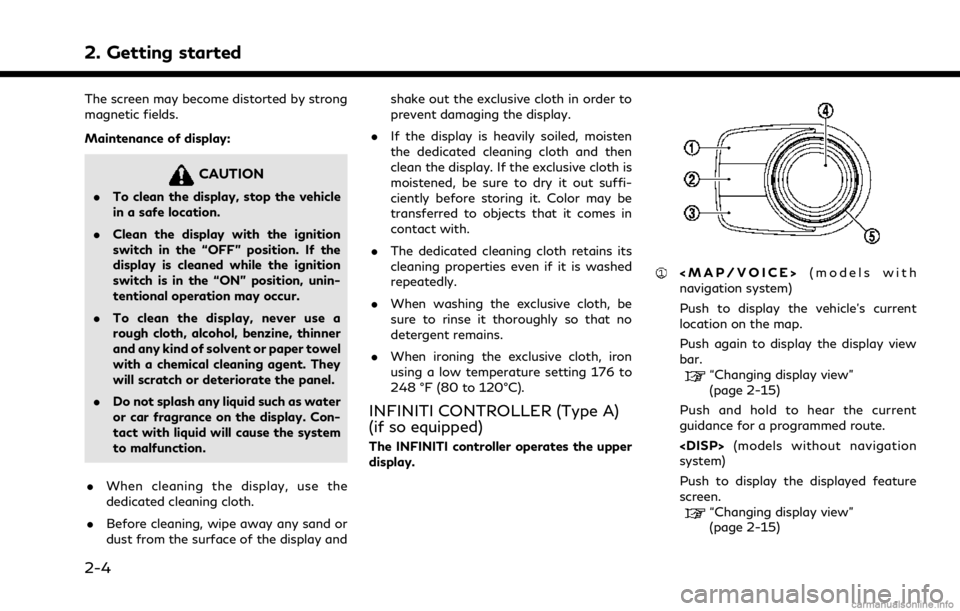
INFINITI CONTROLLER (Type A)
(if so equipped)
The INFINITI controller operates the upper
display.
Page 17 of 268

<>
Push to go back to the previous screen.
Around View® Monitor system)
Push to view the Around View® Moni-
tor screen.
Refer to the vehicle Owner’s Manual for
details.
Push and hold to control the brightness.
“Screen settings” (page 2-34)
<
> (models without Around View®
Monitor system)
Push for brightness control.
“Screen settings” (page 2-34)
Push to enter the selected item.
Models with navigation system:
If this button is pushed while a map is
displayed, the shortcut menu is shown
on the upper display.
“Shortcut menu” (page 2-13)
Models without navigation system:
When this button is pushed when no
item is selected, the shortcut menu is
shown on the upper display.
“Shortcut menu” (page 2-13)
Center dial/Slide switch
Slide or turn to select an item on the
upper display or to adjust a setting
(volume, brightness, etc.).
Models with navigation system:
While the map screen is displayed,
adjust the map scale by turning the dial.
“Changing scale of map” (page 6-7)
While the map screen is displayed, scroll
the map screen by sliding the switch.
“Moving map” (page 6-6)
INFO:
While Apple CarPlay® or Android Auto
screen is displayed on the upper display,
<
/OK>, <>and Center dial/Slide
switch can operate Apple CarPlay® or
Android Auto screen.
“Apple CarPlay®” (page 5-18)“Android AutoTM” (page 5-22)
INFINITI CONTROLLER (Type B)
(if so equipped)
The INFINITI controller operates the upper
display.
Page 155 of 268

6 Navigation (if so equipped)
Safety information ........................................................... 6-3
Map operation ................................................................... 6-3Map types ..................................................................... 6-3
Road color ..................................................................... 6-6
Displaying current vehicle location ........................ 6-6
Moving map .................................................................. 6-6
Changing scale of map ............................................... 6-7
Changing map .............................................................. 6-8
Map settings ................................................................. 6-9
Setting information on map ................................... 6-13
Traffic information on map .................................... 6-13
Setting destination ......................................................... 6-14 Basic operations ........................................................ 6-14
Free Text Search ....................................................... 6-17
Setting home or work location
as destination ............................................................. 6-17
Finding address .......................................................... 6-18
Finding points of interest ....................................... 6-18
Searching from previous destinations ................ 6-20
Searching from address book ................................ 6-21
Setting destinations by Google
TM........................ 6-21
Setting city center ..................................................... 6-22
Setting with INFINITI InTouch
TMServices (if
so equipped) ................................................................ 6-22
Setting intersection .................................................. 6-22 Setting by phone number ..................................... 6-23
Setting from saved routes .................................... 6-23
Setting with SiriusXM® Travel Link .................. 6-24
Setting point on map ............................................. 6-25
Setting with latitude/longitude .......................... 6-25
Options before starting the route guidance ..... 6-26
Route guidance ............................................................... 6-27
About route guidance ............................................ 6-27
Route options menu .............................................. 6-30
Canceling Route ...................................................... 6-33
Displaying Turn List .............................................. 6-33
Setting detour route ............................................... 6-33
Route Preference .................................................... 6-34
Recalculating route ................................................. 6-36
Editing route ............................................................. 6-36
Guidance settings ................................................... 6-40
Viewing traffic information ......................................... 6-41 SiriusXM Traffic
TM(if so equipped) ................... 6-41
Premium Traffic information ............................... 6-42
Viewing available traffic information ................ 6-43
Traffic information setting .................................. 6-44
Storing a location/route .............................................. 6-45 Storing location ....................................................... 6-45
Storing route ............................................................ 6-46
Storing avoid area ................................................... 6-47
Page 156 of 268

Editing stored information .................................... 6-48
Deleting stored item ................................................. 6-51
Navigation settings ........................................................ 6-54 General information for navigation system ........... 6-56
Current vehicle location ........................................ 6-56
Route guidance ........................................................ 6-59
Route calculation .................................................... 6-61
How to update map data ..................................... 6-62
Page 157 of 268

SAFETY INFORMATION
The navigation system is primarily designed
to help you reach your destination. However,
you, the driver, must use the system safely
and properly. Information concerning road
conditions, traffic signs and the availability
of services may not always be up to date.
The system is not a substitute for safe,
proper, and legal driving.
WARNING
Do not rely on route guidance alone.
Always be sure that all driving maneuvers
are legal and safe in order to avoid
accidents.
MAP OPERATION
MAP TYPES
Maps are displayed on the upper touch
screen display (upper display).
Two types of map views are available: 2D
and 3D.
2D map
The 2D map displays the map in a two-
dimensional environment similar to a road
map.
6. Navigation (if so equipped)
6-3
Page 158 of 268

6. Navigation (if so equipped)
Example
Screen information:
Arrow and distance:
Indicates the distance to the next guide
point (intersection or corner) and the
turning direction at that guide point.
Touch to repeat voice guidance.
If the current vehicle position is off the
route, an arrow indicating the direction
to the nearest route may be displayed
instead of displaying the next turn
arrow/distance.
Remaining time/Time of arrival:
Indicates the remaining time or the
estimated arrival time to the destina-
tion. Touch to switch the indicator to
the remaining time/estimated arrival
time to the waypoint.
The remaining time or arrival time dis-
play can be selected to your preference.
“Route Preference” (page 6-34)
This indicator will appear when a desti-
nation or a waypoint is set and route
guidance is started.
Remaining distance to the destination:
Indicates the approximate remaining
distance to the destination or the way-
point. Touch to switch the indicator
between the distance to the destination
or the distance to the waypoint. This
indicator will appear when a destination
or a waypoint is set and route guidance
is started.
Recommended lane indicator:
When a route is set, the arrow and the
recommended driving lane may be dis-
played in blue depending on the road.
Destination:
Indicates the location of the final desti-
nation.
Speed limit icon:
Displays the speed limit of the current
driving road.
INFINITI InTouchTMServices anten-
na icon:
When the system connects to the
INFINITI InTouch
TMServices Data Cen-
ter, an antenna icon will appear on the
screen.
“INFINITI InTouchTMServices”
(page 5-7)
6-4
Page 168 of 268

6. Navigation (if so equipped)
SETTING DESTINATION
The system can provide route guidance once
a destination is set.
BASIC OPERATIONSDisplaying destination setting menu
There are several methods that can be used
to set a destination. Select a preferred
method for finding and setting a destination.
Example
Push