2021 HYUNDAI SONATA Systems
[x] Cancel search: SystemsPage 370 of 546
6-86
Driver Attention Warning system displays
the condition of the driver’s fatigue level
and inattentive driving practices.
System Setting and Operation
System setting
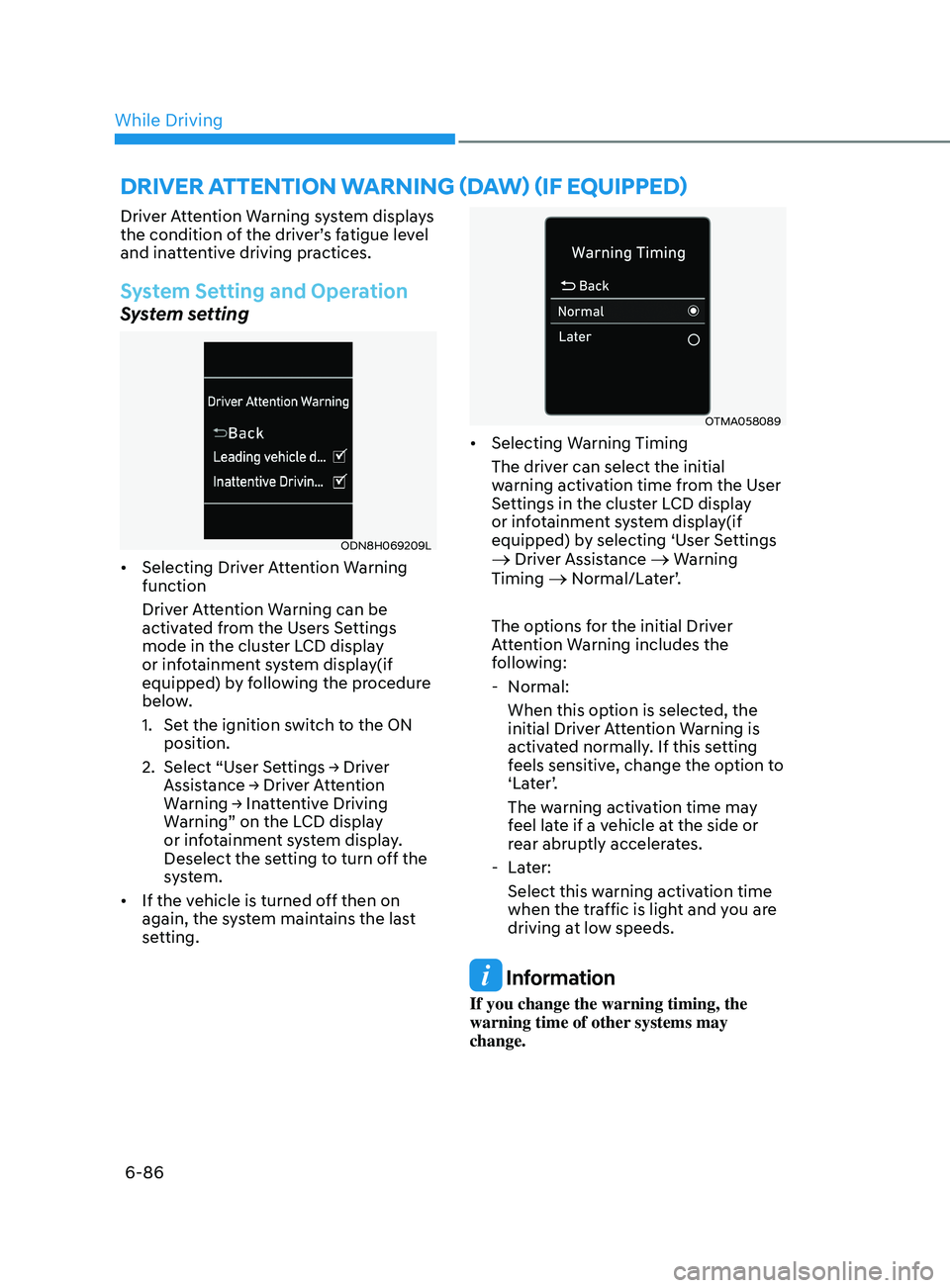
ODN8H069209L
• Selecting Driver Attention Warning
function
Driver Attention Warning can be
activated from the Users Settings
mode in the cluster LCD display
or infotainment system display(if
equipped) by following the procedure
below.
1.
Se
t the ignition switch to the ON
position.
2.
Select
“User Settings → Driver
Assis
tance → Driver Attention
W
arning → Inattentive Driving
W
arning” on the LCD display
or infotainment system display.
Deselect the setting to turn off the
system.
• If the vehicle is turned off then on
again, the system maintains the last
setting.
OTMA058089
• Selecting Warning Timing
The driver can select the initial
warning activation time from the User
Settings in the cluster LCD display
or infotainment system display(if
equipped) by selecting ‘User Settings
→ Driver Assistance → Warning
Timing → Normal/Later’.
The options for the initial Driver
Attention Warning includes the
following:
- N
ormal:
When this option is selected, the
initial Driver Attention Warning is
activated normally. If this setting
feels sensitive, change the option to
‘Later’.
The warning activation time may
feel late if a vehicle at the side or
rear abruptly accelerates.
- La
ter:
Select this warning activation time
when the traffic is light and you are
driving at low speeds.
Information
If you change the warning timing, the
warning time of other systems may
change.
drIver attent I on warn I n G ( daw ) ( I f equ I pped)
While Driving
Page 374 of 546
6-90
Information
The system may suggest a break according
to the driver’s driving pattern or habits
even if the driver doesn’t feel fatigue.
NOTICE
• Driver Attention Warning system
utilizes the camera sensor on the
front windshield for its operation. To
keep the camera sensor in the best
condition, you should observe the
followings:
• Never install any accessories or
stickers on the front windshield, or
tint the front windshield.
• NEVER place any reflective objects
(i.e. white paper, mirror) over the
dashboard. Any light reflection
may cause a malfunction of Driver
Attention Warning system.
• Pay extreme caution to keep the
camera sensor dry.
• Never disassemble the camera
assembly, or apply any impact on the
camera assembly.
If the sensor is forcibly moved out
of proper alignment, the system
may not operate correctly. Have the
vehicle inspected by an authorized
HYUNDAI dealer.
CAUTION
• Driver Attention Warning system may
not provide alerts in the following
situations:
• Driver Attention Warning system
is using the front view camera. To
optimize the function of the front
view camera, the driver should
manage carefully. For detailed
information, please refer to the
warning statements in Lane Keeping
Assist system section.
• The lane detection performance
is limited. (For more information,
refer to “Lane Keeping Assist (LKA)”
section in this chapter.)
• The vehicle is erratically driven
or is abruptly turned for obstacle
avoidance (e.g. construction area,
other vehicles, fallen objects, bumpy
road).
• Forward drivability of the vehicle is
severely undermined (possibly due
to wide variation in tire pressures,
uneven tire wear-out, toe-in/toe-out
alignment).
• The vehicle is driven on a curvy road.
• The vehicle is driven through a windy
area.
• The vehicle is driven on a bumpy
road.
• The vehicle is controlled by the
following driving assist systems:
-F
orward Collision-Avoidance Assist
system
- Lane K
eeping Assist system
-Smart Cruise Con
trol system
-Lane F
ollowing Assist system
CAUTION
Playing the vehicle audio system at
high volume may prevent occupants
from hearing Driver Attention Warning
system warning sounds.
While Driving
Page 413 of 546
06
6-129
WARNING
• Always be aware of road conditions
while driving and be alert for
unexpected situations even though
Rear Cross-Traffic Collision Warning
system and Rear Cross-Traffic
Collision-Avoidance Assist system
are operating.
• Rear Cross-Traffic Collision Warning
system and Rear Cross-Traffic
Collision-Avoidance Assist system
are supplemental systems to assist
you. Do not entirely rely on the
systems. Always pay attention, while
driving, for your safety.
• Rear Cross-Traffic Collision Warning
system and Rear Cross-Traffic
Collision-Avoidance Assist system
are not substitutes for proper and
safe driving. Always drive safely and
use caution when backing up the
vehicle.
System Setting and Activation
System setting
• The driver can activate the systems
by placing the ignition switch to the
ON position and by selecting “User
Settings
→ Driver Assistance → Parking
Sa
fety → Rear Cross-Traffic Safety”.
R
CCW and RCCA turn on and get
ready to be activated when ‘Rear
Cross-Traffic safety’ is selected.
• When the engine is turned off then on
again, the systems are always ready to
be activated.
• When the system is initially turned
on and when the engine is turned off
then on again, the warning light will
illuminate for 3 seconds on the side
view mirror.
The driver can select the initial warning
activation time in the User Settings in
the LCD display or infotainment system
display
by selecting ‘User Settings →
Driv
er Assistance → Warning Timing’.
Page 414 of 546
6-130
The options for the initial Rear Cross-
Traffic Collision Warning includes the
following:
- N
ormal:
When this condition is selected, the
initial Rear Cross-Traffic Collision
Warning is activated normally. If this
setting feels sensitive, change the
option to ‘Later’.
The warning activation time may feel
late if the a vehicle at the side or rear
abruptly accelerates.
- La
ter:
Select this warning activation time
when the traffic is light and you are
driving at a low speed.
Information
If you change the warning timing, the
warning time of other systems may
change. Always be aware before changing
the warning timing.
The driver can select the warning volume
of Rear Cross-Traffic Collision Warning
by
selecting ‘User Settings → Driver
Assis
tance → Warning Volume → High/
Medium/Low’.
Information
If you change the warning volume, the
warning volume of other systems may
change. Always be aware before changing
the warning volume.
Operating conditions
To operate:
Go
to the “User Settings → Driver
Assis
tance → Parking Safety → Rear Cross-
Traffic Safety” on the LCD display or
infotainment system display. The system
will turn on and standby to activate.
The system will activate when vehicle
speed is below 7 mph (10 km/h) and with
the shift button in R (Reverse).
The s
ystem will not activate when
the vehicle speed exceeds 7 mph (10
km/h). The system will activate again
when the speed is below 5 mph (8
km/h).
The system’s detecting range is
approximately 1 ~ 65 ft (0.5 ~ 20 m). An
approaching vehicle will be detected if
their vehicle speed is within 5 ~ 22.5 mph
(8 ~ 36 km/h).
Note that the detecting range and
operating speed may vary under certain
conditions. As always, use caution and
pay close attention to your surroundings
when backing up your vehicle.
While Driving
Page 523 of 546
08
8-69
Cleaning the seat belt webbing
Clean the belt webbing with any
mild soap solution recommended for
cleaning upholstery or carpet. Follow
the instructions provided with the soap.
Do not bleach or re-dye the webbing
because this may weaken the seat belt.
Cleaning the interior window glass
If the interior glass surfaces of the
vehicle become hazy (that is, covered
with an oily, greasy or waxy film), they
should be cleaned with glass cleaner.
Follow the directions on the glass cleaner
container.
NOTICE
Do not scrape or scratch the inside of
the rear window. This may result in
damage to the rear window defroster
grid.
EmiSSion Control
S y
St
E m
The emission control system of your
vehicle is covered by a written limited
warranty. Please see the warranty
information contained in the Owner’s
Handbook & Warranty Information
booklet in your vehicle.
Your vehicle is equipped with an
emission control system to meet all
applicable emission regulations. There
are three emission control systems, as
follows.
(1)
Cr
ankcase emission control system
(2)
E
vaporative emission control system
(3)
Exhaus
t emission control system
In order to ensure the proper function
of the emission control systems, it
is recommended that you have your
vehicle inspected and maintained
by an authorized HYUNDAI dealer in
accordance with the maintenance
schedule in this manual.
NOTICE
For the Inspection and Maintenance
Test (with Electronic Stability Control
(ESC) system)
• To prevent the vehicle from misfiring
during dynamometer testing, turn
the Electronic Stability Control
(ESC) system off by pressing the ESC
switch (ESC OFF light illuminated).
• After dynamometer testing is
completed, turn the ESC system back
on by pressing the ESC switch again.